Python19_WebSocket模拟pipeline进展
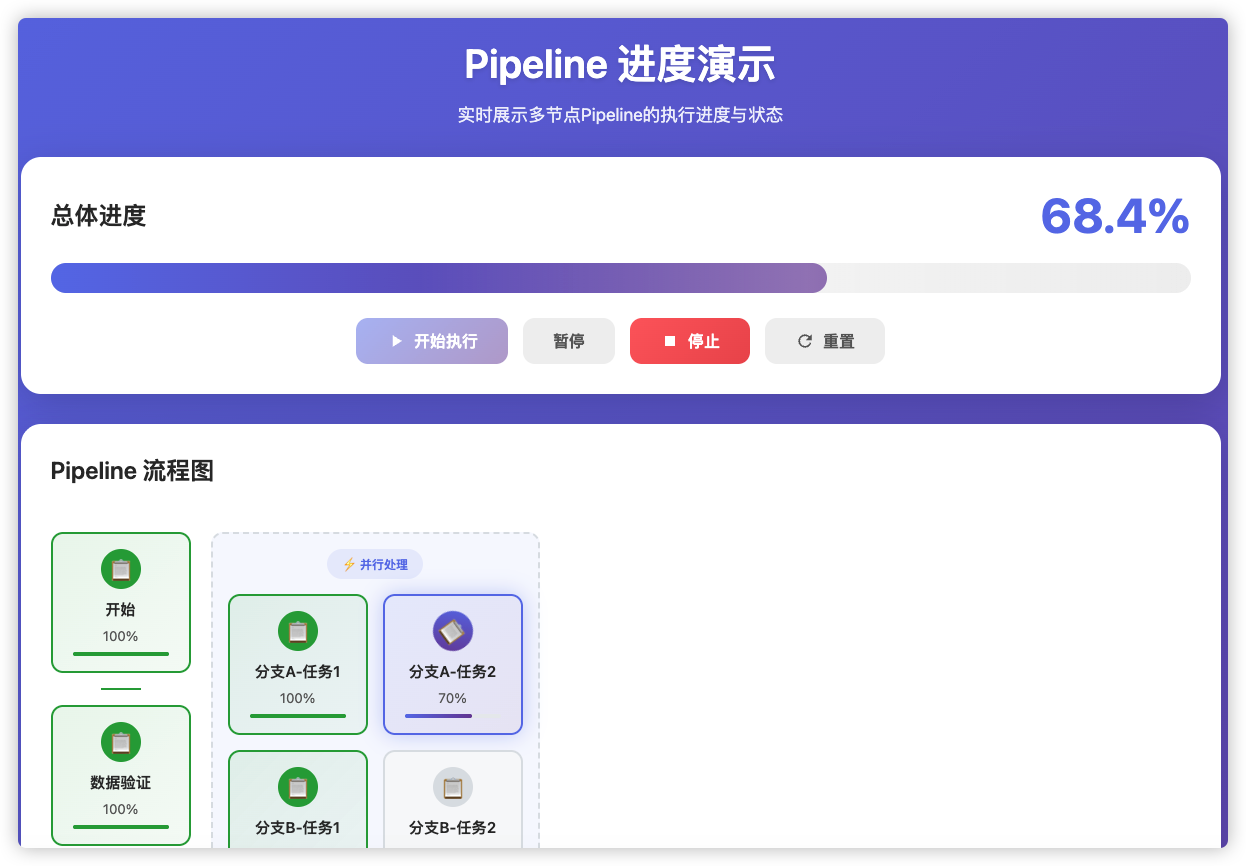
### 文章目录
- [Python19_WebSocket模拟pipeline进展](#文章目录 Python19_WebSocket模拟pipeline进展 @[toc] 1-参考网址 2-技术选项 一、实时进度展示的技术方法 1. 轮询(Polling) ⭐ 最简单 2. WebSocket ⭐⭐ 最佳选择 3. Server-Sent Events (SSE) ⭐⭐ 4. Long Polling ⭐ 5. Frame/Chunked Transfer ⭐ 推荐方案:对于你的Pipeline场景,WebSocket是最佳选择,因为: 二、Pipeline进度计算逻辑设计 核心公式 权重计算策略 方案1:均匀权重 方案2:基于预估耗时权重 ⭐推荐 方案3:动态权重(运行时调整) 并行节点处理 决策分支处理 三、进度数据结构设计 3-项目代码 1-后端项目代码 2-前端项目代码)
- [@toc](#文章目录 Python19_WebSocket模拟pipeline进展 @[toc] 1-参考网址 2-技术选项 一、实时进度展示的技术方法 1. 轮询(Polling) ⭐ 最简单 2. WebSocket ⭐⭐ 最佳选择 3. Server-Sent Events (SSE) ⭐⭐ 4. Long Polling ⭐ 5. Frame/Chunked Transfer ⭐ 推荐方案:对于你的Pipeline场景,WebSocket是最佳选择,因为: 二、Pipeline进度计算逻辑设计 核心公式 权重计算策略 方案1:均匀权重 方案2:基于预估耗时权重 ⭐推荐 方案3:动态权重(运行时调整) 并行节点处理 决策分支处理 三、进度数据结构设计 3-项目代码 1-后端项目代码 2-前端项目代码)
- [1-参考网址](#文章目录 Python19_WebSocket模拟pipeline进展 @[toc] 1-参考网址 2-技术选项 一、实时进度展示的技术方法 1. 轮询(Polling) ⭐ 最简单 2. WebSocket ⭐⭐ 最佳选择 3. Server-Sent Events (SSE) ⭐⭐ 4. Long Polling ⭐ 5. Frame/Chunked Transfer ⭐ 推荐方案:对于你的Pipeline场景,WebSocket是最佳选择,因为: 二、Pipeline进度计算逻辑设计 核心公式 权重计算策略 方案1:均匀权重 方案2:基于预估耗时权重 ⭐推荐 方案3:动态权重(运行时调整) 并行节点处理 决策分支处理 三、进度数据结构设计 3-项目代码 1-后端项目代码 2-前端项目代码)
- [2-技术选项](#文章目录 Python19_WebSocket模拟pipeline进展 @[toc] 1-参考网址 2-技术选项 一、实时进度展示的技术方法 1. 轮询(Polling) ⭐ 最简单 2. WebSocket ⭐⭐ 最佳选择 3. Server-Sent Events (SSE) ⭐⭐ 4. Long Polling ⭐ 5. Frame/Chunked Transfer ⭐ 推荐方案:对于你的Pipeline场景,WebSocket是最佳选择,因为: 二、Pipeline进度计算逻辑设计 核心公式 权重计算策略 方案1:均匀权重 方案2:基于预估耗时权重 ⭐推荐 方案3:动态权重(运行时调整) 并行节点处理 决策分支处理 三、进度数据结构设计 3-项目代码 1-后端项目代码 2-前端项目代码)
- [一、实时进度展示的技术方法](#文章目录 Python19_WebSocket模拟pipeline进展 @[toc] 1-参考网址 2-技术选项 一、实时进度展示的技术方法 1. 轮询(Polling) ⭐ 最简单 2. WebSocket ⭐⭐ 最佳选择 3. Server-Sent Events (SSE) ⭐⭐ 4. Long Polling ⭐ 5. Frame/Chunked Transfer ⭐ 推荐方案:对于你的Pipeline场景,WebSocket是最佳选择,因为: 二、Pipeline进度计算逻辑设计 核心公式 权重计算策略 方案1:均匀权重 方案2:基于预估耗时权重 ⭐推荐 方案3:动态权重(运行时调整) 并行节点处理 决策分支处理 三、进度数据结构设计 3-项目代码 1-后端项目代码 2-前端项目代码)
- [1. **轮询(Polling)** ⭐ 最简单](#文章目录 Python19_WebSocket模拟pipeline进展 @[toc] 1-参考网址 2-技术选项 一、实时进度展示的技术方法 1. 轮询(Polling) ⭐ 最简单 2. WebSocket ⭐⭐ 最佳选择 3. Server-Sent Events (SSE) ⭐⭐ 4. Long Polling ⭐ 5. Frame/Chunked Transfer ⭐ 推荐方案:对于你的Pipeline场景,WebSocket是最佳选择,因为: 二、Pipeline进度计算逻辑设计 核心公式 权重计算策略 方案1:均匀权重 方案2:基于预估耗时权重 ⭐推荐 方案3:动态权重(运行时调整) 并行节点处理 决策分支处理 三、进度数据结构设计 3-项目代码 1-后端项目代码 2-前端项目代码)
- [2. **WebSocket** ⭐⭐ 最佳选择](#文章目录 Python19_WebSocket模拟pipeline进展 @[toc] 1-参考网址 2-技术选项 一、实时进度展示的技术方法 1. 轮询(Polling) ⭐ 最简单 2. WebSocket ⭐⭐ 最佳选择 3. Server-Sent Events (SSE) ⭐⭐ 4. Long Polling ⭐ 5. Frame/Chunked Transfer ⭐ 推荐方案:对于你的Pipeline场景,WebSocket是最佳选择,因为: 二、Pipeline进度计算逻辑设计 核心公式 权重计算策略 方案1:均匀权重 方案2:基于预估耗时权重 ⭐推荐 方案3:动态权重(运行时调整) 并行节点处理 决策分支处理 三、进度数据结构设计 3-项目代码 1-后端项目代码 2-前端项目代码)
- [3. **Server-Sent Events (SSE)** ⭐⭐](#文章目录 Python19_WebSocket模拟pipeline进展 @[toc] 1-参考网址 2-技术选项 一、实时进度展示的技术方法 1. 轮询(Polling) ⭐ 最简单 2. WebSocket ⭐⭐ 最佳选择 3. Server-Sent Events (SSE) ⭐⭐ 4. Long Polling ⭐ 5. Frame/Chunked Transfer ⭐ 推荐方案:对于你的Pipeline场景,WebSocket是最佳选择,因为: 二、Pipeline进度计算逻辑设计 核心公式 权重计算策略 方案1:均匀权重 方案2:基于预估耗时权重 ⭐推荐 方案3:动态权重(运行时调整) 并行节点处理 决策分支处理 三、进度数据结构设计 3-项目代码 1-后端项目代码 2-前端项目代码)
- [4. **Long Polling** ⭐](#文章目录 Python19_WebSocket模拟pipeline进展 @[toc] 1-参考网址 2-技术选项 一、实时进度展示的技术方法 1. 轮询(Polling) ⭐ 最简单 2. WebSocket ⭐⭐ 最佳选择 3. Server-Sent Events (SSE) ⭐⭐ 4. Long Polling ⭐ 5. Frame/Chunked Transfer ⭐ 推荐方案:对于你的Pipeline场景,WebSocket是最佳选择,因为: 二、Pipeline进度计算逻辑设计 核心公式 权重计算策略 方案1:均匀权重 方案2:基于预估耗时权重 ⭐推荐 方案3:动态权重(运行时调整) 并行节点处理 决策分支处理 三、进度数据结构设计 3-项目代码 1-后端项目代码 2-前端项目代码)
- [5. **Frame/Chunked Transfer** ⭐](#文章目录 Python19_WebSocket模拟pipeline进展 @[toc] 1-参考网址 2-技术选项 一、实时进度展示的技术方法 1. 轮询(Polling) ⭐ 最简单 2. WebSocket ⭐⭐ 最佳选择 3. Server-Sent Events (SSE) ⭐⭐ 4. Long Polling ⭐ 5. Frame/Chunked Transfer ⭐ 推荐方案:对于你的Pipeline场景,WebSocket是最佳选择,因为: 二、Pipeline进度计算逻辑设计 核心公式 权重计算策略 方案1:均匀权重 方案2:基于预估耗时权重 ⭐推荐 方案3:动态权重(运行时调整) 并行节点处理 决策分支处理 三、进度数据结构设计 3-项目代码 1-后端项目代码 2-前端项目代码)
- [**推荐方案**:对于你的Pipeline场景,**WebSocket是最佳选择**,因为:](#文章目录 Python19_WebSocket模拟pipeline进展 @[toc] 1-参考网址 2-技术选项 一、实时进度展示的技术方法 1. 轮询(Polling) ⭐ 最简单 2. WebSocket ⭐⭐ 最佳选择 3. Server-Sent Events (SSE) ⭐⭐ 4. Long Polling ⭐ 5. Frame/Chunked Transfer ⭐ 推荐方案:对于你的Pipeline场景,WebSocket是最佳选择,因为: 二、Pipeline进度计算逻辑设计 核心公式 权重计算策略 方案1:均匀权重 方案2:基于预估耗时权重 ⭐推荐 方案3:动态权重(运行时调整) 并行节点处理 决策分支处理 三、进度数据结构设计 3-项目代码 1-后端项目代码 2-前端项目代码)
- [二、Pipeline进度计算逻辑设计](#文章目录 Python19_WebSocket模拟pipeline进展 @[toc] 1-参考网址 2-技术选项 一、实时进度展示的技术方法 1. 轮询(Polling) ⭐ 最简单 2. WebSocket ⭐⭐ 最佳选择 3. Server-Sent Events (SSE) ⭐⭐ 4. Long Polling ⭐ 5. Frame/Chunked Transfer ⭐ 推荐方案:对于你的Pipeline场景,WebSocket是最佳选择,因为: 二、Pipeline进度计算逻辑设计 核心公式 权重计算策略 方案1:均匀权重 方案2:基于预估耗时权重 ⭐推荐 方案3:动态权重(运行时调整) 并行节点处理 决策分支处理 三、进度数据结构设计 3-项目代码 1-后端项目代码 2-前端项目代码)
- [核心公式](#文章目录 Python19_WebSocket模拟pipeline进展 @[toc] 1-参考网址 2-技术选项 一、实时进度展示的技术方法 1. 轮询(Polling) ⭐ 最简单 2. WebSocket ⭐⭐ 最佳选择 3. Server-Sent Events (SSE) ⭐⭐ 4. Long Polling ⭐ 5. Frame/Chunked Transfer ⭐ 推荐方案:对于你的Pipeline场景,WebSocket是最佳选择,因为: 二、Pipeline进度计算逻辑设计 核心公式 权重计算策略 方案1:均匀权重 方案2:基于预估耗时权重 ⭐推荐 方案3:动态权重(运行时调整) 并行节点处理 决策分支处理 三、进度数据结构设计 3-项目代码 1-后端项目代码 2-前端项目代码)
- [权重计算策略](#文章目录 Python19_WebSocket模拟pipeline进展 @[toc] 1-参考网址 2-技术选项 一、实时进度展示的技术方法 1. 轮询(Polling) ⭐ 最简单 2. WebSocket ⭐⭐ 最佳选择 3. Server-Sent Events (SSE) ⭐⭐ 4. Long Polling ⭐ 5. Frame/Chunked Transfer ⭐ 推荐方案:对于你的Pipeline场景,WebSocket是最佳选择,因为: 二、Pipeline进度计算逻辑设计 核心公式 权重计算策略 方案1:均匀权重 方案2:基于预估耗时权重 ⭐推荐 方案3:动态权重(运行时调整) 并行节点处理 决策分支处理 三、进度数据结构设计 3-项目代码 1-后端项目代码 2-前端项目代码)
- [**方案1:均匀权重**](#文章目录 Python19_WebSocket模拟pipeline进展 @[toc] 1-参考网址 2-技术选项 一、实时进度展示的技术方法 1. 轮询(Polling) ⭐ 最简单 2. WebSocket ⭐⭐ 最佳选择 3. Server-Sent Events (SSE) ⭐⭐ 4. Long Polling ⭐ 5. Frame/Chunked Transfer ⭐ 推荐方案:对于你的Pipeline场景,WebSocket是最佳选择,因为: 二、Pipeline进度计算逻辑设计 核心公式 权重计算策略 方案1:均匀权重 方案2:基于预估耗时权重 ⭐推荐 方案3:动态权重(运行时调整) 并行节点处理 决策分支处理 三、进度数据结构设计 3-项目代码 1-后端项目代码 2-前端项目代码)
- [**方案2:基于预估耗时权重** ⭐推荐](#文章目录 Python19_WebSocket模拟pipeline进展 @[toc] 1-参考网址 2-技术选项 一、实时进度展示的技术方法 1. 轮询(Polling) ⭐ 最简单 2. WebSocket ⭐⭐ 最佳选择 3. Server-Sent Events (SSE) ⭐⭐ 4. Long Polling ⭐ 5. Frame/Chunked Transfer ⭐ 推荐方案:对于你的Pipeline场景,WebSocket是最佳选择,因为: 二、Pipeline进度计算逻辑设计 核心公式 权重计算策略 方案1:均匀权重 方案2:基于预估耗时权重 ⭐推荐 方案3:动态权重(运行时调整) 并行节点处理 决策分支处理 三、进度数据结构设计 3-项目代码 1-后端项目代码 2-前端项目代码)
- [**方案3:动态权重(运行时调整)**](#文章目录 Python19_WebSocket模拟pipeline进展 @[toc] 1-参考网址 2-技术选项 一、实时进度展示的技术方法 1. 轮询(Polling) ⭐ 最简单 2. WebSocket ⭐⭐ 最佳选择 3. Server-Sent Events (SSE) ⭐⭐ 4. Long Polling ⭐ 5. Frame/Chunked Transfer ⭐ 推荐方案:对于你的Pipeline场景,WebSocket是最佳选择,因为: 二、Pipeline进度计算逻辑设计 核心公式 权重计算策略 方案1:均匀权重 方案2:基于预估耗时权重 ⭐推荐 方案3:动态权重(运行时调整) 并行节点处理 决策分支处理 三、进度数据结构设计 3-项目代码 1-后端项目代码 2-前端项目代码)
- [并行节点处理](#文章目录 Python19_WebSocket模拟pipeline进展 @[toc] 1-参考网址 2-技术选项 一、实时进度展示的技术方法 1. 轮询(Polling) ⭐ 最简单 2. WebSocket ⭐⭐ 最佳选择 3. Server-Sent Events (SSE) ⭐⭐ 4. Long Polling ⭐ 5. Frame/Chunked Transfer ⭐ 推荐方案:对于你的Pipeline场景,WebSocket是最佳选择,因为: 二、Pipeline进度计算逻辑设计 核心公式 权重计算策略 方案1:均匀权重 方案2:基于预估耗时权重 ⭐推荐 方案3:动态权重(运行时调整) 并行节点处理 决策分支处理 三、进度数据结构设计 3-项目代码 1-后端项目代码 2-前端项目代码)
- [决策分支处理](#文章目录 Python19_WebSocket模拟pipeline进展 @[toc] 1-参考网址 2-技术选项 一、实时进度展示的技术方法 1. 轮询(Polling) ⭐ 最简单 2. WebSocket ⭐⭐ 最佳选择 3. Server-Sent Events (SSE) ⭐⭐ 4. Long Polling ⭐ 5. Frame/Chunked Transfer ⭐ 推荐方案:对于你的Pipeline场景,WebSocket是最佳选择,因为: 二、Pipeline进度计算逻辑设计 核心公式 权重计算策略 方案1:均匀权重 方案2:基于预估耗时权重 ⭐推荐 方案3:动态权重(运行时调整) 并行节点处理 决策分支处理 三、进度数据结构设计 3-项目代码 1-后端项目代码 2-前端项目代码)
- [三、进度数据结构设计](#文章目录 Python19_WebSocket模拟pipeline进展 @[toc] 1-参考网址 2-技术选项 一、实时进度展示的技术方法 1. 轮询(Polling) ⭐ 最简单 2. WebSocket ⭐⭐ 最佳选择 3. Server-Sent Events (SSE) ⭐⭐ 4. Long Polling ⭐ 5. Frame/Chunked Transfer ⭐ 推荐方案:对于你的Pipeline场景,WebSocket是最佳选择,因为: 二、Pipeline进度计算逻辑设计 核心公式 权重计算策略 方案1:均匀权重 方案2:基于预估耗时权重 ⭐推荐 方案3:动态权重(运行时调整) 并行节点处理 决策分支处理 三、进度数据结构设计 3-项目代码 1-后端项目代码 2-前端项目代码)
- [3-项目代码](#文章目录 Python19_WebSocket模拟pipeline进展 @[toc] 1-参考网址 2-技术选项 一、实时进度展示的技术方法 1. 轮询(Polling) ⭐ 最简单 2. WebSocket ⭐⭐ 最佳选择 3. Server-Sent Events (SSE) ⭐⭐ 4. Long Polling ⭐ 5. Frame/Chunked Transfer ⭐ 推荐方案:对于你的Pipeline场景,WebSocket是最佳选择,因为: 二、Pipeline进度计算逻辑设计 核心公式 权重计算策略 方案1:均匀权重 方案2:基于预估耗时权重 ⭐推荐 方案3:动态权重(运行时调整) 并行节点处理 决策分支处理 三、进度数据结构设计 3-项目代码 1-后端项目代码 2-前端项目代码)
- [1-后端项目代码](#文章目录 Python19_WebSocket模拟pipeline进展 @[toc] 1-参考网址 2-技术选项 一、实时进度展示的技术方法 1. 轮询(Polling) ⭐ 最简单 2. WebSocket ⭐⭐ 最佳选择 3. Server-Sent Events (SSE) ⭐⭐ 4. Long Polling ⭐ 5. Frame/Chunked Transfer ⭐ 推荐方案:对于你的Pipeline场景,WebSocket是最佳选择,因为: 二、Pipeline进度计算逻辑设计 核心公式 权重计算策略 方案1:均匀权重 方案2:基于预估耗时权重 ⭐推荐 方案3:动态权重(运行时调整) 并行节点处理 决策分支处理 三、进度数据结构设计 3-项目代码 1-后端项目代码 2-前端项目代码)
- [2-前端项目代码](#文章目录 Python19_WebSocket模拟pipeline进展 @[toc] 1-参考网址 2-技术选项 一、实时进度展示的技术方法 1. 轮询(Polling) ⭐ 最简单 2. WebSocket ⭐⭐ 最佳选择 3. Server-Sent Events (SSE) ⭐⭐ 4. Long Polling ⭐ 5. Frame/Chunked Transfer ⭐ 推荐方案:对于你的Pipeline场景,WebSocket是最佳选择,因为: 二、Pipeline进度计算逻辑设计 核心公式 权重计算策略 方案1:均匀权重 方案2:基于预估耗时权重 ⭐推荐 方案3:动态权重(运行时调整) 并行节点处理 决策分支处理 三、进度数据结构设计 3-项目代码 1-后端项目代码 2-前端项目代码)
1-参考网址
2-技术选项
一、实时进度展示的技术方法
1. 轮询(Polling) ⭐ 最简单
- 原理:前端定期(如每1-3秒)向服务器发送HTTP请求获取最新进度
- 优点:实现简单,兼容性好
- 缺点:有延迟,服务器压力较大
- 适用场景:进度更新不频繁、精度要求不高的场景
2. WebSocket ⭐⭐ 最佳选择
- 原理:建立持久的双向通信通道,服务器主动推送进度更新
- 优点:实时性高,延迟低,支持大量并发连接
- 缺点:实现复杂度较高,需要特殊服务器配置
- 适用场景:需要高实时性、频繁更新的场景(如你的Pipeline)
3. Server-Sent Events (SSE) ⭐⭐
- 原理:服务器单方向推送事件到浏览器
- 优点:比WebSocket简单,支持自动重连
- 缺点:只支持服务器→浏览器单向通信
- 适用场景:只需要服务器推送数据的场景
4. Long Polling ⭐
- 原理:请求挂起直到有数据更新或超时
- 优点:兼容性好,穿透防火墙
- 缺点:实现复杂,资源消耗较大
- 适用场景:WebSocket不可用的环境
5. Frame/Chunked Transfer ⭐
- 原理:使用HTTP分块传输,边执行边输出
- 优点:实现简单
- 缺点:不适合复杂逻辑
- 适用场景:简单的长任务输出
推荐方案 :对于你的Pipeline场景,WebSocket是最佳选择,因为:
- Pipeline节点执行时需要频繁、实时地更新进度
- 用户期望看到每个节点的即时状态变化
- 支持双向通信(前端也可以发送控制命令)
二、Pipeline进度计算逻辑设计
核心公式
总进度 = Σ(各节点权重 × 各节点完成度)权重计算策略
方案1:均匀权重
每个节点权重 = 1 / 总节点数
总进度 = (已完成节点数 / 总节点数) × 100%- 适用场景:所有节点耗时相近
方案2:基于预估耗时权重 ⭐推荐
节点权重 = 节点预估耗时 / 所有节点预估耗时之和
总进度 = Σ(节点i的预估耗时占比 × 节点i的完成度%)- 适用场景:节点耗时差异较大
方案3:动态权重(运行时调整)
节点权重 = 节点实际耗时 / 当前已完成节点的实际总耗时
总进度 = Σ(节点实际耗时占比 × 节点完成度%)- 适用场景:需要精确反映实际执行时间
并行节点处理
当存在并行分支时:
并行组进度 = max(各并行路径的进度)
总进度 = 串行部分进度 × 0.4 + 并行部分进度 × 0.6
决策分支处理
当存在条件分支时:
只计算实际执行的路径
未执行的路径不计入进度
三、进度数据结构设计
python
python
class Pipeline:
    total_weight = sum(node.weight for node in all_nodes)

    @property
    def progress(self):
        return sum(node.weight * node.completion / self.total_weight
                   for node in self.nodes)

class Node:
    weight: float          # 权重(基于预估耗时)
    estimated_time: float   # 预估耗时(秒)
    status: str             # pending | running | completed | failed
    completion: float       # 0-100 完成百分比
3-项目代码
1-后端项目代码
python
# -*- coding: utf-8 -*-
"""
Pipeline进度演示应用
使用Flask + Flask-SocketIO 实现实时进度推送
"""

from flask import Flask, render_template
from flask_socketio import SocketIO, emit
import threading
import time
import random
import json
from enum import Enum

# 创建Flask应用
import os
template_dir = os.path.join(os.path.dirname(os.path.dirname(os.path.dirname(os.path.abspath(__file__)))), 'templates')
app = Flask(__name__, template_folder=template_dir)
app.config['SECRET_KEY'] = 'pipeline-demo-secret-key'
socketio = SocketIO(app, cors_allowed_origins="*", async_mode='threading')


class NodeStatus(Enum):
    """节点状态枚举"""
    PENDING = "pending"      # 等待中
    RUNNING = "running"      # 执行中
    COMPLETED = "completed"   # 已完成
    FAILED = "failed"        # 失败


class PipelineNode:
    """Pipeline节点类"""
    def __init__(self, node_id, name, node_type, estimated_time, weight=None):
        self.id = node_id
        self.name = name
        self.type = node_type  # 'task', 'condition', 'parallel_start', 'parallel_end'
        self.estimated_time = estimated_time  # 预估耗时(秒)
        self.weight = weight if weight else estimated_time  # 权重,默认等于预估耗时
        self.status = NodeStatus.PENDING
        self.completion = 0  # 0-100
        self.start_time = None
        self.end_time = None
        self.error_message = None


class Pipeline:
    """Pipeline管理类"""
    def __init__(self):
        self.nodes = []
        self.is_running = False
        self.is_paused = False
        self.current_node_id = None

    def add_node(self, node):
        """添加节点"""
        self.nodes.append(node)

    def get_total_weight(self):
        """获取总权重"""
        # 对于并行节点组,只计算实际会执行路径上的节点
        total = 0
        for node in self.nodes:
            if node.type != 'parallel_end':  # parallel_end只是占位
                total += node.weight
        return total

    def calculate_progress(self):
        """
        计算总进度
        公式:总进度 = Σ(节点权重 × 节点完成度) / 总权重
        """
        if not self.nodes:
            return 0

        total_weight = self.get_total_weight()
        if total_weight == 0:
            return 0

        weighted_progress = 0
        for node in self.nodes:
            if node.type != 'parallel_end':
                weighted_progress += node.weight * node.completion

        return round(weighted_progress / total_weight, 2)

    def get_status(self):
        """获取Pipeline状态"""
        return {
            'is_running': self.is_running,
            'is_paused': self.is_paused,
            'total_progress': self.calculate_progress(),
            'nodes': [
                {
                    'id': node.id,
                    'name': node.name,
                    'type': node.type,
                    'status': node.status.value,
                    'completion': node.completion,
                    'weight': node.weight,
                    'estimated_time': node.estimated_time,
                    'error_message': node.error_message
                }
                for node in self.nodes
            ]
        }

    def reset(self):
        """重置Pipeline"""
        self.is_running = False
        self.is_paused = False
        self.current_node_id = None
        for node in self.nodes:
            node.status = NodeStatus.PENDING
            node.completion = 0
            node.start_time = None
            node.end_time = None
            node.error_message = None


# 创建全局Pipeline实例
pipeline = Pipeline()


def create_default_pipeline():
    """创建默认的Pipeline配置"""
    pipeline.reset()
    pipeline.nodes.clear()

    # 节点配置:(id, 名称, 类型, 预估耗时, 权重)
    # 权重可以根据预估耗时自动计算,也可以手动指定
    nodes_config = [
        ('start', '开始', 'task', 1, 1),
        ('validate', '数据验证', 'task', 3, 3),
        ('process', '数据处理', 'task', 5, 5),
        # 并行分支开始
        ('parallel_start', '并行处理', 'parallel_start', 0, 0),
        # 分支A:主任务
        ('branch_a_1', '分支A-任务1', 'task', 4, 4),
        ('branch_a_2', '分支A-任务2', 'task', 3, 3),
        # 分支B:次要任务
        ('branch_b_1', '分支B-任务1', 'task', 2, 2),
        ('branch_b_2', '分支B-任务2', 'task', 4, 4),
        ('parallel_end', '并行完成', 'parallel_end', 0, 0),
        # 汇合后任务
        ('aggregate', '结果汇总', 'task', 2, 2),
        ('finish', '完成', 'task', 1, 1),
    ]

    for node_id, name, node_type, est_time, weight in nodes_config:
        node = PipelineNode(node_id, name, node_type, est_time, weight)
        pipeline.add_node(node)


def simulate_node_execution(node_id, socketio_instance):
    """
    模拟节点执行
    这是一个模拟函数,实际项目中这里会调用真实的业务逻辑
    """
    node = next((n for n in pipeline.nodes if n.id == node_id), None)
    if not node:
        return

    # 跳过parallel节点(它们只是标记)
    if node.type in ['parallel_start', 'parallel_end']:
        node.completion = 100
        node.status = NodeStatus.COMPLETED
        return

    # 更新节点状态为运行中
    node.status = NodeStatus.RUNNING
    node.start_time = time.time()
    pipeline.current_node_id = node_id

    # 广播状态更新
    socketio_instance.emit('status_update', pipeline.get_status())

    # 模拟执行过程(带进度更新)
    # 实际项目中,这里应该是真实的业务逻辑,通过回调更新进度
    steps = 10
    for i in range(steps + 1):
        if not pipeline.is_running:
            break

        while pipeline.is_paused and pipeline.is_running:
            time.sleep(0.1)

        # 计算当前进度
        node.completion = int((i / steps) * 100)

        # 模拟处理时间(加入随机性,更真实)
        base_time = node.estimated_time / steps
        sleep_time = base_time + random.uniform(0, base_time * 0.5)
        time.sleep(sleep_time)

        # 广播进度更新(每个步骤都推送)
        socketio_instance.emit('status_update', pipeline.get_status())

    # 节点执行完成
    if pipeline.is_running:
        node.status = NodeStatus.COMPLETED
        node.completion = 100
        node.end_time = time.time()
        socketio_instance.emit('status_update', pipeline.get_status())


def execute_pipeline_thread(socketio_instance):
    """在新线程中执行Pipeline"""
    pipeline.is_running = True

    # 按顺序执行节点(模拟串行+并行)
    execution_order = [
        'start',
        'validate',
        'process',
        # 并行分支
        'parallel_start',
        (['branch_a_1', 'branch_b_1'],),  # 第一批并行
        (['branch_a_2', 'branch_b_2'],),  # 第二批并行
        'parallel_end',
        'aggregate',
        'finish'
    ]

    for item in execution_order:
        if not pipeline.is_running:
            break

        if isinstance(item, str):
            # 单个节点
            simulate_node_execution(item, socketio_instance)
        else:
            # 并行节点组(模拟)
            for parallel_nodes in item:
                for node_id in parallel_nodes:
                    if not pipeline.is_running:
                        break
                    simulate_node_execution(node_id, socketio_instance)

    # Pipeline执行完成
    pipeline.is_running = False
    if all(n.status == NodeStatus.COMPLETED for n in pipeline.nodes):
        socketio_instance.emit('pipeline_complete', {'success': True})
    else:
        socketio_instance.emit('pipeline_complete', {'success': False})


# ==================== Flask路由 ====================

@app.route('/')
def index():
    """首页"""
    return render_template('index.html')


# ==================== WebSocket事件处理 ====================

@socketio.on('connect')
def handle_connect():
    """客户端连接"""
    print('客户端已连接')
    # 发送当前状态
    emit('status_update', pipeline.get_status())


@socketio.on('disconnect')
def handle_disconnect():
    """客户端断开"""
    print('客户端已断开')


@socketio.on('start_pipeline')
def handle_start_pipeline():
    """开始执行Pipeline"""
    global pipeline

    if pipeline.is_running:
        emit('error', {'message': 'Pipeline正在执行中'})
        return

    # 重新创建Pipeline
    create_default_pipeline()

    # 启动执行线程
    thread = threading.Thread(target=execute_pipeline_thread, args=(socketio,))
    thread.daemon = True
    thread.start()

    emit('pipeline_started', {'message': 'Pipeline开始执行'})


@socketio.on('pause_pipeline')
def handle_pause_pipeline():
    """暂停Pipeline"""
    pipeline.is_paused = not pipeline.is_paused
    emit('status_update', pipeline.get_status())


@socketio.on('stop_pipeline')
def handle_stop_pipeline():
    """停止Pipeline"""
    pipeline.is_running = False
    pipeline.is_paused = False
    emit('pipeline_stopped', {'message': 'Pipeline已停止'})
    emit('status_update', pipeline.get_status())


@socketio.on('reset_pipeline')
def handle_reset_pipeline():
    """重置Pipeline"""
    create_default_pipeline()
    emit('status_update', pipeline.get_status())


@socketio.on('get_status')
def handle_get_status():
    """获取当前状态"""
    emit('status_update', pipeline.get_status())


# ==================== 启动应用 ====================

if __name__ == '__main__':
    # 创建默认Pipeline
    create_default_pipeline()

    print("=" * 50)
    print("Pipeline进度演示应用")
    print("=" * 50)
    print("启动服务: http://127.0.0.1:5001")
    print("按 Ctrl+C 停止服务")
    print("=" * 50)

    # 使用socketio.run运行,支持WebSocket
    socketio.run(app, host='0.0.0.0', port=5001, debug=True, allow_unsafe_werkzeug=True)
2-前端项目代码
html
<!DOCTYPE html>
<html lang="zh-CN">
<head>
<meta charset="UTF-8">
<meta name="viewport" content="width=device-width, initial-scale=1.0">
<title>Pipeline 进度演示</title>
<style>
* {
margin: 0;
padding: 0;
box-sizing: border-box;
}
body {
font-family: -apple-system, BlinkMacSystemFont, 'Segoe UI', Roboto, 'Helvetica Neue', Arial, sans-serif;
background: linear-gradient(135deg, #667eea 0%, #764ba2 100%);
min-height: 100vh;
padding: 20px;
}
.container {
max-width: 1200px;
margin: 0 auto;
}
/* 标题区域 */
.header {
text-align: center;
margin-bottom: 30px;
}
.header h1 {
color: white;
font-size: 2.5rem;
font-weight: 600;
margin-bottom: 10px;
text-shadow: 0 2px 4px rgba(0,0,0,0.1);
}
.header p {
color: rgba(255,255,255,0.9);
font-size: 1.1rem;
}
/* 总体进度卡片 */
.progress-card {
background: white;
border-radius: 20px;
padding: 30px;
margin-bottom: 30px;
box-shadow: 0 10px 40px rgba(0,0,0,0.15);
}
.progress-header {
display: flex;
justify-content: space-between;
align-items: center;
margin-bottom: 20px;
}
.progress-title {
font-size: 1.5rem;
font-weight: 600;
color: #333;
}
.progress-percentage {
font-size: 3rem;
font-weight: 700;
color: #667eea;
}
.progress-bar-container {
background: #f0f0f0;
border-radius: 25px;
height: 30px;
overflow: hidden;
position: relative;
}
.progress-bar {
height: 100%;
background: linear-gradient(90deg, #667eea 0%, #764ba2 100%);
border-radius: 25px;
transition: width 0.3s ease;
position: relative;
}
.progress-bar::after {
content: '';
position: absolute;
top: 0;
left: 0;
right: 0;
bottom: 0;
background: linear-gradient(
90deg,
transparent 0%,
rgba(255,255,255,0.3) 50%,
transparent 100%
);
animation: shimmer 2s infinite;
}
@keyframes shimmer {
0% { transform: translateX(-100%); }
100% { transform: translateX(100%); }
}
/* 控制按钮 */
.controls {
display: flex;
gap: 15px;
margin-top: 25px;
justify-content: center;
}
.btn {
padding: 12px 30px;
border: none;
border-radius: 12px;
font-size: 1rem;
font-weight: 600;
cursor: pointer;
transition: all 0.3s ease;
display: flex;
align-items: center;
gap: 8px;
}
.btn-primary {
background: linear-gradient(135deg, #667eea 0%, #764ba2 100%);
color: white;
}
.btn-primary:hover {
transform: translateY(-2px);
box-shadow: 0 5px 20px rgba(102, 126, 234, 0.4);
}
.btn-secondary {
background: #f0f0f0;
color: #666;
}
.btn-secondary:hover {
background: #e0e0e0;
}
.btn-danger {
background: linear-gradient(135deg, #ff6b6b 0%, #ee5a5a 100%);
color: white;
}
.btn-danger:hover {
transform: translateY(-2px);
box-shadow: 0 5px 20px rgba(255, 107, 107, 0.4);
}
.btn:disabled {
opacity: 0.5;
cursor: not-allowed;
transform: none !important;
}
/* 图标样式 */
.icon {
width: 20px;
height: 20px;
display: inline-block;
}
/* Pipeline可视化区域 */
.pipeline-container {
background: white;
border-radius: 20px;
padding: 30px;
box-shadow: 0 10px 40px rgba(0,0,0,0.15);
overflow-x: auto;
}
.pipeline-title {
font-size: 1.5rem;
font-weight: 600;
color: #333;
margin-bottom: 25px;
}
.pipeline {
display: flex;
align-items: flex-start;
gap: 0;
padding: 20px 0;
min-width: fit-content;
}
.pipeline-row {
display: flex;
flex-direction: column;
gap: 15px;
}
/* Pipeline节点 */
.node {
background: #f8f9fa;
border: 2px solid #e9ecef;
border-radius: 12px;
padding: 15px 20px;
min-width: 140px;
text-align: center;
position: relative;
transition: all 0.3s ease;
}
.node.pending {
border-color: #dee2e6;
background: #f8f9fa;
}
.node.running {
border-color: #667eea;
background: linear-gradient(135deg, rgba(102,126,234,0.1) 0%, rgba(118,75,162,0.1) 100%);
box-shadow: 0 0 20px rgba(102, 126, 234, 0.3);
animation: pulse 1.5s infinite;
}
.node.completed {
border-color: #28a745;
background: linear-gradient(135deg, rgba(40,167,69,0.1) 0%, rgba(40,167,69,0.05) 100%);
}
.node.failed {
border-color: #dc3545;
background: rgba(220,53,69,0.1);
}
@keyframes pulse {
0%, 100% { box-shadow: 0 0 20px rgba(102, 126, 234, 0.3); }
50% { box-shadow: 0 0 30px rgba(102, 126, 234, 0.5); }
}
.node-icon {
width: 40px;
height: 40px;
border-radius: 50%;
display: flex;
align-items: center;
justify-content: center;
margin: 0 auto 10px;
font-size: 1.2rem;
}
.node.pending .node-icon {
background: #dee2e6;
color: #adb5bd;
}
.node.running .node-icon {
background: linear-gradient(135deg, #667eea 0%, #764ba2 100%);
color: white;
animation: spin 1s linear infinite;
}
.node.completed .node-icon {
background: #28a745;
color: white;
}
.node.failed .node-icon {
background: #dc3545;
color: white;
}
@keyframes spin {
0% { transform: rotate(0deg); }
100% { transform: rotate(360deg); }
}
.node-name {
font-weight: 600;
color: #333;
font-size: 0.95rem;
margin-bottom: 8px;
}
.node-progress {
font-size: 0.85rem;
color: #666;
}
.node-progress-bar {
height: 4px;
background: #e9ecef;
border-radius: 2px;
margin-top: 8px;
overflow: hidden;
}
.node-progress-fill {
height: 100%;
background: linear-gradient(90deg, #667eea 0%, #764ba2 100%);
border-radius: 2px;
transition: width 0.3s ease;
}
.node.completed .node-progress-fill {
background: #28a745;
}
/* 连接线 */
.connector {
width: 40px;
height: 2px;
background: #dee2e6;
position: relative;
align-self: center;
margin: 0 -5px;
}
.connector.active {
background: linear-gradient(90deg, #667eea 0%, #764ba2 100%);
}
.connector.completed {
background: #28a745;
}
/* 并行区域 */
.parallel-group {
display: flex;
flex-direction: column;
gap: 15px;
padding: 15px;
background: rgba(102, 126, 234, 0.05);
border: 2px dashed #dee2e6;
border-radius: 12px;
margin: 0 10px;
}
.parallel-label {
font-size: 0.75rem;
color: #667eea;
font-weight: 600;
text-align: center;
padding: 5px 15px;
background: rgba(102, 126, 234, 0.1);
border-radius: 20px;
align-self: center;
}
/* 并行节点行 */
.parallel-branch {
display: flex;
gap: 15px;
align-items: flex-start;
}
/* 统计信息 */
.stats {
display: grid;
grid-template-columns: repeat(auto-fit, minmax(200px, 1fr));
gap: 20px;
margin-top: 30px;
}
.stat-card {
background: white;
border-radius: 15px;
padding: 20px;
text-align: center;
box-shadow: 0 5px 20px rgba(0,0,0,0.1);
}
.stat-value {
font-size: 2rem;
font-weight: 700;
color: #667eea;
}
.stat-label {
font-size: 0.9rem;
color: #666;
margin-top: 5px;
}
/* 日志区域 */
.log-container {
background: white;
border-radius: 20px;
padding: 30px;
margin-top: 30px;
box-shadow: 0 10px 40px rgba(0,0,0,0.15);
}
.log-title {
font-size: 1.5rem;
font-weight: 600;
color: #333;
margin-bottom: 15px;
}
.log-content {
background: #1e1e1e;
color: #d4d4d4;
padding: 20px;
border-radius: 12px;
font-family: 'Monaco', 'Menlo', 'Ubuntu Mono', monospace;
font-size: 0.9rem;
max-height: 200px;
overflow-y: auto;
}
.log-entry {
padding: 3px 0;
}
.log-time {
color: #888;
}
.log-info {
color: #4ec9b0;
}
.log-success {
color: #6a9955;
}
.log-warning {
color: #dcdcaa;
}
.log-error {
color: #f14c4c;
}
/* SVG图标 */
.svg-icon {
width: 20px;
height: 20px;
}
</style>
</head>
<body>
<div class="container">
<!-- 标题 -->
<div class="header">
<h1>Pipeline 进度演示</h1>
<p>实时展示多节点Pipeline的执行进度与状态</p>
</div>
<!-- 总体进度 -->
<div class="progress-card">
<div class="progress-header">
<span class="progress-title">总体进度</span>
<span class="progress-percentage" id="totalProgress">0%</span>
</div>
<div class="progress-bar-container">
<div class="progress-bar" id="progressBar" style="width: 0%"></div>
</div>
<div class="controls">
<button class="btn btn-primary" id="startBtn" onclick="startPipeline()">
<svg class="icon" viewBox="0 0 24 24" fill="currentColor">
<path d="M8 5v14l11-7z"/>
</svg>
开始执行
</button>
<button class="btn btn-secondary" id="pauseBtn" onclick="pausePipeline()" disabled>
<svg class="icon" viewBox="0 0 24 24" fill="currentColor">
<path d="M6 19h4V5H6v14zm8-14v14h4V5h-4z"/>
</svg>
暂停
</button>
<button class="btn btn-danger" id="stopBtn" onclick="stopPipeline()" disabled>
<svg class="icon" viewBox="0 0 24 24" fill="currentColor">
<path d="M6 6h12v12H6z"/>
</svg>
停止
</button>
<button class="btn btn-secondary" id="resetBtn" onclick="resetPipeline()">
<svg class="icon" viewBox="0 0 24 24" fill="currentColor">
<path d="M17.65 6.35C16.2 4.9 14.21 4 12 4c-4.42 0-7.99 3.58-7.99 8s3.57 8 7.99 8c3.73 0 6.84-2.55 7.73-6h-2.08c-.82 2.33-3.04 4-5.65 4-3.31 0-6-2.69-6-6s2.69-6 6-6c1.66 0 3.14.69 4.22 1.78L13 11h7V4l-2.35 2.35z"/>
</svg>
重置
</button>
</div>
</div>
<!-- Pipeline可视化 -->
<div class="pipeline-container">
<h2 class="pipeline-title">Pipeline 流程图</h2>
<div class="pipeline" id="pipeline">
<!-- 节点将通过JavaScript动态生成 -->
</div>
</div>
<!-- 统计信息 -->
<div class="stats">
<div class="stat-card">
<div class="stat-value" id="totalNodes">0</div>
<div class="stat-label">总节点数</div>
</div>
<div class="stat-card">
<div class="stat-value" id="completedNodes">0</div>
<div class="stat-label">已完成</div>
</div>
<div class="stat-card">
<div class="stat-value" id="runningNodes">0</div>
<div class="stat-label">执行中</div>
</div>
<div class="stat-card">
<div class="stat-value" id="pendingNodes">0</div>
<div class="stat-label">等待中</div>
</div>
</div>
<!-- 日志 -->
<div class="log-container">
<h2 class="log-title">执行日志</h2>
<div class="log-content" id="logContent">
<div class="log-entry">
<span class="log-time">[等待开始...]</span>
<span class="log-info">系统已就绪,等待用户启动Pipeline</span>
</div>
</div>
</div>
</div>
<!-- Socket.IO -->
<script src="https://cdnjs.cloudflare.com/ajax/libs/socket.io/4.5.4/socket.io.min.js"></script>
<script>
// 连接到WebSocket服务器
const socket = io();
// 状态
let isRunning = false;
let isPaused = false;
// DOM元素
const progressBar = document.getElementById('progressBar');
const totalProgress = document.getElementById('totalProgress');
const startBtn = document.getElementById('startBtn');
const pauseBtn = document.getElementById('pauseBtn');
const stopBtn = document.getElementById('stopBtn');
const resetBtn = document.getElementById('resetBtn');
const pipelineContainer = document.getElementById('pipeline');
const logContent = document.getElementById('logContent');
// 节点图标映射
const nodeIcons = {
'task': '📋',
'condition': '❓',
'parallel_start': '⚡',
'parallel_end': '✓',
'start': '🚀',
'finish': '🏁'
};
// 添加日志
function addLog(message, type = 'info') {
const now = new Date();
const timeStr = now.toLocaleTimeString('zh-CN', { hour12: false });
const entry = document.createElement('div');
entry.className = 'log-entry';
entry.innerHTML = `<span class="log-time">[${timeStr}]</span> <span class="log-${type}">${message}</span>`;
logContent.appendChild(entry);
logContent.scrollTop = logContent.scrollHeight;
}
// 更新UI
function updateUI(status) {
isRunning = status.is_running;
isPaused = status.is_paused;
// 更新进度
const progress = status.total_progress;
progressBar.style.width = `${progress}%`;
totalProgress.textContent = `${progress}%`;
// 更新统计
const nodes = status.nodes || [];
const total = nodes.length;
const completed = nodes.filter(n => n.status === 'completed').length;
const running = nodes.filter(n => n.status === 'running').length;
const pending = nodes.filter(n => n.status === 'pending').length;
document.getElementById('totalNodes').textContent = total;
document.getElementById('completedNodes').textContent = completed;
document.getElementById('runningNodes').textContent = running;
document.getElementById('pendingNodes').textContent = pending;
// 更新按钮状态
startBtn.disabled = isRunning;
pauseBtn.disabled = !isRunning;
stopBtn.disabled = !isRunning;
pauseBtn.textContent = isPaused ? '继续' : '暂停';
// 渲染Pipeline
renderPipeline(status);
}
// 渲染Pipeline
function renderPipeline(status) {
const nodes = status.nodes || [];
// 节点分组
const beforeParallel = [];
const parallelBranchA = [];
const parallelBranchB = [];
const afterParallel = [];
let inParallel = false;
let parallelPhase = 0;
nodes.forEach(node => {
if (node.id === 'parallel_start') {
inParallel = true;
parallelPhase = 1;
} else if (node.id === 'parallel_end') {
inParallel = false;
parallelPhase = 0;
} else if (inParallel) {
if (node.id.startsWith('branch_a')) {
parallelBranchA.push(node);
} else if (node.id.startsWith('branch_b')) {
parallelBranchB.push(node);
}
} else if (!inParallel) {
if (!['parallel_start', 'parallel_end'].includes(node.id)) {
if (parallelBranchA.length > 0 && parallelBranchB.length > 0) {
// 已经处理过并行节点
} else {
beforeParallel.push(node);
}
}
}
});
// 简化渲染:直接按顺序渲染,标记并行区域
let html = '';
// 渲染单个节点
function renderNode(node, index) {
const statusClass = node.status;
const icon = nodeIcons[node.type] || '📋';
const isParallelNode = node.id.startsWith('branch_');
let connectorBefore = '';
let connectorAfter = '';
// 添加连接线
if (index > 0) {
const prevNode = nodes[index - 1];
const connectorClass = getConnectorClass(prevNode.status, node.status);
connectorBefore = `<div class="connector ${connectorClass}"></div>`;
}
// 并行节点特殊处理
if (isParallelNode) {
return `
<div class="node ${statusClass}">
<div class="node-icon">${icon}</div>
<div class="node-name">${node.name}</div>
<div class="node-progress">${node.completion}%</div>
<div class="node-progress-bar">
<div class="node-progress-fill" style="width: ${node.completion}%"></div>
</div>
</div>
`;
}
return `
${connectorBefore}
<div class="node ${statusClass}">
<div class="node-icon">${icon}</div>
<div class="node-name">${node.name}</div>
<div class="node-progress">${node.completion}%</div>
<div class="node-progress-bar">
<div class="node-progress-fill" style="width: ${node.completion}%"></div>
</div>
</div>
`;
}
// 获取连接线状态
function getConnectorClass(fromStatus, toStatus) {
if (fromStatus === 'completed') return 'completed';
if (fromStatus === 'running' && toStatus === 'running') return 'active';
return '';
}
// 分段渲染Pipeline
const normalNodes = nodes.filter(n =>
!['parallel_start', 'parallel_end'].includes(n.id) &&
!n.id.startsWith('branch_')
);
const branchANodes = nodes.filter(n => n.id.startsWith('branch_a'));
const branchBNodes = nodes.filter(n => n.id.startsWith('branch_b'));
// 第一行:主要节点
html += '<div class="pipeline-row">';
normalNodes.forEach((node, index) => {
html += renderNode(node, index);
});
html += '</div>';
// 第二行和第三行:并行分支
if (branchANodes.length > 0 || branchBNodes.length > 0) {
html += '<div class="connector" style="width: 20px;"></div>';
html += '<div class="parallel-group">';
html += '<div class="parallel-label">⚡ 并行处理</div>';
// 分支A
html += '<div class="parallel-branch">';
branchANodes.forEach((node, index) => {
const nodeIndex = nodes.indexOf(node);
html += renderNode(node, nodeIndex);
});
html += '</div>';
// 分支B
html += '<div class="parallel-branch">';
branchBNodes.forEach((node, index) => {
const nodeIndex = nodes.indexOf(node);
html += renderNode(node, nodeIndex);
});
html += '</div>';
html += '</div>';
}
pipelineContainer.innerHTML = html;
}
// 管道节点执行顺序
const executionOrder = [
'start', 'validate', 'process',
'branch_a_1', 'branch_b_1',
'branch_a_2', 'branch_b_2',
'aggregate', 'finish'
];
let lastLoggedNode = null;
// WebSocket事件处理
socket.on('status_update', (status) => {
console.log('状态更新:', status);
// 检测节点状态变化,记录日志
const nodes = status.nodes || [];
for (const node of nodes) {
if (node.status === 'running' && lastLoggedNode !== node.id) {
addLog(`开始执行: ${node.name} (预估耗时: ${node.estimated_time}秒, 权重: ${node.weight})`, 'info');
lastLoggedNode = node.id;
} else if (node.status === 'completed' && node.completion === 100) {
// 检查是否所有节点都完成
const allCompleted = nodes.every(n => n.status === 'completed');
if (allCompleted) {
addLog(`✅ ${node.name} 已完成`, 'success');
}
}
}
updateUI(status);
});
socket.on('pipeline_started', (data) => {
addLog(data.message, 'info');
addLog('Pipeline执行已启动', 'success');
lastLoggedNode = null;
});
socket.on('pipeline_complete', (data) => {
if (data.success) {
addLog('🎉 Pipeline执行完成!', 'success');
} else {
addLog('❌ Pipeline执行失败', 'error');
}
});
socket.on('pipeline_stopped', (data) => {
addLog(data.message, 'warning');
addLog('Pipeline已停止', 'warning');
});
socket.on('error', (data) => {
addLog(`错误: ${data.message}`, 'error');
});
// 控制函数
function startPipeline() {
socket.emit('start_pipeline');
}
function pausePipeline() {
socket.emit('pause_pipeline');
addLog(isPaused ? 'Pipeline已暂停' : 'Pipeline继续执行', 'info');
}
function stopPipeline() {
socket.emit('stop_pipeline');
addLog('正在停止Pipeline...', 'warning');
}
function resetPipeline() {
socket.emit('reset_pipeline');
addLog('Pipeline已重置', 'info');
addLog('等待用户启动...', 'info');
lastLoggedNode = null;
}
// 页面加载完成后获取初始状态
socket.on('connect', () => {
addLog('已连接到服务器', 'success');
socket.emit('get_status');
});
socket.on('disconnect', () => {
addLog('与服务器断开连接', 'error');
});
</script>
</body>
</html>