文章目录
- [1. 抽象类](#1. 抽象类)
- [2. 实现类](#2. 实现类)
-
- [2.1 PatchToolCallsInterceptor](#2.1 PatchToolCallsInterceptor)
- [2.2 ToolSelectionInterceptor](#2.2 ToolSelectionInterceptor)
- [2.3 ModelFallbackInterceptor](#2.3 ModelFallbackInterceptor)
- [2.4 TodoListInterceptor](#2.4 TodoListInterceptor)
- [2.5 SkillsInterceptor](#2.5 SkillsInterceptor)
- [2.6 FilesystemInterceptor](#2.6 FilesystemInterceptor)
- [2.7 ModelRetryInterceptor](#2.7 ModelRetryInterceptor)
- [2.8 SubAgentInterceptor](#2.8 SubAgentInterceptor)
- [2.9 ContextEditingInterceptor](#2.9 ContextEditingInterceptor)
- [3. 生命周期](#3. 生命周期)
-
- [4.1 加载流程](#4.1 加载流程)
- [4.2 执行流程](#4.2 执行流程)
1. 抽象类
ModelInterceptor 继承自 Interceptor(顶层拦截器接口),是模型调用拦截器抽象类,用于对 AI 模型的请求/响应流程进行包装与增强,实现无侵入式扩展。
支持的扩展场景:
- 调用真实模型前,修改请求参数(提示词、模型配置等)
- 实现重试机制,多次执行模型调用
- 调用完成后,修改/格式化响应结果
- 捕获调用异常,实现服务降级与容错处理
声明了一个拦截并处理 AI 模型调用的核心方法(子类必须实现):
java
public abstract class ModelInterceptor implements Interceptor {

	/**
	 * 拦截并处理 AI 模型调用的核心方法
	 * 子类必须实现此方法,自定义模型调用的增强逻辑
	 *
	 * @param request AI 模型请求对象,包含调用参数、上下文信息
	 * @param handler 模型调用处理器,代表调用链中的下一个执行节点
	 * @return 处理后的 AI 模型响应结果
	 */
	public abstract ModelResponse interceptModel(ModelRequest request, ModelCallHandler handler);

}
支持拦截器绑定工具列表,框架会自动将拦截器提供的工具注入到 AI Agent 中:
java
	/**
	 * 获取当前拦截器绑定的自定义工具列表
	 * 框架会自动将拦截器提供的工具注入到 AI Agent 中,用于函数调用
	 *
	 * @return 工具回调对象集合,默认返回空列表
	 */
	public List<ToolCallback> getTools() {
		return Collections.emptyList();
	}
2. 实现类
2.1 PatchToolCallsInterceptor
工具调用缺失修复拦截器,用于修复对话历史中悬空工具调用 (Dangling Tool Calls)。本拦截器会自动为缺失响应的工具调用添加取消/终止消息 ,避免 AI 模型调用时因对话历史不完整抛出异常。
悬空工具调用:AI 助手消息中包含工具调用,但对话历史中没有对应的工具执行结果消息。
悬空工具调用通常发生在:
- 工具执行被意外中断
- 新消息到达时,工具响应尚未写入历史
- 流程异常导致工具响应丢失
使用示例:
java
PatchToolCallsInterceptor interceptor = PatchToolCallsInterceptor.builder().build();修复对话历史中的悬空工具调用(核心拦截方法):
java
	/**
	 * 核心拦截方法:修复对话历史中的悬空工具调用
	 * @param request AI 模型请求对象(包含消息历史)
	 * @param handler 模型调用处理器
	 * @return 处理后的模型响应
	 */
	@Override
	public ModelResponse interceptModel(ModelRequest request, ModelCallHandler handler) {
		// 获取原始对话消息
		List<Message> messages = request.getMessages();

		// 消息为空,直接执行原调用
		if (messages == null || messages.isEmpty()) {
			return handler.call(request);
		}

		// 修复悬空工具调用
		List<Message> patchedMessages = patchDanglingToolCalls(messages);

		// 消息被修改,创建新请求并执行
		if (patchedMessages != messages) {
			ModelRequest patchedRequest = ModelRequest.builder(request)
					.messages(patchedMessages)
					.build();
			return handler.call(patchedRequest);
		}

		// 无修复,直接执行原请求
		return handler.call(request);
	}

	/**
	 * 修复悬空工具调用:为没有对应响应的工具调用添加取消响应
	 *
	 * @param messages 原始消息列表
	 * @return 修复后的消息列表(无修改则返回原列表)
	 */
	private List<Message> patchDanglingToolCalls(List<Message> messages) {
		List<Message> patchedMessages = new ArrayList<>();
		boolean hasPatches = false;

		// 1. 预加载所有已存在的工具响应 ID,用于快速查找
		Set<String> existingToolResponseIds = new HashSet<>();
		for (Message msg : messages) {
			if (msg instanceof ToolResponseMessage toolResponseMsg) {
				for (ToolResponseMessage.ToolResponse response : toolResponseMsg.getResponses()) {
					existingToolResponseIds.add(response.id());
				}
			}
		}

		// 2. 遍历所有消息,检查并修复悬空工具调用
		for (int i = 0; i < messages.size(); i++) {
			Message msg = messages.get(i);
			patchedMessages.add(msg);

			// 仅处理 AI 助手消息(包含工具调用)
			if (msg instanceof AssistantMessage assistantMsg) {
				List<AssistantMessage.ToolCall> toolCalls = assistantMsg.getToolCalls();

				if (!toolCalls.isEmpty()) {
					// 收集所有缺失响应的工具调用
					List<ToolResponseMessage.ToolResponse> missingResponses = new ArrayList<>();

					for (AssistantMessage.ToolCall toolCall : toolCalls) {
						String toolCallId = toolCall.id();

						// 检查该工具调用是否存在响应
						boolean hasResponse = existingToolResponseIds.contains(toolCallId);

						if (!hasResponse) {
							// 生成取消提示信息
							String cancellationMsg = String.format(
									CANCELLATION_MESSAGE_TEMPLATE,
									toolCall.name(),
									toolCallId
							);

							// 构建缺失的工具响应
							missingResponses.add(new ToolResponseMessage.ToolResponse(
									toolCallId,
									toolCall.name(),
									cancellationMsg
							));

							log.info("Patching dangling tool call: {} (id: {})", toolCall.name(), toolCallId);
						}
					}

					// 若存在缺失响应,自动补充工具响应消息
					if (!missingResponses.isEmpty()) {
						Map<String, Object> metadata = new HashMap<>();
						metadata.put("patched", true);
						// 添加修复后的工具响应到消息列表
						patchedMessages.add(ToolResponseMessage.builder().responses(missingResponses).metadata(metadata).build());
						hasPatches = true;
					}
				}
			}
		}

		// 有修复则返回新列表,否则返回原列表
		return hasPatches ? patchedMessages : messages;
	}
工具调用取消提示模板:
java
	/**
	 * 工具调用取消提示模板
	 */
	private static final String CANCELLATION_MESSAGE_TEMPLATE =
			"Tool call %s with id %s was cancelled - another message came in before it could be completed.";
其他源码内容:
java
public class PatchToolCallsInterceptor extends ModelInterceptor {

	/**
	 * 日志记录器
	 */
	private static final Logger log = LoggerFactory.getLogger(PatchToolCallsInterceptor.class);

	/**
	 * 构造方法(私有,通过 Builder 构建)
	 * @param builder 构造器对象
	 */
	private PatchToolCallsInterceptor(Builder builder) {
		// 暂无配置项,使用建造者模式便于后续扩展
	}

	/**
	 * 获取建造者实例
	 * @return Builder 建造器
	 */
	public static Builder builder() {
		return new Builder();
	}

	/**
	 * 获取拦截器名称(用于标识与日志)
	 * @return 拦截器名称
	 */
	@Override
	public String getName() {
		return "PatchToolCalls";
	}

	/**
	 * 建造者类:用于创建 PatchToolCallsInterceptor 实例
	 */
	public static class Builder {

		/**
		 * 建造者无参构造
		 */
		public Builder() {
		}

		/**
		 * 构建拦截器实例
		 * @return 修复拦截器实例
		 */
		public PatchToolCallsInterceptor build() {
			return new PatchToolCallsInterceptor(this);
		}
	}
}
2.2 ToolSelectionInterceptor
工具智能选择拦截器,在调用主模型之前,使用一个轻量 LLM 模型自动筛选最相关的工具 ,当 Agent 拥有大量可用工具时,减少传入主模型的工具数量,降低 Token 消耗、提升模型决策准确性,避免工具过多导致的干扰。
适用场景:
Agent注册工具数量多,需要精简工具列表- 降低大模型调用成本,减少无效工具描述传输
- 提升模型工具选择准确率
使用示例:
java
ToolSelectionInterceptor interceptor = ToolSelectionInterceptor.builder()
    .selectionModel(gpt4oMini)  // 轻量模型做工具筛选
    .maxTools(3)                // 最多保留3个工具
    .build();
核心属性:
java
public class ToolSelectionInterceptor extends ModelInterceptor {

	private static final Logger log = LoggerFactory.getLogger(ToolSelectionInterceptor.class);

	/**
	 * 默认系统提示词,指导轻量模型根据用户查询选择最相关的工具
	 */
	private static final String DEFAULT_SYSTEM_PROMPT =
			"Your goal is to select the most relevant tools for answering the user's query.";

	/**
	 * 用于执行工具选择的轻量级聊天模型
	 */
	private final ChatModel selectionModel;

	/**
	 * 工具选择使用的系统提示词
	 */
	private final String systemPrompt;

	/**
	 * 最大保留工具数量(超过则自动截断)
	 */
	private final Integer maxTools;

	/**
	 * 无论是否相关,必须保留的工具名称集合
	 */
	private final Set<String> alwaysInclude;

	/**
	 * JSON 解析工具,用于解析模型返回的工具选择结果
	 */
	private final ObjectMapper objectMapper;
执行工具筛选逻辑:
- 判断是否需要工具筛选(无工具/工具数量≤阈值则跳过)
- 获取最新用户提问
- 调用轻量模型选择相关工具
- 过滤工具列表,创建新请求并继续执行
核心拦截方法:
java
	/**
	 * 核心拦截方法:执行工具筛选逻辑
	 * 1. 判断是否需要工具筛选(无工具/工具数量≤阈值则跳过)
	 * 2. 获取最新用户提问
	 * 3. 调用轻量模型选择相关工具
	 * 4. 过滤工具列表,创建新请求并继续执行
	 *
	 * @param request AI 模型请求对象
	 * @param handler 模型调用处理器
	 * @return 模型响应结果
	 */
	@Override
	public ModelResponse interceptModel(ModelRequest request, ModelCallHandler handler) {
		// 获取当前请求可用的全部工具
		List<String> availableTools = request.getTools();

		// 无工具 或 工具数量未超过上限,直接跳过筛选
		if (availableTools == null || availableTools.isEmpty() ||
				(maxTools != null && availableTools.size() <= maxTools)) {
			return handler.call(request);
		}

		// 查找最后一条用户消息(用于工具选择依据)
		String lastUserQuery = findLastUserMessage(request.getMessages());
		if (lastUserQuery == null) {
			log.debug("No user message found, skipping tool selection");
			return handler.call(request);
		}

		// 执行工具智能选择
		Set<String> selectedToolNames = selectTools(availableTools, lastUserQuery, request.getToolDescriptions());

		log.info("Selected {} tools from {} available: {}",
				selectedToolNames.size(), availableTools.size(), selectedToolNames);

		// 根据选择结果过滤工具列表
		List<String> filteredTools = availableTools.stream()
				.filter(selectedToolNames::contains)
				.collect(Collectors.toList());

		// 构建过滤后的新请求
		ModelRequest filteredRequest = ModelRequest.builder(request)
				.tools(filteredTools)
				.build();

		// 执行筛选后的模型调用
		return handler.call(filteredRequest);
	}

	/**
	 * 从消息列表中倒序查找**最后一条用户消息**
	 * @param messages 对话消息列表
	 * @return 用户消息文本,无则返回 null
	 */
	private String findLastUserMessage(List<Message> messages) {
		for (int i = messages.size() - 1; i >= 0; i--) {
			Message msg = messages.get(i);
			if (msg instanceof UserMessage) {
				return msg.getText();
			}
		}
		return null;
	}

	/**
	 * 调用轻量 LLM 模型,根据用户查询选择最相关的工具
	 *
	 * @param toolNames 全部可用工具名称
	 * @param userQuery 用户最新提问
	 * @param toolDescriptions 工具描述映射(key=工具名,value=描述)
	 * @return 筛选后的工具名称集合
	 */
	private Set<String> selectTools(List<String> toolNames, String userQuery, Map<String, String> toolDescriptions) {
		try {
			// 构建带描述的工具列表提示词
			StringBuilder toolList = new StringBuilder();
			for (String toolName : toolNames) {
				toolList.append("- ").append(toolName);
				if (toolDescriptions != null) {
					String description = toolDescriptions.get(toolName);
					if (description != null && !description.isEmpty()) {
						toolList.append(": ").append(description);
					}
				}
				toolList.append("\n");
			}

			// 构建最大工具数量提示
			String maxToolsInstruction = maxTools != null
					? "\nIMPORTANT: List the tool names in order of relevance. " +
					"Select at most " + maxTools + " tools."
					: "";

			// 构建工具选择提示词
			List<Message> selectionMessages = List.of(
					new SystemMessage(systemPrompt + maxToolsInstruction),
					new UserMessage("Available tools:\n" + toolList +
							"\nUser query: " + userQuery +
							"\n\nRespond with a JSON object containing a 'tools' array with the selected tool names: {\"tools\": [\"tool1\", \"tool2\"]}")
			);

			// 调用轻量模型执行工具选择
			Prompt prompt = new Prompt(selectionMessages);
			var response = selectionModel.call(prompt);
			String responseText = response.getResult().getOutput().getText();

			// 解析模型返回的工具选择 JSON 结果
			Set<String> selected = parseToolSelection(responseText);

			// 添加必须包含的工具
			selected.addAll(alwaysInclude);

			// 限制最大工具数量
			if (maxTools != null && selected.size() > maxTools) {
				List<String> selectedList = new ArrayList<>(selected);
				selected = new HashSet<>(selectedList.subList(0, maxTools));
			}

			return selected;

		}
		catch (Exception e) {
			// 工具选择失败时降级:使用全部工具,保证流程不中断
			log.warn("Tool selection failed, using all tools: {}", e.getMessage());
			return new HashSet<>(toolNames);
		}
	}

	/**
	 * 解析模型返回的 JSON 格式工具选择结果
	 * 解析失败则返回空集合,走降级逻辑
	 *
	 * @param responseText 模型返回的 JSON 字符串
	 * @return 选中的工具名称集合
	 */
	private Set<String> parseToolSelection(String responseText) {
		try {
			// 尝试直接解析 JSON
			ToolSelectionResponse response = objectMapper.readValue(responseText, ToolSelectionResponse.class);
			return new HashSet<>(response.tools);
		}
		catch (Exception e) {
			// JSON 解析失败,使用备用方案(返回空集合)
			log.debug("Failed to parse JSON, using fallback extraction");
			return new HashSet<>();
		}
	}

	/**
	 * 工具选择响应结果内部类:用于 JSON 反序列化
	 */
	private static class ToolSelectionResponse {
		/**
		 * 模型选中的工具名称数组
		 */
		@JsonProperty("tools")
		public List<String> tools;
	}
2.3 ModelFallbackInterceptor
模型自动降级/故障转移拦截器,当主模型调用失败时,自动按顺序尝试备用模型,直到调用成功或所有备用模型耗尽,保证 AI 服务高可用。
适用场景:
- 主模型限流、超时、服务不可用
- 模型返回异常内容,需要自动切换
- 提升
AI代理服务稳定性与容错能力
使用示例:
java
ModelFallbackInterceptor interceptor = ModelFallbackInterceptor.builder()
     .addFallbackModel(gpt4oMiniModel)    // 第一备用模型
     .addFallbackModel(claude35SonnetModel) // 第二备用模型
     .build();
核心属性:
java
/**
	 * 备用模型列表(按优先级排序)
	 */
	private final List<ChatModel> fallbackModels;
实现主模型失败 + 备用模型重试的容错逻辑:
- 优先调用主模型
- 主模型异常/返回错误内容 → 依次尝试所有备用模型
- 所有模型失败 → 抛出最终异常
核心拦截方法:
java
/**
	 * 核心拦截方法:实现主模型失败 + 备用模型重试的容错逻辑
	 * <p>执行流程:
	 * 1. 优先调用主模型
	 * 2. 主模型异常/返回错误内容 → 依次尝试所有备用模型
	 * 3. 所有模型失败 → 抛出最终异常
	 *
	 * @param request AI 模型请求对象
	 * @param handler 模型调用处理器(主模型)
	 * @return 成功的模型响应
	 */
	@Override
	public ModelResponse interceptModel(ModelRequest request, ModelCallHandler handler) {
		Exception lastException = null;

		// ====================== 1. 优先尝试主模型 ======================
		try {
			ModelResponse modelResponse = handler.call(request);
			Message message = (Message) modelResponse.getMessage();

			// 检查响应文本是否包含异常标识(业务异常判断)
			if (message.getText() != null && message.getText().contains("Exception:")) {
				throw new RuntimeException(message.getText());
			}

			// 主模型调用成功,直接返回
			return modelResponse;
		}
		catch (Exception e) {
			log.warn("Primary model failed: {}", e.getMessage());
			lastException = e;
		}

		// ====================== 2. 依次尝试备用模型 ======================
		for (int i = 0; i < fallbackModels.size(); i++) {
			ChatModel fallbackModel = fallbackModels.get(i);
			try {
				log.info("Trying fallback model {} of {}", i + 1, fallbackModels.size());

				// 使用原请求的消息和配置,直接调用备用模型
				Prompt prompt = new Prompt(request.getMessages(), request.getOptions());
				var response = fallbackModel.call(prompt);

				// 备用模型调用成功,封装并返回响应
				return ModelResponse.of(response.getResult().getOutput());
			}
			catch (Exception e) {
				log.warn("Fallback model {} failed: {}", i + 1, e.getMessage());
				lastException = e;
			}
		}

		// ====================== 3. 所有模型均失败 ======================
		throw new RuntimeException("All models failed after " + (fallbackModels.size() + 1) + " attempts", lastException);
	}
2.4 TodoListInterceptor
待办事项(TodoList)管理拦截器,为 AI Agent 提供任务拆解、进度跟踪、多步骤任务管理 能力。通过自动注入系统提示词,引导 Agent 在处理复杂任务时使用待办清单工具,提升复杂任务的执行可靠性与用户可见性。
核心能力:
- 自动增强系统提示词,指导
Agent合理使用待办清单 - 自动注册
write_todos工具,支持任务创建、状态更新 - 帮助
Agent拆分复杂任务,跟踪执行步骤,标记完成状态 - 避免简单任务滥用工具,节省
Token与耗时
使用示例:
java
 TodoListInterceptor interceptor = TodoListInterceptor.builder()
     .systemPrompt("自定义待办事项使用指南...")
     .build();
核心属性:
java
public class TodoListInterceptor extends ModelInterceptor {

	/**
	 * 默认系统提示词:指导 AI Agent 如何正确使用 write_todos 工具管理复杂任务
	 * 包含使用场景、使用规则、注意事项、禁止行为等
	 */
	private static final String DEFAULT_SYSTEM_PROMPT = """
			## `write_todos`

			You have access to the `write_todos` tool to help you manage and plan complex objectives.
			Use this tool for complex objectives to ensure that you are tracking each necessary step and giving the user visibility into your progress.
			This tool is very helpful for planning complex objectives, and for breaking down these larger complex objectives into smaller steps.

			It is critical that you mark Todos as completed as soon as you are done with a step. Do not batch up multiple steps before marking them as completed.
			For simple objectives that only require a few steps, it is better to just complete the objective directly and NOT use this tool.
			Writing todos takes time and tokens, use it when it is helpful for managing complex many-step problems! But not for simple few-step requests.

			## Important To-Do List Usage Notes to Remember
			- The `write_todos` tool should never be called multiple times in parallel.
			- Don't be afraid to revise the To-Do list as you go. New information may reveal new tasks that need to be done, or old tasks that are irrelevant.
			""";

	/**
	 * 拦截器提供的工具列表(仅包含 write_todos)
	 */
	private final List<ToolCallback> tools;

	/**
	 * 自定义系统提示词(指导 Agent 使用待办功能)
	 */
	private final String systemPrompt;

	/**
	 * write_todos 工具的自定义描述
	 */
	private final String toolDescription;
}
私有构造方法,通过建造者模式创建实例:
java
	/**
	 * 私有构造方法,通过建造者模式创建实例
	 * @param builder 建造者对象
	 */
	private TodoListInterceptor(Builder builder) {
		// 构建并注册 write_todos 工具
		this.tools = Collections.singletonList(
				WriteTodosTool.builder().
						withName("write_todos")
						.withDescription(builder.toolDescription)
						.build()
		);
		this.systemPrompt = builder.systemPrompt;
		this.toolDescription = builder.toolDescription;
	}
增强系统提示词,加入待办事项使用指南逻辑:
- 无系统提示词 → 直接使用本拦截器提示词
- 已有系统提示词 → 追加待办使用指南
- 构建增强后的请求并继续执行调用
核心拦截方法:
java
/**
 * 核心拦截方法:增强系统提示词,加入待办事项使用指南
 *
 * @param request AI 模型请求对象
 * @param handler 模型调用处理器
 * @return 模型响应结果
 */
@Override
public ModelResponse interceptModel(ModelRequest request, ModelCallHandler handler) {
	SystemMessage enhancedSystemMessage;

	// 拼接/创建系统提示词
	if (request.getSystemMessage() == null) {
		enhancedSystemMessage = new SystemMessage(this.systemPrompt);
	} else {
		enhancedSystemMessage = new SystemMessage(request.getSystemMessage().getText() + "\n\n" + systemPrompt);
	}

	// 构建增强后的请求对象
	ModelRequest enhancedRequest = ModelRequest.builder(request)
			.systemMessage(enhancedSystemMessage)
			.build();

	// 执行增强后的模型调用
	return handler.call(enhancedRequest);
}

/**
 * 待办事项状态枚举
 * 使用字符串格式序列化,支持 JSON 标准化交互
 */
@JsonFormat(shape = JsonFormat.Shape.STRING)
public enum TodoStatus {
	/** 待处理 */
	PENDING("pending"),
	/** 执行中 */
	IN_PROGRESS("in_progress"),
	/** 已完成 */
	COMPLETED("completed");

	private final String value;

	TodoStatus(String value) {
		this.value = value;
	}

	/**
	 * 从字符串值解析枚举(JSON 反序列化使用)
	 * @param value 状态字符串
	 * @return 对应的 TodoStatus
	 */
	@JsonCreator
	public static TodoStatus fromValue(String value) {
		if (value == null) {
			throw new IllegalArgumentException("Status value cannot be null");
		}

		// 优先匹配小写字符串值
		for (TodoStatus status : values()) {
			if (status.value.equals(value)) {
				return status;
			}
		}

		// 兼容大写枚举名称(容错处理)
		try {
			return TodoStatus.valueOf(value.toUpperCase());
		}
		catch (IllegalArgumentException e) {
			throw new IllegalArgumentException(
					"Unknown status: " + value + ". Valid values are: pending, in_progress, completed");
		}
	}

	/**
	 * 获取枚举对应的字符串值(JSON 序列化使用)
	 * @return 状态值
	 */
	@JsonValue
	public String getValue() {
		return value;
	}
}

/**
 * 待办事项实体类
 * 表示单个任务条目,包含内容与状态
 */
public static class Todo {
	/** 待办内容/描述 */
	private String content;
	/** 待办状态 */
	private TodoStatus status;

	public Todo() {
	}

	public Todo(String content, TodoStatus status) {
		this.content = content;
		this.status = status;
	}

	// getter & setter
	public String getContent() {
		return content;
	}

	public void setContent(String content) {
		this.content = content;
	}

	public TodoStatus getStatus() {
		return status;
	}

	public void setStatus(TodoStatus status) {
		this.status = status;
	}

	@Override
	public String toString() {
		return String.format("Todo{content='%s', status=%s}", content, status);
	}
}
2.5 SkillsInterceptor
技能(Skills)集成拦截器,实现 Claude 风格的技能系统,用于将技能元数据注入到系统提示词中,遵循渐进式披露 模式,先注入轻量技能列表,LLM 可通过 read_skill 工具读取完整技能内容。
核心功能:
- 将技能列表(名称、描述、路径)注入系统提示词
- 自动解析
read_skill工具调用,动态注入对应技能的工具 - 与
SkillRegistry无缝对接,支持任意技能注册源 - 动态工具注入,实现按需加载技能能力
注册方式:
- 自动注册(推荐):通过
SkillsAgentHook自动创建并注册 - 手动注册:自定义构建实例,灵活配置
技能加载由 SkillsAgentHook 在 beforeAgent 阶段处理。本拦截器从共享的 SkillRegistry 读取技能信息并注入提示词,并通过 getRegistryType() getSkillLoadInstructions() 等通用方法构建提示词,因此可兼容任意 SkillRegistry 实现。
当配置了 groupedTools 时,拦截器会扫描 ModelRequest 消息中名为 read_skill 的工具调用,解析 skill_name 参数,并将对应技能的工具添加到请求的 dynamicToolCallbacks 中。
通过 SkillsAgentHook 自动注册(推荐)使用示例:
java
 FileSystemSkillRegistry registry = FileSystemSkillRegistry.builder().build();
 SkillsAgentHook hook = SkillsAgentHook.builder()
     .skillRegistry(registry)
     .autoReload(true)
     .build();
// SkillsInterceptor 会由 hook 自动创建并注册手动注册并使用分组工具(skillName → tools,用于动态注入):
java
  Map<String, List<ToolCallback>> groupedTools = Map.of("my-skill", List.of(myTool));
  SkillsInterceptor interceptor = SkillsInterceptor.builder()
    .skillRegistry(registry)
     .groupedTools(groupedTools)
      .build();
核心属性:
java
public class SkillsInterceptor extends ModelInterceptor {

	private static final Logger logger = LoggerFactory.getLogger(SkillsInterceptor.class);

	/**
	 * 技能注册中心:管理所有可用技能
	 */
	private final SkillRegistry skillRegistry;

	/**
	 * 按技能分组的工具映射:key=技能名称,value=该技能对应的工具列表
	 */
	private final Map<String, List<ToolCallback>> groupedTools;
}
实现技能提示词增强 + 动态工具注入逻辑:
- 从注册中心获取所有技能
- 解析消息中的
read_skill调用,提取技能名称 - 为读取的技能动态注入工具
- 增强系统提示词,加入技能信息
- 执行修改后的模型请求
核心拦截方法:
java
	/**
	 * 核心拦截方法:实现技能提示词增强 + 动态工具注入
	 *
	 * @param request AI 模型请求对象
	 * @param handler 模型调用处理器
	 * @return 模型响应结果
	 */
	@Override
	public ModelResponse interceptModel(ModelRequest request, ModelCallHandler handler) {
		List<SkillMetadata> skills = skillRegistry.listAll();

		// 无技能,直接执行原请求
		if (skills.isEmpty()) {
			return handler.call(request);
		}

		// 1. 从助手消息中提取 read_skill 工具调用的技能名称
		Set<String> readSkillNames = extractReadSkillNames(request.getMessages());

		// 2. 为已读取的技能添加对应的动态工具
		List<ToolCallback> skillTools = new ArrayList<>(request.getDynamicToolCallbacks());
		Map<String, List<ToolCallback>> grouped = getGroupedTools();
		for (String skillName : readSkillNames) {
			List<ToolCallback> toolsForSkill = grouped.get(skillName);
			if (toolsForSkill != null && !toolsForSkill.isEmpty()) {
				skillTools.addAll(toolsForSkill);
				if (logger.isInfoEnabled()) {
					logger.info("SkillsInterceptor: added {} tool(s) for skill '{}' to dynamicToolCallbacks",
							toolsForSkill.size(), skillName);
				}
			}
		}

		// 3. 构建技能提示词并增强系统消息
		String skillsPrompt = buildSkillsPrompt(skills, skillRegistry, skillRegistry.getSystemPromptTemplate());
		SystemMessage enhanced = enhanceSystemMessage(request.getSystemMessage(), skillsPrompt);

		if (logger.isDebugEnabled()) {
			logger.debug("Enhanced system message:\n{}", enhanced.getText());
		}

		// 4. 构建修改后的请求并执行
		ModelRequest modified = ModelRequest.builder(request)
				.systemMessage(enhanced)
				.dynamicToolCallbacks(skillTools)
				.build();

		return handler.call(modified);
	}

	/**
	 * 遍历消息列表,提取所有 read_skill 工具调用中的技能名称
	 * @param messages 对话消息列表
	 * @return 读取到的技能名称集合(有序、去重)
	 */
	private Set<String> extractReadSkillNames(List<Message> messages) {
		if (messages == null || messages.isEmpty()) {
			return Set.of();
		}
		Set<String> names = new LinkedHashSet<>();
		for (Message message : messages) {
			// 只处理包含工具调用的助手消息
			if (!(message instanceof AssistantMessage assistantMessage) || !assistantMessage.hasToolCalls()) {
				continue;
			}
			// 遍历工具调用,匹配 read_skill
			for (AssistantMessage.ToolCall toolCall : assistantMessage.getToolCalls()) {
				if (!ReadSkillTool.READ_SKILL.equals(toolCall.name())) {
					continue;
				}
				// 解析技能名称
				String skillName = parseSkillNameFromArguments(toolCall.arguments());
				if (skillName != null && !skillName.isEmpty()) {
					names.add(skillName);
				}
			}
		}
		return names;
	}

	/**
	 * 从工具调用参数 JSON 中解析 skill_name 字段
	 * @param arguments 工具参数字符串
	 * @return 技能名称,解析失败返回 null
	 */
	private static String parseSkillNameFromArguments(String arguments) {
		if (arguments == null || arguments.isBlank()) {
			return null;
		}
		try {
			Map<?, ?> map = JsonParser.fromJson(arguments, Map.class);
			Object v = map.get("skill_name");
			return v != null ? v.toString().trim() : null;
		}
		catch (Exception e) {
			if (logger.isDebugEnabled()) {
				logger.debug("Failed to parse read_skill arguments: {}", e.getMessage());
			}
		}
		return null;
	}

	/**
	 * 获取不可修改的分组工具映射
	 * @return 技能-工具映射
	 */
	public Map<String, List<ToolCallback>> getGroupedTools() {
		if (groupedTools.isEmpty()) {
			return Collections.emptyMap();
		}
		return groupedTools.entrySet().stream()
				.collect(Collectors.toMap(Map.Entry::getKey, e -> List.copyOf(e.getValue())));
	}

	/**
	 * 增强系统消息:将技能提示内容追加到原有系统提示词后
	 * @param existing 原有系统消息
	 * @param skillsSection 技能提示内容
	 * @return 增强后的系统消息
	 */
	private SystemMessage enhanceSystemMessage(SystemMessage existing, String skillsSection) {
		if (existing == null) {
			return new SystemMessage(skillsSection);
		}
		return new SystemMessage(existing.getText() + "\n\n" + skillsSection);
	}
2.6 FilesystemInterceptor
文件系统操作拦截器,为 AI Agent 提供完整的文件系统管理能力,包括文件浏览、读取、写入、编辑、搜索等功能。自动注入文件系统相关工具,并增强系统提示词,指导 Agent 规范使用文件操作。
核心特性:
- 支持
ls/read_file/write_file/edit_file/glob/grep工具 - 支持只读模式,保障文件安全
- 内置路径安全校验,防止目录遍历攻击
- 支持自定义工具描述与系统提示词
- 可插拔后端存储(本地/状态/复合)
注意 :大结果自动清理已迁移至 LargeResultEvictionInterceptor ,如需清理超大工具返回结果,请配合该拦截器一起使用。
常量定义:
java
	/** 文件内容为空时的系统提示 */
	private static final String EMPTY_CONTENT_WARNING = "System reminder: File exists but has empty contents";
	/** 文件读取默认偏移量 */
	private static final int DEFAULT_READ_OFFSET = 0;
	/** 文件读取默认限制行数 */
	private static final int DEFAULT_READ_LIMIT = 500;

	/**
	 * 默认系统提示词:指导 Agent 如何规范使用文件系统工具
	 */
	private static final String DEFAULT_SYSTEM_PROMPT = """
			## Filesystem Tools `ls`, `read_file`, `write_file`, `edit_file`, `glob`, `grep`

			You have access to a filesystem which you can interact with using these tools.
			All file paths must start with a /.
			Avoid using the root path because you might not have permission to read/write there.

			- ls: list files in a directory (requires absolute path)
			- read_file: read a file from the filesystem
			- write_file: write to a file in the filesystem
			- edit_file: edit a file in the filesystem
			- glob: find files matching a pattern (e.g., "**/*.py")
			- grep: search for text within files
			""";
成员变量:
java
	/** 文件系统工具列表(不可修改) */
	private final List<ToolCallback> tools;
	/** 自定义系统提示词 */
	private final String systemPrompt;
	/** 是否只读模式(禁用写/编辑) */
	private final boolean readOnly;
	/** 自定义工具描述映射 */
	private final Map<String, String> customToolDescriptions;
	/** 路径遍历攻击检测正则(匹配 .. / ~) */
	private static final Pattern TRAVERSAL_PATTERN = Pattern.compile("\\.\\.|~");
私有构造方法,通过建造者模式构建实例:
java
/**
	 * 私有构造方法,通过建造者模式构建实例
	 * @param builder 建造者对象
	 */
	private FilesystemInterceptor(Builder builder) {
		this.readOnly = builder.readOnly;
		this.systemPrompt = builder.systemPrompt != null ? builder.systemPrompt : DEFAULT_SYSTEM_PROMPT;
		this.customToolDescriptions = builder.customToolDescriptions != null
			? new HashMap<>(builder.customToolDescriptions)
			: new HashMap<>();

		// 构建文件系统工具集合
		List<ToolCallback> toolList = new ArrayList<>();
		// 必选工具:目录列表、文件读取
		toolList.add(ListFilesTool.createListFilesToolCallback(
			customToolDescriptions.getOrDefault("ls", ListFilesTool.DESCRIPTION)
		));
		toolList.add(ReadFileTool.createReadFileToolCallback(
			customToolDescriptions.getOrDefault("read_file", ReadFileTool.DESCRIPTION)
		));

		// 非只读模式下添加:文件写入、编辑
		if (!readOnly) {
			toolList.add(WriteFileTool.createWriteFileToolCallback(
				customToolDescriptions.getOrDefault("write_file", WriteFileTool.DESCRIPTION)
			));
			toolList.add(EditFileTool.createEditFileToolCallback(
				customToolDescriptions.getOrDefault("edit_file", EditFileTool.DESCRIPTION)
			));
		}

		// 必选工具:文件匹配、内容搜索
		toolList.add(GlobTool.createGlobToolCallback(
			customToolDescriptions.getOrDefault("glob", GlobTool.DESCRIPTION)
		));
		toolList.add(GrepTool.createGrepToolCallback(
			customToolDescriptions.getOrDefault("grep", GrepTool.DESCRIPTION)
		));

		this.tools = Collections.unmodifiableList(toolList);
	}
核心拦截方法,增强系统提示词,加入文件系统使用指南:
java
	/**
	 * 核心拦截方法:增强系统提示词,加入文件系统使用指南
	 * <p>逻辑:
	 * 1. 无系统提示词 → 使用内置提示词
	 * 2. 有系统提示词 → 追加文件操作指南
	 * 3. 构建增强请求并执行
	 *
	 * @param request AI 模型请求对象
	 * @param handler 模型调用处理器
	 * @return 模型响应结果
	 */
	@Override
	public ModelResponse interceptModel(ModelRequest request, ModelCallHandler handler) {
		SystemMessage enhancedSystemMessage;

		// 拼接/创建系统提示词
		if (request.getSystemMessage() == null) {
			enhancedSystemMessage = new SystemMessage(this.systemPrompt);
		} else {
			enhancedSystemMessage = new SystemMessage(request.getSystemMessage().getText() + "\n\n" + systemPrompt);
		}

		// 构建增强后的请求对象
		ModelRequest enhancedRequest = ModelRequest.builder(request)
				.systemMessage(enhancedSystemMessage)
				.build();

		// 执行增强后的模型调用
		return handler.call(enhancedRequest);
	}
/**
	 * 路径安全校验与规范化(防止目录遍历攻击)
	 * <p>校验规则:
	 * 1. 禁止包含 .. / ~ 等遍历字符
	 * 2. 统一路径分隔符为 /
	 * 3. 强制转为绝对路径
	 * 4. 可选校验允许的路径前缀
	 *
	 * @param path 待校验路径
	 * @param allowedPrefixes 允许的路径前缀(可为 null)
	 * @return 标准化后的安全路径
	 * @throws IllegalArgumentException 路径非法时抛出异常
	 */
	public static String validatePath(String path, List<String> allowedPrefixes) {
		// 检测目录遍历攻击
		if (TRAVERSAL_PATTERN.matcher(path).find()) {
			throw new IllegalArgumentException("Path traversal not allowed: " + path);
		}

		// 统一分隔符并规范化路径
		String normalized = path.replace("\\", "/");
		normalized = Paths.get(normalized).normalize().toString().replace("\\", "/");

		// 确保以 / 开头(绝对路径)
		if (!normalized.startsWith("/")) {
			normalized = "/" + normalized;
		}

		// 校验允许的路径前缀
		if (allowedPrefixes != null && !allowedPrefixes.isEmpty()) {
			boolean hasValidPrefix = false;
			for (String prefix : allowedPrefixes) {
				if (normalized.startsWith(prefix)) {
					hasValidPrefix = true;
					break;
				}
			}
			if (!hasValidPrefix) {
				throw new IllegalArgumentException(
					"Path must start with one of " + allowedPrefixes + ": " + path
				);
			}
		}

		return normalized;
	}
2.7 ModelRetryInterceptor
模型调用重试拦截器,用于自动捕获模型调用中的可重试异常(网络错误、超时、连接异常等),按照配置的指数退避重试策略自动重试,直到调用成功或达到最大重试次数。
核心能力:
- 支持网络异常、
IO异常、超时等自动重试 - 指数退避(
Exponential Backoff)重试延迟 - 支持自定义可重试异常判断
- 支持模型返回异常消息文本识别
- 提升
AI调用稳定性与容错能力
使用示例:
java
  ModelRetryInterceptor interceptor = ModelRetryInterceptor.builder()
      .maxAttempts(3)
      .initialDelay(1000)
      .maxDelay(10000)
      .backoffMultiplier(2.0)
      .build();
核心属性:
java
public class ModelRetryInterceptor extends ModelInterceptor {

	private static final Logger log = LoggerFactory.getLogger(ModelRetryInterceptor.class);

	/**
	 * 最大重试次数(包含首次调用)
	 */
	private final int maxAttempts;

	/**
	 * 初始重试延迟(毫秒)
	 */
	private final long initialDelay;

	/**
	 * 最大延迟上限(毫秒)
	 */
	private final long maxDelay;

	/**
	 * 退避乘数(每次延迟乘以该值)
	 */
	private final double backoffMultiplier;

	/**
	 * 可重试异常判断函数
	 */
	private final Predicate<Exception> retryableExceptionPredicate;


	/**
	 * 建造者:构建 ModelRetryInterceptor 实例
	 */
	public static class Builder {
		private int maxAttempts = 3;
		private long initialDelay = 1000;
		private long maxDelay = 30000;
		private double backoffMultiplier = 2.0;
		private Predicate<Exception> retryableExceptionPredicate = Builder::isRetryableException;

		/**
		 * 设置最大尝试次数(包含第一次调用)
		 */
		public Builder maxAttempts(int maxAttempts) {
			if (maxAttempts < 1) {
				throw new IllegalArgumentException("maxAttempts must be greater than or equal to 1");
			}
			this.maxAttempts = maxAttempts;
			return this;
		}

		/**
		 * 设置初始重试延迟(毫秒)
		 */
		public Builder initialDelay(long initialDelay) {
			if (initialDelay < 0) {
				throw new IllegalArgumentException("initialDelay must be greater than or equal to 0.");
			}
			this.initialDelay = initialDelay;
			return this;
		}

		/**
		 * 设置最大延迟上限(毫秒)
		 */
		public Builder maxDelay(long maxDelay) {
			if (maxDelay < 0) {
				throw new IllegalArgumentException("maxDelay must be greater than or equal to 0.");
			}
			this.maxDelay = maxDelay;
			return this;
		}

		/**
		 * 设置退避乘数(每次重试延迟 = 延迟 × multiplier)
		 */
		public Builder backoffMultiplier(double backoffMultiplier) {
			if (backoffMultiplier < 1.0) {
				throw new IllegalArgumentException("The backoffMultiplier must be >= 1.0");
			}
			this.backoffMultiplier = backoffMultiplier;
			return this;
		}

		/**
		 * 自定义可重试异常判断逻辑
		 */
		public Builder retryableExceptionPredicate(Predicate<Exception> predicate) {
			this.retryableExceptionPredicate = predicate;
			return this;
		}

		/**
		 * 构建拦截器实例
		 */
		public ModelRetryInterceptor build() {
			return new ModelRetryInterceptor(this);
		}

		/**
		 * 默认可重试异常判断逻辑
		 * 识别:网络异常、IO、Socket、超时、SSL、连接异常
		 */
		private static boolean isRetryableException(Exception e) {
			String message = e.getMessage();
			if (message == null) {
				return false;
			}

			String lowerMessage = message.toLowerCase();

			// 网络相关异常关键词
			if (lowerMessage.contains("i/o error") ||
				lowerMessage.contains("remote host terminated") ||
				lowerMessage.contains("connection") ||
				lowerMessage.contains("timeout") ||
				lowerMessage.contains("handshake") ||
				lowerMessage.contains("socket")) {
				return true;
			}

			// Spring WebClient 相关异常
			if (e.getClass().getName().contains("ResourceAccessException") ||
				e.getClass().getName().contains("WebClientRequestException")) {
				return true;
			}

			// 递归检查根因类型
			Throwable cause = e.getCause();
			while (cause != null) {
				String causeClassName = cause.getClass().getName();
				if (causeClassName.contains("IOException") ||
					causeClassName.contains("SocketException") ||
					causeClassName.contains("ConnectException") ||
					causeClassName.contains("TimeoutException") ||
					causeClassName.contains("SSLException")) {
					return true;
				}
				cause = cause.getCause();
			}

			return false;
		}
	}
}
实现模型调用的异常重试与指数退避逻辑:
- 尝试调用模型
- 异常/错误消息 → 判断是否可重试
- 可重试 → 等待延迟后重试
- 达到最大次数 → 抛出最终异常
核心拦截方法:
java
	/**
	 * 核心拦截方法:实现模型调用的异常重试与指数退避逻辑
	 *
	 * @param request 模型请求
	 * @param handler 调用处理器
	 * @return 成功响应
	 */
	@Override
	public ModelResponse interceptModel(ModelRequest request, ModelCallHandler handler) {
		Exception lastException = null;
		long currentDelay = initialDelay;

		for (int attempt = 1; attempt <= maxAttempts; attempt++) {
			try {
				if (attempt > 1) {
					log.info("Retry model call, on the {}th attempt (out of {} attempts).", attempt, maxAttempts);
				}

				ModelResponse modelResponse = handler.call(request);
				Message message = (Message) modelResponse.getMessage();

				// 检查模型返回的消息是否为异常信息(来自 AgentLlmNode)
				if (message != null && message.getText() != null && message.getText().startsWith("Exception:")) {
					String exceptionText = message.getText();
					log.warn("The model call returned an exception message: {}", exceptionText);

					// 判断是否可重试 + 是否还有重试次数
					if (attempt < maxAttempts && isRetryableExceptionMessage(exceptionText)) {
						lastException = new RuntimeException(exceptionText);

						// 等待后重试
						if (currentDelay > 0) {
							try {
								log.info("Retry after {} ms", currentDelay);
								Thread.sleep(currentDelay);
							} catch (InterruptedException e) {
								Thread.currentThread().interrupt();
								throw new RuntimeException("Retry interrupted", e);
							}
						}

						// 计算下一次延迟(指数退避)
						currentDelay = Math.min((long) (currentDelay * backoffMultiplier), maxDelay);
						continue;
					} else if (attempt >= maxAttempts) {
						log.error("The maximum number of retries has been reached {}, and the model call has failed.", maxAttempts);
						throw new RuntimeException("Model call failed, maximum number of retries reached:" + exceptionText);
					}

					// 不可重试异常,直接返回
					return modelResponse;
				}

				// 调用成功
				if (attempt > 1) {
					log.info("The model call succeeded after the {}th attempt.", attempt);
				}
				return modelResponse;

			} catch (Exception e) {
				lastException = e;
				log.warn("Model call failed (attempted {}/{}): {}", attempt, maxAttempts, e.getMessage());

				// 达到最大次数
				if (attempt >= maxAttempts) {
					log.error("The maximum number of retries has been reached {}, and the model call has failed.", maxAttempts);
					throw new RuntimeException("Model call failed, maximum number of retries reached.", lastException);
				}

				// 判断是否可重试
				if (!retryableExceptionPredicate.test(e)) {
					log.warn("Exceptions cannot be retried and are thrown immediately: {}", e.getMessage());
					throw new RuntimeException("Model call failed (non-retryable exception)", e);
				}

				// 等待延迟
				if (currentDelay > 0) {
					try {
						log.info("Retry after {} ms", currentDelay);
						Thread.sleep(currentDelay);
					} catch (InterruptedException ie) {
						Thread.currentThread().interrupt();
						throw new RuntimeException("Retry interrupted", ie);
					}
				}

				// 更新下一次延迟
				currentDelay = Math.min((long) (currentDelay * backoffMultiplier), maxDelay);
			}
		}

		// 所有重试失败
		throw new RuntimeException("Model call failed, maximum number of retries reached. " + maxAttempts, lastException);
	}

	/**
	 * 判断模型返回的异常消息是否可重试
	 * 识别网络、超时、连接、IO 等异常关键词
	 */
	private boolean isRetryableExceptionMessage(String exceptionText) {
		String lowerText = exceptionText.toLowerCase();
		return lowerText.contains("i/o error") ||
				lowerText.contains("remote host terminated") ||
				lowerText.contains("connection") ||
				lowerText.contains("timeout") ||
				lowerText.contains("network") ||
				lowerText.contains("handshake") ||
				lowerText.contains("socket");
	}
2.8 SubAgentInterceptor
子代理(SubAgent)拦截器,为主代理提供子代理调用能力 ,通过 task 工具启动独立生命周期的子代理,用于隔离复杂任务、并行执行、上下文隔离、降低主代理令牌消耗。
核心价值:
- 隔离复杂多步任务,不污染主代理上下文
- 支持并行执行多个子任务,提升效率
- 子代理执行完成后返回简洁结果,降低令牌开销
- 内置通用子代理,开箱即用
使用示例:
java
SubAgentInterceptor interceptor = SubAgentInterceptor.builder()
     .defaultModel(chatModel)
     .addSubAgent(SubAgentSpec.builder()
         .name("research-analyst")
         .description("Use this agent to conduct thorough research on complex topics")
         .systemPrompt("You are a research analyst...")
         .build())
     .build();
常量定义:
java
	/**
	 * 默认子代理系统提示词(基础任务执行指令)
	 */
	private static final String DEFAULT_SUBAGENT_PROMPT = "In order to complete the objective that the user asks of you, you have access to a number of standard tools.";

	/**
	 * 默认系统提示词:指导主代理如何使用 task 工具启动子代理
	 * 包含使用场景、生命周期、使用禁忌、最佳实践
	 */
	private static final String DEFAULT_SYSTEM_PROMPT = """
		## `task` (subagent spawner)

		You have access to a `task` tool to launch short-lived subagents that handle isolated tasks. These agents are ephemeral --- they live only for the duration of the task and return a single result.

		When to use the task tool:
		- When a task is complex and multi-step, and can be fully delegated in isolation
		- When a task is independent of other tasks and can run in parallel
		- When a task requires focused reasoning or heavy token/context usage that would bloat the orchestrator thread
		- When sandboxing improves reliability (e.g. code execution, structured searches, data formatting)
		- When you only care about the output of the subagent, and not the intermediate steps (ex. performing a lot of research and then returned a synthesized report, performing a series of computations or lookups to achieve a concise, relevant answer.)

		Subagent lifecycle:
		1. **Spawn** → Provide clear role, instructions, and expected output
		2. **Run** → The subagent completes the task autonomously
		3. **Return** → The subagent provides a single structured result
		4. **Reconcile** → Incorporate or synthesize the result into the main thread

		When NOT to use the task tool:
		- If you need to see the intermediate reasoning or steps after the subagent has completed (the task tool hides them)
		- If the task is trivial (a few tool calls or simple lookup)
		- If delegating does not reduce token usage, complexity, or context switching
		- If splitting would add latency without benefit

		## Important Task Tool Usage Notes to Remember
		- Whenever possible, parallelize the work that you do. This is true for both tool_calls, and for tasks. Whenever you have independent steps to complete - make tool_calls, or kick off tasks (subagents) in parallel to accomplish them faster. This saves time for the user, which is incredibly important.
		- Remember to use the `task` tool to silo independent tasks within a multi-part objective.
		- You should use the `task` tool whenever you have a complex task that will take multiple steps, and is independent from other tasks that the agent needs to complete. These agents are highly competent and efficient.
		""";

	/**
	 * 通用子代理描述
	 */
	private static final String DEFAULT_GENERAL_PURPOSE_DESCRIPTION =
			"General-purpose agent for researching complex questions, searching for files and content, " +
			"and executing multi-step tasks. This agent has access to all tools as the main agent.";

	/**
	 * task 工具描述(包含可用代理列表占位符 {available_agents})
	 */
	private static final String TASK_TOOL_DESCRIPTION = """
			Launch an ephemeral subagent to handle complex, multi-step independent tasks with isolated context.

			Available agent types and the tools they have access to:
			{available_agents}

			When using the Task tool, you must specify a subagent_type parameter to select which agent type to use.

			## Usage notes:
			1. Launch multiple agents concurrently whenever possible to maximize performance
			2. When the agent is done, it will return a single message back to you
			3. Each agent invocation is stateless - provide a highly detailed task description
			4. The agent's outputs should generally be trusted
			5. Clearly tell the agent whether you expect it to create content, perform analysis, or just do research
			6. If the agent description mentions that it should be used proactively, then you should try your best to use it without the user having to ask for it first. Use your judgement.
			7. When only the general-purpose agent is provided, you should use it for all tasks. It is great for isolating context and token usage, and completing specific, complex tasks, as it has all the same capabilities as the main agent.

			### Example usage of the general-purpose agent:

			<example_agent_descriptions>
			"general-purpose": use this agent for general purpose tasks, it has access to all tools as the main agent.
			</example_agent_descriptions>

			<example>
			User: "I want to conduct research on the accomplishments of Lebron James, Michael Jordan, and Kobe Bryant, and then compare them."
			Assistant: *Uses the task tool in parallel to conduct isolated research on each of the three players*
			Assistant: *Synthesizes the results of the three isolated research tasks and responds to the User*
			<commentary>
			Research is a complex, multi-step task in it of itself.
			The research of each individual player is not dependent on the research of the other players.
			The assistant uses the task tool to break down the complex objective into three isolated tasks.
			Each research task only needs to worry about context and tokens about one player, then returns synthesized information about each player as the Tool Result.
			This means each research task can dive deep and spend tokens and context deeply researching each player, but the final result is synthesized information, and saves us tokens in the long run when comparing the players to each other.
			</commentary>
			</example>

			<example>
			User: "Analyze a single large code repository for security vulnerabilities and generate a report."
			Assistant: *Launches a single `task` subagent for the repository analysis*
			Assistant: *Receives report and integrates results into final summary*
			<commentary>
			Subagent is used to isolate a large, context-heavy task, even though there is only one. This prevents the main thread from being overloaded with details.
			If the user then asks followup questions, we have a concise report to reference instead of the entire history of analysis and tool calls, which is good and saves us time and money.
			</commentary>
			</example>

			<example>
			User: "Schedule two meetings for me and prepare agendas for each."
			Assistant: *Calls the task tool in parallel to launch two `task` subagents (one per meeting) to prepare agendas*
			Assistant: *Returns final schedules and agendas*
			<commentary>
			Tasks are simple individually, but subagents help silo agenda preparation.
			Each subagent only needs to worry about the agenda for one meeting.
			</commentary>
			</example>

			<example>
			User: "I want to order a pizza from Dominos, order a burger from McDonald's, and order a salad from Subway."
			Assistant: *Calls tools directly in parallel to order a pizza from Dominos, a burger from McDonald's, and a salad from Subway*
			<commentary>
			The assistant did not use the task tool because the objective is super simple and clear and only requires a few trivial tool calls.
			It is better to just complete the task directly and NOT use the `task`tool.
			</commentary>
			</example>

			### Example usage with custom agents:

			<example_agent_descriptions>
			"content-reviewer": use this agent after you are done creating significant content or documents
			"greeting-responder": use this agent when to respond to user greetings with a friendly joke
			"research-analyst": use this agent to conduct thorough research on complex topics
			</example_agent_description>

			<example>
			user: "Please write a function that checks if a number is prime"
			assistant: Sure let me write a function that checks if a number is prime
			assistant: First let me use the Write tool to write a function that checks if a number is prime
			assistant: I'm going to use the Write tool to write the following code:
			<code>
			function isPrime(n) {{
			  if (n <= 1) return false
			  for (let i = 2; i * i <= n; i++) {{
			    if (n % i === 0) return false
			  }}
			  return true
			}}
			</code>
			<commentary>
			Since significant content was created and the task was completed, now use the content-reviewer agent to review the work
			</commentary>
			assistant: Now let me use the content-reviewer agent to review the code
			assistant: Uses the Task tool to launch with the content-reviewer agent
			</example>

			<example>
			user: "Can you help me research the environmental impact of different renewable energy sources and create a comprehensive report?"
			<commentary>
			This is a complex research task that would benefit from using the research-analyst agent to conduct thorough analysis
			</commentary>
			assistant: I'll help you research the environmental impact of renewable energy sources. Let me use the research-analyst agent to conduct comprehensive research on this topic.
			assistant: Uses the Task tool to launch with the research-analyst agent, providing detailed instructions about what research to conduct and what format the report should take
			</example>

			<example>
			user: "Hello"
			<commentary>
			Since the user is greeting, use the greeting-responder agent to respond with a friendly joke
			</commentary>
			assistant: "I'm going to use the Task tool to launch with the greeting-responder agent"
			</example>
			""";
属性定义:
java
	/**
	 * 拦截器提供的工具列表(仅 task 工具)
	 */
	private final List<ToolCallback> tools;

	/**
	 * 自定义系统提示词
	 */
	private final String systemPrompt;

	/**
	 * 子代理实例映射(name → agent)
	 */
	private final Map<String, ReactAgent> subAgents;

	/**
	 * 是否包含内置通用子代理(general-purpose)
	 */
	private final boolean includeGeneralPurpose;
私有构造方法,通过建造者模式构建:
java
	/**
	 * 私有构造方法,通过建造者模式构建
	 */
	private SubAgentInterceptor(Builder builder) {
		this.systemPrompt = builder.systemPrompt != null ? builder.systemPrompt : DEFAULT_SYSTEM_PROMPT;
		this.subAgents = new HashMap<>(builder.subAgents);
		this.includeGeneralPurpose = builder.includeGeneralPurpose;

		// 启用通用子代理时自动创建
		if (includeGeneralPurpose && builder.defaultModel != null) {
			ReactAgent generalPurposeAgent = createGeneralPurposeAgent(
				builder.defaultModel,
				builder.defaultTools,
				builder.defaultInterceptors
			);
			this.subAgents.put("general-purpose", generalPurposeAgent);
		}

		// 创建 task 工具并注入子代理列表
		ToolCallback taskTool = TaskTool.createTaskToolCallback(
			this.subAgents,
			buildTaskToolDescription()
		);

		this.tools = Collections.singletonList(taskTool);
	}
核心拦截方法,增强系统提示词,加入子代理使用指南:
java
	/**
	 * 核心拦截方法:增强系统提示词,加入子代理使用指南
	 */
	@Override
	public ModelResponse interceptModel(ModelRequest request, ModelCallHandler handler) {
		SystemMessage enhancedSystemMessage;

		// 拼接系统提示词
		if (request.getSystemMessage() == null) {
			enhancedSystemMessage = new SystemMessage(this.systemPrompt);
		} else {
			enhancedSystemMessage = new SystemMessage(request.getSystemMessage().getText() + "\n\n" + systemPrompt);
		}

		// 构建增强请求
		ModelRequest enhancedRequest = ModelRequest.builder(request)
				.systemMessage(enhancedSystemMessage)
				.build();

		return handler.call(enhancedRequest);
	}
创建通用子代理(与主代理能力一致,上下文隔离):
java
	/**
	 * 创建通用子代理(与主代理能力一致,上下文隔离)
	 */
	private ReactAgent createGeneralPurposeAgent(
			ChatModel model,
			List<ToolCallback> tools,
			List<? extends Interceptor> interceptors) {

		com.alibaba.cloud.ai.graph.agent.Builder builder = ReactAgent.builder()
				.name("general-purpose")
				.model(model)
				.systemPrompt(DEFAULT_SUBAGENT_PROMPT)
				.saver(new MemorySaver());

		if (tools != null && !tools.isEmpty()) {
			builder.tools(tools);
		}

		if (interceptors != null && !interceptors.isEmpty()) {
			builder.interceptors(interceptors);
		}

		return builder.build();
	}

	/**
	 * 构建 task 工具描述,替换可用子代理列表
	 */
	private String buildTaskToolDescription() {
		StringBuilder agentDescriptions = new StringBuilder();

		if (includeGeneralPurpose) {
			agentDescriptions.append("- general-purpose: ")
					.append(DEFAULT_GENERAL_PURPOSE_DESCRIPTION)
					.append("\n");
		}

		for (Map.Entry<String, ReactAgent> entry : subAgents.entrySet()) {
			if (!"general-purpose".equals(entry.getKey())) {
				agentDescriptions.append("- ")
						.append(entry.getKey())
						.append(": ")
						.append(entry.getValue().description() != null ?
								entry.getValue().description() : "Custom subagent")
						.append("\n");
			}
		}

		return TASK_TOOL_DESCRIPTION.replace("{available_agents}", agentDescriptions.toString());
	}
建造者类:
java
public class SubAgentInterceptor extends ModelInterceptor {

	/**
	 * 获取建造者实例
	 */
	public static Builder builder() {
		return new Builder();
	}

	/**
	 * 获取拦截器提供的工具
	 */
	@Override
	public List<ToolCallback> getTools() {
		return tools;
	}

	/**
	 * 获取拦截器名称
	 */
	@Override
	public String getName() {
		return "SubAgent";
	}

	/**
	 * 建造者类:构建 SubAgentInterceptor 实例
	 * 支持配置默认模型、工具、拦截器、自定义子代理
	 */
	public static class Builder {
		private String systemPrompt;
		private ChatModel defaultModel;
		private List<ToolCallback> defaultTools;
		private List<Interceptor> defaultInterceptors;
		private List<Hook> defaultHooks;
		private Map<String, ReactAgent> subAgents = new HashMap<>();
		private boolean includeGeneralPurpose = true;

		/**
		 * 自定义子代理使用指南提示词
		 */
		public Builder systemPrompt(String systemPrompt) {
			this.systemPrompt = systemPrompt;
			return this;
		}

		/**
		 * 设置子代理默认模型
		 */
		public Builder defaultModel(ChatModel model) {
			this.defaultModel = model;
			return this;
		}

		/**
		 * 设置子代理默认工具
		 */
		public Builder defaultTools(List<ToolCallback> tools) {
			this.defaultTools = tools;
			return this;
		}

		/**
		 * 设置子代理默认拦截器
		 */
		public Builder defaultInterceptors(Interceptor... interceptors) {
			this.defaultInterceptors = Arrays.asList(interceptors);
			return this;
		}

		/**
		 * 设置子代理默认钩子
		 */
		public Builder defaultHooks(Hook... hooks) {
			this.defaultHooks = Arrays.asList(hooks);
			return this;
		}

		/**
		 * 添加自定义子代理
		 */
		public Builder addSubAgent(String name, ReactAgent agent) {
			this.subAgents.put(name, agent);
			return this;
		}

		/**
		 * 通过 SubAgentSpec 添加子代理
		 */
		public Builder addSubAgent(SubAgentSpec spec) {
			ReactAgent agent = createSubAgentFromSpec(spec);
			this.subAgents.put(spec.getName(), agent);
			return this;
		}

		/**
		 * 是否启用内置通用子代理
		 */
		public Builder includeGeneralPurpose(boolean include) {
			this.includeGeneralPurpose = include;
			return this;
		}

		/**
		 * 从 Spec 配置创建子代理实例
		 */
		private ReactAgent createSubAgentFromSpec(SubAgentSpec spec) {
			com.alibaba.cloud.ai.graph.agent.Builder builder = ReactAgent.builder()
					.name(spec.getName())
					.description(spec.getDescription())
					.instruction(spec.getSystemPrompt())
					.saver(new MemorySaver());

			ChatModel model = spec.getModel() != null ? spec.getModel() : defaultModel;
			if (model != null) {
				builder.model(model);
			}

			List<ToolCallback> tools = spec.getTools() != null ? spec.getTools() : defaultTools;
			if (tools != null && !tools.isEmpty()) {
				builder.tools(tools);
			}

			// 合并默认拦截器 + 自定义拦截器
			List<Interceptor> allInterceptors = new ArrayList<>();
			if (defaultInterceptors != null) {
				allInterceptors.addAll(defaultInterceptors);
			}
			if (spec.getInterceptors() != null) {
				allInterceptors.addAll(spec.getInterceptors());
			}

			if (!allInterceptors.isEmpty()) {
				builder.interceptors(allInterceptors);
			}

			if (defaultHooks != null) {
				builder.hooks(defaultHooks);
			}

			builder.enableLogging(spec.isEnableLoopingLog());

			return builder.build();
		}

		/**
		 * 构建最终拦截器实例
		 */
		public SubAgentInterceptor build() {
			return new SubAgentInterceptor(this);
		}
	}
}
2.9 ContextEditingInterceptor
上下文清理拦截器(类 Anthropic 上下文编辑机制),当对话消息总 Token 超过配置阈值时,自动清理早期工具调用结果,保持对话在模型上下文窗口限制内,同时保留最新的有效信息。
核心功能:
- 自动清理旧工具返回值,降低上下文长度
- 保留最近
N条工具消息不清理(keep配置) - 支持排除指定工具不清理
- 可配置清理占位符
- 支持清理
ToolCall入参(arguments)
使用示例:
java
ContextEditingInterceptor interceptor = ContextEditingInterceptor.builder()
     .trigger(100000)          // 超过 100k Token 触发清理
     .keep(3)                  // 保留最新 3 条工具消息
     .clearAtLeast(1000)       // 至少清理 1000 Token
     .build();
属性定义:
java
public class ContextEditingInterceptor extends ModelInterceptor {

	private static final Logger log = LoggerFactory.getLogger(ContextEditingInterceptor.class);

	/** 默认清理占位符 */
	private static final String DEFAULT_PLACEHOLDER = "[cleared]";

	/** 触发清理的 Token 阈值 */
	private final int trigger;

	/** 每次至少清理的 Token 数量 */
	private final int clearAtLeast;

	/** 保留最近的 N 条工具消息不清理 */
	private final int keep;

	/** 是否清理工具调用入参(Assistant 中的 toolCall arguments) */
	private final boolean clearToolInputs;

	/** 排除不清理的工具名称 */
	private final Set<String> excludeTools;

	/** 清理后替换的占位符 */
	private final String placeholder;

	/** Token 计数器 */
	private final TokenCounter tokenCounter;
}
核心拦截方法:
java
	/**
	 * 核心拦截方法:
	 * 1. 计算当前消息总 Token
	 * 2. 超过阈值则清理旧工具消息
	 * 3. 构造清理后的消息列表
	 * 4. 继续执行模型调用
	 */
	@Override
	public ModelResponse interceptModel(ModelRequest request, ModelCallHandler handler) {
		List<Message> messages = new ArrayList<>(request.getMessages());

		// 计算总 Token
		int tokens = tokenCounter.countTokens(messages);

		// 未达到触发条件,直接调用
		if (tokens <= trigger) {
			return handler.call(request);
		}

		log.info("Token count {} exceeds trigger {}, clearing tool results", tokens, trigger);

		// 查找可清理的工具消息
		List<ClearableToolMessage> candidates = findClearableCandidates(messages);

		if (candidates.isEmpty()) {
			log.debug("No tool messages to clear");
			return handler.call(request);
		}

		int clearedTokens = 0;
		Set<Integer> indicesToClear = new HashSet<>();

		// 清理直到满足最小清理 Token 数量
		for (ClearableToolMessage candidate : candidates) {
			if (clearedTokens >= clearAtLeast) {
				break;
			}

			indicesToClear.add(candidate.index);
			clearedTokens += candidate.estimatedTokens;
		}

		// 构建清理后的消息列表
		List<Message> updatedMessages = new ArrayList<>();
		for (int i = 0; i < messages.size(); i++) {
			Message msg = messages.get(i);

			if (indicesToClear.contains(i)) {
				// 清理 ToolResponse
				if (msg instanceof ToolResponseMessage) {
					ToolResponseMessage toolMsg = (ToolResponseMessage) msg;
					List<ToolResponseMessage.ToolResponse> clearedResponses = new ArrayList<>();

					for (ToolResponseMessage.ToolResponse resp : toolMsg.getResponses()) {
						clearedResponses.add(new ToolResponseMessage.ToolResponse(
								resp.id(), resp.name(), placeholder));
					}

					updatedMessages.add(ToolResponseMessage.builder()
						.responses(clearedResponses)
						.metadata(toolMsg.getMetadata())
						.build());
				}
				// 清理 Assistant 中的 ToolCall 入参
				else if (msg instanceof AssistantMessage assistantMsg && clearToolInputs) {
					List<AssistantMessage.ToolCall> clearedToolCalls = new ArrayList<>();

					for (AssistantMessage.ToolCall toolCall : assistantMsg.getToolCalls()) {
						clearedToolCalls.add(new AssistantMessage.ToolCall(
								toolCall.id(), toolCall.type(), toolCall.name(), placeholder));
					}

					AssistantMessage clearedAssistantMsg = AssistantMessage.builder()
						.content(assistantMsg.getText())
						.properties(assistantMsg.getMetadata())
						.toolCalls(clearedToolCalls)
						.build();
					updatedMessages.add(clearedAssistantMsg);
				}
				else {
					updatedMessages.add(msg);
				}
			}
			else {
				updatedMessages.add(msg);
			}
		}

		if (clearedTokens > 0) {
			log.info("Cleared approximately {} tokens from {} tool messages",
					clearedTokens, indicesToClear.size());

			ModelRequest updatedRequest = ModelRequest.builder(request)
					.messages(updatedMessages)
					.build();

			return handler.call(updatedRequest);
		}

		return handler.call(request);
	}

	/**
	 * 查找所有可清理的工具消息
	 * 规则:
	 * 1. 只包含 ToolResponse / Assistant(含toolCalls)
	 * 2. 排除已清理的
	 * 3. 排除配置的不清理工具
	 * 4. 保留最新 keep 条
	 */
	private List<ClearableToolMessage> findClearableCandidates(List<Message> messages) {
		List<ClearableToolMessage> candidates = new ArrayList<>();

		for (int i = 0; i < messages.size(); i++) {
			Message msg = messages.get(i);

			// 处理工具返回消息
			if (msg instanceof ToolResponseMessage toolMsg) {
				// 已清理过的跳过
				boolean alreadyCleared = false;
				for (ToolResponseMessage.ToolResponse resp : toolMsg.getResponses()) {
					if (placeholder.equals(resp.responseData())) {
						alreadyCleared = true;
						break;
					}
				}
				if (alreadyCleared) continue;

				// 排除工具跳过
				boolean excluded = false;
				for (ToolResponseMessage.ToolResponse resp : toolMsg.getResponses()) {
					if (excludeTools.contains(resp.name())) {
						excluded = true;
						break;
					}
				}
				if (excluded) continue;

				int tokens = TokenCounter.approximateMsgCounter().countTokens(List.of(toolMsg));
				candidates.add(new ClearableToolMessage(i, tokens));
			}
			// 处理助手工具调用消息
			else if (msg instanceof AssistantMessage assistantMsg && clearToolInputs) {
				if (assistantMsg.getToolCalls().isEmpty()) continue;

				// 已清理跳过
				boolean alreadyCleared = false;
				for (AssistantMessage.ToolCall toolCall : assistantMsg.getToolCalls()) {
					if (placeholder.equals(toolCall.arguments())) {
						alreadyCleared = true;
						break;
					}
				}
				if (alreadyCleared) continue;

				// 排除工具跳过
				boolean excluded = false;
				for (AssistantMessage.ToolCall toolCall : assistantMsg.getToolCalls()) {
					if (excludeTools.contains(toolCall.name())) {
						excluded = true;
						break;
					}
				}
				if (excluded) continue;

				int tokens = TokenCounter.approximateMsgCounter().countTokens(List.of(assistantMsg));
				candidates.add(new ClearableToolMessage(i, tokens));
			}
		}

		// 保留最新 keep 条,其余可清理
		if (candidates.size() > keep) {
			candidates = candidates.subList(0, candidates.size() - keep);
		} else {
			candidates.clear();
		}

		return candidates;
	}

	/**
	 * 可清理消息实体:存储消息索引与预估 Token
	 */
	private static class ClearableToolMessage {
		final int index;
		final int estimatedTokens;

		ClearableToolMessage(int index, int estimatedTokens) {
			this.index = index;
			this.estimatedTokens = estimatedTokens;
		}
	}
建造者:
java
	/**
	 * 建造者:构建 ContextEditingInterceptor 实例
	 */
	public static class Builder {
		private int trigger = 100000;
		private int clearAtLeast = 0;
		private int keep = 3;
		private boolean clearToolInputs = false;
		private Set<String> excludeTools;
		private String placeholder = DEFAULT_PLACEHOLDER;
		private TokenCounter tokenCounter = TokenCounter.approximateMsgCounter();

		/**
		 * 设置触发清理的 Token 阈值
		 */
		public Builder trigger(int trigger) {
			this.trigger = trigger;
			return this;
		}

		/**
		 * 设置每次至少清理的 Token 数量
		 */
		public Builder clearAtLeast(int clearAtLeast) {
			this.clearAtLeast = clearAtLeast;
			return this;
		}

		/**
		 * 设置保留最近 N 条工具消息不清理
		 */
		public Builder keep(int keep) {
			this.keep = keep;
			return this;
		}

		/**
		 * 是否清理工具调用入参(Assistant 中的 arguments)
		 */
		public Builder clearToolInputs(boolean clearToolInputs) {
			this.clearToolInputs = clearToolInputs;
			return this;
		}

		/**
		 * 设置排除不清理的工具名称
		 */
		public Builder excludeTools(Set<String> excludeTools) {
			this.excludeTools = excludeTools;
			return this;
		}

		/**
		 * 便捷方式排除工具(多个名称)
		 */
		public Builder excludeTools(String... toolNames) {
			this.excludeTools = new HashSet<>(Arrays.asList(toolNames));
			return this;
		}

		/**
		 * 设置清理后的占位符
		 */
		public Builder placeholder(String placeholder) {
			this.placeholder = placeholder;
			return this;
		}

		/**
		 * 自定义 Token 计数器
		 */
		public Builder tokenCounter(TokenCounter tokenCounter) {
			this.tokenCounter = tokenCounter;
			return this;
		}

		/**
		 * 构建拦截器实例
		 */
		public ContextEditingInterceptor build() {
			return new ContextEditingInterceptor(this);
		}
	}
}
3. 生命周期
示例代码:
java
        PatchToolCallsInterceptor patchToolCallsInterceptor = PatchToolCallsInterceptor.builder().build();
        ReactAgent chatAgent = ReactAgent.builder()
                .name("my-agent")
                .model(zhiPuAiChatModel)
                .methodTools(new WeatherTool())
                .interceptors(patchToolCallsInterceptor)
                .build();

        String text = chatAgent.call("查询长沙的天气情况").getText();
        System.out.println(text);
4.1 加载流程
ReactAgent.builder() 注册拦截器入口:
java
	public Builder interceptors(List<? extends Interceptor> interceptors) {
		Assert.notNull(interceptors, "interceptors cannot be null");
		Assert.noNullElements(interceptors, "interceptors cannot contain null elements");
		this.interceptors.addAll(interceptors);
		return this;
	}

	public Builder interceptors(Interceptor... interceptors) {
		Assert.notNull(interceptors, "interceptors cannot be null");
		Assert.noNullElements(interceptors, "interceptors cannot contain null elements");
		this.interceptors.addAll(List.of(interceptors));
		return this;
	}
DefaultBuilder # ReactAgent build() 会先将统一注册的拦截器集合,按照拦截器类型进行拆分归类:
java
/**
 * 【拦截器分类核心方法】
 * 将统一注册的拦截器集合,按照拦截器类型进行拆分归类:
 * 1. ModelInterceptor:大模型交互拦截器(处理LLM请求/响应)
 * 2. ToolInterceptor:工具调用拦截器(处理Agent工具执行)
 * 拆分后分别存入独立的集合,便于后续按场景执行拦截逻辑
 */
protected void separateInterceptorsByType() {
    // 1. 判断全局拦截器集合是否非空,空则无需拆分
    if (CollectionUtils.isNotEmpty(interceptors)) {
        // 2. 初始化 大模型交互拦截器 集合
        modelInterceptors = new ArrayList<>();
        // 3. 初始化 工具调用拦截器 集合
        toolInterceptors = new ArrayList<>();

        // 4. 遍历所有统一注册的拦截器,进行类型匹配拆分
        for (Interceptor interceptor : interceptors) {
            // 判断:当前拦截器是 大模型交互拦截器 → 加入modelInterceptors
            if (interceptor instanceof ModelInterceptor) {
                modelInterceptors.add((ModelInterceptor) interceptor);
            }
            // 判断:当前拦截器是 工具调用拦截器 → 加入toolInterceptors
            // 注:使用if而非else if,支持一个拦截器同时实现两种接口
            if (interceptor instanceof ToolInterceptor) {
                toolInterceptors.add((ToolInterceptor) interceptor);
            }
        }
    }
}
最后在 ReactAgent 构造函数中,从 ModelHook、AgentHook 钩子中收集模型拦截器,并与当前已配置的模型拦截器合并,并设置给 AgentLlmNode :
java
		if (mergedModelInterceptors != null && !mergedModelInterceptors.isEmpty()) {
			this.llmNode.setModelInterceptors(mergedModelInterceptors);
		}


/**
 * 收集钩子(ModelHook和AgentHook)中的模型拦截器,并与当前配置的模型拦截器合并
 * <p>
 * 若存在同名拦截器,ReactAgent配置中的拦截器优先级高于钩子中的拦截器
 *
 * @return 合并后的模型拦截器列表;若无任何拦截器,返回null
 */
private List<ModelInterceptor> collectAndMergeModelInterceptors() {
    // 存储最终合并完成的拦截器列表
    List<ModelInterceptor> result = new ArrayList<>();
    // 存储已添加的拦截器名称,用于去重(避免同名拦截器重复添加)
    Set<String> addedNames = new HashSet<>();

    // 第一步:优先添加当前配置的模型拦截器(高优先级)
    if (this.modelInterceptors != null && !this.modelInterceptors.isEmpty()) {
        for (ModelInterceptor interceptor : this.modelInterceptors) {
            // 将配置的拦截器加入结果集
            result.add(interceptor);
            // 记录该拦截器名称,标记为已添加
            addedNames.add(interceptor.getName());
        }
    }

    // 第二步:收集所有钩子中的模型拦截器,跳过已存在的同名拦截器
    if (this.hooks != null && !this.hooks.isEmpty()) {
        // 遍历所有钩子对象
        for (Hook hook : this.hooks) {
            // 获取当前钩子下的模型拦截器集合
            List<ModelInterceptor> hookInterceptors = hook.getModelInterceptors();
            // 校验拦截器集合非空,防止空指针异常
            if (hookInterceptors != null && !hookInterceptors.isEmpty()) {
                for (ModelInterceptor interceptor : hookInterceptors) {
                    String name = interceptor.getName();
                    // 判断该名称的拦截器是否已添加
                    if (!addedNames.contains(name)) {
                        // 未添加:加入结果集并记录名称
                        result.add(interceptor);
                        addedNames.add(name);
                    } else {
                        // 已添加:打印日志,跳过钩子中的低优先级同名拦截器
                        logger.info("跳过钩子[{}]中的模型拦截器[{}],ReactAgent配置中已存在同名拦截器", name, hook.getName());
                    }
                }
            }
        }
    }

    // 结果集为空返回null,否则返回合并后的列表
    return result.isEmpty() ? null : result;
}
构建完成的 AgentLlmNode 中封装了所有模型拦截器:
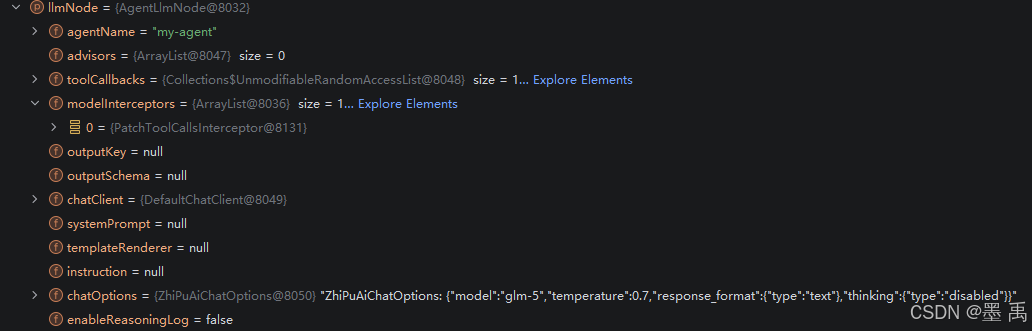
4.2 执行流程
可以看到加载流程和工具拦截器逻辑一致,其执行流程也差不多,就不赘述了,主要流程:
- 构建模型请求
ModelRequest - 创建
ModelCallHandler - 执行责任链
- 返回模型响应
ModelResponse