效果图
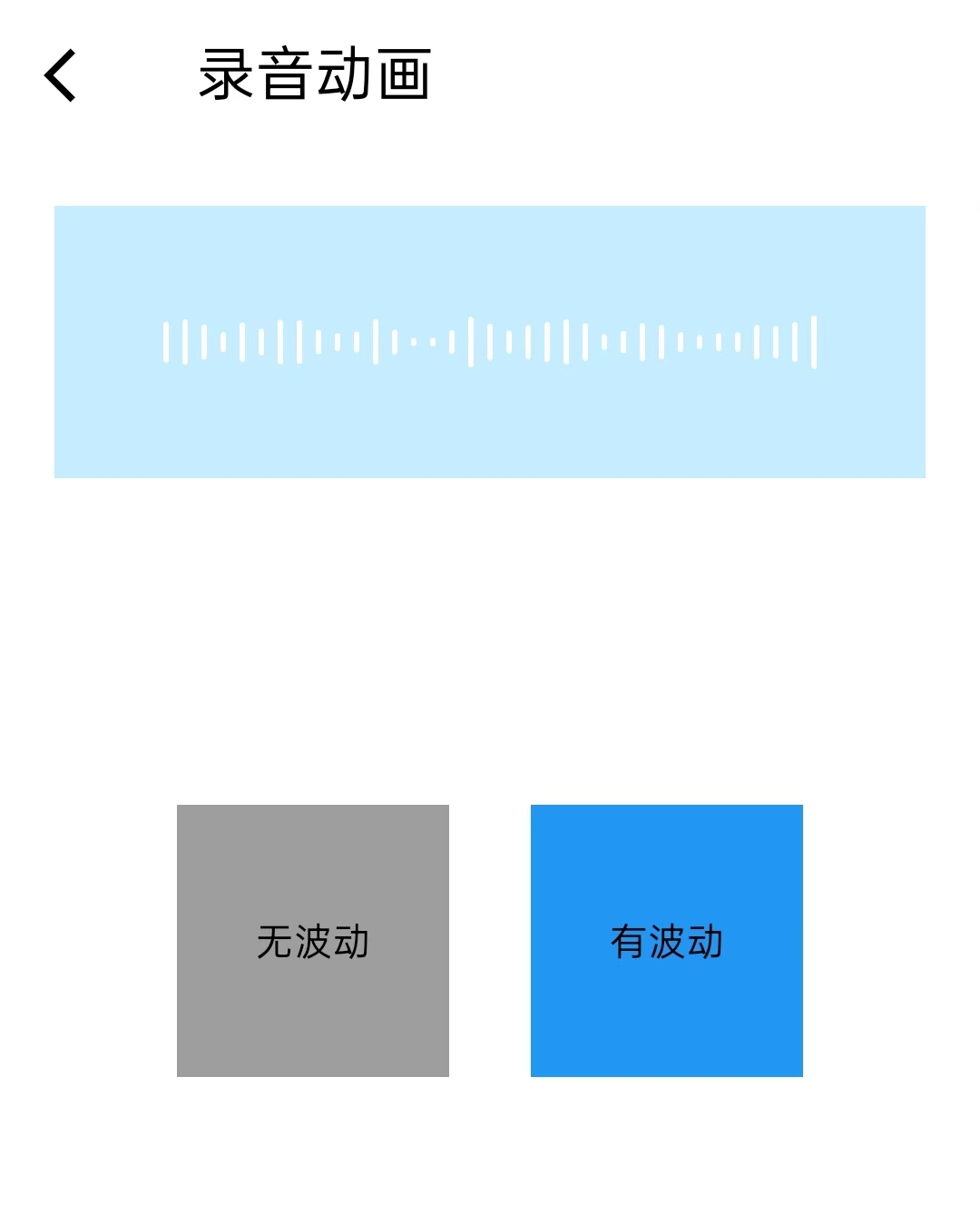
动画原理
Dart
动画控制器每16ms触发一次,每3帧(约50ms)执行一次数据更新:删除最左边的柱子,
在最右边添加新柱子,通过 setState 触发界面重绘,形成柱子不断向左滚动的视觉效果。

关键点:

持续的时间驱动(AnimationController.repeat())

持续的数据变化(不断删除和添加柱子)

缺一不可:

有时间驱动没数据变化 → 界面静止(白刷新)

有数据变化没时间驱动 → 只变一次(不连续)
关键代码
Dart
//移除最左边的柱子
heightValue.removeAt(0);
//在右边添加柱子
isHaveVoice ? heightValue.add(_random.nextDouble()*10) : heightValue.add(1.5);
动画循环图
Dart
┌─────────────────────────────────────────────────────────┐
│                    动画循环(每16ms)                     │
└─────────────────────────────────────────────────────────┘
                          ↓
┌─────────────────────────────────────────────────────────┐
│ 1. AnimationController 触发 addListener                 │
│    (屏幕每刷新一次就触发一次,约16ms/次)                  │
└─────────────────────────────────────────────────────────┘
                          ↓
┌─────────────────────────────────────────────────────────┐
│ 2. 调用 _updateBars()                                   │
│    _frameCount++ (计数器+1)                              │
└─────────────────────────────────────────────────────────┘
                          ↓
┌─────────────────────────────────────────────────────────┐
│ 3. 判断:_frameCount - _lastAddFrame >= 3 ?             │
│    (每3帧执行一次,约50ms)                               │
└─────────────────────────────────────────────────────────┘
                          ↓ 是
┌─────────────────────────────────────────────────────────┐
│ 4. setState() 触发重绘                                  │
│    - heightValue.removeAt(0) 删除左边                   │
│    - heightValue.add(新高度)  添加右边                   │
└─────────────────────────────────────────────────────────┘
                          ↓
┌─────────────────────────────────────────────────────────┐
│ 5. Flutter 重新执行 build() 方法                        │
│    - Row 根据新的 heightValue 重建所有柱子               │
│    - AnimatedContainer 平滑过渡到新高度                  │
└─────────────────────────────────────────────────────────┘
                          ↓
┌─────────────────────────────────────────────────────────┐
│ 6. 用户看到:柱子向左移动了1格,右边出现新柱子            │
└─────────────────────────────────────────────────────────┘
                          ↓
                    回到步骤1(无限循环)
数据变化过程
Dart
// 初始状态
[0, 0, 0, 0, 0, 0, 0, 0, 0, 0, ..., 0]  (35个0)

// 第1次更新(32ms)
删除左边第1个0 → [0, 0, ..., 0] (34个0)
添加新高度5.2   → [0, 0, ..., 0, 5.2] (34个0 + 1个5.2)

// 第2次更新(80ms)
删除左边第1个0 → [0, ..., 0, 5.2] (33个0 + 1个5.2)
添加新高度8.1   → [0, ..., 0, 5.2, 8.1] (33个0 + 2个有高度的)

// 第3次更新(128ms)
删除左边第1个0 → [0, ..., 5.2, 8.1] (32个0 + 2个有高度的)
添加新高度3.5   → [0, ..., 5.2, 8.1, 3.5] (32个0 + 3个有高度的)

// 持续执行...
// 有高度的柱子逐渐向左移动
// 最终35个柱子都有高度(全是非0值)
疑问点
Dart
1.heightValue = List.generate(barCount, (index) => 0.0);
可变的列表初始化时什么意思?如果更好的理解List.generate?

答:可变列表是指可以增加和删减数据。

// 基本语法
List.generate(长度, 生成器函数)

// 示例1:最简单的用法
List.generate(5, (index) => 0)
// 结果:[0, 0, 0, 0, 0]


一开始都是0,所有看着是没有图形,但是是有数据的

2.为什么使用Row构建UI,而不是Stack,为什么不需要切换小柱子的x轴,就可以直接挪动实现动画?

答:Row 自动布局,Stack 需要手动定位。
 Row 会自动根据数据顺序重新计算每个柱子的位置。你只需要改变数据(删除第一个,添加最后一个),
Row 就会自动完成所有位置计算和重新排列,你完全不需要手动操作 x 轴。
代码示例
Dart
import 'package:flutter/material.dart';
import 'dart:math';

class DemoPage extends StatefulWidget {
  const DemoPage({super.key});

  @override
  State<StatefulWidget> createState() => _DemoPageState();
}

class _DemoPageState extends State<DemoPage> with SingleTickerProviderStateMixin {

  List<double> heightValue = []; //存储每个柱子的高度值
  final Random _random = Random();
  late AnimationController _animationController;

  // 柱子配置
  final int barCount = 35; // 同时显示的柱子数量
  final double barWidth = 2; //柱子宽度
  final double spacing = 5; //柱子之间的间距

  bool isHaveVoice = false; //控制是否波动

  int _lastAddFrame = 0; // 上次添加新柱子的帧数
  int _frameCount = 0;  //总帧数计数器

  @override
  void initState() {
    super.initState();

    // 使用可变的列表初始化
    heightValue = List.generate(barCount, (index) => 0.0);

    // 创建动画控制器
    _animationController = AnimationController(
      vsync: this,
      duration: const Duration(milliseconds: 16), // 每帧触发
    )..addListener(() { //添加监听器
      // 每帧都会调用,更新柱子的位置
      if(mounted){
        _updateBars();
      }
    });

    // 启动动画
    _animationController.repeat();
  }


  //================================更新柱子的位置==============================
  void _updateBars() {

    _frameCount++;

     if(!mounted)return;


    // 每3帧添加一个新柱子(约50ms,接近40ms)
    if (_frameCount - _lastAddFrame >= 3) {
      _lastAddFrame = _frameCount;//更新上次添加的帧数

      setState(() {
        // 移除最左边的柱子(移出屏幕)
        heightValue.removeAt(0);
        // 在右边添加新的随机高度柱子
        isHaveVoice ? heightValue.add(_random.nextDouble() * 10) : heightValue.add(1.5);
      });
    }

  }

   @override
  void dispose() {
    // TODO: implement dispose

    _animationController.stop();
    _animationController.dispose();
    super.dispose();
  }

  @override
  Widget build(BuildContext context) {
    return Scaffold(
      appBar: AppBar(
        automaticallyImplyLeading: false,
        leading: IconButton(
          onPressed: () {
            Navigator.pop(context);
          },
          icon: const Icon(Icons.arrow_back_ios),
        ),
        title: const Text("录音动画"),
      ),
      body: Column(
        children: [
          Container(
            height: 100,
            width: double.infinity,
            margin: const EdgeInsets.all(20),
            color: Colors.lightBlueAccent.withOpacity(0.3),
            child: Center(
              child: Row(
                mainAxisAlignment: MainAxisAlignment.center,
                crossAxisAlignment: CrossAxisAlignment.center,
                children: List.generate(heightValue.length, (index) {
                  final height = 200 * heightValue[index] / 100;

                  return Container(
                    width: barWidth,
                    margin: EdgeInsets.symmetric(horizontal: spacing / 2),
                    child: AnimatedContainer(
                      duration: const Duration(milliseconds: 50), // 过渡动画时长
                      curve: Curves.easeOut,
                      height: height,
                      decoration: BoxDecoration(
                        color: Colors.white,
                        borderRadius: BorderRadius.circular(2),
                      ),
                    ),
                  );
                }),
              ),
            ),
          ),

          SizedBox(height: 100,),
          //按钮
          Row(
            mainAxisAlignment: MainAxisAlignment.center,
            children: [

              //无声音
              GestureDetector(
                onTap: (){
                  setState(() {
                    isHaveVoice = false;
                  });
                },
                  child: Container(
                    width: 100,
                    height: 100,
                    color: Colors.grey,
                    child: Center(
                      child: Text("无波动"),
                    ),
                  ),
              ),

              SizedBox(width: 30,),

              //有声音
              GestureDetector(
                onTap: (){
                  setState(() {
                    isHaveVoice = true;
                  });
                },
                child: Container(
                  width: 100,
                  height: 100,
                  color: Colors.blue,
                  child: Center(
                    child: Text("有波动"),
                  ),
                ),
              ),
            ],
          )
        ],
      )
    );
  }
}