ArcGIS JS 基础教程(3):地图缩放、平移、旋转(基础交互)
零、写在前面
📌 本系列教程完整目录 :ArcGIS JS 系列基础教程(100个项目常用热门功能)
💡 在线示例 :完整可运行的 HTML 示例,无需任何环境配置,可直接在浏览器中打开体验
🗂️ 专栏导航 :收藏 + 关注,专栏文章第一时间送达
❤️ 一键三连:点赞(给教程充电)+ 评论(提问必回)+ 收藏(下次再看)
一、功能介绍
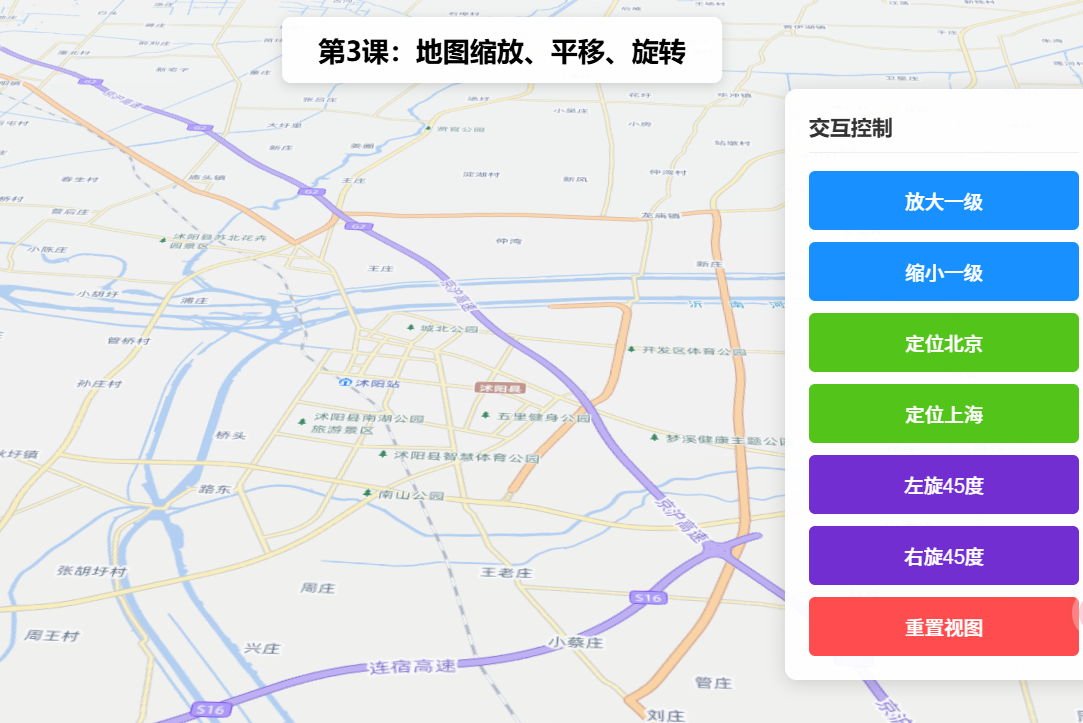
实现地图的核心交互操作,包括鼠标滚轮缩放、拖拽平移、鼠标右键旋转(2D视图),同时支持通过代码控制缩放级别、平移至指定位置、设置旋转角度,适配用户手动交互和自动定位场景。
二、功能实现
SceneView默认支持鼠标滚轮缩放、拖拽平移,通过heading属性控制旋转;代码控制通过view.zoom(设置缩放级别)、view.goTo(平移至指定中心点/范围)、view.heading(设置旋转角度)实现。
三、功能应用
所有包含地图的项目,如导航类项目的手动缩放查看细节、后台系统的地图定位平移、可视化项目的视角调整。
四、核心代码
html
<!DOCTYPE html>
<html lang="zh-CN">
<head>
    <meta charset="UTF-8">
    <meta name="viewport" content="width=device-width, initial-scale=1.0">
    <title>第3课:地图缩放、平移、旋转(基础交互)</title>
    <link rel="stylesheet" href="https://js.arcgis.com/5.0/esri/themes/light/main.css">
    <script type="module" src="https://js.arcgis.com/5.0/"></script>
    <style>
        body { margin: 0; padding: 0; font-family: "Microsoft YaHei", sans-serif; }
        #mapContainer { width: 100vw; height: 100vh; }
        .page-title {
            position: absolute;
            top: 20px;
            left: 50%;
            transform: translateX(-50%);
            background: rgba(255,255,255,0.95);
            padding: 10px 24px;
            border-radius: 6px;
            font-size: 18px;
            font-weight: bold;
            z-index: 100;
            box-shadow: 0 2px 8px rgba(0,0,0,0.15);
        }
        .control-panel {
            position: absolute;
            top: 80px;
            right: 20px;
            background: rgba(255,255,255,0.95);
            padding: 16px;
            border-radius: 8px;
            box-shadow: 0 2px 12px rgba(0,0,0,0.15);
            z-index: 100;
            min-width: 180px;
        }
        .btn-group { display: flex; flex-direction: column; gap: 8px; }
        .btn-group button {
            padding: 10px 16px;
            border: none;
            border-radius: 4px;
            cursor: pointer;
            font-size: 13px;
            font-weight: 500;
        }
        .btn-zoom { background: #1890ff; color: white; }
        .btn-pan { background: #52c41a; color: white; }
        .btn-rotate { background: #722ed1; color: white; }
        .btn-reset { background: #ff4d4f; color: white; }
        .btn-group button:hover { opacity: 0.85; }
    </style>
</head>
<body>
<h1 class="page-title">第3课:地图缩放、平移、旋转</h1>
<div class="control-panel">
    <div class="btn-group">
        <button class="btn-zoom" id="zoomIn">放大一级</button>
        <button class="btn-zoom" id="zoomOut">缩小一级</button>
        <button class="btn-pan" id="panToBeijing">定位北京</button>
        <button class="btn-rotate" id="rotateLeft">左旋45度</button>
        <button class="btn-rotate" id="rotateRight">右旋45度</button>
        <button class="btn-reset" id="resetView">重置视图</button>
    </div>
</div>
<div id="mapContainer"></div>

<script type="module">
    const Map = await $arcgis.import("@arcgis/core/Map.js");
    const SceneView = await $arcgis.import("@arcgis/core/views/SceneView.js");
    const getTianditu = await $arcgis.import("https://openlayers.vip/examples/resources/tianditu.js");

    const vecLayers = getTianditu.default({ type: "vec_w" });
    const map = new Map({
        basemap: { baseLayers: [vecLayers.base, vecLayers.anno] },
        ground: {
            surface: {
                elevationLayers: [{
                    url: "https://www.geosceneonline.cn/image/rest/services/OpenData/ChinaTerrain3D/ImageServer/"
                }]
            }
        }
    });

    window.view = new SceneView({
        container: "mapContainer",
        map: map,
        center: [118.805, 34.027],
        zoom: 13,
        tilt: 45
    });

    window.zoomIn = () => view.goTo({ zoom: view.zoom + 1 });
    window.zoomOut = () => view.goTo({ zoom: view.zoom - 1 });
    window.panToBeijing = () => view.goTo({ center: [116.39, 39.9], zoom: 12 });
    window.rotateLeft = () => view.goTo({ heading: view.heading - 45 });
    window.rotateRight = () => view.goTo({ heading: view.heading + 45 });
    window.resetView = () => view.goTo({ center: [118.805, 34.027], zoom: 13, heading: 0, tilt: 45 });

    document.getElementById("zoomIn").onclick = zoomIn;
    document.getElementById("zoomOut").onclick = zoomOut;
    document.getElementById("panToBeijing").onclick = panToBeijing;
    document.getElementById("rotateLeft").onclick = rotateLeft;
    document.getElementById("rotateRight").onclick = rotateRight;
    document.getElementById("resetView").onclick = resetView;

    view.when(() => console.log("地图缩放、平移、旋转示例加载完成!"));
</script>
</body>
</html>
五、在线示例
🔗 在线体验地址(GitHub资源,等待时间较长,或者架梯子) :https://southjor.github.io/arcgis-examples/lessons/lesson3.html
六、关键API说明
| API | 说明 |
|---|---|
| view.zoom | 获取/设置当前缩放级别 |
| view.center | 获取/设置地图中心点 |
| view.heading | 获取/设置旋转角度(0-360度) |
| view.goTo(target, options) | 动画跳转到指定视图状态 |
| view.tilt | 三维视角倾斜角度(仅SceneView) |
七、系列导航
⬅️ 上一篇 :ArcGIS JS 基础教程(2):地图切换底图(天地图)