如果说 ai-core 是 AI 客服的"CPU",那么 Prompt,就是它的"操作系统逻辑层"。你也可以去 GitHub 上获取相配套的项目代码。
很多人做 AI 应用时,会犯一个非常典型的错误:
❌ 把 Prompt 当字符串拼接
结果就是:
- AI 输出不稳定
- 结果不可控
- 系统无法演进
一、为什么 Prompt 必须工程化?
我们先看一个最原始的写法:
java
String prompt = "你是一个客服,请回答:" + message;这种方式的问题:
❌ 1. 无法复用
❌ 2. 无法版本管理
❌ 3. 无法优化
❌ 4. 无法做A/B测试
👉 在真实 AI 系统中,这是不可接受的。
二、Prompt工程的本质是什么?
一句话定义:
👉 Prompt = AI行为控制层
它决定:
- AI 是客服还是分析师
- AI 是否遵循规则
- AI 输出风格
三、Prompt工程的三层结构
在本项目中,我们把 Prompt 拆成三层:
🧠 1. System Prompt(身份层)
定义 AI 是谁:
text
你是一个专业的AI客服助手🧩 2. Instruction Prompt(行为层)
定义 AI 怎么做:
text
请用中文回答用户问题,保持简洁💬 3. Context Prompt(上下文层)
定义 AI 看到什么:
text
历史对话 + RAG内容 + 用户问题👉 三者组合:
= 一个完整 AI 行为系统
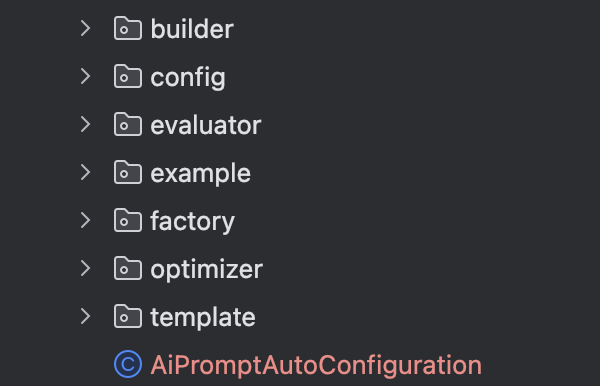
四、Prompt工程模块设计(ai-prompt)
我们在 ai-core 之上新增模块:
五、核心能力实现
1️⃣ PromptTemplate(模板系统)
java
/**
 * 多角色 Prompt 模板:分别持有 system / user / assistant 片段,支持 {@code {var}} 占位符替换。
 * <p>
 * assistant 片段常用于 few-shot 示例或对话前缀,可按业务选择是否参与最终拼接。
 */
public final class PromptTemplate {

    /** 占位符格式:{@code {key}},key 仅含字母、数字、下划线与点号。 */
    private static final Pattern PLACEHOLDER = Pattern.compile("\\{([a-zA-Z0-9_.]+)}");

    /** 系统提示片段。 */
    private final String system;
    /** 用户侧模板片段。 */
    private final String user;
    /** 助手侧模板片段(如 few-shot)。 */
    private final String assistant;

    /**
     * 使用三段文本构造模板;{@code null} 视为空字符串。
     *
     * @param system    系统提示
     * @param user      用户模板
     * @param assistant 助手模板
     */
    public PromptTemplate(String system, String user, String assistant) {
        this.system = system == null ? "" : system;
        this.user = user == null ? "" : user;
        this.assistant = assistant == null ? "" : assistant;
    }

    /**
     * 仅包含 system 段的模板。
     *
     * @param system 系统提示文本
     * @return 模板实例
     */
    public static PromptTemplate ofSystem(String system) {
        return new PromptTemplate(system, "", "");
    }

    /**
     * 仅包含 user 段的模板。
     *
     * @param user 用户模板文本
     * @return 模板实例
     */
    public static PromptTemplate ofUser(String user) {
        return new PromptTemplate("", user, "");
    }

    /**
     * 包含 system 与 user,不含 assistant。
     *
     * @param system 系统提示
     * @param user   用户模板
     * @return 模板实例
     */
    public static PromptTemplate of(String system, String user) {
        return new PromptTemplate(system, user, "");
    }

    /**
     * 完整三段模板工厂方法。
     *
     * @param system    系统提示
     * @param user      用户模板
     * @param assistant 助手模板
     * @return 模板实例
     */
    public static PromptTemplate of(String system, String user, String assistant) {
        return new PromptTemplate(system, user, assistant);
    }

    /**
     * @return 系统提示原文(未替换占位符)
     */
    public String system() {
        return system;
    }

    /**
     * @return 用户模板原文
     */
    public String user() {
        return user;
    }

    /**
     * @return 助手模板原文
     */
    public String assistant() {
        return assistant;
    }

    /**
     * 使用变量渲染各段文本;未提供的占位符保留原样,便于排查。
     *
     * @param variables 占位符键值;{@code null} 视为空映射
     * @return 替换后的新模板实例(不可变)
     */
    public PromptTemplate render(Map<String, String> variables) {
        Map<String, String> safe = variables == null ? Map.of() : variables;
        return new PromptTemplate(
                apply(system, safe),
                apply(user, safe),
                apply(assistant, safe));
    }

    /**
     * 先按变量渲染,再返回指定角色的文本。
     *
     * @param role      要取出的角色段
     * @param variables 占位符变量
     * @return 该角色渲染后的字符串
     */
    public String renderRole(PromptRole role, Map<String, String> variables) {
        PromptTemplate r = render(variables);
        return switch (role) {
            case SYSTEM -> r.system;
            case USER -> r.user;
            case ASSISTANT -> r.assistant;
        };
    }

    /**
     * 将 {@code raw} 中的 {@code {key}} 替换为 {@code variables} 中对应值。
     */
    private static String apply(String raw, Map<String, String> variables) {
        if (raw.isEmpty() || variables.isEmpty()) {
            return raw;
        }
        Matcher m = PLACEHOLDER.matcher(raw);
        StringBuilder sb = new StringBuilder();
        while (m.find()) {
            String key = m.group(1);
            String value = variables.get(key);
            m.appendReplacement(sb, Matcher.quoteReplacement(value != null ? value : m.group(0)));
        }
        m.appendTail(sb);
        return sb.toString();
    }

    /**
     * 返回非空角色段与文本的只读映射,便于按角色遍历。
     *
     * @return 角色到文本的映射
     */
    public Map<PromptRole, String> asRoleMap() {
        Map<PromptRole, String> map = new HashMap<>(3);
        if (!system.isEmpty()) {
            map.put(PromptRole.SYSTEM, system);
        }
        if (!user.isEmpty()) {
            map.put(PromptRole.USER, user);
        }
        if (!assistant.isEmpty()) {
            map.put(PromptRole.ASSISTANT, assistant);
        }
        return Collections.unmodifiableMap(map);
    }

    @Override
    public boolean equals(Object o) {
        if (this == o) {
            return true;
        }
        if (!(o instanceof PromptTemplate that)) {
            return false;
        }
        return Objects.equals(system, that.system)
                && Objects.equals(user, that.user)
                && Objects.equals(assistant, that.assistant);
    }

    @Override
    public int hashCode() {
        return Objects.hash(system, user, assistant);
    }
}
2️⃣ PromptBuilder(链式构建)
java
/**
 * 链式构建 Prompt:支持模板 + 历史 + 上下文 + 指令,以及变量替换。
 * <p>
 * 典型顺序:{@code template -> variables -> history -> context -> instruction -> build}
 */
public final class PromptBuilder {

    /** 基础模板,在 {@link #build()} 时先做变量替换。 */
    private PromptTemplate base = PromptTemplate.of("", "", "");
    /** 占位符变量累积。 */
    private final Map<String, String> variables = new HashMap<>();
    /** 历史对话文本。 */
    private String history = "";
    /** RAG 或外部检索得到的上下文。 */
    private String context = "";
    /** 额外任务说明。 */
    private String instruction = "";
    /** 是否在 user 块中追加「历史对话」小节。 */
    private boolean includeHistorySection = true;
    /** 是否在 user 块中追加「参考上下文」小节。 */
    private boolean includeContextSection = true;

    /**
     * 设置基础模板;{@code null} 视为空模板。
     *
     * @param template 多角色模板
     * @return {@code this}
     */
    public PromptBuilder template(PromptTemplate template) {
        this.base = Objects.requireNonNullElse(template, PromptTemplate.of("", "", ""));
        return this;
    }

    /**
     * 追加单个占位符变量(与模板中 {@code {key}} 对应)。
     *
     * @param key   占位符键
     * @param value 替换值;键或值为 {@code null} 时忽略
     * @return {@code this}
     */
    public PromptBuilder variable(String key, String value) {
        if (key != null && value != null) {
            variables.put(key, value);
        }
        return this;
    }

    /**
     * 批量追加占位符变量。
     *
     * @param extra 键值对;{@code null} 忽略
     * @return {@code this}
     */
    public PromptBuilder variables(Map<String, String> extra) {
        if (extra != null) {
            extra.forEach((k, v) -> {
                if (k != null && v != null) {
                    variables.put(k, v);
                }
            });
        }
        return this;
    }

    /**
     * 设置会话历史,将拼入「历史对话」小节(若启用)。
     *
     * @param history 历史文本;{@code null} 视为空
     * @return {@code this}
     */
    public PromptBuilder history(String history) {
        this.history = history == null ? "" : history;
        return this;
    }

    /**
     * 设置参考上下文(如 RAG 检索片段),将拼入「参考上下文」小节(若启用)。
     *
     * @param context 上下文文本;{@code null} 视为空
     * @return {@code this}
     */
    public PromptBuilder context(String context) {
        this.context = context == null ? "" : context;
        return this;
    }

    /**
     * 设置任务说明,将拼入「任务说明」小节。
     *
     * @param instruction 说明文本;{@code null} 视为空
     * @return {@code this}
     */
    public PromptBuilder instruction(String instruction) {
        this.instruction = instruction == null ? "" : instruction;
        return this;
    }

    /**
     * 控制是否在 user 块中包含历史与上下文两个小节。
     *
     * @param includeHistory 是否包含「历史对话」
     * @param includeContext 是否包含「参考上下文」
     * @return {@code this}
     */
    public PromptBuilder sections(boolean includeHistory, boolean includeContext) {
        this.includeHistorySection = includeHistory;
        this.includeContextSection = includeContext;
        return this;
    }

    /**
     * 完成变量替换并按规则拼接 user 块,生成 {@link BuiltPrompt}。
     *
     * @return 不可变的构建结果
     */
    public BuiltPrompt build() {
        PromptTemplate rendered = base.render(variables);
        String sys = rendered.system();
        String userCore = rendered.user();
        String asst = rendered.assistant();

        StringBuilder userBlock = new StringBuilder();
        if (!userCore.isEmpty()) {
            userBlock.append(userCore.trim());
        }
        if (includeHistorySection && !history.isEmpty()) {
            appendSection(userBlock, "历史对话", history);
        }
        if (includeContextSection && !context.isEmpty()) {
            appendSection(userBlock, "参考上下文", context);
        }
        if (!instruction.isEmpty()) {
            appendSection(userBlock, "任务说明", instruction);
        }

        return new BuiltPrompt(sys, userBlock.toString(), asst, rendered);
    }

    /**
     * 向 user 块追加 Markdown 风格小节。
     */
    private static void appendSection(StringBuilder sb, String title, String body) {
        if (!sb.isEmpty()) {
            sb.append("\n\n");
        }
        sb.append("### ").append(title).append("\n").append(body.trim());
    }
}
3️⃣ PromptFactory(场景化管理)
java
/**
 * 按场景与版本产出已绑定模板的 {@link PromptBuilder},调用方继续链式填写变量与上下文后 {@link PromptBuilder#build()} 得到 {@link com.aics.prompt.builder.BuiltPrompt}。
 * <p>
 * 示例:
 * <pre>{@code
 * BuiltPrompt p = promptFactory.forScenario(PromptScenario.RAG, PromptVersion.V2)
 *     .variable("question", "如何退款?")
 *     .context(retrievedChunks)
 *     .build();
 * }</pre>
 */
@Component
public class PromptFactory {

    /** 默认 Prompt 版本等引擎配置。 */
    private final PromptEngineProperties properties;

    /**
     * @param properties 绑定 {@code aics.prompt.*} 的配置属性
     */
    public PromptFactory(PromptEngineProperties properties) {
        this.properties = properties;
    }

    /**
     * 使用配置中的默认版本({@code aics.prompt.default-version})选择内置模板。
     *
     * @param scenario 业务场景
     * @return 已设置模板的构建器
     */
    public PromptBuilder forScenario(PromptScenario scenario) {
        return forScenario(scenario, properties.getDefaultVersion());
    }

    /**
     * 指定场景与版本,从目录中选取对应模板并包装为构建器。
     *
     * @param scenario 业务场景
     * @param version  Prompt 版本(V1/V2)
     * @return 已设置模板的构建器
     */
    public PromptBuilder forScenario(PromptScenario scenario, PromptVersion version) {
        PromptTemplate base = selectTemplate(scenario, version);
        return new PromptBuilder().template(base);
    }

    /**
     * 仅获取某场景某版本的原始模板(不做构建器封装),便于自定义扩展。
     *
     * @param scenario 业务场景
     * @param version  Prompt 版本
     * @return 目录中的 {@link PromptTemplate}
     */
    public PromptTemplate templateFor(PromptScenario scenario, PromptVersion version) {
        return selectTemplate(scenario, version);
    }

    /**
     * 根据场景与版本从 {@link DefaultPromptCatalog} 选取模板。
     */
    private static PromptTemplate selectTemplate(PromptScenario scenario, PromptVersion version) {
        return switch (scenario) {
            case CHAT -> DefaultPromptCatalog.chat(version);
            case RAG -> DefaultPromptCatalog.rag(version);
            case TOOL -> DefaultPromptCatalog.tool(version);
        };
    }
}
4️⃣ Prompt版本管理(关键)
java
public enum PromptVersion {

    V1,
    V2
}
👉 用法:
java
if (version == PromptVersion.V1) {
    return oldPrompt;
} else {
    return newPrompt;
}
5️⃣ Prompt日志(评估基础)
java
/**
 * 一次 Prompt 调用的轻量审计记录,便于后续评估与 A/B 分析。
 *
 * @param id               日志唯一标识
 * @param createdAt        记录时间(UTC)
 * @param scenario         业务场景
 * @param version          使用的 Prompt 版本
 * @param systemText       最终 system 文本
 * @param userText         最终 user 侧文本
 * @param assistantPrefix  最终 assistant 前缀(若有)
 * @param modelOutput      模型输出原文
 */
public record PromptLog(
        String id,
        Instant createdAt,
        PromptScenario scenario,
        PromptVersion version,
        String systemText,
        String userText,
        String assistantPrefix,
        String modelOutput
) {
}
六、如何在 ai-core 中使用 Prompt 模块?
改造 ChatService:
java
String prompt = PromptFactory.createChatPrompt(history, message);

String answer = llmProvider.chat(prompt);
👉 变化很关键:
❗ 从"写死prompt" → "工程化prompt"
七、Prompt工程带来的本质变化
🧠 1. 可控性提升
可以明确控制 AI 行为
🧪 2. 可实验性
可以做 A/B test:
- prompt v1
- prompt v2
🔁 3. 可迭代性
可以持续优化 AI 表现
🧱 4. 系统化
Prompt 不再是字符串,而是系统组件
八、这一层在整个AI系统中的位置
text
ai-core → 提供能力
   ↓
ai-prompt → 控制行为
   ↓
ai-rag → 提供知识
   ↓
ai-tools → 提供动作
   ↓
ai-eval → 评估效果
九、总结
这一篇你完成了一个关键升级:
👉 从"能聊天"升级为"可控AI系统"
下一篇预告
👉 《RAG系统设计:让AI真正理解你的业务》
我们将进入:
- 向量数据库
- 文档切分
- 检索增强
- 语义召回