欢迎加入开源鸿蒙跨平台社区:https://openharmonycrossplatform.csdn.net
一、video_player 库简介
video_player 是 Flutter 官方维护的视频播放插件,提供跨平台的视频播放能力,支持网络视频、本地文件视频和 Asset 资源视频。无论是短视频应用、在线教育平台还是多媒体内容展示,video_player 都是最核心的解决方案。
video_player 核心特点
| 特点 | 说明 |
|---|---|
| 网络视频 | 支持播放在线视频 URL |
| 本地文件 | 支持播放设备本地视频文件 |
| Asset 资源 | 支持播放应用内置视频资源 |
| 播放控制 | 播放、暂停、跳转、循环 |
| 倍速播放 | 支持 0.25x - 2.0x 变速播放 |
| 音量控制 | 支持音量调节 |
| 进度指示 | 内置 VideoProgressIndicator |
| 缓冲状态 | 实时显示缓冲进度 |
| 字幕支持 | 支持 WebVTT 和 SRT 字幕 |
| 跨平台兼容 | 支持 Android、iOS、Web、OpenHarmony |
平台功能支持对比
| 功能 | Android | iOS | Web | OpenHarmony |
|---|---|---|---|---|
| 网络视频 | ✔️ | ✔️ | ✔️ | ✔️ |
| 本地文件 | ✔️ | ✔️ | ✔️ | ✔️ |
| Asset 资源 | ✔️ | ✔️ | ✔️ | ✔️ |
| 播放控制 | ✔️ | ✔️ | ✔️ | ✔️ |
| 倍速播放 | ✔️ | ✔️ | ✔️ | ✔️ |
| 音量控制 | ✔️ | ✔️ | ✔️ | ✔️ |
| 循环播放 | ✔️ | ✔️ | ✔️ | ✔️ |
| 进度跳转 | ✔️ | ✔️ | ✔️ | ✔️ |
| 缓冲指示 | ✔️ | ✔️ | ✔️ | ✔️ |
| 字幕显示 | ✔️ | ✔️ | ✔️ | ✔️ |
| 后台播放 | ✔️ | ✔️ | ❌ | ❌ |
使用场景
- 短视频应用
- 在线教育视频课程
- 企业宣传视频
- 直播回放
- 多媒体内容管理
二、OpenHarmony 适配版本
2.1 环境说明
| 组件 | 版本 |
|---|---|
| Flutter | 3.27.5 |
| HarmonyOS | 6.0 |
| video_player | 2.9.2 (OpenHarmony 适配版本) |
2.2 引入方式
在 pubspec.yaml 文件中添加以下依赖配置:
yaml
dependencies:
  video_player:
    git:
      url: https://atomgit.com/openharmony-sig/flutter_packages.git
      path: packages/video_player/video_player
      ref: master
2.3 权限配置
在 OpenHarmony 项目的 module.json5 文件中添加网络权限(播放网络视频时需要):
json
{
  "module": {
    "requestPermissions": [
      {
        "name": "ohos.permission.INTERNET"
      }
    ]
  }
}
三、核心 API 详解
3.1 VideoPlayerController
VideoPlayerController 是视频播放的核心控制器,负责视频的加载、播放、暂停、跳转等操作。
构造函数
dart
// 网络视频
VideoPlayerController.networkUrl(Uri url, {
  VideoFormat? formatHint,           // 可选:视频格式提示
  Future<ClosedCaptionFile>? closedCaptionFile, // 可选:字幕文件
  VideoPlayerOptions? videoPlayerOptions,       // 可选:播放选项
  Map<String, String> httpHeaders = const {},   // 可选:HTTP 请求头
})

// 本地文件(通用)
VideoPlayerController.file(File file, {
  Future<ClosedCaptionFile>? closedCaptionFile,
  VideoPlayerOptions? videoPlayerOptions,
  Map<String, String> httpHeaders = const {},
})

// 本地文件(OpenHarmony 专用,使用文件描述符)
VideoPlayerController.fileFd(int fileFd, {
  Future<ClosedCaptionFile>? closedCaptionFile,
  VideoPlayerOptions? videoPlayerOptions,
  Map<String, String> httpHeaders = const {},
})

// Asset 资源
VideoPlayerController.asset(String dataSource, {
  String? package,
  Future<ClosedCaptionFile>? closedCaptionFile,
  VideoPlayerOptions? videoPlayerOptions,
})
核心方法
| 方法 | 返回值 | 说明 |
|---|---|---|
initialize() |
Future<void> |
初始化视频控制器,加载视频元数据 |
play() |
Future<void> |
开始播放视频 |
pause() |
Future<void> |
暂停视频播放 |
seekTo(Duration position) |
Future<void> |
跳转到指定位置 |
setLooping(bool looping) |
Future<void> |
设置是否循环播放 |
setVolume(double volume) |
Future<void> |
设置音量(0.0 - 1.0) |
setPlaybackSpeed(double speed) |
Future<void> |
设置播放速度 |
dispose() |
Future<void> |
释放资源,必须调用 |
核心属性(通过 value 访问)
| 属性 | 类型 | 说明 |
|---|---|---|
duration |
Duration |
视频总时长 |
position |
Duration |
当前播放位置 |
isPlaying |
bool |
是否正在播放 |
isLooping |
bool |
是否循环播放 |
isBuffering |
bool |
是否正在缓冲 |
isInitialized |
bool |
是否已初始化 |
hasError |
bool |
是否有错误 |
errorDescription |
String? |
错误描述 |
volume |
double |
当前音量 |
playbackSpeed |
double |
当前播放速度 |
aspectRatio |
double |
视频宽高比 |
size |
Size |
视频尺寸 |
buffered |
List<DurationRange> |
已缓冲的时间范围 |
3.2 VideoPlayerValue
VideoPlayerValue 是视频播放器的状态值对象,包含所有播放状态信息。
dart
const VideoPlayerValue({
  required Duration duration,        // 视频总时长
  Duration position = Duration.zero, // 当前播放位置
  bool isPlaying = false,            // 是否正在播放
  bool isLooping = false,            // 是否循环播放
  bool isBuffering = false,          // 是否正在缓冲
  double volume = 1.0,               // 音量
  double playbackSpeed = 1.0,        // 播放速度
  Size size = Size.zero,             // 视频尺寸
  String? errorDescription,          // 错误描述
});
3.3 VideoPlayer 组件
VideoPlayer 是用于显示视频的 Widget,需要传入已初始化的 VideoPlayerController。
dart
VideoPlayer(controller)3.4 VideoProgressIndicator
VideoProgressIndicator 是内置的进度条组件,自动显示播放进度和缓冲进度。
dart
VideoProgressIndicator(
  controller,
  allowScrubbing: true,  // 是否允许拖动
  colors: VideoProgressColors(
    playedColor: Colors.red,    // 已播放颜色
    bufferedColor: Colors.grey, // 缓冲颜色
    backgroundColor: Colors.white, // 背景颜色
  ),
  padding: EdgeInsets.symmetric(vertical: 8.0),
)
3.5 VideoPlayerOptions
VideoPlayerOptions 用于配置视频播放选项。
dart
VideoPlayerOptions(
  mixWithOthers: true,   // 是否与其他音频混合播放
  allowBackgroundPlayback: false, // 是否允许后台播放
)
四、应用级别完整代码:视频播放器应用
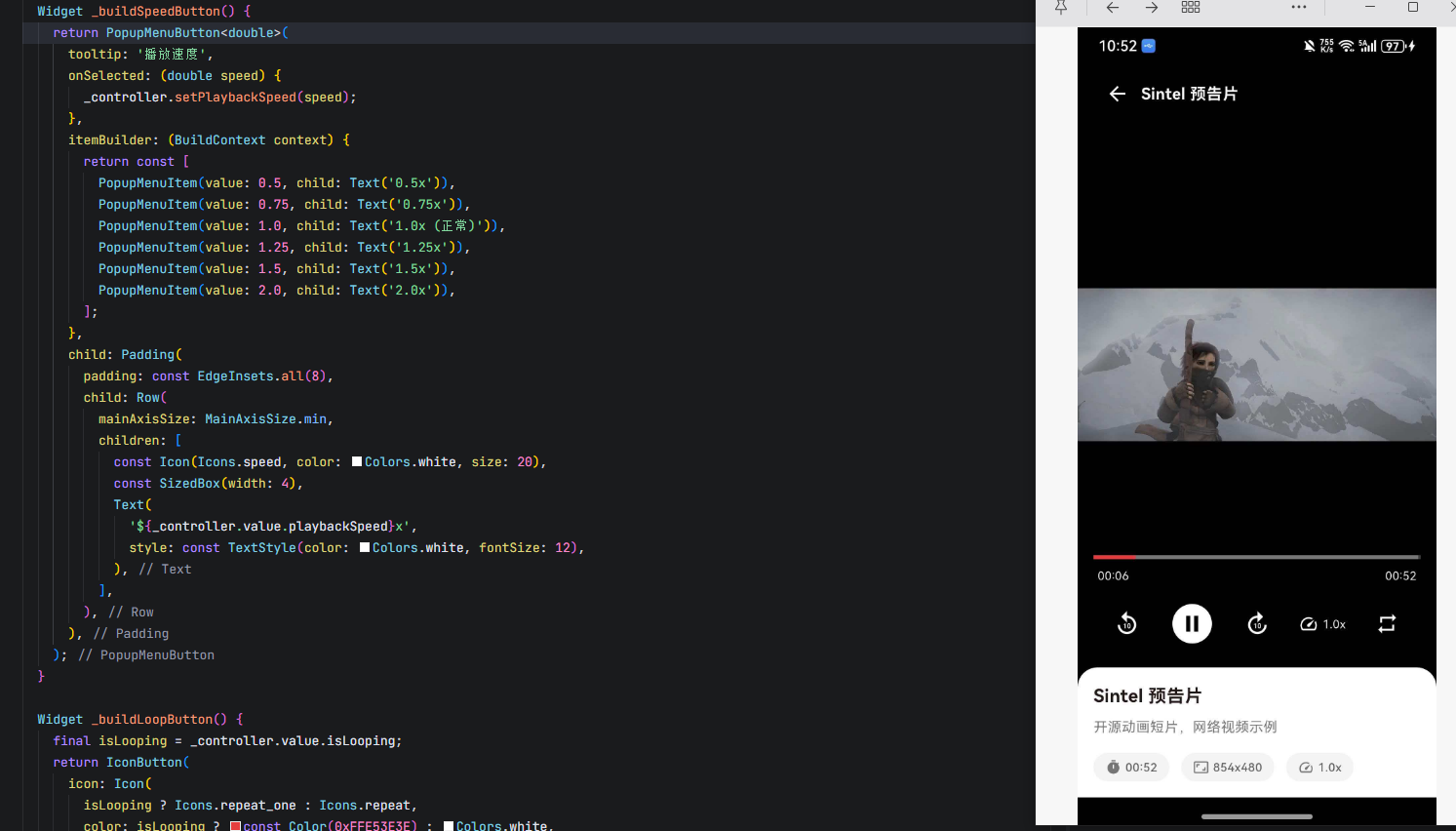
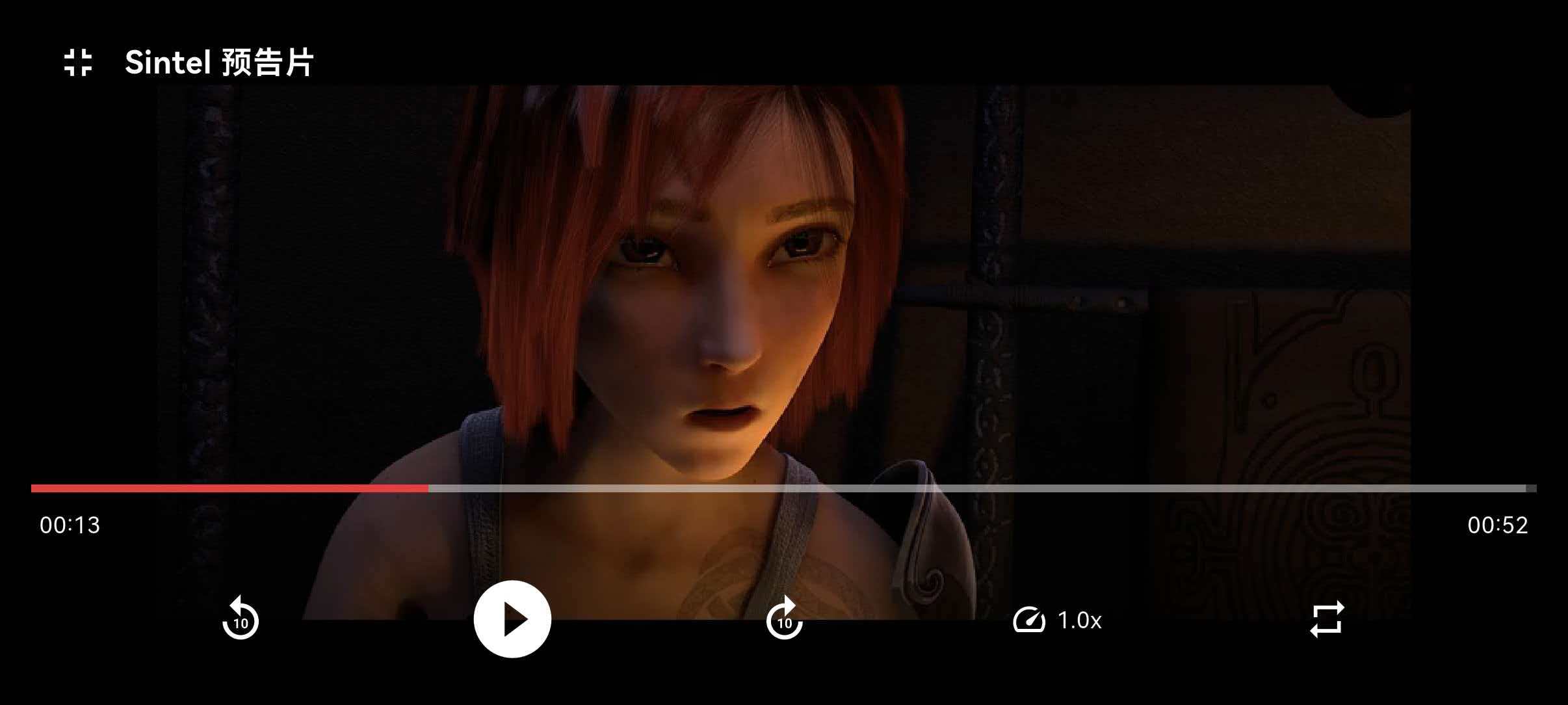
dart
import 'dart:async';
import 'dart:io';
import 'package:flutter/material.dart';
import 'package:flutter/services.dart';
import 'package:video_player/video_player.dart';
void main() {
runApp(const VideoPlayerApp());
}
class VideoPlayerApp extends StatelessWidget {
const VideoPlayerApp({super.key});
@override
Widget build(BuildContext context) {
return MaterialApp(
title: '视频播放器',
debugShowCheckedModeBanner: false,
theme: ThemeData(
colorScheme: ColorScheme.fromSeed(seedColor: const Color(0xFFE53E3E)),
useMaterial3: true,
),
home: const VideoPlayerHomePage(),
);
}
}
class VideoPlayerHomePage extends StatelessWidget {
const VideoPlayerHomePage({super.key});
@override
Widget build(BuildContext context) {
return Scaffold(
appBar: AppBar(
title: const Text('视频播放器'),
backgroundColor: const Color(0xFFE53E3E),
foregroundColor: Colors.white,
elevation: 0,
),
body: const VideoListPage(),
);
}
}
class VideoItem {
final String title;
final String description;
final String? networkUrl;
final String? assetPath;
final IconData icon;
const VideoItem({
required this.title,
required this.description,
this.networkUrl,
this.assetPath,
this.icon = Icons.play_circle_outline,
});
}
class VideoListPage extends StatefulWidget {
const VideoListPage({super.key});
@override
State<VideoListPage> createState() => _VideoListPageState();
}
class _VideoListPageState extends State<VideoListPage> {
final List<VideoItem> _videoItems = const [
VideoItem(
title: 'Sintel 预告片',
description: '开源动画短片,网络视频示例',
networkUrl: 'https://media.w3.org/2010/05/sintel/trailer.mp4',
icon: Icons.movie,
),
VideoItem(
title: 'Big Buck Bunny',
description: '经典开源动画,网络视频示例',
networkUrl: 'https://commondatastorage.googleapis.com/gtv-videos-bucket/sample/BigBuckBunny.mp4',
icon: Icons.animation,
),
VideoItem(
title: 'Elephant Dream',
description: '开源电影,网络视频示例',
networkUrl: 'https://commondatastorage.googleapis.com/gtv-videos-bucket/sample/ElephantsDream.mp4',
icon: Icons.video_library,
),
];
@override
Widget build(BuildContext context) {
return ListView.builder(
padding: const EdgeInsets.all(16),
itemCount: _videoItems.length,
itemBuilder: (context, index) {
final item = _videoItems[index];
return Card(
margin: const EdgeInsets.only(bottom: 12),
elevation: 2,
shape: RoundedRectangleBorder(
borderRadius: BorderRadius.circular(12),
),
child: InkWell(
onTap: () {
Navigator.push(
context,
MaterialPageRoute(
builder: (context) => VideoPlayerPage(videoItem: item),
),
);
},
borderRadius: BorderRadius.circular(12),
child: Padding(
padding: const EdgeInsets.all(16),
child: Row(
children: [
Container(
width: 60,
height: 60,
decoration: BoxDecoration(
color: const Color(0xFFE53E3E).withOpacity(0.1),
borderRadius: BorderRadius.circular(12),
),
child: Icon(
item.icon,
color: const Color(0xFFE53E3E),
size: 32,
),
),
const SizedBox(width: 16),
Expanded(
child: Column(
crossAxisAlignment: CrossAxisAlignment.start,
children: [
Text(
item.title,
style: const TextStyle(
fontSize: 16,
fontWeight: FontWeight.bold,
),
),
const SizedBox(height: 4),
Text(
item.description,
style: TextStyle(
fontSize: 13,
color: Colors.grey[600],
),
maxLines: 2,
overflow: TextOverflow.ellipsis,
),
],
),
),
Icon(
Icons.arrow_forward_ios,
size: 16,
color: Colors.grey[400],
),
],
),
),
),
);
},
);
}
}
class VideoPlayerPage extends StatefulWidget {
final VideoItem videoItem;
const VideoPlayerPage({super.key, required this.videoItem});
@override
State<VideoPlayerPage> createState() => _VideoPlayerPageState();
}
class _VideoPlayerPageState extends State<VideoPlayerPage> {
late VideoPlayerController _controller;
bool _isInitialized = false;
bool _hasError = false;
String _errorMessage = '';
bool _isFullScreen = false;
@override
void initState() {
super.initState();
_initializePlayer();
}
Future<void> _initializePlayer() async {
try {
if (widget.videoItem.networkUrl != null) {
_controller = VideoPlayerController.networkUrl(
Uri.parse(widget.videoItem.networkUrl!),
videoPlayerOptions: VideoPlayerOptions(
mixWithOthers: true,
),
);
} else if (widget.videoItem.assetPath != null) {
_controller = VideoPlayerController.asset(
widget.videoItem.assetPath!,
);
} else {
setState(() {
_hasError = true;
_errorMessage = '不支持的视频类型';
});
return;
}
await _controller.initialize();
await _controller.setLooping(false);
_controller.addListener(() {
if (mounted) {
setState(() {});
}
});
if (mounted) {
setState(() {
_isInitialized = true;
});
_controller.play();
}
} on PlatformException catch (e) {
if (mounted) {
setState(() {
_hasError = true;
_errorMessage = '初始化失败: ${e.message}';
});
}
} catch (e) {
if (mounted) {
setState(() {
_hasError = true;
_errorMessage = '初始化失败: $e';
});
}
}
}
@override
void dispose() {
_controller.dispose();
super.dispose();
}
String _formatDuration(Duration duration) {
String twoDigits(int n) => n.toString().padLeft(2, '0');
final hours = duration.inHours;
final minutes = duration.inMinutes.remainder(60);
final seconds = duration.inSeconds.remainder(60);
if (hours > 0) {
return '$hours:${twoDigits(minutes)}:${twoDigits(seconds)}';
}
return '${twoDigits(minutes)}:${twoDigits(seconds)}';
}
void _toggleFullScreen() {
setState(() {
_isFullScreen = !_isFullScreen;
});
if (_isFullScreen) {
SystemChrome.setEnabledSystemUIMode(SystemUiMode.immersiveSticky);
SystemChrome.setPreferredOrientations([
DeviceOrientation.landscapeLeft,
DeviceOrientation.landscapeRight,
]);
} else {
SystemChrome.setEnabledSystemUIMode(
SystemUiMode.edgeToEdge,
overlays: SystemUiOverlay.values,
);
SystemChrome.setPreferredOrientations([DeviceOrientation.portraitUp]);
}
}
void _seekRelative(Duration offset) {
final newPosition = _controller.value.position + offset;
Duration clampedPosition;
if (newPosition < Duration.zero) {
clampedPosition = Duration.zero;
} else if (newPosition > _controller.value.duration) {
clampedPosition = _controller.value.duration;
} else {
clampedPosition = newPosition;
}
_controller.seekTo(clampedPosition);
}
@override
Widget build(BuildContext context) {
return Scaffold(
backgroundColor: Colors.black,
body: SafeArea(
child: Column(
children: [
Expanded(
child: _buildVideoDisplay(),
),
if (!_isFullScreen) _buildVideoInfo(),
],
),
),
);
}
Widget _buildVideoDisplay() {
return GestureDetector(
onTap: () {
if (_controller.value.isPlaying) {
_controller.pause();
} else {
_controller.play();
}
},
onDoubleTapDown: (details) {
final screenWidth = MediaQuery.of(context).size.width;
if (details.localPosition.dx < screenWidth / 2) {
_seekRelative(const Duration(seconds: -10));
} else {
_seekRelative(const Duration(seconds: 10));
}
},
child: Stack(
alignment: Alignment.center,
children: [
if (_isInitialized)
Center(
child: AspectRatio(
aspectRatio: _controller.value.aspectRatio,
child: VideoPlayer(_controller),
),
)
else if (!_hasError)
const Center(
child: Column(
mainAxisSize: MainAxisSize.min,
children: [
CircularProgressIndicator(color: Color(0xFFE53E3E)),
SizedBox(height: 16),
Text(
'正在加载视频...',
style: TextStyle(color: Colors.white, fontSize: 14),
),
],
),
)
else
Center(
child: Column(
mainAxisSize: MainAxisSize.min,
children: [
Icon(
Icons.error_outline,
color: Colors.red[300],
size: 64,
),
const SizedBox(height: 16),
Text(
_errorMessage,
style: const TextStyle(color: Colors.white, fontSize: 14),
textAlign: TextAlign.center,
),
const SizedBox(height: 16),
ElevatedButton.icon(
onPressed: () {
setState(() {
_hasError = false;
_isInitialized = false;
});
_initializePlayer();
},
icon: const Icon(Icons.refresh),
label: const Text('重试'),
style: ElevatedButton.styleFrom(
backgroundColor: const Color(0xFFE53E3E),
foregroundColor: Colors.white,
),
),
],
),
),
if (_isInitialized) _buildControlsOverlay(),
if (_isInitialized) _buildTopBar(),
],
),
);
}
Widget _buildTopBar() {
return Positioned(
top: 0,
left: 0,
right: 0,
child: Container(
padding: const EdgeInsets.symmetric(horizontal: 16, vertical: 8),
decoration: BoxDecoration(
gradient: LinearGradient(
begin: Alignment.topCenter,
end: Alignment.bottomCenter,
colors: [
Colors.black.withOpacity(0.6),
Colors.transparent,
],
),
),
child: Row(
children: [
IconButton(
icon: Icon(
_isFullScreen ? Icons.fullscreen_exit : Icons.arrow_back,
color: Colors.white,
),
onPressed: _toggleFullScreen,
),
Expanded(
child: Text(
widget.videoItem.title,
style: const TextStyle(
color: Colors.white,
fontSize: 16,
fontWeight: FontWeight.bold,
),
maxLines: 1,
overflow: TextOverflow.ellipsis,
),
),
],
),
),
);
}
Widget _buildControlsOverlay() {
return Positioned(
bottom: 0,
left: 0,
right: 0,
child: Container(
padding: const EdgeInsets.symmetric(horizontal: 16, vertical: 12),
decoration: BoxDecoration(
gradient: LinearGradient(
begin: Alignment.bottomCenter,
end: Alignment.topCenter,
colors: [
Colors.black.withOpacity(0.7),
Colors.transparent,
],
),
),
child: Column(
mainAxisSize: MainAxisSize.min,
children: [
VideoProgressIndicator(
_controller,
allowScrubbing: true,
colors: const VideoProgressColors(
playedColor: Color(0xFFE53E3E),
bufferedColor: Colors.white30,
backgroundColor: Colors.white24,
),
padding: const EdgeInsets.only(bottom: 8),
),
Padding(
padding: const EdgeInsets.symmetric(horizontal: 4),
child: Row(
children: [
Text(
_formatDuration(_controller.value.position),
style: const TextStyle(
color: Colors.white,
fontSize: 12,
),
),
const Spacer(),
Text(
_formatDuration(_controller.value.duration),
style: const TextStyle(
color: Colors.white,
fontSize: 12,
),
),
],
),
),
const SizedBox(height: 8),
Row(
mainAxisAlignment: MainAxisAlignment.spaceEvenly,
children: [
IconButton(
icon: const Icon(Icons.replay_10, color: Colors.white, size: 28),
onPressed: () => _seekRelative(const Duration(seconds: -10)),
),
IconButton(
icon: Icon(
_controller.value.isPlaying
? Icons.pause_circle_filled
: Icons.play_circle_filled,
color: Colors.white,
size: 48,
),
onPressed: () {
if (_controller.value.isPlaying) {
_controller.pause();
} else {
_controller.play();
}
},
),
IconButton(
icon: const Icon(Icons.forward_10, color: Colors.white, size: 28),
onPressed: () => _seekRelative(const Duration(seconds: 10)),
),
_buildSpeedButton(),
_buildLoopButton(),
],
),
],
),
),
);
}
Widget _buildSpeedButton() {
return PopupMenuButton<double>(
tooltip: '播放速度',
onSelected: (double speed) {
_controller.setPlaybackSpeed(speed);
},
itemBuilder: (BuildContext context) {
return const [
PopupMenuItem(value: 0.5, child: Text('0.5x')),
PopupMenuItem(value: 0.75, child: Text('0.75x')),
PopupMenuItem(value: 1.0, child: Text('1.0x (正常)')),
PopupMenuItem(value: 1.25, child: Text('1.25x')),
PopupMenuItem(value: 1.5, child: Text('1.5x')),
PopupMenuItem(value: 2.0, child: Text('2.0x')),
];
},
child: Padding(
padding: const EdgeInsets.all(8),
child: Row(
mainAxisSize: MainAxisSize.min,
children: [
const Icon(Icons.speed, color: Colors.white, size: 20),
const SizedBox(width: 4),
Text(
'${_controller.value.playbackSpeed}x',
style: const TextStyle(color: Colors.white, fontSize: 12),
),
],
),
),
);
}
Widget _buildLoopButton() {
final isLooping = _controller.value.isLooping;
return IconButton(
icon: Icon(
isLooping ? Icons.repeat_one : Icons.repeat,
color: isLooping ? const Color(0xFFE53E3E) : Colors.white,
size: 24,
),
onPressed: () {
_controller.setLooping(!isLooping);
},
tooltip: isLooping ? '取消循环' : '循环播放',
);
}
Widget _buildVideoInfo() {
if (!_isInitialized) return const SizedBox.shrink();
return Container(
padding: const EdgeInsets.all(16),
decoration: BoxDecoration(
color: Colors.white,
borderRadius: const BorderRadius.vertical(top: Radius.circular(20)),
boxShadow: [
BoxShadow(
color: Colors.black.withOpacity(0.05),
blurRadius: 10,
offset: const Offset(0, -2),
),
],
),
child: Column(
crossAxisAlignment: CrossAxisAlignment.start,
children: [
Text(
widget.videoItem.title,
style: const TextStyle(
fontSize: 18,
fontWeight: FontWeight.bold,
),
),
const SizedBox(height: 8),
Text(
widget.videoItem.description,
style: TextStyle(
fontSize: 14,
color: Colors.grey[600],
),
),
const SizedBox(height: 16),
Row(
children: [
_buildInfoChip(
Icons.timer,
_formatDuration(_controller.value.duration),
),
const SizedBox(width: 12),
_buildInfoChip(
Icons.aspect_ratio,
'${_controller.value.size.width.toInt()}x${_controller.value.size.height.toInt()}',
),
const SizedBox(width: 12),
_buildInfoChip(
Icons.speed,
'${_controller.value.playbackSpeed}x',
),
],
),
if (_controller.value.isBuffering)
Padding(
padding: const EdgeInsets.only(top: 12),
child: Row(
children: [
SizedBox(
width: 16,
height: 16,
child: CircularProgressIndicator(
strokeWidth: 2,
color: const Color(0xFFE53E3E),
),
),
const SizedBox(width: 8),
Text(
'正在缓冲...',
style: TextStyle(
fontSize: 13,
color: Colors.grey[600],
),
),
],
),
),
],
),
);
}
Widget _buildInfoChip(IconData icon, String label) {
return Container(
padding: const EdgeInsets.symmetric(horizontal: 12, vertical: 6),
decoration: BoxDecoration(
color: Colors.grey[100],
borderRadius: BorderRadius.circular(20),
),
child: Row(
mainAxisSize: MainAxisSize.min,
children: [
Icon(icon, size: 16, color: Colors.grey[600]),
const SizedBox(width: 4),
Text(
label,
style: TextStyle(
fontSize: 12,
color: Colors.grey[700],
fontWeight: FontWeight.w500,
),
),
],
),
);
}
}五、OpenHarmony 适配要点
5.1 本地文件播放特殊处理
在 OpenHarmony 平台,本地文件播放需要使用 VideoPlayerController.fileFd 方法,通过文件描述符加载视频:
dart
// 使用文件选择器获取文件描述符
final int? fileFd = await fileSelector.openFile();

// 使用文件描述符创建控制器
final controller = VideoPlayerController.fileFd(fileFd!);
await controller.initialize();
5.2 网络视频权限
播放网络视频需要在 module.json5 中配置网络权限:
json
{
  "module": {
    "requestPermissions": [
      {
        "name": "ohos.permission.INTERNET"
      }
    ]
  }
}
5.3 视频格式支持
OpenHarmony 平台支持的视频格式:
| 格式 | 支持情况 | 说明 |
|---|---|---|
| MP4 (H.264) | ✔️ | 最常用,推荐 |
| MP4 (H.265) | ✔️ | 高效编码 |
| WebM | ✔️ | 开源格式 |
| HLS (m3u8) | ✔️ | 流媒体格式 |
六、常见问题
Q1: 视频初始化失败?
原因: 网络问题、视频格式不支持或 URL 错误。
解决方案:
dart
try {
  await _controller.initialize();
} on PlatformException catch (e) {
  print('初始化失败: ${e.message}');
  // 显示错误提示
}
Q2: 视频播放卡顿?
解决方案:
- 检查网络连接
- 使用
isBuffering状态显示加载提示 - 降低视频分辨率或使用 CDN 加速
dart
if (_controller.value.isBuffering) {
  // 显示缓冲提示
}
Q3: 倍速播放不生效?
原因: 某些设备或视频格式可能不支持特定倍速。
解决方案:
dart
try {
  await _controller.setPlaybackSpeed(1.5);
} catch (e) {
  print('不支持该播放速度');
}
Q4: 如何获取视频时长?
解决方案:
dart
// 初始化后获取
await _controller.initialize();
final duration = _controller.value.duration;
print('视频时长: ${duration.inSeconds}秒');
Q5: 如何实现视频预加载?
解决方案:
dart
// 提前创建并初始化控制器
final preloadedController = VideoPlayerController.networkUrl(
  Uri.parse(videoUrl),
);
await preloadedController.initialize();
// 用户点击时直接播放
Q6: 视频播放完成后如何自动跳转?
解决方案:
dart
_controller.addListener(() {
  if (_controller.value.position >= _controller.value.duration) {
    // 播放完成,执行跳转逻辑
    print('视频播放完成');
  }
});
七、总结
video_player 是 Flutter 生态中最常用的视频播放插件,在 OpenHarmony 平台的适配已经非常成熟。通过本文的介绍,你应该已经掌握了:
- VideoPlayerController 的创建和初始化方法
- 播放控制(播放、暂停、跳转、循环、倍速)
- 自定义播放控制器的实现
- 视频信息展示和状态管理
- 完整的应用级别视频播放器实现
- OpenHarmony 平台的适配要点和权限配置
- 常见问题和解决方案
在实际开发中,建议根据具体需求选择合适的视频源类型,注意错误处理和资源释放。对于复杂的视频播放场景,可以结合其他库(如 media_info 获取视频元数据)实现更丰富的功能。
提示:更多 OpenHarmony 适配的 Flutter 三方库信息,请访问 开源鸿蒙跨平台开发者社区 获取最新资源和技术支持。