前言
备忘录的分类是动态的------用户需要能跟自己的需求变化新增、重命名、删除分类。"工作"和"个人"是初始分类,但随着时间推移,可能需要增加"健身"、"读书笔记"、"旅行计划"等分类。
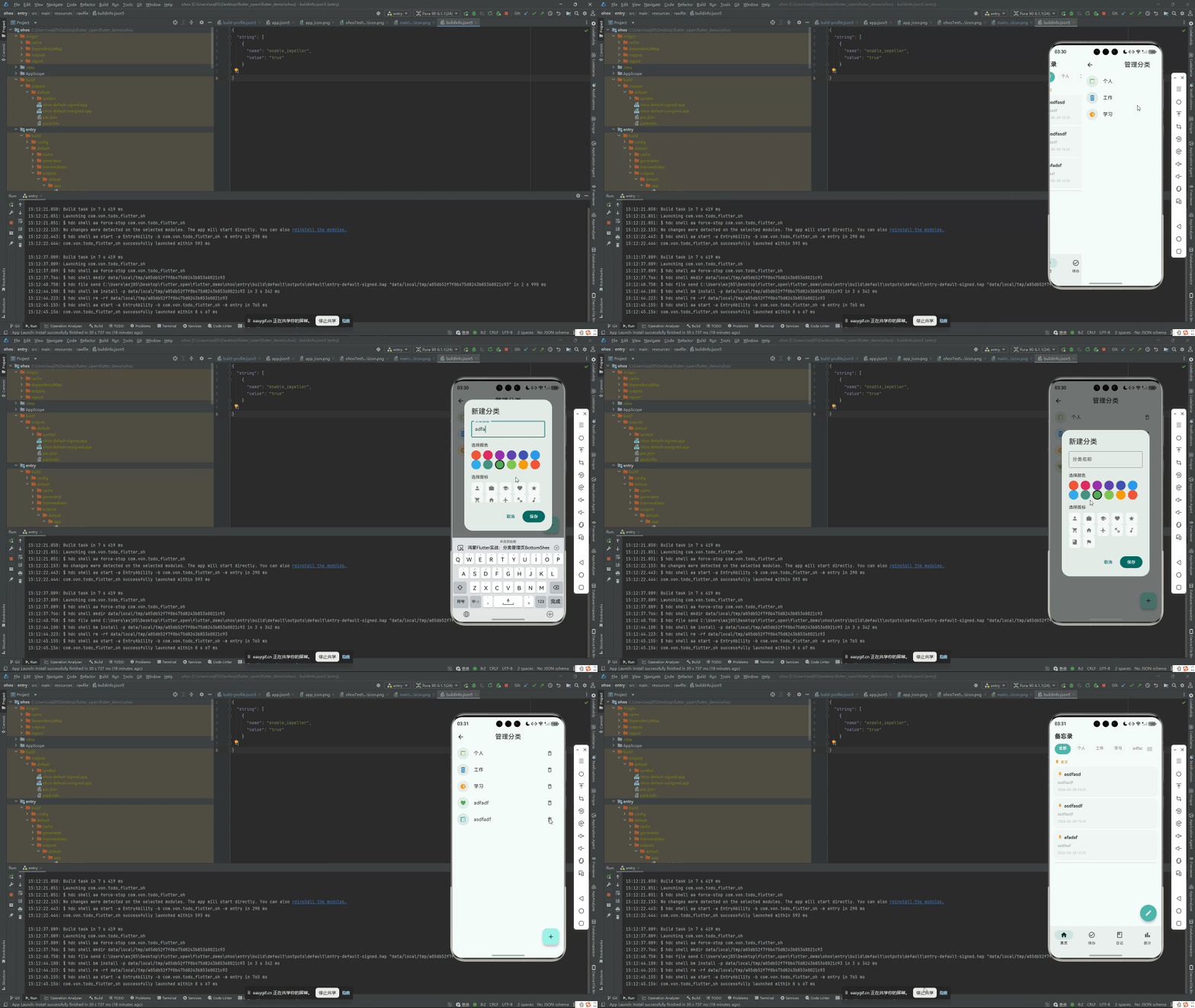
鸿蒙 Flutter 备忘录提供了一个完整的分类管理页面,支持新增(BottomSheet 输入)、编辑(重命名)和删除(确认对话框)。本文拆解分类管理的完整 CRUD 实现,重点放在 BottomSheet 交互和删除时的数据迁移逻辑。
项目仓库:todo_flutter_harmony
分类管理页整体布局
dart
class CategoryPage extends StatelessWidget {
  @override
  Widget build(BuildContext context) {
    return Scaffold(
      appBar: AppBar(
        title: const Text('分类管理'),
      ),
      body: Consumer<CategoryProvider>(
        builder: (context, provider, _) {
          final categories = provider.categories;

          if (categories.isEmpty) {
            return Center(
              child: Column(
                mainAxisSize: MainAxisSize.min,
                children: [
                  Icon(Icons.folder_outlined, size: 64, color: Colors.grey.shade300),
                  const SizedBox(height: 12),
                  Text('暂无分类', style: TextStyle(color: Colors.grey.shade500)),
                  const SizedBox(height: 16),
                  FilledButton.icon(
                    onPressed: () => _showAddCategorySheet(context, provider),
                    icon: const Icon(Icons.add),
                    label: const Text('新建分类'),
                  ),
                ],
              ),
            );
          }

          return ListView.builder(
            itemCount: categories.length,
            itemBuilder: (context, index) {
              return _buildCategoryItem(context, categories[index], provider);
            },
          );
        },
      ),
      floatingActionButton: FloatingActionButton(
        onPressed: () => _showAddCategorySheet(context,
            context.read<CategoryProvider>()),
        child: const Icon(Icons.add),
      ),
    );
  }
新增分类:BottomSheet
新增分类不使用全屏页面导航,而是用 showModalBottomSheet------这是一个从底部弹出的半屏面板,交互更轻量:
dart
void _showAddCategorySheet(BuildContext context, CategoryProvider provider,
    {MemoCategory? existingCategory}) {
  final nameController = TextEditingController(text: existingCategory?.name ?? '');
  final emojiController = TextEditingController(text: existingCategory?.icon ?? '📋');
  final isEditing = existingCategory != null;

  showModalBottomSheet(
    context: context,
    isScrollControlled: true,  // 键盘弹出时 BottomSheet 跟着上移
    shape: const RoundedRectangleBorder(
      borderRadius: BorderRadius.vertical(top: Radius.circular(20)),
    ),
    builder: (ctx) {
      return Padding(
        padding: EdgeInsets.only(
          left: 20,
          right: 20,
          top: 20,
          bottom: MediaQuery.of(ctx).viewInsets.bottom + 20,  // 为键盘留空间
        ),
        child: Column(
          mainAxisSize: MainAxisSize.min,
          crossAxisAlignment: CrossAxisAlignment.stretch,
          children: [
            // 拖拽指示条
            Center(
              child: Container(
                width: 40,
                height: 4,
                decoration: BoxDecoration(
                  color: Colors.grey.shade300,
                  borderRadius: BorderRadius.circular(2),
                ),
              ),
            ),
            const SizedBox(height: 20),
            Text(
              isEditing ? '编辑分类' : '新建分类',
              style: const TextStyle(fontSize: 18, fontWeight: FontWeight.bold),
            ),
            const SizedBox(height: 20),
            // Emoji 输入
            TextField(
              controller: emojiController,
              maxLength: 2,
              decoration: const InputDecoration(
                labelText: '图标 (Emoji)',
                border: OutlineInputBorder(),
                counterText: '',
              ),
            ),
            const SizedBox(height: 16),
            // 分类名称输入
            TextField(
              controller: nameController,
              autofocus: true,
              decoration: InputDecoration(
                labelText: '分类名称',
                border: const OutlineInputBorder(),
                errorText: _validateName(nameController.text),
              ),
            ),
            const SizedBox(height: 20),
            // 确认按钮
            FilledButton(
              onPressed: () {
                final name = nameController.text.trim();
                if (name.isEmpty) return;

                if (isEditing) {
                  provider.updateCategory(
                    existingCategory!.copyWith(name: name, icon: emojiController.text),
                  );
                } else {
                  provider.addCategory(MemoCategory(
                    name: name,
                    icon: emojiController.text.isNotEmpty ? emojiController.text : '📋',
                    sortOrder: provider.categories.length,
                  ));
                }

                Navigator.pop(ctx);
              },
              child: Text(isEditing ? '保存' : '创建'),
            ),
            const SizedBox(height: 8),
          ],
        ),
      );
    },
  );
}
关键细节:
isScrollControlled: true:让 BottomSheet 在键盘弹出时自动上移,输入框不会被键盘遮挡MediaQuery.of(ctx).viewInsets.bottom:底部 padding 动态跟随键盘高度- 拖拽指示条:顶部一个 40×4 的灰色小横条,暗示 BottomSheet 可以下拉关闭
autofocus: true:打开 BottomSheet 后键盘自动弹出,聚焦到名称输入框- 同一组件处理新增和编辑 :通过
isEditing参数区分
编辑分类
编辑复用同一个 BottomSheet,传入 existingCategory 参数即可:
dart
Widget _buildCategoryItem(
    BuildContext context, MemoCategory category, CategoryProvider provider) {
  return ListTile(
    leading: Text(category.icon, style: const TextStyle(fontSize: 24)),
    title: Text(category.name),
    trailing: PopupMenuButton<String>(
      onSelected: (value) {
        switch (value) {
          case 'edit':
            _showAddCategorySheet(context, provider, existingCategory: category);
            break;
          case 'delete':
            _confirmDeleteCategory(context, provider, category);
            break;
        }
      },
      itemBuilder: (ctx) => [
        const PopupMenuItem(value: 'edit', child: Text('编辑')),
        const PopupMenuItem(value: 'delete', child: Text('删除')),
      ],
    ),
  );
}
删除分类 + 数据迁移
删除分类时有一个关键问题:该分类下的备忘录怎么办?粗暴的做法是直接删除关联备忘录,但这对用户来说是数据丢失。更好的做法是:将关联的备忘录迁移到"未分类"(即 categoryId = null)。
dart
void _confirmDeleteCategory(
    BuildContext context, CategoryProvider provider, MemoCategory category) {
  showDialog(
    context: context,
    builder: (ctx) => AlertDialog(
      title: const Text('删除分类'),
      content: Text(
        '确定要删除「${category.name}」分类吗?\n\n该分类下的备忘录将被移至"未分类"。',
      ),
      actions: [
        TextButton(
          onPressed: () => Navigator.pop(ctx),
          child: const Text('取消'),
        ),
        TextButton(
          onPressed: () async {
            await provider.deleteCategory(category.id!);
            if (ctx.mounted) {
              Navigator.pop(ctx);
              ScaffoldMessenger.of(context).showSnackBar(
                SnackBar(content: Text('已删除分类「${category.name}」')),
              );
            }
          },
          style: TextButton.styleFrom(foregroundColor: Colors.red),
          child: const Text('删除'),
        ),
      ],
    ),
  );
}
Provider 中的删除逻辑负责数据迁移:
dart
Future<void> deleteCategory(int id) async {
  // 1. 将该分类下的所有备忘录设为"未分类"
  final db = DatabaseHelper.instance;
  final memos = await db.getAllMemos();
  for (final memo in memos) {
    if (memo.categoryId == id) {
      await db.updateMemo(memo.copyWith(categoryId: null));
    }
  }

  // 2. 删除分类本身
  await db.deleteCategory(id);

  // 3. 如果当前筛选器选中该分类,回退到"全部"
  if (_selectedCategoryId == id) {
    _selectedCategoryId = null;
  }

  // 4. 重新加载
  await loadCategories();
  // 注意:需要通知 MemoProvider 也重新加载
}
重名检测
新增分类时应检测同名:
dart
String? _validateName(String name, CategoryProvider provider,
    {MemoCategory? exclude}) {
  if (name.trim().isEmpty) return '名称不能为空';

  final exists = provider.categories.any((c) =>
    c.name.trim().toLowerCase() == name.trim().toLowerCase() &&
    c.id != exclude?.id  // 编辑时排除自身
  );

  if (exists) return '该分类名称已存在';
  return null;
}
CategoryProvider 完整接口
dart
class CategoryProvider extends ChangeNotifier {
  List<MemoCategory> _categories = [];

  List<MemoCategory> get categories => List.unmodifiable(_categories);

  Future<void> loadCategories() async {
    _categories = await DatabaseHelper.instance.getAllCategories();
    _categories.sort((a, b) => a.sortOrder.compareTo(b.sortOrder));
    notifyListeners();
  }

  Future<void> addCategory(MemoCategory category) async {
    await DatabaseHelper.instance.insertCategory(category);
    await loadCategories();
  }

  Future<void> updateCategory(MemoCategory category) async {
    await DatabaseHelper.instance.updateCategory(category);
    await loadCategories();
  }

  Future<void> deleteCategory(int id) async {
    // 迁移关联备忘录到"未分类"
    final db = DatabaseHelper.instance;
    final memos = await db.getAllMemos();
    for (final memo in memos) {
      if (memo.categoryId == id) {
        await db.updateMemo(memo.copyWith(categoryId: null));
      }
    }
    await db.deleteCategory(id);
    await loadCategories();
  }
}
鸿蒙兼容性
showModalBottomSheet:Material 组件,Flutter 框架层实现MediaQuery.viewInsets:Flutter 框架从引擎获取键盘高度信息------这在鸿蒙上依赖flutter_ohos引擎正确报告键盘状态- 数据迁移逻辑:纯 Dart 代码,与平台无关
如果鸿蒙引擎在键盘高度报告上有不准确的情况,viewInsets.bottom 可能不会是期望的值。这可以通过在 OHOS 端 EntryAbility 中做额外处理来修正。
总结
分类管理的 CRUD 实现关键点:
- 新增/编辑 :
showModalBottomSheet+isScrollControlled,轻量半屏交互 - 删除:确认对话框 + 关联数据迁移到"未分类",防止数据丢失
- 重名检测:大小写不敏感的字符串比较
- BottomSheet 键盘适配 :
viewInsets.bottom动态调整底部间距
完整项目代码见:todo_flutter_harmony