Nginx 介绍
Nginx(读作 "Engine X")是一款高性能的 Web 服务器、反向代理服务器及负载均衡器。由 Igor Sysoev 于 2004 年开发,初衷是解决当时大型网站的高并发连接问题。
Nginx 以 事件驱动架构 和 异步处理 著称,因此在处理大量并发连接时表现非常优秀。
主要功能
1. Web 服务器
- 可以直接提供静态文件(HTML、CSS、JS、图片等)。
- 支持 HTTP、HTTPS 协议。
- 高效处理高并发请求,资源占用低。
2. 反向代理
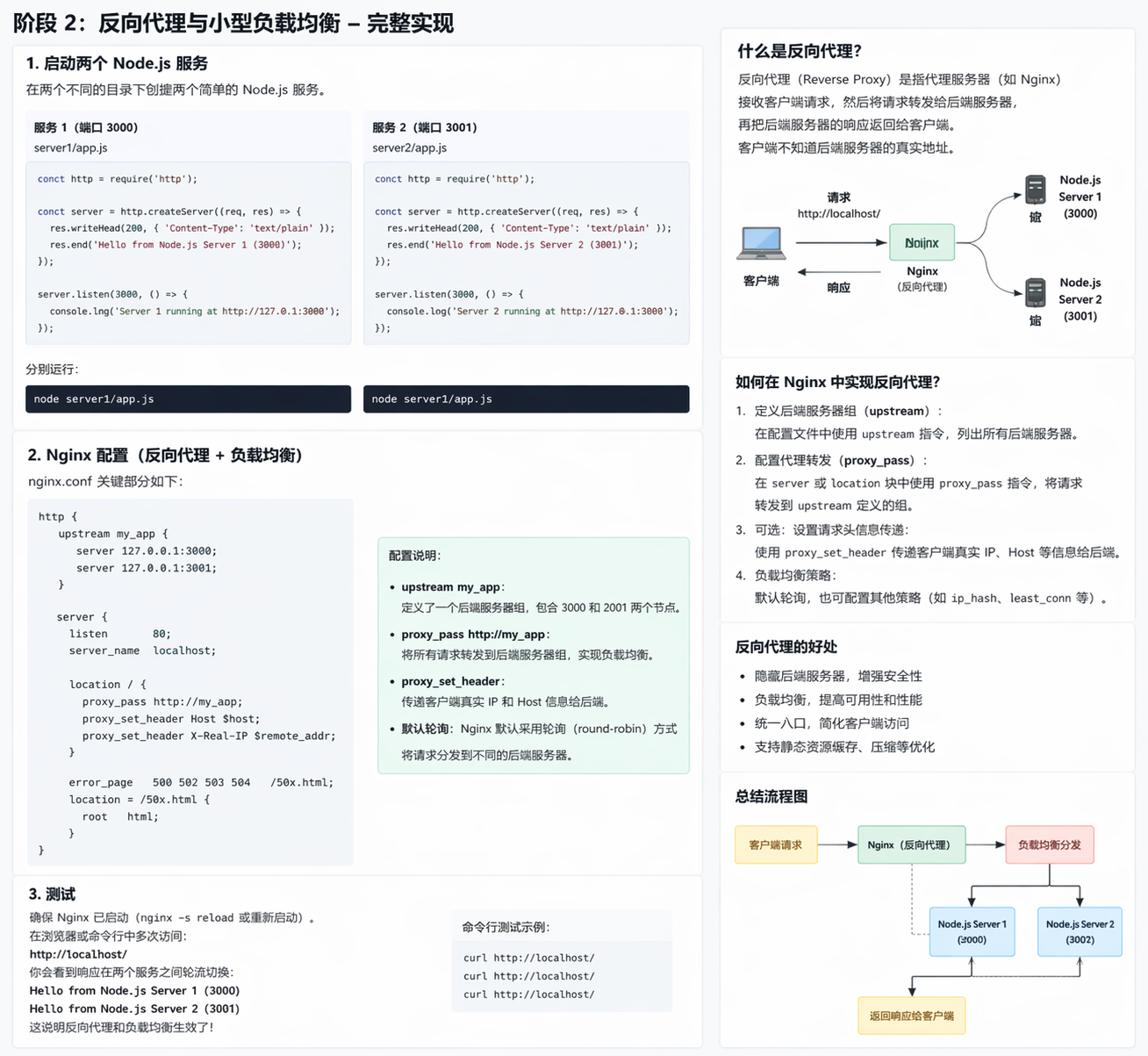
- 客户端请求先到 Nginx,由 Nginx 转发到后端服务器(如 Apache、Tomcat、Node.js)。
- 可以缓存后端内容,减轻后端压力。
- 提供安全隔离和请求过滤功能。
3. 负载均衡
- 将请求分发到多台后端服务器,提高系统可用性和扩展性。
- 支持多种负载均衡策略:
- 轮询(Round Robin)
- 最少连接(Least Connections)
- IP 哈希(IP Hash)
4. 邮件代理
- 支持 IMAP、POP3、SMTP 协议代理。
5. 静态资源缓存
- 可以缓存常访问的内容,提升访问速度。
架构特点
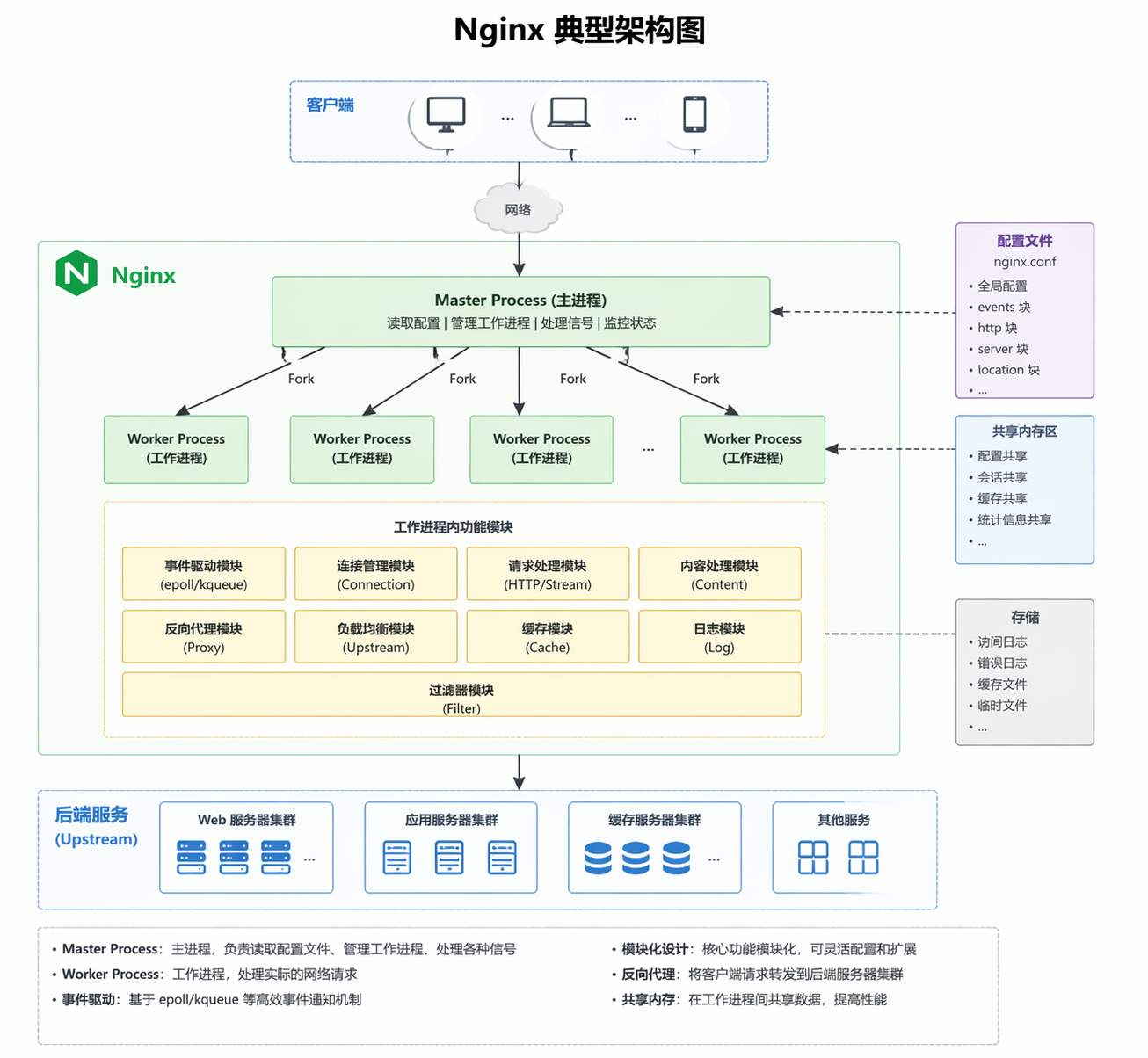
事件驱动(Event-Driven)
- 使用异步非阻塞 I/O 模型。
- 每个工作进程可以同时处理成千上万的并发连接。
模块化设计
- 核心功能轻量,额外功能通过模块扩展(例如 HTTP 模块、Stream 模块、Mail 模块)。
高性能、高稳定性
- 少量进程即可处理大量连接。
- 在大型网站中广泛使用(如 Netflix、WordPress.com)。
典型应用场景
- 静态网站:提供 HTML、图片、CSS 等静态资源。
- 反向代理:隐藏后端服务器,统一入口。
- 负载均衡:提高系统吞吐量和高可用性。
- API 网关:管理和转发 API 请求。
- 内容缓存加速:提高访问速度,降低后端压力。
1. 架构图
2. 直观的反向代理 + 两台后端服务流程图
C:\nginx\conf\nginx.conf
bash
#user  nobody;
worker_processes  1;

#error_log  logs/error.log;
#error_log  logs/error.log  notice;
#error_log  logs/error.log  info;

#pid        logs/nginx.pid;


events {
    worker_connections  1024;
}


http {
    include       mime.types;
    default_type  application/octet-stream;

    #log_format  main  '$remote_addr - $remote_user [$time_local] "$request" '
    #                  '$status $body_bytes_sent "$http_referer" '
    #                  '"$http_user_agent" "$http_x_forwarded_for"';

    #access_log  logs/access.log  main;

    sendfile        on;
    #tcp_nopush     on;

    #keepalive_timeout  0;
    keepalive_timeout  65;

    #gzip  on;

    upstream my_app {
        server 127.0.0.1:3000;
        server 127.0.0.1:3001;
    }

    server {
        listen       80;
        server_name  localhost;

        root         C:/nginx/my_site;
        index        index.html;

        #access_log  logs/host.access.log  main;

        location / {
            # root   html;
            # index  index.html index.htm;
            # try_files $uri $uri/ =404;  # 如果文件不存在,返回 404

            proxy_pass http://my_app;
            proxy_set_header Host $host;
            proxy_set_header X-Real-IP $remote_addr;
        }

        #error_page  404              /404.html;

        # redirect server error pages to the static page /50x.html
        #
        error_page   500 502 503 504  /50x.html;
        location = /50x.html {
            root   html;
        }

        # proxy the PHP scripts to Apache listening on 127.0.0.1:80
        #
        #location ~ \.php$ {
        #    proxy_pass   http://127.0.0.1;
        #}

        # pass the PHP scripts to FastCGI server listening on 127.0.0.1:9000
        #
        #location ~ \.php$ {
        #    root           html;
        #    fastcgi_pass   127.0.0.1:9000;
        #    fastcgi_index  index.php;
        #    fastcgi_param  SCRIPT_FILENAME  /scripts$fastcgi_script_name;
        #    include        fastcgi_params;
        #}

        # deny access to .htaccess files, if Apache's document root
        # concurs with nginx's one
        #
        #location ~ /\.ht {
        #    deny  all;
        #}
    }


    # another virtual host using mix of IP-, name-, and port-based configuration
    #
    #server {
    #    listen       8000;
    #    listen       somename:8080;
    #    server_name  somename  alias  another.alias;

    #    location / {
    #        root   html;
    #        index  index.html index.htm;
    #    }
    #}


    # HTTPS server
    #
    #server {
    #    listen       443 ssl;
    #    server_name  localhost;

    #    ssl_certificate      cert.pem;
    #    ssl_certificate_key  cert.key;

    #    ssl_session_cache    shared:SSL:1m;
    #    ssl_session_timeout  5m;

    #    ssl_ciphers  HIGH:!aNULL:!MD5;
    #    ssl_prefer_server_ciphers  on;

    #    location / {
    #        root   html;
    #        index  index.html index.htm;
    #    }
    #}

}
创建2个js
bash
const http = require('http');

const PORT = 3000;

http.createServer((req, res) => {
    res.writeHead(200, {'Content-Type': 'text/plain'});
    res.end('Hello from Node.js app1 on port 3000\n');
}).listen(PORT, () => console.log(`App1 listening on ${PORT}`));
bash
const http = require('http');

const PORT = 3001;

http.createServer((req, res) => {
    res.writeHead(200, {'Content-Type': 'text/plain'});
    res.end('Hello from Node.js app2 on port 3001\n');
}).listen(PORT, () => console.log(`App2 listening on ${PORT}`));
打开2个终端,分别运行
node app1.js
App1 listening on 3000
node app2.js
App2 listening on 3001
启动一个简单 Node.js 服务 node app.js 在 3000 端口
通过 Nginx 访问 http://localhost,确认能看到 Node.js 输出。
刷新网页交替输出:
bash
Hello from Node.js app2 on port 3001
bash
Hello from Node.js app1 on port 3000