目录
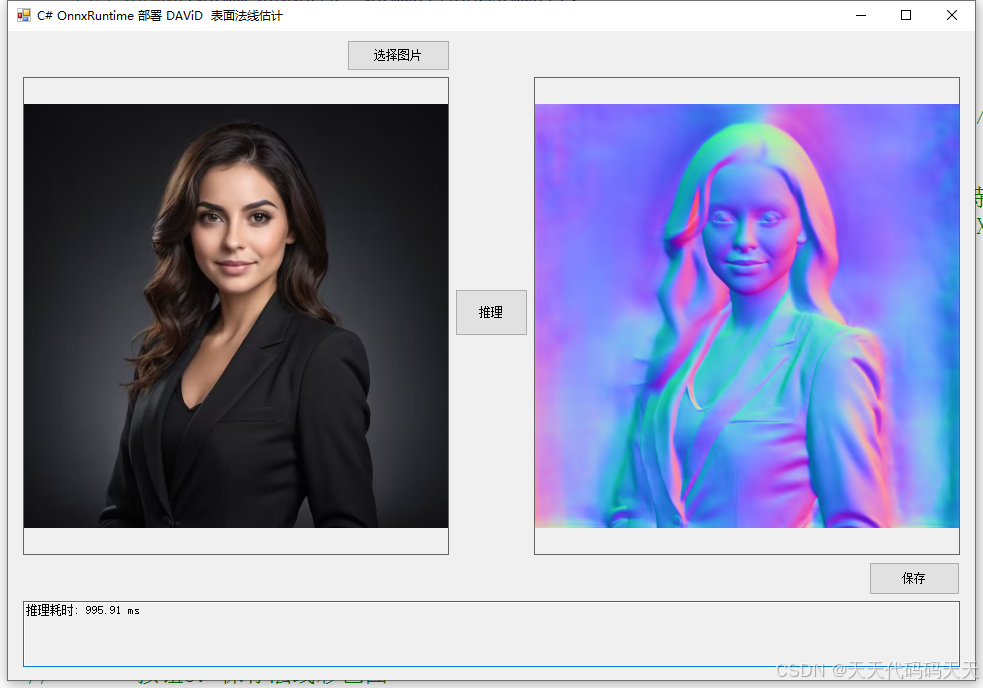
效果
模型信息
Model Properties
metadata:{}
Inputs
name:input
tensor:Float-1, 3, 512, 512
Outputs
name:output
tensor:Float-1, 3, 512, 512
项目
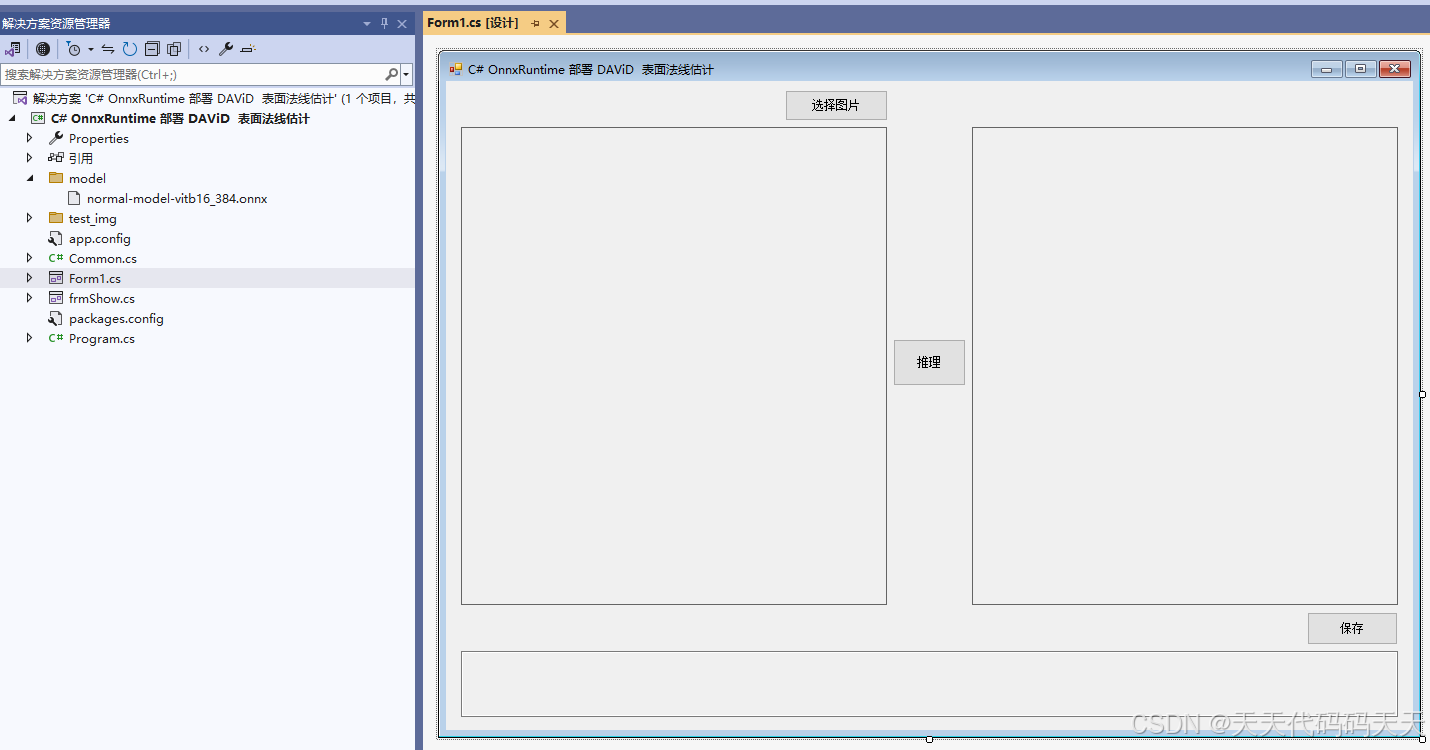
代码
using Microsoft.ML.OnnxRuntime;
using Microsoft.ML.OnnxRuntime.Tensors;
using OpenCvSharp;
using System;
using System.Collections.Generic;
using System.Drawing;
using System.Drawing.Imaging;
using System.Linq;
using System.Windows.Forms;
namespace Onnx_Demo
{
public partial class Form1 : Form
{
// ----- 法线估计专用字段 -----
string fileFilter = "*.*|*.bmp;*.jpg;*.jpeg;*.tiff;*.png";
string image_path = "";
string startupPath;
DateTime dt1 = DateTime.Now;
DateTime dt2 = DateTime.Now;
string model_path;
Mat image; // 原始图像(BGR)
Mat normal_color_map; // 生成的法线彩色图
SessionOptions options;
InferenceSession onnx_session;
Tensor<float> input_tensor;
List<NamedOnnxValue> input_container;
IDisposableReadOnlyCollection<DisposableNamedOnnxValue> result_infer;
int inpHeight = 512, inpWidth = 512;
public Form1()
{
InitializeComponent();
}
// ----- 按钮1:选择图片 -----
private void button1_Click(object sender, EventArgs e)
{
OpenFileDialog ofd = new OpenFileDialog();
ofd.Filter = fileFilter;
if (ofd.ShowDialog() != DialogResult.OK) return;
pictureBox1.Image = null;
image_path = ofd.FileName;
pictureBox1.Image = new Bitmap(image_path);
textBox1.Text = "";
image = new Mat(image_path);
pictureBox2.Image = null;
normal_color_map = null;
}
// ----- 按钮2:执行法线估计推理 -----
private void button2_Click(object sender, EventArgs e)
{
if (string.IsNullOrEmpty(image_path))
{
MessageBox.Show("请先选择图片!");
return;
}
button2.Enabled = false;
pictureBox2.Image = null;
textBox1.Text = "";
Application.DoEvents();
// 读取原始图像(BGR)
image = new Mat(image_path);
int originalWidth = image.Cols;
int originalHeight = image.Rows;
// ------------------ 预处理 ------------------
// 1. 缩放至模型输入尺寸 512x512
Mat resized = new Mat();
Cv2.Resize(image, resized, new OpenCvSharp.Size(inpWidth, inpHeight));
// 2. 转换为浮点型并归一化到 0,1
resized.ConvertTo(resized, MatType.CV_32FC3, 1.0 / 255.0);
// 3. 分离 BGR 通道,并按 RGB 顺序填充(模型预期 RGB)
Mat\[\] channels = Cv2.Split(resized); // channels0=B, 1=G, 2=R
int channelSize = inpHeight * inpWidth;
float\[\] inputData = new float3 \* channelSize;
// 将 B,G,R 重新排列为 R,G,B
for (int c = 0; c < 3; c++)
{
float\[\] channelData = new floatchannelSize;
System.Runtime.InteropServices.Marshal.Copy(channelsc.Data, channelData, 0, channelSize);
int targetIndex = (c == 0) ? 2 : (c == 2) ? 0 : 1; // B->2, G->1, R->0
Array.Copy(channelData, 0, inputData, targetIndex * channelSize, channelSize);
}
// 4. 创建输入张量
input_tensor = new DenseTensor<float>(inputData, new\[\] { 1, 3, inpHeight, inpWidth });
input_container.Clear();
input_container.Add(NamedOnnxValue.CreateFromTensor("input", input_tensor));
// ------------------ 推理 ------------------
dt1 = DateTime.Now;
result_infer = onnx_session.Run(input_container);
dt2 = DateTime.Now;
// 获取输出
var output = result_infer.First(x => x.Name == "output").AsTensor<float>();
var dimensions = output.Dimensions.ToArray();
int outChannels = dimensions1; // 应为 3
int outH = dimensions2;
int outW = dimensions3;
float\[\] normalFloat = output.ToArray();
// 创建三通道法线 Mat (CV_32FC3),形状 H×W×3
Mat normalRaw = new Mat(outH, outW, MatType.CV_32FC3);
// 注意:输出张量布局为 N,C,H,W,需要转换为 H,W,C 存储
int planeSize = outH * outW;
for (int c = 0; c < outChannels; c++)
{
float\[\] channelData = new floatplaneSize;
Array.Copy(normalFloat, c * planeSize, channelData, 0, planeSize);
// 将每个通道的数据填充到 Mat 的对应通道
Mat channelMat = new Mat(outH, outW, MatType.CV_32FC1);
System.Runtime.InteropServices.Marshal.Copy(channelData, 0, channelMat.Data, planeSize);
// 将单通道合并到 normalRaw
Mat\[\] destChannels = Cv2.Split(normalRaw);
channelMat.CopyTo(destChannelsc);
Cv2.Merge(destChannels, normalRaw);
}
// ------------------ 后处理 ------------------
// 1. 双线性插值恢复原始尺寸
Mat normalResized = new Mat();
Cv2.Resize(normalRaw, normalResized, new OpenCvSharp.Size(originalWidth, originalHeight), interpolation: InterpolationFlags.Linear);
// 2. 归一化法线向量(确保每个像素的向量长度为1,防止模型输出未严格归一化)
Mat\[\] normChannels = Cv2.Split(normalResized);
Mat normSq = new Mat();
Cv2.Pow(normChannels0, 2, normSq);
Mat tmp = new Mat();
Cv2.Pow(normChannels1, 2, tmp);
Cv2.Add(normSq, tmp, normSq);
Cv2.Pow(normChannels2, 2, tmp);
Cv2.Add(normSq, tmp, normSq);
Mat norm = new Mat();
Cv2.Sqrt(normSq, norm);
norm += 1e-8; // 避免除零
for (int i = 0; i < 3; i++)
{
Cv2.Divide(normChannelsi, norm, normChannelsi);
}
Mat normalizedNormal = new Mat();
Cv2.Merge(normChannels, normalizedNormal);
// 3. 将法线从 -1,1 映射到 0,255 并转为 8UC3 用于显示
Mat normalDisplay = new Mat();
normalizedNormal.ConvertTo(normalDisplay, MatType.CV_32FC3, 127.5, 127.5); // 0.5*255 = 127.5, 映射后值域0,255
normalDisplay.ConvertTo(normalDisplay, MatType.CV_8UC3);
// 注意:OpenCV 默认 BGR 顺序,而法线 RGB 直接显示可能会颜色偏差,若需要保持 RGB 可交换 R 和 B
// 这里为了视觉效果,交换 R 和 B 通道使显示更自然(法线常见可视化中 R 对应 X,G 对应 Y,B 对应 Z)
Mat\[\] displayChannels = Cv2.Split(normalDisplay);
// 交换 R 和 B
Mat temp = displayChannels0.Clone();
displayChannels0 = displayChannels2;
displayChannels2 = temp;
Cv2.Merge(displayChannels, normalDisplay);
normal_color_map = normalDisplay.Clone();
// 显示结果
pictureBox2.Image = new Bitmap(normal_color_map.ToMemoryStream());
textBox1.Text = $"推理耗时: {(dt2 - dt1).TotalMilliseconds:F2} ms";
button2.Enabled = true;
}
// ----- 按钮3:保存法线彩色图 -----
private void button3_Click(object sender, EventArgs e)
{
if (normal_color_map == null || normal_color_map.Empty())
{
MessageBox.Show("请先执行法线估计!");
return;
}
SaveFileDialog sdf = new SaveFileDialog();
sdf.Title = "保存法线彩色图";
sdf.Filter = "PNG图片 (*.png)|*.png|JPEG图片 (*.jpg)|*.jpg|BMP图片 (*.bmp)|*.bmp";
sdf.FilterIndex = 1;
if (sdf.ShowDialog() == DialogResult.OK)
{
Cv2.ImWrite(sdf.FileName, normal_color_map);
MessageBox.Show($"保存成功: {sdf.FileName}");
}
}
// ----- 窗体加载:初始化 ONNX 模型 -----
private void Form1_Load(object sender, EventArgs e)
{
startupPath = Application.StartupPath;
// 法线估计模型路径(请根据实际位置修改)
model_path = System.IO.Path.Combine(startupPath, "model", "normal-model-vitb16_384.onnx");
if (!System.IO.File.Exists(model_path))
{
MessageBox.Show($"模型文件不存在: {model_path}\n请将模型放置于 {startupPath}\\model\\ 目录下");
return;
}
options = new SessionOptions();
options.LogSeverityLevel = OrtLoggingLevel.ORT_LOGGING_LEVEL_INFO;
options.AppendExecutionProvider_CPU(0);
// 若需 CUDA,可取消注释
// options.AppendExecutionProvider_CUDA(0);
onnx_session = new InferenceSession(model_path, options);
input_container = new List<NamedOnnxValue>();
// 可选默认测试图片
string testImg = System.IO.Path.Combine(startupPath, "test_img", "0.jpg");
if (System.IO.File.Exists(testImg))
{
image_path = testImg;
pictureBox1.Image = new Bitmap(image_path);
image = new Mat(image_path);
}
}
// ----- 双击图片放大(保留原功能,假设存在 Common 类)-----
private void pictureBox1_DoubleClick(object sender, EventArgs e)
{
Common.ShowNormalImg(pictureBox1.Image);
}
private void pictureBox2_DoubleClick(object sender, EventArgs e)
{
Common.ShowNormalImg(pictureBox2.Image);
}
}
}
using Microsoft.ML.OnnxRuntime;
using Microsoft.ML.OnnxRuntime.Tensors;
using OpenCvSharp;
using System;
using System.Collections.Generic;
using System.Drawing;
using System.Drawing.Imaging;
using System.Linq;
using System.Windows.Forms;

namespace Onnx_Demo
{
    public partial class Form1 : Form
    {
        // ----- 法线估计专用字段 -----
        string fileFilter = "*.*|*.bmp;*.jpg;*.jpeg;*.tiff;*.png";
        string image_path = "";
        string startupPath;
        DateTime dt1 = DateTime.Now;
        DateTime dt2 = DateTime.Now;
        string model_path;
        Mat image;                       // 原始图像(BGR)
        Mat normal_color_map;            // 生成的法线彩色图
        SessionOptions options;
        InferenceSession onnx_session;
        Tensor<float> input_tensor;
        List<NamedOnnxValue> input_container;
        IDisposableReadOnlyCollection<DisposableNamedOnnxValue> result_infer;
        int inpHeight = 512, inpWidth = 512;

        public Form1()
        {
            InitializeComponent();
        }

        // ----- 按钮1:选择图片 -----
        private void button1_Click(object sender, EventArgs e)
        {
            OpenFileDialog ofd = new OpenFileDialog();
            ofd.Filter = fileFilter;
            if (ofd.ShowDialog() != DialogResult.OK) return;
            pictureBox1.Image = null;
            image_path = ofd.FileName;
            pictureBox1.Image = new Bitmap(image_path);
            textBox1.Text = "";
            image = new Mat(image_path);
            pictureBox2.Image = null;
            normal_color_map = null;
        }

        // ----- 按钮2:执行法线估计推理 -----
        private void button2_Click(object sender, EventArgs e)
        {
            if (string.IsNullOrEmpty(image_path))
            {
                MessageBox.Show("请先选择图片!");
                return;
            }

            button2.Enabled = false;
            pictureBox2.Image = null;
            textBox1.Text = "";
            Application.DoEvents();

            // 读取原始图像(BGR)
            image = new Mat(image_path);
            int originalWidth = image.Cols;
            int originalHeight = image.Rows;

            // ------------------ 预处理 ------------------
            // 1. 缩放至模型输入尺寸 512x512
            Mat resized = new Mat();
            Cv2.Resize(image, resized, new OpenCvSharp.Size(inpWidth, inpHeight));

            // 2. 转换为浮点型并归一化到 [0,1]
            resized.ConvertTo(resized, MatType.CV_32FC3, 1.0 / 255.0);

            // 3. 分离 BGR 通道,并按 RGB 顺序填充(模型预期 RGB)
            Mat[] channels = Cv2.Split(resized);   // channels[0]=B, [1]=G, [2]=R
            int channelSize = inpHeight * inpWidth;
            float[] inputData = new float[3 * channelSize];

            // 将 B,G,R 重新排列为 R,G,B
            for (int c = 0; c < 3; c++)
            {
                float[] channelData = new float[channelSize];
                System.Runtime.InteropServices.Marshal.Copy(channels[c].Data, channelData, 0, channelSize);
                int targetIndex = (c == 0) ? 2 : (c == 2) ? 0 : 1; // B->2, G->1, R->0
                Array.Copy(channelData, 0, inputData, targetIndex * channelSize, channelSize);
            }

            // 4. 创建输入张量
            input_tensor = new DenseTensor<float>(inputData, new[] { 1, 3, inpHeight, inpWidth });
            input_container.Clear();
            input_container.Add(NamedOnnxValue.CreateFromTensor("input", input_tensor));

            // ------------------ 推理 ------------------
            dt1 = DateTime.Now;
            result_infer = onnx_session.Run(input_container);
            dt2 = DateTime.Now;

            // 获取输出
            var output = result_infer.First(x => x.Name == "output").AsTensor<float>();
            var dimensions = output.Dimensions.ToArray();
            int outChannels = dimensions[1];          // 应为 3
            int outH = dimensions[2];
            int outW = dimensions[3];
            float[] normalFloat = output.ToArray();

            // 创建三通道法线 Mat (CV_32FC3),形状 H×W×3
            Mat normalRaw = new Mat(outH, outW, MatType.CV_32FC3);
            // 注意:输出张量布局为 [N,C,H,W],需要转换为 H,W,C 存储
            int planeSize = outH * outW;
            for (int c = 0; c < outChannels; c++)
            {
                float[] channelData = new float[planeSize];
                Array.Copy(normalFloat, c * planeSize, channelData, 0, planeSize);
                // 将每个通道的数据填充到 Mat 的对应通道
                Mat channelMat = new Mat(outH, outW, MatType.CV_32FC1);
                System.Runtime.InteropServices.Marshal.Copy(channelData, 0, channelMat.Data, planeSize);
                // 将单通道合并到 normalRaw
                Mat[] destChannels = Cv2.Split(normalRaw);
                channelMat.CopyTo(destChannels[c]);
                Cv2.Merge(destChannels, normalRaw);
            }

            // ------------------ 后处理 ------------------
            // 1. 双线性插值恢复原始尺寸
            Mat normalResized = new Mat();
            Cv2.Resize(normalRaw, normalResized, new OpenCvSharp.Size(originalWidth, originalHeight), interpolation: InterpolationFlags.Linear);

            // 2. 归一化法线向量(确保每个像素的向量长度为1,防止模型输出未严格归一化)
            Mat[] normChannels = Cv2.Split(normalResized);
            Mat normSq = new Mat();
            Cv2.Pow(normChannels[0], 2, normSq);
            Mat tmp = new Mat();
            Cv2.Pow(normChannels[1], 2, tmp);
            Cv2.Add(normSq, tmp, normSq);
            Cv2.Pow(normChannels[2], 2, tmp);
            Cv2.Add(normSq, tmp, normSq);
            Mat norm = new Mat();
            Cv2.Sqrt(normSq, norm);
            norm += 1e-8;   // 避免除零
            for (int i = 0; i < 3; i++)
            {
                Cv2.Divide(normChannels[i], norm, normChannels[i]);
            }
            Mat normalizedNormal = new Mat();
            Cv2.Merge(normChannels, normalizedNormal);

            // 3. 将法线从 [-1,1] 映射到 [0,255] 并转为 8UC3 用于显示
            Mat normalDisplay = new Mat();
            normalizedNormal.ConvertTo(normalDisplay, MatType.CV_32FC3, 127.5, 127.5); // 0.5*255 = 127.5, 映射后值域[0,255]
            normalDisplay.ConvertTo(normalDisplay, MatType.CV_8UC3);

            // 注意:OpenCV 默认 BGR 顺序,而法线 RGB 直接显示可能会颜色偏差,若需要保持 RGB 可交换 R 和 B
            // 这里为了视觉效果,交换 R 和 B 通道使显示更自然(法线常见可视化中 R 对应 X,G 对应 Y,B 对应 Z)
            Mat[] displayChannels = Cv2.Split(normalDisplay);
            // 交换 R 和 B
            Mat temp = displayChannels[0].Clone();
            displayChannels[0] = displayChannels[2];
            displayChannels[2] = temp;
            Cv2.Merge(displayChannels, normalDisplay);

            normal_color_map = normalDisplay.Clone();

            // 显示结果
            pictureBox2.Image = new Bitmap(normal_color_map.ToMemoryStream());
            textBox1.Text = $"推理耗时: {(dt2 - dt1).TotalMilliseconds:F2} ms";
            button2.Enabled = true;
        }

        // ----- 按钮3:保存法线彩色图 -----
        private void button3_Click(object sender, EventArgs e)
        {
            if (normal_color_map == null || normal_color_map.Empty())
            {
                MessageBox.Show("请先执行法线估计!");
                return;
            }

            SaveFileDialog sdf = new SaveFileDialog();
            sdf.Title = "保存法线彩色图";
            sdf.Filter = "PNG图片 (*.png)|*.png|JPEG图片 (*.jpg)|*.jpg|BMP图片 (*.bmp)|*.bmp";
            sdf.FilterIndex = 1;
            if (sdf.ShowDialog() == DialogResult.OK)
            {
                Cv2.ImWrite(sdf.FileName, normal_color_map);
                MessageBox.Show($"保存成功: {sdf.FileName}");
            }
        }

        // ----- 窗体加载:初始化 ONNX 模型 -----
        private void Form1_Load(object sender, EventArgs e)
        {
            startupPath = Application.StartupPath;
            // 法线估计模型路径(请根据实际位置修改)
            model_path = System.IO.Path.Combine(startupPath, "model", "normal-model-vitb16_384.onnx");
            if (!System.IO.File.Exists(model_path))
            {
                MessageBox.Show($"模型文件不存在: {model_path}\n请将模型放置于 {startupPath}\\model\\ 目录下");
                return;
            }

            options = new SessionOptions();
            options.LogSeverityLevel = OrtLoggingLevel.ORT_LOGGING_LEVEL_INFO;
            options.AppendExecutionProvider_CPU(0);
            // 若需 CUDA,可取消注释
            // options.AppendExecutionProvider_CUDA(0);

            onnx_session = new InferenceSession(model_path, options);
            input_container = new List<NamedOnnxValue>();

            // 可选默认测试图片
            string testImg = System.IO.Path.Combine(startupPath, "test_img", "0.jpg");
            if (System.IO.File.Exists(testImg))
            {
                image_path = testImg;
                pictureBox1.Image = new Bitmap(image_path);
                image = new Mat(image_path);
            }
        }

        // ----- 双击图片放大(保留原功能,假设存在 Common 类)-----
        private void pictureBox1_DoubleClick(object sender, EventArgs e)
        {
            Common.ShowNormalImg(pictureBox1.Image);
        }

        private void pictureBox2_DoubleClick(object sender, EventArgs e)
        {
            Common.ShowNormalImg(pictureBox2.Image);
        }
    }
}