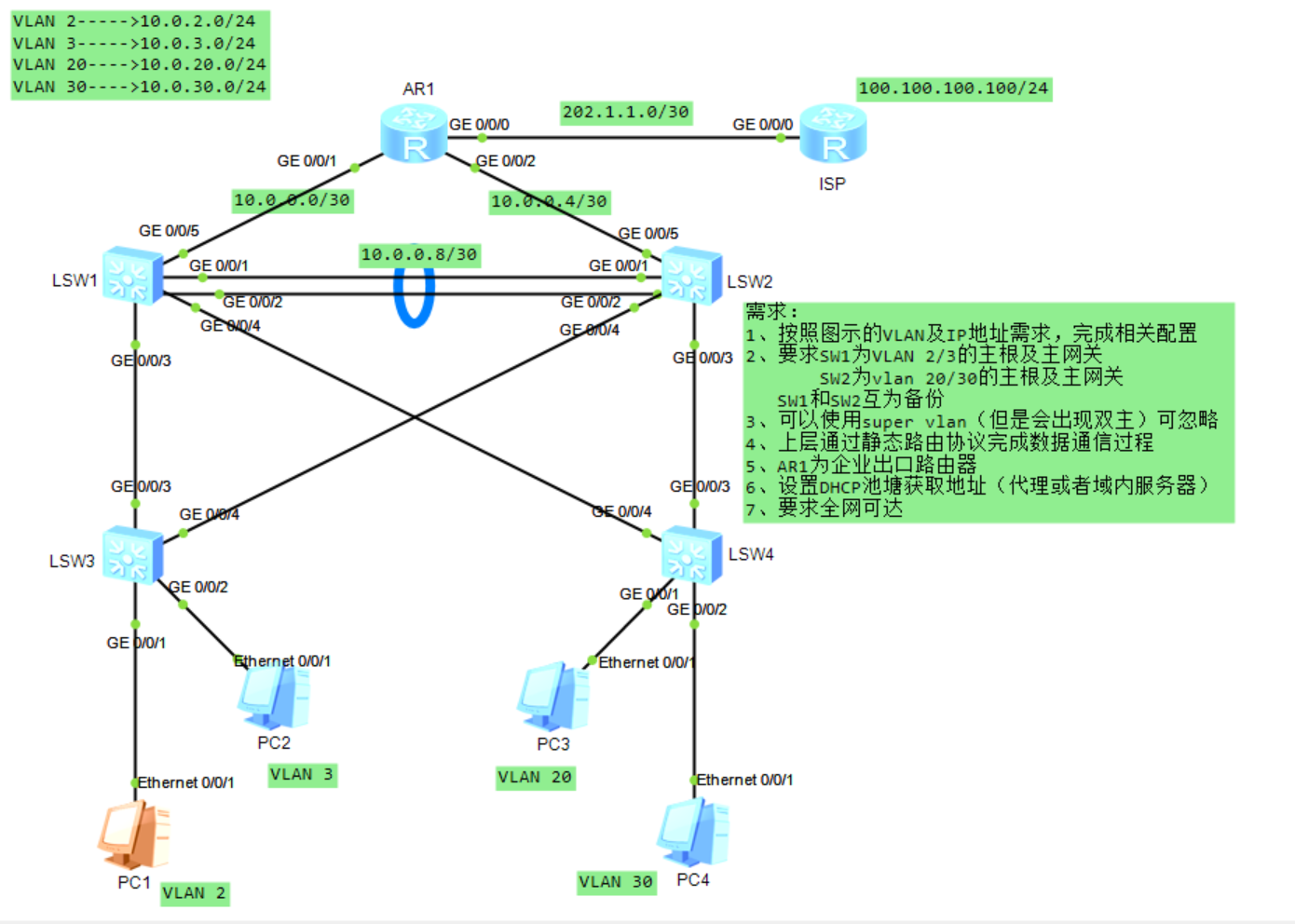
1.按照图示的VLAN及IP地址 需求,完成相关配需
2、要求SW1为VLAN 2/3的主根及主网关,SW2为vlan 20/30的主根及主网关,SW1和SW2互为备份
3.上层通过静态路由协议 完成数据通信过程
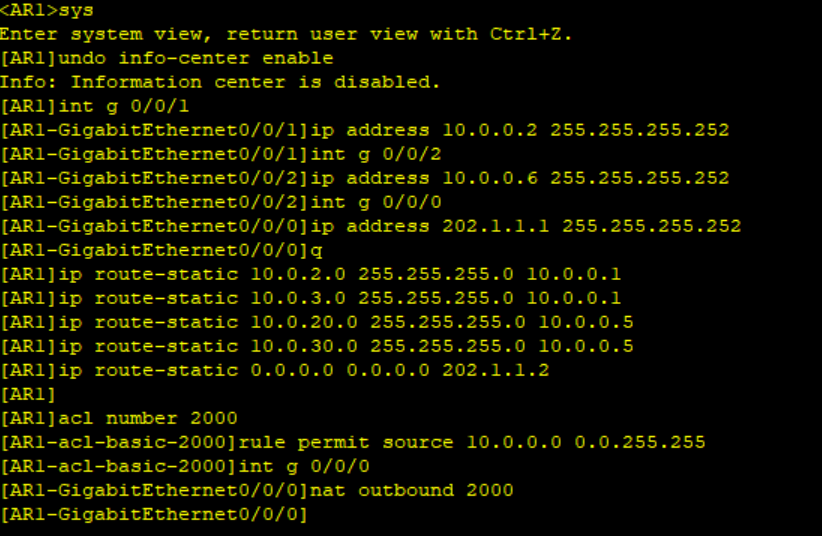
4.AR1为企业出口路由器
5.要求全网可达
忽略图中的条件三
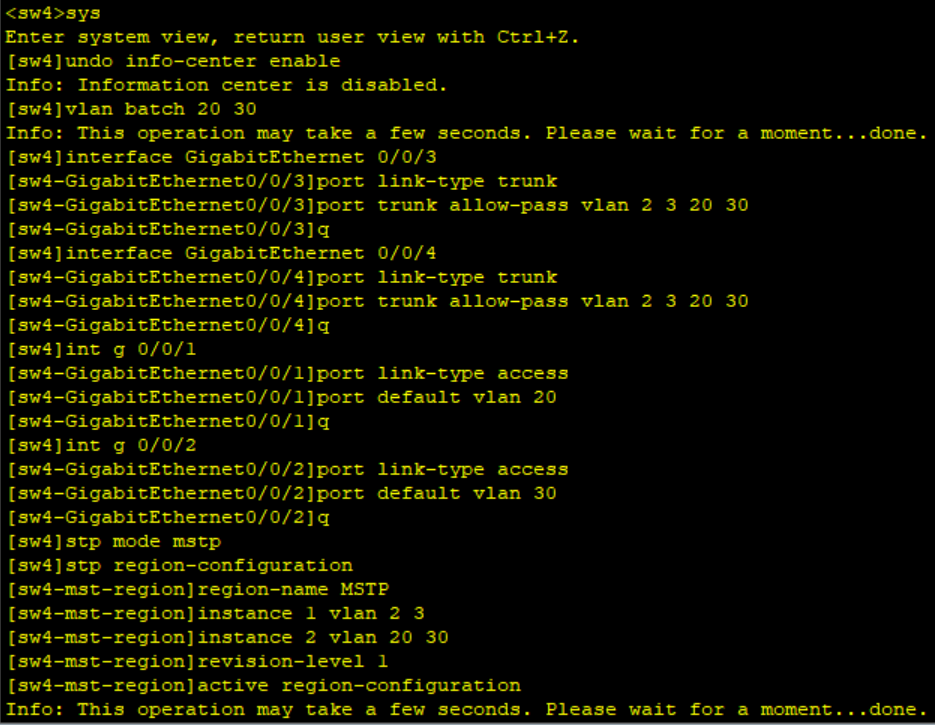
需求一:vlan划分
在拓扑图里将四个pc分为了四个vlan,可以直接将lsw3下的两个接口作为access接口通行vlan2和vlan3,lsw4下的vlan20和vlan30同理
由于要求在最后是全网可通,所以不需要特地去更改其余接口的vlan放行,均设计为trunk接口并放行vlan2 3 20 30即可
需求二:生成树
MSTP协议的使用,因为整个拓扑中以sw1和sw2为首存在两个树,而能够存在两个树的只能是MSTP而非RSTP和STP,主动调整各个交换机的优先级使其成为主根
并且主动加入缺省路由将其他不同vlan交由路由器处理
在此时还可以将两个主根之间的两条链路聚合
需求三:VRRP
这个涉及到了VRRP内容,也就是VRRP协议,需要我们主动设计每条vlan所在主网关的权限,只需要注意vlan2和3在lsw1,vlan20和30在lsw2然后设计虚拟网关
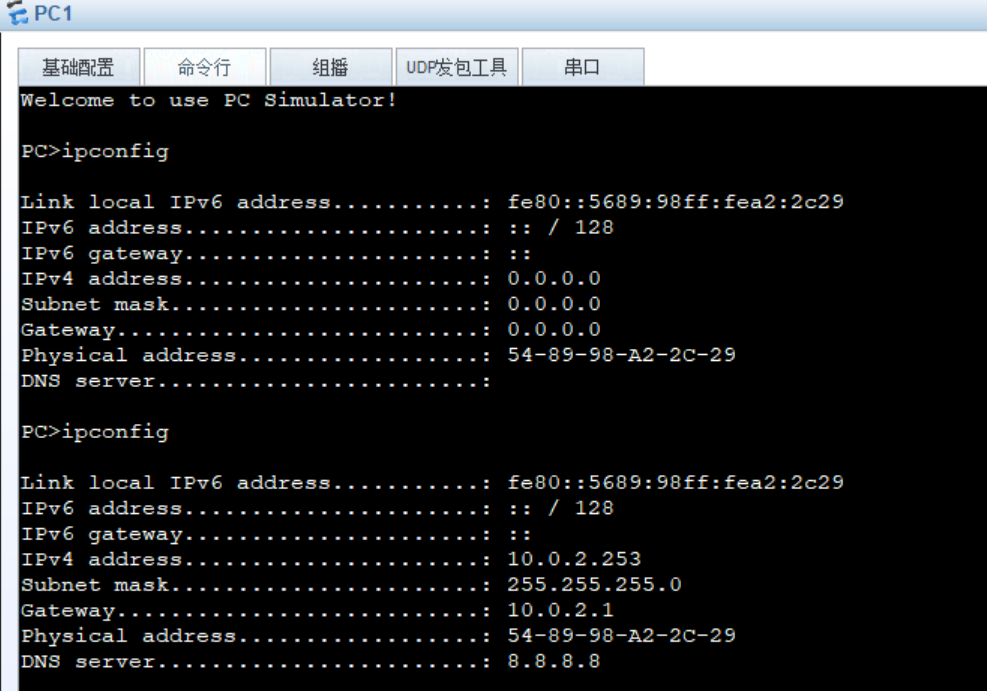
需求四:DHCP
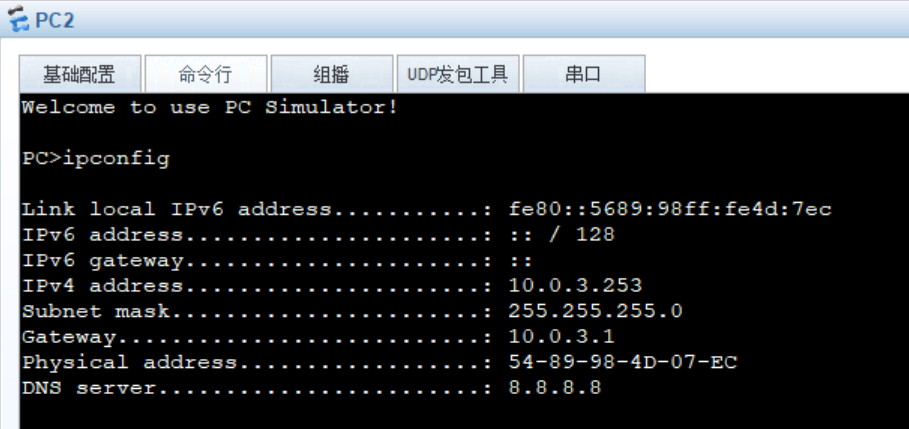
以sw1和sw2为中心启用DHCP协议分发ip,因为两个树各个主根分别为不同vlan的网关,我们可以以此建立ip地址池。(为了防止其中某个交换机的中途损坏,我们可以在备用主根里同样设计该vlan的地址池,在此实验未显示)
需求五:路由
在因为两个主根为网关且因为交换机只有二层交换技术,对于交换机到路由器AR1我们需要再添加新的vlan用于交换机和路由器的网络连接
需求六:ACL/NAT
为了将园区网的私网内容发送到公网,我们需要主动设计NAT和与之配套的ACL,只需要简单的再AR1的公网接口加入允许所有私网ip通行的命令(permit)
总结需求
| 设备 | 接口/网段 | IP地址 | 角色/功能 |
|---|---|---|---|
| LSW1(核心交换机) | Vlanif2、Vlanif3、Vlanif20、Vlanif30 | 10.0.2.1/24、10.0.3.1/24、10.0.20.1/24、10.0.30.1/24 | VLAN2/3主根+主网关;VLAN20/30备根+备网关;DHCP服务器 |
| LSW1 | Vlanif100(与AR1互联) | 10.0.0.1/30 | 三层互联接口 |
| LSW1 | Vlanif4000(与LSW2互联) | 10.0.0.9/30 | 核心交换机三层互联 |
| LSW2(核心交换机) | Vlanif2、Vlanif3、Vlanif20、Vlanif30 | 10.0.2.2/24、10.0.3.2/24、10.0.20.2/24、10.0.30.2/24 | VLAN20/30主根+主网关;VLAN2/3备根+备网关;DHCP服务器 |
| LSW2 | Vlanif200(与AR1互联) | 10.0.0.5/30 | 三层互联接口 |
| LSW2 | Vlanif4000(与LSW1互联) | 10.0.0.10/30 | 核心交换机三层互联 |
| LSW3(接入交换机) | E0/0/1、E0/0/2 | 无(二层设备) | 下联PC,上联核心交换机Trunk链路 |
命令实现
LSW1
<sw1>sys
Enter system view, return user view with Ctrl+Z.
sw1
Apr 19 2026 15:54:14-08:00 sw1 %%01PHY/1/PHY(l)0: GigabitEthernet0/0/5: cha
nge status to up
sw1undo info-center enable
Info: Information center is disabled.
sw1vlan batch 2 3 20 30 100 4000
Info: This operation may take a few seconds. Please wait for a moment...done.
sw1interface GigabitEthernet 0/0/5
sw1-GigabitEthernet0/0/5port link-type access
sw1-GigabitEthernet0/0/5port default vlan 100
sw1-GigabitEthernet0/0/5q
sw1interface Vlanif 100
sw1-Vlanif100ip address 10.0.0.1 255.255.255.252
sw1-Vlanif100q
sw1interface GigabitEthernet 0/0/3
sw1-GigabitEthernet0/0/3port link-type trunk
sw1-GigabitEthernet0/0/3port trunk allow-pass vlan 2 3 20 30
sw1-GigabitEthernet0/0/3q
sw1interface GigabitEthernet 0/0/4
sw1-GigabitEthernet0/0/4port link-type trunk
sw1-GigabitEthernet0/0/4port trunk allow-pass vlan 2 3 20 30
sw1-GigabitEthernet0/0/4q
sw1interface GigabitEthernet 0/0/1
sw1-GigabitEthernet0/0/1port link-type trunk
sw1-GigabitEthernet0/0/1port trunk allow-pass vlan 2 3 20 30 4000
sw1-GigabitEthernet0/0/1q
sw1interface GigabitEthernet 0/0/2
sw1-GigabitEthernet0/0/2port link-type trunk
sw1-GigabitEthernet0/0/2port trunk allow-pass vlan 2 3 20 30 4000
sw1-GigabitEthernet0/0/2q
sw1interface Vlanif 4000
sw1-Vlanif4000description LSW1-LSW2
sw1-Vlanif4000ip address 10.0.0.9 255.255.255.252
sw1-Vlanif4000q
sw1dhcp enable
Info: The operation may take a few seconds. Please wait for a moment.done.
sw1interface Vlanif 2
sw1-Vlanif2ip address 10.0.2.1 255.255.255.0
sw1-Vlanif2vrrp vrid 2 virtual-ip 10.0.2.254
sw1-Vlanif2vrrp vrid 2 priority 120
sw1-Vlanif2vrrp vrid 2 preempt-mode timer delay 10
sw1-Vlanif2dhcp select interface
sw1-Vlanif2dhcp server dns-list 8.8.8.8
sw1-Vlanif2q
sw1interface Vlanif 3
sw1-Vlanif3ip address 10.0.3.1 255.255.255.0
sw1-Vlanif3vrrp vrid 3 virtual-ip 10.0.3.254
sw1-Vlanif3vrrp vrid 3 priority 120
sw1-Vlanif3vrrp vrid 3 preempt-mode timer delay 10
sw1-Vlanif3dhcp select interface
sw1-Vlanif3dhcp server dns-list 8.8.8.8
sw1-Vlanif3q
sw1interface Vlanif 20
sw1-Vlanif20ip address 10.0.20.1 255.255.255.0
sw1-Vlanif20vrrp vrid 20 virtual-ip 10.0.20.254
sw1-Vlanif20dhcp select interface
sw1-Vlanif20dhcp server dns-list 8.8.8.8
sw1-Vlanif20q
sw1interface Vlanif 30
sw1-Vlanif30ip address 10.0.30.1 255.255.255.0
sw1-Vlanif30vrrp vrid 30 virtual-ip 10.0.30.254
sw1-Vlanif30dhcp select interface
sw1-Vlanif30dhcp server dns-list 8.8.8.8
sw1-Vlanif30q
sw1stp mode mstp
sw1stp region-configuration
sw1-mst-regionregion-name MSTP
sw1-mst-regioninstance 1 vlan 2 3
sw1-mst-regioninstance 2 vlan 20 30
sw1-mst-regionrevision-level 1
sw1-mst-regionactive region-configuration
Info: This operation may take a few seconds. Please wait for a moment...done.
sw1-mst-regionq
sw1stp instance 1 root primary
sw1stp instance 2 root secondary
sw1ip route-static 0.0.0.0 0.0.0.0 10.0.0.2
sw1ip route-static 10.0.0.4 255.255.255.252 10.0.0.10
sw1 User interface con0 is available
AR1
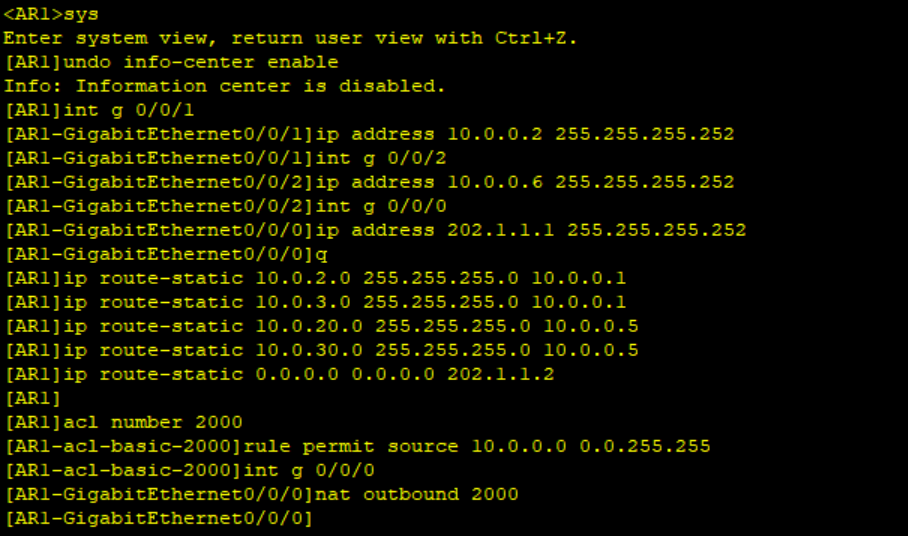
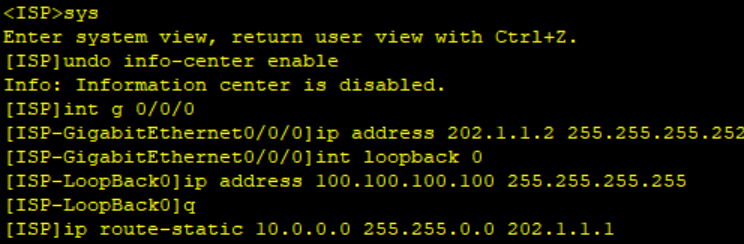
ISP
LSW2
<sw2>
Apr 19 2026 15:54:14-08:00 sw2 %%01PHY/1/PHY(l)0: GigabitEthernet0/0/5: cha
nge status to upsys
Enter system view, return user view with Ctrl+Z.
sw2undo info-center enable
Info: Information center is disabled.
sw2vlan batch 2 3 20 30 200 4000
Info: This operation may take a few seconds. Please wait for a moment...done.
sw2interface GigabitEthernet 0/0/5
sw2-GigabitEthernet0/0/5port link-type access
sw2-GigabitEthernet0/0/5port default vlan 200
sw2-GigabitEthernet0/0/5q
sw2interface Vlanif 200
sw2-Vlanif200ip address 10.0.0.5 255.255.255.252
sw2-Vlanif200q
sw2interface GigabitEthernet 0/0/3
sw2-GigabitEthernet0/0/3port link-type trunk
sw2-GigabitEthernet0/0/3port trunk allow-pass vlan 2 3 20 30
sw2-GigabitEthernet0/0/3interface GigabitEthernet 0/0/4
sw2-GigabitEthernet0/0/4port link-type trunk
sw2-GigabitEthernet0/0/4port trunk allow-pass vlan 2 3 20 30
sw2-GigabitEthernet0/0/4q
sw2interface GigabitEthernet 0/0/1
sw2-GigabitEthernet0/0/1port link-type trunk
sw2-GigabitEthernet0/0/1port trunk allow-pass vlan 2 3 20 30 4000
sw2-GigabitEthernet0/0/1q
sw2interface GigabitEthernet 0/0/2
sw2-GigabitEthernet0/0/2port link-type trunk
sw2-GigabitEthernet0/0/2port trunk allow-pass vlan 2 3 20 30 4000
sw2-GigabitEthernet0/0/2q
sw2interface Vlanif 4000
sw2-Vlanif4000description LSW1-LSW2
sw2-Vlanif4000ip address 10.0.0.10 255.255.255.252
sw2-Vlanif4000q
sw2dhcp enable
Info: The operation may take a few seconds. Please wait for a moment.done.
sw2interface Vlanif 2
sw2-Vlanif2ip address 10.0.2.2 255.255.255.0
sw2-Vlanif2vrrp vrid 2 virtual-ip 10.0.2.254
sw2-Vlanif2dhcp select interface
sw2-Vlanif2dhcp server dns-list 8.8.8.8
sw2-Vlanif2q
sw2interface Vlanif 3
sw2-Vlanif3ip address 10.0.3.2 255.255.255.0
sw2-Vlanif3vrrp vrid 3 virtual-ip 10.0.3.254
sw2-Vlanif3dhcp select interface
sw2-Vlanif3dhcp server dns-list 8.8.8.8
sw2-Vlanif3q
sw2interface Vlanif 20
sw2-Vlanif20ip address 10.0.20.2 255.255.255.0
sw2-Vlanif20vrrp vrid 20 virtual-ip 10.0.20.254
sw2-Vlanif20vrrp vrid 20 priority 120
sw2-Vlanif20vrrp vrid 20 preempt-mode timer delay 10
sw2-Vlanif20dhcp select interface
sw2-Vlanif20dhcp server dns-list 8.8.8.8
sw2-Vlanif20q
sw2interface Vlanif 30
sw2-Vlanif30ip address 10.0.30.2 255.255.255.0
sw2-Vlanif30vrrp vrid 30 virtual-ip 10.0.30.254
sw2-Vlanif30vrrp vrid 30 priority 120
sw2-Vlanif30vrrp vrid 30 preempt-mode timer delay 10
sw2-Vlanif30dhcp select interface
sw2-Vlanif30dhcp server dns-list 8.8.8.8
sw2-Vlanif30q
sw2stp mode mstp
sw2stp region-configuration
sw2-mst-regionregion-name MSTP
sw2-mst-regioninstance 1 vlan 2 3
sw2-mst-regioninstance 2 vlan 20 30
sw2-mst-regionrevision-level 1
sw2-mst-regionactive region-configuration
Info: This operation may take a few seconds. Please wait for a moment...done.
sw2-mst-regionq
sw2stp instance 1 root secondary
sw2stp instance 2 root primary
sw2ip route-static 0.0.0.0 0.0.0.0 10.0.0.6
sw2ip route-static 10.0.0.0 255.255.255.252 10.0.0.9
sw2 User interface con0 is available
AR1
LSW4
通过dhcp来获取IP地址
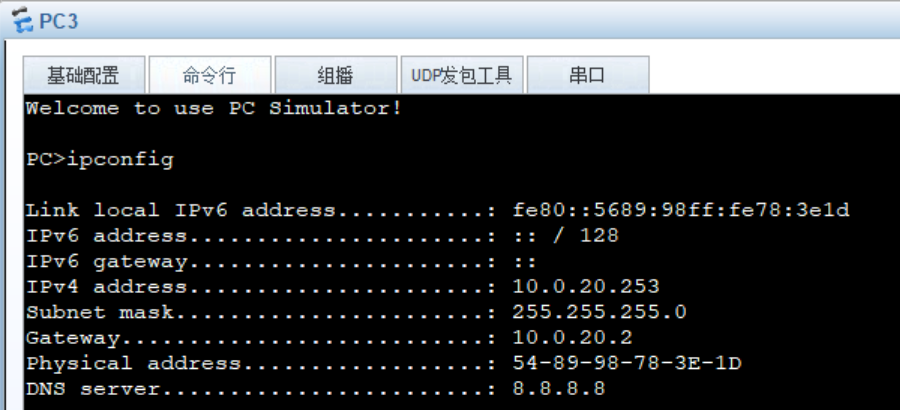
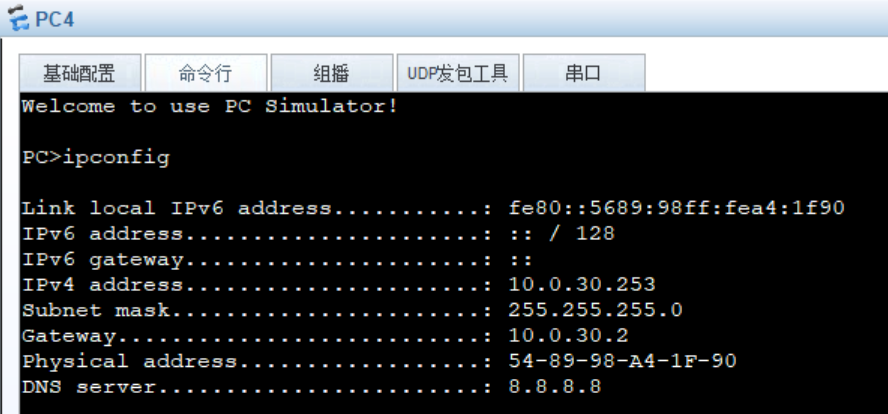
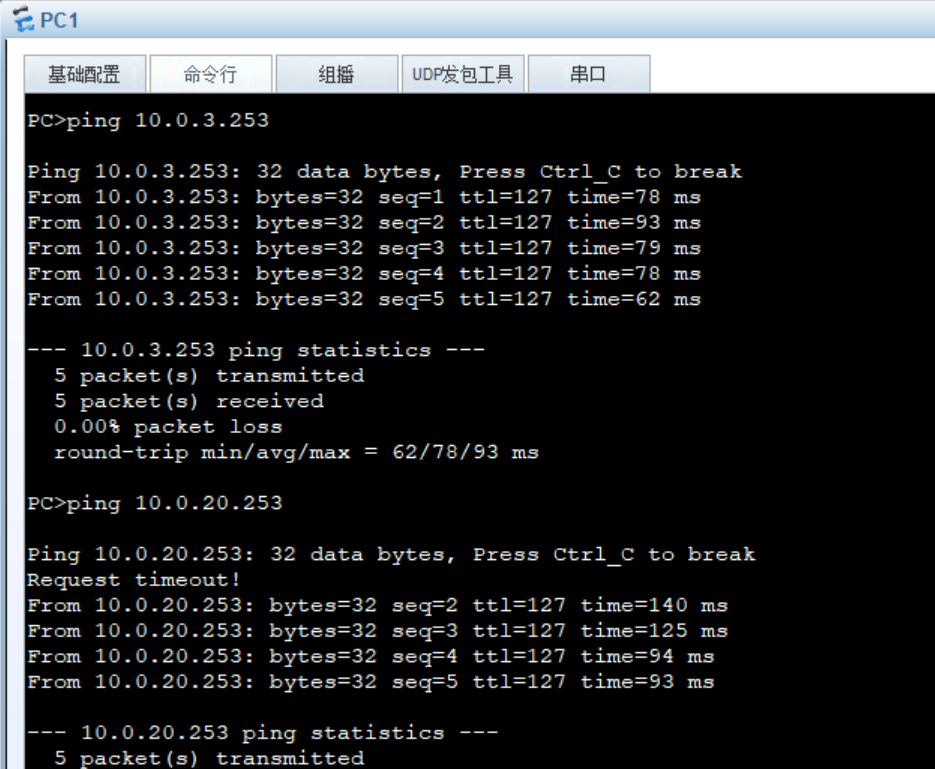
利用pc1来尝试ping通其余的pc以测试是否全网互通