android项目工程化之Github Actions
本地部署
环境搭建
当前系统:windows
用 WSL 跑 Ruby + Fastlane
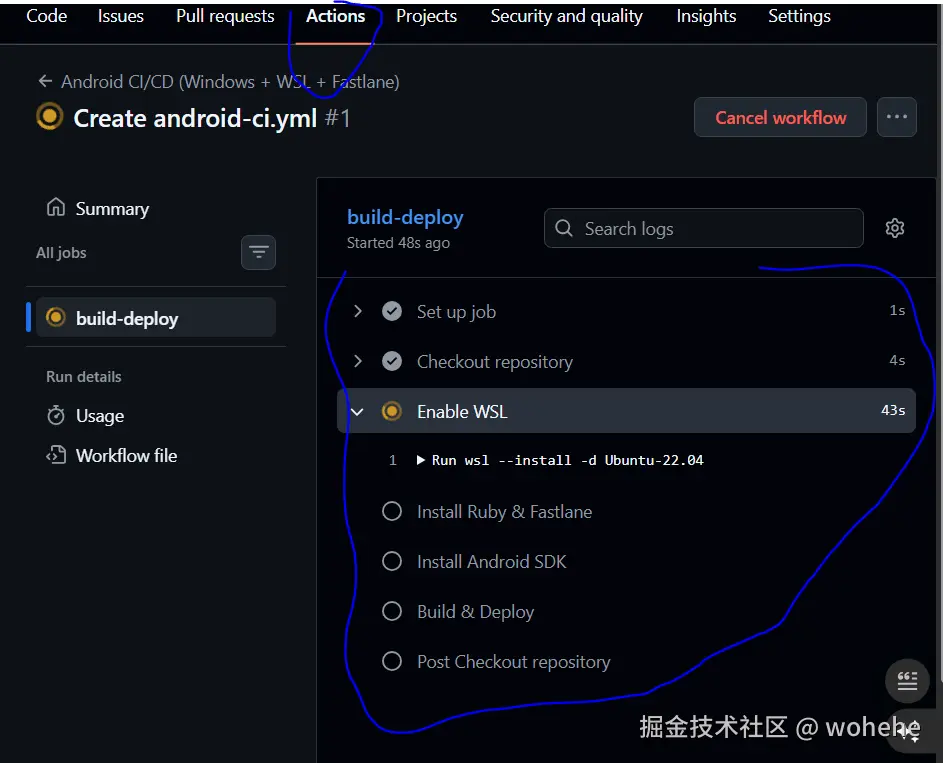
【结论】:WSL跑 Ruby + Fastlane 不可行,系统环境问题
使用Ubuntu22.04 : 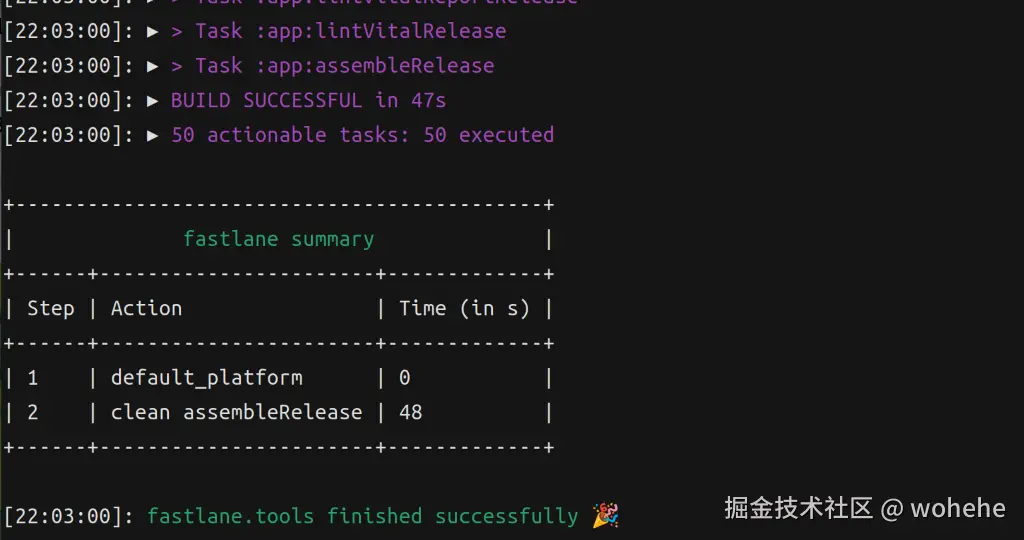
结论:直接使用Ubuntu22.04
windows上安装Linux子系统
- 打开powershell
- 查看可用Linux子系统版本:
wsl --list --online指令 - 安装Linux子系统:
wsl --install -d Ubuntu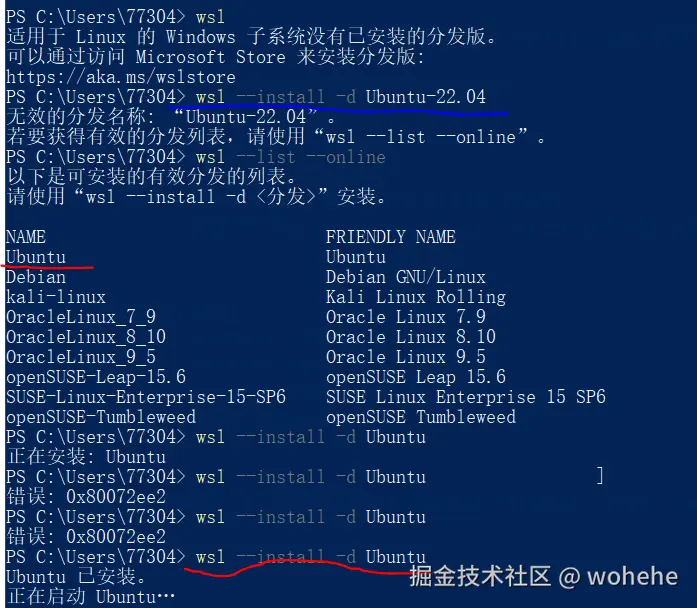
安装ruby
启动Ubuntu子系统
-
打开powershell ->
wsl
-
安装 ruby:
sudo apt install -y ruby-full build-essential
-
验证:
ruby -v
安装Fastlane
gem 属于 ruby的【RubyGems is a package manager for Ruby.】
gem install bundler坑点

解决:sudo gem install bundler
或者添加为系统环境变量:
bash
echo 'export GEM_HOME=$HOME/.gem' >> ~/.bashrc
echo 'export PATH=$HOME/.gem/bin:$PATH' >> ~/.bashrc
source ~/.bashrc
配置Java环境
- 安装 JDK21
sql
sudo apt update
sudo apt install -y openjdk-21-jdk- 配置环境变量
bash
echo 'export JAVA_HOME=/usr/lib/jvm/java-21-openjdk-amd64' >> ~/.bashrc
echo 'export PATH=$JAVA_HOME/bin:$PATH' >> ~/.bashrc
source ~/.bashrc- 验证:
java -version
配置Android SDK环境
安装SDK
shell
mkdir -p $HOME/Android/cmdline-tools
cd $HOME/Android

wget https://dl.google.com/android/repository/commandlinetools-linux-14742923_latest.zip -O cmdline-tools.zip
unzip cmdline-tools.zip -d cmdline-tools
整理目录 mv cmdline-tools/cmdline-tools cmdline-tools/latest
工具链
bash
yes | sdkmanager --licenses

sdkmanager \
  "platform-tools" \
  "platforms;android-34" \
  "build-tools;34.0.0" \
  "cmake;3.22.1" \
  "ndk;25.2.9519653"
配置环境变量
bash
echo 'export ANDROID_HOME=$HOME/Android' >> ~/.bashrc
echo 'export ANDROID_SDK_ROOT=$HOME/Android' >> ~/.bashrc
echo 'export PATH=$ANDROID_HOME/cmdline-tools/latest/bin:$ANDROID_HOME/platform-tools:$PATH' >> ~/.bashrc

source ~/.bashrc
安装SDK组件
bash
yes | sdkmanager --licenses

sdkmanager \
  "platform-tools" \
  "platforms;android-34" \
  "build-tools;34.0.0" \
  "cmake;3.22.1" \
  "ndk;25.2.9519653"
安装CMake
arduino
sdkmanager "cmake;3.22.1"本地执行
给项目添加Fastlane
进入项目根目录 -> 执行指令
csharp
bundle init
bundle add fastlane
执行Fastlane进行打包
bash
bundle exec fastlane deploy执行结果:【需配置信息 以及 指导】
powershell
[22:04:15]: Detected an Android project in the current directory...$ cd ..
[22:04:15]: -----------------------------StrongVoicePlayer$ cat fastlane/Fastfile
[22:04:15]: --- Welcome to fastlane 🚀 ---rectory
[22:04:15]: -----------------------------StrongVoicePlayer$ cat Gemfile
[22:04:15]: fastlane can help you with all kinds of automation for your mobile app
[22:04:15]: We recommend automating one task first, and then gradually automating more over time
[22:04:15]: s://rubygems.org"
[22:04:15]: To avoid re-entering your package name and issuer every time you run fastlane, we'll store those in a so-called Appfile.
############## 配置包名 ##########################
[22:04:15]: Package Name (com.krausefx.app): com.weiyi.strongvoiceplayer
############## Google商店信息配置【可选】 ##########################
To automatically upload builds and metadata to Google Play, fastlane needs a service account json secret file
Follow the Setup Guide on how to get the Json file: https://docs.fastlane.tools/actions/supply/
Feel free to press Enter at any time in order to skip providing pieces of information when asked
[22:04:42]: Path to the json secret file: trongVoicePlayer$ bundle exec fastlane init
[22:05:33]:
[22:05:33]: Do you plan on uploading metadata, screenshots, and builds to Google Play using fastlane?
[22:05:33]: We will now download your existing metadata and screenshots into the `fastlane` folder so fastlane can manage it
[22:05:33]: Download existing metadata and setup metadata management? (y/n)
n
############## 引导1:`fastlane supply init`重新配置信息 ##########################
[22:05:55]: You can run `fastlane supply init` to set up metadata management at a later point.
[22:05:55]: --------------------------------------------------------
[22:05:55]: --- ✅ Successfully generated fastlane configuration ---
[22:05:55]: --------------------------------------------------------
[22:05:55]: Generated Fastfile at path `./fastlane/Fastfile`
[22:05:55]: Generated Appfile at path `./fastlane/Appfile`
[22:05:55]: Gemfile and Gemfile.lock at path `Gemfile`
[22:05:55]: Please check the newly generated configuration files into git along with your project
[22:05:55]: This way everyone in your team can benefit from your fastlane setup
[22:05:55]: Continue by pressing Enter ⏎
############## 引导2:错误信息收集指引文档 ##########################
[22:06:45]: fastlane will collect the number of errors for each action to detect integration issues
[22:06:45]: No sensitive/private information will be uploaded, more information: https://docs.fastlane.tools/#metrics #文档地址
[22:06:45]: ----------------------
[22:06:45]: --- fastlane lanes ---
[22:06:45]: ----------------------
[22:06:45]: fastlane uses a `Fastfile` to store the automation configuration
[22:06:45]: Within that, you'll see different lanes.
[22:06:45]: Each is there to automate a different task, like screenshots, code signing, or pushing new releases
[22:06:45]: Continue by pressing Enter ⏎
############## 引导3:如何自定义你的Fastfile ##########################
[22:07:15]: --------------------------------------
[22:07:15]: --- How to customize your Fastfile ---
[22:07:15]: --------------------------------------
[22:07:15]: Use a text editor of your choice to open the newly created Fastfile and take a look
[22:07:15]: You can now edit the available lanes and actions to customize the setup to fit your needs
[22:07:15]: To get a list of all the available actions, open https://docs.fastlane.tools/actions #文档
[22:07:15]: Continue by pressing Enter ⏎
############## 引导4:各种配置文档 ##########################
[22:07:48]: ------------------------------
[22:07:48]: --- Where to go from here? ---
[22:07:48]: ------------------------------
[22:07:48]: 📸 Learn more about how to automatically generate localized Google Play screenshots:
[22:07:48]: https://docs.fastlane.tools/getting-started/android/screenshots/
[22:07:48]: 👩✈️ Learn more about distribution to beta testing services:
[22:07:48]: https://docs.fastlane.tools/getting-started/android/beta-deployment/
[22:07:48]: 🚀 Learn more about how to automate the Google Play release process:
[22:07:48]: https://docs.fastlane.tools/getting-started/android/release-deployment/
[22:07:48]:
[22:07:48]: To try your new fastlane setup, just enter and run
[22:07:48]: $ fastlane test坑点
Windows 与 Linux文件系统格式是不一样的,如果使用Windows进行项目开发,wsl(Linux)进行 Fastlane 打包,是会报错的,Ext4 和NTFS 文件系统权限不一样导致
解决:
bash
#复制Windows目录中项目 到 Linux子系统的系统目录中
cp /mnt/.../[项目目录] ~/
ci脚本存放目录
lua
<你的仓库根目录>/
└─ .github/
   └─ workflows/
      └─ android-ci.yml   <-- 这里放你的 workflow 脚本
android-ci.yml脚本
yaml
name: Android CI/CD (Windows + WSL + Fastlane)

on:
  push:
    tags:
      - 'v*.*.*'  # 只在版本标签时触发

jobs:
  build-deploy:
    runs-on: windows-latest

    env:
      # GitHub Secret,存放 Google Play Service Account JSON
      SUPPLY_JSON_KEY: ${{ secrets.GOOGLE_PLAY_JSON_KEY }}

    steps:
      # 1️⃣ 检出代码
      - name: Checkout repository
        uses: actions/checkout@v3

      # 2️⃣ 安装 WSL 2(Ubuntu)
      - name: Enable WSL
        run: |
          wsl --install -d Ubuntu-22.04

      # 3️⃣ 在 WSL 内安装 Ruby + Fastlane
      - name: Install Ruby & Fastlane
        run: |
          wsl sudo apt update
          wsl sudo apt install -y ruby-full build-essential git
          wsl gem install bundler
          wsl bundle install

      # 4️⃣ 在 WSL 内安装 Android SDK
      - name: Install Android SDK
        run: |
          wsl sudo apt install -y openjdk-17-jdk wget unzip
          wsl mkdir -p $HOME/Android/cmdline-tools
          wsl wget https://dl.google.com/android/repository/commandlinetools-linux-9477386_latest.zip -O cmdline-tools.zip
          wsl unzip cmdline-tools.zip -d $HOME/Android/cmdline-tools
          wsl yes | $HOME/Android/cmdline-tools/cmdline-tools/bin/sdkmanager --licenses
          wsl $HOME/Android/cmdline-tools/cmdline-tools/bin/sdkmanager "platform-tools" "platforms;android-33" "build-tools;33.0.2"

      # 5️⃣ 构建 APK/AAB 并发布
      - name: Build & Deploy
        run: |
          wsl bundle exec fastlane deploy
Push 标签
yaml
on:
  push:
    tags:
      - 'v*.*.*'   # 当 push 的标签符合 v1.0.0、v2.3.4 格式触发
操作:
perl
git tag v1.0.0
git push origin v1.0.0
Workflow 会在推送标签时自动触发。
进入Github项目中 查看Action标签