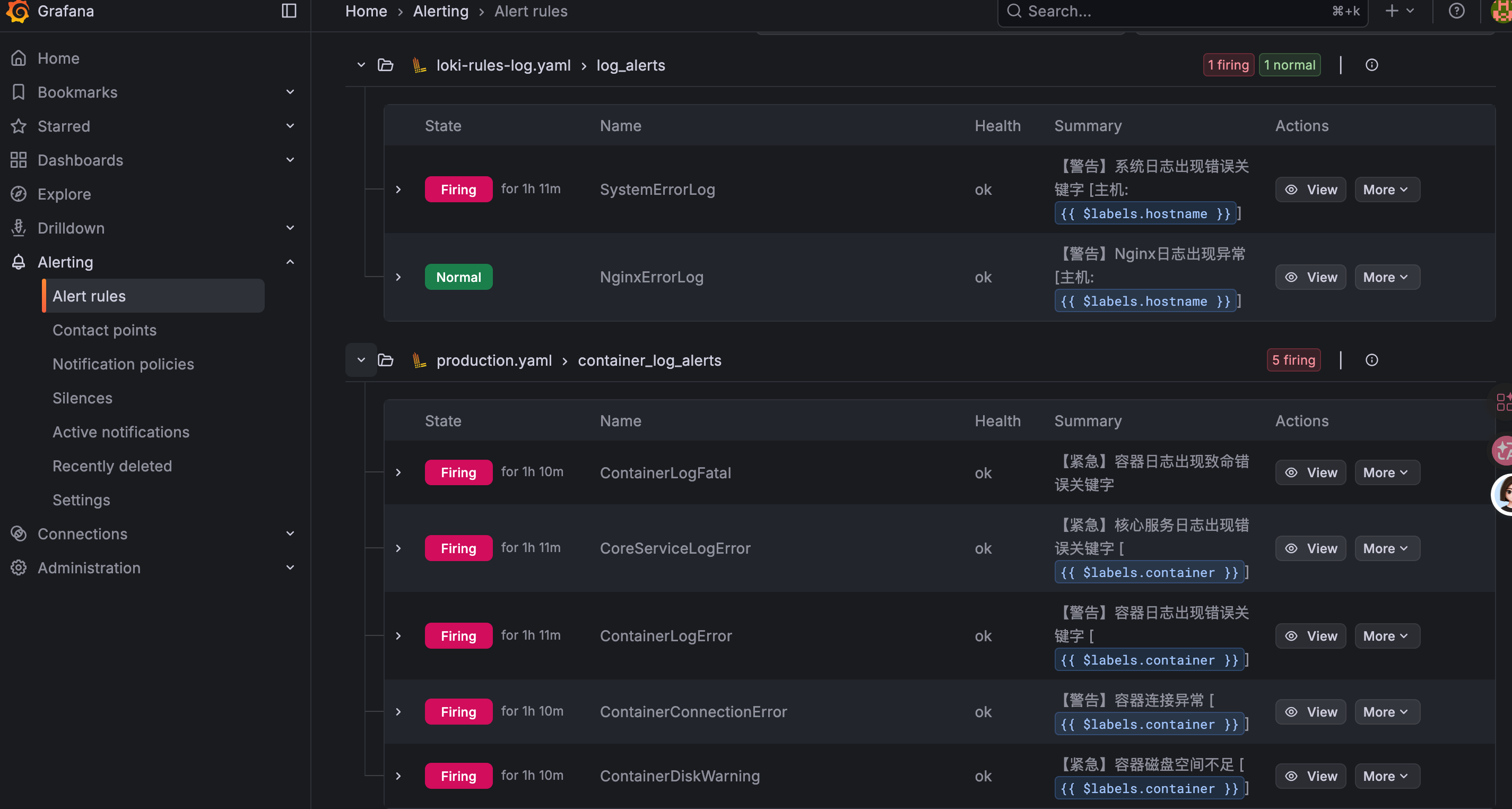
最近一直在研究日志接入了loki的告警规则,经过workbuddy AI和个人的坚持,终于实现告警,分享给大家
1.监控系统日志和nginx日志的告警规则
vim loki-rules-log.yaml
bash
groups:
  - name: log_alerts
    interval: 1m
    rules:
      # 1. 系统日志错误告警
      - alert: SystemErrorLog
        expr: |
          sum by (job, hostname, instance) (
            count_over_time(
              {job="jiankongji_syslog"} |~ "(?i)(error|panic|fatal|exception)"
              [1m]
            )
          ) > 0
        for: 1m
        labels:
          severity: warning
          type: system_log
          business: system
        annotations:
          summary: "【警告】系统日志出现错误关键字 [主机: {{ $labels.hostname }}]"
          description: |
            系统日志检测到错误关键字!
            - 主机名称: {{ $labels.hostname }}
            - 主机地址: {{ $labels.instance }}
            - 作业名称: {{ $labels.job }}
            - 1分钟内匹配次数: {{ $value }}
            - 匹配关键字: error/panic/fatal/exception

            详细信息:
            1. 日志来源: {{ $labels.job }}
            2. 主机信息: {{ $labels.hostname }} ({{ $labels.instance }})
            3. 告警时间: {{ $labels.timestamp }}

      # 2. Nginx异常告警
      - alert: NginxErrorLog
        expr: |
          sum by (job, hostname, instance) (
            count_over_time(
              {job="jiankongji_nginxlog"} |~ "(?i)(error|4\\d\\d|5\\d\\d)"
              [1m]
            )
          ) > 0
        for: 1m
        labels:
          severity: warning
          type: nginx_log
          business: web
        annotations:
          summary: "【警告】Nginx日志出现异常 [主机: {{ $labels.hostname }}]"
          description: |
            Nginx日志检测到异常!
            - 主机名称: {{ $labels.hostname }}
            - 主机地址: {{ $labels.instance }}
            - 作业名称: {{ $labels.job }}
            - 1分钟内匹配次数: {{ $value }}
            - 匹配内容: error关键字或4xx/5xx状态码

            主机信息:
            - 主机名: {{ $labels.hostname }}
            - IP地址: {{ $labels.instance }}
            - 日志类型: {{ $labels.type }}
            - 业务系统: {{ $labels.business }}
2.容器日志的告警规则
vim production.yaml
bash
groups:
  - name: container_log_alerts
    interval: 1m
    rules:
      - alert: ContainerLogFatal
        expr: |
          sum by (container) (
            count_over_time(
              {container!~"^$", container!~"prometheus", container!~"cadvisor", container!~"alloy"} |~ "(?i)(FATAL|OutOfMemoryError|Killed|segmentation fault)"
              [5m]
            )
          ) > 0
        for: 0m
        labels:
          severity: critical
          type: container_log
        annotations:
          summary: "【紧急】容器日志出现致命错误关键字"
          description: |
            容器 {{ $labels.container }} 日志中检测到致命错误关键字!
            - 5分钟内匹配次数: {{ $value }}
            - 建议: docker logs {{ $labels.container }}

      - alert: CoreServiceLogError
        expr: |
          sum by (container) (
            count_over_time(
              {container=~"evaluate-loki.*|prometheus|alertmanager"} |~ "(?i)(ERROR|failed|Err)"
              [5m]
            )
          ) > 0
        for: 1m
        labels:
          severity: critical
          type: container_log
          business: core
        annotations:
          summary: "【紧急】核心服务日志出现错误关键字 [{{ $labels.container }}]"
          description: |
            核心服务 {{ $labels.container }} 出现错误日志!
            - 5分钟内匹配次数: {{ $value }}

      - alert: ContainerLogError
        expr: |
          sum by (container) (
            count_over_time(
              {container!~"^$", container!~"prometheus", container!~"cadvisor", container!~"alloy", container!~"grafana", container!~"minio"} |~ "(?i)(error|ERROR|exception|Exception)"
              [5m]
            )
          ) > 0
        for: 2m
        labels:
          severity: warning
          type: container_log
        annotations:
          summary: "【警告】容器日志出现错误关键字 [{{ $labels.container }}]"
          description: |
            容器 {{ $labels.container }} 日志中检测到 error/ERROR/exception 关键字
            - 5分钟内匹配次数: {{ $value }}

      - alert: ContainerConnectionError
        expr: |
          sum by (container) (
            count_over_time(
              {container!~"^$"} |~ "(?i)(connection refused|connection timeout|i/o timeout)"
              [5m]
            )
          ) > 0
        for: 3m
        labels:
          severity: warning
          type: container_log
        annotations:
          summary: "【警告】容器连接异常 [{{ $labels.container }}]"
          description: |
            容器 {{ $labels.container }} 出现连接错误!
            - 5分钟内匹配次数: {{ $value }}
            - 可能原因: 服务连接失败或网络问题

      - alert: ContainerDiskWarning
        expr: |
          sum by (container) (
            count_over_time(
              {container=~".+"}
              |~ "no space left|disk full|ENOSPC"
              [5m]
            )
          ) > 0
        for: 0m
        labels:
          severity: critical
          type: container_log
        annotations:
          summary: "【紧急】容器磁盘空间不足 [{{ $labels.container }}]"
          description: |
            容器 {{ $labels.container }} 磁盘空间不足!
            - 5分钟内匹配次数: {{ $value }}
            - 请立即检查磁盘容量
3.查看告警