一、RAG:破解大模型「知识困境」的核心方案
大语言模型(LLM)凭借强大的语义理解和生成能力,成为当下技术领域的核心抓手,但实际落地中两个痛点始终无法回避:一是「知识时效性」,模型训练数据存在截止时间,无法获取最新信息;二是「幻觉问题」,模型可能生成不符合事实的内容,尤其在企业私有数据场景下,这两个问题直接制约了LLM的生产应用。
检索增强生成(Retrieval-Augmented Generation,RAG)正是为解决这些问题而生的技术架构------它将「检索」与「生成」结合,先从私有/外部数据源中检索与用户问题相关的信息,再将这些信息作为上下文传入大模型,让模型基于真实、最新的信息生成回答。相比模型微调,RAG无需重新训练模型,成本更低、更新更快,是企业落地LLM的首选方案。
二、RAG核心原理与流程拆解
2.1 核心流程
RAG的完整执行链路可拆解为6个核心步骤,各环节环环相扣,决定了最终回答的准确性和效率:
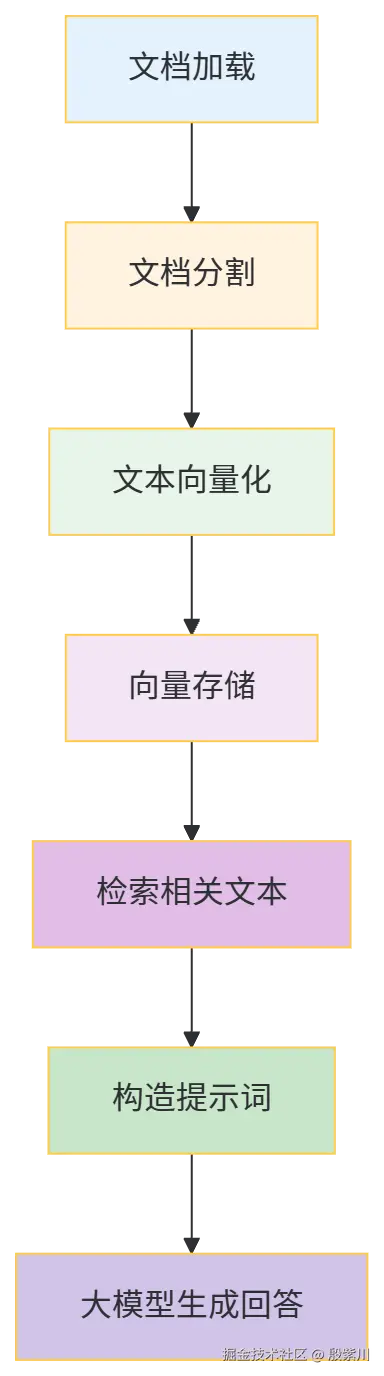
(1)文档加载
核心目标是将不同格式(PDF、TXT、Word、数据库等)的数据源,转化为程序可处理的文本格式。这一步的关键是兼容多源数据,同时保证文本提取的完整性(比如PDF的分页、格式还原)。
(2)文档分割
大模型的上下文窗口存在长度限制,且长文本直接传入会导致关键信息被稀释。文档分割需按「语义粒度」拆分(而非简单按字符数),比如按段落、章节拆分,既保证单段文本的语义完整性,又适配模型的上下文长度。
(3)文本向量化
将自然语言文本转化为机器可计算的向量(Embedding),向量的维度和表征能力直接影响检索精度。向量化的核心是通过预训练的嵌入模型,将文本的语义信息映射到高维向量空间,语义相似的文本,向量距离也更近。
(4)向量存储
将向量化后的文本片段存储到向量数据库(或简易的内存结构),方便后续快速检索。向量数据库需支持「相似性检索」(如余弦相似度、欧氏距离计算),常见的有Milvus、Pinecone、FAISS等,轻量场景也可使用Redis的向量扩展。
(5)检索相关文本
接收用户问题后,先将问题向量化,再从向量存储中检索出与问题语义最相似的文本片段(Top-N)。检索策略可优化,比如结合关键词检索+向量检索,提升召回率。
(6)构造提示词&生成回答
将检索到的文本片段作为「上下文」,与用户问题拼接成提示词,传入大模型。模型基于上下文生成回答,从根源上减少幻觉,保证回答的准确性。
2.2 RAG与微调的核心差异
| 维度 | RAG | 微调 |
|---|---|---|
| 知识更新 | 实时更新(修改数据源即可) | 需重新训练/增量微调,周期长 |
| 成本 | 低(无需算力训练) | 高(需GPU算力、数据标注) |
| 适用场景 | 私有数据频繁更新、中小规模数据 | 通用知识固化、大规模专有数据 |
| 技术门槛 | 低(侧重工程实现) | 高(需算法、训练经验) |
三、实战准备:技术栈与环境搭建
3.1 技术栈选型
本次实战基于企业级Java技术栈,所有组件均选用稳定且主流的版本,兼顾兼容性和实用性:
- 基础框架:Spring Boot 3.2.5(JDK 17)
- 文档处理:Spring AI 1.0.0-M1(PDF读取)、Apache PDFBox 3.0.1
- 大模型调用:RestTemplate(HTTP请求)、火山引擎LLM API
- 工具类:Lombok 1.18.30、Spring Utils、FastJSON2 2.0.48、Guava 32.1.3-jre
- 接口文档:SpringDoc OpenAPI 2.2.0(Swagger3)
- 构建工具:Maven 3.9.6
3.2 Maven依赖配置
创建Maven项目,在pom.xml中引入以下依赖,确保版本兼容且无冲突:
xml
<?xml version="1.0" encoding="UTF-8"?>
<project xmlns="http://maven.apache.org/POM/4.0.0"
         xmlns:xsi="http://www.w3.org/2001/XMLSchema-instance"
         xsi:schemaLocation="http://maven.apache.org/POM/4.0.0 https://maven.apache.org/xsd/maven-4.0.0.xsd">
    <modelVersion>4.0.0</modelVersion>
    <parent>
        <groupId>org.springframework.boot</groupId>
        <artifactId>spring-boot-starter-parent</artifactId>
        <version>3.2.5</version>
        <relativePath/>
    </parent>
    <groupId>com.jam.demo</groupId>
    <artifactId>rag-demo</artifactId>
    <version>0.0.1-SNAPSHOT</version>
    <name>rag-demo</name>
    <description>RAG实战演示项目</description>

    <properties>
        <java.version>17</java.version>
        <fastjson2.version>2.0.48</fastjson2.version>
        <guava.version>32.1.3-jre</guava.version>
        <lombok.version>1.18.30</lombok.version>
        <springdoc.version>2.2.0</springdoc.version>
        <spring-ai.version>1.0.0-M1</spring-ai.version>
        <pdfbox.version>3.0.1</pdfbox.version>
    </properties>

    <dependencies>
        <!-- Spring Boot核心依赖 -->
        <dependency>
            <groupId>org.springframework.boot</groupId>
            <artifactId>spring-boot-starter-web</artifactId>
        </dependency>

        <!-- Lombok -->
        <dependency>
            <groupId>org.projectlombok</groupId>
            <artifactId>lombok</artifactId>
            <version>${lombok.version}</version>
            <scope>provided</scope>
        </dependency>

        <!-- Swagger3(SpringDoc) -->
        <dependency>
            <groupId>org.springdoc</groupId>
            <artifactId>springdoc-openapi-starter-webmvc-ui</artifactId>
            <version>${springdoc.version}</version>
        </dependency>

        <!-- Spring AI(文档处理) -->
        <dependency>
            <groupId>org.springframework.ai</groupId>
            <artifactId>spring-ai-core</artifactId>
            <version>${spring-ai.version}</version>
        </dependency>
        <dependency>
            <groupId>org.springframework.ai</groupId>
            <artifactId>spring-ai-pdf-document-reader</artifactId>
            <version>${spring-ai.version}</version>
        </dependency>

        <!-- PDF处理增强 -->
        <dependency>
            <groupId>org.apache.pdfbox</groupId>
            <artifactId>pdfbox</artifactId>
            <version>${pdfbox.version}</version>
        </dependency>

        <!-- FastJSON2 -->
        <dependency>
            <groupId>com.alibaba.fastjson2</groupId>
            <artifactId>fastjson2</artifactId>
            <version>${fastjson2.version}</version>
        </dependency>

        <!-- Guava -->
        <dependency>
            <groupId>com.google.guava</groupId>
            <artifactId>guava</artifactId>
            <version>${guava.version}</version>
        </dependency>

        <!-- 测试依赖 -->
        <dependency>
            <groupId>org.springframework.boot</groupId>
            <artifactId>spring-boot-starter-test</artifactId>
            <scope>test</scope>
        </dependency>
    </dependencies>

    <build>
        <plugins>
            <plugin>
                <groupId>org.springframework.boot</groupId>
                <artifactId>spring-boot-maven-plugin</artifactId>
                <configuration>
                    <excludes>
                        <exclude>
                            <groupId>org.projectlombok</groupId>
                            <artifactId>lombok</artifactId>
                        </exclude>
                    </excludes>
                </configuration>
            </plugin>
        </plugins>
    </build>

    <!-- Spring AI仓库(M1版本需手动引入) -->
    <repositories>
        <repository>
            <id>spring-milestones</id>
            <name>Spring Milestones</name>
            <url>https://repo.spring.io/milestone</url>
            <snapshots>
                <enabled>false</enabled>
            </snapshots>
        </repository>
    </repositories>
</project>
3.3 配置文件(application.yml)
在src/main/resources下创建application.yml,配置火山引擎LLM API信息、文件路径等核心参数:
yaml
spring:
  # 火山引擎LLM配置
  volc:
    api-key: your-volc-api-key  # 替换为实际API Key
    base-url: https://ark.cn-beijing.volces.com/api/v3/chat/completions  # 火山引擎API地址
    endpoint-id: your-endpoint-id  # 替换为实际模型端点ID
  # 文档路径配置
  doc:
    pdf-path: C:\Users\jamhi\Downloads\低代码开发师【初级】实战教程.pdf  # 替换为实际PDF路径

# 日志配置
logging:
  level:
    com.jam.demo: INFO
    org.springframework.web: WARN
  pattern:
    console: "%d{yyyy-MM-dd HH:mm:ss} [%thread] %-5level %logger{36} - %msg%n"

# 服务器配置
server:
  port: 8080
  servlet:
    context-path: /rag-demo
四、核心模块实现:从文档加载到回答生成
4.1 文档加载工具类(DocLoadUtil.java)
封装PDF、TXT等文档的加载逻辑,保证文本提取的完整性,同时处理文件不存在、读取失败等异常:
ini
package com.jam.demo.util;

import com.google.common.collect.Lists;
import lombok.extern.slf4j.Slf4j;
import org.apache.pdfbox.pdmodel.PDDocument;
import org.apache.pdfbox.text.PDFTextStripper;
import org.springframework.ai.document.Document;
import org.springframework.ai.reader.pdf.PagePdfDocumentReader;
import org.springframework.core.io.FileSystemResource;
import org.springframework.util.ObjectUtils;
import org.springframework.util.StringUtils;

import java.io.File;
import java.io.FileReader;
import java.io.IOException;
import java.util.List;

/**
 * 文档加载工具类
 * 作者:ken
 * 功能:支持PDF、TXT格式的文档加载,提取文本内容
 */
@Slf4j
public class DocLoadUtil {

    /**
     * 加载PDF文档并提取文本
     * @param pdfPath PDF文件绝对路径
     * @return 文档文本内容
     * @throws IOException 文件读取异常
     */
    public static String loadPdf(String pdfPath) throws IOException {
        // 参数校验
        StringUtils.hasText(pdfPath, "PDF文件路径不能为空");
        File pdfFile = new File(pdfPath);
        if (!pdfFile.exists()) {
            throw new IOException("PDF文件不存在:" + pdfPath);
        }

        // 方式1:基于Spring AI的PDF读取(简化版)
        PagePdfDocumentReader reader = new PagePdfDocumentReader(new FileSystemResource(pdfFile));
        List<Document> documents = reader.read();
        if (ObjectUtils.isEmpty(documents)) {
            log.warn("PDF文件内容为空:{}", pdfPath);
            return "";
        }

        // 拼接所有页面文本
        StringBuilder pdfContent = new StringBuilder();
        for (Document doc : documents) {
            String text = doc.getText();
            if (StringUtils.hasText(text)) {
                pdfContent.append(text);
            }
        }
        return pdfContent.toString();
    }

    /**
     * 加载TXT文档并提取文本
     * @param txtPath TXT文件绝对路径
     * @return 文档文本内容
     * @throws IOException 文件读取异常
     */
    public static String loadTxt(String txtPath) throws IOException {
        // 参数校验
        StringUtils.hasText(txtPath, "TXT文件路径不能为空");
        File txtFile = new File(txtPath);
        if (!txtFile.exists()) {
            throw new IOException("TXT文件不存在:" + txtPath);
        }

        // 按字符读取TXT内容
        char[] buffer = new char[1024];
        StringBuilder txtContent = new StringBuilder();
        try (FileReader reader = new FileReader(txtFile)) {
            int len;
            while ((len = reader.read(buffer)) != -1) {
                txtContent.append(buffer, 0, len);
            }
        }
        return txtContent.toString();
    }

    /**
     * 按语义分割文本(简易版)
     * @param content 原始文本
     * @param chunkSize 每个片段的最大字符数
     * @return 分割后的文本片段列表
     */
    public static List<String> splitText(String content, int chunkSize) {
        if (!StringUtils.hasText(content)) {
            return Lists.newArrayList();
        }
        if (chunkSize <= 0) {
            chunkSize = 1000; // 默认每段1000字符
        }

        List<String> chunks = Lists.newArrayList();
        int start = 0;
        int end = chunkSize;
        int contentLength = content.length();

        while (start < contentLength) {
            // 避免最后一段超出文本长度
            if (end > contentLength) {
                end = contentLength;
            }
            // 按段落分割(优先按换行符截断,保证语义完整)
            int splitIndex = content.lastIndexOf("\n", end);
            if (splitIndex == -1 || splitIndex < start) {
                splitIndex = end;
            }
            chunks.add(content.substring(start, splitIndex));
            start = splitIndex + 1;
            end = start + chunkSize;
        }
        return chunks;
    }
}
4.2 大模型调用工具类(LlmClientUtil.java)
封装火山引擎LLM API的调用逻辑,统一处理请求头、请求体构造,以及响应的安全解析:
typescript
package com.jam.demo.util;

import com.alibaba.fastjson2.JSON;
import com.google.common.collect.Maps;
import lombok.extern.slf4j.Slf4j;
import org.springframework.http.*;
import org.springframework.util.CollectionUtils;
import org.springframework.util.ObjectUtils;
import org.springframework.util.StringUtils;
import org.springframework.web.client.RestTemplate;

import java.util.List;
import java.util.Map;

/**
 * 大模型调用工具类
 * 作者:ken
 * 功能:封装火山引擎LLM API的调用逻辑,处理请求与响应
 */
@Slf4j
public class LlmClientUtil {

    private static final RestTemplate REST_TEMPLATE = new RestTemplate();

    /**
     * 调用火山引擎LLM API生成回答
     * @param apiKey 火山引擎API Key
     * @param baseUrl API请求地址
     * @param endpointId 模型端点ID
     * @param prompt 拼接后的提示词(上下文+用户问题)
     * @return 大模型生成的回答
     * @throws Exception 调用异常
     */
    public static String callVolcLlm(String apiKey, String baseUrl, String endpointId, String prompt) throws Exception {
        // 参数校验
        StringUtils.hasText(apiKey, "API Key不能为空");
        StringUtils.hasText(baseUrl, "API请求地址不能为空");
        StringUtils.hasText(endpointId, "模型端点ID不能为空");
        StringUtils.hasText(prompt, "提示词不能为空");

        // 1. 构造请求头
        HttpHeaders headers = new HttpHeaders();
        headers.setContentType(MediaType.APPLICATION_JSON);
        headers.set("Authorization", "Bearer " + apiKey);

        // 2. 构造请求体
        Map<String, Object> params = Maps.newHashMap();
        params.put("model", endpointId);
        params.put("messages", List.of(Maps.newHashMap(
                "role", "user",
                "content", prompt
        )));

        // 3. 发送POST请求
        HttpEntity<Map<String, Object>> request = new HttpEntity<>(params, headers);
        ResponseEntity<Map> response = REST_TEMPLATE.postForEntity(baseUrl, request, Map.class);

        // 4. 安全解析响应(逐层判空,避免空指针)
        Map<String, Object> responseBody = response.getBody();
        if (ObjectUtils.isEmpty(responseBody)) {
            log.warn("LLM API返回空响应");
            return "未获取到有效回答";
        }

        List<Map<String, Object>> choices = (List<Map<String, Object>>) responseBody.get("choices");
        if (CollectionUtils.isEmpty(choices)) {
            log.warn("LLM API响应中无choices字段");
            return "未获取到有效回答";
        }

        Map<String, Object> firstChoice = choices.get(0);
        if (ObjectUtils.isEmpty(firstChoice)) {
            log.warn("LLM API响应中第一个choice为空");
            return "未获取到有效回答";
        }

        Map<String, Object> message = (Map<String, Object>) firstChoice.get("message");
        if (ObjectUtils.isEmpty(message)) {
            log.warn("LLM API响应中无message字段");
            return "未获取到有效回答";
        }

        String content = (String) message.get("content");
        if (!StringUtils.hasText(content)) {
            log.warn("LLM API响应中content字段为空");
            return "未获取到有效回答";
        }

        log.info("LLM API调用成功,生成回答长度:{}", content.length());
        return content;
    }
}
4.3 RAG核心控制器(RagChatController.java)
整合文档加载、提示词构造、大模型调用逻辑,提供REST接口,添加Swagger3注解,支持参数校验和异常处理:
kotlin
package com.jam.demo.controller;

import com.jam.demo.util.DocLoadUtil;
import com.jam.demo.util.LlmClientUtil;
import io.swagger.v3.oas.annotations.Operation;
import io.swagger.v3.oas.annotations.Parameter;
import io.swagger.v3.oas.annotations.tags.Tag;
import lombok.extern.slf4j.Slf4j;
import org.springframework.beans.factory.annotation.Value;
import org.springframework.util.StringUtils;
import org.springframework.web.bind.annotation.GetMapping;
import org.springframework.web.bind.annotation.RequestMapping;
import org.springframework.web.bind.annotation.RequestParam;
import org.springframework.web.bind.annotation.RestController;

/**
 * RAG聊天控制器
 * 作者:ken
 * 功能:提供RAG增强的聊天接口,基于PDF文档回答用户问题
 */
@Slf4j
@RestController
@RequestMapping("/ragChat")
@Tag(name = "RAG聊天接口", description = "基于PDF文档的检索增强生成接口")
public class RagChatController {

    @Value("${spring.volc.api-key}")
    private String volcApiKey;

    @Value("${spring.volc.base-url}")
    private String volcBaseUrl;

    @Value("${spring.volc.endpoint-id}")
    private String volcEndpointId;

    @Value("${spring.doc.pdf-path}")
    private String pdfPath;

    /**
     * 基于PDF文档的RAG聊天接口
     * @param question 用户问题
     * @return 基于文档内容的回答
     */
    @GetMapping("/v2")
    @Operation(summary = "PDF文档RAG聊天", description = "传入用户问题,基于指定PDF文档内容生成回答")
    public String ragChat(
            @Parameter(description = "用户问题", required = true)
            @RequestParam String question) {
        // 参数校验
        if (!StringUtils.hasText(question)) {
            log.error("用户问题为空");
            return "用户问题不能为空";
        }

        try {
            // 1. 加载PDF文档内容
            String pdfContent = DocLoadUtil.loadPdf(pdfPath);
            if (!StringUtils.hasText(pdfContent)) {
                log.warn("PDF文档内容为空,路径:{}", pdfPath);
                return "文档内容为空,无法回答问题";
            }

            // 2. 分割文档(避免提示词过长)
            // 实际场景可根据模型上下文长度调整,这里暂不分割,直接拼接
            String prompt = "请基于以下文档内容回答用户问题,仅使用文档中的信息,不要编造内容:\n"
                    + "文档内容:\n" + pdfContent + "\n"
                    + "用户问题:" + question;

            // 3. 调用大模型生成回答
            return LlmClientUtil.callVolcLlm(volcApiKey, volcBaseUrl, volcEndpointId, prompt);

        } catch (Exception e) {
            log.error("RAG聊天接口调用失败", e);
            return "回答生成失败:" + e.getMessage();
        }
    }
}
4.4 启动类(RagDemoApplication.java)
配置Spring Boot启动类,排除不必要的自动配置(如数据库相关),减少资源占用:
arduino
package com.jam.demo;

import org.springframework.boot.SpringApplication;
import org.springframework.boot.autoconfigure.SpringBootApplication;
import org.springframework.boot.autoconfigure.jdbc.DataSourceAutoConfiguration;
import org.springframework.boot.autoconfigure.jdbc.JdbcTemplateAutoConfiguration;

/**
 * RAG实战项目启动类
 * 作者:ken
 */
@SpringBootApplication(exclude = {
        // 排除数据库自动配置(无需数据库)
        DataSourceAutoConfiguration.class,
        JdbcTemplateAutoConfiguration.class
})
public class RagDemoApplication {

    public static void main(String[] args) {
        SpringApplication.run(RagDemoApplication.class, args);
        log.info("RAG实战项目启动成功,访问地址:http://localhost:8080/rag-demo/swagger-ui/index.html");
    }
}
五、接口测试与问题排查
5.1 接口访问与测试
项目启动后,可通过以下方式测试接口:
- Swagger3文档:访问
http://localhost:8080/rag-demo/swagger-ui/index.html,找到/ragChat/v2接口,传入用户问题(如"低代码开发师初级的核心知识点有哪些?"),点击执行即可获取回答。 - Postman/浏览器:访问
http://localhost:8080/rag-demo/ragChat/v2?question=低代码开发师初级的核心知识点有哪些?,直接查看返回结果。 以下是返回截图: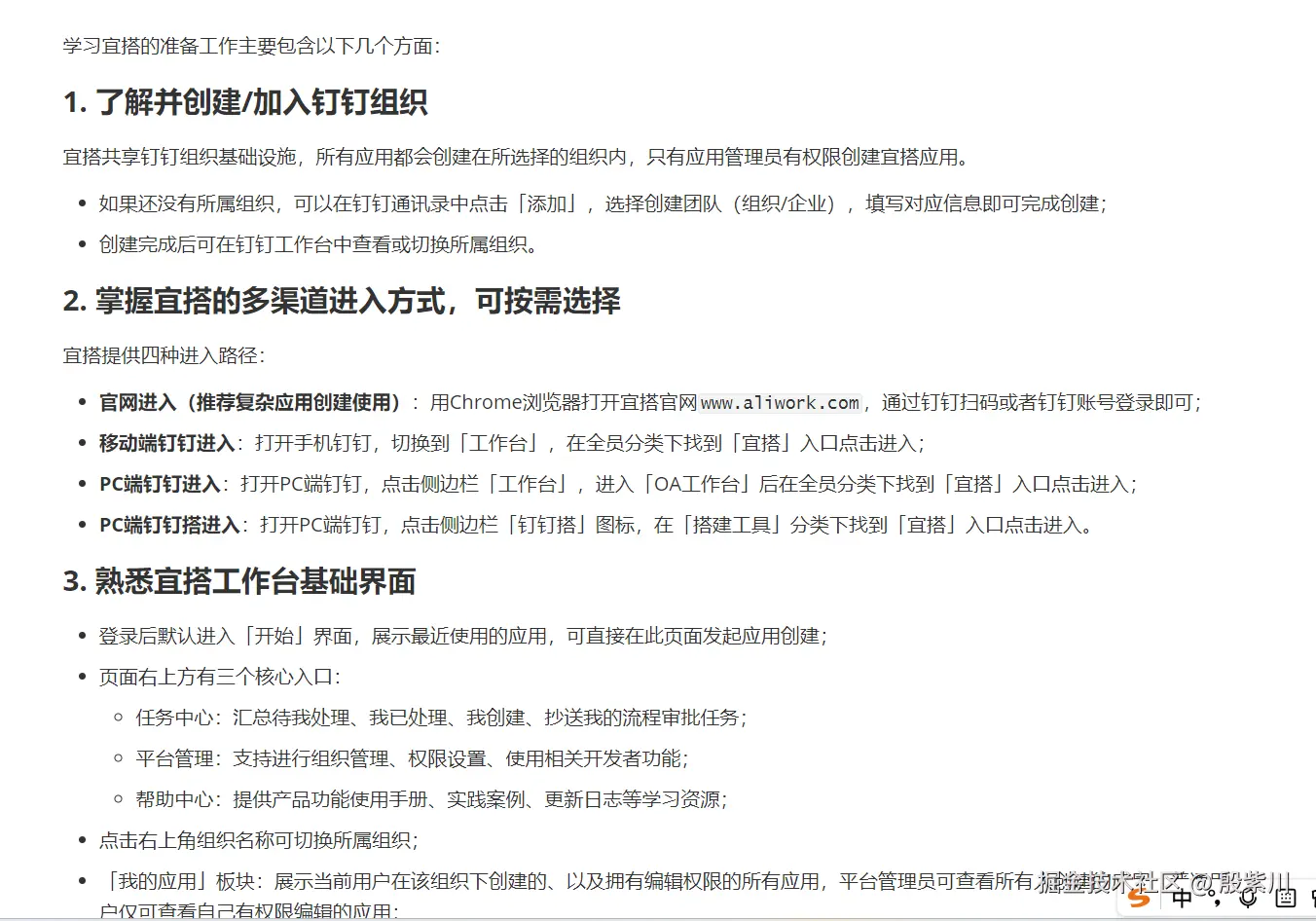
5.2 常见问题与解决方案
(1)PDF读取乱码
-
原因:PDF文件编码不兼容,或包含图片型文本(无法提取)。
-
解决方案:
- 对于编码问题:使用PDFBox的
PDFTextStripper指定编码(如UTF-8); - 对于图片型PDF:集成OCR工具(如Tesseract),先识别图片文本再提取。
- 对于编码问题:使用PDFBox的
(2)大模型调用返回空内容
-
原因:API Key/endpoint-id错误、请求体格式不合法、模型上下文长度超限。
-
解决方案:
- 校验API参数是否正确,可通过火山引擎控制台验证;
- 拆分长文本,减少单次提示词长度;
- 检查
LlmClientUtil中的响应解析逻辑,确保字段名与API文档一致。
(3)接口调用超时
-
原因:网络延迟、火山引擎API响应慢、文档加载耗时过长。
-
解决方案:
-
为
RestTemplate设置超时时间:scssRestTemplate restTemplate = new RestTemplate(); restTemplate.setRequestFactory(new HttpComponentsClientHttpRequestFactory(HttpClients.custom() .setConnectTimeout(5000) .setConnectionRequestTimeout(5000) .setSocketTimeout(10000) .build())); -
异步加载文档,缓存已加载的文档内容(如Redis),避免重复读取。
-
六、RAG底层逻辑深挖与优化
6.1 向量检索的核心:余弦相似度
文本向量化后,检索的核心是计算「问题向量」与「文档片段向量」的余弦相似度,公式如下:
- 相似度取值范围为-1,1,越接近1,语义越相似;
- 实战中无需手动计算,向量数据库(如Milvus)已内置该算法,只需调用检索接口即可。
6.2 提示词工程优化
RAG的效果与提示词直接相关,以下是实战验证的优化技巧:
- 明确指令:在提示词中加入"仅使用文档中的信息回答,不要编造内容",减少幻觉;
- 上下文排序:将与问题最相似的文档片段放在提示词前部,提升模型关注度;
- 精简上下文:只保留与问题相关的片段,避免无关信息稀释核心内容。
6.3 检索策略优化
单一的向量检索可能存在召回率不足的问题,可采用「混合检索」:
- 关键词检索:先通过ES/MySQL全文索引筛选出包含问题关键词的文档片段;
- 向量检索:对筛选后的片段做向量相似度排序,取Top-N;
- 结果融合:将两种检索结果融合,提升召回率和精度。
七、RAG扩展与进阶方向
7.1 多数据源接入
除了本地PDF,可扩展支持以下数据源:
- 数据库:通过MyBatis Plus读取MySQL/PostgreSQL中的结构化数据;
- 云存储:接入阿里云OSS、腾讯云COS,加载云端文档;
- 网页:通过Jsoup爬取指定网页内容,补充数据源。
7.2 缓存层设计
文档加载和向量检索是耗时操作,可引入Redis缓存:
- 缓存已加载的文档文本(按文件路径为Key);
- 缓存已向量化的文档片段(按片段ID为Key);
- 缓存高频问题的检索结果(按问题哈希为Key)。
7.3 分布式部署
当文档量和请求量增大时,可采用分布式架构:
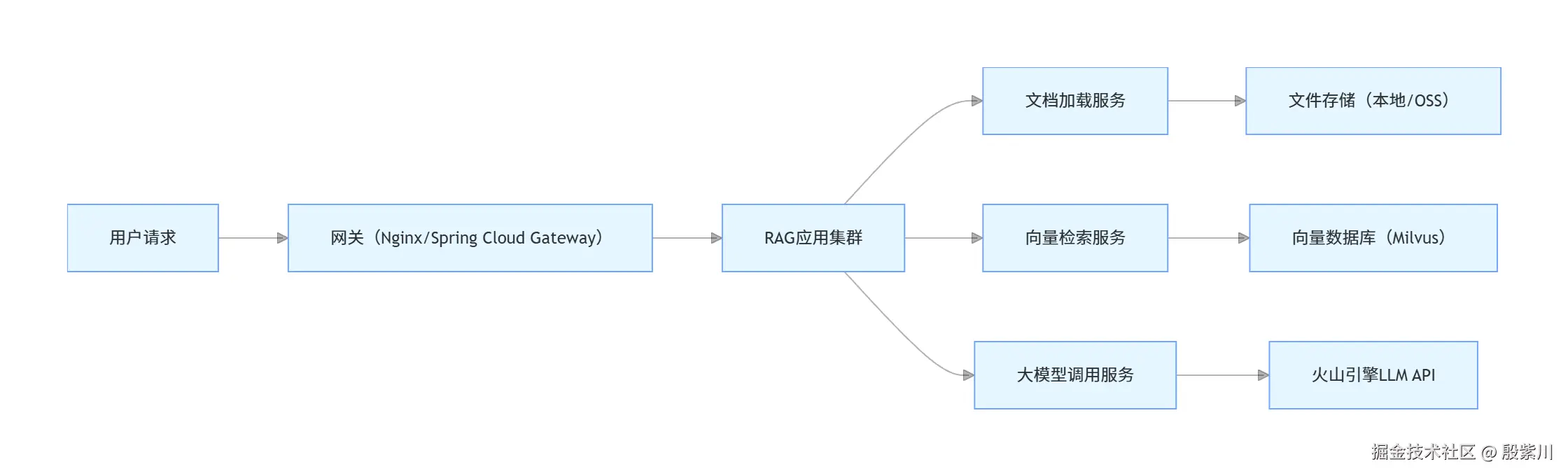
- 文档加载服务:独立部署,负责多源文档的加载和分割;
- 向量检索服务:独立部署,对接向量数据库,提供检索接口;
- 大模型调用服务:独立部署,封装不同厂商的LLM API,实现多模型兼容。
八、总结
RAG并非复杂的算法创新,而是工程化的架构思路------它将「检索」的精准性与「生成」的灵活性结合,解决了大模型落地的核心痛点。从实战角度看,RAG的效果取决于三个核心:文档处理的完整性、检索的精准性、提示词的合理性。在企业落地中,无需追求"大而全"的架构,可从简单场景(如单PDF文档问答)切入,逐步扩展多数据源、缓存、分布式等能力。同时,需结合业务场景持续调优:比如ToB场景需注重回答的准确性和合规性,ToC场景需兼顾回答的流畅性和时效性。 RAG的价值不仅在于解决当下的问题,更在于为LLM落地提供了"低成本、快速迭代"的路径------企业无需投入巨额算力做微调,只需维护好数据源,就能让大模型持续输出有价值的内容。这也是RAG成为当前LLM落地主流方案的核心原因。
📦 本文配套源码已备好,评论区留个言,我发你邮箱!