目录
[十一、PowerShell 专属命令](#十一、PowerShell 专属命令)
[⚠️ 常见陷阱](#⚠️ 常见陷阱)
[📊 分支发行版关系图](#📊 分支发行版关系图)
一、包管理器(核心差异)
关键差异: Linux 发行版最核心的区别在于包管理器。Debian 系用 APT,RHEL 系用 YUM/DNF,Arch 用 Pacman,macOS 用 Homebrew,Windows 用 Winget。
发行版包管理器对照
| 操作 | Debian/Ubuntu | RHEL/CentOS | Arch Linux | macOS | Windows |
|---|---|---|---|---|---|
| 安装包 | apt install nginx |
yum install nginx / dnf install nginx |
pacman -S nginx |
brew install nginx |
winget install Notepad++ |
| 卸载包 | apt remove nginx |
yum remove nginx |
pacman -R nginx |
brew uninstall nginx |
winget uninstall |
| 更新仓库 | apt update |
yum check-update |
pacman -Sy |
brew update |
winget source update |
| 升级全部 | apt upgrade |
yum update / dnf upgrade |
pacman -Syu |
brew upgrade |
winget upgrade --all |
| 搜索包 | apt search nginx |
yum search nginx |
pacman -Ss nginx |
brew search nginx |
winget search nginx |
| 包信息 | apt show nginx |
yum info nginx |
pacman -Qi nginx |
brew info nginx |
--- |
各发行版包管理详解
📌 Debian /Ubuntu( APT 生态)
apt update && apt upgrade          # 完整更新
apt autoremove                     # 清理无用依赖
dpkg -l | grep ^ii                # 查看已安装包
add-apt-repository ppa:user/repo   # 添加PPA源
apt-cache search nginx             # 搜索包
📌 RHEL / CentOS / Fedora ( YUM / DNF 生态)
dnf check-update                   # 检查更新(dnf)
dnf update                         # 升级(dnf)
yum info nginx                     # 包信息
yum localinstall package.rpm       # 本地rpm安装
firewall-cmd --list-all            # 防火墙(CentOS 7+)
📌 Arch Linux ( Pacman 生态)
pacman -Syu                        # 同步 + 全面更新
pacman -Ss nginx                   # 搜索远程仓库
pacman -Qs nginx                   # 搜索已安装
pacman -Rsc nginx                  # 彻底删除(含依赖)
makepkg -si                        # 编译AUR包
📌 macOS (Homebrew生态)
brew update && brew upgrade # 更新 brew doctor # 诊断 brew services list # 管理服务 xcode-select --install # 安装命令行工具 softwareupdate -i -a # 系统更新
二、系统信息查看
| 操作 | Linux (通用) | macOS | Windows |
|---|---|---|---|
| 内核版本 | uname -r |
uname -r |
ver (CMD) |
| 系统版本 | cat /etc/os-release |
sw_vers |
winver |
| 主机名 | hostname |
hostname |
hostname |
| CPU信息 | lscpu |
sysctl machdep.cpu.brand_string |
`systeminfo |
| 内存 | free -h |
`top -l 1 | grep Mem` |
| 磁盘使用 | df -h |
df -h |
wmic diskdrive get size |
| 开机时间 | uptime |
uptime |
`systeminfo |
| 当前用户 | whoami |
whoami |
echo %username% (CMD) |
三、网络命令
注意: Windows CMD 和 PowerShell 命令差异较大,Linux 与 macOS 命令基本兼容(少数如 traceroute 写法不同)。
| 操作 | Linux/macOS | Windows CMD | Windows PowerShell |
|---|---|---|---|
| 查 IP (本机) | ip addr / hostname -I |
ipconfig |
Get-NetIPAddress |
| DNS 解析 | nslookup google.com |
nslookup google.com |
Resolve-DnsName google.com |
| 测试连通 | ping google.com |
ping google.com |
Test-Connection google.com |
| 追踪路由 | traceroute google.com (Linux) |
tracert google.com |
Test-NetConnection -TraceRoute |
| 端口 扫描 | netstat -tuln / ss -tuln |
netstat -an |
Get-NetTCPConnection |
| 查 路由表 | ip route / route -n |
route print |
Get-NetRoute |
| WiFi列表 | nmcli device wifi list |
netsh wlan show networks |
netsh wlan show networks |
| 连接WiFi | nmcli d wifi connect "X" pw "Y" |
netsh wlan connect name="X" |
netsh wlan connect name="X" |
| 网络接口 | ip link / netstat -i |
ipconfig /all |
Get-NetAdapter |
macOS 特有: networksetup - 管理系统网络偏好(WiFi、以太网、VPN)。
四、进程管理
| 操作 | Linux/macOS | Windows |
|---|---|---|
| 进程列表 | ps aux |
tasklist |
| 实时监控 | top / htop |
taskmgr (GUI) / Get-Process |
| 后台进程 | jobs / fg / bg |
start /b (CMD批处理) |
| 杀进程 | kill PID / pkill name |
taskkill /PID 1234 |
| 强制杀 | kill -9 PID |
taskkill /F /PID 1234 |
| 按名称杀 | killall chrome |
taskkill /IM chrome.exe /F |
| 进程树 | pstree |
tasklist /FI "IMAGENAME eq chrome.exe" |
htop 补充(Linux): 比 top 更直观,支持鼠标操作,apt install htop。
五、文件与目录操作
| 操作 | Linux/macOS | Windows CMD | PowerShell |
|---|---|---|---|
| 列出文件 | ls -la |
dir |
Get-ChildItem |
| 切换目录 | cd /path |
cd C:\path |
Set-Location C:\path |
| 当前目录 | pwd |
cd |
Get-Location |
| 创建目录 | mkdir dir |
mkdir dir |
New-Item -ItemType Directory |
| 删除文件 | rm file |
del file |
Remove-Item file |
| 删除目录 | rm -rf dir |
rmdir /s /q dir |
Remove-Item -Recurse -Force |
| 复制文件 | cp src dst |
copy src dst |
Copy-Item src dst |
| 移动文件 | mv src dst |
move src dst |
Move-Item src dst |
| 查看文件 | cat / less / head / tail |
type file / more file |
Get-Content file |
| 查找文件 | find / -name "*.txt" |
dir /s *.txt |
Get-ChildItem -Recurse -Filter "*.txt" |
| 磁盘使用 | du -sh * |
dir /s |
`Get-ChildItem -Recurse |
六、用户与权限
| 操作 | Linux | macOS | Windows |
|---|---|---|---|
| 切换用户 | su - username |
su - username |
runas /user:Admin cmd |
| 提权执行 | sudo apt install nginx |
sudo nano /etc/hosts |
(UAC管理员权限) |
| 当前用户 | whoami |
whoami |
whoami |
| 用户列表 | cat /etc/passwd |
dscl . list /Users |
net user |
| 用户组 | groups / id |
id |
whoami /groups |
| 添加用户 | useradd -m user |
dscl . -create /Users/user |
net user add user pwd /add |
| sudoers配置 | visudo |
sudo visudo |
(本地安全策略) |
七、服务与守护进程
| 操作 | Debian/Ubuntu | RHEL/CentOS | macOS | Windows |
|---|---|---|---|---|
| 启动服务 | systemctl start nginx |
systemctl start nginx |
launchctl load |
net start ServiceName |
| 停止服务 | systemctl stop nginx |
systemctl stop nginx |
launchctl unload |
net stop ServiceName |
| 重启 服务 | systemctl restart nginx |
systemctl restart nginx |
--- | Restart-Service |
| 服务状态 | systemctl status nginx |
systemctl status nginx |
launchctl list |
sc query ServiceName |
| 开机自启 | systemctl enable nginx |
systemctl enable nginx |
sudo launchctl load -w |
sc config ServiceName start= auto |
systemd 补充: journalctl -u nginx -f 查看服务日志。RHEL/CentOS 7+ 全面使用 systemd。
八、压缩与归档
| 操作 | Linux/macOS | Windows |
|---|---|---|
| tar 打包 | tar -cvf archive.tar dir/ |
(PowerShell) Compress-Archive |
| tar 解压 | tar -xvf archive.tar |
(PowerShell) Expand-Archive |
| tar.gz | tar -czvf archive.tar.gz dir/ |
--- |
| zip 压缩 | zip -r archive.zip dir/ |
Compress-Archive -Path dir -DestinationPath archive.zip |
| zip 解压 | unzip archive.zip |
Expand-Archive archive.zip |
| 7z 压缩 | 7z a archive.7z dir/ |
7z a archive.7z dir/ |
九、常见系统路径对照
| 用途 | Linux | macOS | Windows |
|---|---|---|---|
| 主目录 | /home/username |
/Users/username |
C:\Users\username |
| 系统根目录 | / |
/ |
C:\ |
| 临时文件 | /tmp |
/tmp |
C:\Windows\Temp |
| 日志目录 | /var/log |
/var/log |
C:\Windows\Logs |
| hosts文件 | /etc/hosts |
/etc/hosts |
C:\Windows\System32\drivers\etc\hosts |
十、软件安装(编译类)
| 操作 | Debian/Ubuntu | RHEL/CentOS | Arch | macOS |
|---|---|---|---|---|
| 编译工具 | apt install build-essential |
yum groupinstall "Development Tools" |
pacman -S base-devel |
xcode-select --install |
| 从 源码 编译 | ./configure && make && make install |
同左 | 同左 | 同左 |
| 从 deb 安装 | dpkg -i package.deb |
--- | --- | --- |
| 从 rpm 安装 | --- | rpm -ivh package.rpm |
--- | --- |
| 添加仓库 | add-apt-repository ppa:xxx |
yum-config-manager --add-repo repo_url |
编辑 /etc/pacman.conf |
brew tap user/repo |
十一、PowerShell 专属命令
Get-Command                         # 列出所有命令
Get-Help Get-Process                # 查看命令帮助
Get-Process | Where-Object CPU -gt 10  # 筛选进程
Install-Module -Name Az            # 安装模块
Update-Help                         # 更新帮助文档
Get-EventLog -LogName System -Newest 10  # 查看事件日志
⚠️ 常见陷阱
-
Linux 大小写敏感 :
Desktop≠desktop≠DESKTOP -
macOS 路径分隔符 :虽然显示为
/,代码层也用/ -
Windows 路径反斜杠 :
dir C:\Users\admin\Documents -
权限拒绝 :Linux/macOS 用
sudo,Windows 以管理员身份运行 PowerShell -
换行符差异 :Linux/macOS 用
\n,Windows 用\r\n。跨平台传文件用dos2unix/unix2dos -
删除区别 :Linux
rm -rf很危险,Windowsdel /s /q同样危险
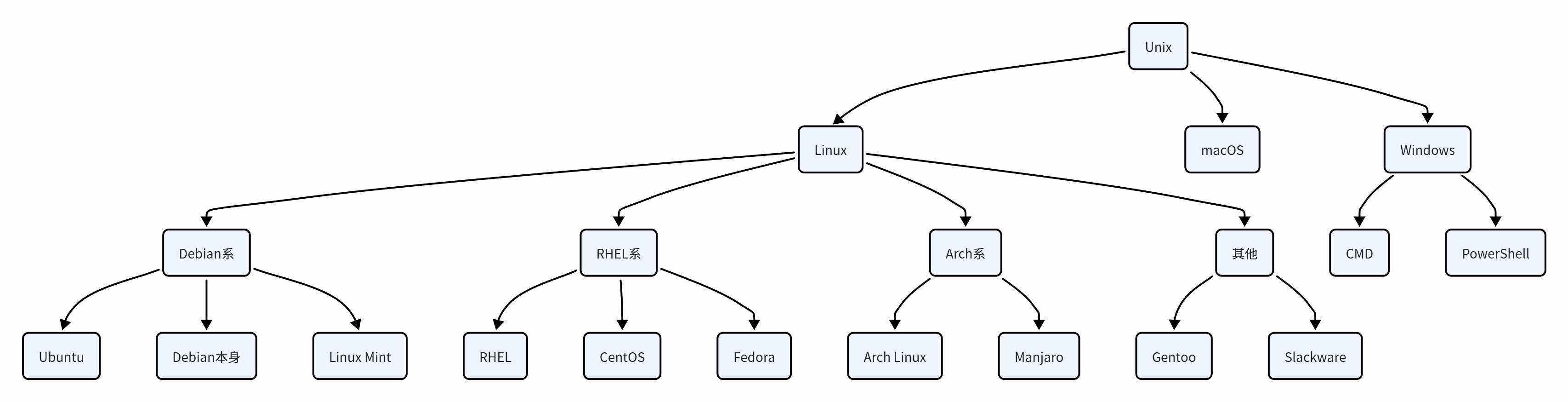
📊 分支发行版关系图