1、 安装Electron
在Vue项目 目录下,执行以下命令安装Electron:
npm install electron --save-dev
2、 创建Electron主进程
在Vue项目根目录下创建一个名为main .js的文件,该文件将作为Electron的主进程
javascript
const { app, BrowserWindow, Menu } = require('electron')
const path = require('path')

Menu.setApplicationMenu(null)
function createWindow () {
  const win = new BrowserWindow({
    width: 800,
    height: 600,
    webPreferences: {
      nodeIntegration: false,
      contextIsolation: true,
      sandbox: true,
      preload: path.join(__dirname, 'preload.js')
    },
    menu: null,

    // 🔥 双重保险:彻底关闭菜单
    autoHideMenuBar: true,
    frame: true, // 正常窗口(不想有标题栏可以改成 false)
    // 👇 最关键配置
    icon: path.join(__dirname, 'logo.ico')
  })
  win.setMenu(null)
  win.menuBarVisible = false
  win.loadFile(path.join(__dirname, 'dist/index.html'))
}

app.whenReady().then(() => {
  createWindow()
  app.on('activate', () => {
    if (BrowserWindow.getAllWindows().length === 0) {
      createWindow()
    }
  })
})

app.on('window-all-closed', () => {
  if (process.platform !== 'darwin') {
    app.quit()
  }
})
3. 配置打包参数
在项目 根目录下创建一个名为electron-builder.json的文件,用于配置打包参数
javascript
{
  "productName": "cdl", // 安装之后软件的名称
  "appId": "myapp",
  "directories": {
    "output": "release"
  },
  "files": [
    "dist/**/*",
    "main.js"
  ],
  "win": {
    "target": "nsis",
    "icon": "src/assets/icon.ico"
  }
}
4. 执行打包命令
在项目根目录下执行以下命令进行打包:
npm run electron:build
其他配置
background.js
javascript
'use strict'

import { app, protocol, BrowserWindow, Menu } from 'electron'
import { createProtocol } from 'vue-cli-plugin-electron-builder/lib'
import installExtension, { VUEJS_DEVTOOLS } from 'electron-devtools-installer'
const isDevelopment = process.env.NODE_ENV !== 'production'
Menu.setApplicationMenu(null)

// Scheme must be registered before the app is ready
protocol.registerSchemesAsPrivileged([
  { scheme: 'app', privileges: { secure: true, standard: true } }
])

async function createWindow () {
  // Create the browser window.
  const win = new BrowserWindow({
    width: 800,
    height: 600,
    webPreferences: {

      // Use pluginOptions.nodeIntegration, leave this alone
      // See nklayman.github.io/vue-cli-plugin-electron-builder/guide/security.html#node-integration for more info
      nodeIntegration: process.env.ELECTRON_NODE_INTEGRATION,
      contextIsolation: !process.env.ELECTRON_NODE_INTEGRATION
    }
  })

  if (process.env.WEBPACK_DEV_SERVER_URL) {
    // Load the url of the dev server if in development mode
    await win.loadURL(process.env.WEBPACK_DEV_SERVER_URL)
    if (!process.env.IS_TEST) win.webContents.openDevTools()
  } else {
    createProtocol('app')
    // Load the index.html when not in development
    win.loadURL('app://./index.html')
  }

  // 创建窗口时加入
  win.setMenu(null)
  win.menuBarVisible = false
}

// Quit when all windows are closed.
app.on('window-all-closed', () => {
  // On macOS it is common for applications and their menu bar
  // to stay active until the user quits explicitly with Cmd + Q
  if (process.platform !== 'darwin') {
    app.quit()
  }
})

app.on('activate', () => {
  // On macOS it's common to re-create a window in the app when the
  // dock icon is clicked and there are no other windows open.
  if (BrowserWindow.getAllWindows().length === 0) createWindow()
})

// This method will be called when Electron has finished
// initialization and is ready to create browser windows.
// Some APIs can only be used after this event occurs.
app.on('ready', async () => {
  if (isDevelopment && !process.env.IS_TEST) {
    // Install Vue Devtools
    try {
      await installExtension(VUEJS_DEVTOOLS)
    } catch (e) {
      console.error('Vue Devtools failed to install:', e.toString())
    }
  }
  createWindow()
})

// Exit cleanly on request from parent process in development mode.
if (isDevelopment) {
  if (process.platform === 'win32') {
    process.on('message', (data) => {
      if (data === 'graceful-exit') {
        app.quit()
      }
    })
  } else {
    process.on('SIGTERM', () => {
      app.quit()
    })
  }
}
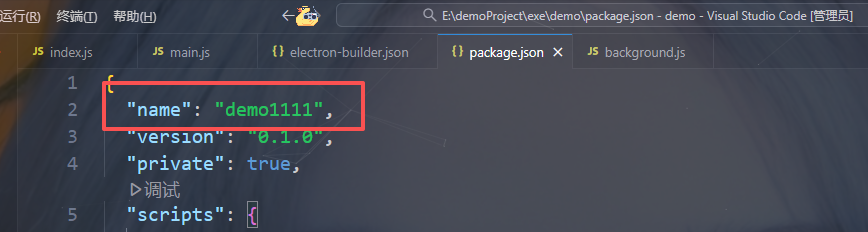
如果想要修改打开软件之后右上角显示的名字