需求描述
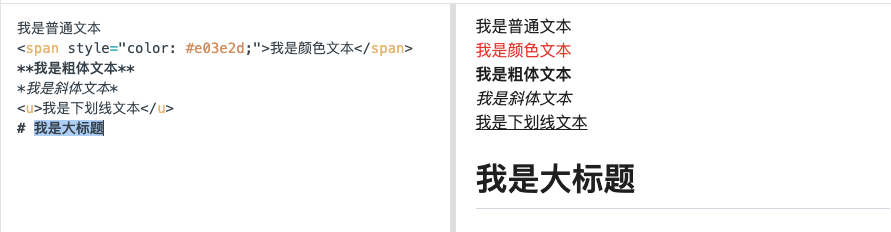
应用要求能够加载markdown文本,以及常规html标签。
组件高度自适应问题
JS端只设置组件宽度,不设置组件高度,我们期待组件高度跟随内容调整,使得内容能够完全显示出来。 但是JS端组件不设置高度和原生组件不调用setContentBoxMeasurement方法,那么组件高度就是默认0,组件将无法显示。其次由于是富文本,常规使用
java
setContentBoxMeasurement(new TextContentBoxMeasurement())将出现内容显示不全被裁减的问题,因为TextContentBoxMeasurement是通过给TextPaint画笔设置字体大小和行高来测量文本显示的Layout。MarkDown中有很多格式转义符(标签、*号、#号)等,这些仅用于配置文本的样式,如果将它们也纳入普通文本通过TextContentBoxMeasurement测量,那么必然测量出来的高度是有问题,尤其是插入了图片、标题等。
解决思路
原生组件使用ScrollerView包裹TextView,这样即便ScrollerView和其父层容器高度为0,Text View将也可以自由伸展,等TextView渲染完成后,我们拿到最新的TextView高度,将高度数据返回通知JS端去重新设置组件高度,这样就解决了高度自适应问题。
java
@Override
    protected FrameLayout initComponentHostView(@NonNull Context context) {
        // 外层侦布局
        FrameLayout layout = new FrameLayout(context);
        // 可滚动布局【用于让文本组件可自由伸展】
        ScrollView scrollView = new ScrollView(context);
        // 设置滚动布局高度撑满,即JS设置多高,它便有多高
        ViewGroup.LayoutParams params =
                new ViewGroup.LayoutParams(ViewGroup.LayoutParams.MATCH_PARENT, ViewGroup.LayoutParams.MATCH_PARENT);
        scrollView.setLayoutParams(params);
        // 隐藏可滚动条,禁止滚动,拦截滚动事件
        scrollView.setVerticalScrollBarEnabled(false);
        scrollView.setOverScrollMode(View.OVER_SCROLL_NEVER);
        scrollView.setOnTouchListener((v, event) -> true);
        // 创建文本显示组件
        this.mTextView = new TextView(context);
        ViewGroup.LayoutParams textParams =
                new ViewGroup.LayoutParams(ViewGroup.LayoutParams.MATCH_PARENT, ViewGroup.LayoutParams.WRAP_CONTENT);
        this.mTextView.setLayoutParams(textParams);
        // 添加文本组件布局变化监听
        this.mTextView.addOnLayoutChangeListener(new View.OnLayoutChangeListener() {
            @Override
            public void onLayoutChange(View v, int left, int top, int right, int bottom, int oldLeft, int oldTop, int oldRight, int oldBottom) {
                int actualHeight = bottom - top;
                if (actualHeight > 0 && lastLayoutHeight != actualHeight) {
                    // fireEvent 通知Weex JS或者native,让上层刷新使用最新测量的实际高度
                    // JS端接收后,请重新设置高度
                    Map<String, Object> params = new HashMap<>();
                    params.put("height", WXViewUtils.getWebPxByWidth(actualHeight));
                    fireEvent("onRealHeight", params);
                }
            }
        });
        scrollView.addView(this.mTextView);
        layout.addView(scrollView);
        return layout;
    }
JS端:
html
<Markdown
  class="richtext"
  :style="{height: maxValue || 'auto'}"
  :content="content"
  @onRealHeight="handleOnRealHeight"
/>
css
.richtext {
  font-size: 26px;
  color: #666666;
  line-height: 40px;
}
javascript
handleOnRealHeight (params) {
  const newHeight = params.height
  if (newHeight > this.maxValue) {
    this.maxValue = newHeight
  }
}