Spring AI + Milvus 实战:从零构建 RAG 智能问答系统
技术栈一览
- 后端框架:Spring Boot 3.5.11
- AI 框架:Spring AI 1.1.4
- 向量数据库:Milvus 2.6.0 (RPM 安装)
- JDK 版本:17+
- API 服务:硅基流动 (SiliconFlow)

📌 前言:为什么需要 RAG?
大语言模型(LLM)虽然强大,但存在两个致命短板:
- 幻觉问题:会"一本正经地胡说八道"
- 知识盲区:无法访问私有数据或实时信息
RAG(检索增强生成) 技术正是解决这些问题的最佳方案。
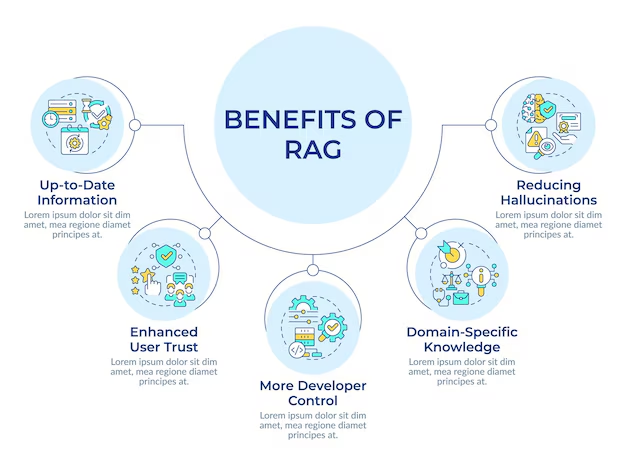
🎯 一、RAG 核心架构速览
1.1 什么是 RAG?
RAG 的核心思想是 "先检索,后生成" ------ 让大模型在回答前先查阅"参考资料"。
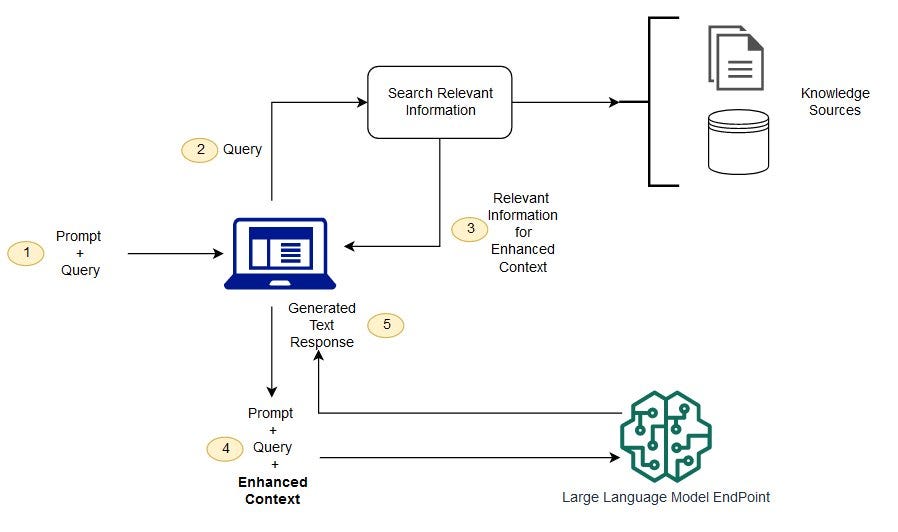
1.2 工作流程拆解
| 阶段 | 动作 | 说明 |
|---|---|---|
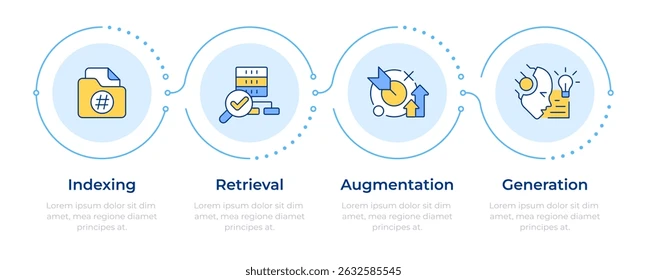
| ① 数据摄入 | 文档 → 向量 | 将私有知识库文档"翻译"成向量,存入 Milvus |
| ② 用户提问 | 问题 → 向量 | 将用户问题也转换成向量 |
| ③ 相似检索 | 向量匹配 | 在 Milvus 中寻找最相似的文档片段 |
| ④ 增强生成 | 上下文 + LLM | 将检索结果作为上下文,交给大模型生成答案 |
1.3 向量数据库的作用
向量数据库是 RAG 的"记忆中枢"。它将文本转换成高维向量,实现语义级搜索:
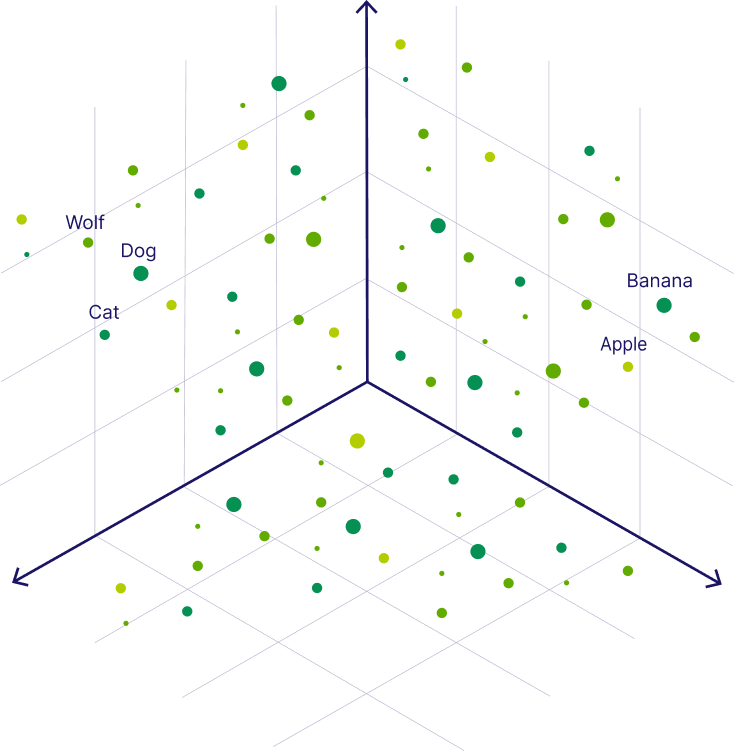
💡 通俗理解:语义相似的文本在向量空间中距离更近。比如"狗"和"狼"的向量距离,比"狗"和"苹果"更近。
🐳 二、环境准备:使用 RPM 安装 Milvus 2.6.0
2.1 为什么选择 RPM 安装?
| 安装方式 | 适用场景 | 优缺点 |
|---|---|---|
| RPM 包 | 生产环境 | 与 systemd 集成好,便于运维管理 |
| Docker | 开发测试 | 需要额外安装 Docker,有性能损耗 |
| 源码编译 | 深度定制 | 编译耗时,依赖复杂 |
2.2 系统要求检查
bash
# 检查操作系统版本
cat /etc/os-release

# 检查 libstdc++ 版本(需要 8.5.0+)
strings /usr/lib64/libstdc++.so.6 | grep GLIBCXX
2.3 下载并安装 Milvus
bash
# 下载 Milvus 2.6.0 RPM 包
wget https://github.com/milvus-io/milvus/releases/download/v2.6.0/milvus_2.6.0-1_amd64.rpm -O milvus_2.6.0-1_amd64.rpm

# 使用 yum 安装(自动解决依赖)
sudo yum install -y ./milvus_2.6.0-1_amd64.rpm
2.4 服务管理
bash
# 启动 Milvus 服务
sudo systemctl start milvus

# 查看运行状态
sudo systemctl status milvus预期输出:
● milvus.service - Milvus Server
   Loaded: loaded (/lib/systemd/system/milvus.service; enabled)
   Active: active (running) since ...
bash
# 设置开机自启(推荐)
sudo systemctl enable milvus

# 停止服务
sudo systemctl stop milvus验证安装:
shell
# 验证安装
curl http://127.0.0.1:9091/api/v1/health
2.5 网络配置
bash
# 开放 19530 端口(gRPC 业务端口)
sudo firewall-cmd --zone=public --add-port=19530/tcp --permanent
sudo firewall-cmd --reload

# 验证端口连通性
nc -zv localhost 19530
⚠️ 端口说明:
19530:gRPC 端口,Java SDK 连接用此端口9091:HTTP 端口,仅用于健康检查
2.6 配置文件速查
| 文件类型 | 路径 |
|---|---|
| 主程序 | /usr/bin/milvus |
| 配置文件 | /etc/milvus/configs/milvus.yaml |
| Systemd 服务 | /lib/systemd/system/milvus.service |
| 依赖库 | /usr/lib/milvus/ |
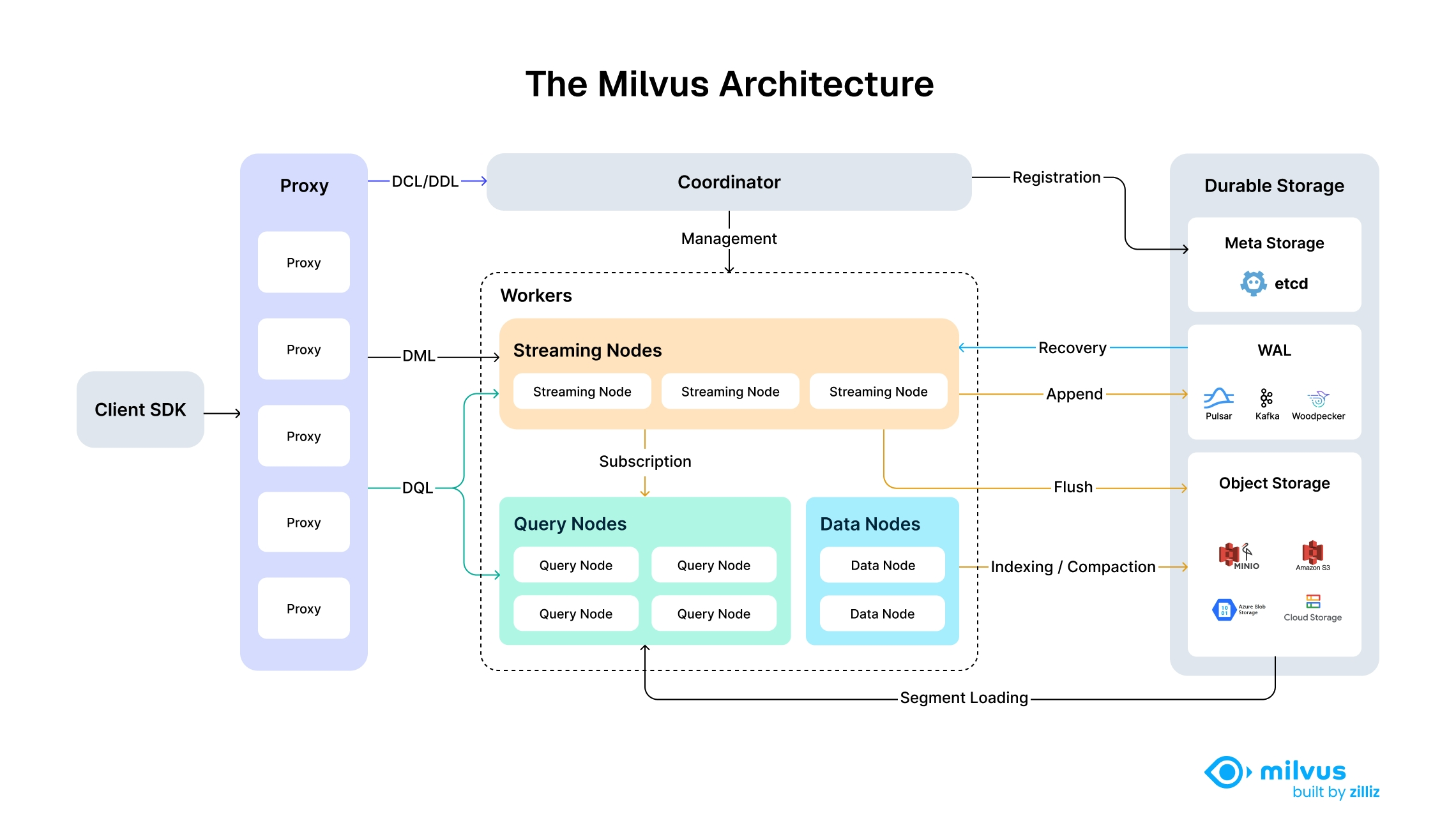
🚀 三、创建 Spring Boot 项目
3.1 项目结构预览
springboot-ai-rag-milvus/
├── src/main/java/com/example/rag/
│   ├── SpringbootAiRagMilvusApplication.java  # 启动类
│   ├── config/                                # 配置类
│   ├── controller/                            # API 接口
│   ├── service/                               # 业务逻辑
│   └── core/                                  # 核心组件
├── src/main/resources/
│   ├── application.yml                        # 配置文件
│   └── data/test-knowledge.txt               # 测试文档
└── pom.xml                                    # Maven 配置
3.2 Maven 依赖配置
xml
<?xml version="1.0" encoding="UTF-8"?>
<project xmlns="http://maven.apache.org/POM/4.0.0"
         xmlns:xsi="http://www.w3.org/2001/XMLSchema-instance"
         xsi:schemaLocation="http://maven.apache.org/POM/4.0.0
         http://maven.apache.org/xsd/maven-4.0.0.xsd">
    <modelVersion>4.0.0</modelVersion>

    <parent>
        <groupId>org.springframework.boot</groupId>
        <artifactId>spring-boot-starter-parent</artifactId>
        <version>3.5.11</version>
        <relativePath/>
    </parent>

    <groupId>com.example</groupId>
    <artifactId>springboot-ai-rag-milvus</artifactId>
    <version>1.0.0</version>

    <properties>
        <java.version>17</java.version>
        <spring-ai.version>1.1.4</spring-ai.version>
    </properties>

    <dependencies>
        <!-- Spring Boot Web -->
        <dependency>
            <groupId>org.springframework.boot</groupId>
            <artifactId>spring-boot-starter-web</artifactId>
        </dependency>

        <!-- Spring AI OpenAI(调用硅基流动 API) -->
        <dependency>
            <groupId>org.springframework.ai</groupId>
            <artifactId>spring-ai-openai-spring-boot-starter</artifactId>
        </dependency>

        <!-- Spring AI Milvus 向量存储 -->
        <dependency>
            <groupId>org.springframework.ai</groupId>
            <artifactId>spring-ai-starter-vector-store-milvus</artifactId>
        </dependency>

        <!-- 文档解析器(支持 PDF/Word/HTML 等) -->
        <dependency>
            <groupId>org.springframework.ai</groupId>
            <artifactId>spring-ai-tika-document-reader</artifactId>
        </dependency>

        <!-- Lombok(简化代码) -->
        <dependency>
            <groupId>org.projectlombok</groupId>
            <artifactId>lombok</artifactId>
            <optional>true</optional>
        </dependency>
    </dependencies>

    <dependencyManagement>
        <dependencies>
            <!-- Spring AI BOM 统一管理版本 -->
            <dependency>
                <groupId>org.springframework.ai</groupId>
                <artifactId>spring-ai-bom</artifactId>
                <version>${spring-ai.version}</version>
                <type>pom</type>
                <scope>import</scope>
            </dependency>
        </dependencies>
    </dependencyManagement>

    <repositories>
        <repository>
            <id>spring-milestones</id>
            <name>Spring Milestones</name>
            <url>https://repo.spring.io/milestone</url>
            <snapshots>
                <enabled>false</enabled>
            </snapshots>
        </repository>
    </repositories>
</project>
3.3 核心配置文件
yaml
spring:
  application:
    name: springboot-ai-rag-milvus

  ai:
    openai:
      # 硅基流动 API 配置
      api-key: sk-xxxxxxxxxxxxxxxxxxxxxxxxxxxxx  # 替换为你的 API Key
      base-url: https://api.siliconflow.cn

      chat:
        options:
          model: deepseek-ai/DeepSeek-R1-Distill-Qwen-7B  # 对话模型
          temperature: 0.7

      embedding:
        options:
          model: Qwen/Qwen3-Embedding-8B  # 必须选嵌入模型(向量化用)

    vectorstore:
      milvus:
        client:
          host: localhost          # Milvus 地址
          port: 19530              # gRPC 端口 ⚠️ 注意不是 9091
          connect-timeout-ms: 20000
        database-name: default
        collection-name: "vector_store"
        embedding-dimension: 4096   # 必须与嵌入模型维度一致
        index-type: IVF_FLAT
        metric-type: COSINE
        initialize-schema: true     # 自动创建集合

  servlet:
    multipart:
      max-file-size: 50MB
      max-request-size: 50MB
⚠️ 关键配置说明:
配置项 说明 常见错误 embedding-dimension向量维度 必须与模型输出维度一致(Qwen3-Embedding-8B 是 4096) port连接端口 必须用 19530(gRPC),不要用 9091 initialize-schema自动建表 首次启动设为 true,之后可设为 false
3.4 启动类
java
package com.example.rag;

import org.springframework.boot.SpringApplication;
import org.springframework.boot.autoconfigure.SpringBootApplication;

@SpringBootApplication
public class SpringbootAiRagMilvusApplication {
    public static void main(String[] args) {
        SpringApplication.run(SpringbootAiRagMilvusApplication.class, args);
    }
}
💻 四、核心代码实现
4.1 知识库加载服务
负责在应用启动时自动加载文档到 Milvus:
java
package com.example.rag.core;

import lombok.extern.slf4j.Slf4j;
import org.springframework.ai.document.Document;
import org.springframework.ai.reader.tika.TikaDocumentReader;
import org.springframework.ai.transformer.splitter.TokenTextSplitter;
import org.springframework.ai.vectorstore.VectorStore;
import org.springframework.beans.factory.annotation.Autowired;
import org.springframework.boot.context.event.ApplicationReadyEvent;
import org.springframework.context.event.EventListener;
import org.springframework.core.io.ClassPathResource;
import org.springframework.stereotype.Component;

import java.util.List;


@Slf4j
@Component
public class KnowledgeBaseLoader {

    @Autowired
    private VectorStore vectorStore;

    @EventListener(ApplicationReadyEvent.class)
    public void loadDocumentsOnStartup() {
        try {
            // 读取 classpath 下的测试文档
            ClassPathResource resource = new ClassPathResource("data/test-knowledge.txt");
            TikaDocumentReader reader = new TikaDocumentReader(resource);

            // 分割文档
            TokenTextSplitter splitter = new TokenTextSplitter();
            List<Document> documents = splitter.apply(reader.read());

            // 存入 Milvus
            vectorStore.add(documents);
            log.info("成功加载 {} 个文档片段到知识库。", documents.size());
        } catch (Exception e) {
            log.error("加载文档失败", e);
        }
    }
}代码逻辑图解:
文档文件 → TikaDocumentReader → 原始文本 → TokenTextSplitter → 文本片段 → VectorStore → Milvus4.2 RAG 核心服务
实现"检索 + 生成"的完整流程:
java
package com.example.rag.service;

import org.springframework.ai.chat.client.ChatClient;
import org.springframework.ai.chat.prompt.PromptTemplate;
import org.springframework.ai.document.Document;
import org.springframework.ai.vectorstore.SearchRequest;
import org.springframework.ai.vectorstore.VectorStore;
import org.springframework.beans.factory.annotation.Autowired;
import org.springframework.stereotype.Service;

import java.util.List;
import java.util.Map;
import java.util.stream.Collectors;

@Service
public class RAGService {

    private final ChatClient chatClient;
    private final VectorStore vectorStore;

    @Autowired
    public RAGService(ChatClient.Builder chatClientBuilder, VectorStore vectorStore) {
        this.chatClient = chatClientBuilder.build();
        this.vectorStore = vectorStore;
    }

    public String ask(String question) {
        //  从 Milvus 检索与问题最相关的 5 个文档片段
        SearchRequest searchRequest = SearchRequest.builder()
                .query(question)  // 查询文本
                .topK(5)          // 指定返回的最相似文档数量
                .build();
        List<Document> documents = vectorStore.similaritySearch(searchRequest);
        List<String> context = documents.stream()
                .map(Document::getText)
                .collect(Collectors.toList());

        // 构建 Prompt
        PromptTemplate promptTemplate = new PromptTemplate("""
                请根据以下背景信息回答用户的问题。如果背景信息不包含答案,请说明"依据现有资料无法回答"。

                ### 背景信息:
                {context}

                ### 用户问题:
                {question}

                ### 回答:
                """);

        // 调用 LLM 生成答案
        return chatClient.prompt(promptTemplate.create(Map.of("context", context, "question", question)))
                .call()
                .content();
    }

}
RAG 流程可视化:
用户问题 ──┬──→ 向量化 ──→ Milvus 检索 ──┬──→ 组装 Prompt ──→ LLM ──→ 生成答案
           │                            │
           └────────────────────────────┘
                    (检索结果作为上下文)
4.3 REST API 接口
java
package com.example.rag.controller;

import com.example.rag.service.RAGService;
import org.springframework.beans.factory.annotation.Autowired;
import org.springframework.web.bind.annotation.*;

@RestController
@RequestMapping("/api/rag")
public class RAGController {

    @Autowired
    private RAGService ragService;

    @PostMapping("/ask")
    public String askQuestion(@RequestBody String question) {
        return ragService.ask(question);
    }
}
🧪 五、测试与验证
5.1 准备测试文档
创建 src/main/resources/data/test-knowledge.txt:
Spring AI 是一个用于简化 AI 应用开发的 Spring 框架扩展。
它提供了与多种大语言模型和向量数据库的集成抽象,让 Java 开发者
能够快速构建智能应用。

Milvus 是一款开源的向量数据库,专为海量向量数据的存储、索引和
相似性搜索而设计。它支持多种索引类型和距离计算方式,能够处理
十亿级向量数据。

RAG(检索增强生成)是一种将信息检索与大语言模型生成相结合的技术。
它通过先检索相关知识,再基于检索结果生成答案,能够有效缓解大模型
的幻觉问题,并使其能够处理私有或实时更新的知识。
5.2 运行测试
java
package com.example.rag;

import com.example.rag.service.RAGService;
import org.junit.jupiter.api.Test;
import org.springframework.beans.factory.annotation.Autowired;
import org.springframework.boot.test.context.SpringBootTest;

@SpringBootTest
class RAGApplicationTests {

    @Autowired
    private RAGService ragService;

   @Test
    void testRAGFlow() throws IOException {
        // 执行 RAG 提问
        String question = "什么是 RAG?它的主要作用是什么?";
        String answer = ragService.ask(question);
        System.out.println("用户问题: " + question);
        System.out.println("模型回答: " + answer);
    }
}
5.3 预期输出
❓ 用户问题:什么是 RAG?它的主要作用是什么?
💡 模型回答:
RAG(Retrieval-Augmented Generation,检索增强生成)是一种将信息检索与大语言模型生成相结合的技术。
在 RAG 流程中,系统首先从向量数据库中检索与用户问题最相关的文档片段(上下文),然后将这些上下文与用户问题一起提供给大语言模型,使模型能够基于外部知识生成更准确、更可靠的答案。这种技术能够有效缓解大模型的幻觉问题,并使其能够处理私有或实时更新的知识。
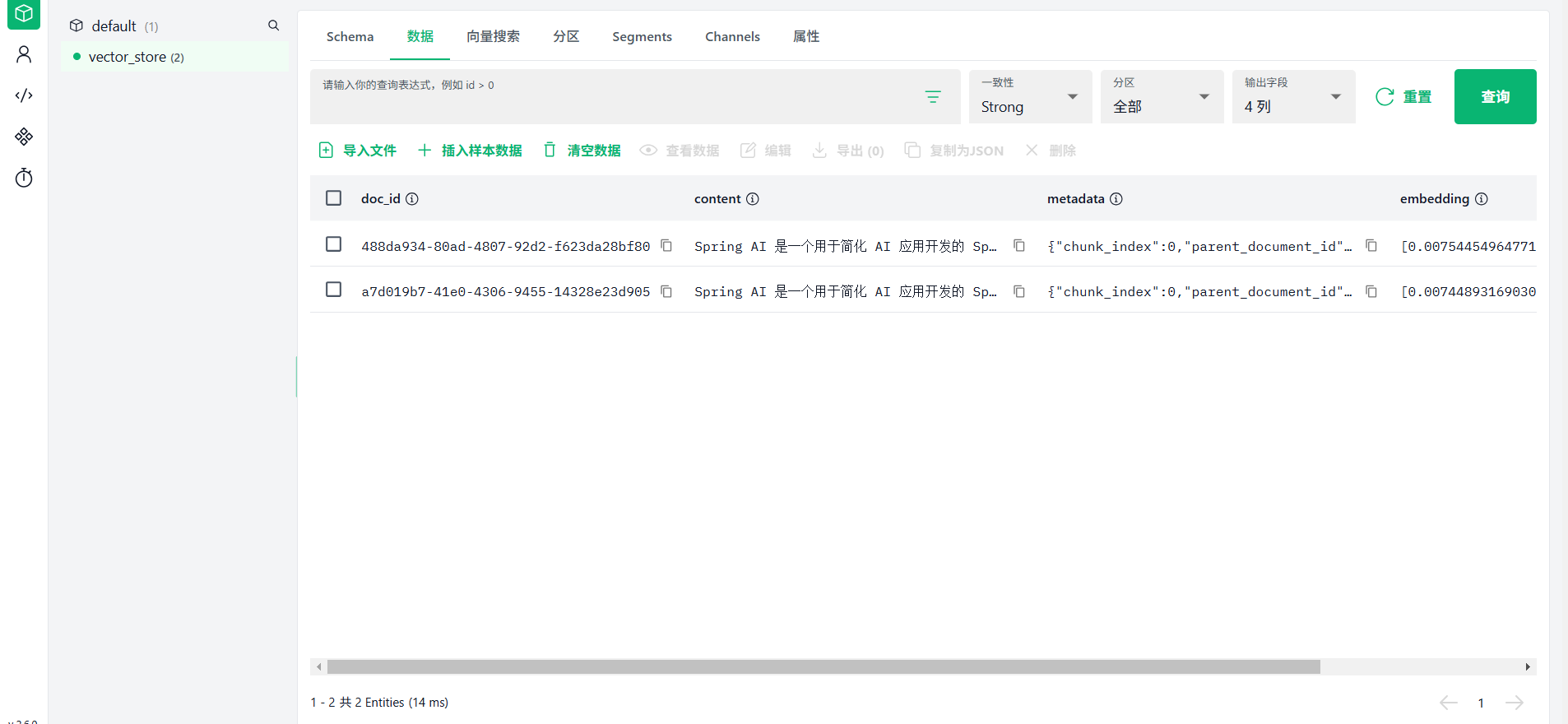
使用attu2.6.0版本登录127.0.0.1:19530查看,可以看到文档内容写到向量数据库
🔧 六、常见问题与排错指南
6.1 连接类错误
| 错误信息 | 原因 | 解决方案 |
|---|---|---|
DEADLINE_EXCEEDED |
端口配置错误或网络不通 | 检查 port: 19530,使用 nc -zv 测试连通性 |
Could not resolve host |
CentOS 8 镜像源下线 | 切换到阿里云 vault 镜像源 |
6.2 维度不匹配错误
错误现象:
ParamException: Incorrect dimension
the no.0 vector's dimension: 4096 is not equal to field's dimension: 1536解决方案:
yaml
# 1. 确认嵌入模型维度(Qwen3-Embedding-8B = 4096)
# 2. 修改配置
spring:
  ai:
    vectorstore:
      milvus:
        embedding-dimension: 4096  # 必须与模型一致

# 3. 删除旧 Collection,让 Spring AI 自动重建
6.3 模型不存在错误
错误现象 :HTTP 400 - Model does not exist
解决方案:
yaml
# 使用经过验证的可用模型
spring:
  ai:
    openai:
      chat:
        options:
          model: deepseek-ai/DeepSeek-R1-Distill-Qwen-7B  # 或 DeepSeek-R1-Distill-Qwen-7B
      embedding:
        options:
          model: Qwen/Qwen3-Embedding-8B  # 备选嵌入模型
6.4 重复加载问题
问题:每次重启都重新加载知识库
解决方案:
java
@EventListener(ApplicationReadyEvent.class)
public void loadDocumentsOnStartup() {
    // 添加存在性检查,避免重复加载
    if (vectorStore.isEmpty()) {  // 伪代码,实际需自行实现检查逻辑
        // 执行加载...
    }
}
🎉 总结与展望
已完成的里程碑
基础设施 :使用 RPM 包安装并运行 Milvus 2.6.0
应用框架 :Spring Boot 3.5.11 + Spring AI 1.1.4 集成
模型接入 :硅基流动 API(对话 + 嵌入模型)
RAG 流程:文档加载 → 向量化 → 语义检索 → 增强生成
生产优化建议
| 优化方向 | 技术方案 | 效果 |
|---|---|---|
| 混合检索 | BM25 关键词 + 向量检索 | 召回率提升 20-30% |
| 重排序 | 使用 Cross-Encoder 精排 | 准确率提升 15-25% |
| 对话记忆 | 引入 ChatMemory 组件 | 支持多轮上下文 |
| 缓存加速 | Redis 缓存高频查询 | 响应时间降低 50%+ |
架构演进路线
当前阶段:基础 RAG
    ↓
下一阶段:多路召回 + 重排序
    ↓
高级阶段:Agentic RAG(带工具调用和自主规划)参考资源:
希望这篇优化后的指南能帮助你顺利构建企业级 RAG 应用!如有问题,欢迎在评论区交流。