在服务端PHP语言使用天地图
目录
使用天地图
注册天地图
注册地址:https://passport.tianditu.gov.cn/register
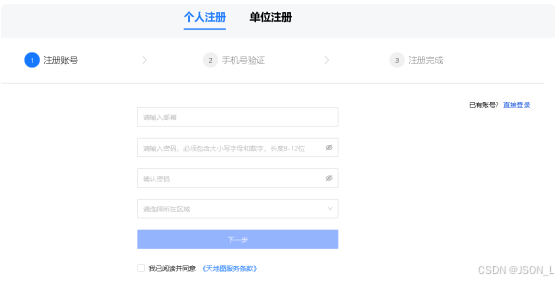
选择个人注册 填写信息
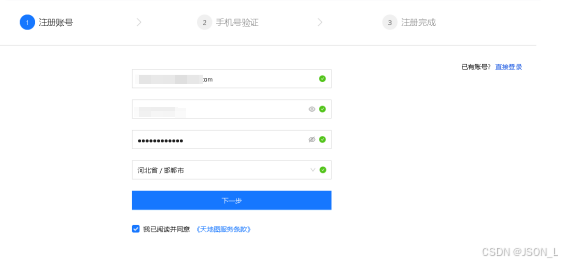
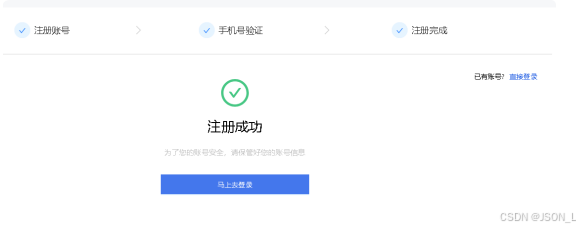
手机号验证,注册成功
开发者认证
注册后直接选择注册的账号和密码进行登录,然后选择开发者认证,如下图:
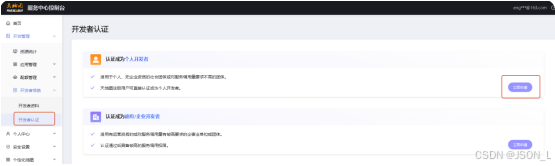
选择立即申请

创建应用
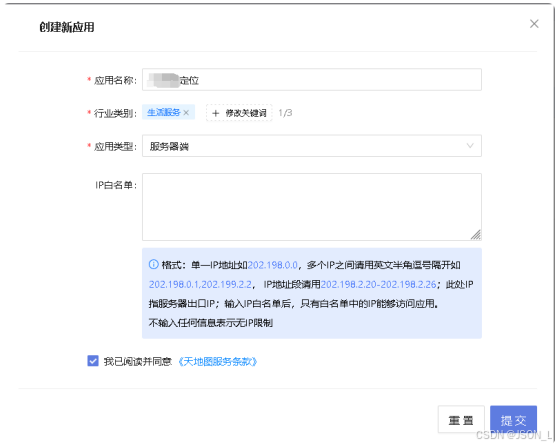
在开发管理>我的应用中选择创建新应用,如下图:
获取key
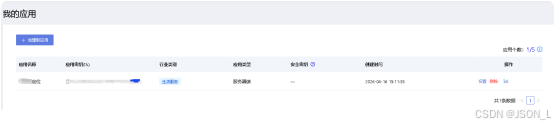
在创建的应用列表中选择应用密钥复制,以备用。
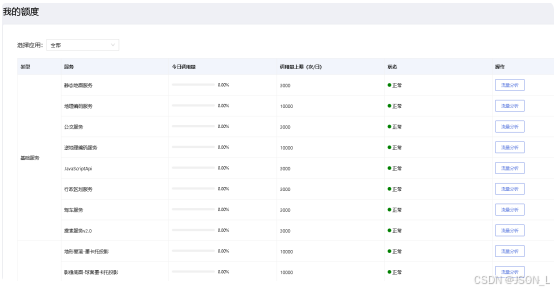
查看我的额度
使用地图API
逆地理编码查询
简介
天地图逆地理服务API是一类简单的HTTP/HTTPS接口,提供将坐标点(经纬度)转换为结构化的地址信息的功能。
使用逆地理编码服务前您需要申请Key。
请求接口
|-------------|--------------|--------------|--------------|------------|
| 参数值 | 参数说明 | 参数类型 | 是否必备 | 备注 |
| lon | 坐标的x值 | string | 是 | |
| lat | 坐标的y值 | string | 是 | |
| appkey | 网站的唯一编码 | string | 是 | |
| ver | 接口版本 | string | 是 | |
请求示例
bash
http://api.tianditu.gov.cn/geocoder?postStr={'lon':116.37304,'lat':39.92594,'ver':1}&type=geocode&tk=您的密钥返回:
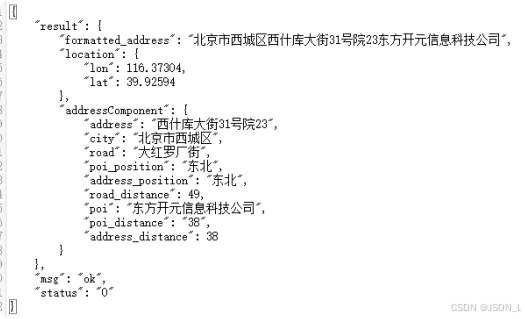
响应接口
|-------------|--------------|---------------------------|--------------|--------------------|
| 参数值 | 参数说明 | 参数类型 | 返回条件 | 备注 |
| result | 响应的具体信息 | Json | 有结果时返回 | |
| status | 状态 | String(0:正确,1:错误,404:出错。) | 必返回 | |
| msg | 响应信息是否有 | String(OK:有信息) | 必返回 | Status=404时返回错误信息。 |
result:
|-------------------|--------------|--------------|--------------|------------|
| 参数值 | 参数说明 | 参数类型 | 返回条件 | 备注 |
| addressComponent | 此点的具体信息(分类) | Json | 必返回 | |
| formatted_address | 详细地址 | String | 必返回 | |
| location | 此点坐标 | Json | 必返回 | -180。 |
addressComponent
|------------------|---------------|--------------|--------------|------------|
| 参数值 | 参数说明 | 参数类型 | 返回条件 | 备注 |
| address | 此点最近地点信息 | string | 必返回 | |
| address_distince | 此点距离最近地点信息距离 | int | 必返回 | |
| address_position | 此点在最近地点信息方向 | string | 必返回 | |
| city | 此点所在国家或城市或区县 | string | 必返回 | |
| poi | 距离此点最近poi点 | string | 必返回 | |
| poi_distince | 距离此点最近poi点的距离 | int | 必返回 | |
| poi_position | 此点在最近poi点的方向 | string | 必返回 | |
| road | 距离此点最近的路 | string | 必返回 | |
| road_distince | 此点距离此路的距离 | int | 必返回 | |
location:
|-------------|--------------|--------------|--------------|------------|
| 参数值 | 参数说明 | 参数类型 | 返回条件 | 备注 |
| lon | 此点坐标x值 | string | 必返回 | |
| lat | 此点坐标y值 | string | 必返回 | |
封装逆地理编码查询
设置配置
在项目.env文件中增加天地图API 密钥,如下:
bash
[tianditu]
# 天地地图API密钥
appkey=你的密钥
注意:因为我是在服务器端使用,所以创建应用时要选择服务器端。
浏览器访问的话,创建应用时选择浏览器端,
然后直接地址栏拼接好参数访问即可。
封装地图类
在Fastadmin中的common下的library中创建TianMap.php,
内容如下:
php
<?php

namespace app\common\library;

use think\Env;
use think\Exception;

/**
 * 天地图逆地理编码服务类
 * 提供将坐标点(经纬度)转换为结构化地址信息的功能
 */
class TianMap
{

    /**
     * API 请求地址
     * @var string
     */
    protected static $apiUrl = 'http://api.tianditu.gov.cn/geocoder';

    /**
     * API 密钥(需要在配置文件中设置)
     * @var string
     */
    protected static $appKey = '';

    /**
     * 接口版本号
     * @var string
     */
    protected static $version = '1';

    /**
     * 初始化配置
     */
    public static function init()
    {
        self::$appKey = Env::get('tianditu.appkey');
    }

    /**
     * 逆地理编码查询
     * 将经纬度坐标转换为结构化地址信息
     *
     * @param float $lon 经度(x 坐标)
     * @param float $lat 纬度(y 坐标)
     * @param string $appKey API 密钥(可选,为空时使用默认配置)
     * @return array 返回地址信息数组
     * @throws Exception
     *
     * @example
     * $result = TianMap::reverseGeocode(116.37304, 39.92594);
     * // 返回示例:
     * // [
     * //     'status' => '0',
     * //     'msg' => 'OK',
     * //     'result' => [
     * //         'formatted_address' => '北京市东城区 xxx',
     * //         'addressComponent' => [...],
     * //         'location' => [...]
     * //     ]
     * // ]
     */
    public static function reverseGeocode($lon, $lat, $appKey = '')
    {
        // 验证参数
        if (!is_numeric($lon) || !is_numeric($lat)) {
            throw new Exception('经纬度参数必须为数字');
        }

        // 验证经度范围
        if ($lon < -180 || $lon > 180) {
            throw new Exception('经度超出有效范围 (-180 到 180)');
        }

        // 验证纬度范围
        if ($lat < -90 || $lat > 90) {
            throw new Exception('纬度超出有效范围 (-90 到 90)');
        }

        // 初始化配置
        if (empty(self::$appKey)) {
            self::init($appKey);
        }

        if (empty(self::$appKey)) {
            throw new Exception('请先配置天地图 API 密钥(appkey)');
        }

        // 构建请求参数
        $postData = [
            'lon' => $lon,
            'lat' => $lat,
            'ver' => self::$version,
        ];

        $params = [
            'postStr' => json_encode($postData),
            'type'    => 'geocode',
            'tk'      => self::$appKey
        ];

        // 发送 HTTP 请求
        $result = self::sendRequest($params);

        return $result;
    }

    /**
     * 发送 HTTP 请求到天地图 API
     *
     * @param array $params 请求参数
     * @return array 返回解析后的 JSON 响应
     * @throws Exception
     */
    protected static function sendRequest($params)
    {
        // 构建请求 URL
        $url = self::$apiUrl . '?' . http_build_query($params);
        // 初始化 cURL
        $ch = curl_init();
        curl_setopt($ch, CURLOPT_URL, $url);
        curl_setopt($ch, CURLOPT_RETURNTRANSFER, true);
        curl_setopt($ch, CURLOPT_TIMEOUT, 30);
        curl_setopt($ch, CURLOPT_SSL_VERIFYPEER, false);
        curl_setopt($ch, CURLOPT_SSL_VERIFYHOST, false);

        // 执行请求
        $response = curl_exec($ch);
        $httpCode = curl_getinfo($ch, CURLINFO_HTTP_CODE);
        $error = curl_error($ch);
        curl_close($ch);

        // 检查请求是否成功
        if ($response === false) {
            throw new Exception('天地图 API 请求失败:' . $error);
        }

        if ($httpCode != 200) {
            throw new Exception('天地图 API 返回错误,HTTP 状态码:' . $httpCode);
        }

        // 解析 JSON 响应
        $result = json_decode($response, true);
        if (json_last_error() !== JSON_ERROR_NONE) {
            throw new Exception('天地图 API 响应解析失败:' . json_last_error_msg());
        }

        return $result;
    }

    /**
     * 获取格式化的地址
     *
     * @param float $lon 经度
     * @param float $lat 纬度
     * @param string $appKey API 密钥
     * @return string 格式化地址,失败时返回空字符串
     */
    public static function getFormattedAddress($lon, $lat, $appKey = '')
    {
        try {
            $result = self::reverseGeocode($lon, $lat, $appKey);
            if (isset($result['status']) && $result['status'] == '0' && isset($result['result']['formatted_address'])) {
                return $result['result']['formatted_address'];
            }
        } catch (Exception $e) {
            // 记录日志或返回空
            return '';
        }
        return '';
    }

    /**
     * 获取地址组件信息
     *
     * @param float $lon 经度
     * @param float $lat 纬度
     * @param string $appKey API 密钥
     * @return array 地址组件信息,失败时返回空数组
     */
    public static function getAddressComponent($lon, $lat, $appKey = '')
    {
        try {
            $result = self::reverseGeocode($lon, $lat, $appKey);
            if (isset($result['status']) && $result['status'] == '0' && isset($result['result']['addressComponent'])) {
                return $result['result']['addressComponent'];
            }
        } catch (Exception $e) {
            return [];
        }
        return [];
    }

    /**
     * 检查 API 响应状态
     *
     * @param array $result API 响应结果
     * @return bool 是否成功
     */
    public static function isSuccess($result)
    {
        return isset($result['status']) && $result['status'] == '0';
    }

    /**
     * 获取错误信息
     *
     * @param array $result API 响应结果
     * @return string 错误信息
     */
    public static function getErrorMessage($result)
    {
        if (isset($result['msg'])) {
            return $result['msg'];
        }
        return '未知错误';
    }
}
注意:在使用服务器端应用key,请求时需要注意,
不要设置user-agent类似的任何模拟参数,否则会报错:
{ "resolve": "不支持的key类型!", "code": 301018, "msg": "权限类型错误" }
请求地图接口
在demo控制器中方法增加请求地图,示例如下:
php
public function test1()
{
    $result = \app\common\library\TianMap::reverseGeocode(114.546562,38.010771);
    print_r($result);die;
}
响应结果
bash
Array (
    [result] =>
        Array (
            [formatted_address] => 河北省石家庄市裕华区裕兴街道翟营大街66号沿街门市北御蜂园1室西北约116米
            [location] => Array (
                [lon] => 114.546562
                [lat] => 38.010771
                )
            [addressComponent] => Array (
                [address] => 石家庄市裕华区翟营大街66号沿街门市北裕华区御蜂园1室
                [town] => 裕兴街道
                [nation] => 中国
                [city] => 石家庄市
                [county_code] => 156130108
                [poi_position] => 西北
                [county] => 裕华区
                [city_code] => 156130100
                [address_position] => 西北
                [poi] => 裕华区御蜂园
                [province_code] => 156130000
                [town_code] => 156130108001
                [province] => 河北省
                [road] => 东环北街
                [road_distance] => 63
                [address_distance] => 116
                [poi_distance] => 116
                )
            )
    [msg] => ok
    [status] => 0
)
总结
在服务端PHP语言使用天地图