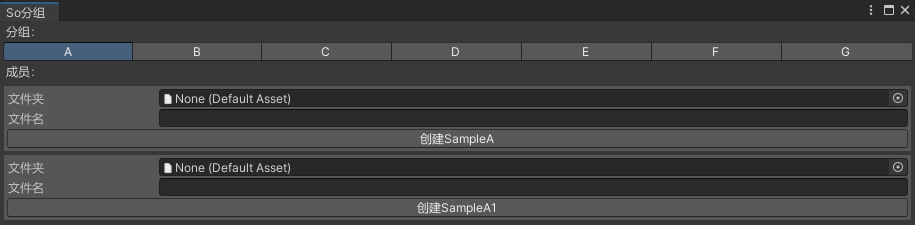
需求
ScriptableObject脚本添加分组特性,依据该特性进行分组。
分组特性实现
- 使用特性手动给ScriptableObject脚本分组
设置group用于区分不同的组;
设置type用于创建So资产;
设置名字用于UI显示;
设置order用于组内排序; - 静态方法GetGroups
从程序集中获取添加了分组特性的So脚本并分类。
csharp
using System;
using System.Collections.Generic;
using System.Reflection;
using UnityEngine;
/// <summary>
/// ScriptObject分组特性
/// </summary>
[AttributeUsage(AttributeTargets.Class, AllowMultiple = false)]
public class ScriptObjectGroupAttribute : Attribute, IComparable<ScriptObjectGroupAttribute>
{
    public Type type;//脚本类型 用于识别ScritpableObject
    public string name;//So名字
    public string group;//So分组名
    public int order;//组中的顺序

    public ScriptObjectGroupAttribute(string group, Type type, string name, int order)
    {
        this.group = group;
        this.type = type;
        this.name = name;
        this.order = order;
    }

    public int CompareTo(ScriptObjectGroupAttribute other)
    {
        if (other == null) return 1;
        if (order < other.order)
            return -1;
        else if (order == other.order)
            return 0;
        else
            return 1;
    }

    public static Dictionary<string, List<ScriptObjectGroupAttribute>> GetGroups()
    {
        Dictionary<string, List<ScriptObjectGroupAttribute>> groupDic =
        new Dictionary<string, List<ScriptObjectGroupAttribute>>();

        Assembly[] assemblies = AppDomain.CurrentDomain.GetAssemblies();

        foreach (var asm in assemblies)
        {
            string asmName = asm.FullName;
            if (asmName.StartsWith("UnityEngine")
            || asmName.StartsWith("UnityEditor")
            || asmName.StartsWith("System"))
                continue;

            Type[] types;
            try
            {
                types = asm.GetTypes();
            }
            catch (ReflectionTypeLoadException)
            {
                continue;
            }
            foreach (Type type in types)
            {
                //跳过:抽象类
                if (type.IsAbstract)
                    continue;

                //跳过:没有继承ScriptableObject的类
                if (!type.IsSubclassOf(typeof(ScriptableObject)))
                    continue;

                //使用了分组特性,不是抽象类,继承了ScriptableObject
                var attribute = type.GetCustomAttribute<ScriptObjectGroupAttribute>();
                if (attribute != null)
                {
                    //打印信息
                    // Debug.Log((attribute.group, attribute.type,
                    //  attribute.name, attribute.order));

                    if (string.IsNullOrEmpty(attribute.group))
                    {
                        Debug.LogError("分组特性不能为空" + attribute.type);
                    }
                    else
                    {
                        //加入字典
                        if (groupDic.ContainsKey(attribute.group))
                        {
                            groupDic[attribute.group].Add(attribute);
                        }
                        else
                        {
                            var list = new List<ScriptObjectGroupAttribute>
                            {
                                attribute
                            };
                            groupDic.Add(attribute.group, list);
                        }
                    }
                }
            }
        }

        return groupDic;
    }
}
编辑器窗口绘制GUI,用于创建So
使用工具栏切换不同的组
使用IDrawCreateSoGUI接口绘制创建So资产的GUI
csharp
using System.Collections.Generic;
using System.Linq;
using UnityEditor;
using UnityEngine;

public class GroupVisualizationWindow : EditorWindow
{
    private Dictionary<string, List<ScriptObjectGroupAttribute>> groupDic;//分组信息
    private string[] groupNames;//所有分组
    private int selected = 0;//当前选择的组索引

    private IDrawCreateSoGUI drawCreateSoGUI = new DrawCreateSo();//绘制创建So的GUI

    private Vector2 scrollPosition;//滑动窗口位置

    private void OnEnable()
    {
        //获取所有So组,排序
        groupDic = ScriptObjectGroupAttribute.GetGroups();
        foreach (var item in groupDic.Values)
            item.Sort();
        //所有名称
        groupNames = groupDic.Keys.ToArray();
        selected = 0;
    }

    private void OnGUI()
    {
        if (groupNames == null || groupNames.Length <= 0) return;

        GUILayout.Label("分组:");
        selected = GUILayout.Toolbar(selected, groupNames);
        GUILayout.Label("成员:");
        scrollPosition = EditorGUILayout.BeginScrollView(scrollPosition);
        if (selected >= 0 && selected < groupNames.Length)
        {
            var key = groupNames[selected];
            var value = groupDic[key];
            int length = value.Count();
            for (int i = 0; i < length; i++)
                drawCreateSoGUI.Draw( i, value[i]);
        }
        EditorGUILayout.EndScrollView();
    }

    [MenuItem("分组/ScriptableObject分组")]
    private static void ShowWindow()
    {
        var window = CreateWindow<GroupVisualizationWindow>("So分组");
        window.Show();
    }
}
绘制创建So资产的GUI
定义接口
csharp
public interface IDrawCreateSoGUI
{
    void Draw(int index, ScriptObjectGroupAttribute info);
}
添加路径验证和创建So资产的方法,子类中绘制GUI用于创建So资产
csharp
using System;
using System.IO;
using UnityEditor;
using UnityEngine;

public abstract class DrawCreateSoBase : IDrawCreateSoGUI
{
    public abstract void Draw(int index, ScriptObjectGroupAttribute info);

    protected void Create(string folderPath, string fileName, Type type)
    {
        if (PathVerify(folderPath, fileName, out string path))
            SoCreate(path, type);
    }

    protected virtual bool PathVerify(string folderPath, string fileName, out string path)
    {
        bool result = false;
        path = string.Empty;

        if (string.IsNullOrEmpty(folderPath))
            EditorUtility.DisplayDialog("提示", "文件夹为空,请设置文件夹", "OK");
        else if (string.IsNullOrEmpty(fileName))
            EditorUtility.DisplayDialog("提示", "文件名为空,请填写名称", "OK");
        else
        {
            path = folderPath + "/" + fileName + ".asset";
            if (File.Exists(path))
                EditorUtility.DisplayDialog("提示", "名称重复,请使用其他名称或更换文件夹", "OK");
            else
                result = true;
        }
        return result;
    }

    protected void SoCreate(string path, Type type)
    {
        var asset = ScriptableObject.CreateInstance(type);
        AssetDatabase.CreateAsset(asset, path);
        AssetDatabase.SaveAssets();
        AssetDatabase.Refresh();
    }
}
绘制GUI,设置So存放文件夹以及So资产的名字;
点击按钮创建So资产
csharp
using UnityEngine;
using UnityEditor;
using System.Collections.Generic;
public class DrawCreateSo : DrawCreateSoBase
{
    private Dictionary<int, DefaultAsset> savePathDic = new Dictionary<int, DefaultAsset>();
    private Dictionary<int, string> saveFileNameDic = new Dictionary<int, string>();

    private GUIStyle backgroundStyle;
    GUIStyle BackgroundStyle
    {
        get
        {
            if (backgroundStyle == null)
            {
                backgroundStyle = new GUIStyle(GUI.skin.box);
                float colorValue = 0.45f;
                Color color = new Color(colorValue, colorValue, colorValue, 0.5f);
                backgroundStyle.normal.background = MakeText(2, 2, color);
            }
            return backgroundStyle;
        }
    }

    private Texture2D MakeText(int w, int h, Color color)
    {
        Texture2D texture = new Texture2D(w, h);
        Color[] colors = new Color[w * h];
        for (int i = 0; i < colors.Length; i++)
            colors[i] = color;
        texture.SetPixels(colors);
        texture.Apply();
        return texture;
    }

    public override void Draw(int index, ScriptObjectGroupAttribute info)
    {
        EditorGUILayout.BeginVertical(BackgroundStyle);

        savePathDic.TryGetValue(index, out DefaultAsset defaultAsset);

        defaultAsset = (DefaultAsset)EditorGUILayout.ObjectField("文件夹",
        defaultAsset, typeof(DefaultAsset), true);

        savePathDic[index] = defaultAsset;

        saveFileNameDic.TryGetValue(index, out string fileName);

        fileName = EditorGUILayout.TextField("文件名", fileName);

        saveFileNameDic[index] = fileName;

        if (GUILayout.Button("创建" + info.name))
            Create(AssetDatabase.GetAssetPath(defaultAsset), fileName, info.type);

        EditorGUILayout.EndVertical();
    }
}
使用
So脚本添加特性,设置组名,So脚本类型,名字,组内序号
示例脚本1
csharp
using UnityEngine;
[ScriptObjectGroup("A", typeof(SampleA), "SampleA", 1)]
public class SampleA : ScriptableObject
{

}
示例脚本2
csharp
using UnityEngine;
[ScriptObjectGroup("A", typeof(SampleA1), "SampleA1", 2)]
public class SampleA1 : ScriptableObject
{

}
效果图