一、项目概述
实现功能
-
顶部标题栏展示 "新闻列表",右侧排序按钮支持切换正序 / 倒序
-
新闻列表以卡片形式展示新闻标题、摘要、分类标签和发布日期
-
点击排序按钮,根据
isAscending状态按日期升序或降序排列新闻
二、知识点
1. 类 class
-
作用:定义数据模型,封装属性与构造函数,统一对象格式
-
使用场景:创建结构化的新闻数据对象
TypeScript
export class News {
  id: number
  title: string
  summary: string
  date: string
  category: string

  constructor(id: number, title: string, summary: string, date: string, category: string) {
    this.id = id
    this.title = title
    this.summary = summary
    this.date = date
    this.category = category
  }
}
2. 数组排序 sort
-
作用:对数组元素进行排序,直接修改原数组(需先复制避免影响原数据)
-
核心逻辑 :将日期字符串转为时间戳(毫秒数)进行比较,避免直接比较字符串的格式隐患,适配多种合法日期格式,根据
isAscending返回正负值
TypeScript
export function getSortedNews(newsList: Array<News>, isAscending: boolean): Array<News> {
  let result: Array<News> = [...newsList] // 复制数组,不修改原数据
  // 补充:将日期字符串转为时间戳(毫秒数),避免直接比较字符串的格式隐患
  result.sort((a, b) => {
    const timeA = new Date(a.date).getTime() // 转换为时间戳
    const timeB = new Date(b.date).getTime()
    if (isAscending) {
      return timeA - timeB // 升序:时间戳小(日期早)排在前
    } else {
      return timeB - timeA // 降序:时间戳大(日期晚)排在前
    }
  })
  return result
}
3. 响应式状态 @State / @Prop
-
@State:修饰组件内变量,变量改变时页面自动刷新 UI
TypeScript@State newsList: Array<News> = [] @State isAscending: boolean = false // 默认倒序- 特点:仅修饰组件内变量,驱动视图更新
-
@Prop:修饰组件内变量,接收父组件传递的数据,单向数据流
TypeScript@Prop news: News- 使用场景:自定义组件接收外部数据
4. 循环渲染 ForEach
-
作用:遍历数组批量渲染 UI
-
语法:
TypeScript
ForEach(数组, (item: 类型) => {
  // 渲染组件
}, (item: 类型) => item.id.toString()) // 键生成函数,提高渲染性能
5. 列表组件 List + ListItem
-
规则:List 必须嵌套 ListItem 使用,用于长列表展示
-
项目用法:
TypeScript
List({ space: 12 }) {
  ForEach(this.getNews(), (item: News) => {
    ListItem() {
      NewsItem({ news: item })
    }
  }, (item: News) => item.id.toString())
}
.width('100%')
.layoutWeight(1)
.padding({ left: 16, right: 16, top: 8, bottom: 8 })
.backgroundColor('#F5F7FA')
6. 自定义组件 @Component
-
作用:封装可复用的 UI 组件,提高代码可维护性
-
使用场景:将新闻项封装为独立组件
TypeScript
@Component
struct NewsItem {
  @Prop news: News
  // build方法实现UI
}
7. aboutToAppear
-
执行时机:页面即将渲染前自动调用
-
用途:初始化新闻数据
TypeScript
aboutToAppear() {
  this.newsList = [
    new News(1, '人工智能助力医疗发展', 'AI技术在医疗领域的应用取得突破性进展', '2023-08-03 14:20', '科技'),
    // 其他新闻数据...
  ]
}
8. 点击事件 onClick
- 绑定在组件上,触发排序状态切换
TypeScript
Button(this.isAscending ? '正序 ↑' : '倒序 ↓')
  .onClick(() => {
    this.isAscending = !this.isAscending
  })
三、功能实现
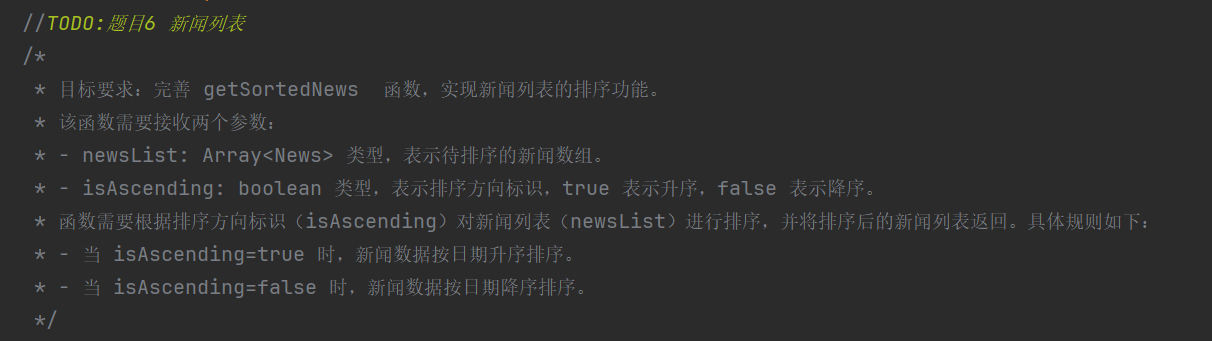
目标 :完善 getSortedNews 函数,实现新闻列表排序功能
题目要求
核心目的
-
完善
getSortedNews函数,实现按日期升序 / 降序排序 -
考察数组
sort方法的使用、日期比较逻辑与函数封装


代码实现
TypeScript
export function getSortedNews(newsList: Array<News>, isAscending: boolean): Array<News> {
  let result: Array<News> = [...newsList] // 复制数组,不修改原数据
  // 关键优化:将日期字符串转为时间戳(毫秒数),解决直接比较字符串的格式隐患
  // 避免因日期格式不统一(如无时间、格式错乱)导致排序异常
  result.sort((a, b) => {
    const timeA = new Date(a.date).getTime() // 转换为时间戳(毫秒)
    const timeB = new Date(b.date).getTime()
    if (isAscending) {
      return timeA - timeB // 升序:日期早(时间戳小)的排在前
    } else {
      return timeB - timeA // 降序:日期晚(时间戳大)的排在前
    }
  })
  return result
}