如果填充模板采用写死的方式,比如第2行第3列填充什么内容,直接用POI就可以实现,不需要EasyExcel,也比较简单。
如果只导出一个单层机的信息也比较简单。
今天讲的主要是要求用替换占位符的方式填充Excel,并且数据是主子表信息,主表单条子表多条的这种数据。
-
首先配置模板,如下:
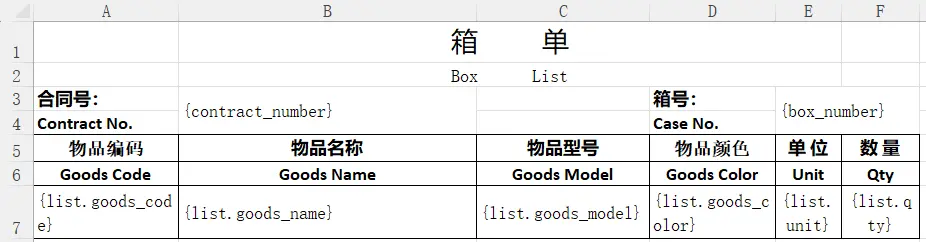
其中
{contract_number}、{box_number}为表头信息,而下面的{list.goods_code}等则为表体信息。 -
将该模板文件命名为
BoxList.xlsx,并放到resources/excel-template下。 -
引入EasyExcel依赖:
xml
<dependency>
	<groupId>com.alibaba</groupId>
	<artifactId>easyexcel</artifactId>
	<version>4.0.3</version>
</dependency>- 生成文件代码如下:
java
Map<String, Object> boxMap = new HashMap<>();
boxMap1.put("contract_number", "HT-2026-001");
boxMap1.put("box_wrap_number", "BOX-20260423-001");

List<Map<String, Object>> detail = new ArrayList<>();
Map<String, Object> d1_1 = new HashMap<>();
d1_1.put("goods_code", "GC260424-1524");
d1_1.put......;

detail.add(d1_1);
boxMap.put("list", detail);

// 读取Excel模板
try (InputStream template = new ClassPathResource("excel-template/BoxList.xlsx").getInputStream()) {
                {
                    // excelFilePath为保存文件的路径,需要进行预创建
                    String fileName = excelFilePath + File.separator + "包装箱单_" + boxMap.get("id") + ".xlsx";
                    // 准备写入文件,声明即将写入的文件和模板
                    ExcelWriter excelWriter = EasyExcel.write(fileName)
                            .withTemplate(template)
                            .build();
                    WriteSheet writeSheet = EasyExcel.writerSheet().build();
                    // 写入表头信息
                    excelWriter.fill(boxMap, writeSheet);
                    List<Map<String, Object>> detailList = (List<Map<String, Object>>) boxMap.get("list");
                    // 写入表体的配置
                    FillConfig fillConfig = FillConfig.builder().forceNewRow(Boolean.TRUE).build();
                    FillWrapper wrapper = new FillWrapper("list", detailList);
                    // 写入表体信息
                    excelWriter.fill(wrapper, fillConfig, writeSheet);
                    // 正式写入文件
                    excelWriter.finish();
                }
            } catch (Exception e) {
                throw new RuntimeException(e);
            }
这样就可以成功写入文件了。注意在
EasyExcel.write()......中,不要加.autoTrim()以及其他多余的东西,否则可能会写入失败。如果需要同时生成多个箱单,并通过zip压缩方式导出,往下看。
- 生成多个箱单Excel,并通过zip压缩方式导出,直接上接口代码:
java
@GetMapping(value = "/exportBoxList")
public void exportBoxList(@RequestParam(name = "ids") String ids, HttpServletResponse response) {
	List<Map<String, Object>> boxMapList = boxService.getBoxList(ids);
	List<File> fileList = new ArrayList<>(boxMapList.size());
	for (Map<String, Object> boxMap : boxMapList) {
		try (InputStream template = new ClassPathResource("excel-template/BoxList.xlsx").getInputStream()) {
			{
                                // 这里注意,箱号如果包含特殊符号,这里就不要用箱单做名字了,否则可能导致路径混乱找不到文件
				String fileName = excelFilePath + File.separator + "箱单_" + boxMap.get("box_number") + ".xlsx";
				ExcelWriter excelWriter = EasyExcel.write(fileName)
						.withTemplate(template)
						.build();
				WriteSheet writeSheet = EasyExcel.writerSheet().build();
				excelWriter.fill(boxMap, writeSheet);
				List<Map<String, Object>> detailList = (List<Map<String, Object>>) boxMap.get("list");
				FillConfig fillConfig = FillConfig.builder().forceNewRow(Boolean.TRUE).build();
				FillWrapper wrapper = new FillWrapper("list", detailList);
				excelWriter.fill(wrapper, fillConfig, writeSheet);
				excelWriter.finish();
				fileList.add(new File(fileName));
			}
		} catch (Exception e) {
			throw new RuntimeException(e);
		}
	}
	try {
		response.setContentType("application/octet-stream");
		response.setHeader("Content-disposition","attachment;filename=" + URLEncoder.encode("箱单.zip", "UTF-8"));
		OutputStream os = response.getOutputStream();
		ZipUtils.downloadZipForFiles(os, fileList);
		os.flush();
		os.close();
		for (File file : fileList) {
			file.deleteOnExit();
		}
	} catch (IOException e) {
		throw new RuntimeException(e);
	}
}
就到这里。后面附上ZipUtils的代码:
java
package org.jeecg.common.util;

import java.io.*;
import java.util.List;
import java.util.Map;
import java.util.Objects;
import java.util.zip.ZipEntry;
import java.util.zip.ZipOutputStream;
import static org.springframework.util.StreamUtils.BUFFER_SIZE;

/**
 * @Author: wyf
 * @Date: 2026-4-23 16:02
 * @Description: zip工具类
 */
public class ZipUtils {
    /**
     * 传入文件file
     * @param outputStream
     * @param fileList
     */
    public static void downloadZipForFiles(OutputStream outputStream, List<File> fileList){
        ZipOutputStream zipOutputStream = null;
        try {
            zipOutputStream = new ZipOutputStream(outputStream);
            for (File file : fileList) {
                ZipEntry zipEntry = new ZipEntry(file.getName());
                zipOutputStream.putNextEntry(zipEntry);
                byte[] buf = new byte[BUFFER_SIZE];
                int len;
                FileInputStream in = new FileInputStream(file);
                while ((len = in.read(buf)) != -1) {
                    zipOutputStream.write(buf, 0, len);
                    zipOutputStream.flush();
                }
            }
            zipOutputStream.flush();
            zipOutputStream.close();
        } catch (IOException e) {
            e.printStackTrace();
        } finally {
            // 关闭流
            try {
                if (zipOutputStream != null ) {
                    zipOutputStream.close();
                }
                if (outputStream != null) {
                    outputStream.close();
                }
            } catch (IOException e) {
                e.printStackTrace();
            }
        }
    }

    /**
     * 传入文件的 byte[]
     * Map<String,byte[]> fileBufMap key是文件名(包含后缀),value是文件的byte[]
     * @param outputStream
     * @param fileBufMap
     */
    public static void downloadZipForByteMore(OutputStream outputStream,Map<String,byte[]> fileBufMap)  {
            ZipOutputStream zipOutputStream = null;
            try {
                zipOutputStream = new ZipOutputStream(outputStream);
                for (String fileName:fileBufMap.keySet()){
                    ZipEntry zipEntry = new ZipEntry(fileName);
                    zipOutputStream.putNextEntry(zipEntry);
                    if (Objects.nonNull(fileBufMap.get(fileName))){
                        byte[] fileBytes = fileBufMap.get(fileName);
                        zipOutputStream.write(fileBytes);
                        zipOutputStream.flush();
                    }
                }
                zipOutputStream.flush();
                zipOutputStream.close();
            } catch (IOException e) {
                e.printStackTrace();
            }finally {
                // 关闭流
                try {
                    if (zipOutputStream != null ) {
                        zipOutputStream.close();
                    }
                    if (outputStream != null) {
                        outputStream.close();
                    }
                } catch (IOException e) {
                    e.printStackTrace();
                }
            }
    }

    /**
     * 返回zip包的 byte[]
     *
     * @param fileBufMap
     * @return
     */
    public static byte[] getZipForByteMore(Map<String,byte[]> fileBufMap)  {
        ByteArrayOutputStream totalZipBytes = null;
        ZipOutputStream zipOutputStream = null;
        try {
            totalZipBytes = new ByteArrayOutputStream();
            zipOutputStream = new ZipOutputStream(totalZipBytes);
            for (String fileName:fileBufMap.keySet()){
                ZipEntry zipEntry = new ZipEntry(fileName);
                zipOutputStream.putNextEntry(zipEntry);
                if (Objects.nonNull(fileBufMap.get(fileName))){
                    byte[] fileBytes = fileBufMap.get(fileName);
                    zipOutputStream.write(fileBytes);
                    zipOutputStream.flush();
                }
            }
            zipOutputStream.close();
            byte[] bytes = totalZipBytes.toByteArray();
            totalZipBytes.close();
            return bytes;
        } catch (IOException e) {
            e.printStackTrace();
        } finally {
            try {
                if (totalZipBytes != null) {
                    totalZipBytes.close();
                }
                if (zipOutputStream != null) {
                    zipOutputStream.close();
                }
            } catch (IOException e) {
                e.printStackTrace();
            }
        }
        return null;
    }
}