270 亿参数稠密多模态模型 Qwen3.6-27B正式开源。目前,昇腾生态已完成对 Qwen3.6-27B 模型的适配支持,相关模型文件与权重已同步上线 AtomGit AI,开发者们可直接获取并进行部署测试。
🔗 SGLang 部署:https://ai.atomgit.com/SGLangAscend/Qwen3.6-27B
🔗 vLLM Ascend 部署:https://ai.atomgit.com/vLLM_Ascend/Qwen3.6-27B
模型介绍
**✅ 稠密架构优势:**部署更友好、推理更高效,兼顾性能与实用性,开发者部署首选。
**✅ 旗舰级智能体编程:**SWE-bench Verified、Terminal-Bench 2.0 等权威基准测试超越更大规模模型
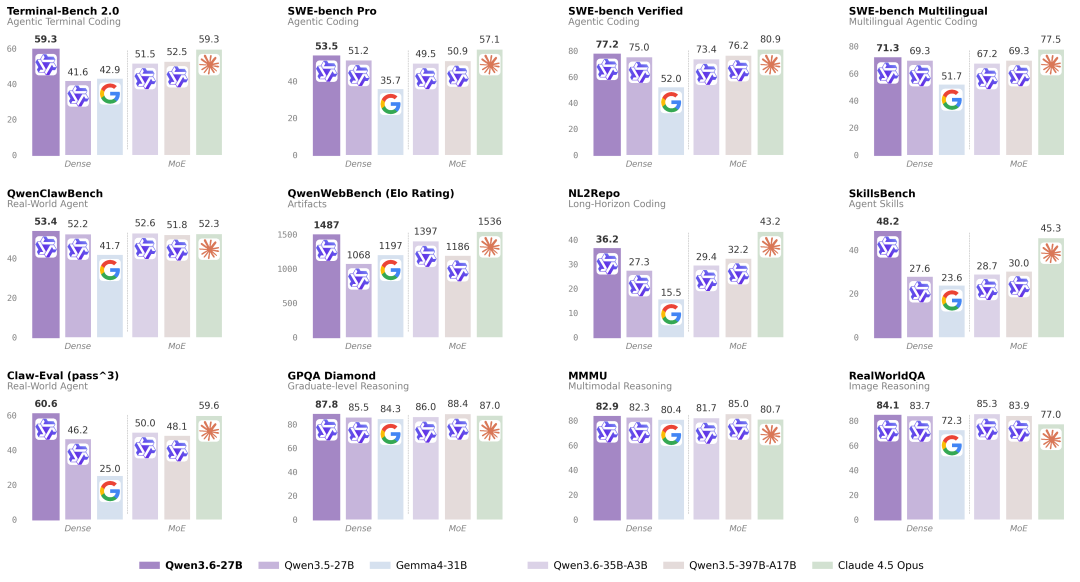
**✅ 原生多模态全能:**支持视觉推理、文档理解和视觉问答等任务,能力与 Qwen3.6-35B-A3B 一致。
基于 SGLang 部署流程
环境准备
安装
NPU 运行时环境所需的依赖已集成到 Docker 镜像中,并上传至华为云平台,用户可直接拉取该镜像。
#Atlas
 800 A3
docker pull quay.io/ascend/sglang:v0.5.10-npu.rc1-a3
#Atlas
 800 A2
docker pull quay.io/ascend/sglang:v0.5.10-npu.rc1-910b
#start
 container
docker run -itd --shm-size=16g --privileged=true --name ${NAME} \
--privileged=true --net=host \
-v /var/queue_schedule:/var/queue_schedule \
-v /etc/ascend_install.info:/etc/ascend_install.info \
-v /usr/local/sbin:/usr/local/sbin \
-v /usr/local/Ascend/driver:/usr/local/Ascend/driver \
-v /usr/local/Ascend/firmware:/usr/local/Ascend/firmware \
--device=/dev/davinci0:/dev/davinci0  \
--device=/dev/davinci1:/dev/davinci1  \
--device=/dev/davinci2:/dev/davinci2  \
--device=/dev/davinci3:/dev/davinci3  \
--device=/dev/davinci4:/dev/davinci4  \
--device=/dev/davinci5:/dev/davinci5  \
--device=/dev/davinci6:/dev/davinci6  \
--device=/dev/davinci7:/dev/davinci7  \
--device=/dev/davinci8:/dev/davinci8  \
--device=/dev/davinci9:/dev/davinci9  \
--device=/dev/davinci10:/dev/davinci10  \
--device=/dev/davinci11:/dev/davinci11  \
--device=/dev/davinci12:/dev/davinci12  \
--device=/dev/davinci13:/dev/davinci13  \
--device=/dev/davinci14:/dev/davinci14  \
--device=/dev/davinci15:/dev/davinci15  \
--device=/dev/davinci_manager:/dev/davinci_manager \
--device=/dev/hisi_hdc:/dev/hisi_hdc \
--entrypoint=bash \
quay.io/ascend/sglang:${tag}
权重下载
Qwen3.6-27B:https://ai.gitcode.com/hf_mirrors/Qwen/Qwen3.6-27B
部署
单节点部署
执行以下脚本进行在线推理.
# high performance cpu
echo performance | tee /sys/devices/system/cpu/cpu*/cpufreq/scaling_governor
sysctl -w vm.swappiness=0
sysctl -w kernel.numa_balancing=0
sysctl -w kernel.sched_migration_cost_ns=50000
export SGLANG_SET_CPU_AFFINITY=1
unset https_proxy
unset http_proxy
unset HTTPS_PROXY
unset HTTP_PROXY
unset ASCEND_LAUNCH_BLOCKING
# cann
source /usr/local/Ascend/ascend-toolkit/set_env.sh
source /usr/local/Ascend/nnal/atb/set_env.sh
export STREAMS_PER_DEVICE=32
export HCCL_OP_EXPANSION_MODE=AIV
export HCCL_SOCKET_IFNAME=lo
export GLOO_SOCKET_IFNAME=lo
export SGLANG_ENABLE_SPEC_V2=1
export SGLANG_ENABLE_OVERLAP_PLAN_STREAM=0
export SGLANG_SCHEDULER_DECREASE_PREFILL_IDLE=1
export SGLANG_PREFILL_DELAYER_MAX_DELAY_PASSES=100
python3 -m sglang.launch_server \
    --model-path $MODEL_PATH \
    --attention-backend ascend \
    --device npu \
    --tp-size 4 --nnodes 1 --node-rank 0 \
    --chunked-prefill-size -1 --max-prefill-tokens 60000 \
    --disable-radix-cache \
    --trust-remote-code \
    --host 127.0.0.1 --max-running-requests 48 --max-mamba-cache-size 60 \
    --mem-fraction-static 0.7 \
    --port 8000 \
    --cuda-graph-bs 2 8 16 32 48 \
    --enable-multimodal \
    --mm-attention-backend ascend_attn \
    --dtype bfloat16 --mamba-ssm-dtype bfloat16 \
    --speculative-algorithm NEXTN \
    --speculative-num-steps 3 \
    --speculative-eagle-topk 1 \
    --speculative-num-draft-tokens 4
发送请求测试
curl --location http://127.0.0.1:8000/v1/chat/completions --header 'Content-Type: application/json' --data '{
"model": "qwen3.6",
"messages": [
    {
"role": "user",
"content": [
        {
"type": "image_url",
"image_url": {"url": "/image_path/qwen.png"}
        },
        {"type": "text", "text": "What is the text in the illustrate?"}
      ]
    }
  ]
}'结果返回如下
{"id":"cdcd6d14645846e69cc486554f198154","object":"chat.completion","created":1772098465,"model":"qwen3.6","choices":[{"index":0,"message":{"role":"assistant","content":"The user is asking about the text present in the image. I will analyze the image to identify the text.\n</think>\n\nThe text in the image is \"TONGyi Qwen\".","reasoning_content":null,"tool_calls":null},"logprobs":null,"finish_reason":"stop","matched_stop":248044}],"usage":{"prompt_tokens":98,"total_tokens":138,"completion_tokens":40,"prompt_tokens_details":null,"reasoning_tokens":0},"metadata":{"weight_version":"default"}}基于 vLLM Ascend 部署流程
环境准备
模型权重
- Qwen3.6-27B(BF16 版本):https://ai.gitcode.com/hf_mirrors/Qwen/Qwen3.6-27B
安装
1️⃣ 官方 Docker 镜像
您可以通过镜像链接下载镜像压缩包来进行部署,具体流程如下:
🔗 镜像链接:https://quay.io/repository/ascend/vllm-ascend?tab=tags&tag=latest
# 拉取0.18.0rc1镜像,以A3 openeuler为例
docker pull quay.io/ascend/vllm-ascend:v0.18.0rc1-a3-openeuler
# 配置对应的Image名
export IMAGE=vllm-ascend:v0.18.0rc1-a3-openeuler
export NAME=vllm-ascend
# 使用定义的变量运行容器
# 注意:若使用 Docker 桥接网络,请提前开放可供多节点通信的端口
# 根据您的设备更新 --device(Atlas A3:/dev/davinci[0-15])。
docker run --rm \
--name $NAME \
--net=host \
--shm-size=100g \
--device /dev/davinci0 \
--device /dev/davinci1 \
--device /dev/davinci2 \
--device /dev/davinci3 \
--device /dev/davinci4 \
--device /dev/davinci5 \
--device /dev/davinci6 \
--device /dev/davinci7 \
--device /dev/davinci_manager \
--device /dev/devmm_svm \
--device /dev/hisi_hdc \
-v /usr/local/dcmi:/usr/local/dcmi \
-v /usr/local/Ascend/driver/tools/hccn_tool:/usr/local/Ascend/driver/tools/hccn_tool \
-v /usr/local/bin/npu-smi:/usr/local/bin/npu-smi \
-v /usr/local/Ascend/driver/lib64/:/usr/local/Ascend/driver/lib64/ \
-v /usr/local/Ascend/driver/version.info:/usr/local/Ascend/driver/version.info \
-v /etc/ascend_install.info:/etc/ascend_install.info \
-v /root/.cache:/root/.cache \
-it $IMAGE bash
2️⃣ 源码构建
如果您不希望使用上述 Docker 镜像,也可通过源码完整构建:
-
保证你的环境成功安装了 CANN 8.5.0
-
从源码安装 vllm-ascend ,请参考安装指南。
🔗 安装指南:https://docs.vllm.ai/projects/ascend/en/latest/installation.html
从源码安装 vllm-ascend 后,您需要将 vllm、vllm-ascend、transformers 升级至主分支:
# 升级 vllm
git clone https://github.com/vllm-project/vllm.git
cd vllm
git checkout bcf2be96120005e9aea171927f85055a6a5c0cf6
VLLM_TARGET_DEVICE=empty pip install -v .
# 升级 vllm-ascend
pip uninstall vllm-ascend -y
git clone https://github.com/vllm-project/vllm-ascend.git
cd vllm-ascend
git checkout 99e1ea0fe685e93f53ee5adfe4b41cdd42fb809f
pip install -v .
# 重新安装 transformers
git clone https://github.com/huggingface/transformers.git
cd transformers
git reset --hard fc9137225880a9d03f130634c20f9dbe36a7b8bf
pip install .
如需部署多节点环境,您需要在每个节点上分别完成环境配置。
部署
单节点部署
1️⃣ A2 系列
执行以下脚本进行在线推理.
export PYTORCH_NPU_ALLOC_CONF="expandable_segments:True"
export HCCL_OP_EXPANSION_MODE="AIV"
export HCCL_BUFFSIZE=1024
export OMP_NUM_THREADS=1
export TASK_QUEUE_ENABLE=1
export LD_PRELOAD=/usr/lib/aarch64-linux-gnu/libjemalloc.so.2:$LD_PRELOAD
vllm serve /root/.cache/Qwen3.6-27B \
    --served-model-name "qwen3.6" \
    --host 0.0.0.0 \
    --port 8010 \
    --data-parallel-size 1 \
    --tensor-parallel-size 2 \
    --max-model-len 262144 \
    --max-num-batched-tokens 25600 \
    --max-num-seqs 128 \
    --gpu-memory-utilization 0.94 \
    --compilation-config '{"cudagraph_capture_sizes":[1,2,3,4,8,12,16,24,32,48], "cudagraph_mode":"FULL_DECODE_ONLY"}' \
    --trust-remote-code \
    --async-scheduling \
    --allowed-local-media-path / \
    --no-enable-prefix-caching \
    --mm-processor-cache-gb 0 \
    --additional-config '{"enable_cpu_binding":true}'
2️⃣ A3 系列
执行以下脚本进行在线推理。
export PYTORCH_NPU_ALLOC_CONF="expandable_segments:True"
export HCCL_OP_EXPANSION_MODE="AIV"
export HCCL_BUFFSIZE=1024
export OMP_NUM_THREADS=1
export TASK_QUEUE_ENABLE=1
export LD_PRELOAD=/usr/lib/aarch64-linux-gnu/libjemalloc.so.2:$LD_PRELOAD
vllm serve /root/.cache/Qwen3.6-27B \
    --served-model-name "qwen3.6" \
    --host 0.0.0.0 \
    --port 8010 \
    --data-parallel-size 1 \
    --tensor-parallel-size 2 \
    --max-model-len 262144 \
    --max-num-batched-tokens 25600 \
    --max-num-seqs 128 \
    --gpu-memory-utilization 0.94 \
    --compilation-config '{"cudagraph_capture_sizes":[1,2,3,4,8,12,16,24,32,48], "cudagraph_mode":"FULL_DECODE_ONLY"}' \
    --trust-remote-code \
    --async-scheduling \
    --allowed-local-media-path / \
    --no-enable-prefix-caching \
    --mm-processor-cache-gb 0 \
    --additional-config '{"enable_cpu_binding":true}'
执行以下脚本向模型发送一条请求:
curl http://localhost:8010/v1/completions \
  -H "Content-Type: application/json" \
  -d '{
        "prompt": "The future of AI is",
        "path": "/path/to/model/Qwen3.6-27B/",
        "max_tokens": 100,
        "temperature": 0
}'执行结束后,您可以看到模型回答如下:
Prompt: 'The future of AI is', Generated text: ' not just about building smarter machines, but about creating systems that can collaborate with humans in meaningful, ethical, and sustainable ways. As AI continues to evolve, it will increasingly shape how we live, work, and interact --- and the decisions we make today will determine whether this future is one of shared prosperity or deepening inequality.\n\nThe rise of generative AI, for example, has already begun to transform creative industries, education, and scientific research. Tools like ChatGPT, Midjourney, and'也可执行以下脚本向模型发送一条多模态请求:
curl http://localhost:8010/v1/completions \
  -H "Content-Type: application/json" \
    -d '{
        "model": "qwen3.6",
        "messages": [
            {"role": "system", "content": "You are a helpful assistant."},
            {"role": "user", "content": [
                {"type": "image_url", "image_url": {"url": "https://modelscope.oss-cn-beijing.aliyuncs.com/resource/qwen.png"}},
                {"type": "text", "text": "What is the text in the illustrate?"}
            ]}
        ]
    }'
执行结束后,您可以看到模型回答如下:
{"id":"chatcmpl-9dab99d55addd8c0","object":"chat.completion","created":1771060145,"model":"qwen3.6","choices":[{"index":0,"message":{"role":"assistant","content":"TONGYI Qwen","refusal":null,"annotations":null,"audio":null,"function_call":null,"tool_calls":[],"reasoning":null},"logprobs":null,"finish_reason":"stop","stop_reason":null,"token_ids":null}],"service_tier":null,"system_fingerprint":null,"usage":{"prompt_tokens":112,"total_tokens":119,"completion_tokens":7,"prompt_tokens_details":null},"prompt_logprobs":null,"prompt_token_ids":null,"kv_transfer_params":null}声明
当前为尝鲜版本,我们还在持续优化性能,给大家带来更好的体验。
以上内容及代码仓中提到的数据集和模型仅作示例使用,仅供非商业用途学习与参考。如果您基于示例使用这些数据集和模型,请注意遵守对应的开源协议(License),避免产生相关纠纷。
如果您在使用过程中遇到任何问题(包括功能、合规等),欢迎在代码仓提交 Issue,我们会及时查看并回复~