一、展示:
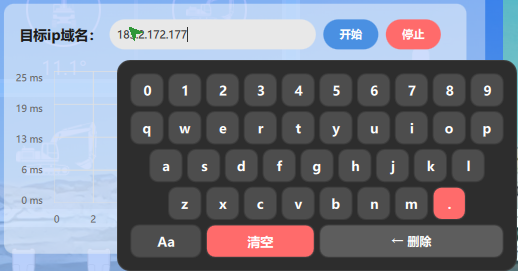
二、使用方法:
1.实例化(如Main.qml)只一次
2.在输入框下面调用函数
第一步-实例化
javascript
// main.qml 或 MainContainer.qml
import "qrc:/uiitem/component/" // 键盘所在的路径

Item {
    id: root
    width: 1920
    height: 1080

    // ... 你原有的所有页面内容 ...

    // 【全局唯一】把键盘放在最底层,z值设高,确保永远在最上面
    ReusableVirtualKeyboard {
        id: reusableKeyboard
        z: 9999
        // 可选:默认关闭弹出/收起的平滑移动动画
        keyboardAnimationEnabled: false
    }
}
第二步-在输入框调用函数
reusableKeyboard为虚拟键盘示例化的id
1.自适应位置,根据输入框位置自动计算不遮挡
setKeyboardWidth 必须在前可以设置大小(最好300大小以上)
showKeyboard只传id时,会自己计算位置。
javascript
TextInput {
           id: pingInput

           //selectByMouse: true
           /*============虚拟键盘输入框事件===============*/

           //虚拟键盘输入框点击事件--确保MouseArea不拦截焦点,且正确触发
           MouseArea {
               anchors.fill: parent
               cursorShape: Qt.IBeamCursor
               onClicked: {
                    reusableKeyboard.setKeyboardWidth(pingInput, 400);
                    reusableKeyboard.showKeyboard(pingInput);

                    // 允许事件传播,确保输入框能获取焦点
                    mouse.accepted = false;
               }
          }
}
2.设置固定位置id,"fixed",
setKeyboardWidth 必须在前可以设置大小
showKeyboard中的"fixed"表示固定位置(左上为起点),x水平位置,y垂直位置
javascript
TextField {
           id: passwordField

           //。。。。。。。。。

           //虚拟键盘输入框点击事件--确保MouseArea不拦截焦点,且正确触发
           //selectByMouse: true

           MouseArea {
               anchors.fill: parent
               cursorShape: Qt.IBeamCursor
               onClicked: {
               reusableKeyboard.setKeyboardWidth(passwordField, 600);
               reusableKeyboard.showKeyboard(passwordField, "fixed", logWindow.width/2-300, loginCard.y+loginCard.height);//logWindow.width/2-600

               // 允许事件传播,确保输入框能获取焦点
               mouse.accepted = false;
               }
          }
}
三、源码:
1.数字+26键大小写
ReusableVirtualKeyboard.qml
javascript
// ReusableVirtualKeyboard.qml ------ 无限制 + 动态大小写版
import QtQuick 2.15
import QtQuick.Window 2.15
Item {
id: keyboardRoot
anchors.fill: parent
visible: false
z: 998
// ===== 兼容原有接口 =====
property int keyboardAnimationDuration: 250
property string keyboardStyle: "default"
property bool hideCandidateList: true
property bool clearInputOnHide: false
signal hideKeyboard()
property Item activeInputField: null
property bool keyboardAnimationEnabled: false
property bool isPanelVisible: keyboardPanel.visible
property int currentKeyboardWidth: 0
property int targetX: 0
property int targetY: 0
property string currentInputText: ""
// ===== 输入规则属性 =====
property bool _currentAllowDecimal: true
property int _currentMaxDecimalPlaces: -1
property bool _currentAllowLeadingZeros: true
// ===== 大小写切换属性(默认小写) =====
property bool _isUpperCase: false
// 颜色主题
property var theme: ({
bgColor: "#2d2d2d",
keyColor: "#4d4d4d",
keyPressedColor: "#6d6d6d",
keyTextColor: "#ffffff",
specialKeyColor: "#ff6b6b",
specialKeyTextColor: "#ffffff",
borderColor: "#3d3d3d"
})
// ===== 等比例缩放核心算法 =====
readonly property real _baseWidth: 450
readonly property real _baseSpacing: 5
readonly property real _baseRadius: 10
readonly property real _basePadding: 15
readonly property real _scaleFactor: (currentKeyboardWidth > 0 ? currentKeyboardWidth : _baseWidth) / _baseWidth
readonly property real _dynamicSpacing: _baseSpacing * _scaleFactor
readonly property real _dynamicRadius: _baseRadius * _scaleFactor
readonly property real _dynamicPadding: _basePadding * _scaleFactor
readonly property real _keyWidth: {
var w = currentKeyboardWidth > 0 ? currentKeyboardWidth : _baseWidth;
return (w - _dynamicPadding * 2 - _dynamicSpacing * 9) / 10;
}
readonly property real _keyHeight: _keyWidth
readonly property real _keyboardHeight: _keyHeight * 5 + _dynamicSpacing * 4 + _dynamicPadding * 2
// ===== 点击外部隐藏键盘 =====
MouseArea {
id: globalMouseArea
anchors.fill: parent
enabled: keyboardRoot.visible
z: 1
preventStealing: true
onPressed: {
if (!activeInputField) { mouse.accepted = false; return; }
var inputPos = activeInputField.mapToItem(keyboardRoot, 0, 0);
var inInput = mouse.x >= inputPos.x && mouse.x <= inputPos.x + activeInputField.width &&
mouse.y >= inputPos.y && mouse.y <= inputPos.y + activeInputField.height;
if (!inInput) {
var panelPos = keyboardPanel.mapToItem(keyboardRoot, 0, 0);
var inPanel = mouse.x >= panelPos.x && mouse.x <= panelPos.x + keyboardPanel.width &&
mouse.y >= panelPos.y && mouse.y <= panelPos.y + keyboardPanel.height;
if (!inPanel) {
keyboardRoot.hideKeyboardManual();
mouse.accepted = true;
return;
}
}
mouse.accepted = false;
}
}
// ===== 键盘面板 =====
Rectangle {
id: keyboardPanel
z: 999
x: keyboardRoot.targetX
y: keyboardRoot.targetY
width: keyboardRoot.currentKeyboardWidth > 0 ? keyboardRoot.currentKeyboardWidth : _baseWidth
height: _keyboardHeight
visible: keyboardRoot.visible
color: theme.bgColor
radius: _dynamicRadius * 1.5
border.color: theme.borderColor
border.width: Math.max(1, _scaleFactor)
clip: true
MouseArea { anchors.fill: parent; onPressed: mouse.accepted = true; onReleased: mouse.accepted = true }
Behavior on x { NumberAnimation { duration: keyboardRoot.keyboardAnimationEnabled ? keyboardRoot.keyboardAnimationDuration : 0; easing.type: Easing.InOutQuad } }
Behavior on y { NumberAnimation { duration: keyboardRoot.keyboardAnimationEnabled ? keyboardRoot.keyboardAnimationDuration : 0; easing.type: Easing.InOutQuad } }
Column {
id: keyColumn
anchors.fill: parent
anchors.margins: _dynamicPadding
spacing: _dynamicSpacing
// 通用按键组件
Component {
id: baseKeyComponent
Rectangle {
id: keyRect
property string baseChar: "" // 统一存放基础字符(大写字母/数字/符号)
property string action: "char"
property bool isSpecial: false
// 【核心优化】:通过属性绑定,实时跟随 _isUpperCase 状态动态计算显示和输出字符
readonly property string displayLabel: {
if (isSpecial) return baseChar;
if (baseChar >= 'A' && baseChar <= 'Z') {
return keyboardRoot._isUpperCase ? baseChar : baseChar.toLowerCase();
}
return baseChar;
}
readonly property string displayCharVal: displayLabel
width: keyboardRoot._keyWidth
height: keyboardRoot._keyHeight
color: keyMouse.pressed ? (isSpecial ? Qt.darker(theme.specialKeyColor, 1.2) : theme.keyPressedColor) : (isSpecial ? theme.specialKeyColor : theme.keyColor)
radius: keyboardRoot._dynamicRadius
border.color: theme.borderColor
border.width: _scaleFactor > 0.6 ? 1 : 0
Text {
anchors.centerIn: parent
text: keyRect.displayLabel
color: theme.keyTextColor
font { pixelSize: parent.height * 0.4; bold: true; family: "Microsoft YaHei" }
}
MouseArea {
id: keyMouse
anchors.fill: parent
onClicked: {
if (action === "char") {
var c = keyRect.displayCharVal;
if (c >= '0' && c <= '9')
keyboardRoot.appendDigit(parseInt(c));
else
keyboardRoot.insertLetter(c);
} else if (action === "decimal") {
keyboardRoot.appendDecimal();
}
}
}
}
}
// 第1排:数字 0-9
Row {
spacing: _dynamicSpacing
Repeater {
model: ["0","1","2","3","4","5","6","7","8","9"]
Loader {
sourceComponent: baseKeyComponent;
onLoaded: { item.baseChar = modelData; }
}
}
}
// 第2排:Q W E R T Y U I O P
Row {
spacing: _dynamicSpacing
Repeater {
model: ["Q","W","E","R","T","Y","U","I","O","P"]
Loader {
sourceComponent: baseKeyComponent;
onLoaded: { item.baseChar = modelData; }
}
}
}
// 第3排:A S D F G H J K L
Row {
spacing: _dynamicSpacing
anchors.horizontalCenter: parent.horizontalCenter
Repeater {
model: ["A","S","D","F","G","H","J","K","L"]
Loader {
sourceComponent: baseKeyComponent;
onLoaded: { item.baseChar = modelData; }
}
}
}
// 第4排:Z X C V B N M .
Row {
spacing: _dynamicSpacing
anchors.horizontalCenter: parent.horizontalCenter
Repeater {
model: ["Z","X","C","V","B","N","M"]
Loader {
sourceComponent: baseKeyComponent;
onLoaded: { item.baseChar = modelData; }
}
}
Loader {
sourceComponent: baseKeyComponent
onLoaded: {
item.baseChar = ".";
item.action = "decimal";
item.isSpecial = true;
}
}
}
// ===== 第5排:大小写键、清空键 和 删除键 =====
Row {
spacing: _dynamicSpacing
anchors.horizontalCenter: parent.horizontalCenter
// 大小写键 (占2个按键位 + 1个间距位)
Rectangle {
width: keyboardRoot._keyWidth * 2 + keyboardRoot._dynamicSpacing
height: keyboardRoot._keyHeight
color: caseMouse.pressed ? theme.keyPressedColor : (keyboardRoot._isUpperCase ? theme.specialKeyColor : theme.keyColor)
radius: keyboardRoot._dynamicRadius
border.color: theme.borderColor
border.width: _scaleFactor > 0.6 ? 1 : 0
Text {
anchors.centerIn: parent
text: "Aa"
color: theme.keyTextColor
font { pixelSize: parent.height * 0.4; bold: true; family: "Microsoft YaHei" }
}
MouseArea {
id: caseMouse
anchors.fill: parent
onClicked: { keyboardRoot._isUpperCase = !keyboardRoot._isUpperCase; }
}
}
// 清空键 (占3个按键位 + 2个间距位)
Rectangle {
width: keyboardRoot._keyWidth * 3 + keyboardRoot._dynamicSpacing * 2
height: keyboardRoot._keyHeight
color: clearMouse.pressed ? Qt.darker(theme.specialKeyColor, 1.2) : theme.specialKeyColor
radius: keyboardRoot._dynamicRadius
border.color: theme.borderColor
border.width: _scaleFactor > 0.6 ? 1 : 0
Text {
anchors.centerIn: parent
text: "清空"
color: theme.specialKeyTextColor
font { pixelSize: parent.height * 0.4; bold: true; family: "Microsoft YaHei" }
}
MouseArea {
id: clearMouse
anchors.fill: parent
onClicked: keyboardRoot.clearAll()
}
}
// 删除键 (占5个按键位 + 4个间距位)
Rectangle {
width: keyboardRoot._keyWidth * 5 + keyboardRoot._dynamicSpacing * 4
height: keyboardRoot._keyHeight
color: delMouse.pressed ? theme.keyPressedColor : "#5d5d5d"
radius: keyboardRoot._dynamicRadius
border.color: theme.borderColor
border.width: _scaleFactor > 0.6 ? 1 : 0
Text {
anchors.centerIn: parent
text: "← 删除"
color: theme.keyTextColor
font { pixelSize: parent.height * 0.35; bold: true; family: "Microsoft YaHei" }
}
MouseArea {
id: delMouse
anchors.fill: parent
onClicked: keyboardRoot.backspace()
onPressAndHold: deleteTimer.start()
onReleased: deleteTimer.stop()
}
}
}
}
}
Timer {
id: deleteTimer
interval: 100
repeat: true
onTriggered: keyboardRoot.backspace()
}
// ===== 核心输入逻辑(完全无限制) =====
function insertLetter(c) {
if (!activeInputField) return;
// 直接追加传入的字符(按键组件本身已处理好大小写转换)
var currentText = activeInputField.text || "";
activeInputField.text = currentText + c;
currentInputText = activeInputField.text;
activeInputField.cursorPosition = activeInputField.text.length;
}
function appendDigit(digit) {
if (!activeInputField) return;
var currentText = activeInputField.text || "";
activeInputField.text = currentText + String(digit);
currentInputText = activeInputField.text;
activeInputField.cursorPosition = activeInputField.text.length;
}
function appendDecimal() {
if (!activeInputField) return;
var currentText = activeInputField.text || "";
activeInputField.text = currentText + ".";
currentInputText = activeInputField.text;
activeInputField.cursorPosition = activeInputField.text.length;
}
function backspace() {
if (!activeInputField) return;
var currentText = activeInputField.text || "";
if (currentText.length === 0) return;
if (activeInputField.selectedText.length > 0) {
activeInputField.remove(activeInputField.selectionStart, activeInputField.selectionEnd);
} else {
var cursorPos = activeInputField.cursorPosition;
if (cursorPos > 0) {
activeInputField.text = currentText.substring(0, cursorPos - 1) + currentText.substring(cursorPos);
activeInputField.cursorPosition = cursorPos - 1;
}
}
currentInputText = activeInputField.text;
}
function clearAll() {
if (!activeInputField) return;
activeInputField.text = "";
currentInputText = "";
}
// ===== 接口 =====
function setKeyboardWidth(targetInput, customWidth) {
if (!targetInput || !(targetInput instanceof Item) || typeof targetInput.width !== "number") return false;
var finalWidth = (customWidth && !isNaN(customWidth) && customWidth > 0) ? customWidth : Math.max(_baseWidth, targetInput.width);
keyboardRoot.currentKeyboardWidth = finalWidth;
return true;
}
function showKeyboard(targetInputField, mode, fixedX, fixedY, opts) {
mode = mode || "dynamic";
fixedX = fixedX || 0;
fixedY = fixedY || 0;
// 强制放开所有限制,无视外部传入的 opts
_currentAllowDecimal = true;
_currentMaxDecimalPlaces = -1;
_currentAllowLeadingZeros = true;
if (!targetInputField) return;
if (keyboardRoot.currentKeyboardWidth <= 0) setKeyboardWidth(targetInputField);
if (activeInputField && activeInputField !== targetInputField) activeInputField.focus = false;
activeInputField = targetInputField;
targetInputField.forceActiveFocus();
currentInputText = targetInputField.text || "";
keyboardRoot.visible = true;
var kbHeight = _keyboardHeight;
var kbWidth = keyboardRoot.currentKeyboardWidth > 0 ? keyboardRoot.currentKeyboardWidth : _baseWidth;
if (mode === "dynamic") {
var inputFieldPos = targetInputField.mapToItem(keyboardRoot, 0, 0);
var calcY = inputFieldPos.y + targetInputField.height + 10;
var calcX = inputFieldPos.x;
if (calcX + kbWidth > keyboardRoot.width) calcX = keyboardRoot.width - kbWidth - 10;
calcX = Math.max(10, calcX);
if (calcY + kbHeight > keyboardRoot.height) {
calcY = inputFieldPos.y - kbHeight - 10;
calcY = Math.max(10, calcY);
}
keyboardRoot.targetX = calcX;
keyboardRoot.targetY = calcY;
} else {
keyboardRoot.targetX = fixedX;
keyboardRoot.targetY = fixedY;
}
}
function hideKeyboardManual() {
try {
keyboardRoot.visible = false;
keyboardRoot.targetX = 0;
keyboardRoot.targetY = 0;
keyboardRoot.currentKeyboardWidth = 0;
keyboardRoot.currentInputText = "";
if (activeInputField && !activeInputField.destroyed) activeInputField.focus = false;
activeInputField = null;
hideKeyboard();
} catch (e) {
keyboardRoot.visible = false;
activeInputField = null;
}
}
function obtainPanelVisible() {
return isPanelVisible;
}
}