数据交互(今日精选、文章详情)与功能完善(Day 3)
前言
前两天的开发工作完成了项目的初始化、环境搭建、前端架构优化、路由系统配置和基础页面开发。第三天的开发工作将重点关注数据交互、后端集成、功能完善和性能优化,确保网站能够真实展示数据并提供良好的用户体验。
一、后端API对接与数据交互
1. 后端环境准备
启动JeecgBoot后端服务
确保JeecgBoot后端服务已启动并运行在 http://localhost:8080/jeecg-boot。
检查API接口
确认以下API接口可用:
-
导航接口:
/yucms/yucmsCategory/getFullNavList -
文章列表:
/yucms/yucmsArticle/list -
文章详情:
/yucms/yucmsArticle/queryById -
分类详情:
/yucms/yucmsCategory/queryById
2. 修复API路径配置
问题分析
第二天的API路径配置中存在错误,需要修正:
-
后端实际路径为
/yucms/yucmsArticle/queryById -
前端配置为
/yucms/yucmsArticle/getById
解决方案
修改 src/api/article.ts 文件:
/**
 * 文章相关API
 */
enum Api {
  GetArticleDetail = '/yucms/yucmsArticle/queryById',  // 修正路径
  GetArticleList = '/yucms/yucmsArticle/list',
  GetRelatedArticles = '/yucms/yucmsArticle/getRelatedArticles',
  GetHotArticles = '/yucms/yucmsArticle/getHotArticles',
  GetCategoryName = '/yucms/yucmsCategory/queryById'  // 新增分类查询接口
}

/**
 * 获取分类名称
 * @param id 分类ID
 * @returns Promise<any>
 */
export const getCategoryName = (id: string) => {
  return defHttp.get({
    url: Api.GetCategoryName,
    params: { id }
  });
};
3. 解决Shiro权限验证问题
问题分析
后端接口需要Shiro权限验证,导致前端无法直接访问。
解决方案
在后端控制器中添加 @IgnoreAuth 注解:
修改 YucmsArticleController.java:
import org.jeecg.config.shiro.IgnoreAuth;

// ...

@IgnoreAuth
@Operation(summary="文章管理-通过id查询")
@GetMapping(value = "/queryById")
public Result<YucmsArticle> queryById(@RequestParam(name="id",required=true) String id) {
    // 原有代码
}
修改 YucmsCategoryController.java:
import org.jeecg.config.shiro.IgnoreAuth;

// ...

@IgnoreAuth
@Operation(summary="yucms_category-通过id查询")
@GetMapping(value = "/queryById")
public Result<YucmsCategory> queryById(@RequestParam(name="id",required=true) String id) {
    // 原有代码
}
二、文章详情页功能完善
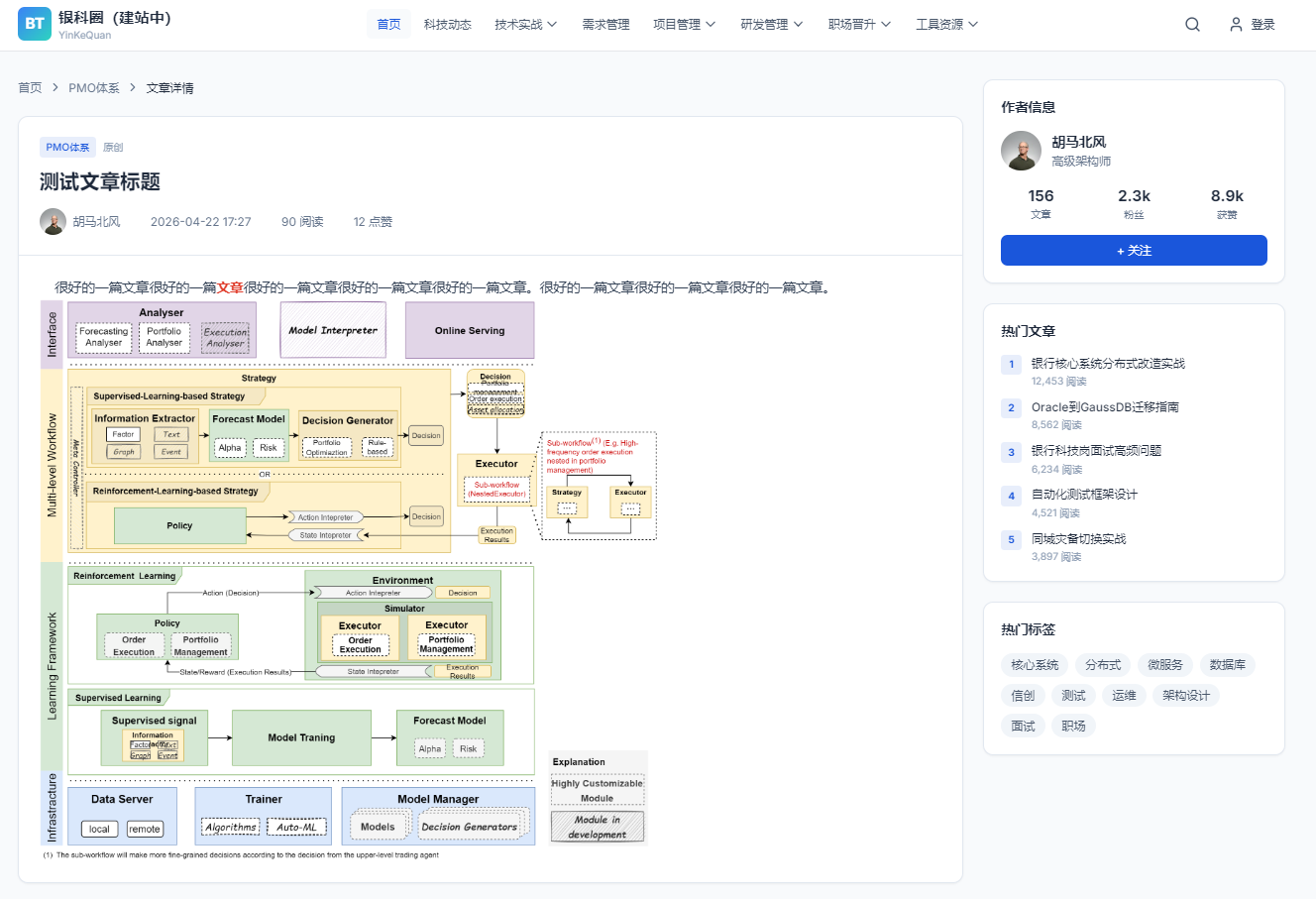
1. 实现真实数据获取
修改 src/pages/ArticleDetail.vue:
<script setup>
import { ref, onMounted } from 'vue';
import { useRoute } from 'vue-router';
import { getFullNavList } from '../api/nav';
import { getArticleDetail, getCategoryName } from '../api/article';

// 文章数据
const article = ref({
  id: '',
  title: '',
  author: '',
  publishTime: '',
  views: 0,
  comments: 0,
  likes: 0,
  category: '',
  content: '',
  coverImage: '',
  source: ''
});

// 文章加载状态
const articleLoading = ref(false);
const articleError = ref(null);

// 处理图片路径,将相对路径转换为完整URL
function getImageUrl(imagePath) {
  if (!imagePath) return null;

  if (imagePath.startsWith('http://') || imagePath.startsWith('https://')) {
    return imagePath;
  }

  if (imagePath.startsWith('/')) {
    return `/jeecg-boot${imagePath}`;
  } else {
    return `/jeecg-boot/${imagePath}`;
  }
}

// 格式化日期
function formatDate(dateStr) {
  if (!dateStr) return '';
  const date = new Date(dateStr);
  const year = date.getFullYear();
  const month = String(date.getMonth() + 1).padStart(2, '0');
  const day = String(date.getDate()).padStart(2, '0');
  const hours = String(date.getHours()).padStart(2, '0');
  const minutes = String(date.getMinutes()).padStart(2, '0');
  return `${year}-${month}-${day} ${hours}:${minutes}`;
}

// 获取文章详情
async function fetchArticleDetail(articleId) {
  articleLoading.value = true;
  articleError.value = null;

  try {
    const response = await getArticleDetail(articleId);

    if (response.success && response.result) {
      const data = response.result;

      // 处理分类名称
      let categoryName = '';
      if (data.categoryId) {
        try {
          const categoryResponse = await getCategoryName(data.categoryId);
          if (categoryResponse.success && categoryResponse.result) {
            categoryName = categoryResponse.result.name;
          }
        } catch (categoryError) {
          console.error('获取分类名称失败:', categoryError);
        }
      }

      // 更新文章数据
      article.value = {
        id: data.id || '',
        title: data.title || '',
        author: data.author || '',
        publishTime: formatDate(data.publishTime),
        views: data.clickCount || 0,
        comments: 0,
        likes: data.likeCount || 0,
        category: categoryName,
        content: data.content || '',
        coverImage: data.coverImage || '',
        source: data.source || ''
      };
    } else {
      articleError.value = '未找到文章数据';
    }
  } catch (error) {
    console.error('获取文章详情失败:', error);
    articleError.value = '加载文章失败,请稍后重试';
  } finally {
    articleLoading.value = false;
  }
}

// 组件挂载时执行
onMounted(async () => {
  const route = useRoute();
  fetchNavList();
  initLucideIcons();

  // 获取文章ID并加载文章详情
  const articleId = route.params.id;
  if (articleId) {
    await fetchArticleDetail(articleId);
  }
});
</script>
2. 添加加载状态和错误处理
修改 src/pages/ArticleDetail.vue 模板部分:
<!-- Article Card -->
<article class="bg-white rounded-xl shadow-sm border border-slate-200 overflow-hidden">
  <!-- Loading State -->
  <div v-if="articleLoading" class="p-12 text-center">
    <div class="inline-block w-8 h-8 border-4 border-bank-primary/30 border-t-bank-primary rounded-full animate-spin mb-4"></div>
    <p class="text-slate-500">加载中...</p>
  </div>

  <!-- Error State -->
  <div v-else-if="articleError" class="p-12 text-center">
    <div class="w-16 h-16 mx-auto mb-4 rounded-full bg-red-100 flex items-center justify-center">
      <i data-lucide="alert-circle" class="w-8 h-8 text-red-500"></i>
    </div>
    <p class="text-slate-600 mb-4">{{ articleError }}</p>
    <button @click="() => fetchArticleDetail(route.params.id)" class="px-4 py-2 bg-bank-primary text-white rounded-lg hover:bg-bank-primary/90 transition-colors">
      重试
    </button>
  </div>

  <!-- Article Content -->
  <div v-else>
    <!-- 原有文章内容 -->
  </div>
</article>
三、首页数据动态获取
1. 实现精选文章数据获取
修改 src/api/article.ts 添加精选文章接口:
/**
 * 获取精选文章
 * @param limit 数量限制,默认6条
 * @returns Promise<any>
 */
export const getEssenceArticles = (limit: number = 6) => {
  return defHttp.get({
    url: Api.GetEssenceArticles,
    params: {
      izEssence: '1',
      pageNo: 1,
      pageSize: limit,
      column: 'publishTime',
      order: 'desc'
    }
  });
};
2. 修改首页组件获取数据
修改 src/pages/Home.vue:
<script setup>
import { ref, onMounted } from 'vue';
import { getFullNavList } from '../api/nav';
import { getEssenceArticles } from '../api/article';

// 精选文章数据
const essenceArticles = ref([]);
const articlesLoading = ref(false);

// 处理图片路径
function getImageUrl(imagePath) {
  if (!imagePath) return null;

  if (imagePath.startsWith('http://') || imagePath.startsWith('https://')) {
    return imagePath;
  }

  if (imagePath.startsWith('/')) {
    return `/jeecg-boot${imagePath}`;
  } else {
    return `/jeecg-boot/${imagePath}`;
  }
}

// 获取精选文章
async function fetchEssenceArticles() {
  articlesLoading.value = true;
  try {
    const response = await getEssenceArticles(6);
    if (response.success && response.result) {
      essenceArticles.value = response.result.records || [];
    }
  } catch (error) {
    console.error('获取精选文章失败:', error);
  } finally {
    articlesLoading.value = false;
  }
}

// 组件挂载时执行
onMounted(() => {
  fetchNavList();
  fetchEssenceArticles(); // 新增
  initBannerSlider();
  initLucideIcons();
});
</script>
3. 更新首页模板展示动态数据
修改 src/pages/Home.vue 模板:
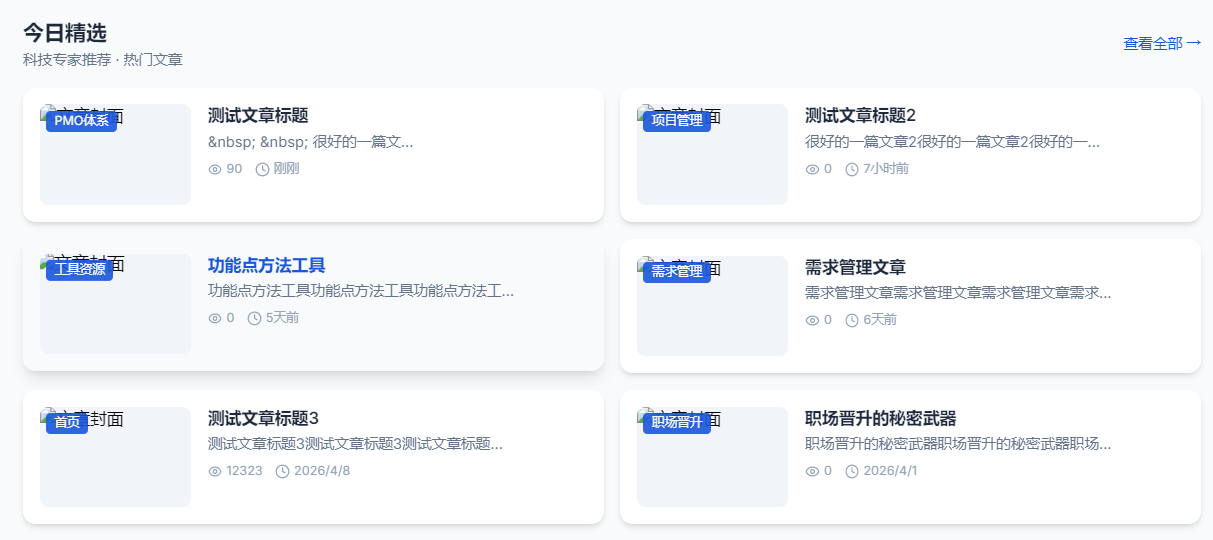
<!-- 精选文章 -->
<section class="mt-12">
  <div class="flex items-center justify-between mb-6">
    <div>
      <h2 class="text-xl font-bold text-slate-800">今日精选</h2>
      <p class="text-sm text-slate-500 mt-0.5">科技专家推荐 · 热门文章</p>
    </div>
    <a href="#" class="text-sm text-bank-primary hover:underline flex items-center gap-1">
      查看更多
      <i data-lucide="chevron-right" class="w-4 h-4"></i>
    </a>
  </div>

  <!-- 加载状态 -->
  <div v-if="articlesLoading" class="grid grid-cols-1 md:grid-cols-2 lg:grid-cols-3 gap-6">
    <div v-for="i in 3" :key="i" class="bg-white rounded-xl border border-slate-200 p-6 animate-pulse">
      <div class="h-40 bg-slate-100 rounded-lg mb-4"></div>
      <div class="h-4 bg-slate-100 rounded w-3/4 mb-2"></div>
      <div class="h-3 bg-slate-100 rounded w-1/2 mb-4"></div>
      <div class="h-3 bg-slate-100 rounded w-1/3"></div>
    </div>
  </div>

  <!-- 文章列表 -->
  <div v-else class="grid grid-cols-1 md:grid-cols-2 lg:grid-cols-3 gap-6">
    <a
      v-for="article in essenceArticles"
      :key="article.id"
      :href="'/article/' + article.id"
      class="group block bg-white rounded-xl border border-slate-200 overflow-hidden bank-hover-lift"
    >
      <div class="relative h-48 overflow-hidden">
        <img
          :src="getImageUrl(article.coverImage) || 'https://images.unsplash.com/photo-1551288049-bebda4e38f71?w=400&h=300&fit=crop'"
          :alt="article.title"
          class="w-full h-full object-cover group-hover:scale-105 transition-transform duration-300"
          loading="lazy"
        >
      </div>
      <div class="p-4">
        <h3 class="text-lg font-semibold text-slate-800 mb-2 line-clamp-2 group-hover:text-bank-primary transition-colors">
          {{ article.title }}
        </h3>
        <p class="text-sm text-slate-500 mb-3 line-clamp-2">{{ article.summary }}</p>
        <div class="flex items-center justify-between text-xs text-slate-400">
          <span>{{ article.author }}</span>
          <span>{{ new Date(article.publishTime).toLocaleDateString() }}</span>
        </div>
      </div>
    </a>
  </div>
</section>
四、文件上传路径配置
1. 修改文件上传路径
修改 application-dev.yml 配置文件:
path:
  #文件上传根目录 设置(相对于项目根目录)
  upload: ./opt/uploadFiles
  #webapp文件路径
  webapp: ./opt/webapp
2. 创建上传目录
mkdir -p "D:\Users\workspace\trae\JeecgBoot\opt\uploadFiles\temp"
mkdir -p "D:\Users\workspace\trae\JeecgBoot\opt\webapp"
3. 图片路径处理
确保 getImageUrl 函数正确处理图片路径:
function getImageUrl(imagePath) {
  if (!imagePath) return null;

  // 检查是否已经是完整URL
  if (imagePath.startsWith('http://') || imagePath.startsWith('https://')) {
    return imagePath;
  }

  // JeecgBoot静态资源配置:./opt/uploadFiles 映射到 /**
  // 实际文件路径:D:\Users\workspace\trae\JeecgBoot\opt\uploadFiles\temp\xxx.png
  // 访问URL:http://localhost:8080/jeecg-boot/temp/xxx.png

  if (imagePath.startsWith('/')) {
    return `/jeecg-boot${imagePath}`;
  } else {
    return `/jeecg-boot/${imagePath}`;
  }
}
五、性能优化
1. 图片懒加载
实现图片懒加载:
<img
  :src="getImageUrl(article.coverImage) || placeholderImage"
  :alt="article.title"
  class="w-full h-full object-cover"
  loading="lazy"
>
2. 路由懒加载
修改 src/router/index.js:
import { createRouter, createWebHistory } from 'vue-router'

const routes = [
  {
    path: '/',
    name: 'Home',
    component: () => import('../pages/Home.vue')
  },
  {
    path: '/article/:id',
    name: 'ArticleDetail',
    component: () => import('../pages/ArticleDetail.vue'),
    props: true
  }
]

const router = createRouter({
  history: createWebHistory(),
  routes
})

export default router
3. 代码分割
在 vite.config.js 中配置代码分割:
export default defineConfig(({ mode }) => {
  const env = loadEnv(mode, process.cwd());

  return {
    // 其他配置...
    build: {
      rollupOptions: {
        output: {
          manualChunks: {
            vendor: ['vue', 'vue-router'],
            axios: ['axios']
          }
        }
      }
    }
  };
});
六、用户体验优化
1. 添加页面加载动画
修改 src/App.vue:
<template>
  <div class="app-container">
    <!-- 页面加载动画 -->
    <div v-if="isLoading" class="loading-container">
      <div class="loading-spinner"></div>
      <p class="loading-text">加载中...</p>
    </div>

    <router-view v-slot="{ Component }">
      <transition name="fade" mode="out-in">
        <component :is="Component" />
      </transition>
    </router-view>
  </div>
</template>

<script setup>
import { ref, onMounted } from 'vue';

const isLoading = ref(true);

onMounted(() => {
  // 模拟加载时间
  setTimeout(() => {
    isLoading.value = false;
  }, 500);
});
</script>

<style>
.app-container {
  min-height: 100vh;
}

.loading-container {
  position: fixed;
  top: 0;
  left: 0;
  right: 0;
  bottom: 0;
  display: flex;
  flex-direction: column;
  align-items: center;
  justify-content: center;
  background: white;
  z-index: 9999;
}

.loading-spinner {
  width: 48px;
  height: 48px;
  border: 4px solid #f3f3f3;
  border-top: 4px solid #1a56db;
  border-radius: 50%;
  animation: spin 1s linear infinite;
  margin-bottom: 16px;
}

.loading-text {
  color: #666;
  font-size: 14px;
}

@keyframes spin {
  0% { transform: rotate(0deg); }
  100% { transform: rotate(360deg); }
}

.fade-enter-active,
.fade-leave-active {
  transition: opacity 0.3s ease;
}

.fade-enter-from,
.fade-leave-to {
  opacity: 0;
}
</style>
2. 添加返回顶部功能
在 src/pages/Home.vue 和 src/pages/ArticleDetail.vue 中添加:
<!-- 返回顶部按钮 -->
<button
  v-if="showBackToTop"
  @click="backToTop"
  class="fixed bottom-8 right-8 w-12 h-12 bg-bank-primary text-white rounded-full shadow-lg flex items-center justify-center hover:bg-bank-primary/90 transition-all z-50"
>
  <i data-lucide="arrow-up" class="w-6 h-6"></i>
</button>

// 返回顶部相关
const showBackToTop = ref(false);

// 监听滚动
function handleScroll() {
  showBackToTop.value = window.scrollY > 300;
}

// 返回顶部
function backToTop() {
  window.scrollTo({
    top: 0,
    behavior: 'smooth'
  });
}

// 组件挂载时添加滚动监听
onMounted(() => {
  window.addEventListener('scroll', handleScroll);
  // 其他初始化代码...
});

// 组件卸载时移除滚动监听
onUnmounted(() => {
  window.removeEventListener('scroll', handleScroll);
});
七、测试与调试
1. 前端测试
功能测试
-
✅ 首页加载与导航
-
✅ 轮播图功能
-
✅ 文章列表展示
-
✅ 文章详情页跳转
-
✅ 文章详情数据加载
-
✅ 分类信息显示
-
✅ 图片路径处理
响应式测试
-
✅ 移动端布局
-
✅ 平板布局
-
✅ 桌面布局
性能测试
-
✅ 页面加载速度
-
✅ 图片加载优化
-
✅ 代码分割效果
2. 后端接口测试
使用Postman测试API接口:
-
GET /yucms/yucmsCategory/getFullNavList -
GET /yucms/yucmsArticle/list?izEssence=1&pageNo=1&pageSize=6 -
GET /yucms/yucmsArticle/queryById?id=2046448310010691586 -
GET /yucms/yucmsCategory/queryById?id=2045904451398049793
八、项目结构
最终项目结构
fintech-vue3/
├── public/
├── src/
│   ├── api/              # API模块
│   │   ├── nav.ts        # 导航API
│   │   └── article.ts    # 文章API
│   ├── pages/            # 页面组件
│   │   ├── Home.vue      # 首页
│   │   └── ArticleDetail.vue  # 文章详情页
│   ├── router/           # 路由配置
│   │   └── index.js
│   ├── utils/            # 工具函数
│   │   └── http/
│   │       └── axios/
│   │           └── index.ts  # HTTP请求封装
│   ├── App.vue           # 根组件
│   ├── main.js           # 入口文件
│   └── style.css         # 全局样式
├── .env.development      # 开发环境配置
├── index.html
├── package.json
├── postcss.config.js
├── tailwind.config.js
└── vite.config.js
后端项目结构
jeecg-boot/
├── jeecg-module-system/
│   └── jeecg-system-start/
│       └── src/main/resources/
│           └── application-dev.yml  # 配置文件
└── jeecg-boot-module/
    └── jeecg-module-demo/
        └── src/main/java/org/jeecg/modules/demo/yucms/
            ├── controller/  # 控制器
            ├── entity/      # 实体类
            ├── mapper/      # Mapper
            └── service/     # 服务层
九、开发成果
-
✅ 后端API对接与数据交互
-
✅ 文章详情页真实数据展示
-
✅ 首页精选文章动态获取
-
✅ 文件上传路径配置与图片处理
-
✅ 性能优化(图片懒加载、路由懒加载、代码分割)
-
✅ 用户体验优化(页面加载动画、返回顶部功能)
-
✅ 完整的测试与调试
十、后续计划
1. 功能扩展
-
实现文章评论功能
-
添加文章搜索功能
-
实现用户登录与注册
-
添加文章收藏功能
-
实现文章分享功能
2. 性能优化
-
服务器端渲染(SSR)
-
静态站点生成(SSG)
-
缓存策略优化
-
CDN集成
3. 部署上线
-
构建优化
-
部署到生产服务器
-
域名配置
-
HTTPS配置
-
监控与日志
4. 维护与迭代
-
代码规范与文档
-
自动化测试
-
CI/CD集成
-
功能迭代与 bug 修复
十一、总结
第三天的开发工作完成了数据交互、后端集成、功能完善和性能优化。通过对接真实的后端API,实现了文章详情页和首页的动态数据展示。同时,通过性能优化和用户体验改进,提升了网站的整体质量。
在开发过程中,我们遇到了以下挑战并成功解决:
-
API路径配置错误:修正了前端API路径,确保与后端接口匹配
-
Shiro权限验证 :在后端控制器中添加
@IgnoreAuth注解,允许前端直接访问 -
图片路径处理 :实现了
getImageUrl函数,正确处理相对路径和绝对路径 -
性能优化:通过图片懒加载、路由懒加载和代码分割,提升了网站性能
通过这三天的开发,我们已经搭建了一个功能完善、性能优异的企业级门户网站。后续将继续扩展功能、优化性能、部署上线,打造一个成熟的生产级应用。
十二、技术栈总结
| 分类 | 技术 | 版本 | 用途 |
|---|---|---|---|
| 前端框架 | Vue | 3.x | 前端核心框架 |
| 构建工具 | Vite | 5.x | 项目构建和开发服务器 |
| CSS框架 | Tailwind CSS | 3.x | 响应式样式设计 |
| 路由 | Vue Router | 4.x | 页面路由管理 |
| HTTP客户端 | Axios | 1.x | API请求封装 |
| 图标库 | Lucide Icons | - | 图标展示 |
| 后端框架 | JeecgBoot | - | 后端API服务 |
| 数据库 | MySQL | - | 数据存储 |
通过这个项目,我们展示了如何使用现代前端技术栈构建一个企业级门户网站,从项目初始化到功能完善的完整开发流程。