新建一个js文件,搭建个服务,模拟相亲交友,代码如下:
javascript
const http = require('http');

// 内存模拟数据库
let users = [];
let likes = [];
let userIdAutoIncrement = 1;

const server = http.createServer((req, res) => {
    // 通用响应头
    res.setHeader('Access-Control-Allow-Origin', '*');
    res.setHeader('Content-Type', 'application/json');

    // -------------------------------------------------------------------------
    // 1. POST 注册接口
    // -------------------------------------------------------------------------
    if (req.method === 'POST' && req.url === '/api/register') {
        let data = '';
        req.on('data', chunk => data += chunk);
        req.on('end', () => {
            try {
                const body = JSON.parse(data);
                const { username, password, nickname, gender, age, city } = body;

                if (!username || !password) {
                    return res.end(JSON.stringify({ code: 400, msg: '账号密码不能为空' }));
                }

                // 检查是否已注册
                const exists = users.find(u => u.username === username);
                if (exists) {
                    return res.end(JSON.stringify({ code: 400, msg: '用户名已存在' }));
                }

                // 注册
                const user = {
                    id: userIdAutoIncrement++,
                    username,
                    password,
                    nickname: nickname || '用户' + userIdAutoIncrement,
                    gender: gender || '未知',
                    age: age || 0,
                    city: city || '保密'
                };
                users.push(user);

                res.end(JSON.stringify({
                    code: 200,
                    msg: '注册成功',
                    userId: user.id
                }));
            } catch (e) {
                res.end(JSON.stringify({ code: 400, msg: '参数格式错误' }));
            }
        });
        return;
    }

    // -------------------------------------------------------------------------
    // 2. POST 登录接口
    // -------------------------------------------------------------------------
    if (req.method === 'POST' && req.url === '/api/login') {
        let data = '';
        req.on('data', chunk => data += chunk);
        req.on('end', () => {
            try {
                const body = JSON.parse(data);
                const { username, password } = body;

                const user = users.find(u => u.username === username && u.password === password);
                if (!user) {
                    return res.end(JSON.stringify({ code: 401, msg: '账号或密码错误' }));
                }

                res.end(JSON.stringify({
                    code: 200,
                    msg: '登录成功',
                    token: 'token-' + user.id,
                    userId: user.id
                }));
            } catch (e) {
                res.end(JSON.stringify({ code: 400, msg: '参数错误' }));
            }
        });
        return;
    }

    // -------------------------------------------------------------------------
    // 3. GET 获取个人资料
    // -------------------------------------------------------------------------
    if (req.method === 'GET' && req.url.startsWith('/api/profile')) {
        const url = new URL(req.url, 'http://localhost:3000');
        const userId = url.searchParams.get('userId');

        if (!userId) {
            return res.end(JSON.stringify({ code: 400, msg: '缺少userId' }));
        }

        const user = users.find(u => u.id == userId);
        if (!user) {
            return res.end(JSON.stringify({ code: 404, msg: '用户不存在' }));
        }

        res.end(JSON.stringify({
            code: 200,
            data: {
                id: user.id,
                nickname: user.nickname,
                gender: user.gender,
                age: user.age,
                city: user.city
            }
        }));
        return;
    }

    // -------------------------------------------------------------------------
    // 4. GET 查询异性推荐列表
    // -------------------------------------------------------------------------
    if (req.method === 'GET' && req.url.startsWith('/api/user/recommend')) {
        const url = new URL(req.url, 'http://localhost:3000');
        const gender = url.searchParams.get('gender'); // 想要看的性别:男/女

        if (!gender) {
            return res.end(JSON.stringify({ code: 400, msg: '请指定要查询的性别' }));
        }

        const list = users
            .filter(u => u.gender === gender)
            .map(u => ({
                id: u.id,
                nickname: u.nickname,
                age: u.age,
                city: u.city
            }));

        res.end(JSON.stringify({
            code: 200,
            count: list.length,
            list: list
        }));
        return;
    }

    // -------------------------------------------------------------------------
    // 5. POST 发送喜欢(打招呼)
    // -------------------------------------------------------------------------
    if (req.method === 'POST' && req.url === '/api/user/like') {
        let data = '';
        req.on('data', chunk => data += chunk);
        req.on('end', () => {
            try {
                const body = JSON.parse(data);
                const { fromUserId, toUserId } = body;

                if (!fromUserId || !toUserId) {
                    return res.end(JSON.stringify({ code: 400, msg: '缺少参数' }));
                }
                if (fromUserId == toUserId) {
                    return res.end(JSON.stringify({ code: 400, msg: '不能喜欢自己' }));
                }

                const fromUser = users.find(u => u.id == fromUserId);
                const toUser = users.find(u => u.id == toUserId);
                if (!fromUser || !toUser) {
                    return res.end(JSON.stringify({ code: 404, msg: '用户不存在' }));
                }

                // 记录喜欢
                likes.push({ fromUserId, toUserId, time: new Date() });
                res.end(JSON.stringify({ code: 200, msg: `你已成功喜欢 ${toUser.nickname}` }));
            } catch (e) {
                res.end(JSON.stringify({ code: 400, msg: '参数错误' }));
            }
        });
        return;
    }

    // 404
    res.writeHead(404);
    res.end(JSON.stringify({ code: 404, msg: '接口不存在' }));
});

// 启动日志(完全规范、无歧义、不暴露变量)
server.listen(3000, () => {
    console.log('相亲交友接口服务已启动:http://localhost:3000');
    console.log('');
    console.log('POST 注册        /api/register');
    console.log('   参数:username, password, nickname, gender, age, city');
    console.log('');
    console.log(' POST 登录        /api/login');
    console.log('   参数:username, password');
    console.log('');
    console.log(' GET  个人资料    /api/profile?userId=xxx');
    console.log('');
    console.log(' GET  推荐异性    /api/user/recommend?gender=女');
    console.log('');
    console.log(' POST 发送喜欢    /api/user/like');
    console.log('   参数:fromUserId, toUserId');
	console.log('龙能大能小,能升能隐;大则兴云吐雾,小则隐介藏形;升则飞腾于宇宙之间,隐则潜伏于波涛之内。方今春深,龙乘时变化,犹人得志而纵横四海。龙之为物,可比世之英雄。');
});
运行:
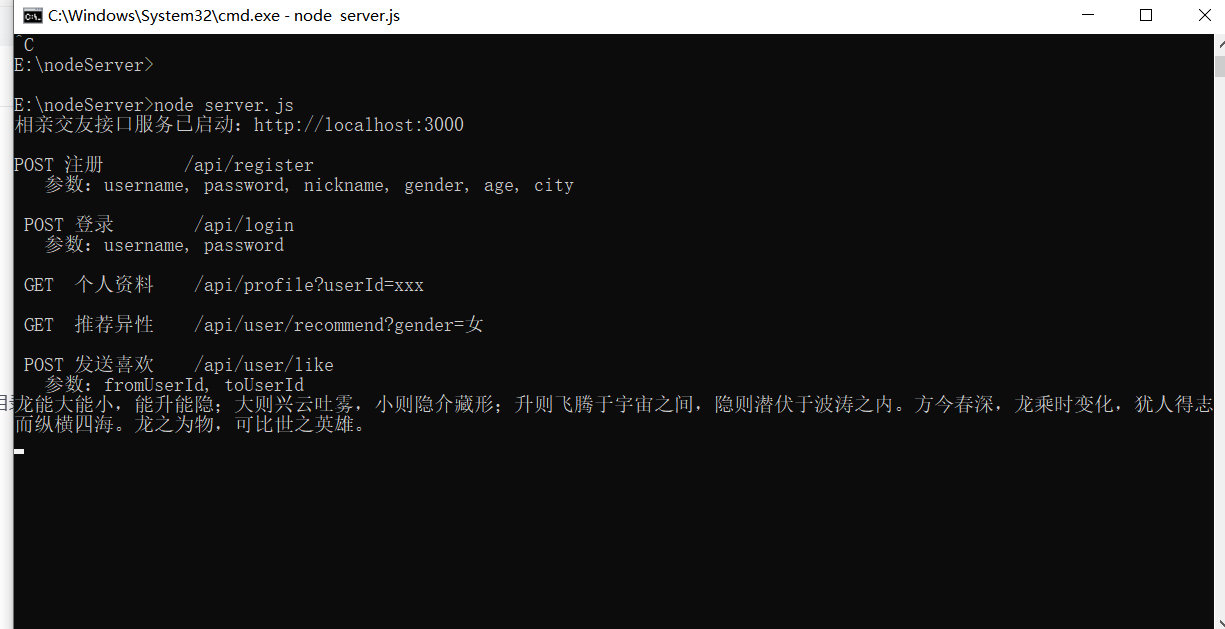
ok. 先试试一个get请求,在浏览器输入:http://localhost:3000/api/user/recommend?gender=%E5%A5%B3
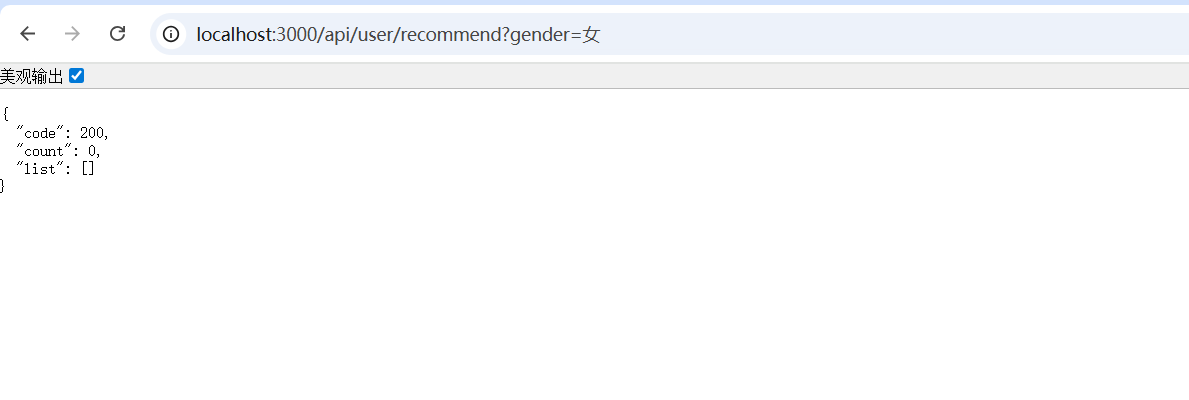
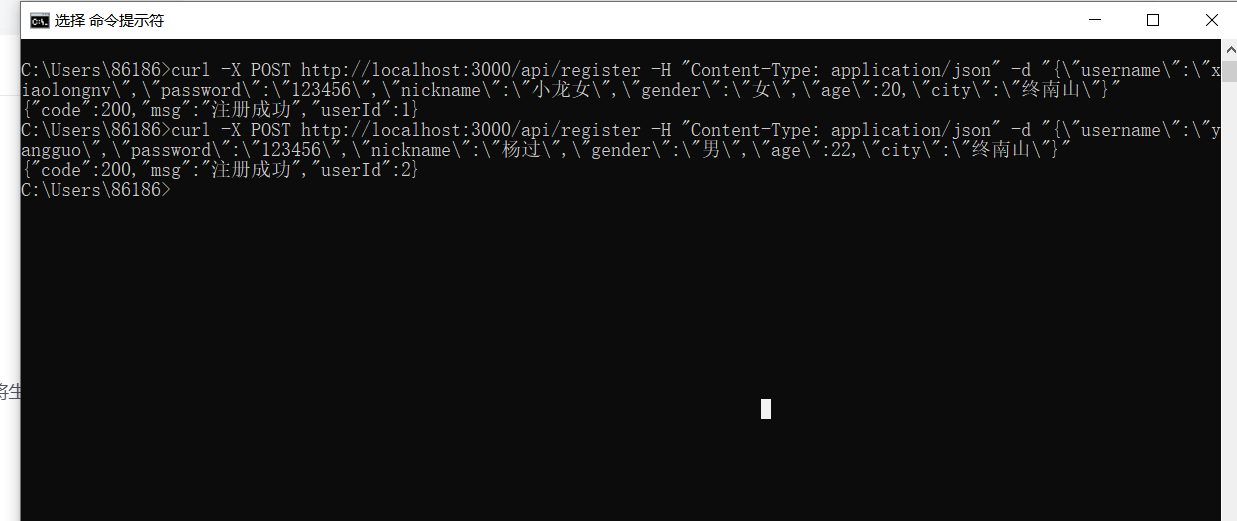
因为没人注册呢,所以没人。注册一个小龙女和一个杨过。
输入命令:
bash
curl -X POST http://localhost:3000/api/register -H "Content-Type: application/json" -d "{\"username\":\"xiaolongnv\",\"password\":\"123456\",\"nickname\":\"小龙女\",\"gender\":\"女\",\"age\":20,\"city\":\"终南山\"}"
bash
curl -X POST http://localhost:3000/api/register -H "Content-Type: application/json" -d "{\"username\":\"yangguo\",\"password\":\"123456\",\"nickname\":\"杨过\",\"gender\":\"男\",\"age\":22,\"city\":\"终南山\"}"运行如下:
ok, 再查询女性用户:
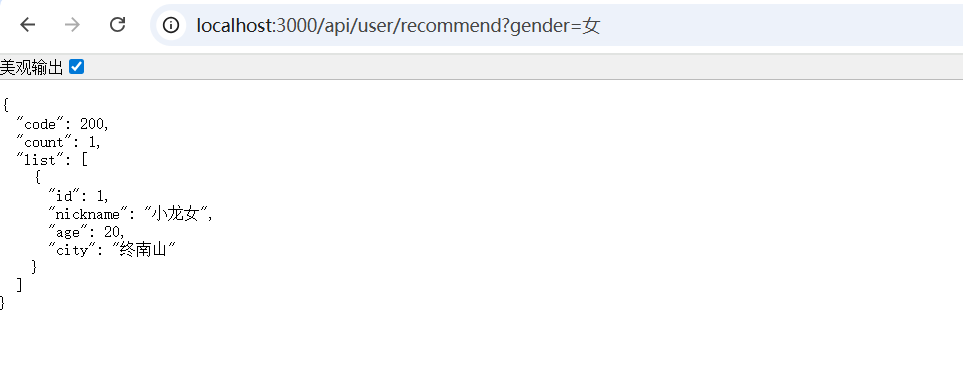
ok. 现在能查询到了。