常见的sql日志打印无非就是sql记录完整的带参展示。但是我觉得还不够。
因为这些简单的记录看起来还不够明显。
这次优化,我将对于不同操作类型展示不同的颜色:查询使用绿色、更新使用黄色、新增使用红色。并且同时展示该sql是哪一个方法执行的,不仅如此,还支持一键点击直接跳转到该方法,可谓是效率大大的提高。
效果如下:
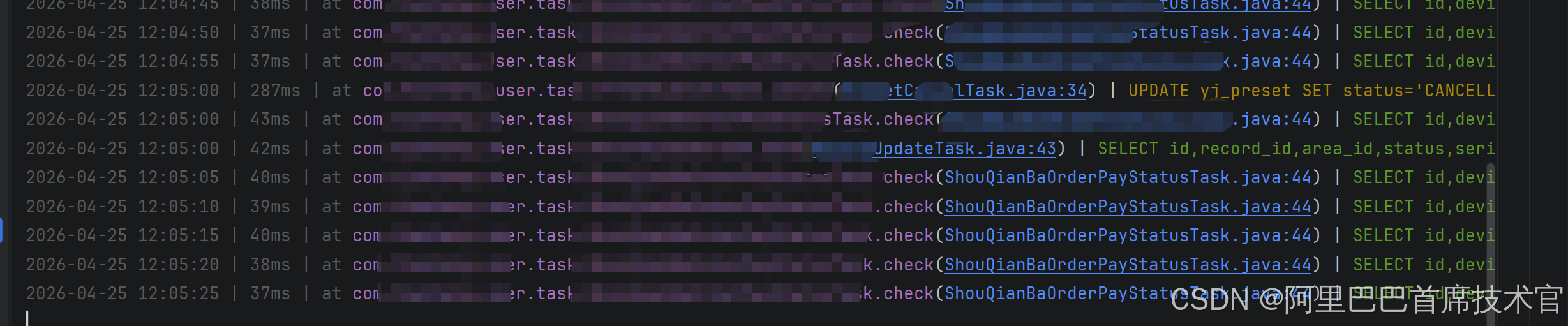
这日志看起来真的太清晰直接了
实现源码:
java
spring:
  datasource:
    druid:
      driver-class-name: com.p6spy.engine.spy.P6SpyDriver
      url: jdbc:p6spy:mysql://xxxxx:3306/xxxxxuseUnicode=true&serverTimezone=GMT%2B8&characterEncoding=utf8
      username: root
      password: xxxxxxx
      #初始链接数
      initial-size: 3
      #最小连接数量
      min-idle: 3
      #最大连接数量
      max-active: 6
      #等待连接超时时间
max-wait: 600000spy.properties
java
# p6spy(仅建议在 dev 使用 jdbc:p6spy:mysql 前缀)
# 生产环境 datasource 请保持 com.mysql.cj.jdbc.Driver + jdbc:mysql,勿引用本代理

# 必须包含 P6LogFactory 才会输出 SQL
modulelist=com.p6spy.engine.spy.P6SpyFactory,com.p6spy.engine.logging.P6LogFactory,com.p6spy.engine.outage.P6OutageFactory

# 实际 JDBC 驱动(由 p6spy 委托执行)
driverlist=com.mysql.cj.jdbc.Driver

autoflush=true

# 控制台输出;若需进 logback 可改为 com.p6spy.engine.spy.appender.Slf4JLogger 并配置 logging.level.p6spy
appender=com.p6spy.engine.spy.appender.StdoutLogger

logMessageFormat=com.xxx.common.config.P6SpyColorLogger

# 减少 resultset / batch 等噪音
excludecategories=info,debug,result,resultset,batch

filter=false

# 慢 SQL 检测(秒),0 表示关闭
outagedetection=false
outagedetectioninterval=60
java
package com.xxxxx.config;

import com.p6spy.engine.spy.appender.MessageFormattingStrategy;

import java.time.Instant;
import java.time.ZoneId;
import java.time.format.DateTimeFormatter;

/**
 * p6spy 控制台 SQL 彩色单行输出,并附带业务调用栈(首个 com.xxxx 非 mapper 帧)。
 * <p>调用方格式与 Java 堆栈一致,IDEA 运行窗口可点击跳转到源码。</p>
 * <p>在 {@code spy.properties} 中配置:{@code logMessageFormat=com.xxxxxx.config.P6SpyColorLogger}</p>
 */
public class P6SpyColorLogger implements MessageFormattingStrategy {

    private static final DateTimeFormatter TIME_FMT = DateTimeFormatter.ofPattern("yyyy-MM-dd HH:mm:ss")
            .withZone(ZoneId.systemDefault());

    private static final String RESET = "\u001B[0m";
    private static final String GREY = "\u001B[90m";
    private static final String GREEN = "\u001B[32m";
    private static final String YELLOW = "\u001B[33m";
    private static final String RED = "\u001B[31m";
    private static final String CYAN = "\u001B[36m";
    private static final String MAGENTA = "\u001B[35m";

    @Override
    public String formatMessage(int connectionId, String now, long elapsed,
                                String category, String prepared, String sql, String url) {
        if (sql == null || sql.trim().isEmpty()) {
            return "";
        }
        String oneLine = compressWhitespace(sql);
        String upper = oneLine.toUpperCase().trim();
        String sqlColor;
        if (upper.startsWith("SELECT") || upper.startsWith("WITH")) {
            sqlColor = GREEN;
        } else if (upper.startsWith("INSERT")) {
            sqlColor = CYAN;
        } else if (upper.startsWith("UPDATE")) {
            sqlColor = YELLOW;
        } else if (upper.startsWith("DELETE")) {
            sqlColor = RED;
        } else {
            sqlColor = RESET;
        }
        String caller = resolveBusinessCaller();
        return GREY + formatSpyNow(now) + " | " + elapsed + "ms | "
                + caller + " | "
                + sqlColor + oneLine + RESET;
    }

    /** p6spy 传入的 {@code now} 一般为毫秒时间戳字符串 */
    private static String formatSpyNow(String now) {
        if (now == null || now.isEmpty()) {
            return TIME_FMT.format(Instant.now());
        }
        try {
            long ms = Long.parseLong(now.trim());
            return TIME_FMT.format(Instant.ofEpochMilli(ms));
        } catch (NumberFormatException ignored) {
            return now;
        }
    }

    /**
     * 从当前线程栈顶向下找第一个业务调用:com.xxx(填写当前项目包) 包内且非 MyBatis Mapper 接口。
     * <p>输出形如 {@code at 全限定类.方法(源文件.java:行)},其中括号内为纯文本便于 IDEA 识别链接。</p>
     */
    private static String resolveBusinessCaller() {
        StackTraceElement[] trace = Thread.currentThread().getStackTrace();
        for (StackTraceElement e : trace) {
            String cn = e.getClassName();
            if (skipFrameworkClass(cn)) {
                continue;
            }
            // 备注:xxx 为当前项目包
            if (cn.startsWith("com.xxxx.") && !cn.contains(".mapper.")) {
                return formatCallerForIdeaConsole(e, stripCglibSuffix(cn));
            }
        }
        return "?";
    }

    /**
     * IDEA 控制台靠 {@code (源文件.java:行号)} 生成可点击链接。若整段包在同一串 ANSI 颜色里,
     * 类名较长时部分版本识别不稳定;因此仅给「包名.类.方法」上色,定位段保持纯文本。
     * 与异常堆栈一致可加 {@code at } 前缀,进一步利于解析。
     */
    private static String formatCallerForIdeaConsole(StackTraceElement e, String fqcn) {
        String file = e.getFileName();
        if (file == null || file.isEmpty()) {
            file = inferSourceFileName(fqcn);
        }
        int line = e.getLineNumber();
        String linePart = line > 0 ? String.valueOf(line) : "?";
        String loc = "(" + file + ":" + linePart + ")";
        return "at " + MAGENTA + fqcn + "." + e.getMethodName() + RESET + loc;
    }

    /** 无字节码行号表时 getFileName 可能为空,按外层类名推断 .java 文件名 */
    private static String inferSourceFileName(String fqcn) {
        int dot = fqcn.lastIndexOf('.');
        String simple = dot >= 0 ? fqcn.substring(dot + 1) : fqcn;
        int dollar = simple.indexOf('$');
        if (dollar > 0) {
            simple = simple.substring(0, dollar);
        }
        return simple + ".java";
    }

    private static boolean skipFrameworkClass(String cn) {
        if (cn.equals("java.lang.Thread") || cn.startsWith("java.") || cn.startsWith("javax.")
                || cn.startsWith("sun.") || cn.startsWith("jdk.") || cn.startsWith("com.sun.")) {
            return true;
        }
        if (cn.startsWith("com.xxxx.common.config.P6SpyColorLogger")) {
            return true;
        }
        if (cn.startsWith("com.p6spy.")) {
            return true;
        }
        if (cn.startsWith("org.apache.ibatis.") || cn.startsWith("org.mybatis.")) {
            return true;
        }
        if (cn.startsWith("com.baomidou.mybatisplus.")) {
            return true;
        }
        if (cn.startsWith("org.springframework.")) {
            return true;
        }
        if (cn.startsWith("com.alibaba.druid.")) {
            return true;
        }
        return cn.startsWith("com.mysql.") || cn.startsWith("org.apache.tomcat.");
    }

    /** 去掉 Spring CGLIB 代理后缀,保留完整包名+类名 */
    private static String stripCglibSuffix(String fqcn) {
        int enh = fqcn.indexOf("$$");
        return enh > 0 ? fqcn.substring(0, enh) : fqcn;
    }

    private static String compressWhitespace(String sql) {
        return sql.replaceAll("\\s+", " ").trim();
    }
}