本文将带你从零到一,完整实现一套基于行政区划的地理围栏方案,包含数据获取、坐标解析、点位判断全流程。
前言
在很多业务场景中,我们都需要用到地理围栏(GeoFence)功能:
- 🚗 出行/物流:判断车辆是否进出某个城市/区域
- 🏪 电商/本地生活:判断用户是否在配送范围内
- 📍 营销活动:基于地理位置推送定向活动
- 🏭 安防监控:判断人员/设备是否越界
- 🛵 共享出行:电动车禁停区、限行区管控
传统方案通常需要手动在地图上画多边形,成本高且不够精准。
本文的方案是:直接从阿里 DataV 抓取官方行政区划边界坐标,构建精准的城市/区县级地理围栏。
一、方案整体设计
scss
Text
┌─────────────────────────────────────────────────────┐
│                    整体流程                          │
│                                                     │
│  DataV API  ──►  解析GeoJSON  ──►  存储边界坐标        │
│                                          │          │
│  用户坐标  ──────────────────────►  R-tree算法判断     │
│                                          │          │
│                                     在围栏内/外       │
└─────────────────────────────────────────────────────┘
技术选型:
| 模块 | 技术 |
|---|---|
| 边界数据源 | Alibaba DataV GeoJSON API |
| 坐标体系 | GCJ-02(国内高德/腾讯地图标准) |
| 判断算法 | R-tree |
| 后端语言 | Java / Python(本文以Java为主) |
| 数据存储 | Redis / MySQL |
二、数据源:Alibaba DataV 行政区划 API
2.1 API 介绍
阿里 DataV 提供了完整的中国行政区划边界数据,地址如下:
Text
https://geo.datav.aliyun.com/areas_v3/bound/{adcode}.json参数说明:
| 参数 | 说明 | 示例 |
|---|---|---|
| adcode | 行政区划编码 | 100000(全国)、310000(上海市)、110105(朝阳区) |
常用 adcode 参考:
Text
    100000  →  全国
    110000  →  北京市
    110105  →  朝阳区
    310000  →  上海市
    310101  →  黄浦区
    440100  →  广州市
    440300  →  深圳市
💡 完整的 adcode 可以从国家统计局查询,也可以通过高德地图 API 获取。
2.2 返回数据结构(GeoJSON)
访问 https://geo.datav.aliyun.com/areas_v3/bound/440300.json(深圳市),返回:
Json
    {
      "type": "FeatureCollection",
      "features": [
        {
          "type": "Feature",
          "properties": {
            "adcode": 440300,
            "name": "深圳市",
            "center": [114.085947, 22.547],
            "centroid": [114.054495, 22.542468],
            "childrenNum": 9,
            "level": "city",
            "parent": { "adcode": 440000 },
            "subFeatureIndex": 0,
            "acroutes": [100000, 440000]
          },
          "geometry": {
            "type": "MultiPolygon",
            "coordinates": [
              [
                [
                  [113.817451, 22.638359],
                  [113.818071, 22.637468],
                  // ... 大量坐标点
                  [113.817451, 22.638359]  // 闭合回起点
                ]
              ]
            ]
          }
        }
      ]
    }
2.3 注意 MultiPolygon vs Polygon
DataV 返回的 geometry 类型有两种:
- Polygon:单个多边形(适用于形状简单的区域)
- MultiPolygon:多个多边形组合(适用于有岛屿、飞地的区域)
判断时需要对所有子多边形都做检测,任意一个包含则视为在围栏内。
三、获取并解析边界数据
3.1 HTTP 请求获取 GeoJSON
Maven 依赖:
Xml
    <dependencies>
        <!-- HTTP 请求 -->
        <dependency>
            <groupId>org.apache.httpcomponents</groupId>
            <artifactId>httpclient</artifactId>
            <version>4.5.14</version>
        </dependency>
        <!-- JSON 解析 -->
        <dependency>
            <groupId>com.alibaba</groupId>
            <artifactId>fastjson</artifactId>
            <version>2.0.32</version>
        </dependency>
        <!-- Lombok -->
        <dependency>
            <groupId>org.projectlombok</groupId>
            <artifactId>lombok</artifactId>
            <version>1.18.28</version>
        </dependency>
    </dependencies>
GeoFence 数据库模型:
java
    /**
     * 地理围栏实体
     */
    @Data
    @Builder
    @TableName("geo_fence")
    public class GeoFenceDO {

        /** 行政区划编码 */
        private String code;

        /** 区域名称 */
        private String name;

        /** 行政级别:country/province/city/district */
        private String level;

        /** 中心点 */
        private String center;

        /** 上级行政区划编码 */
        private String parentCode;

        /** 坐标集类型 MultiPolygon或Polygon */
        private String geoType;

        /**
         * 边界多边形列表(MultiPolygon)
         * 外层List:多个多边形
         * 内层List:单个多边形的顶点坐标
         */
        private String coordinates;
    }
GeoFence 数据库服务:
java
package com.example.geofence.service;

import java.util.List;
import org.springframework.stereotype.Service;
import com.example.geofence.entity.GeoFenceDO;
import com.example.geofence.mapper.GeoFenceMapper;
import jakarta.annotation.Resource;
import lombok.extern.slf4j.Slf4j;

/**
 * 行政区域围栏数据库服务
 */
@Slf4j
@Service
public class GeoFenceDbService {

	@Resource
	GeoFenceMapper geoFenceMapper;

	public void save(GeoFenceDO entīty) {
	    geoFenceMapper.insert(entīty);
	}

	public void update(GeoFenceDO entīty) {
	    geoFenceMapper.updateById(entīty);
	}

	public GeoFenceDO getByCode(String code) {
	    return geoFenceMapper.selectByCode(code);
	}

	public List<GeoFenceDO> findByParentCode(String parentCode) {
	    return geoFenceMapper.selectByParentCode(parentCode);
	}

	public List<GeoFenceDO> findByAll() {
	    return geoFenceMapper.selectByAll();
	}

	public List<GeoFenceDO> findByCodeList(List<String> codeList) {
	    return geoFenceMapper.selectByCodeList(codeList);
	}
}
DataV数据获取并存储服务:
java
package com.example.geofence.service;

import org.slf4j.Logger;
import org.slf4j.LoggerFactory;
import org.springframework.beans.factory.annotation.Value;
import org.springframework.stereotype.Service;

import com.alibaba.fastjson2.JSONArray;
import com.alibaba.fastjson2.JSONObject;
import com.example.geofence.entity.GeoFenceDO;

import cn.hutool.http.HttpUtil;
import jakarta.annotation.PostConstruct;

/**
 * Loads province/city/district boundaries at startup
 * for fast point-in-polygon queries.
 *
 * Cache strategy:
 *   1. If the SQLite region table is non-empty, load from DB (fast path).
 *   2. Otherwise fetch from geo.datav.aliyun.com, persist to SQLite, then build index.
 *
 * Loading hierarchy from datav API:
 *   100000_full.json  → 34 provinces
 *   {province}_full.json → cities / direct districts
 *   {city}_full.json  → districts  (only when childrenNum > 0)
 */
@Service
public class DatavLoadService {

    private static final Logger log = LoggerFactory.getLogger(DatavLoadService.class);

    private static final String CHINA_ADCODE = "100000";

    private final GeoFenceDbService geoFenceDbService;

    @Value("${geofence.load-on-startup:true}")
    private boolean loadOnStartup;

    public DatavLoadService(GeoFenceDbService geoFenceDbService) {
        this.geoFenceDbService = geoFenceDbService;
    }

    @PostConstruct
    public void init() {
      if (!loadOnStartup) return;
      log.info("Initializing geofence ...");
      long t = System.currentTimeMillis();
      doUpdateProvince();
      doUpdateCity();
      doUpdateDistrict();
      log.info("DataV ready, built in {} ms", System.currentTimeMillis() - t);
    }

    public void doUpdateProvince() {
      log.info("正在更新全国数据");
      doUpdate(CHINA_ADCODE);
    }

    public void doUpdateCity() {
      geoFenceDbService.findByParentCode(CHINA_ADCODE).forEach(areaGeo -> {
	      String adcode = areaGeo.getCode();
	      String name = areaGeo.getName();
	      log.info("正在更新城市数据: {} - {}", adcode, name);
	      doUpdate(adcode);
	  });
    }

    public void doUpdateDistrict() {
	    geoFenceDbService.findByParentCode(CHINA_ADCODE).forEach(provinceAreaGeo -> {
         String provinceAdcode = provinceAreaGeo.getCode();
         geoFenceDbService.findByParentCode(provinceAdcode).forEach(cityAreaGeo -> {
           String cityAdcode = cityAreaGeo.getCode();
           String cityName = cityAreaGeo.getName();
           log.info("正在更新城市数据: {} - {}", cityAdcode, cityName);
           try {
             doUpdate(cityAdcode);
           } catch (Exception e) {
             log.error("解析错误,跳过数据: {}", cityAdcode);
           }
	    });
	  });
    }

    public void doUpdateDistrict(String cityAdcode) {
        geoFenceDbService.findByParentCode(cityAdcode).forEach(areaGeo -> {
            String adcode = areaGeo.getCode();
            String name = areaGeo.getName();
            log.info("正在更新区域数据: {} - {}", adcode, name);
            try {
                doUpdate(adcode);
            } catch (Exception e) {
                log.error("解析错误,跳过数据: {}", areaGeo.getCode());
            }
      });
    }

    public void doUpdate(String code) {
        try {
                String url = "https://geo.datav.aliyun.com/areas_v3/bound/" + code + "_full.json"; // 替换为实际URL

                String result = HttpUtil.get(url);

                JSONObject jsonObject = JSONObject.parseObject(result);
                JSONArray features = jsonObject.getJSONArray("features");
                if (features != null) {
                    for (int i = 0; i < features.size(); i++) {
                        JSONObject feature = features.getJSONObject(i);
                        JSONObject properties = feature.getJSONObject("properties");
                        JSONObject geometry = feature.getJSONObject("geometry");
                        String adcode = properties.getString("adcode");
                        GeoFenceDO existingAreaGeo = geoFenceDbService.getByCode(adcode);
                        if (existingAreaGeo != null) {
                            log.info("--------------跳过已经存在数据: {}", adcode);
                            continue;
                        }
                        if(adcode.equals("100000_JD")) {
                            log.info("--------------跳过数据: {}", adcode);
                            continue;
                        }
                        JSONArray center = properties.getJSONArray("center");
                        JSONObject parent =  properties.getJSONObject("parent");

                        GeoFenceDO areaGeo = new GeoFenceDO();
                        areaGeo.setName(properties.getString("name"));
                        areaGeo.setCode(properties.getString("adcode"));
                        areaGeo.setCenter(center.toJSONString());
                        areaGeo.setLevel(properties.getString("level"));
                        areaGeo.setParentCode(parent.getString("adcode"));

                        JSONArray coordinates = geometry.getJSONArray("coordinates");
                        String type = geometry.getString("type");
                        areaGeo.setGeoType(type);
                        areaGeo.setCoordinates(coordinates.toJSONString());
                        geoFenceDbService.save(areaGeo);
                    }
                }
		} catch (Exception e) {
			log.error("更新数据失败, 跳过: {}", code);
		}
	}

}
四、核心算法:基于 RTree 的地理围栏判断
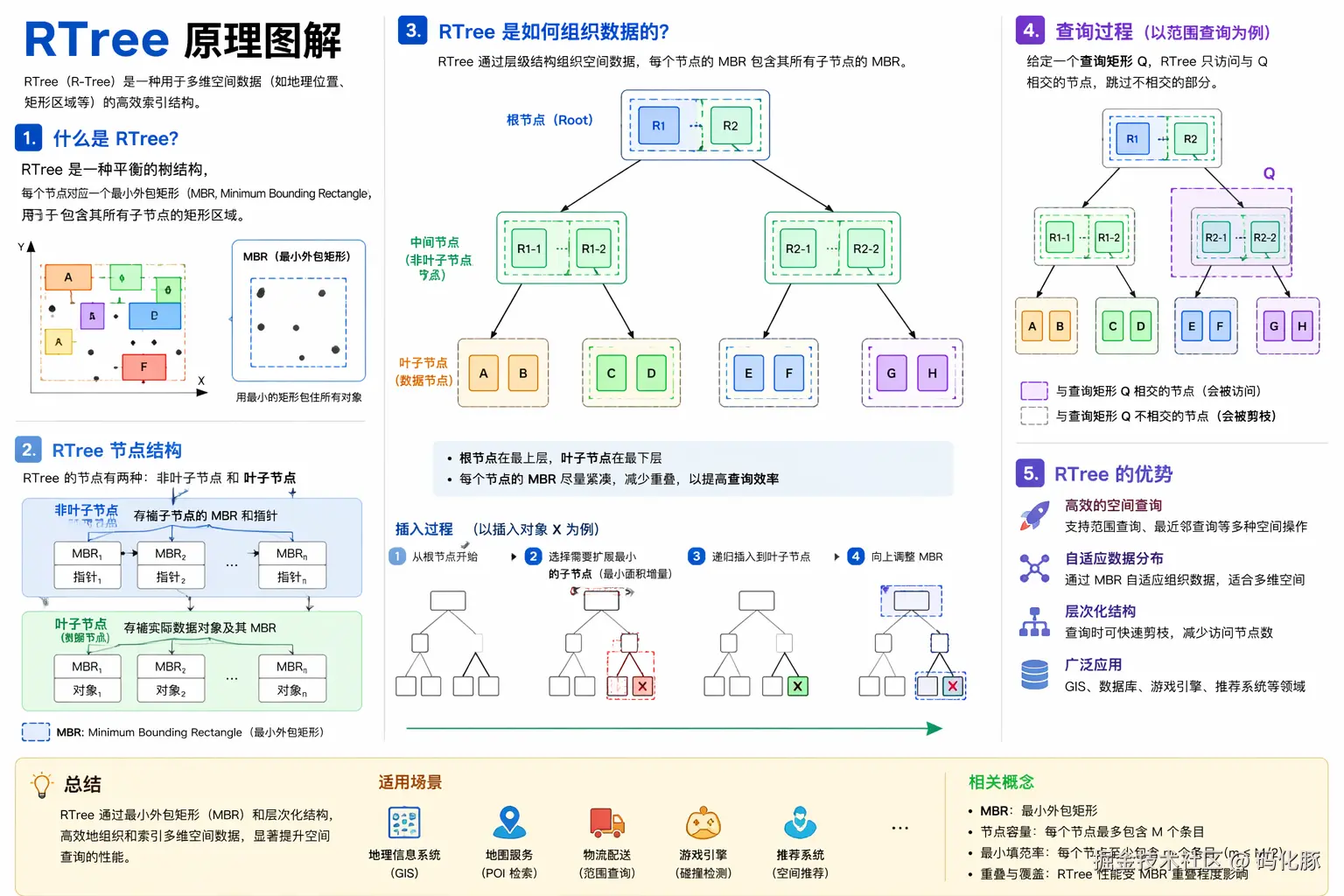
4.1 为什么选择 RTree?
先看一下几种方案的对比:
| 算法 | 原理 | 时间复杂度 | 适合场景 |
|---|---|---|---|
| 射线投射法 | 逐边遍历判断 | O(n) | 单次判断、顶点少 |
| RTree 空间索引 | 空间矩形树分区检索 | O(log n) | 高并发、多围栏、顶点多 |
| GeoHash | 网格化编码 | O(1) | 近似匹配、精度要求不高 |
| MySQL ST_Contains | 数据库空间函数 | 依赖索引 | 数据量小、低并发 |
RTree 核心优势:
markdown
Text
传统射线法:每次判断都要遍历所有围栏的所有顶点
              → 100个围栏 × 1000个顶点 = 100,000次计算
RTree索引:   先通过空间分区快速缩小候选范围
              → 只对极少数候选围栏做精确判断
              → 性能提升 10x ~ 100x
RTree 空间原理:
4.2 引入 JTS + RTree 依赖
Xml
    <dependencies>
        <!-- JTS 空间几何计算库,提供 Polygon、Point 等空间对象 -->
        <dependency>
            <groupId>org.locationtech.jts</groupId>
            <artifactId>jts-core</artifactId>
            <version>1.19.0</version>
        </dependency>

        <!-- HTTP 请求 -->
        <dependency>
            <groupId>org.apache.httpcomponents</groupId>
            <artifactId>httpclient</artifactId>
            <version>4.5.14</version>
        </dependency>

        <!-- JSON 解析 -->
        <dependency>
            <groupId>com.alibaba</groupId>
            <artifactId>fastjson</artifactId>
            <version>2.0.32</version>
        </dependency>

        <dependency>
            <groupId>org.projectlombok</groupId>
            <artifactId>lombok</artifactId>
            <version>1.18.28</version>
        </dependency>
    </dependencies>
💡 JTS(Java Topology Suite)是 Java 生态中最成熟的空间几何库,内置了 RTree 空间索引、
contains()、intersects()等空间关系判断能力。
4.3 数据库获取GeoJSON并解析 + 构建RTree空间索引
Java
package com.example.geofence.service;

import java.util.ArrayList;
import java.util.List;

import org.locationtech.jts.geom.Coordinate;
import org.locationtech.jts.geom.GeometryFactory;
import org.locationtech.jts.geom.Point;
import org.locationtech.jts.geom.Polygon;
import org.locationtech.jts.index.strtree.STRtree;
import org.springframework.stereotype.Service;

import com.alibaba.fastjson2.JSONArray;

import jakarta.annotation.Resource;
import lombok.extern.slf4j.Slf4j;

@Slf4j
@Service
public class GeoFenceIndexService {

    @Resource
    GeoFenceDbService geoFenceDbService;

    private GeometryFactory factory = new GeometryFactory();
    private STRtree index = new STRtree();

    public void init() {
        geoFenceDbService.findByAll().forEach(areaGeo -> {
            String geoType = areaGeo.getGeoType();
            if ("Polygon".equals(geoType)) {
                String coordinates = areaGeo.getCoordinates();
                log.info(areaGeo.getCode() + " - " + areaGeo.getName() + " - " + geoType);
                JSONArray oneArray = JSONArray.parse(coordinates);
                for (int one = 0; one < oneArray.size(); one++) {
                    JSONArray twoArray = oneArray.getJSONArray(one);
                    Coordinate[] shell = new Coordinate[twoArray.size()];
                    for (int two = 0; two < twoArray.size(); two++) {
                        JSONArray point = twoArray.getJSONArray(two);
                        double x = point.getDouble(0);
                        double y = point.getDouble(1);
                        shell[two] = new Coordinate(x, y);
                    }
                    Polygon polygon = factory.createPolygon(shell);
                    polygon.setUserData(areaGeo.getCode());
                    // 插入 R-tree(用 envelope)
                    index.insert(polygon.getEnvelopeInternal(), polygon);
                }
            } else if ("MultiPolygon".equals(geoType)) {
                String coordinates = areaGeo.getCoordinates();
                log.info(areaGeo.getCode() + " - " + areaGeo.getName() + " - " + geoType);
                JSONArray onwArray = JSONArray.parse(coordinates);
                for (int one = 0; one < onwArray.size(); one++) {
                    JSONArray twoArray = onwArray.getJSONArray(one);
                    for (int two = 0; two < twoArray.size(); two++) {
                        JSONArray threeArray = twoArray.getJSONArray(two);
                        Coordinate[] shell = new Coordinate[threeArray.size()];
                        for (int three = 0; three < threeArray.size(); three++) {
                            JSONArray point = threeArray.getJSONArray(three);
                            double x = point.getDouble(0);
                            double y = point.getDouble(1);
                            shell[three] = new Coordinate(x, y);
                        }
                        Polygon polygon = factory.createPolygon(shell);
                        polygon.setUserData(areaGeo.getCode());
                        // 插入 R-tree(用 envelope)
                        index.insert(polygon.getEnvelopeInternal(), polygon);
                    }
                }
            } else {
                log.warn("未知的地理数据类型: {}", geoType);
            }
        });
        log.warn("初始化完成,R-tree 索引中共有 {} 个元素", index.size());
    }

    public List<String> query(Double x, Double y) {
        // 查询点
        Point point = factory.createPoint(new Coordinate(x, y));
        // 1️⃣ R-tree 查询候选
        var candidates = index.query(point.getEnvelopeInternal());
        List<String> list = new ArrayList<>();
        // 2️⃣ 精确判断
        for (Object obj : candidates) {
            Polygon p = (Polygon) obj;
            if (p.contains(point)) {
                log.info("命中围栏" + p.getUserData());
                list.add((String) p.getUserData());
            }
        }
        return list;
	}
}
五、RTree 空间索引构建与围栏判断
上面4.3的GeoFenceIndexService的代码已经有Rtree的创建和围栏判断的代码,在这里我在举其他例子
Java
import org.locationtech.jts.index.strtree.STRtree;
import org.locationtech.jts.geom.Envelope;
import org.locationtech.jts.geom.Point;
import org.locationtech.jts.geom.GeometryFactory;

public class RTreeExample {

    public static void main(String[] args) {
        STRtree rTree = new STRtree();
        GeometryFactory geometryFactory = new GeometryFactory();
        // 创建示例点
        Point point1 = geometryFactory.createPoint(new Coordinate(1, 1));
        Point point2 = geometryFactory.createPoint(new Coordinate(2, 2));
        Point point3 = geometryFactory.createPoint(new Coordinate(3, 3));
        // 将点添加到R树中
        rTree.insert(point1.getEnvelopeInternal(), point1);
        rTree.insert(point2.getEnvelopeInternal(), point2);
        rTree.insert(point3.getEnvelopeInternal(), point3);

        // 查询范围内的点
        Envelope searchEnv = new Envelope(1.5, 3.0, 1.5, 3.0);
        List<Point> result = rTree.query(searchEnv);
        for (Point point : result) {
            System.out.println("查询到点: " + point);
        }
    }
}
六、启动预加载
6.1 启动初始化地理围栏数据
Java
@Service
public class DatavLoadService {

    ...

    public void init() {
        if (!loadOnStartup) return;
        log.info("Initializing geofence ...");
        long t = System.currentTimeMillis();
        doUpdateProvince();
        doUpdateCity();
        doUpdateDistrict();
        log.info("DataV ready, built in {} ms", System.currentTimeMillis() - t);
    }
}
7.2 Spring Boot启动时初始化RTree索引
Java
package com.example.geofence.config;

import org.springframework.boot.CommandLineRunner;
import org.springframework.stereotype.Component;
import com.example.geofence.service.GeoFenceIndexService;
import com.example.geofence.service.DatavLoadService;


DatavLoadService datavLoadService;
import jakarta.annotation.Resource;
import lombok.extern.slf4j.Slf4j;

@Slf4j
@Component
public class GeoFenceInitializer implements CommandLineRunner {

    @Resource
    DatavLoadService datavLoadService;

    @Resource
    GeoFenceIndexService geoFenceIndexService;

    @Override
    public void run(String... args) {
        log.info("========== 开始获取DataV地理围栏数据 ==========");
        long start = System.currentTimeMillis();
        try {
            datavLoadService.init();
            long cost = System.currentTimeMillis() - start;
            log.info("========== DataV地理围栏数据处理完成,耗时 {}ms ==========", cost);
        } catch (Exception e) {
            log.error("DataV地理围栏数据处理失败,系统将降级运行", e);
        }
        log.info("========== 开始预加载数据库地理围栏数据 ==========");
        start = System.currentTimeMillis();
        try {
            geoFenceIndexService.init();
            long cost = System.currentTimeMillis() - start;
            log.info("========== 数据库地理围栏预加载完成,耗时 {}ms ==========", cost);
        } catch (Exception e) {
            log.error("数据库地理围栏预加载失败,系统将降级运行", e);
        }

    }
}
七、Controller 接口层
Java
package com.example.geofence.controller;

import java.util.List;
import java.util.stream.Collectors;

import org.springframework.http.ResponseEntity;
import org.springframework.web.bind.annotation.GetMapping;
import org.springframework.web.bind.annotation.RequestMapping;
import org.springframework.web.bind.annotation.RequestParam;
import org.springframework.web.bind.annotation.RestController;

import com.example.geofence.model.Result
import com.example.geofence.entity.GeoFenceDO;
import com.example.geofence.model.GeoFenceVO;
import com.example.geofence.service.GeoFenceDbService;
import com.example.geofence.service.GeoFenceIndexService;

import jakarta.annotation.Resource;

@RestController
@RequestMapping("/api/geofence")
public class GeoFenceController {

    @Resource
    GeoFenceIndexService geoFenceIndexService;

    @Resource
    GeoFenceDbService geoFenceDbService;

    /**
     * Query which province/city/district contains the given coordinate.
     *
     * GET /api/geofence/query?lon=116.3974&lat=39.9093
     */
    @GetMapping("/query")
    public Result<List<GeoFenceVO>> query(
            @RequestParam double lon,
            @RequestParam double lat) {

        if (lon < -180 || lon > 180 || lat < -90 || lat > 90) {
            return Result.fail("Invalid coordinates");
        }

        List<String> areaCodeList = geoFenceIndexService.query(lon, lat);
        if (areaCodeList.isEmpty()) {
           return Result.fail("没有命中任何围栏");
        }
        List<GeoFenceDO> fenceList = geoFenceDbService.findByCodeList(areaCodeList);
        List<GeoFenceVO> resultList = fenceList.stream().map(item -> convertToResultVo(item)).collect(Collectors.toList());
        return Result.ok(resultList);
    }

    private GeoFenceVO convertToResultVo(GeoFenceDO item) {
		GeoFenceVO result = new GeoFenceVO();
		result.setCode(item.getCode());
		result.setName(item.getName());
		result.setLevel(item.getLevel());
		result.setParentCode(item.getParentCode());
		return result;
	}

}
八、VO & 统一返回封装
8.1 区域 VO
Java
package com.example.geofence.model;

import java.io.Serializable;
import lombok.Data;

@Data
public class GeoFenceVO implements Serializable {

    private static final long serialVersionUID = 1L;

    /**
     * 名称
     */
    private String name;

    /**
     * 区域编号
     */
    private String code;

    /**
     * 区域层级
     */
    private String level;

    /**
     * 区域上级编号
     */
    private String parentCode;

}
8.2 统一返回体
Java
    /**
     * 统一接口返回体
     */
    @Data
    @Builder
    public class Result<T> {
        /** 状态码:200成功,其他失败 */
        private int code;
        /** 提示信息 */
        private String message;
        /** 返回数据 */
        private T data;
        public static <T> Result<T> ok(T data) {
            return Result.<T>builder()
                    .code(200)
                    .message("success")
                    .data(data)
                    .build();
        }
        public static <T> Result<T> fail(String message) {
            return Result.<T>builder()
                    .code(500)
                    .message(message)
                    .build();
        }
    }
九、单元测试
Java
package com.example.geofence;

import static org.junit.jupiter.api.Assertions.assertTrue;
import java.util.List;
import org.junit.jupiter.api.Test;
import org.springframework.beans.factory.annotation.Autowired;
import org.springframework.boot.test.context.SpringBootTest;
import org.springframework.test.context.TestPropertySource;
import com.example.geofence.entity.GeoFenceDO;
import com.example.geofence.service.GeoFenceDbService;
import com.example.geofence.service.GeoFenceIndexService;
import lombok.extern.slf4j.Slf4j;

/**
* 地理围栏服务单元测试
*/

@Slf4j
@SpringBootTest
@TestPropertySource(properties = "geofence.load-on-startup=true")
public class GeoFenceIndexServiceTest {

    @Autowired
    private GeoFenceIndexService geoFenceIndexService;

    @Autowired
    private GeoFenceDbService geoFenceDbService;

    /**
    * 测试点位(深圳各区典型坐标)
    * 格式:{ 名称, 经度, 纬度 }
    */

    private static final Object[][] TEST_POINTS = {
        {"深圳市民中心(福田)", 114.0579, 22.5494},
        {"深圳湾公园(南山)", 113.9697, 22.5084},
        {"大剧院(罗湖)", 114.1218, 22.5490},
        {"宝安机场(宝安)", 113.8213, 22.6329},
        {"深圳北站(龙华)", 114.0293, 22.6087},
        {"香港(不在深圳)", 114.1694, 22.3193},
        {"东莞(不在深圳)", 113.7518, 23.0207},

    };

    @Test

    public void testQuery() {
        log.info("========== 开始测试 query ==========");
        for (Object[] point : TEST_POINTS) {
            String name = (String) point[0];
            double lng = (double) point[1];
            double lat = (double) point[2];
            List<String> codeList = geoFenceIndexService.query(lng, lat);
            if(codeList.isEmpty()) {
                log.info("【{}】未匹配到围栏(符合预期)", name);
            }
            List<GeoFenceDO> fenceList = geoFenceDbService.findByCodeList(codeList);
            for (GeoFenceDO fence : fenceList) {
                log.info("【{}】匹配结果:{}({})", name, fence.getName(), fence.getCode());
            }
        }
    }

    @Test
    public void testPerformance() {
        log.info("========== 开始性能测试 ==========");
        int total = 10000;
        double lng = 114.0579;
        double lat = 22.5494;
        long start = System.currentTimeMillis();
        for (int i = 0; i < total; i++) {
            geoFenceIndexService.query(lng, lat);
        }
        long cost = System.currentTimeMillis() - start;
        log.info("RTree 性能测试:{}次查询,总耗时 {}ms,平均 {}ms/次", total, cost, (double) cost / total);
        // 平均每次查询应在 1ms 以内
        assertTrue((double) cost / total < 1.0, "RTree 查询性能不达标,平均耗时 " + (double) cost / total + "ms");
    }
}
十、整体流程回顾
scss
Text
应用启动
   │
   ▼
GeoFenceInitializer.run()
   │
   ├─→ 请求 DataV API → 解析 GeoJSON → 写入本地SQLite数据库
   │
   └─→ 读取本地SQLite数据 → 解析 geometryJson → 重建 JTS Geometry → 插入STRtree构建索引
                                                   │
                                                   └─→ 构建 JTS Polygon/MultiPolygon
业务查询请求(lng, lat)
   │
   ▼
GeoFenceIndexService.query(lng, lat)
   │
   ├─→ STRtree.query(envelope)    ← RTree 粗筛(O(log n))
   │         │
   │         └─→ 返回 MBR 相交的候选围栏列表
   │
   └─→ Geometry.contains(point)  ← JTS 精确判断
             │
             └─→ 返回最终匹配结果
十一、注意事项
| 问题 | 原因 | 解决方案 |
|---|---|---|
| Geometry 无效 | 部分行政区划边界数据存在自相交 | geometry.buffer(0) 修复 |
| 边界点判断不准 | 坐标系不一致(GCJ-02 vs WGS-84) | 统一转换为 WGS-84 后再判断 |
| STRtree 线程安全 | 构建完成后只读,查询是线程安全的 | 初始化完成后不要再 insert |
| 内存占用过高 | 加载区域过多或顶点密度过大 | 按需加载、适当简化几何精度 |
| DataV 请求限流 | 短时间大量请求会被限制 | 本地缓存 + 请求间隔 200ms |
至此,完整的基于 DataV + JTS STRtree 的地理围栏方案全部实现完毕。
如果你觉得这篇内容对你有帮助:
- 👍 点赞支持一下作者熬的这些夜
- ⭐ 收藏起来下次选型时翻出来
- 💬 评论区聊聊你现在在用什么工具?踩过哪些坑?
我们下期见! 🚀
🍱 顺便推荐:如果你和我一样经常加班点外卖,可以微信搜索小程序「美豚外卖」------美团/淘宝闪购订单额外返利,一个月省下的钱够再订一个 AI 编程工具。