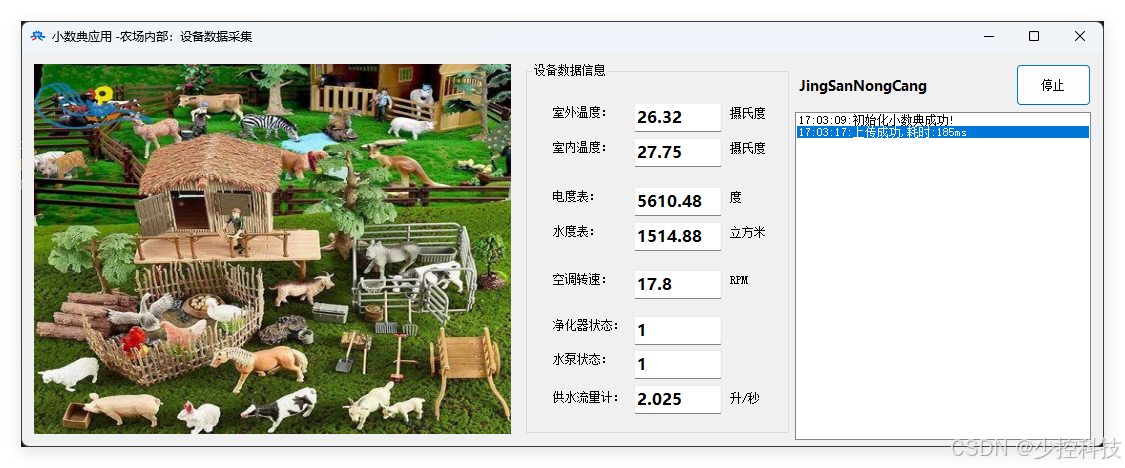
场端采集传感器数据上传:
using SmallDataDict;
using System;
using System.CodeDom;
using System.Collections.Generic;
using System.ComponentModel;
using System.Data;
using System.Diagnostics;
using System.Drawing;
using System.Linq;
using System.Text;
using System.Threading.Tasks;
using System.Windows.Forms;
namespace MothineManger
{
public partial class frmMM : Form
{
Dictionary<string,float> Datas = new Dictionary<string,float>();
public frmMM()
{
InitializeComponent();
}
private void frmMM_Load(object sender, EventArgs e)
{
if(SmallDataDict.SmallData.Init(new AppInfo("JingSanNongCang","V30","jsznc20260426ok")))
//本场注册的编号与SEC密码
{
AddLog("初始化小数典成功!");
ss = new SmallData("JingSanNongCang");
}
else
{
AddLog("初始化小数典失败!");
}
Init();
laOwer.Text = ss.Owner;
}
private void Init()
{
Datas = new Dictionary<string, float> {
{"CangId",1001f },
{"Time_Year",2026},{"Time_Month",4},{"Time_Day",26},
{"Time_Hour",14},{"Time_Minute",16},{"Time_Second",01},
{"TempOut",28f },{"TempIn",25f },
{"ShuiBiao",1578f },{"DianBiao",5784f },
{"KongRpm",20f },{"PowerJing",1f },
{"PowerBeng",0f },{"GongShuiJi",2.5f }
};
}
Random f=new Random(DateTime.Now.Millisecond);
SmallDataDict.SmallData ss = null;
Stopwatch t= new Stopwatch();
private void timer1_Tick(object sender, EventArgs e)
{
timer1.Enabled = false;
t.Restart();
string\[\] keys = Datas.Keys.ToArray();
foreach (string key in keys)
{
if (key == "CangId")
continue;
if(key.StartsWith("Time_"))
{
if (key.EndsWith("Year"))
{ Dataskey = DateTime.Now.Year; continue; }
if (key.EndsWith("Month"))
{ Dataskey = DateTime.Now.Month; continue; }
if (key.EndsWith("Day"))
{ Dataskey = DateTime.Now.Day; continue; }
if (key.EndsWith("Hour"))
{ Dataskey = DateTime.Now.Hour; continue; }
if (key.EndsWith("Minute"))
{ Dataskey = DateTime.Now.Minute; continue; }
if (key.EndsWith("Second"))
{ Dataskey = DateTime.Now.Second; continue; }
}
else
{
if(!key.Contains("Power"))
{
Dataskey *= (f.Next(80, 120) / 100f);
continue;
}
else
{
Dataskey = 1f - (f.Next(0, 10) % 2 == 0 ? Dataskey : 0);
continue;
}
}
}
string data = Newtonsoft.Json.JsonConvert.SerializeObject(Datas);
if (ss != null)
{
if (!ss.SetData("Device" + Datas"CangId".ToString(), data, out string error))
{
AddLog(error + ",耗时:" + t.ElapsedMilliseconds.ToString() + "ms");
}
else
{
AddLog("上传成功," + "耗时:" + t.ElapsedMilliseconds.ToString() + "ms");
}
}
else
{
AddLog("小数典初始化失败,无法上传数据!");
}
t.Stop();
UpdateUI();
timer1.Enabled = true;
}
private void UpdateUI()
{
this.BeginInvoke(new Action(() =>
{
txtBeng.Text = Datas"PowerBeng".ToString();
txtEb.Text = Datas"DianBiao".ToString();
txtJing.Text = Datas"PowerJing".ToString();
txtKong.Text = Datas"KongRpm".ToString();
txtLiu.Text = Datas"GongShuiJi".ToString();
txtTempIn.Text = Datas"TempIn".ToString();
txtTempOut.Text = Datas"TempOut".ToString();
txtWb.Text = Datas"ShuiBiao".ToString();
}));
}
void AddLog(string log)
{
lstLog.BeginInvoke(new Action(() =>
{
lstLog.Items.Add(DateTime.Now.ToString("HH:mm:ss") + ":" + log);
lstLog.SelectedIndex=lstLog.Items.Count-1;
}));
}
private void button1_Click(object sender, EventArgs e)
{
timer1.Enabled = !timer1.Enabled;
button1.Text = timer1.Enabled ? "停止" : "启动";
}
private void lstLog_MouseDoubleClick(object sender, MouseEventArgs e)
{
MessageBox.Show(lstLog.Text);
}
}
}
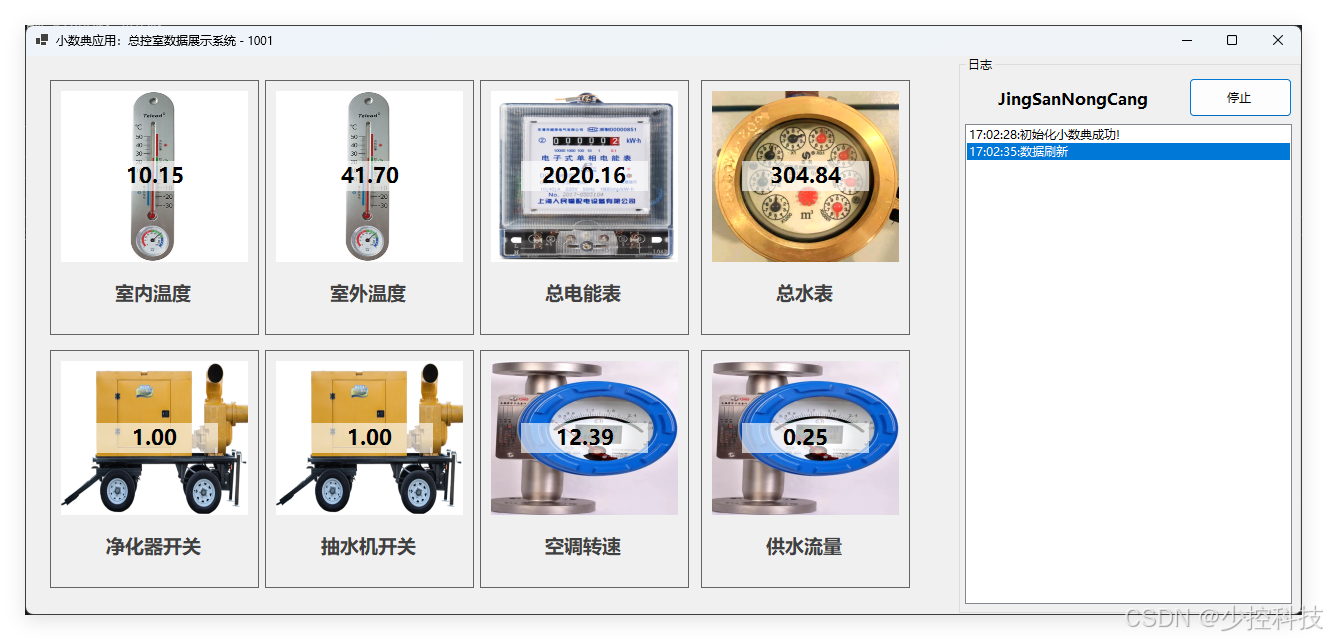
总控室读取数据展示:
using Microsoft.VisualBasic.Devices;
using SmallDataDict;
namespace DeviceMangerWindows
{
public partial class frmWidnows : Form
{
public frmWidnows()
{
InitializeComponent();
}
SmallDataDict.SmallData ss = null;
private string CangId = "1001";
private void Form1_Load(object sender, EventArgs e)
{
Init();
this.Text = "小数典应用:总控室数据展示系统 - " + CangId;
}
private void Init()
{
if (SmallDataDict.SmallData.Init(new AppInfo("JingSanNongCang", "V30", "jsznc20260426ok")))
//本场注册的编号与SEC密码
{
AddLog("初始化小数典成功!");
ss = new SmallData("JingSanNongCang");
laName.Text = ss.Owner;
}
else
{
AddLog("初始化小数典失败!");
}
}
void AddLog(string log)
{
lstLog.BeginInvoke(new Action(() =>
{
lstLog.Items.Add(DateTime.Now.ToString("HH:mm:ss") + ":" + log);
lstLog.SelectedIndex = lstLog.Items.Count - 1;
}));
}
private void timer1_Tick(object sender, EventArgs e)
{
timer1.Enabled = false;
if (ss != null)
{
if (ss.GetData("Device" + "1001", out string value, out string error))
{
Dictionary<string, float>? datas = Newtonsoft.Json.JsonConvert.DeserializeObject<Dictionary<string, float>>(value);
if (datas != null && datas.Count > 0)
{
//有内容
foreach (string key in datas.Keys.ToArray())
{
if (key != "CangId" && !key.StartsWith("Time"))
{
if (panel1.Controls.ContainsKey("uc" + key))
{
(panel1.Controls"uc" + key as UC_Device).DeviceValue = dataskey;
}
else
{
AddLog(key + "设备没有控件!");
}
}
}
}
AddLog("数据刷新");
}
}
timer1.Enabled = true;
}
private void button1_Click(object sender, EventArgs e)
{
timer1.Enabled = !timer1.Enabled;
button1.Text = timer1.Enabled ? "停止" : "开始";
}
private void Form1_FormClosing(object sender, FormClosingEventArgs e)
{
timer1.Enabled = false;
ss?.Dispose();
SmallData.Clear();
}
}
}
仿真传感器控件
using System;
using System.Collections.Generic;
using System.ComponentModel;
using System.Data;
using System.Drawing;
using System.Linq;
using System.Text;
using System.Threading.Tasks;
using System.Windows.Forms;
namespace DeviceMangerWindows
{
public partial class UC_Device : UserControl
{
private string _name = "";
public string DeviceName
{
get
{
return _name;
}
set
{
if (_name != value)
{
_name = value;
laName.Text = _name;
}
}
}
private string _type = "";
private Image? bg = null;
public string DeviceType
{
get
{
return _type;
}
set
{
if (_type != value)
{
_type = value;
bg= Properties.Resources.ResourceManager.GetObject(_type) as Image;
Refresh();
}
}
}
private float _value { get; set; } = 0;
public float DeviceValue
{
get
{
return _value;
}
set
{
_value = value;
picImage.Refresh();
}
}
public UC_Device()
{
InitializeComponent();
}
private void picImage_Paint(object sender, PaintEventArgs e)
{
if (bg != null)
{
e.Graphics.DrawImage(bg, e.ClipRectangle, new Rectangle(Point.Empty, bg.Size),GraphicsUnit.Pixel);
}
Rectangle textrect = new Rectangle(e.ClipRectangle.X+30,
(e.ClipRectangle.Y + (e.ClipRectangle.Height - 30) / 2),
e.ClipRectangle.Width-60,30);
e.Graphics.FillRectangle(new SolidBrush(Color.FromArgb(160,255,255,255)), textrect);
e.Graphics.DrawString(_value.ToString("0.00"), this.Font, new SolidBrush(this.ForeColor),textrect,
new StringFormat() { Alignment = StringAlignment.Center, LineAlignment = StringAlignment.Center });
}
}
}
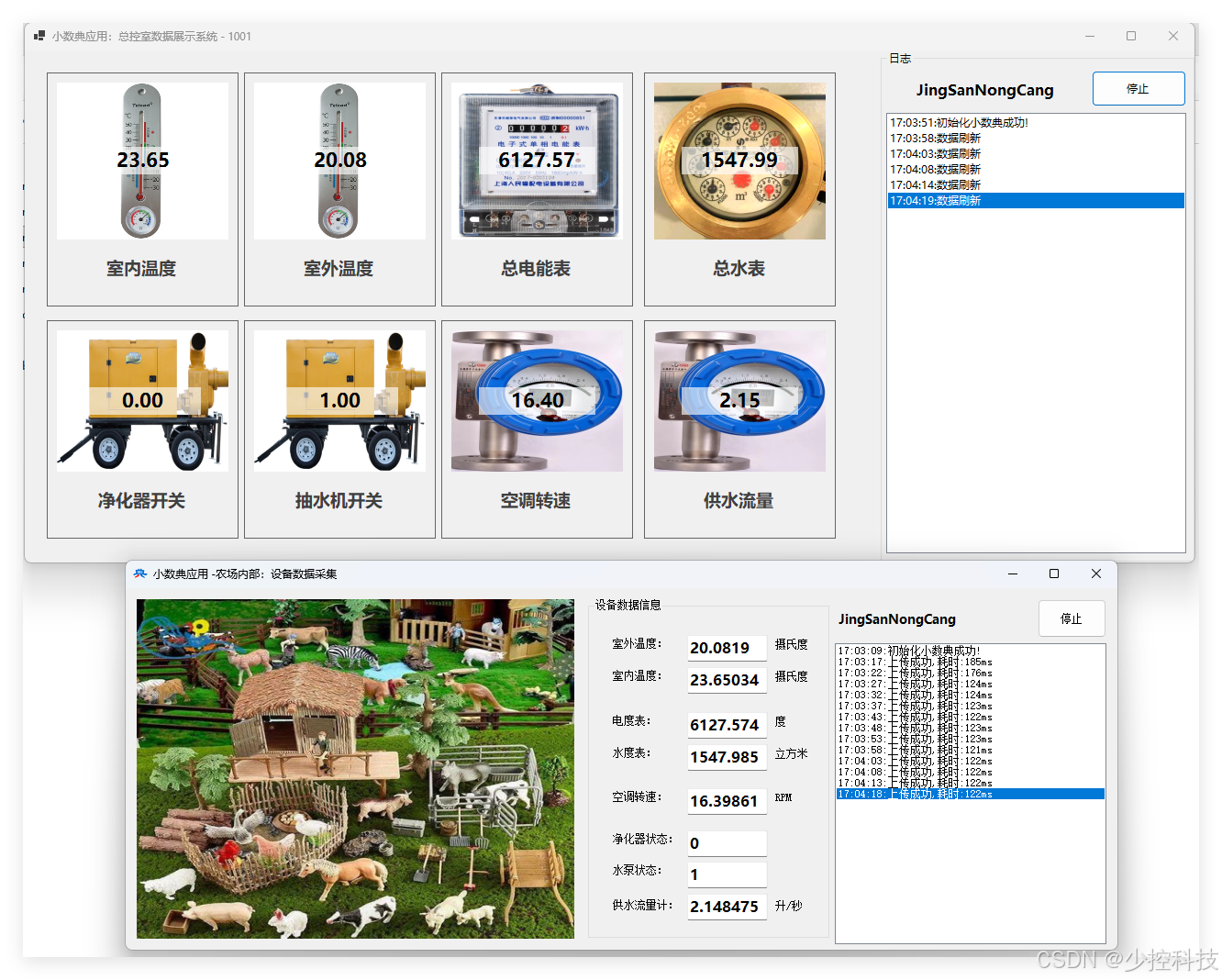
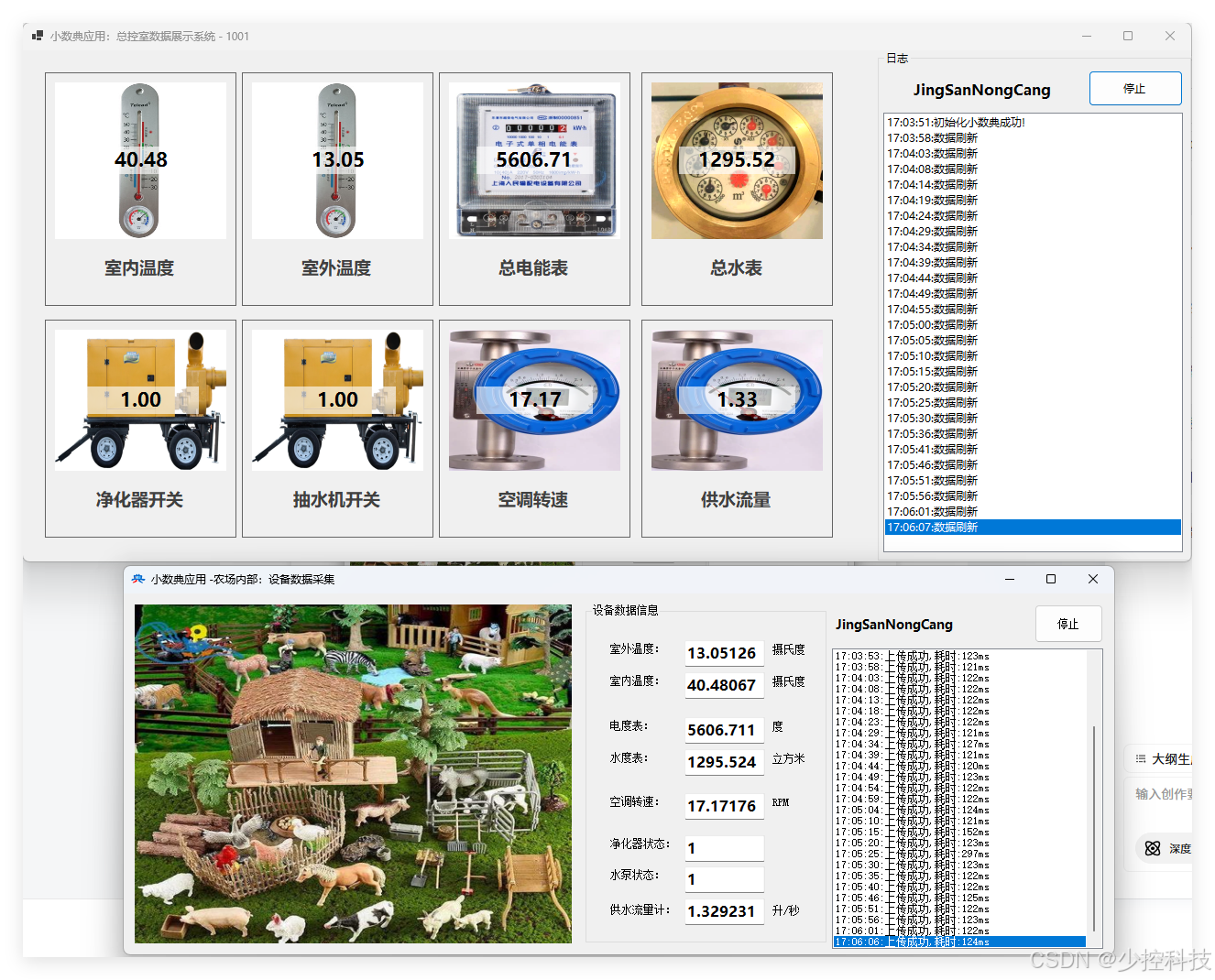
小数典库,只要用同一样的appinfo,无论在任何地方,只要有网的地方,使用它就会访问到原来存的数据内容。单数据内容长度2KB,一个appinfo帐户能存1000项数据。
点击链接加入群聊【小数典】:https://qm.qq.com/q/uSmCtLJhHG