文章目录
- 代理传值 (反向传值)
-
-
- 场景设置
- [第一步:在 VCSecond.h 中定义协议](#第一步:在 VCSecond.h 中定义协议)
- [第二步:VCSecond.m 中调用代理方法](#第二步:VCSecond.m 中调用代理方法)
- [第三步:VCFirst 遵守协议并实现方法](#第三步:VCFirst 遵守协议并实现方法)
- 在反向传值中遇到的问题
-
- [问题一: VCFirst 采用 NSString 类型的属性接受传回来的值可以吗](#问题一: VCFirst 采用 NSString 类型的属性接受传回来的值可以吗)
- [问题二: 第一次切换视图从视图VCSecond传回来正常显示, 然后我次切换视图,没有做任何修改, 视图VCFirst的值就清空了](#问题二: 第一次切换视图从视图VCSecond传回来正常显示, 然后我次切换视图,没有做任何修改, 视图VCFirst的值就清空了)
-
代理传值 (反向传值)
反向传递值 =从B界面→A界面传递数据(返回时传递值)
属性传值做不到反向传值,因为A跳转到B时,A已经处于等待了,B无法直接访问A。
代理模式三要素:
| 要素 | 比喻 |
|---|---|
| 协议(Protocol) | 规定"参与做某事" |
| 代理人(代表) | 真正做事的人(A界面) |
| 委托方 | 发出请求的人(B界面) |
场景设置
B界面有一个输入框,用户输入文字后点击返回,A界面的标签显示该文字。
第一步:在 VCSecond.h 中定义协议
objc
// VCSecond.h

#import <UIKit/UIKit.h>

//  第一步:定义协议
@protocol VCSecondDelegate <NSObject>
// 协议方法:B界面需要传值时调用这个方法
- (void)vcSecond:(id)vcSecond didSendText:(NSString *)text;
@end
声明VCSecond的delegate属性
objc
@interface VCSecond : UIViewController
//  第二步:声明delegate属性
// weak避免循环引用!代理属性必须用weak
@property (nonatomic, weak) id<VCSecondDelegate> delegate;
@property (nonatomic, strong) UITextField *textField;
@end
代理属性必须用
weak,避免A和B互相强引用导致内存泄漏。
这里的 UITextField 对象需要定义在属性里, 因为在后续传值的时候需要在在不同的方法, 如果使用在方法内部定义的局部变量, 就会导致在传值的时候访问不到
第二步:VCSecond.m 中调用代理方法
objc
// VCSecond.m
#import "VCSecond.h"

@interface VCSecond ()
@end


@implementation VCSecond
- (void)viewDidLoad {
    [super viewDidLoad];
    self.view.backgroundColor = [UIColor orangeColor];

    // 输入框
    self.title = @"VCSecond";
    self.view.backgroundColor = [UIColor yellowColor];
    _textField = [[UITextField alloc] init];
    _textField.backgroundColor = [UIColor whiteColor];
    self.textField.placeholder = @"请输入内容";
    [self.view addSubview: _textField];
    [_textField mas_makeConstraints:^(MASConstraintMaker *make) {
            make.left.equalTo(self.view).offset(100);
            make.top.equalTo(self.view).offset(200);
            make.height.mas_equalTo(40);
            make.width.mas_equalTo(200);
    }];

    // 返回按钮
    UIBarButtonItem* item = [[UIBarButtonItem alloc] initWithTitle: @"back" style: UIBarButtonItemStylePlain target: self action: @selector(pressBack)];
    self.navigationItem.leftBarButtonItem = item;
}
- (void) pressBack {
    // 这里检查是否代理对象实现了协议方法, 在返回的时候把值同时也传回去
    if ([self.delegate respondsToSelector: @selector(vcSecond:didSendText:)]) {
        [self.delegate vcSecond: self didSendText: self.textField.text];
    }
    [self.navigationController popViewControllerAnimated: YES];
}
@end
第三步:VCFirst 遵守协议并实现方法
objc
// VCFirst.h

#import <UIKit/UIKit.h>
#import "VCSecond.h"  //  导入,才能使用协议, 协议定义在VCSecond中

//  遵守协议
@interface VCFirst : UIViewController <VCSecondDelegate>
@property (nonatomic, strong) UILabel *label;
@end
objc
// VCFirst.m
#import "VCFirst.h"
@interface VCFirst ()

@end

@implementation VCFirst

- (void)viewDidLoad {
    [super viewDidLoad];
    self.view.backgroundColor = [UIColor whiteColor];

    // 显示传回来的文字
    _label = [[UILabel alloc] init];
    _label.backgroundColor = [UIColor whiteColor];
    [self.view addSubview: _label];
    [_label mas_makeConstraints:^(MASConstraintMaker *make) {
        make.left.mas_equalTo(self.view).offset(100);
        make.top.mas_equalTo(self.view).offset(200);
        make.height.mas_equalTo(40);
        make.width.mas_equalTo(200);
    }];
    // 添加跳转按钮
    UIBarButtonItem* item01 = [[UIBarButtonItem alloc] initWithTitle: @"next" style: UIBarButtonItemStylePlain target: self action: @selector(pressNext)];

    self.navigationItem.rightBarButtonItem = item01;
}
@end
设置跳转按钮, 创建视图二Seconcd, 并将Second视图的代理设置为自己, 在传值的时候可以接受传回来的值
objc
- (void) pressNext {
    VCSecond* vc = [[VCSecond alloc] init];
    vc.delegate = self;
    vc.recesiveText = self.label.text;
//    vc.view.backgroundColor = [UIColor purpleColor];
    [self.navigationController pushViewController: vc animated: YES];
}
实现协议方法,接收B传回来的值, 将值赋给自身的label,做到了切换视图后可以看到显示的内容
objc
//  实现协议方法,接收B传回来的值
- (void)vcSecond:(id)vcSecond didSendText:(NSString *)text {
    self.label.text = text;
}
在反向传值中遇到的问题
问题一: VCFirst 采用 NSString 类型的属性接受传回来的值可以吗
在这一块笔者整理在学习反向传值的过程中遇到的问题,在开始的时候,为什么 VCFirst 的属性要设为label呢, 和正向传值的时候一样使用 NSString 不可以吗, 所以笔者就做了实验, 只是稍作修改
代码如下:
把 VCFirst 的属性改为NSString类型的对象, 用来接收视图B传回来的值
objc
// VCFirst.h
@interface VCFirst : UIViewController <VCSecondDeleagate>
@property (nonatomic) UITextField* textField;
@property (nonatomic) NSString* receiveText;
@end
然后后面的协议方法实现也要稍微调整
把视图B传回来的值赋值给自身的NSString 类型对象, receiveIText
objc
// VCFirst.m
- (void) vcSecond:(id)vcSecond didSendText:(NSString *)text {
    self.receiveText = text;
}
现在接受到的是NSString类型的属性, 然后就理所当然的回到viewDidLoad方法中将 接受的值传给 label.text
objc
// VCFirst.m

- (void)viewDidLoad {
    [super viewDidLoad];
    self.view.backgroundColor = [UIColor whiteColor];
    // 显示传回来的文字
    _label = [[UILabel alloc] init];
    _label.backgroundColor = [UIColor whiteColor];
    [self.view addSubview: _label];
    [_label mas_makeConstraints:^(MASConstraintMaker *make) {
        make.left.mas_equalTo(self.view).offset(100);
        make.top.mas_equalTo(self.view).offset(200);
        make.height.mas_equalTo(40);
        make.width.mas_equalTo(200);
    }];


    label.text = self.receiveText;  // 添加这一行


    // 添加跳转按钮
    UIBarButtonItem* item01 = [[UIBarButtonItem alloc] initWithTitle: @"next" style: UIBarButtonItemStylePlain target: self action: @selector(pressNext)];

    self.navigationItem.rightBarButtonItem = item01;
}然后点击运行,发现没有反应!!! , 在视图B的UITextField中输入内容后返回到视图A, 发现视图A的Label中空空如也
问题出现在视图A viewDidLoad 中加载label的时候,VCFirst的receiveTewxt还没有值, 所以赋的是空字符串, 然后切换视图到视图VCSecond, 传回来值, 此时VCFirst的receiveText更新,但是,viewDidLoad方法只会在视图第一次加载的时候调用, 所以VCSecond 的receiveText 不会赋值给label.text, 就导致我们看到切换视图传值后没有显示
问题二: 第一次切换视图从视图VCSecond传回来正常显示, 然后我次切换视图,没有做任何修改, 视图VCFirst的值就清空了
先说一下这个问题的产生的原因
看代码
objc
//VCFirst.m


- (void) pressNext {
    VCSecond* vc = [[VCSecond alloc] init];
    vc.delegate = self;
    vc.recesiveText = self.label.text;
//    vc.view.backgroundColor = [UIColor purpleColor];
    [self.navigationController pushViewController: vc animated: YES];
}
可以看出, 在执行切换界面切换的时候, 每次都是创建了一个新的VCSecond 视图, 然后进行切换, 并且
objc
// VCSecond.m

- (void) pressBack {
    if ([self.delegate respondsToSelector: @selector(vcSecond:didSendText:)]) {
        [self.delegate vcSecond: self didSendText: self.textField.text];
    }
    [self.navigationController popViewControllerAnimated: YES];
}
在视图VCSecond向VCFirst传值的时候, 是把返回功能和传值放到一个按钮中了, 这就导致了无论我们是否修改了VCSecond 中UITextField的内容, 都会把 UITextField 中的内容传给VCFirst, (甚至是空字符串)那么
笔者在发现这个问题之后一开始的想法就是创建一个新的按钮,把传值功能和返回前一个视图的功能分开
看代码
objc
// VCSecond.m


- (void)viewDidLoad {
    [super viewDidLoad];
    self.view.backgroundColor = [UIColor orangeColor];

    // 输入框
    self.title = @"VCSecond";
    self.view.backgroundColor = [UIColor yellowColor];
    _textField = [[UITextField alloc] init];
    _textField.backgroundColor = [UIColor whiteColor];
    self.textField.placeholder = @"请输入内容";
    [self.view addSubview: _textField];
    [_textField mas_makeConstraints:^(MASConstraintMaker *make) {
            make.left.equalTo(self.view).offset(100);
            make.top.equalTo(self.view).offset(200);
            make.height.mas_equalTo(40);
            make.width.mas_equalTo(200);
    }];

    // 返回按钮
    UIBarButtonItem* item = [[UIBarButtonItem alloc] initWithTitle: @"back" style: UIBarButtonItemStylePlain target: self action: @selector(pressBack)];
    self.navigationItem.leftBarButtonItem = item;

    // 单独添加传值按钮
    UIBarButtonItem* item01 = [[UIBarButtonItem alloc] initWithTitle: @"传值" style: UIBarButtonItemStylePlain target: self action: @selector(pressSend)];
    self.navigationItem.rightBarButtonItem = item01;
}
效果如下
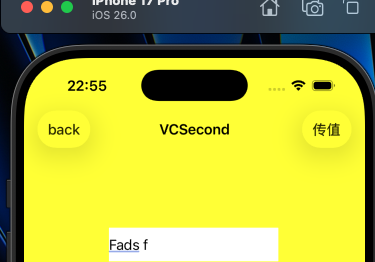
这样就在需要传值的时候点击传值按钮, 就可以把 UITextField的text值传回UILabel的text了,否则就点击back直接返回, 这样就可以保证VCFirst 的label中的内容不会轻易改变
但是笔者还是想再进行优化, 让每次切换到视图VCSecond 的时候都可以在原来的基础上修改, 而不是每次都是重新输入, 而且放两个按钮麻烦了, 就是想在返回的时候顺便传值
这样就可以想到结合正向传值和反向传值,每次在创建VCSecond的时候, 都把VCFirst的label中的内容传给新创建的VCSecond视图的UITextField
看代码
给VCSecond视图添加一个NSString类型的属性, 用来就收VCFirst的albel中的内容
objc
// VCSecond.h

@interface VCSecond : UIViewController
@property (nonatomic, weak) id<VCSecondDeleagate> delegate;
@property (nonatomic) NSString* recesiveText;
@property (nonatomic) UITextField* textField;
@end
在每次在创建VCSecond的时候, 都把VCFirst的label中的内容传给新创建的VCSecond视图的NSString属性
objc
// VCFirst.m

- (void) pressNext {
    VCSecond* vc = [[VCSecond alloc] init];
    vc.delegate = self;
    vc.recesiveText = self.label.text;
    [self.navigationController pushViewController: vc animated: YES];
}
然后在每次VCSecond初识化的时候都用VCFirst传过来的值赋值给UITextField
objc
// VCSecond.m


- (void)viewDidLoad {
    [super viewDidLoad];
    self.view.backgroundColor = [UIColor orangeColor];

    // 输入框
    self.title = @"VCSecond";
    self.view.backgroundColor = [UIColor yellowColor];
    _textField = [[UITextField alloc] init];
    _textField.backgroundColor = [UIColor whiteColor];
    self.textField.placeholder = @"请输入内容";


    _textField.text = self.recesiveText; // 添加这一行


    [self.view addSubview: _textField];
    [_textField mas_makeConstraints:^(MASConstraintMaker *make) {
            make.left.equalTo(self.view).offset(100);
            make.top.equalTo(self.view).offset(200);
            make.height.mas_equalTo(40);
            make.width.mas_equalTo(200);
    }];

    // 返回按钮
    UIBarButtonItem* item = [[UIBarButtonItem alloc] initWithTitle: @"back" style: UIBarButtonItemStylePlain target: self action: @selector(pressBack)];
    self.navigationItem.leftBarButtonItem = item;

}
把传值功能和返回功能都放到一个按钮中
objc
- (void) pressBack {
    if ([self.delegate respondsToSelector: @selector(vcSecond:didSendText:)]) {
        [self.delegate vcSecond: self didSendText: self.textField.text];
    }
    [self.navigationController popViewControllerAnimated: YES];
}
这样就实现了VCFirst 和 VCSecond 的内容同步
这样就在需要传值的时候点击传值按钮, 就可以把 UITextField的text值传回UILabel的text了,否则就点击back直接返回, 这样就可以保证VCFirst 的label中的内容不会轻易改变
但是笔者还是想再进行优化, 让每次切换到视图VCSecond 的时候都可以在原来的基础上修改, 而不是每次都是重新输入, 而且放两个按钮麻烦了, 就是想在返回的时候顺便传值
这样就可以想到结合正向传值和反向传值,每次在创建VCSecond的时候, 都把VCFirst的label中的内容传给新创建的VCSecond视图的UITextField
看代码
给VCSecond视图添加一个NSString类型的属性, 用来就收VCFirst的albel中的内容
objc
// VCSecond.h

@interface VCSecond : UIViewController
@property (nonatomic, weak) id<VCSecondDeleagate> delegate;
@property (nonatomic) NSString* recesiveText;
@property (nonatomic) UITextField* textField;
@end
在每次在创建VCSecond的时候, 都把VCFirst的label中的内容传给新创建的VCSecond视图的NSString属性
objc
// VCFirst.m

- (void) pressNext {
    VCSecond* vc = [[VCSecond alloc] init];
    vc.delegate = self;
    vc.recesiveText = self.label.text;
    [self.navigationController pushViewController: vc animated: YES];
}
然后在每次VCSecond初识化的时候都用VCFirst传过来的值赋值给UITextField
objc
// VCSecond.m


- (void)viewDidLoad {
    [super viewDidLoad];
    self.view.backgroundColor = [UIColor orangeColor];

    // 输入框
    self.title = @"VCSecond";
    self.view.backgroundColor = [UIColor yellowColor];
    _textField = [[UITextField alloc] init];
    _textField.backgroundColor = [UIColor whiteColor];
    self.textField.placeholder = @"请输入内容";


    _textField.text = self.recesiveText; // 添加这一行


    [self.view addSubview: _textField];
    [_textField mas_makeConstraints:^(MASConstraintMaker *make) {
            make.left.equalTo(self.view).offset(100);
            make.top.equalTo(self.view).offset(200);
            make.height.mas_equalTo(40);
            make.width.mas_equalTo(200);
    }];

    // 返回按钮
    UIBarButtonItem* item = [[UIBarButtonItem alloc] initWithTitle: @"back" style: UIBarButtonItemStylePlain target: self action: @selector(pressBack)];
    self.navigationItem.leftBarButtonItem = item;

}
把传值功能和返回功能都放到一个按钮中
objc
- (void) pressBack {
    if ([self.delegate respondsToSelector: @selector(vcSecond:didSendText:)]) {
        [self.delegate vcSecond: self didSendText: self.textField.text];
    }
    [self.navigationController popViewControllerAnimated: YES];
}
这样就实现了VCFirst 和 VCSecond 的内容同步