概述
上节完成嘟宝MQTT消息的推送、订阅,以及医嘱消息的实现。至此嘟宝完成基本功能,包括:
- 响应Andorid开机消息,实现自启动
- 启动前台服务。在前台服务启动MQTT连接
- MQTT实现医嘱消息、订阅消息、推送消息功能。 嘟宝作为后台程序,没有登录、注册功能。后台服务器仅有EMQX、Coturn服务程序,无任何后台开发。如何在众多嘟宝中区别是每一个。 UUID,个人识别码。通用唯一标识符,Universally Unique Identifier。唯一标识信息由128位数字组成,32个十六进制字符组成的字符串(带连字符分隔)。它的设计目标是在无需集中管理的情况下,生成在全球范围内几乎不会重复的ID,如:3f29c9b2-9c2a-4c1f-8c7d-6e2b7a1f9a0d 。
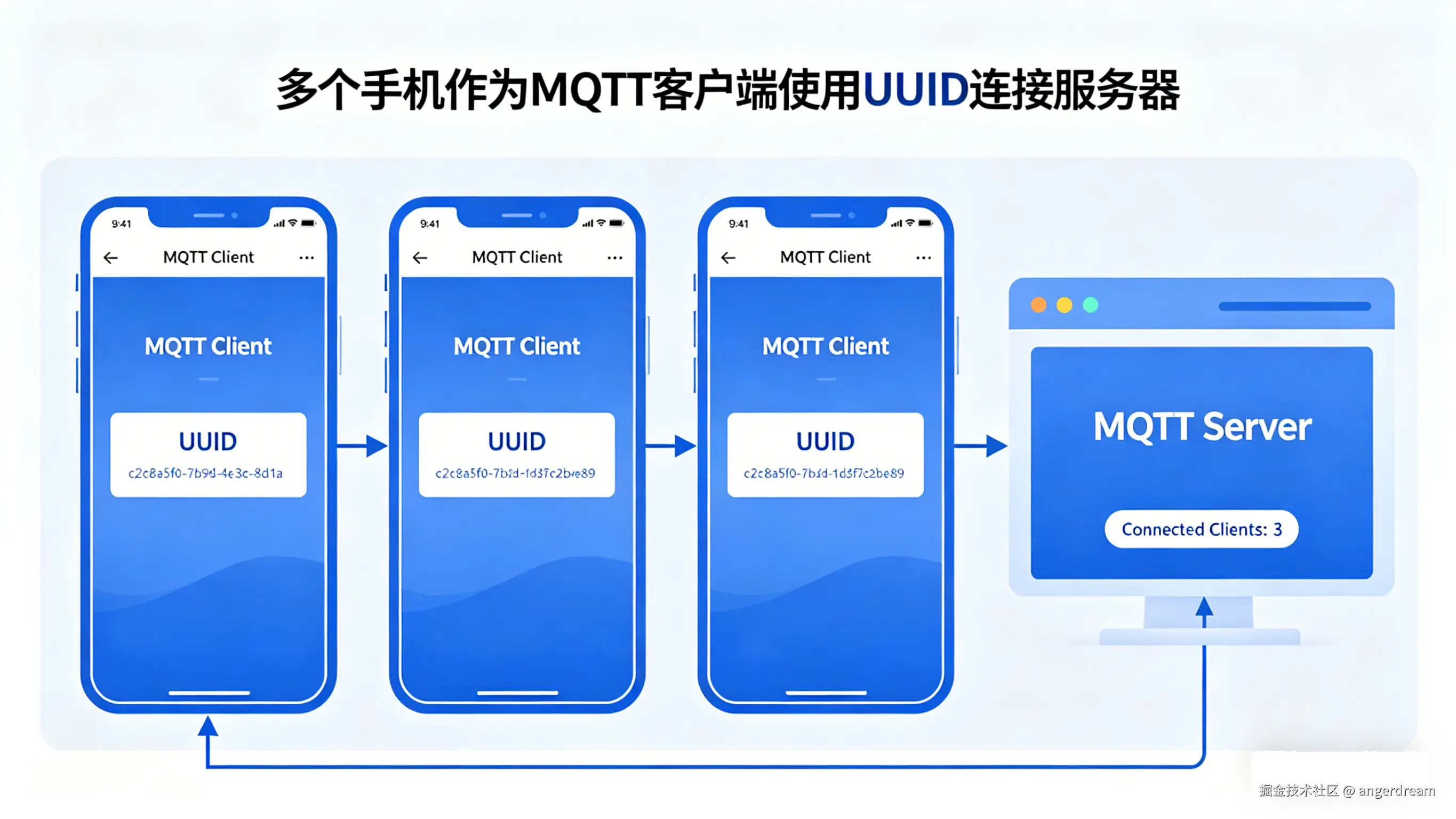
嘟宝在建立MQTT连接之前,需要指明clientID。将clientID用uuid作为嘟宝id,就不会出现重复的嘟宝连接。如下之前用0001做测试
clike
 String url= "tcp://192.168.1.20:1883";
 String dubaoID="0001";
 client=new MqttClient(url, "dubao_server"+dubaoID, new MemoryPersistence());
andorid 生成uuid
- 新建一个uuid类
- uuid类中添加createUUID创建一个uuid
- 在MainActivity创建一个按钮生成uuid 类uuid源码
clike
package com.zilong.dubao;

import java.util.UUID;

public class uuid {
    public String createUUID(){
        String s="";
        s=UUID.randomUUID().toString();
        return s;

    }
}
MainActivity源码
clike
package com.zilong.dubao;

import androidx.appcompat.app.AppCompatActivity;
import android.os.Bundle;
import android.widget.Button;
import android.widget.Toast;

public class MainActivity extends AppCompatActivity {
    @Override
    protected void onCreate(Bundle savedInstanceState) {
        super.onCreate(savedInstanceState);
        setContentView(R.layout.activity_main);
        Button startbtn=findViewById(R.id.sendbtn);
        startbtn.setOnClickListener(v->{
           uuid u=new uuid();
           String s= u.createUUID();
           Toast.makeText(this,s,Toast.LENGTH_SHORT).show();

        });

    }

}
运行查看效果  每次生成的uuid,都是唯一值
uuid存储
uuid在嘟宝app首次启动后生成,先于MQTT连接之前。启动后检查嘟宝有没有被存储在本地。
- 若有从本地读取,返回本地uuid
- 若没有创建新uuid,存储本地 Andorid数据存储,有很多种方式,轻量级的使用SharedPreferences,对于复杂数据可以使用SQLite 数据库等
- SharedPreferences:以 键值对 (Key-Value) 形式存储轻量级的简单数据,常用于保存应用设置
- 文件存储, Android 的 openFileInput() / openFileOutput() 方法,将数据以字节流的形式写入设备的文件系统。
- SQLite 数据库:Android 内置的轻量级关系型数据库,适合存储结构化、复杂且相互关联的数据
- Content Provider:虽然常被称为四大组件之一,但它也提供了一种跨应用数据共享的存储接口 使用SharedPreferences存储uuid。 uuid类源码
clike
package com.zilong.dubao;

import static android.content.Context.MODE_PRIVATE;

import android.content.Context;
import android.content.SharedPreferences;

import java.util.UUID;

public class uuid {
    private String createUUID(){
        String s="";
        s=UUID.randomUUID().toString();
        return s;

    }
    public String getuuid(Context context){
        SharedPreferences  preferences=context.getSharedPreferences("uuid",MODE_PRIVATE);
        String uuid= preferences.getString("id","");
        if (uuid.equals("")){
            uuid=createUUID();
            SharedPreferences.Editor editor=context.getSharedPreferences("uuid",MODE_PRIVATE).edit();
            editor.putString("id",uuid);
            editor.apply();
            return uuid;
        }
        return uuid;


    }
}
运行效果
生成的uuid实现mqtt连接
uuid用于mqtt连接,完成嘟宝唯一身份标识。
- 在前台服务中获取uuid
- 初始化mqtt连接时,修改connect参数,传入uuid值 前台服务代码
clike
package com.zilong.dubao;
import android.app.Notification;
import android.app.NotificationChannel;
import android.app.NotificationManager;
import android.app.PendingIntent;
import android.app.Service;
import android.content.Intent;
import android.os.Build;
import android.os.IBinder;
import android.widget.Toast;

import androidx.core.app.NotificationCompat;

public class MyService extends Service {
    MyMqttClient myMqttClient;
    public MyService() {
    }


    @Override
    public void onCreate() {
        super.onCreate();
        createNotificationChannel();
        uuid u=new uuid();
        String uuid= u.getuuid(this);
        myMqttClient=new MyMqttClient();
        myMqttClient.connect(uuid);

    }

    @Override
    public int onStartCommand(Intent intent, int flags, int startId) {
        return super.onStartCommand(intent, flags, startId);

    }

    @Override
    public void onDestroy() {

        myMqttClient.colse();
        super.onDestroy();
    }

    @Override
    public IBinder onBind(Intent intent) {
        // TODO: Return the communication channel to the service.
        throw new UnsupportedOperationException("Not yet implemented");
    }


    private void createNotificationChannel() {
        NotificationChannel channel = new NotificationChannel(
                "DUBAO",
                "嘟宝安心守护孩子安全",
                NotificationManager.IMPORTANCE_LOW
        );
        NotificationManager manager = getSystemService(NotificationManager.class);
        manager.createNotificationChannel(channel);

        Intent intent = new Intent(this, MainActivity.class);
        PendingIntent pendingIntent = PendingIntent.getActivity(
                this, 0, intent,
                PendingIntent.FLAG_UPDATE_CURRENT | PendingIntent.FLAG_IMMUTABLE
        );

        Notification notification= new NotificationCompat.Builder(this, "DUBAO")
                .setContentTitle("嘟宝")
                .setContentText("嘟宝安心守护孩子安全...")
                .setSmallIcon(android.R.drawable.ic_menu_info_details)
                .setContentIntent(pendingIntent)
                .setOngoing(true)  // 不可滑动删除
                .build();
        startForeground(10001, notification);
    }
}
MyMqttClient代码
clike
package com.zilong.dubao;

import android.os.Handler;
import android.os.HandlerThread;
import android.util.Log;
import android.widget.Toast;

import org.eclipse.paho.client.mqttv3.IMqttDeliveryToken;
import org.eclipse.paho.client.mqttv3.MqttCallbackExtended;
import org.eclipse.paho.client.mqttv3.MqttClient;
import org.eclipse.paho.client.mqttv3.MqttConnectOptions;
import org.eclipse.paho.client.mqttv3.MqttException;
import org.eclipse.paho.client.mqttv3.MqttMessage;
import org.eclipse.paho.client.mqttv3.persist.MemoryPersistence;

import java.nio.charset.StandardCharsets;

public class MyMqttClient {
    private Handler mWorkHandler;
    private MqttClient client;
    private MqttConnectOptions connOpts;
    MyMqttClient(){
        HandlerThread handlerThread = new HandlerThread("worker");
        handlerThread.start();
        mWorkHandler = new Handler(handlerThread.getLooper());
    }

    public void connect(String uuid) {
        mWorkHandler.post(()->{
            _connect(uuid);

        });

    }
    private MqttCallbackExtended callbackExtendedallback =new MqttCallbackExtended() {
        @Override
        public void connectComplete(boolean reconnect, String serverURI) {
            Log.d("mqtt","connectComplete");
            try {
                client.subscribe("/duma/#");
            } catch (MqttException e) {
                e.printStackTrace();
            }


        }

        @Override
        public void connectionLost(Throwable cause) {
            Log.d("mqtt","connectionLost");

        }

        @Override
        public void messageArrived(String topic, MqttMessage message) throws Exception {
            String s=new String(message.getPayload());
            Log.d("mqtt","主题是:"+topic);
            Log.d("mqtt","内容是::"+s);
        }

        @Override
        public void deliveryComplete(IMqttDeliveryToken token) {

        }
    };

    protected void _connect(String uuid){
        try {
            String url= "tcp://"+MyConfig.mqttip+":"+MyConfig.mqttport;
            String dubaoID=uuid;
            client=new MqttClient(url, "dubao_server"+dubaoID, new MemoryPersistence());
            connOpts=new MqttConnectOptions();
            connOpts.setCleanSession(true);// 重连接是否清理会话
            connOpts.setConnectionTimeout(10);
            connOpts.setKeepAliveInterval(60);//心跳间隔(秒)
            connOpts.setAutomaticReconnect(true);
            String s="嘟宝异常掉线了";
            connOpts.setWill("/dubao/will",s.getBytes(StandardCharsets.UTF_8),0,false);
            client.setCallback(callbackExtendedallback);
            _connectionMQTTServer();

        } catch (MqttException e) {
            e.printStackTrace();
        }

    }

    protected  void _connectionMQTTServer(){
        while (true){
            try {
                client.connect(connOpts);
                break;
            } catch (MqttException e) {
                Log.d("mqtt","连接失败");
                e.printStackTrace();
            }
            try {
                Thread.sleep(5*1000);
                Log.d("mqtt","准备重新连接");
            } catch (InterruptedException e) {
                e.printStackTrace();
            }
        }
    }

    public void publish(String topic,String msg){
        publish(topic,msg,0,false);
    }
    public void publish(String topic,String msg,int qos,boolean retained){
        mWorkHandler.post(()->{
            try {
                MqttMessage message=new MqttMessage(msg.getBytes(StandardCharsets.UTF_8));
                message.setQos(qos);
                message.setRetained(retained);
                client.publish(topic,message);
            } catch (MqttException e) {
                e.printStackTrace();
            }

        });
    }
    public void colse(){
        mWorkHandler.post(()->{
            try {
                client.disconnect();
                client.close();
            } catch (MqttException e) {
                e.printStackTrace();
            }

        });

    }

}
至此完成MQTT连接,剩下的发布、订阅消息数据格式定义。