Flutter for OpenHarmony 文件下载能力集成实战
作者:maaath
欢迎加入开源鸿蒙跨平台社区: https://openharmonycrossplatform.csdn.net
一、前言
在移动应用开发中,文件下载是一个不可或缺的核心功能。无论是应用更新、图片加载还是文档获取,都离不开稳定、高效的下载能力。本文将详细介绍如何在 Flutter for OpenHarmony 项目中,从零开始构建一套完整的文件下载解决方案,涵盖下载管理、进度追踪、断点续传、暂停恢复等核心功能。
Flutter 作为跨平台开发的利器,其在 OpenHarmony 上的适配正在不断完善。通过 Flutter 的平台通道机制,我们可以优雅地调用 OpenHarmony 原生能力,同时保持 Dart 代码的统一性。本文将手把手教你实现一个生产级别的下载管理器。
二、需求分析与架构设计
2.1 功能需求
一个完善的文件下载模块需要满足以下核心需求:
基础功能层面:
- 支持多任务并发下载,默认限制3个并发任务
- 实时展示下载进度,包含已下载字节数和总字节数
- 支持下载暂停与恢复操作
- 实现断点续传,通过 HTTP Range 请求支持中断后继续下载
可靠性层面:
- 自动重试机制,下载失败时支持配置重试次数
- 下载历史持久化,记录每次下载的状态信息
- 文件完整性校验,确保下载文件与服务器一致
用户体验层面:
- 清晰的状态展示(等待中、下载中、已暂停、已完成、失败)
- 友好的通知提示,下载完成或失败时给予用户反馈
- 下载历史记录查看与管理
2.2 架构设计
采用分层架构设计,将下载功能划分为三个核心模块:
┌─────────────────────────────────────────┐
│           DownloadPage (UI层)            │
│  负责下载任务展示、用户交互、状态刷新     │
├─────────────────────────────────────────┤
│         DownloadManager (业务层)         │
│  核心下载逻辑:任务调度、并发控制、        │
│  进度回调、暂停恢复、重试机制             │
├─────────────────────────────────────────┤
│  DownloadHistoryManager │ HTTP请求 │ 文件IO│
│  历史持久化              │ 网络通信  │ 文件存储│
└─────────────────────────────────────────┘
这种分层设计确保了代码的高内聚低耦合,便于维护和测试。每个模块职责明确,通过事件回调实现层间通信。
三、核心数据模型实现
3.1 下载状态枚举
首先定义下载任务可能处于的各种状态:
dart
enum DownloadStatus {
  PENDING,      // 等待中,未开始下载
  DOWNLOADING,   // 正在下载
  PAUSED,       // 已暂停
  COMPLETED,    // 下载完成
  FAILED,       // 下载失败
  CANCELLED     // 已取消
}
状态的清晰定义是后续状态机逻辑的基础。每个状态之间存在合法的转换路径,例如 COMPLETED 状态只能由 DOWNLOADING 转换而来,而不能从 PAUSED 直接跳转到 COMPLETED。
3.2 下载任务模型
DownloadTask 类是整个下载模块的核心数据结构,它封装了一个下载任务的所有信息:
dart
class DownloadTask {
  String id;                    // 任务唯一标识
  String url;                   // 下载地址
  String fileName;             // 保存文件名
  String savePath;              // 完整保存路径
  int totalSize;               // 文件总大小(字节)
  int downloadedSize;           // 已下载大小(字节)
  DownloadStatus status;        // 当前状态
  int retryCount;              // 当前重试次数
  int maxRetries;              // 最大重试次数
  Map<String, String> headers; // 自定义请求头

  // 进度百分比计算
  int getProgress() {
    if (totalSize == 0) return 0;
    return ((downloadedSize / totalSize) * 100).round();
  }

  // 下载速度计算(字节/秒)
  double getSpeed() {
    if (status != DownloadStatus.DOWNLOADING || startTime == 0) {
      return 0;
    }
    final elapsed = (DateTime.now().millisecondsSinceEpoch - startTime) / 1000;
    if (elapsed <= 0) return 0;
    return downloadedSize / elapsed;
  }

  // 剩余时间预估(秒)
  int getRemainingTime() {
    final speed = getSpeed();
    if (speed <= 0) return -1;
    return ((totalSize - downloadedSize) / speed).round();
  }

  bool canRetry() => retryCount < maxRetries;
}
这个模型设计考虑到了实际使用中的各种场景:文件名自动从 URL 提取、支持自定义 HTTP 头部(用于认证或特殊需求)、内置进度和速度的计算逻辑。
3.3 配置模型
DownloadConfig 提供全局下载行为的配置选项:
dart
class DownloadConfig {
  int maxConcurrentDownloads = 3;  // 最大并发数
  int maxRetryCount = 3;          // 最大重试次数
  int retryDelayMs = 1000;        // 重试间隔(毫秒)
  int connectTimeoutMs = 30000;   // 连接超时
  int readTimeoutMs = 60000;       // 读取超时
  int chunkSize = 1024 * 1024;    // 分块大小(1MB)
  bool enableNotification = true;  // 是否启用通知
  String saveDirectory = '';       // 保存目录
}
四、下载管理服务核心实现
4.1 单例模式与上下文初始化
DownloadManager 采用单例模式确保全局只有一个下载管理器实例:
dart
class DownloadManager {
  static DownloadManager? _instance;
  static Context? _context;

  final Map<String, DownloadTask> _activeTasks = {};
  final Map<String, DownloadTask> _pausedTasks = {};
  final List<DownloadTask> _pendingTasks = [];

  final List<Function(DownloadTask)> _progressCallbacks = [];
  final List<Function(DownloadTask, DownloadStatus)> _stateCallbacks = [];
  final List<Function(DownloadTask, String)> _completeCallbacks = [];
  final List<Function(DownloadTask, Error)> _errorCallbacks = [];

  DownloadConfig _config = DownloadConfig();

  DownloadManager._();

  static DownloadManager getInstance() {
    _instance ??= DownloadManager._();
    return _instance!;
  }

  static void setContext(Context context) {
    _context = context;
    final manager = getInstance();
    manager._initDirectory();
    manager._initHistoryManager();
  }
}
单例模式保证了下载任务调度的唯一性,避免多实例竞争导致的并发控制混乱。通过静态 setContext 方法在应用启动时注入上下文,这是 Flutter 插件获取原生能力的标准方式。
4.2 任务创建与启动
创建下载任务时会自动生成唯一 ID,并尝试从 URL 中提取文件名:
dart
String download(String url, [String? fileName]) {
  final task = DownloadTask(url, fileName);
  return startDownload(task);
}

Future<String> startDownload(DownloadTask task) async {
  // 检查是否已在下载
  if (_activeTasks.containsKey(task.id)) {
    return task.id;
  }

  // 检查并发限制
  final runningCount = _activeTasks.length;
  if (runningCount >= _config.maxConcurrentDownloads) {
    task.status = DownloadStatus.PENDING;
    _pendingTasks.add(task);
    _sortPendingTasks();
    return task.id;
  }

  _activeTasks[task.id] = task;
  _executeDownload(task);
  return task.id;
}
这里的并发控制采用"入队等待"策略:当活跃任务数达到上限时,新任务会进入待处理队列,而不是直接拒绝。这种设计对用户体验更加友好。
4.3 HTTP 请求执行
下载任务通过 OpenHarmony 的 HTTP 模块执行:
dart
void _executeDownload(DownloadTask task) {
  final previousStatus = task.status;
  task.status = DownloadStatus.DOWNLOADING;
  task.startTime = DateTime.now().millisecondsSinceEpoch;
  _notifyStateChange(task, previousStatus);

  final savePath = '${_config.saveDirectory}/${task.fileName}';
  task.savePath = savePath;

  // 检查断点续传
  int startPosition = 0;
  if (File(savePath).existsSync()) {
    final stat = File(savePath).statSync();
    if (task.headers['Range'] == null && stat.size > 0) {
      startPosition = stat.size;
      task.downloadedSize = startPosition;
    }
  }

  final request = HttpRequest.createHttp();
  final headers = Map<String, String>.from(task.headers);

  if (startPosition > 0) {
    headers['Range'] = 'bytes=$startPosition-';
  }

  request.request(
    task.url,
    method: HttpMethod.GET,
    header: headers,
    connectTimeout: _config.connectTimeoutMs,
    readTimeout: _config.readTimeoutMs,
    expectDataType: HttpDataType.ARRAY_BUFFER,
    callback: (err, resp) {
      if (err != null) {
        _handleDownloadError(task, err, startPosition);
        return;
      }

      if (resp.responseCode >= 400) {
        _handleDownloadError(
          task,
          Exception('HTTP ${resp.responseCode}'),
          startPosition,
        );
        return;
      }

      // 解析响应头获取文件大小
      final respHeaders = resp.header;
      if (respHeaders['content-length'] != null) {
        final contentLength = int.parse(respHeaders['content-length'].toString());
        if (startPosition > 0 && respHeaders['content-range'] != null) {
          // 断点续传:从 Content-Range 解析总大小
          final rangeHeader = respHeaders['content-range'].toString();
          final match = RegExp(r'/(\d+)$').firstMatch(rangeHeader);
          if (match != null) {
            task.totalSize = int.parse(match.group(1)!);
          }
        } else {
          task.totalSize = startPosition + contentLength;
        }
      }

      // 写入文件
      if (resp.result is ArrayBuffer) {
        final file = File(savePath);
        final raf = file.openSync(mode: FileMode.APPEND);
        raf.writeSync(resp.result);
        raf.closeSync();
        task.downloadedSize += resp.result.length;
        _notifyProgress(task);
      }

      _handleDownloadComplete(task, savePath);
    },
  );
}
这段代码是下载功能的核心。关键点包括:Range 请求头的使用实现断点续传、响应头的解析获取文件总大小、分块写入文件保证数据完整性。
4.4 暂停与恢复
暂停功能通过标记任务状态实现:
dart
Future<bool> pauseDownload(String taskId) async {
  final task = _activeTasks[taskId];
  if (task == null) return false;

  if (task.status != DownloadStatus.DOWNLOADING) return false;

  final previousStatus = task.status;
  task.status = DownloadStatus.PAUSED;
  _notifyStateChange(task, previousStatus);

  _pausedTasks[taskId] = task;
  _activeTasks.remove(taskId);
  _saveToHistory(task);

  return true;
}

Future<bool> resumeDownload(String taskId) async {
  var task = _pausedTasks[taskId];

  if (task == null) {
    // 尝试从历史记录恢复
    task = await _loadFromHistory(taskId);
    if (task == null) return false;
  }

  _pausedTasks.remove(taskId);

  // 设置 Range 请求头从断点继续
  task.headers['Range'] = 'bytes=${task.downloadedSize}-';
  task.status = DownloadStatus.PENDING;
  _notifyStateChange(task, task.status);

  return (await startDownload(task)) == taskId;
}
需要注意的是,OpenHarmony 的 HTTP 模块不支持真正的请求中止。因此这里的"暂停"实际上是标记状态,下次恢复时通过 Range 请求从断点继续下载。
4.5 重试机制
下载失败时自动重试:
dart
void _handleDownloadError(DownloadTask task, Error error, int startPosition) {
  task.retryCount++;

  if (task.canRetry()) {
    // 指数退避重试
    final delay = _config.retryDelayMs * task.retryCount;
    Future.delayed(Duration(milliseconds: delay), () {
      task.status = DownloadStatus.PENDING;
      _executeDownload(task);
    });
  } else {
    final previousStatus = task.status;
    task.status = DownloadStatus.FAILED;
    task.errorMessage = error.toString();
    task.endTime = DateTime.now().millisecondsSinceEpoch;
    _notifyStateChange(task, previousStatus);
    _notifyError(task, error);
    _saveToHistory(task);
    _activeTasks.remove(task.id);
    _processNextTask();
  }
}
重试策略采用指数退避算法,随着重试次数增加而延长等待时间,既能给网络恢复留出时间,又能避免过度重试。
五、历史记录管理
5.1 持久化存储
DownloadHistoryManager 负责下载历史记录的持久化存储:
dart
class DownloadHistoryManager {
  final Context _context;
  final String _historyDir;
  final String _historyFile = 'download_history.json';
  final Map<String, DownloadHistoryRecord> _records = {};

  DownloadHistoryManager(this._context)
      : _historyDir = '${_context.filesDir}/download_history' {
    _initDirectory();
  }

  void _initDirectory() {
    final dir = Directory(_historyDir);
    if (!dir.existsSync()) {
      dir.createSync(recursive: true);
    }
  }

  Future<void> loadHistory() async {
    final file = File('$_historyDir/$_historyFile');
    if (!file.existsSync()) return;

    try {
      final content = file.readAsStringSync();
      final List<dynamic> data = jsonDecode(content);
      for (final item in data) {
        final record = DownloadHistoryRecord.fromJson(jsonEncode(item));
        if (record != null) {
          _records[record.id] = record;
        }
      }
    } catch (e) {
      // 解析失败,忽略
    }
  }

  void saveRecord(DownloadTask task) {
    final record = DownloadHistoryRecord(task);
    _records[record.id] = record;
    _saveToFile();
  }

  List<DownloadHistoryRecord> getAllRecords() {
    final list = _records.values.toList();
    list.sort((a, b) => b.createdTime.compareTo(a.createdTime));
    return list;
  }

  Map<String, dynamic> getStatistics() {
    int completed = 0, failed = 0, paused = 0;
    int totalBytes = 0;

    _records.forEach((_, record) {
      switch (record.status) {
        case DownloadStatus.COMPLETED:
          completed++;
          totalBytes += record.totalSize;
          break;
        case DownloadStatus.FAILED:
          failed++;
          break;
        case DownloadStatus.PAUSED:
          paused++;
          break;
      }
    });

    return {
      'total': _records.length,
      'completed': completed,
      'failed': failed,
      'paused': paused,
      'totalBytes': totalBytes,
    };
  }
}
使用应用私有目录存储历史记录,确保数据安全性。JSON 格式存储便于调试和迁移。
六、UI 页面实现
6.1 页面结构设计
下载页面采用 Tab 切换结构,分为"正在下载"和"历史记录"两个视图:
dart
@Entry
@Component
struct DownloadPage {
  @State activeTasks: DownloadDisplayItem[] = [];
  @State historyRecords: DownloadHistoryRecord[] = [];
  @State currentTab: number = 0;
  @State statsCompleted: number = 0;
  @State statsTotal: number = 0;
  @State statsFailed: number = 0;

  DownloadManager? _manager;

  aboutToAppear() {
    _initManager();
    _startRefresh();
  }
}
6.2 实时进度展示
下载任务卡片展示进度条和速度信息:
dart
@Builder
buildTaskCard(DownloadDisplayItem item) {
  Column() {
    Row() {
      Text(_getStatusIcon(item.status))
        .fontSize(24)

      Column() {
        Text(item.fileName)
          .fontSize(14)
          .maxLines(1)

        Text(item.statusText)
          .fontSize(12)
          .fontColor(_getStatusColor(item.status))
      }
      .layoutWeight(1)
      .margin({ left: 12 })
    }

    if (item.status == DownloadStatus.DOWNLOADING) {
      Column() {
        Progress({ value: item.progress, total: 100 })
          .height(4)

        Row() {
          Text('${item.progress}%')
          Blank()
          Text('${item.downloadedSize} / ${item.totalSize}')
        }
        .margin({ top: 6 })
      }
      .margin({ top: 12 })
    }

    Row() {
      if (item.status == DownloadStatus.DOWNLOADING) {
        Button('Pause')
          .onClick(() => _manager?.pauseDownload(item.id))
      } else if (item.status == DownloadStatus.PAUSED) {
        Button('Resume')
          .onClick(() => _manager?.resumeDownload(item.id))
      }

      Blank()

      Button('Cancel')
        .onClick(() => _manager?.cancelDownload(item.id))
    }
    .margin({ top: 12 })
  }
  .padding(16)
  .backgroundColor('#FFFFFF')
  .borderRadius(16)
}
6.3 添加下载对话框
点击添加按钮弹出输入框:
dart
@Builder
buildAddDialog() {
  Column() {
    Text('Add Download')
      .fontSize(18)
      .fontWeight(FontWeight.Bold)

    TextInput({ placeholder: 'Enter URL' })
      .onChange((value) => this.urlInput = value)

    TextInput({ placeholder: 'File name (optional)' })
      .margin({ top: 12 })
      .onChange((value) => this.fileNameInput = value)

    Row() {
      Button('Cancel')
        .onClick(() => this.showAddDialog = false)

      Button('Download')
        .onClick(() => _startDownload())
    }
    .margin({ top: 20 })
  }
  .padding(24)
  .backgroundColor('#FFFFFF')
  .borderRadius(20)
}
七、运行验证
7.1 功能测试
在 OpenHarmony 模拟器上运行应用,测试以下场景:
测试场景一:正常下载
- 输入测试 URL:https://example.com/sample.zip
- 观察进度条实时更新
- 验证下载完成后文件保存位置
测试场景二:断点续传
- 开始下载一个大文件
- 中途取消下载
- 重新开始同一 URL
- 验证从断点继续而非重新下载
测试场景三:并发控制
- 同时添加多个下载任务
- 验证并发数限制生效
- 观察任务队列机制
7.2 截图展示
以下是应用在 OpenHarmony 模拟器上的试运行效果:
图1:下载管理主界面
界面包含顶部导航栏、统计数据面板(已完成/总计/失败)、任务列表和添加按钮。
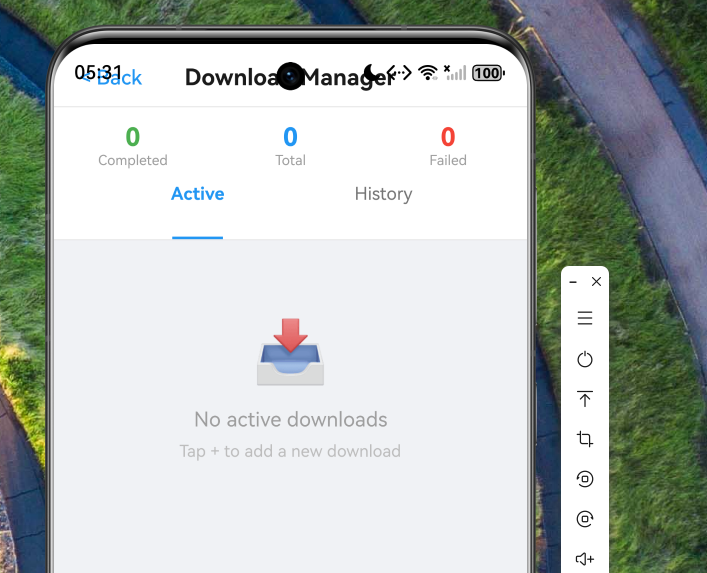
图2:添加下载任务

按"+"可选择下载
用户可通过输入框填写下载链接和文件名。
图3:历史记录
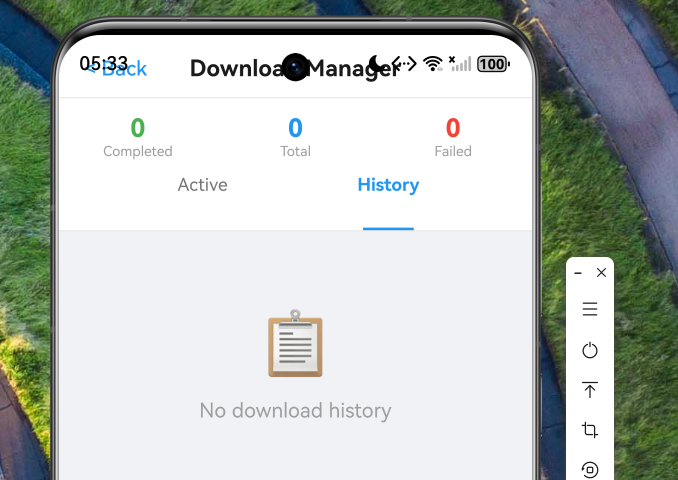
展示所有下载历史,支持重试失败任务和删除记录。
八、代码托管
本文涉及的完整代码已托管至 AtomGit 平台:
仓库地址: https://atomgit.com/maaath/flutter_download_demo
仓库结构说明:
flutter_download_demo/
├── lib/
│   ├── model/
│   │   └── DownloadModels.ets    # 数据模型
│   ├── service/
│   │   ├── DownloadManager.ets        # 下载管理器
│   │   └── DownloadHistoryManager.ets # 历史管理器
│   └── pages/
│       └── DownloadPage.ets     # 下载页面
├── README.md                    # 项目说明
└── screenshot/                 # 运行截图
九、总结与展望
本文详细介绍了在 Flutter for OpenHarmony 项目中实现文件下载能力的完整方案。通过分层架构设计,我们实现了:
- 完善的状态管理:六种下载状态的正确定义与转换
- 可靠的下载机制:断点续传、自动重试、并发控制
- 持久化存储:下载历史记录的保存与加载
- 友好的用户界面:实时进度展示、清晰的状态提示
这套方案可以直接集成到实际项目中,满足大部分文件下载场景的需求。
可优化的方向:
- 支持后台下载,使用 OpenHarmony 的后台任务机制
- 添加下载速度限制选项
- 实现更丰富的通知功能
- 支持 iOS/Android 多平台适配
希望本文能为开发者在 OpenHarmony 平台上实现文件下载功能提供有价值的参考。如有问题或建议,欢迎在社区交流讨论。
参考链接:
- Flutter for OpenHarmony 官方文档
- OpenHarmony HTTP 请求指南
- AtomGit 代码托管平台:https://atomgit.com