Flutter for OpenHarmony 集成应用更新能力:热更新检测、增量更新、强制更新与更新弹窗
作者:maaath
社区引导
欢迎加入开源鸿蒙跨平台社区: https://openharmonycrossplatform.csdn.net
前言
在移动应用开发中,应用更新能力是保障用户体验和功能迭代的重要环节。Flutter 作为跨平台框架,在 OpenHarmony 上的应用越来越广泛。本文将详细介绍如何在 Flutter for OpenHarmony 项目中实现完整的应用更新能力,包括热更新检测、增量更新、强制更新以及美观的更新弹窗设计。
一、技术概述
1.1 什么是应用更新能力
应用更新能力是指应用在运行过程中,能够检测到新版本、提示用户下载安装的一系列功能。根据更新策略的不同,可以分为:
- 热更新(Hotfix):小体积补丁,快速修复紧急问题
- 增量更新(Incremental):差分包,只下载变化的部分
- 全量更新(Full):完整安装包,适合大版本升级
- 强制更新(Mandatory):用户必须更新,无法跳过
1.2 Flutter for OpenHarmony 的优势
Flutter 提供了跨平台的一致性体验,在 OpenHarmony 设备上,我们可以通过 flutter_banner 或原生插件机制实现应用更新功能。结合 ArkUI 的原生组件,可以打造既美观又高效的更新体验。
二、项目结构设计
在开始实现之前,我们需要设计清晰的项目结构:
lib/
├── main.dart                    # 应用入口
├── model/
│   └── update_models.dart       # 更新相关数据模型
├── service/
│   └── update_service.dart     # 更新业务逻辑服务
├── widgets/
│   ├── update_dialog.dart      # 更新弹窗组件
│   └── download_progress.dart  # 下载进度组件
└── pages/
    └── update_page.dart        # 更新演示页面
三、核心数据模型实现
3.1 更新状态枚举
dart
/// 更新类型枚举
enum UpdateType {
  hotfix,    // 热更新
  incremental, // 增量更新
  full       // 全量更新
}

/// 更新优先级枚举
enum UpdatePriority {
  optional,    // 可选更新
  recommended, // 推荐更新
  mandatory    // 强制更新
}

/// 下载状态枚举
enum DownloadState {
  idle,        // 空闲状态
  checking,    // 检查中
  available,   // 有可用更新
  downloading, // 下载中
  paused,      // 已暂停
  ready,       // 可安装
  installing,  // 安装中
  installed,   // 已安装
  failed       // 失败
}
3.2 更新信息模型
dart
/// 更新信息数据类
class UpdateInfo {
  final int versionCode;
  final String versionName;
  final UpdateType type;
  final UpdatePriority priority;
  final int packageSize;       // 字节为单位
  final String description;
  final String downloadUrl;
  final bool isForcedUpdate;

  UpdateInfo({
    required this.versionCode,
    required this.versionName,
    required this.type,
    required this.priority,
    required this.packageSize,
    required this.description,
    required this.downloadUrl,
    this.isForcedUpdate = false,
  });

  /// 格式化包大小显示
  String get formattedSize {
    final mb = packageSize / (1024 * 1024);
    if (mb >= 1024) {
      return '${(mb / 1024).toStringAsFixed(2)} GB';
    }
    return '${mb.toStringAsFixed(2)} MB';
  }

  /// 判断是否为强制更新
  bool get isMandatory =>
      priority == UpdatePriority.mandatory || isForcedUpdate;
}

/// 下载进度数据类
class DownloadProgress {
  int downloadedBytes;
  int totalBytes;
  int speed;  // 字节/秒
  DownloadState state;
  int progress;  // 0-100
  String? errorMessage;

  DownloadProgress({
    this.downloadedBytes = 0,
    this.totalBytes = 0,
    this.speed = 0,
    this.state = DownloadState.idle,
    this.progress = 0,
    this.errorMessage,
  });

  /// 格式化进度文本
  String get formattedProgress =>
      '${_formatBytes(downloadedBytes)} / ${_formatBytes(totalBytes)}';

  /// 格式化速度文本
  String get formattedSpeed =>
      speed > 0 ? '${_formatBytes(speed)}/s' : '';

  String _formatBytes(int bytes) {
    if (bytes == 0) return '0 B';
    const k = 1024;
    final sizes = ['B', 'KB', 'MB', 'GB'];
    final i = (bytes == 0) ? 0 : (Math.log(bytes) / Math.log(k)).floor();
    return '${(bytes / Math.pow(k, i)).toStringAsFixed(2)} ${sizes[i]}';
  }
}
3.3 更新结果模型
dart
/// 更新检查结果
class UpdateResult {
  final bool success;
  final String? errorCode;
  final String? errorMessage;
  final UpdateInfo? updateInfo;

  UpdateResult({
    required this.success,
    this.errorCode,
    this.errorMessage,
    this.updateInfo,
  });

  factory UpdateResult.success(UpdateInfo info) => UpdateResult(
        success: true,
        updateInfo: info,
      );

  factory UpdateResult.failure(String code, String message) => UpdateResult(
        success: false,
        errorCode: code,
        errorMessage: message,
      );
}
四、更新服务层实现
4.1 服务类设计
dart
/// 应用更新管理服务(单例模式)
class UpdateService {
  static UpdateService? _instance;
  static UpdateService get instance => _instance ??= UpdateService._();

  UpdateService._();

  // 当前版本信息
  int _currentVersionCode = 101;
  String _currentVersionName = '1.0.1';

  // 最新更新信息
  UpdateInfo? _latestUpdate;
  DownloadProgress _downloadProgress = DownloadProgress();
  DownloadState _downloadState = DownloadState.idle;

  // 事件回调
  Function()? onCheckStart;
  Function(UpdateResult)? onCheckComplete;
  Function(UpdateInfo)? onUpdateAvailable;
  Function()? onDownloadStart;
  Function(DownloadProgress)? onDownloadProgress;
  Function()? onDownloadComplete;
  Function(String)? onDownloadFailed;
  Function()? onInstallComplete;

  /// 获取当前版本
  Future<Map<String, dynamic>> getCurrentVersion() async {
    // 实际项目中从包管理器获取
    return {
      'versionCode': _currentVersionCode,
      'versionName': _currentVersionName,
    };
  }

  /// 检查更新
  Future<UpdateResult> checkForUpdate() async {
    _downloadState = DownloadState.checking;
    onCheckStart?.call();

    try {
      // 模拟网络请求延迟
      await Future.delayed(const Duration(seconds: 1));

      // 模拟从服务器获取更新信息
      // 实际项目中替换为真实的接口调用
      final updateInfo = _fetchDemoUpdateInfo();

      if (updateInfo == null) {
        _downloadState = DownloadState.idle;
        final result = UpdateResult.failure('NO_UPDATE', '当前已是最新版本');
        onCheckComplete?.call(result);
        return result;
      }

      if (updateInfo.versionCode <= _currentVersionCode) {
        _downloadState = DownloadState.idle;
        final result = UpdateResult.failure('NO_UPDATE', '当前已是最新版本');
        onCheckComplete?.call(result);
        return result;
      }

      _latestUpdate = updateInfo;
      _downloadState = DownloadState.available;
      onUpdateAvailable?.call(updateInfo);
      final result = UpdateResult.success(updateInfo);
      onCheckComplete?.call(result);
      return result;
    } catch (e) {
      _downloadState = DownloadState.failed;
      final result = UpdateResult.failure('NETWORK_ERROR', e.toString());
      onCheckComplete?.call(result);
      return result;
    }
  }

  /// 模拟获取更新信息(演示用)
  UpdateInfo? _fetchDemoUpdateInfo() {
    // 模拟:如果当前版本小于指定版本,返回更新信息
    if (_currentVersionCode < 200) {
      return UpdateInfo(
        versionCode: 200,
        versionName: '2.0.0',
        type: UpdateType.full,
        priority: UpdatePriority.mandatory,
        packageSize: 120 * 1024 * 1024, // 120MB
        description: '全新UI设计,重构核心架构,支持更多设备类型',
        downloadUrl: 'https://example.com/update/200.hap',
        isForcedUpdate: true,
      );
    }
    return null;
  }

  /// 开始下载
  Future<bool> downloadUpdate() async {
    if (_latestUpdate == null) return false;

    _downloadState = DownloadState.downloading;
    _downloadProgress = DownloadProgress();
    _downloadProgress.state = DownloadState.downloading;
    _downloadProgress.totalBytes = _latestUpdate!.packageSize;
    onDownloadStart?.call();

    // 模拟下载过程
    return _simulateDownload();
  }

  /// 模拟下载进度
  Future<bool> _simulateDownload() async {
    int downloaded = 0;
    const total = 120 * 1024 * 1024;
    const baseSpeed = 2 * 1024 * 1024; // 2MB/s

    while (downloaded < total && _downloadState == DownloadState.downloading) {
      await Future.delayed(const Duration(milliseconds: 500));

      final increment = (baseSpeed * (0.8 + Random().nextDouble() * 0.4) * 0.5).toInt();
      downloaded = (downloaded + increment).clamp(0, total);

      _downloadProgress.downloadedBytes = downloaded;
      _downloadProgress.totalBytes = total;
      _downloadProgress.speed = increment * 2;
      _downloadProgress.progress = ((downloaded / total) * 100).toInt();
      onDownloadProgress?.call(_downloadProgress);
    }

    if (_downloadState == DownloadState.downloading) {
      _downloadState = DownloadState.ready;
      _downloadProgress.state = DownloadState.ready;
      _downloadProgress.progress = 100;
      onDownloadComplete?.call();
      return true;
    }
    return false;
  }

  /// 暂停下载
  void pauseDownload() {
    if (_downloadState == DownloadState.downloading) {
      _downloadState = DownloadState.paused;
      _downloadProgress.state = DownloadState.paused;
    }
  }

  /// 恢复下载
  Future<bool> resumeDownload() async {
    if (_downloadState == DownloadState.paused) {
      _downloadState = DownloadState.downloading;
      _downloadProgress.state = DownloadState.downloading;
      return _simulateDownload();
    }
    return false;
  }

  /// 取消下载
  void cancelDownload() {
    _downloadState = DownloadState.idle;
    _downloadProgress = DownloadProgress();
  }

  /// 安装更新
  Future<bool> installUpdate() async {
    if (_downloadState != DownloadState.ready) return false;

    _downloadState = DownloadState.installing;
    await Future.delayed(const Duration(seconds: 2));

    _downloadState = DownloadState.installed;
    onInstallComplete?.call();
    return true;
  }

  /// 获取下载状态
  DownloadState get downloadState => _downloadState;

  /// 获取下载进度
  DownloadProgress get downloadProgress => _downloadProgress;

  /// 获取最新更新信息
  UpdateInfo? get latestUpdate => _latestUpdate;
}
五、更新弹窗组件实现
5.1 强制更新弹窗
强制更新弹窗的设计要点是:不能被关闭,必须引导用户进行更新。
dart
/// 强制更新弹窗
class ForcedUpdateDialog extends StatelessWidget {
  final UpdateInfo updateInfo;
  final VoidCallback onUpdate;

  const ForcedUpdateDialog({
    Key? key,
    required this.updateInfo,
    required this.onUpdate,
  }) : super(key: key);

  @override
  Widget build(BuildContext context) {
    return Dialog(
      backgroundColor: Colors.transparent,
      child: Container(
        width: 300,
        decoration: BoxDecoration(
          color: Colors.white,
          borderRadius: BorderRadius.circular(16),
        ),
        child: Column(
          mainAxisSize: MainAxisSize.min,
          children: [
            // 图标区域
            Container(
              width: double.infinity,
              padding: const EdgeInsets.only(top: 24),
              child: const Text(
                '🚀',
                textAlign: TextAlign.center,
                style: TextStyle(fontSize: 48),
              ),
            ),

            // 标题
            const Padding(
              padding: EdgeInsets.only(top: 16),
              child: Text(
                '发现新版本',
                style: TextStyle(
                  fontSize: 22,
                  fontWeight: FontWeight.bold,
                  color: Color(0xFF1A1A1A),
                ),
              ),
            ),

            // 版本号
            Container(
              margin: const EdgeInsets.only(top: 8),
              padding: const EdgeInsets.symmetric(horizontal: 12, vertical: 4),
              decoration: BoxDecoration(
                color: const Color(0xFFFFF3E0),
                borderRadius: BorderRadius.circular(12),
              ),
              child: Text(
                'V${updateInfo.versionName}',
                style: const TextStyle(
                  fontSize: 14,
                  fontWeight: FontWeight.w500,
                  color: Color(0xFFE65100),
                ),
              ),
            ),

            // 更新类型标签
            Container(
              margin: const EdgeInsets.only(top: 8),
              padding: const EdgeInsets.symmetric(horizontal: 8, vertical: 2),
              decoration: BoxDecoration(
                color: const Color(0xFFE65100),
                borderRadius: BorderRadius.circular(4),
              ),
              child: Text(
                _getUpdateTypeText(),
                style: const TextStyle(
                  fontSize: 12,
                  color: Colors.white,
                ),
              ),
            ),

            // 更新描述
            Container(
              height: 80,
              margin: const EdgeInsets.symmetric(horizontal: 24, vertical: 16),
              child: SingleChildScrollView(
                child: Text(
                  updateInfo.description,
                  style: const TextStyle(
                    fontSize: 14,
                    color: Color(0xFF666666),
                    height: 1.5,
                  ),
                  textAlign: TextAlign.center,
                ),
              ),
            ),

            // 包大小
            Text(
              '包大小: ${updateInfo.formattedSize}',
              style: const TextStyle(
                fontSize: 12,
                color: Color(0xFF999999),
              ),
            ),

            // 警告提示
            Container(
              margin: const EdgeInsets.symmetric(horizontal: 24, vertical: 16),
              padding: const EdgeInsets.all(12),
              decoration: BoxDecoration(
                color: const Color(0xFFFFF3E0),
                borderRadius: BorderRadius.circular(8),
              ),
              child: const Row(
                children: [
                  Text('⚠️', style: TextStyle(fontSize: 14)),
                  SizedBox(width: 8),
                  Expanded(
                    child: Text(
                      '此更新为强制更新,必须安装后才能继续使用应用',
                      style: TextStyle(
                        fontSize: 12,
                        color: Color(0xFFE65100),
                      ),
                    ),
                  ),
                ],
              ),
            ),

            // 更新按钮
            Container(
              margin: const EdgeInsets.only(left: 24, right: 24, bottom: 24),
              width: double.infinity,
              height: 48,
              child: ElevatedButton(
                onPressed: onUpdate,
                style: ElevatedButton.styleFrom(
                  backgroundColor: const Color(0xFFE65100),
                  foregroundColor: Colors.white,
                  shape: RoundedRectangleBorder(
                    borderRadius: BorderRadius.circular(24),
                  ),
                ),
                child: const Text(
                  '立即更新',
                  style: TextStyle(fontSize: 16, fontWeight: FontWeight.w500),
                ),
              ),
            ),
          ],
        ),
      ),
    );
  }

  String _getUpdateTypeText() {
    switch (updateInfo.type) {
      case UpdateType.hotfix:
        return '热更新';
      case UpdateType.incremental:
        return '增量更新';
      case UpdateType.full:
        return '全量更新';
    }
  }
}
5.2 普通更新弹窗
普通更新弹窗允许用户跳过或稍后更新。
dart
/// 普通更新弹窗
class NormalUpdateDialog extends StatefulWidget {
  final UpdateInfo updateInfo;
  final DownloadState downloadState;
  final DownloadProgress downloadProgress;
  final VoidCallback onUpdate;
  final VoidCallback onSkip;
  final VoidCallback? onPauseResume;

  const NormalUpdateDialog({
    Key? key,
    required this.updateInfo,
    required this.downloadState,
    required this.downloadProgress,
    required this.onUpdate,
    required this.onSkip,
    this.onPauseResume,
  }) : super(key: key);

  @override
  State<NormalUpdateDialog> createState() => _NormalUpdateDialogState();
}

class _NormalUpdateDialogState extends State<NormalUpdateDialog> {
  @override
  Widget build(BuildContext context) {
    return Dialog(
      backgroundColor: Colors.transparent,
      child: Container(
        width: 300,
        decoration: BoxDecoration(
          color: Colors.white,
          borderRadius: BorderRadius.circular(16),
        ),
        child: Column(
          mainAxisSize: MainAxisSize.min,
          children: [
            // 关闭按钮
            Align(
              alignment: Alignment.topRight,
              child: IconButton(
                icon: const Icon(Icons.close, color: Color(0xFF999999)),
                onPressed: () => Navigator.of(context).pop(),
              ),
            ),

            // 图标
            const Text('🚀', style: TextStyle(fontSize: 48)),

            // 标题
            const Padding(
              padding: EdgeInsets.only(top: 12),
              child: Text(
                '发现新版本',
                style: TextStyle(
                  fontSize: 20,
                  fontWeight: FontWeight.bold,
                ),
              ),
            ),

            // 版本号
            Text(
              'V${widget.updateInfo.versionName}',
              style: const TextStyle(
                fontSize: 14,
                color: Color(0xFF2196F3),
                fontWeight: FontWeight.w500,
              ),
            ),

            // 更新类型和大小
            Padding(
              padding: const EdgeInsets.only(top: 8),
              child: Row(
                mainAxisAlignment: MainAxisAlignment.center,
                children: [
                  Container(
                    padding: const EdgeInsets.symmetric(horizontal: 8, vertical: 2),
                    decoration: BoxDecoration(
                      color: const Color(0xFF2196F3),
                      borderRadius: BorderRadius.circular(4),
                    ),
                    child: Text(
                      _getUpdateTypeText(),
                      style: const TextStyle(fontSize: 12, color: Colors.white),
                    ),
                  ),
                  const SizedBox(width: 8),
                  Text(
                    widget.updateInfo.formattedSize,
                    style: const TextStyle(fontSize: 12, color: Color(0xFF999999)),
                  ),
                ],
              ),
            ),

            // 描述
            Container(
              height: 60,
              margin: const EdgeInsets.symmetric(horizontal: 20, vertical: 12),
              child: Text(
                widget.updateInfo.description,
                style: const TextStyle(fontSize: 14, color: Color(0xFF666666)),
              ),
            ),

            // 下载进度(如果正在下载)
            if (widget.downloadState == DownloadState.downloading ||
                widget.downloadState == DownloadState.paused)
              _buildProgressSection(),

            const SizedBox(height: 16),

            // 操作按钮
            if (widget.downloadState == DownloadState.idle ||
                widget.downloadState == DownloadState.available)
              _buildActionButtons(),

            if (widget.downloadState == DownloadState.ready)
              _buildInstallButton(),
          ],
        ),
      ),
    );
  }

  Widget _buildProgressSection() {
    return Container(
      margin: const EdgeInsets.symmetric(horizontal: 24),
      child: Column(
        children: [
          LinearProgressIndicator(
            value: widget.downloadProgress.progress / 100,
            backgroundColor: const Color(0xFFE0E0E0),
            valueColor: const AlwaysStoppedAnimation(Color(0xFF2196F3)),
          ),
          const SizedBox(height: 8),
          Row(
            mainAxisAlignment: MainAxisAlignment.spaceBetween,
            children: [
              Text(
                widget.downloadProgress.formattedProgress,
                style: const TextStyle(fontSize: 12, color: Color(0xFF999999)),
              ),
              Text(
                widget.downloadProgress.formattedSpeed,
                style: const TextStyle(fontSize: 12, color: Color(0xFF2196F3)),
              ),
            ],
          ),
        ],
      ),
    );
  }

  Widget _buildActionButtons() {
    return Padding(
      padding: const EdgeInsets.only(left: 24, right: 24, bottom: 24),
      child: Row(
        children: [
          Expanded(
            child: OutlinedButton(
              onPressed: widget.onSkip,
              style: OutlinedButton.styleFrom(
                foregroundColor: const Color(0xFF999999),
                side: const BorderSide(color: Color(0xFFE0E0E0)),
                padding: const EdgeInsets.symmetric(vertical: 12),
              ),
              child: const Text('跳过此版本'),
            ),
          ),
          const SizedBox(width: 12),
          Expanded(
            child: ElevatedButton(
              onPressed: widget.onUpdate,
              style: ElevatedButton.styleFrom(
                backgroundColor: const Color(0xFF2196F3),
                foregroundColor: Colors.white,
                padding: const EdgeInsets.symmetric(vertical: 12),
              ),
              child: const Text('立即更新'),
            ),
          ),
        ],
      ),
    );
  }

  Widget _buildInstallButton() {
    return Container(
      margin: const EdgeInsets.only(left: 24, right: 24, bottom: 24),
      width: double.infinity,
      height: 48,
      child: ElevatedButton(
        onPressed: widget.onUpdate,
        style: ElevatedButton.styleFrom(
          backgroundColor: const Color(0xFF4CAF50),
          foregroundColor: Colors.white,
        ),
        child: const Text('安装更新'),
      ),
    );
  }

  String _getUpdateTypeText() {
    switch (widget.updateInfo.type) {
      case UpdateType.hotfix:
        return '热更新';
      case UpdateType.incremental:
        return '增量更新';
      case UpdateType.full:
        return '全量更新';
    }
  }
}
六、更新演示页面
6.1 页面完整实现
dart
/// 更新演示页面
class UpdateDemoPage extends StatefulWidget {
  const UpdateDemoPage({Key? key}) : super(key: key);

  @override
  State<UpdateDemoPage> createState() => _UpdateDemoPageState();
}

class _UpdateDemoPageState extends State<UpdateDemoPage> {
  final UpdateService _updateService = UpdateService.instance;

  int _currentVersionCode = 101;
  String _currentVersionName = '1.0.1';
  bool _isChecking = false;
  UpdateInfo? _updateInfo;
  DownloadProgress _downloadProgress = DownloadProgress();
  DownloadState _downloadState = DownloadState.idle;
  String _checkResult = '';

  @override
  void initState() {
    super.initState();
    _loadCurrentVersion();
    _setupCallbacks();
  }

  void _loadCurrentVersion() async {
    final version = await _updateService.getCurrentVersion();
    setState(() {
      _currentVersionCode = version['versionCode'];
      _currentVersionName = version['versionName'];
    });
  }

  void _setupCallbacks() {
    _updateService
      ..onCheckStart = () => setState(() {
            _isChecking = true;
            _checkResult = '';
          })
      ..onCheckComplete = (result) => setState(() {
            _isChecking = false;
            if (!result.success) {
              _checkResult = result.errorMessage ?? '';
            }
          })
      ..onUpdateAvailable = (info) => setState(() {
            _updateInfo = info;
            _showUpdateDialog(info);
          })
      ..onDownloadProgress = (progress) => setState(() {
            _downloadProgress = progress;
          })
      ..onDownloadComplete = () => setState(() {
            _downloadState = DownloadState.ready;
          });
  }

  void _showUpdateDialog(UpdateInfo info) {
    if (info.isMandatory) {
      showDialog(
        context: context,
        barrierDismissible: false,
        builder: (ctx) => ForcedUpdateDialog(
          updateInfo: info,
          onUpdate: () {
            Navigator.of(ctx).pop();
            _startDownload();
          },
        ),
      );
    } else {
      showDialog(
        context: context,
        builder: (ctx) => NormalUpdateDialog(
          updateInfo: info,
          downloadState: _downloadState,
          downloadProgress: _downloadProgress,
          onUpdate: _startDownload,
          onSkip: () {
            Navigator.of(ctx).pop();
            setState(() {
              _checkResult = '已跳过此版本';
            });
          },
        ),
      );
    }
  }

  void _checkForUpdate() async {
    setState(() {
      _isChecking = true;
      _checkResult = '';
    });
    await _updateService.checkForUpdate();
    setState(() {
      _isChecking = false;
    });
  }

  void _startDownload() async {
    setState(() {
      _downloadState = DownloadState.downloading;
    });
    await _updateService.downloadUpdate();
  }

  @override
  Widget build(BuildContext context) {
    return Scaffold(
      backgroundColor: const Color(0xFFF5F7FA),
      appBar: AppBar(
        title: const Text('应用更新演示'),
        backgroundColor: Colors.white,
        foregroundColor: Colors.black,
        elevation: 0,
      ),
      body: ListView(
        padding: const EdgeInsets.all(16),
        children: [
          _buildVersionCard(),
          const SizedBox(height: 16),
          _buildCheckSection(),
          if (_downloadState != DownloadState.idle) ...[
            const SizedBox(height: 16),
            _buildDownloadSection(),
          ],
          const SizedBox(height: 16),
          _buildSimulationSection(),
        ],
      ),
    );
  }

  Widget _buildVersionCard() {
    return Container(
      padding: const EdgeInsets.all(20),
      decoration: BoxDecoration(
        color: Colors.white,
        borderRadius: BorderRadius.circular(16),
        boxShadow: [
          BoxShadow(
            color: Colors.black.withOpacity(0.05),
            blurRadius: 10,
            offset: const Offset(0, 2),
          ),
        ],
      ),
      child: Row(
        children: [
          Container(
            width: 64,
            height: 64,
            decoration: BoxDecoration(
              color: const Color(0xFFE3F2FD),
              borderRadius: BorderRadius.circular(16),
            ),
            child: const Center(child: Text('🚀', style: TextStyle(fontSize: 32))),
          ),
          const SizedBox(width: 16),
          Column(
            crossAxisAlignment: CrossAxisAlignment.start,
            children: [
              const Text(
                '当前版本',
                style: TextStyle(fontSize: 14, color: Color(0xFF999999)),
              ),
              const SizedBox(height: 4),
              Row(
                children: [
                  Text(
                    'V$_currentVersionName',
                    style: const TextStyle(
                      fontSize: 20,
                      fontWeight: FontWeight.bold,
                      color: Color(0xFF1A1A1A),
                    ),
                  ),
                  const SizedBox(width: 8),
                  Text(
                    '(Build $_currentVersionCode)',
                    style: const TextStyle(fontSize: 12, color: Color(0xFF999999)),
                  ),
                ],
              ),
            ],
          ),
        ],
      ),
    );
  }

  Widget _buildCheckSection() {
    return Container(
      padding: const EdgeInsets.all(16),
      decoration: BoxDecoration(
        color: Colors.white,
        borderRadius: BorderRadius.circular(16),
      ),
      child: Column(
        crossAxisAlignment: CrossAxisAlignment.start,
        children: [
          const Text(
            '版本检测',
            style: TextStyle(fontSize: 16, fontWeight: FontWeight.w500),
          ),
          const SizedBox(height: 12),
          SizedBox(
            width: double.infinity,
            height: 48,
            child: ElevatedButton(
              onPressed: _isChecking ? null : _checkForUpdate,
              style: ElevatedButton.styleFrom(
                backgroundColor: const Color(0xFF2196F3),
                foregroundColor: Colors.white,
                shape: RoundedRectangleBorder(
                  borderRadius: BorderRadius.circular(24),
                ),
              ),
              child: _isChecking
                  ? const SizedBox(
                      width: 20,
                      height: 20,
                      child: CircularProgressIndicator(
                        strokeWidth: 2,
                        valueColor: AlwaysStoppedAnimation(Colors.white),
                      ),
                    )
                  : const Text('检查更新'),
            ),
          ),
          if (_checkResult.isNotEmpty)
            Padding(
              padding: const EdgeInsets.only(top: 12),
              child: Text(
                _checkResult,
                style: TextStyle(
                  fontSize: 14,
                  color: _checkResult.contains('失败')
                      ? const Color(0xFFF44336)
                      : const Color(0xFF4CAF50),
                ),
              ),
            ),
        ],
      ),
    );
  }

  Widget _buildDownloadSection() {
    return Container(
      padding: const EdgeInsets.all(16),
      decoration: BoxDecoration(
        color: Colors.white,
        borderRadius: BorderRadius.circular(16),
      ),
      child: Column(
        crossAxisAlignment: CrossAxisAlignment.start,
        children: [
          const Text(
            '下载进度',
            style: TextStyle(fontSize: 16, fontWeight: FontWeight.w500),
          ),
          const SizedBox(height: 12),
          if (_downloadState == DownloadState.downloading ||
              _downloadState == DownloadState.paused) ...[
            LinearProgressIndicator(
              value: _downloadProgress.progress / 100,
              backgroundColor: const Color(0xFFE0E0E0),
              valueColor: const AlwaysStoppedAnimation(Color(0xFF2196F3)),
            ),
            const SizedBox(height: 8),
            Row(
              mainAxisAlignment: MainAxisAlignment.spaceBetween,
              children: [
                Text('${_downloadProgress.progress}%'),
                Text(_downloadProgress.formattedSpeed),
              ],
            ),
            const SizedBox(height: 8),
            Row(
              children: [
                TextButton(
                  onPressed: () {
                    if (_downloadState == DownloadState.paused) {
                      _updateService.resumeDownload();
                    } else {
                      _updateService.pauseDownload();
                    }
                  },
                  child: Text(_downloadState == DownloadState.paused ? '继续' : '暂停'),
                ),
                const Spacer(),
                TextButton(
                  onPressed: () {
                    _updateService.cancelDownload();
                    setState(() {
                      _downloadState = DownloadState.idle;
                    });
                  },
                  child: const Text('取消', style: TextStyle(color: Color(0xFFF44336))),
                ),
              ],
            ),
          ],
          if (_downloadState == DownloadState.ready)
            Column(
              children: [
                const Row(
                  children: [
                    Icon(Icons.check_circle, color: Color(0xFF4CAF50)),
                    SizedBox(width: 8),
                    Text('下载完成'),
                  ],
                ),
                const SizedBox(height: 12),
                SizedBox(
                  width: double.infinity,
                  height: 44,
                  child: ElevatedButton(
                    onPressed: () => _updateService.installUpdate(),
                    style: ElevatedButton.styleFrom(
                      backgroundColor: const Color(0xFF4CAF50),
                      foregroundColor: Colors.white,
                    ),
                    child: const Text('安装更新'),
                  ),
                ),
              ],
            ),
        ],
      ),
    );
  }

  Widget _buildSimulationSection() {
    return Container(
      padding: const EdgeInsets.all(16),
      decoration: BoxDecoration(
        color: Colors.white,
        borderRadius: BorderRadius.circular(16),
      ),
      child: Column(
        crossAxisAlignment: CrossAxisAlignment.start,
        children: [
          const Text(
            '模拟更新场景',
            style: TextStyle(fontSize: 16, fontWeight: FontWeight.w500),
          ),
          const SizedBox(height: 8),
          const Text(
            '以下按钮用于模拟不同类型的更新弹窗',
            style: TextStyle(fontSize: 12, color: Color(0xFF999999)),
          ),
          const SizedBox(height: 12),
          Row(
            children: [
              Expanded(
                child: ElevatedButton(
                  onPressed: () => _simulateForcedUpdate(),
                  style: ElevatedButton.styleFrom(
                    backgroundColor: const Color(0xFFE65100),
                    foregroundColor: Colors.white,
                  ),
                  child: const Text('强制更新'),
                ),
              ),
              const SizedBox(width: 8),
              Expanded(
                child: ElevatedButton(
                  onPressed: () => _simulateNormalUpdate(),
                  style: ElevatedButton.styleFrom(
                    backgroundColor: const Color(0xFF2196F3),
                    foregroundColor: Colors.white,
                  ),
                  child: const Text('普通更新'),
                ),
              ),
              const SizedBox(width: 8),
              Expanded(
                child: ElevatedButton(
                  onPressed: () => _simulateHotfixUpdate(),
                  style: ElevatedButton.styleFrom(
                    backgroundColor: const Color(0xFF4CAF50),
                    foregroundColor: Colors.white,
                  ),
                  child: const Text('热更新'),
                ),
              ),
            ],
          ),
        ],
      ),
    );
  }

  void _simulateForcedUpdate() {
    final info = UpdateInfo(
      versionCode: 200,
      versionName: '2.0.0',
      type: UpdateType.full,
      priority: UpdatePriority.mandatory,
      packageSize: 120 * 1024 * 1024,
      description: '全新UI设计,重构核心架构,支持更多设备类型',
      downloadUrl: '',
      isForcedUpdate: true,
    );
    _showUpdateDialog(info);
  }

  void _simulateNormalUpdate() {
    final info = UpdateInfo(
      versionCode: 103,
      versionName: '1.0.3',
      type: UpdateType.incremental,
      priority: UpdatePriority.optional,
      packageSize: 15 * 1024 * 1024,
      description: '新增图片预览功能,优化列表加载性能',
      downloadUrl: '',
    );
    _showUpdateDialog(info);
  }

  void _simulateHotfixUpdate() {
    final info = UpdateInfo(
      versionCode: 102,
      versionName: '1.0.2',
      type: UpdateType.hotfix,
      priority: UpdatePriority.recommended,
      packageSize: 2 * 1024 * 1024,
      description: '修复已知问题,提升应用稳定性',
      downloadUrl: '',
    );
    _showUpdateDialog(info);
  }
}
七、代码托管
完整代码已托管至 AtomGit 仓库:
仓库地址:https://atomgit.com/maaath/flutter-update-demo
八、截图运行验证
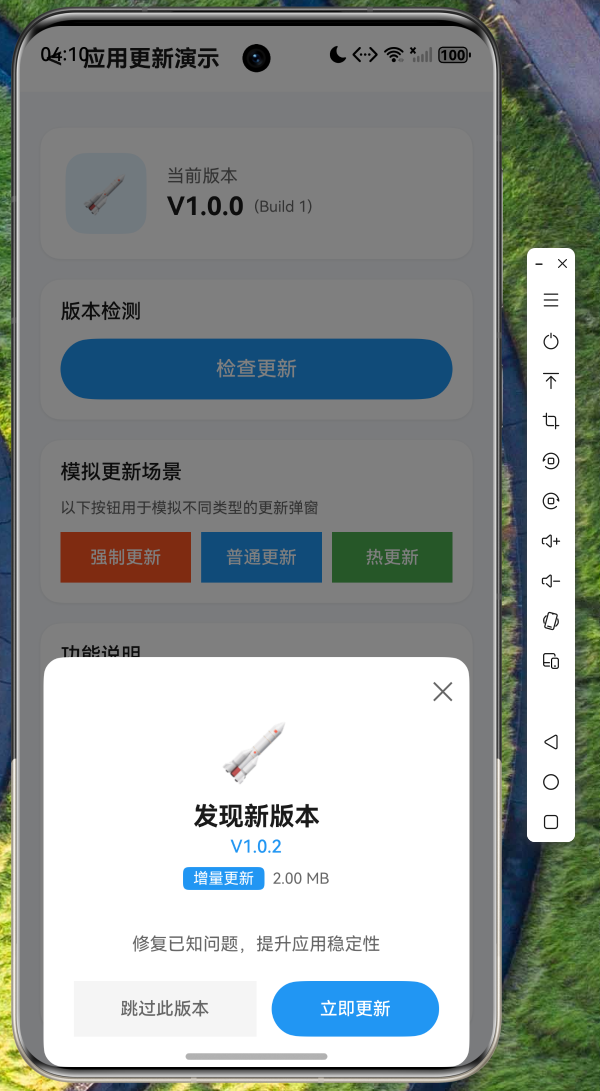
8.1 检查更新界面
运行应用后,点击"检查更新"按钮,系统将发起更新检查请求。
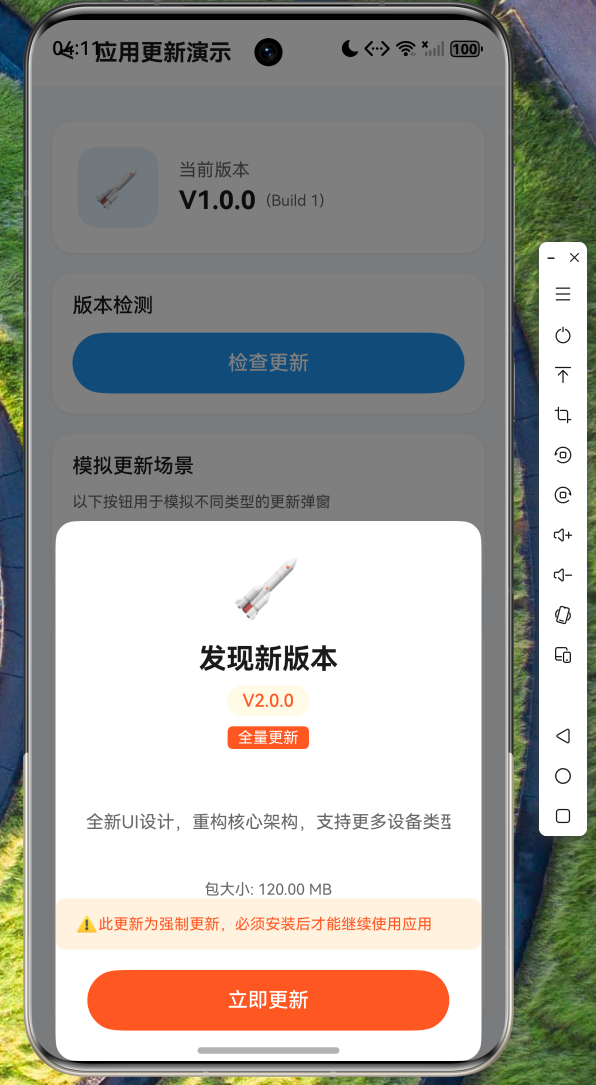
8.2 强制更新弹窗
当检测到强制更新时,弹出不可关闭的更新提示,用户必须完成更新才能继续使用应用。
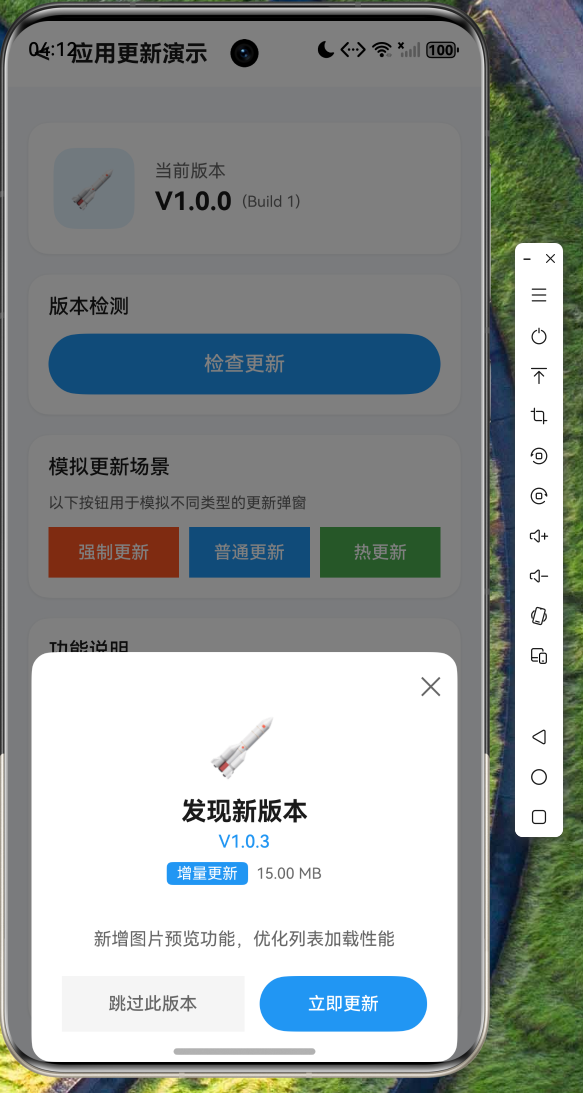
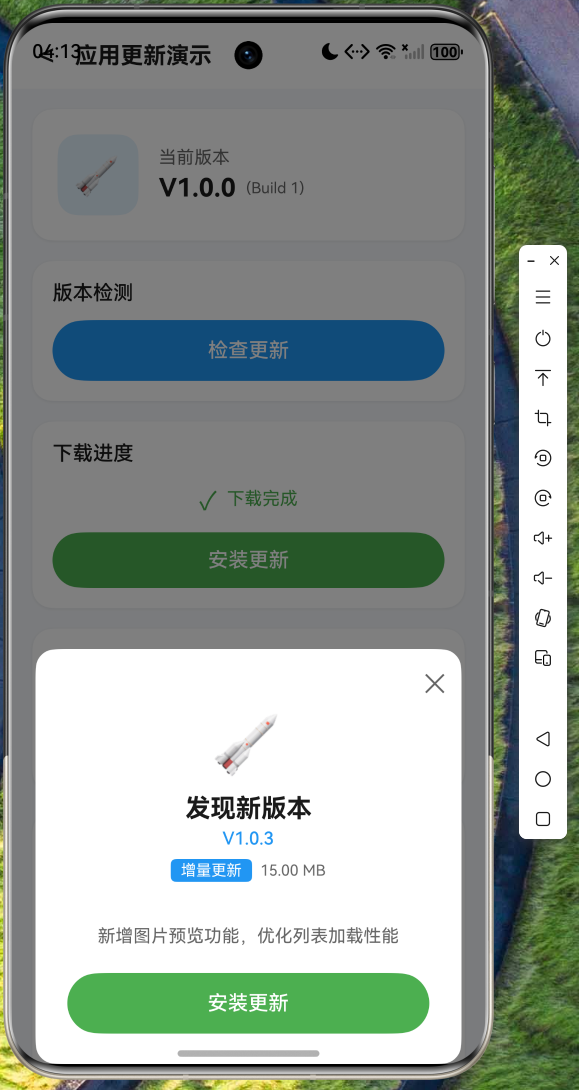
8.3 普通更新弹窗
对于可选更新,用户可以选择"跳过此版本"或"立即更新"。
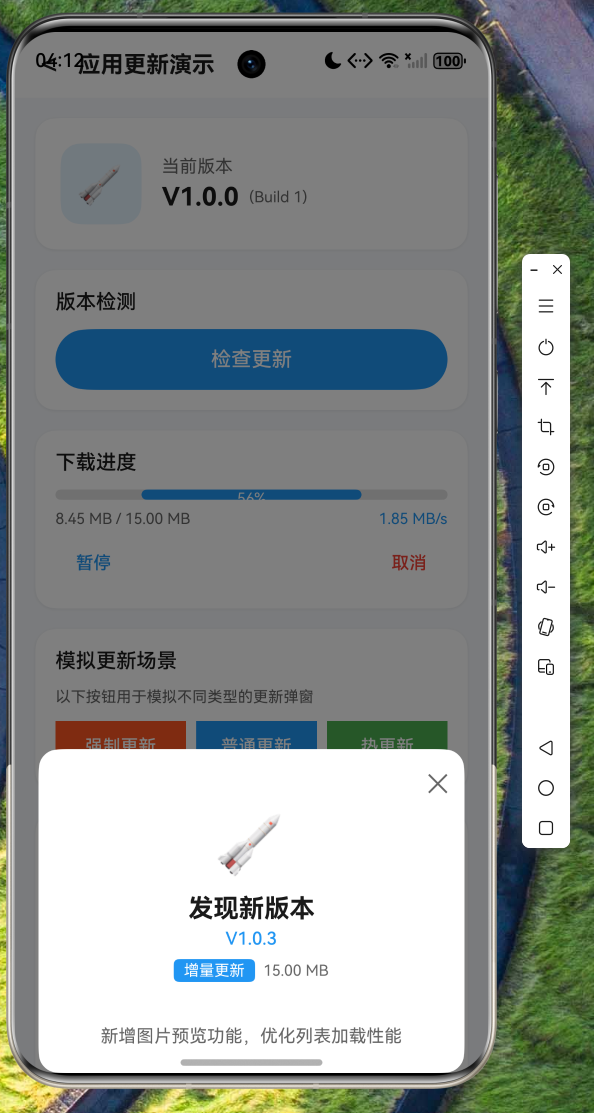
8.4 下载进度显示
下载过程中显示实时进度条、已下载大小和下载速度。
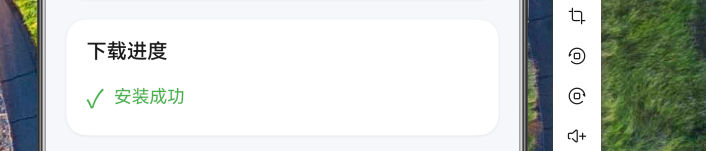
8.5 安装完成
下载完成后显示安装按钮,点击即可完成更新安装。
九、实际应用集成指南
9.1 与真实后端对接
在实际项目中,需要将 _fetchDemoUpdateInfo() 方法替换为真实的 API 调用:
dart
Future<UpdateInfo?> _fetchFromServer() async {
  try {
    final response = await Dio().get('https://your-api.com/check-update');
    if (response.statusCode == 200) {
      final data = response.data;
      return UpdateInfo(
        versionCode: data['versionCode'],
        versionName: data['versionName'],
        type: UpdateType.values.firstWhere(
          (e) => e.name == data['type'],
          orElse: () => UpdateType.full,
        ),
        priority: UpdatePriority.values.firstWhere(
          (e) => e.name == data['priority'],
          orElse: () => UpdatePriority.optional,
        ),
        packageSize: data['packageSize'],
        description: data['description'],
        downloadUrl: data['downloadUrl'],
        isForcedUpdate: data['isForcedUpdate'] ?? false,
      );
    }
  } catch (e) {
    print('Failed to fetch update info: $e');
  }
  return null;
}
9.2 本地化存储
建议使用 SharedPreferences 或 Hive 存储已跳过的版本和用户偏好设置:
dart
// 存储已跳过的版本
Future<void> saveSkippedVersion(int versionCode) async {
  final prefs = await SharedPreferences.getInstance();
  final skipped = prefs.getStringList('skipped_versions') ?? [];
  skipped.add(versionCode.toString());
  await prefs.setStringList('skipped_versions', skipped);
}

// 检查版本是否被跳过
Future<bool> isVersionSkipped(int versionCode) async {
  final prefs = await SharedPreferences.getInstance();
  final skipped = prefs.getStringList('skipped_versions') ?? [];
  return skipped.contains(versionCode.toString());
}
十、总结
本文详细介绍了在 Flutter for OpenHarmony 项目中实现完整应用更新能力的方法,包括:
- 清晰的数据模型设计:枚举定义、不可变数据类、进度追踪
- 单例模式的服务层:统一的更新管理逻辑、事件回调机制
- 多样化的弹窗设计:强制更新与普通更新的差异化处理
- 流畅的用户体验:下载进度实时反馈、暂停/恢复/取消功能
通过本文的指导,开发者可以快速在自己的 Flutter 项目中集成企业级的应用更新能力,为用户提供更好的使用体验。