项目介绍
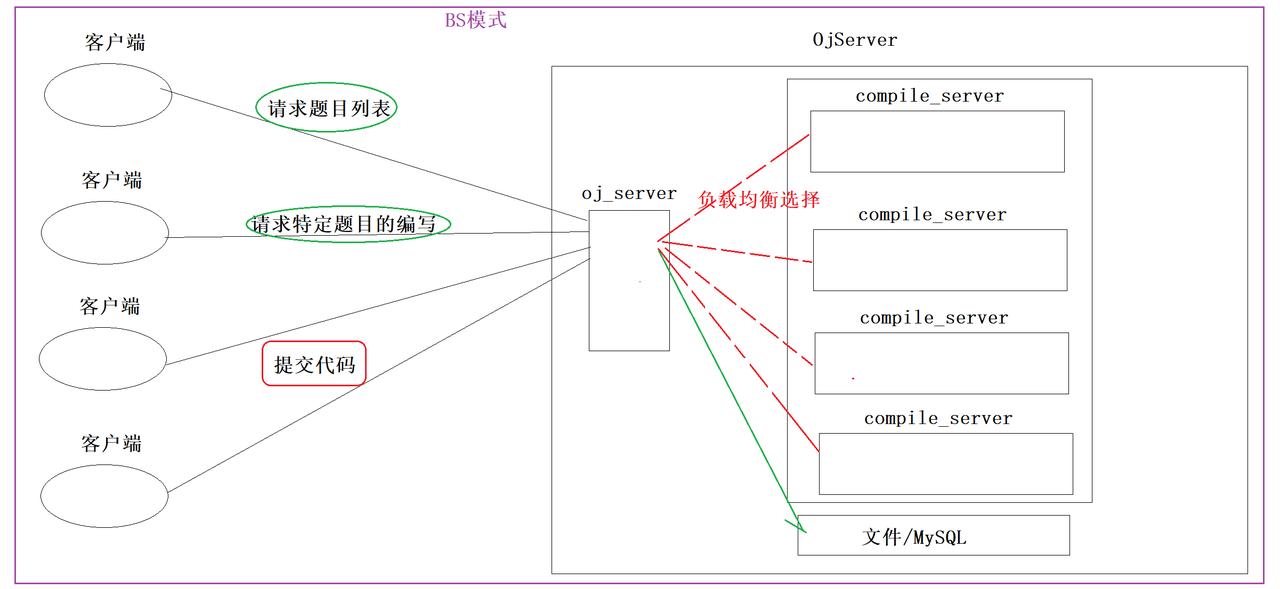
该项目是基于负载均衡的在线oj,模拟我们平时刷题网站(leetcode和牛客)写的一个在线判题系统。
项目主要分为五个模块:
编译运行模块:基于httplib库搭建的编译运行服务器,对用户提交的代码进行测试
业务逻辑模块:基于httplib库并结合MVC模式框架搭建oj服务器,负责题目获取,网页渲染以及负载均衡地将用户提交代码发送给编译服务器进行处理
数据管理模块:基于MySQL数据库对用户的数据、题目数据进行管理
会话模块:基于cookie和session针对登录用户创建唯一的会话ID,通过cookie返回给浏览器
公共模块:包含整个项目需要用到的第三方库以及自己编写的工具类的函数
整体框架示图
主要技术
- C++ STL 标准库
- cpp-httplib 第三方开源网络库
- ctemplate google第三方开源前端网页渲染库
- jsoncpp 第三方开源序列化、反序列化库
- 负载均衡设计
- MVC模式框架
- ajax
- MySQL
项目演示
1普通用户登录界面

2登陆成功后的页面

3题目列表

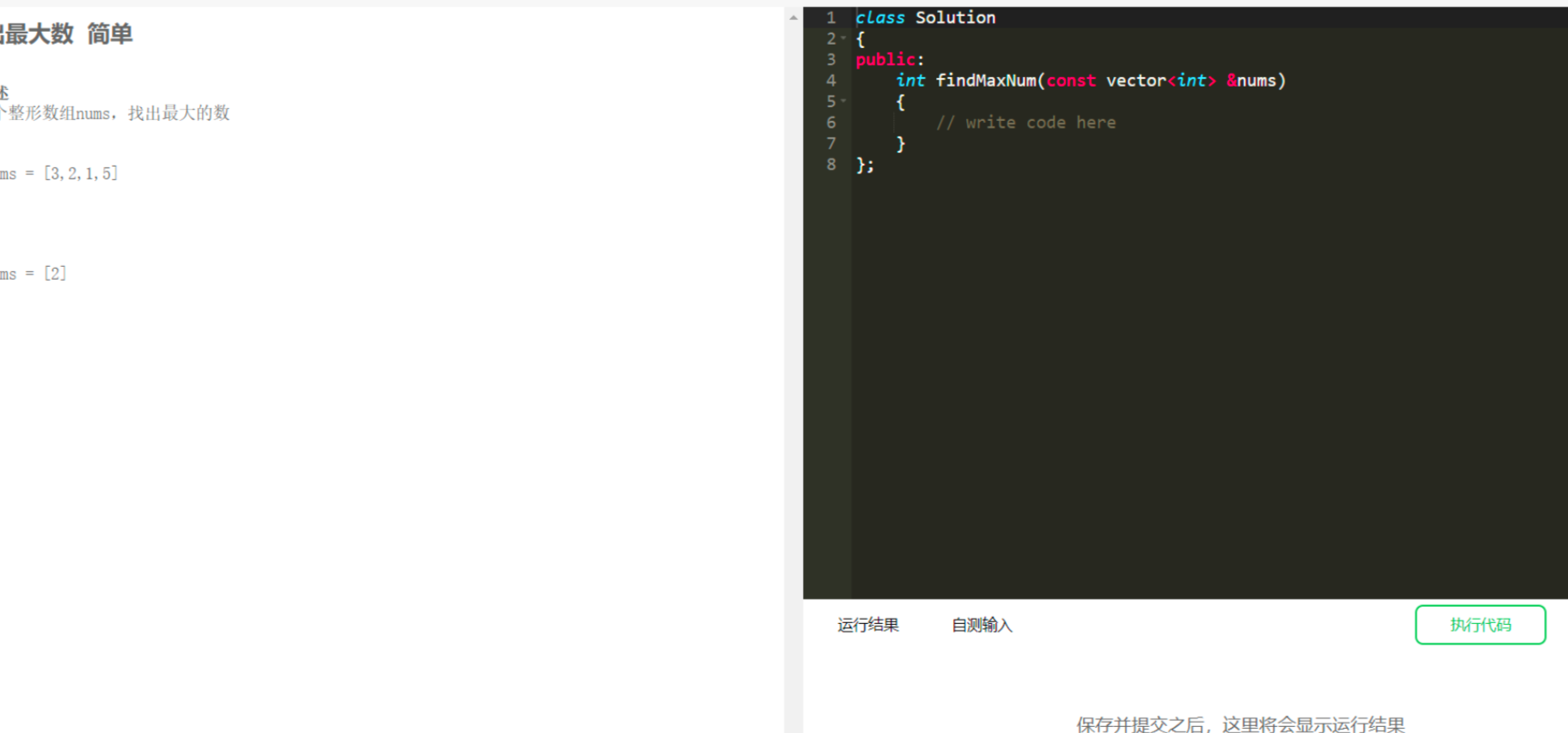
4单个题目
项目的实现
第一部分
关于编译和运行部分的设计
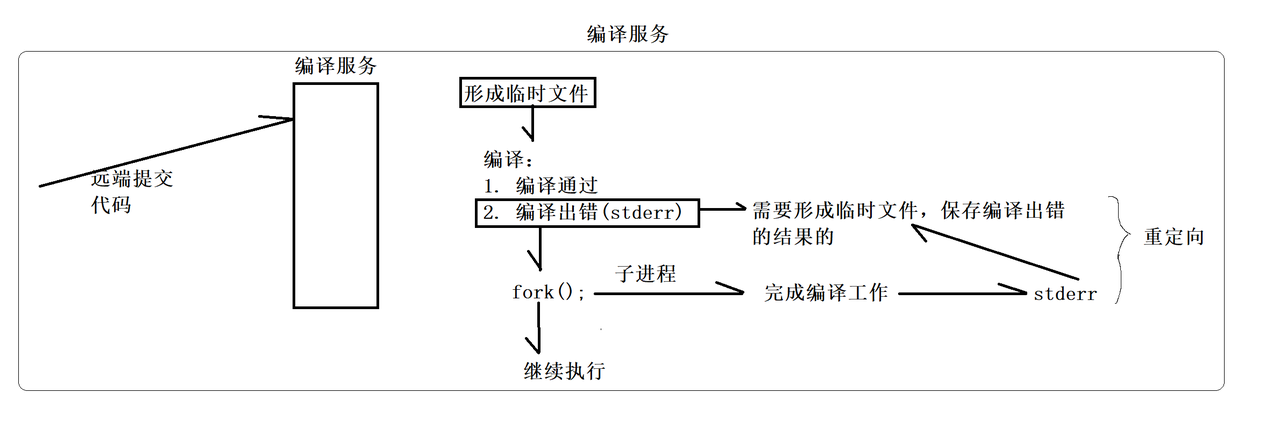
编译
用户的代码可以写入到文件中,并保存在我们项目设置的temp目录下。对应每一个用户的代码的文件,我们都需要给它设置一个唯一的文件名,这个文件名我们通过毫秒级时间戳+原子性递增id生成唯一的一个文件名
cpp
#pragma once
#include <iostream>
#include <unistd.h>
#include "../comm/Util.hpp"
#include "../comm/Log.hpp"

#include <sys/types.h>
#include <sys/wait.h>
#include <fcntl.h>
namespace ns_complier
{
    //引入路径拼接功能
    using namespace ns_util;
    using namespace ns_Log;

    class complier
    {
    public:
        complier() {}

        ~complier() {}
        // bool值代表编译是否成功,成功返回true
        // 输入参数文件名 1234
        // 1234---./temp/1234.cpp
        // 1234---./temp/1234.exe
        // 1234---./temp/1234.stderr
        static bool Complie(const std::string &file_name)
        {
            // fork
            pid_t pid = fork();
            if (pid < 0)
            {
                LOG(ERROR) << "内部错误,创建子进程失败"  << "\n";
                return false;
            }
            else if (pid == 0)
            {
                umask(0);
                // 打开一个文件,将标准错误重定向到文件中
                int _stderr = open(Path_Util::Compiler_Err(file_name).c_str(), O_CREAT | O_WRONLY, 0644);
                if (_stderr < 0)
                {
                    LOG(WARNING) << "没有形成stderr文件错误" << "\n";
                    exit(1);
                }
                // 2重定向到_stderr
                dup2(_stderr, 2);

                // 程序替换,并不影响进程文件描述符
                //  子进程要调用编译器,完成对代码的编译工作
                //  g++ -o target src -std=C++11
                execlp("g++","g++", "-o", Path_Util::Exe(file_name).c_str(),
                       Path_Util::Src(file_name).c_str(), "-std=c++11", nullptr);
                LOG(ERROR) << "无法调用编译器g++,可能是传的参数错误" << "\n";
                exit(2);
            }
            else
            { // 父进程
                waitpid(pid, nullptr, 0);

                // 判断编译是否成功--判断可执行文件是否存在
                if (File_Util::IfFileExiests(Path_Util::Exe(file_name)))
                {
                    LOG(INFO) << Path_Util::Src(file_name) <<" 编译成功!" << "\n";
                    return true;
                }
            }

            LOG(ERROR) << "编译失败,没有形成可执行程序" << "\n";
            return false;
        }
    };
}
运行
编译成功后,就要开始对可执行程序进行执行了,执行之前,需要打开三个文件,也就是上面谈到的xxx_x.stdin、xxx_x.stdout和
xxx_x.stderr三个文件,并将标准输入、标准输出和标准错误分别重定向到三个文件中。执行可执行程序的方式和上面的一样,也是通过创建子进程并进行程序替换的方式运行可执行程序,通过退出码分析出运行结果。
我们这个项目对每道题题目的代码运行时间和内存大小都有限制,所以我们执行可执行程序之前我们需要对内存和时间进行限制,这里使用setrlimit系统函数来进行设置
cpp
#pragma once

#include <iostream>
#include <string>
#include <unistd.h>

#include <sys/types.h>
#include <sys/stat.h>
#include <fcntl.h>

#include "../comm/Log.hpp"
#include "../comm/Util.hpp"

#include <sys/types.h>
#include <sys/wait.h>

#include <sys/time.h>
#include <sys/resource.h>

namespace ns_runner
{
    using namespace ns_Log;
    using namespace ns_util;

    class Runner
    {
    public:
        Runner() {}
        ~Runner() {}

    public:
        // 设置程序运行占用资源的接口
        static void SetProcLimit(int _cpu_limit, int _mem_limit) // KB
        {
            struct rlimit cpu_limit;
            cpu_limit.rlim_cur = _cpu_limit;
            cpu_limit.rlim_max = RLIM_INFINITY;
            setrlimit(RLIMIT_CPU, &cpu_limit);

            struct rlimit mem_limit;
            mem_limit.rlim_cur = _mem_limit * 1024;
            mem_limit.rlim_max = RLIM_INFINITY;
            setrlimit(RLIMIT_AS, &mem_limit);
        }

        // 指明文件名即可,不需要代理路径,不需要带后缀
        /*******************************************
         * 返回值 > 0: 程序异常了,退出时收到了信号,返回值就是对应的信号编号
         * 返回值 == 0: 正常运行完毕的,结果保存到了对应的临时文件中
         * 返回值 < 0: 内部错误
         *
         * cpu_limit:程序运行所能占用CPU资源的大小
         * mem_limit:程序运行所能占用空间的大小
         * **************************************/

        static int Run(const std::string &file_name, int cpu_limit, int mem_limit)
        {
            /******************************************
             * 程序运行:
             * 1. 代码跑完,结果正确
             * 2. 代码跑完,结果不正确
             * 3. 代码没跑完,异常了
             * Run需要考虑代码跑完,结果正确与否吗??不考虑!
             * 结果正确与否:是由我们的测试用例决定的!
             * 我们只考虑:是否正确运行完毕
             *
             * 我们必须知道可执行程序是谁?
             * 一个程序在默认启动的时候
             * 标准输入: 不处理
             * 标准输出: 程序运行完成,输出结果是什么
             * 标准错误: 运行时错误信息
             *****************************************/

            // 程序在运行前,要打开三个文件stdin stdout stderr
            std::string _execute = Path_Util::Exe(file_name);
            std::string _stdin = Path_Util::Stdin(file_name);
            std::string _stdout = Path_Util::Stdout(file_name);
            std::string _stderr = Path_Util::Stderr(file_name);

            umask(0);
            int _stdin_fd = open(_stdin.c_str(), O_CREAT | O_RDONLY, 0644);
            int _stdout_fd = open(_stdout.c_str(), O_CREAT | O_WRONLY, 0644);
            int _stderr_fd = open(_stderr.c_str(), O_CREAT | O_WRONLY, 0644);

            if (_stdin_fd < 0 || _stdout_fd < 0 || _stderr_fd < 0)
            {
                LOG(ERROR) << "内部错误,打开文件失败" << "\n";
                return -1; // 代表文件打开失败
            }

            pid_t pid = fork();
            if (pid < 0)
            {
                LOG(ERROR) << "运行时,子进程创建失败" << "\n";
                close(_stdin_fd);
                close(_stdout_fd);
                close(_stderr_fd);
                return -2; // 代表内部错误,子进程创建失败
            }
            else if (pid == 0)
            {
                dup2(_stdin_fd, 0);
                dup2(_stdout_fd, 1);
                dup2(_stderr_fd, 2);

                SetProcLimit(cpu_limit, mem_limit);
                execl(_execute.c_str() /*我要执行谁*/, _execute.c_str() /*我想在命令行上如何执行该程序*/, nullptr);

                exit(1);
            }
            else
            {
                close(_stdin_fd);
                close(_stdout_fd);
                close(_stderr_fd);
                int status = 0;
                waitpid(pid, &status, 0);
                LOG(INFO) << "程序运行完毕 info:" << (status & 0x7F) << "\n";
                // 程序是否异常结束,就是看是否收到了对应的信号
                return status & 0x7F;
            }
        }
    };
}
综合编译和运行结果进行分析,对返回json串进行设置:
- 如果编译失败,或编译成功运行失败,我只需要设置status、reason两个个字段
- 如果编译运行成功,我们还需要设置stdout和stderr两个字
业务逻辑模块
介绍
该模块是整个项目业务逻辑的核心,包括用户登录注册、题目获取、与数据库进行数据交互、网页渲染以及协调编译服务器的负载均衡,同时该模块也会用到会话模块和数据库模块,进行用户会话管理、数据管理。综合这些利用第三方库cpp-httplib结合MVC模式框架搭建一个oj服务器,该服务器注册了很多Get和Post请求方法,供前端页面发起ajax请求进行前后端数据交互,及时更新前端页面
M : Model ,通常是和数据交互的模块,
比如,对题库进行增删改查(文件版,MySQL)
cpp
#pragma once

#include"../comm/Log.hpp"
#include"../comm/Util.hpp"
#include<iostream>
#include<string>
//根据题目编号,将题目加载到内存中来
//model: 主要用来数据交互,对外访问的接口

#include<vector>
#include<assert.h>
#include<fstream>

#include<unordered_map>

namespace ns_model
{
    using namespace std;
    using namespace ns_Log;
    using namespace ns_util;
    struct Question
    {
        std::string number; //题目的编号
        std::string title;  //题目的标题
        std::string star;   //题目的难度
        int cpu_limit;      //题目的时间限制
        int mem_limit;      //题目的空间限制
        std::string desc;   //题目的描述
        std::string header; //题目的题干
        std::string tail;   //题目的测试用例
    };

    const std::string questions_list="./questions/question.list";
    const std::string question_path="./questions/";

    class Model
    {
    private:
        //题号:题目细节
        unordered_map<string,Question> questions;
    public:
        Model()
        {
            assert(LoadAllQuestionList(questions_list));
        }

        bool LoadAllQuestionList(const std::string &question_list)
        {
            //加载配置文件:questions/questions.list + 题目编号
            ifstream in(question_list);

            if(!in.is_open())
            {
                LOG(FATAL)<<" 加载题目列表失败"<<"\n";
                return false;
            }

            std::string line;
            while(getline(in,line))
            {
                vector<string> token;
                StringUtil::SplitString(line,&token," ");

                if(token.size()!=5)
                {
                    LOG(WARNING)<<" 获取部分题目失败,请检查文件格式"<<"\n";
                    continue;
                }

                //1 回文数 简单 1 30000
                Question q;
                q.number=token[0];
                q.title=token[1];
                q.star=token[2];
                q.cpu_limit=stoi(token[3]);
                q.mem_limit=stoi(token[4]);

                string path=question_path;
                path+=q.number;
                path+="/";

                File_Util::ReadFile(path+"desc.txt",&(q.desc),true);
                File_Util::ReadFile(path+"header.cpp",&(q.header),true);
                File_Util::ReadFile(path+"tail.cpp",&(q.tail),true);

                questions.insert({q.number,q});
            }

            LOG(INFO)<<" 成功的加载了题目列表"<<"\n";
            in.close();
            return true;
        }

        bool GetAllQuestions(vector<Question> *out)
        {
            if(questions.size() == 0)
            {
                LOG(WARNING)<<" 获取题目失败"<<"\n";
                return false;
            }
            for(const auto &q:questions)
            {
                out->push_back(q.second);//key:题号  second:题目的详细信息
            }
            return true;
        }

        bool GetOneQuestion(const std::string num,Question *q)
        {
            const auto& iter=questions.find(num);
            if(iter==questions.end())
            {
                LOG(WARNING)<<" 获取部分题目失败,题目的编号是->"<<num<<"\n";
                return false;
            }
            (*q)=iter->second;
            return true;
        }

        ~Model()
        {}
    };
}
V :view ,通常是拿到数据之后,要进行构建网页
,渲染网页内容,展示给用户的(浏览器)
cpp
#pragma once

#include <iostream>
#include <string>
#include "oj_model.hpp"
#include <ctemplate/template.h>

namespace ns_view
{

    // struct Question
    // {
    //     std::string number; // 题目的编号
    //     std::string title;  // 题目的标题
    //     std::string star;   // 题目的难度
    //     int cpu_limit;      // 题目的时间限制
    //     int mem_limit;      // 题目的空间限制
    //     std::string desc;   // 题目的描述
    //     std::string header; // 题目的题干
    //     std::string tail;   // 题目的测试用例
    // };

    using namespace ns_model;

    const std::string template_path = "./template_html/";

    class View
    {
    public:
        View() {}
        ~View() {}

    public:
        void AllExpendHtml(const vector<Question> &question, std::string *out)
        {
            // 编号 标题 难度
            // 以表格形式返回
            // 1形成路径
            const std::string src_html = template_path + "all_questions.html";

            // 2定义数据字典
            ctemplate::TemplateDictionary root("all_question");

            for (const auto &q : question)
            {
                ctemplate::TemplateDictionary *sub = root.AddSectionDictionary("question_list");
                sub->SetValue("number", q.number);
                sub->SetValue("title", q.title);
                sub->SetValue("star", q.star);
            }

            // 3获取被渲染的网页
            ctemplate::Template *ptl = ctemplate::Template::GetTemplate(src_html,
                                                                        ctemplate::DO_NOT_STRIP);

            // 开始渲染
            ptl->Expand(out, &root);
        }

        void OneExpendHtml(const Question &q, std::string *out)
        {
            // 1形成路径
            const std::string src_html = template_path + "one_question.html";
            // 2定义数据字典
            ctemplate::TemplateDictionary root("one_question");

            root.SetValue("number",q.number);
            root.SetValue("title",q.title);
            root.SetValue("star",q.star);
            root.SetValue("desc",q.desc);
            root.SetValue("prev_code",q.header);

             // 3获取被渲染的网页
            ctemplate::Template *ptl = ctemplate::Template::GetTemplate(src_html,
                                                                        ctemplate::DO_NOT_STRIP);
            // 开始渲染
            ptl->Expand(out, &root);
        }
    };
}
C: control, 控制器,就是我们的核⼼业务逻辑
cpp
#pragma once

#include <iostream>
#include "oj_model.hpp"
#include "oj_view.hpp"

#include "../comm/Log.hpp"
#include "../comm/Util.hpp"

#include <vector>

namespace ns_contral
{
    using namespace std;
    using namespace ns_model;
    using namespace ns_Log;
    using namespace ns_util;
    using namespace ns_view;

    class Control
    {
    private:
        Model model_;
        View view_;

    public:
        Control() {}
        ~Control() {}
        bool AllQuestion(string *html)
        {
            bool ret=true;
            vector<Question> all;
            if (model_.GetAllQuestions(&all))
            {
                // 获取题目信息成功,构建成网页返回
                view_.AllExpendHtml(all, html);
            }
            else
            {
                ret=false;
                *html = "获取题目列表失败,返回网页失败";
            }
            return ret;
        }

        bool OneQuestion(std::string number, std::string *html)
        {
            Question q;
            bool ret=true;
            if (model_.GetOneQuestion(number, &q))
            {
                // 获得单个题目的详细信息,构建网页返回
                view_.OneExpendHtml(q, html);
            }
            else
            {
                ret=false;
                *html = "获取单个题目失败,返回网页失败";
            }
            return ret;
        }
    };
}