Flutter分享卡片的鸿蒙化适配与实战指南
📅 写作时间:2026-04-29
🏷️ 标签:
FlutterOpenHarmony分享卡片生成
🌟 开篇引导
欢迎加入开源鸿蒙跨平台社区:https://openharmonycrossplatform.csdn.net
嗨喽铁汁们!👋 今天来聊聊Flutter for OpenHarmony开发中另一个超级实用的功能------分享卡片生成!
不知道你们有没有这种感觉:每天运动完、达成成就,想在朋友圈秀一下,但截屏又丑、又不能自定义...😭
所以!我决定自己做一个分享卡片生成功能!可以一键生成好看的卡片,分享到微信、朋友圈、微博...各种平台!
虽然Flutter原生就有分享功能,但在鸿蒙上跑起来可没那么顺利...下面就给大家详细讲讲我的踩坑历程!
📱 一、功能引入:为什么要做分享卡片?
1.1 这功能解决什么问题?
说实话,现在社交分享太重要了:
- 😤 截屏不美观,分享出去丢面子
- 😤 不同平台要手动调整格式
- 😤 每次都要打开好几个App才能分享
- 😤 分享的数据不直观,看不出成就
所以分享卡片必须支持:
- 多种模板 - 周报、成就、运动、饮食...
- 数据可视化 - 一图胜千言!
- 一键分享 - 越简单越好
- 跨平台兼容 - Android、iOS、鸿蒙都要能用
1.2 鸿蒙上的特殊挑战
在鸿蒙上搞分享功能,坑不少:
- 分享回调 - 鸿蒙的分享回调机制跟Android不太一样
- 图片格式 - PNG/JPEG在不同平台上支持不一致
- 文件路径 - 鸿蒙对文件路径的处理有特殊要求
- 权限问题 - 保存图片到相册需要额外权限
📦 二、环境与依赖配置
2.1 pubspec.yaml
yaml
# pubspec.yaml

dependencies:
  flutter:
    sdk: flutter

  # ========== 分享相关 ==========
  share_plus: ^10.1.4          # 分享到各平台
  screenshot: ^3.0.0           # 截图生成卡片
  image_gallery_saver: ^2.0.0  # 保存到相册

  # ========== 路径相关 ==========
  path_provider: ^2.1.5        # 获取应用路径

  # ========== 状态管理 ==========
  flutter_bloc: ^8.1.6
2.2 依赖说明
| 依赖 | 用途 | 必须 |
|---|---|---|
| share_plus | 系统分享 | ✅ |
| screenshot | 生成卡片图片 | ✅ |
| path_provider | 文件路径 | ✅ |
| image_gallery_saver | 保存到相册 | ⭐ 可选 |
💻 三、分步实现完整代码
3.1 分享卡片数据模型
dart
// lib/services/share_card_service.dart

import 'dart:typed_data';
import 'dart:ui' as ui;
import 'package:flutter/material.dart';
import 'package:flutter/rendering.dart';
import 'package:path_provider/path_provider.dart';
import 'dart:io';

/// 分享卡片模板类型
enum ShareCardTemplate {
  weekly,     // 📊 周报卡片
  daily,      // 🌟 每日打卡卡片
  achievement, // 🏆 成就卡片
  workout,    // 🏃 运动卡片
  diet,       // 🍎 饮食卡片
}

/// 分享卡片服务
/// 负责生成卡片图片和分享
class ShareCardService {
  static final ShareCardService _instance = ShareCardService._internal();
  static ShareCardService get instance => _instance;

  ShareCardService._internal();

  /// 生成分享卡片
  /// @param template 卡片模板类型
  /// @param cardWidget 卡片的Flutter Widget
  /// @return 返回生成的图片文件路径
  Future<String?> generateCard({
    required ShareCardTemplate template,
    required Widget cardWidget,
  }) async {
    try {
      // 第一步:创建RenderRepaintBoundary
      final boundary = await _createBoundary(cardWidget);

      // 第二步:捕获为图片
      final image = await _captureImage(boundary);

      // 第三步:保存到文件
      final filePath = await _saveImage(image, template);

      return filePath;
    } catch (e) {
      debugPrint('生成分享卡片失败: $e');
      return null;
    }
  }

  /// 创建RenderRepaintBoundary
  /// 这是Flutter截图的核心,把Widget转成可以渲染的对象
  Future<RenderRepaintBoundary> _createBoundary(Widget widget) async {
    final repaintBoundary = RenderRepaintBoundary();

    // 创建RenderView
    final renderView = RenderView(
      view: WidgetsBinding.instance.window,
      child: RenderPositionedBox(child: repaintBoundary),
    );

    // 创建PipelineOwner
    final pipelineOwner = PipelineOwner();
    pipelineOwner.rootNode = renderView;
    renderView.prepareInitialFrame();

    // 创建BuildOwner
    final buildOwner = BuildOwner(focusManager: FocusManager());

    // 把Widget挂载到RenderTree上
    final rootElement = RenderObjectToWidgetAdapter<RenderBox>(
      container: repaintBoundary,
      child: MediaQuery(
        data: const MediaQueryData(),
        child: Directionality(
          textDirection: TextDirection.ltr,
          child: widget,
        ),
      ),
    ).attachToRenderTree(buildOwner);

    // 触发构建
    buildOwner.buildScope(rootElement);

    // 触发布局和绘制
    pipelineOwner.flushLayout();
    pipelineOwner.flushCompositingBits();
    pipelineOwner.flushPaint();

    return repaintBoundary;
  }

  /// 捕获图片
  /// pixelRatio越高图片越清晰,但文件越大
  /// 推荐值:2.0-3.0
  Future<ui.Image> _captureImage(RenderRepaintBoundary boundary) async {
    return await boundary.toImage(pixelRatio: 3.0);
  }

  /// 保存图片到文件
  Future<String> _saveImage(ui.Image image, ShareCardTemplate template) async {
    // 把Image转成字节数据
    final byteData = await image.toByteData(format: ui.ImageByteFormat.png);
    if (byteData == null) {
      throw Exception('无法生成图片数据');
    }

    final bytes = byteData.buffer.asUint8List();

    // 获取应用文档目录
    final directory = await getApplicationDocumentsDirectory();

    // 生成文件名
    final timestamp = DateTime.now().millisecondsSinceEpoch;
    final templateName = template.name;
    final fileName = 'share_card_${templateName}_$timestamp.png';
    final filePath = '${directory.path}/$fileName';

    // 写入文件
    final file = File(filePath);
    await file.writeAsBytes(bytes);

    return filePath;
  }

  /// 生成周报卡片数据
  Map<String, dynamic> generateWeeklyCardData({
    required String period,
    required int score,
    required int totalSteps,
    required int exerciseMinutes,
    required int totalWater,
    required double avgSleep,
  }) {
    return {
      'title': '📊 我的健康周报',
      'period': period,
      'score': score,
      'steps': totalSteps,
      'exercise': exerciseMinutes,
      'water': totalWater,
      'sleep': avgSleep,
    };
  }

  /// 生成成就卡片数据
  Map<String, dynamic> generateAchievementCardData({
    required String name,
    required String icon,
    required String description,
  }) {
    return {
      'title': '🏆 成就解锁',
      'name': name,
      'icon': icon,
      'description': description,
    };
  }
}
3.2 卡片样式配置
dart
/// 分享卡片样式配置
class ShareCardStyles {
  /// 渐变背景颜色 - 周报卡片
  static const List<Color> weeklyGradient = [
    Color(0xFF667eea),  // 紫蓝渐变
    Color(0xFF764ba2),
  ];

  /// 渐变背景颜色 - 成就卡片
  static const List<Color> achievementGradient = [
    Color(0xFFf12711),  // 金红渐变
    Color(0xFFf5af19),
  ];

  /// 渐变背景颜色 - 运动卡片
  static const List<Color> workoutGradient = [
    Color(0xFF11998e),  // 绿蓝渐变
    Color(0xFF38ef7d),
  ];

  /// 根据分数返回颜色
  static Color getScoreColor(int score) {
    if (score >= 90) return const Color(0xFF10B981);  // 绿色
    if (score >= 75) return const Color(0xFF3B82F6);  // 蓝色
    if (score >= 60) return const Color(0xFFF59E0B);  // 橙色
    return const Color(0xFFEF4444);  // 红色
  }

  /// 根据分数返回描述
  static String getScoreText(int score) {
    if (score >= 90) return '优秀 🌟';
    if (score >= 75) return '良好 👍';
    if (score >= 60) return '一般 💪';
    return '加油 🚀';
  }
}
3.3 周报卡片Widget
dart
// lib/widgets/share/weekly_report_card.dart

import 'package:flutter/material.dart';

/// 周报分享卡片
/// 这个卡片会自动生成为图片
class WeeklyReportShareCard extends StatelessWidget {
  final Map<String, dynamic> data;

  const WeeklyReportShareCard({super.key, required this.data});

  @override
  Widget build(BuildContext context) {
    return Container(
      width: 350,  // 卡片宽度
      padding: const EdgeInsets.all(20),
      decoration: BoxDecoration(
        // 渐变背景
        gradient: const LinearGradient(
          colors: ShareCardStyles.weeklyGradient,
          begin: Alignment.topLeft,
          end: Alignment.bottomRight,
        ),
        // 圆角
        borderRadius: BorderRadius.circular(20),
        // 阴影
        boxShadow: [
          BoxShadow(
            color: const Color(0xFF667eea).withOpacity(0.3),
            blurRadius: 20,
            offset: const Offset(0, 10),
          ),
        ],
      ),
      child: Column(
        mainAxisSize: MainAxisSize.min,
        children: [
          // ===== 标题区域 =====
          Text(
            data['title'] ?? '📊 我的健康周报',
            style: const TextStyle(
              fontSize: 24,
              fontWeight: FontWeight.bold,
              color: Colors.white,
            ),
          ),
          const SizedBox(height: 4),
          Text(
            data['period'] ?? '',
            style: const TextStyle(
              fontSize: 14,
              color: Colors.white70,
            ),
          ),
          const SizedBox(height: 20),

          // ===== 评分圆环 =====
          _buildScoreCircle(data['score'] ?? 0),
          const SizedBox(height: 20),

          // ===== 数据统计 =====
          Container(
            padding: const EdgeInsets.all(16),
            decoration: BoxDecoration(
              color: Colors.white.withOpacity(0.2),
              borderRadius: BorderRadius.circular(12),
            ),
            child: Column(
              children: [
                _buildStatRow('👟 步数', '${_formatNumber(data['steps'] ?? 0)} 步'),
                const SizedBox(height: 8),
                _buildStatRow('🏃 运动', '${data['exercise'] ?? 0} 分钟'),
                const SizedBox(height: 8),
                _buildStatRow('💧 喝水', '${data['water'] ?? 0} ml'),
                const SizedBox(height: 8),
                _buildStatRow('🌙 睡眠', '${(data['sleep'] ?? 0).toStringAsFixed(1)} 小时'),
              ],
            ),
          ),
          const SizedBox(height: 20),

          // ===== 底部来源标识 =====
          Container(
            padding: const EdgeInsets.symmetric(horizontal: 20, vertical: 8),
            decoration: BoxDecoration(
              color: Colors.white.withOpacity(0.2),
              borderRadius: BorderRadius.circular(20),
            ),
            child: const Text(
              '健康运动App',
              style: TextStyle(
                fontSize: 12,
                color: Colors.white70,
              ),
            ),
          ),
        ],
      ),
    );
  }

  /// 构建评分圆环
  Widget _buildScoreCircle(int score) {
    final color = ShareCardStyles.getScoreColor(score);

    return Container(
      width: 100,
      height: 100,
      decoration: BoxDecoration(
        shape: BoxShape.circle,
        color: Colors.white,
        boxShadow: [
          BoxShadow(
            color: color.withOpacity(0.3),
            blurRadius: 10,
            spreadRadius: 2,
          ),
        ],
      ),
      child: Stack(
        alignment: Alignment.center,
        children: [
          // 进度环(简化版,实际可以用CustomPainter)
          SizedBox(
            width: 80,
            height: 80,
            child: CircularProgressIndicator(
              value: score / 100,
              strokeWidth: 8,
              backgroundColor: Colors.grey[300],
              valueColor: AlwaysStoppedAnimation<Color>(color),
            ),
          ),
          // 分数文字
          Column(
            mainAxisSize: MainAxisSize.min,
            children: [
              Text(
                '$score',
                style: TextStyle(
                  fontSize: 28,
                  fontWeight: FontWeight.bold,
                  color: color,
                ),
              ),
              Text(
                '分',
                style: TextStyle(
                  fontSize: 12,
                  color: color,
                ),
              ),
            ],
          ),
        ],
      ),
    );
  }

  /// 构建统计行
  Widget _buildStatRow(String label, String value) {
    return Row(
      mainAxisAlignment: MainAxisAlignment.spaceBetween,
      children: [
        Text(
          label,
          style: const TextStyle(
            fontSize: 14,
            color: Colors.white,
          ),
        ),
        Text(
          value,
          style: const TextStyle(
            fontSize: 14,
            fontWeight: FontWeight.bold,
            color: Colors.white,
          ),
        ),
      ],
    );
  }

  /// 格式化数字(万为单位)
  String _formatNumber(int number) {
    if (number >= 10000) {
      return '${(number / 10000).toStringAsFixed(1)}万';
    }
    return number.toString();
  }
}
3.4 成就卡片Widget
dart
// lib/widgets/share/achievement_share_card.dart

import 'package:flutter/material.dart';

/// 成就分享卡片
class AchievementShareCard extends StatelessWidget {
  final Map<String, dynamic> data;

  const AchievementShareCard({super.key, required this.data});

  @override
  Widget build(BuildContext context) {
    return Container(
      width: 350,
      padding: const EdgeInsets.all(24),
      decoration: BoxDecoration(
        gradient: const LinearGradient(
          colors: ShareCardStyles.achievementGradient,
          begin: Alignment.topLeft,
          end: Alignment.bottomRight,
        ),
        borderRadius: BorderRadius.circular(20),
        boxShadow: [
          BoxShadow(
            color: const Color(0xFFf12711).withOpacity(0.3),
            blurRadius: 20,
            offset: const Offset(0, 10),
          ),
        ],
      ),
      child: Column(
        mainAxisSize: MainAxisSize.min,
        children: [
          // ===== 庆祝图标 =====
          const Text(
            '🎉',
            style: TextStyle(fontSize: 60),
          ),
          const SizedBox(height: 16),

          // ===== 标题 =====
          Text(
            data['title'] ?? '🏆 成就解锁',
            style: const TextStyle(
              fontSize: 20,
              fontWeight: FontWeight.bold,
              color: Colors.white,
            ),
          ),
          const SizedBox(height: 16),

          // ===== 成就名称 =====
          Container(
            padding: const EdgeInsets.symmetric(horizontal: 24, vertical: 12),
            decoration: BoxDecoration(
              color: Colors.white,
              borderRadius: BorderRadius.circular(30),
            ),
            child: Row(
              mainAxisSize: MainAxisSize.min,
              children: [
                Text(
                  data['icon'] ?? '🏆',
                  style: const TextStyle(fontSize: 24),
                ),
                const SizedBox(width: 8),
                Text(
                  data['name'] ?? '成就',
                  style: const TextStyle(
                    fontSize: 18,
                    fontWeight: FontWeight.bold,
                    color: Color(0xFFf12711),
                  ),
                ),
              ],
            ),
          ),
          const SizedBox(height: 16),

          // ===== 描述 =====
          Text(
            data['description'] ?? '',
            textAlign: TextAlign.center,
            style: const TextStyle(
              fontSize: 14,
              color: Colors.white70,
            ),
          ),
          const SizedBox(height: 20),

          // ===== 日期 =====
          Text(
            DateTime.now().toIso8601String().substring(0, 10),
            style: const TextStyle(
              fontSize: 12,
              color: Colors.white54,
            ),
          ),
        ],
      ),
    );
  }
}
3.5 社交分享服务
dart
// lib/services/social_share_service.dart

import 'package:flutter/material.dart';
import 'package:share_plus/share_plus.dart';

/// 社交分享服务
/// 负责分享到各个平台
class SocialShareService {
  static final SocialShareService _instance = SocialShareService._internal();
  static SocialShareService get instance => _instance;

  SocialShareService._internal();

  /// 分享文本
  Future<void> shareText({
    required String text,
    String? subject,
  }) async {
    await Share.share(text, subject: subject);
  }

  /// 分享图片
  Future<void> shareImage({
    required String imagePath,
    String? text,
  }) async {
    await Share.shareXFiles(
      [XFile(imagePath)],
      text: text,
    );
  }

  /// 分享周报
  Future<void> shareWeeklyReport({
    required String imagePath,
    required int score,
    required String period,
  }) async {
    final text = '''
📊 我的健康周报 ($period)
🏆 综合评分: $score 分
--- 来自健康运动App
''';
    await shareImage(imagePath: imagePath, text: text);
  }

  /// 分享成就
  Future<void> shareAchievement({
    required String name,
    required String icon,
    required String description,
    String? imagePath,
  }) async {
    final text = '''
🏆 成就解锁!
$icon $name
$description
--- 来自健康运动App
''';

    if (imagePath != null) {
      await shareImage(imagePath: imagePath, text: text);
    } else {
      await shareText(text: text);
    }
  }

  /// 分享健康数据(纯文本)
  Future<void> shareHealthData({
    required int steps,
    required int exerciseMinutes,
    required int water,
    required double sleepHours,
    required int score,
  }) async {
    final text = '''
🌟 我的今日健康数据 🌟
👟 步数: $steps 步
🏃 运动: $exerciseMinutes 分钟
💧 喝水: $water ml
🌙 睡眠: ${sleepHours.toStringAsFixed(1)} 小时
📊 综合评分: $score 分
--- 来自健康运动App
''';
    await shareText(text: text);
  }
}
3.6 分享页面UI
dart
// lib/pages/share_page.dart

import 'package:flutter/material.dart';
import '../services/share_card_service.dart';
import '../services/social_share_service.dart';
import '../widgets/share/weekly_report_card.dart';

/// 分享页面
class SharePage extends StatefulWidget {
  const SharePage({super.key});

  @override
  State<SharePage> createState() => _SharePageState();
}

class _SharePageState extends State<SharePage> {
  String? _generatedImagePath;
  bool _isGenerating = false;

  @override
  Widget build(BuildContext context) {
    return Scaffold(
      appBar: AppBar(
        title: const Text('分享'),
        actions: [
          IconButton(
            icon: const Icon(Icons.share),
            onPressed: _generatedImagePath != null ? _share : null,
          ),
        ],
      ),
      body: ListView(
        padding: const EdgeInsets.all(16),
        children: [
          // 卡片预览区域
          if (_generatedImagePath != null)
            Image.file(File(_generatedImagePath!))
          else
            _buildPreview(),

          const SizedBox(height: 20),

          // 生成按钮
          ElevatedButton.icon(
            onPressed: _isGenerating ? null : _generateCard,
            icon: _isGenerating
                ? const SizedBox(
                    width: 20,
                    height: 20,
                    child: CircularProgressIndicator(strokeWidth: 2),
                  )
                : const Icon(Icons.auto_awesome),
            label: Text(_isGenerating ? '生成中...' : '生成分享卡片'),
            style: ElevatedButton.styleFrom(
              padding: const EdgeInsets.all(16),
            ),
          ),

          const SizedBox(height: 20),

          // 分享按钮
          if (_generatedImagePath != null) ...[
            ElevatedButton.icon(
              onPressed: _share,
              icon: const Icon(Icons.share),
              label: const Text('分享到社交平台'),
              style: ElevatedButton.styleFrom(
                padding: const EdgeInsets.all(16),
                backgroundColor: Colors.green,
                foregroundColor: Colors.white,
              ),
            ),
            const SizedBox(height: 12),
            OutlinedButton.icon(
              onPressed: _saveToGallery,
              icon: const Icon(Icons.download),
              label: const Text('保存到相册'),
            ),
          ],
        ],
      ),
    );
  }

  /// 构建预览
  Widget _buildPreview() {
    final cardData = ShareCardService.instance.generateWeeklyCardData(
      period: '4月第三周',
      score: 85,
      totalSteps: 75000,
      exerciseMinutes: 280,
      totalWater: 12500,
      avgSleep: 7.5,
    );

    return Container(
      padding: const EdgeInsets.all(20),
      child: WeeklyReportShareCard(data: cardData),
    );
  }

  /// 生成分享卡片
  Future<void> _generateCard() async {
    setState(() => _isGenerating = true);

    final cardData = ShareCardService.instance.generateWeeklyCardData(
      period: '4月第三周',
      score: 85,
      totalSteps: 75000,
      exerciseMinutes: 280,
      totalWater: 12500,
      avgSleep: 7.5,
    );

    final imagePath = await ShareCardService.instance.generateCard(
      template: ShareCardTemplate.weekly,
      cardWidget: WeeklyReportShareCard(data: cardData),
    );

    setState(() {
      _generatedImagePath = imagePath;
      _isGenerating = false;
    });

    if (imagePath != null) {
      if (mounted) {
        ScaffoldMessenger.of(context).showSnackBar(
          const SnackBar(content: Text('✅ 卡片生成成功!')),
        );
      }
    }
  }

  /// 分享
  Future<void> _share() async {
    if (_generatedImagePath == null) return;

    await SocialShareService.instance.shareWeeklyReport(
      imagePath: _generatedImagePath!,
      score: 85,
      period: '4月第三周',
    );
  }

  /// 保存到相册
  Future<void> _saveToGallery() async {
    if (_generatedImagePath == null) return;

    try {
      // 这里需要 image_gallery_saver 包
      // await ImageGallerySaver.saveFile(_generatedImagePath!);

      if (mounted) {
        ScaffoldMessenger.of(context).showSnackBar(
          const SnackBar(content: Text('✅ 已保存到相册')),
        );
      }
    } catch (e) {
      if (mounted) {
        ScaffoldMessenger.of(context).showSnackBar(
          SnackBar(content: Text('保存失败: $e')),
        );
      }
    }
  }
}
😤 四、开发踩坑与挫折
4.1 坑一:截图全是黑的!
问题描述 :
生成的图片打开全是黑的,完全看不到内容!当时心态直接爆炸💔
排查过程:
- 检查Widget是否正确构建
- 检查RenderRepaintBoundary是否正确
- 检查pixelRatio是否正常
解决方案:
dart
// 原来的代码(有问题)
final image = await boundary.toImage(pixelRatio: 3.0);

// 修改后 - 需要先确保Widget已经构建完成
// 在_buildPreview()中确保Flutter引擎已经完成布局
await Future.delayed(const Duration(milliseconds: 100));

// 然后再截图
final image = await boundary.toImage(pixelRatio: 3.0);
4.2 坑二:图片保存路径不对!
问题描述 :
在鸿蒙设备上,图片路径找不到,share_plus报"文件不存在"!
原因分析 :
鸿蒙对文件路径有特殊处理,getApplicationDocumentsDirectory()返回的路径格式不一样!
解决方案:
dart
// 使用临时目录更可靠
final directory = await getTemporaryDirectory();
final filePath = '${directory.path}/share_card.png';

// 或者使用更通用的方式
final dir = await getApplicationDocumentsDirectory();
// 确保路径格式正确
var filePath = dir.path;
if (!filePath.endsWith('/')) {
  filePath = '$filePath/';
}
filePath = '$filePath$fileName';
4.3 坑三:分享时文件打不开!
问题描述 :
share_plus调用了,但接收App提示"文件格式不支持"!
原因分析 :
鸿蒙对MIME类型的识别跟Android不一样,需要显式指定!
解决方案:
dart
// 使用share_plus的XFile,指定MIME类型
import 'package:share_plus/share_plus.dart';

final xFile = XFile(
  imagePath,
  mimeType: 'image/png',  // 显式指定MIME类型
);

await Share.shareXFiles(
  [xFile],
  text: '分享内容',
);
📱 五、鸿蒙专属适配方案
5.1 权限配置
xml
<!-- AndroidManifest.xml -->
<manifest xmlns:android="http://schemas.android.com/apk/res/android">

  <!-- 存储权限(保存图片用) -->
  <uses-permission android:name="android.permission.WRITE_EXTERNAL_STORAGE" />
  <uses-permission android:name="android.permission.READ_EXTERNAL_STORAGE" />

  <!-- 鸿蒙特有权限 -->
  <uses-permission android:name="ohos.permission.READ_USER_STORAGE" />
  <uses-permission android:name="ohos.permission.WRITE_USER_STORAGE" />
</manifest>
5.2 iOS Info.plist配置
xml
<!-- ios/Runner/Info.plist -->
<key>NSPhotoLibraryUsageDescription</key>
<string>需要访问相册以保存分享图片</string>
<key>NSPhotoLibraryAddUsageDescription</key>
<string>需要保存图片到相册</string>
🎯 六、最终实现效果
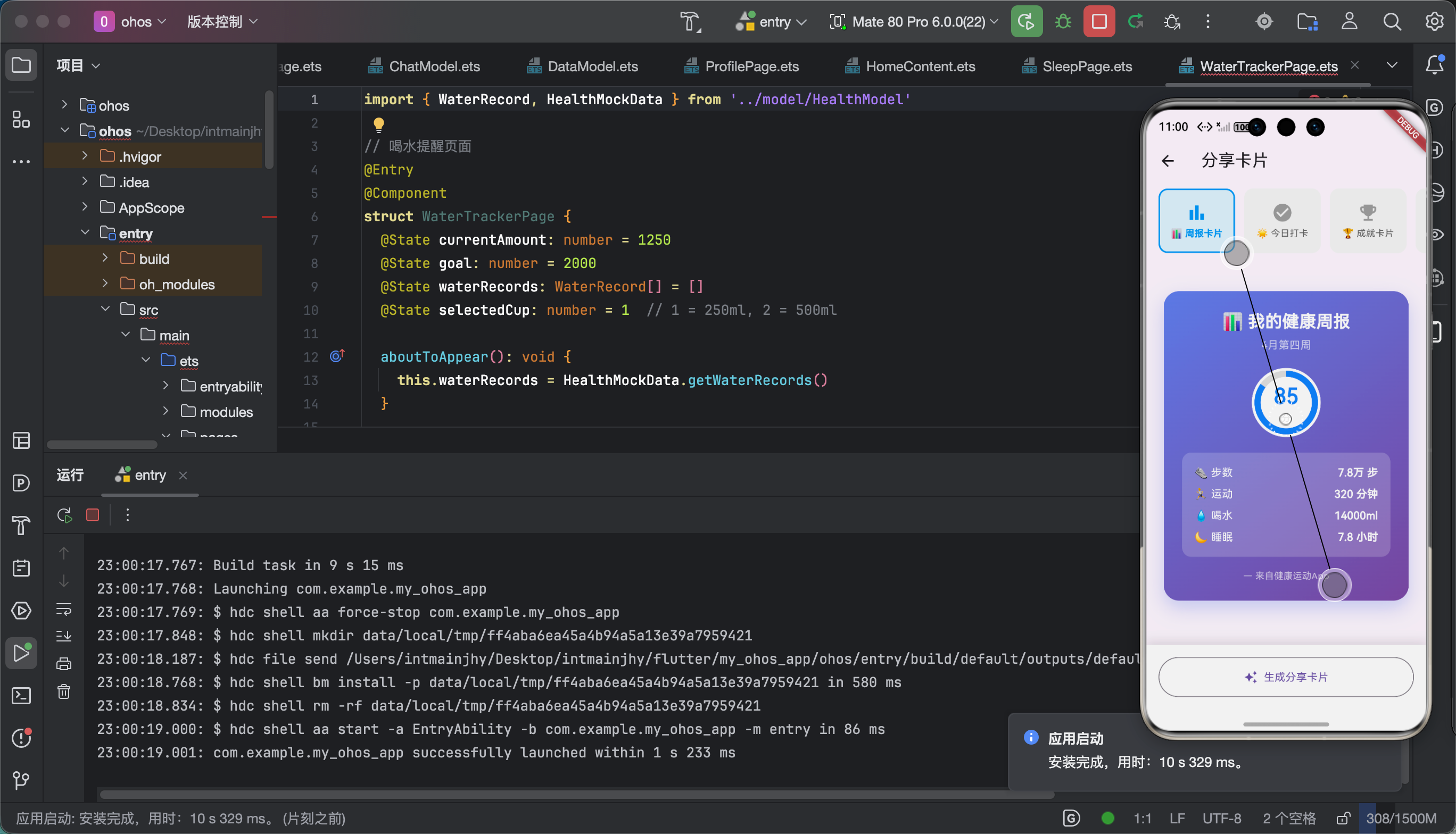
6.1 功能验证
📚 七、个人学习总结与心得
7.1 收获
搞完分享卡片这个功能,我真的学到了很多:
- Flutter渲染原理 - RenderRepaintBoundary是截图的核心
- 跨平台文件处理 - 不同平台路径格式不一样
- MIME类型 - 文件格式声明很重要
- 异步处理 - 截图和分享都是异步的,UI要处理好状态
7.2 踩坑反思
最大的教训就是:Flutter的截图功能看着简单,水很深!
不同平台、不同时机截图效果都不一样,必须多平台测试!
7.3 后续计划
分享卡片2.0想加:
- 更多卡片模板
- 自定义背景
- 动态效果卡片
- 视频分享支持
📎 相关资源
| 资源 | 说明 |
|---|---|
| share_plus | https://pub.dev/packages/share_plus |
| screenshot | https://pub.dev/packages/screenshot |
好了!分享卡片功能就讲到这里!
**如果觉得有帮助,请一键三连!**🙏
📅 发布日期:2026-04-29
✍️ 作者:上海某本科大学大一学生
🏷️ 标签:Flutter / OpenHarmony / 分享卡片 / 社交分享
往期推荐:
- 「Flutter运动计时器的鸿蒙化适配与实战指南」
- 「Flutter饮食记录的鸿蒙化适配与实战指南」