一、Chrome浏览器音/视频无法自动播放
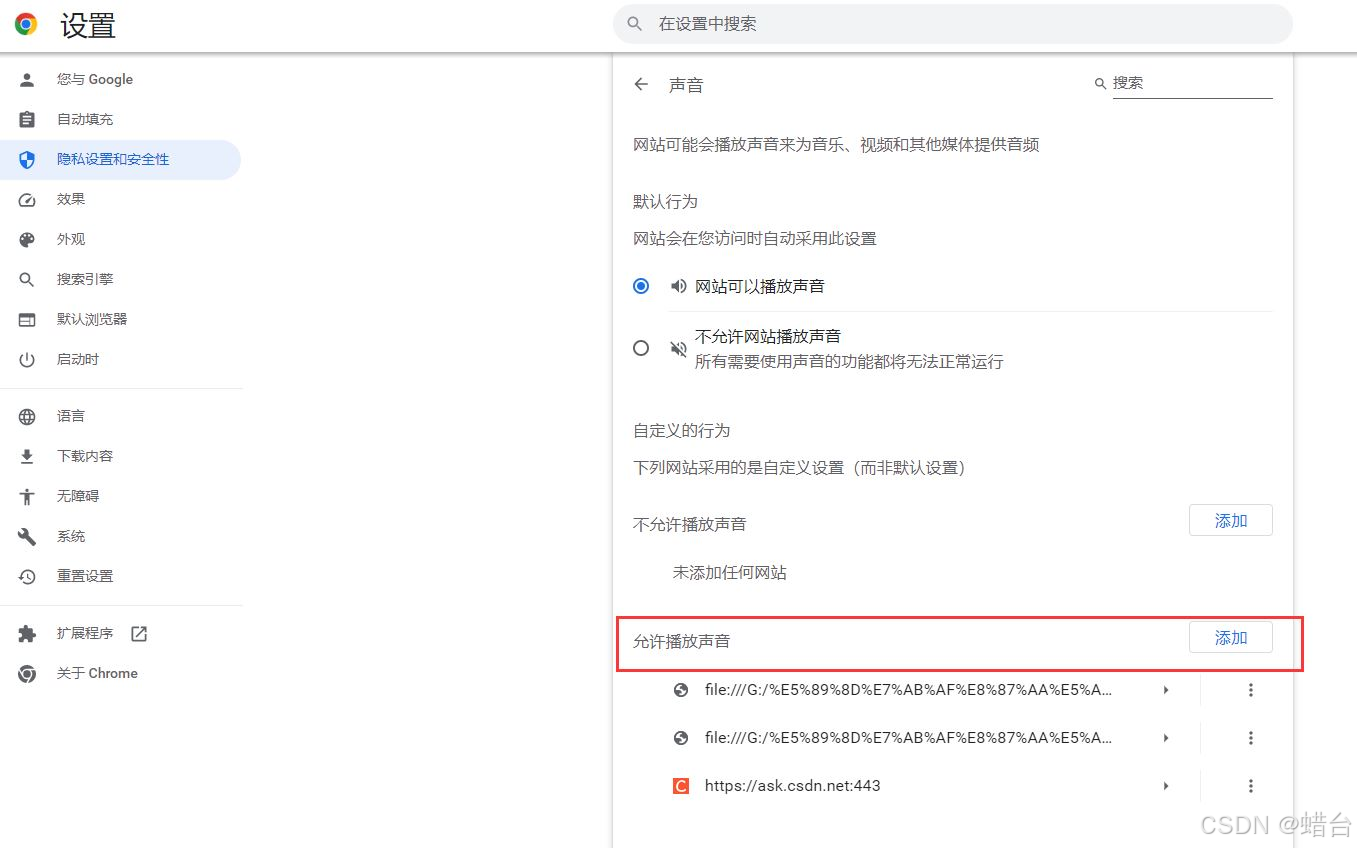
第一种:修改chrome 浏览器配置
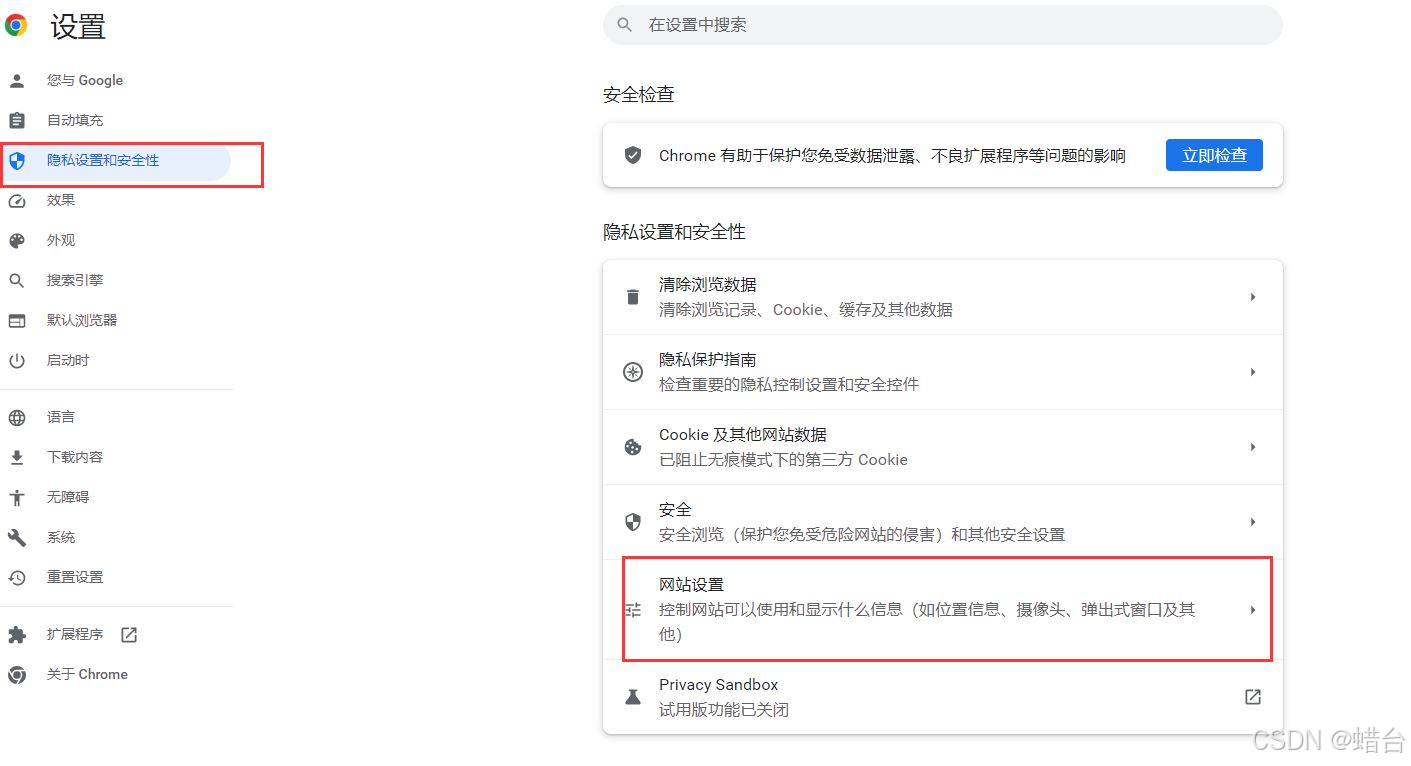
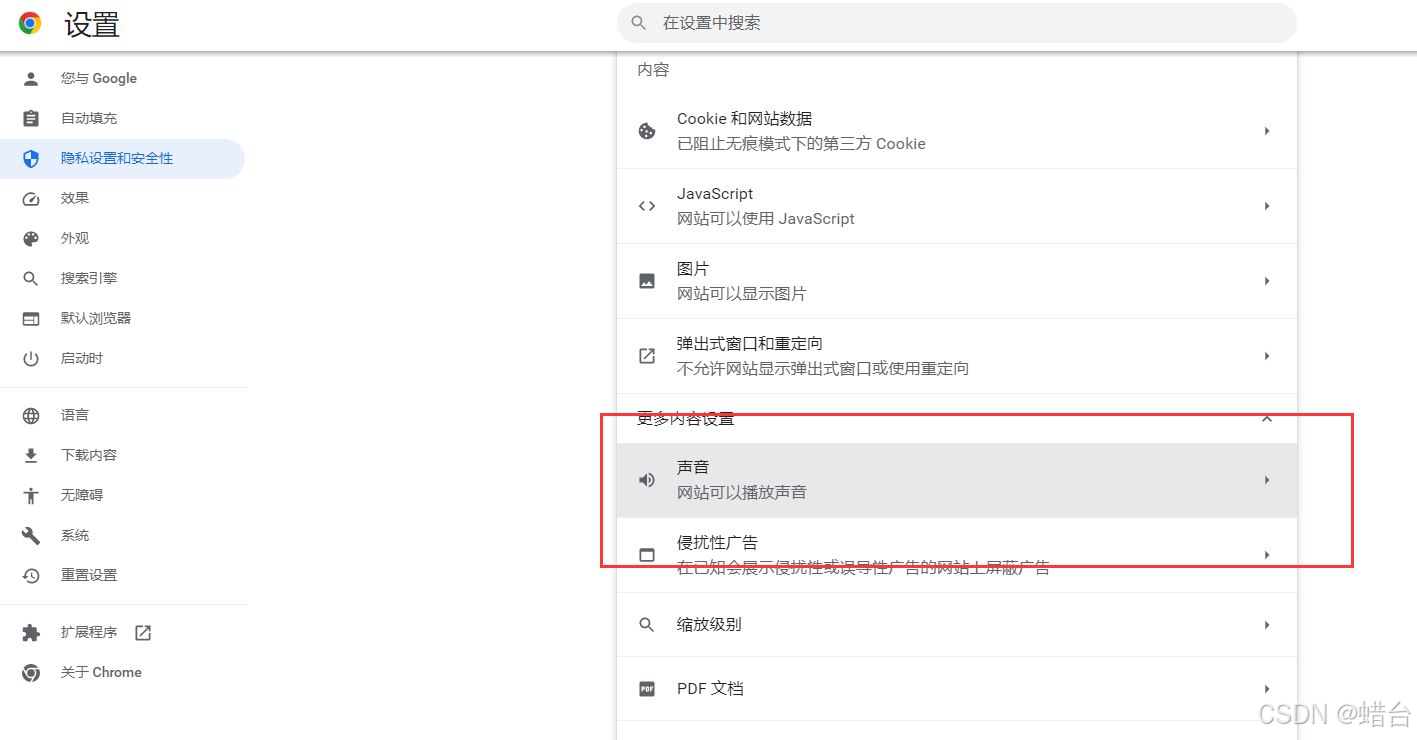
添加对应的网站地址或者html 代码,允许其播放声音。
二、Chrome桌面提醒功能,兼容新老版本,firefox最新版本也通过
html
<!DOCTYPE html>
<html lang="en">
 <head>
  <title> new document </title>
  <meta charset="utf-8">
  <meta http-equiv="X-UA-Compatible" content="IE=edge,chrome=1">
  <meta name="renderer" content="webkit">
  <meta name="viewport" content="width=device-width, initial-scale=1, maximum-scale=1, user-scalable=no">
 </head>
 <body>
  <div>
    <button type="button" autofocus onclick="start()">测试发送消息</button>
  </div>
<script>

  function start(){
    var count=1
    setInterval(()=>{
      notify("测试","测试"+count)
      count++
    },1000)

  }


//桌面提醒
function notify(title, content) {
        console.log("notify")
        if(!title && !content){
            title = "桌面提醒";
            content = "您看到此条信息桌面提醒设置成功";
        }
        //var iconUrl = "/images/send_ok.png";
     var iconUrl="https://profile-avatar.csdnimg.cn/764d816f76e346ea98a3a6ffefde8588_simayilong.jpg"

        if (window.webkitNotifications) {
            //chrome老版本
            if (window.webkitNotifications.checkPermission() == 0) {
                var notif = window.webkitNotifications.createNotification(iconUrl, title, content);
                notif.display = function() {}
                notif.onerror = function() {}
                notif.onclose = function() {}
                notif.onclick = function() {this.cancel();}
                notif.replaceId = 'Meteoric';
                notif.show();
            } else {
                window.webkitNotifications.requestPermission($jy.notify);
            }
        }
        else if("Notification" in window){
            // 判断是否有权限
            if (Notification.permission === "granted") {
                var notification = new Notification(title, {
                    "icon": iconUrl,
                    "body": content,
                });
            }
            //如果没权限,则请求权限
            else if (Notification.permission !== 'denied') {
                Notification.requestPermission(function(permission) {
                    // Whatever the user answers, we make sure we store the
                    // information
                    if (!('permission' in Notification)) {
                        Notification.permission = permission;
                    }
                    //如果接受请求
                    if (permission === "granted") {
                        var notification = new Notification(title, {
                            "icon": iconUrl,
                            "body": content,
                        });
                    }
                });
            }
        }
    }

</script>
 </body>
</html>
recat 代码
javascript
 ### Recat index.tsx
/*
    1. 进入页面时请求通知权限
    2. 建立websocket连接
        2.1 收到来自后端的消息,更新页面数据
        2.2 如果是页面被隐藏,那么则进行通知提示
*/
import warmTipsAudio from '@/assets/warmTips.mp3';
import type { TableProps } from 'antd';
import { Alert, message, Space, Statistic, Table, Tag } from 'antd';
import { useEffect, useRef, useState } from 'react';

interface DataType {
  key: string;
  name: string;
  age: number;
  address: string;
  tags: string[];
}

const columns: TableProps<DataType>['columns'] = [
  {
    title: 'Name',
    dataIndex: 'name',
    key: 'name',
    render: (text) => <a>{text}</a>,
  },
  {
    title: 'Age',
    dataIndex: 'age',
    key: 'age',
  },
  {
    title: 'Address',
    dataIndex: 'address',
    key: 'address',
  },
  {
    title: 'Tags',
    key: 'tags',
    dataIndex: 'tags',
    render: (_, { tags }) => (
      <>
        {tags.map((tag) => {
          let color = tag.length > 5 ? 'geekblue' : 'green';
          if (tag === 'loser') {
            color = 'volcano';
          }
          return (
            <Tag color={color} key={tag}>
              {tag.toUpperCase()}
            </Tag>
          );
        })}
      </>
    ),
  },
  {
    title: 'Action',
    key: 'action',
    render: (_, record) => (
      <Space size="middle">
        <a>Invite {record.name}</a>
        <a>Delete</a>
      </Space>
    ),
  },
];

export default function Warning() {
  const [sum, setSum] = useState(0);
  const [tableData, setTableData] = useState<DataType[]>([]);
  const [notifArr, setNotifArr] = useState<Notification[]>([]);
  const [visible, setVisible] = useState(false);

  const [messageApi, contextHolder] = message.useMessage();
  // 这个值要取localStorage的notifyTip
  const [notifyTip, setNotifyTip] = useState(true);

  // 这个值存到浏览器中
  const [warmTips, setWarnTips] = useState(true);

  // 音频控制
  const warmTipsAudioRef = useRef();

  const handleWarmTipsClose = () => {
    setWarnTips(false);
    localStorage.setItem('warmTips', 'false');
  };

  const closeNotif = () => {
    if (document.visibilityState === 'visible') {
      notifArr.forEach((item: Notification) => {
        item.close();
      });
      setNotifArr([]);
    }
  };

  const handleNotifyTip = (e: boolean) => {
    setNotifyTip(e);
    localStorage.setItem('notifyTip', e + '');
  };

  const initNotifyPermission = () => {
    const notify = new Notification('提示(3s后自动关闭)', {
      body: '当弹窗被遮挡或是收起的时候,会通过此形式将「预警信息」提示用户',
      icon: 'https://gw.alipayobjects.com/zos/rmsportal/BiazfanxmamNRoxxVxka.png',
    });
    handleNotifyTip(false);
    setTimeout(() => {
      notify.close();
    }, 3000);
  };

  // 请求用户通知权限,需要用户点击允许
  const notificationSet = () => {
    if (!('Notification' in window)) {
      // 检查浏览器是否支持通知
      setVisible(true);
    } else if (Notification.permission === 'granted') {
      // 检查是否已授予通知权限;如果是的话,创建一个通知
      initNotifyPermission();
    } else if (Notification.permission === 'default') {
      // 默认则征求用户的许可
      Notification.requestPermission().then((permission) => {
        // 如果用户接受,我们就创建一个通知
        if (permission === 'granted') {
          initNotifyPermission();
        } else {
          // 用户点击拒绝,再次发起征求请求
          setNotifyTip(true);
          messageApi.open({
            type: 'error',
            content:
              '您禁用了该页面发出通知,这将导致您收不到后续更新提示,请在浏览器设置中放开该页面通知权限',
            duration: 10,
          });
        }
      });
    } else {
      // 提示用户放开浏览器通知权限和系统通知权限
      setNotifyTip(true);
      handleNotifyTip(true);
    }
  };

  // 建立websocket连接
  const webSocketSet = () => {
    // Create WebSocket connection.
    const socket = new WebSocket('ws://localhost:8080');

    // 监听连接
    socket.addEventListener('open', function () {
      socket.send('Hello Server!');
    });

    // 监听后端传来的消息
    socket.addEventListener('message', function (event) {
      console.log('Message from server ', event.data);
      // 用新增一行table来标识接受到了消息
      setTableData((data) => [
        ...data,
        {
          key: Math.random().toString(36).slice(-6),
          name: 'Joe Black',
          age: 32,
          address: 'Sydney No. 1 Lake Park',
          tags: ['cool', 'teacher'],
        },
      ]);
      // eslint-disable-next-line no-param-reassign
      setSum((sum) => sum + 1);
      // 同时在这里判断,若网页变为不可见了,则进行提示
      if (document.visibilityState !== 'visible') {
        // 通知被关闭再发,不要一直发
        const notif = new Notification('数据已更新,请立即查看', {
          body: '具体信息。。。',
          icon: 'https://gw.alipayobjects.com/zos/rmsportal/BiazfanxmamNRoxxVxka.png',
          requireInteraction: true,
          image:
            'https://gw.alipayobjects.com/zos/rmsportal/JiqGstEfoWAOHiTxclqi.png',
        });
        notif.onclick = () => {
          window.focus();
        };
        warmTipsAudioRef.current.play();
        setNotifArr((data: Notification[]) => [...data, notif]);
      }
    });
  };
  useEffect(() => {
    notificationSet();
    webSocketSet();
    if (localStorage.getItem('warmTips')) {
      setWarnTips(localStorage.getItem('warmTips') === 'true' ? true : false);
    }
    if (localStorage.getItem('notifyTip')) {
      setNotifyTip(localStorage.getItem('notifyTip') === 'true' ? true : false);
    }
  }, []);

  useEffect(() => {
    document.addEventListener('visibilitychange', closeNotif);
    return () => {
      document.removeEventListener('visibilitychange', closeNotif);
    };
  }, [notifArr]);

  return (
    <>
      {contextHolder}
      {warmTips && (
        <Alert
          message="若您收不到该页面发出的通知,可能是您禁止该页面发出通知或者是该浏览器被系统禁止发出通知,请放开相关权限"
          type="info"
          showIcon
          closable
          style={{ marginBottom: '10px' }}
          onClose={handleWarmTipsClose}
        />
      )}
      {notifyTip && (
        <Alert
          message="该页面已被禁止发出通知,这将导致您收不到后续更新提示,请检查"
          type="error"
          showIcon
          closable
        />
      )}
      {visible && (
        <Alert message="该浏览器不支持通知" type="error" showIcon closable />
      )}
      <Statistic title="数据量" value={sum} />
      <Table columns={columns} dataSource={tableData} />
      <audio
        src={warmTipsAudio}
        style={{ display: 'none' }}
        ref={warmTipsAudioRef}
      ></audio>
    </>
  );
}


### websocket server nodejs

const express = require('express');
const WebSocket = require('ws');
const WebSocketServer = WebSocket.WebSocketServer;

const app = express();

app.get('/', (req, res) => {
  res.send({
    ok: 1,
  });
});

app.listen(3000, () => {
  console.log('express start');
});

const wss = new WebSocketServer({port: 8080});

wss.on('connection', function connection(ws) {
  ws.on('error', console.error);

  ws.on('message', function message(data) {
    console.log('received: %s', data);
  });
  setInterval(() => {
    ws.send('something', {binary: false});
  }, 4000);
});
这里还有一个额外的知识,就是我发现某些网页能够实现:即使浏览器没有打开,也可以发送通知的功能,这个我去了解了一下,大致原理如下,有需要的朋友自行阅读:
「即使浏览器未打开,某些网页也能发出桌面通知」,通常是通过浏览器推送通知(Browser Push Notifications)技术实现的。具体来说,这项功能依赖于以下几个关键技术组件:
- 服务工作线程(Service Workers):
服务工作线程是一种独立于网页主线程的脚本,能够在后台运行,即使浏览器未打开,或者用户没有打开特定网站。它们在浏览器中作为一个中间层,处理网络请求、推送通知、缓存等任务。服务工作线程可以在后台保持活跃,并在接收到来自服务器的推送消息时触发通知。
- 推送通知(Push Notifications):
推送通知是由服务工作线程处理的消息。这些通知通过推送服务从服务器发送到用户的浏览器,即使用户当前没有访问该网站。推送服务将消息传递到浏览器中的服务工作线程,后者可以根据消息的内容在桌面上显示通知。
- Web 推送 API(Web Push API):
这是一个标准化的 API,允许网站在用户授权后注册一个服务工作线程,并通过推送服务发送通知。网站首先需要获得用户的许可,才能使用这项功能。一旦用户同意,网站可以在服务工作线程中注册推送事件,并配置通知的内容。
- 浏览器推送服务(Browser Push Service):
各大浏览器都有自己的推送服务,用于中转来自网站的推送消息。这些服务确保消息能够在合适的时间传递给浏览器,即使用户未打开浏览器。这些推送服务通常与操作系统通知系统集成,确保通知能在桌面上显示。
工作流程概述
- 用户授权:当用户访问支持推送通知的网站时,网站会请求通知权限。
- 服务工作线程注册:如果用户同意,浏览器会在后台注册一个服务工作线程。
- 推送通知:网站服务器通过浏览器的推送服务向用户的设备发送通知,即使浏览器未打开,服务工作线程也能接收到这些消息,并在桌面上显示通知。
这种机制使得网站能够在用户没有主动访问时,仍然与用户保持互动,提供及时的信息或提醒。