Flutter for OpenHarmony 实战:健身运动应用的跨平台开发指南
欢迎加入开源鸿蒙跨平台社区: https://openharmonycrossplatform.csdn.net
作者:maaath
前言
随着鸿蒙生态的快速发展,Flutter 作为跨平台开发框架的佼佼者,也在积极拥抱 OpenHarmony 平台。本文将通过一个完整的健身运动应用实战案例,带大家深入了解如何使用 Flutter 开发可运行在鸿蒙设备上的跨平台应用。
一、项目概述
1.1 应用功能
本次实战开发的健身运动应用具备以下核心功能:
- 网络请求健身课程数据:从后端接口获取课程列表
- 课程分类列表:支持多维度分类筛选
- 下拉刷新/上拉加载:流畅的列表交互体验
- 底部选项卡:课程/训练/社区/我的 四大模块
- 倒计时/计步动画效果:丰富的交互动画
1.2 技术栈
- 框架:Flutter 3.x for OpenHarmony
- 状态管理:Provider / Riverpod
- 网络请求:dio
- 本地存储:shared_preferences
- 目标平台:OpenHarmony
二、项目结构
首先,让我们看一下项目的目录结构:
lib/
├── main.dart                 # 应用入口
├── model/                    # 数据模型
│   └── fitness_model.dart
├── pages/                   # 页面
│   ├── fitness_main_page.dart
│   ├── course_page.dart
│   ├── training_page.dart
│   ├── community_page.dart
│   └── my_fitness_page.dart
├── services/                # 网络服务
│   └── fitness_service.dart
├── widgets/                 # 通用组件
│   └── fitness_widgets.dart
└── theme/                   # 主题配置
    └── app_theme.dart
三、核心代码实现
3.1 数据模型
健身课程数据模型是整个应用的基础,我们需要定义课程、训练计划、社区帖子等核心数据结构:
dart
// model/fitness_model.dart

// 健身课程模型
class CourseModel {
  String id;
  String title;
  String coach;
  String coverUrl;
  String description;
  int duration;           // 时长(分钟)
  int calories;           // 消耗卡路里
  String difficulty;      // 初级/中级/高级
  String category;
  double rating;
  int participants;       // 参与人数
  List<String> tags;
  bool isHot;
  bool isNew;

  CourseModel({
    required this.id,
    required this.title,
    required this.coach,
    required this.coverUrl,
    required this.description,
    required this.duration,
    required this.calories,
    required this.difficulty,
    required this.category,
    required this.rating,
    required this.participants,
    required this.tags,
    this.isHot = false,
    this.isNew = false,
  });

  // 从JSON解析
  factory CourseModel.fromJson(Map<String, dynamic> json) {
    return CourseModel(
      id: json['id'] ?? '',
      title: json['title'] ?? '',
      coach: json['coach'] ?? '',
      coverUrl: json['coverUrl'] ?? '',
      description: json['description'] ?? '',
      duration: json['duration'] ?? 0,
      calories: json['calories'] ?? 0,
      difficulty: json['difficulty'] ?? '初级',
      category: json['category'] ?? '',
      rating: (json['rating'] ?? 0).toDouble(),
      participants: json['participants'] ?? 0,
      tags: List<String>.from(json['tags'] ?? []),
      isHot: json['isHot'] ?? false,
      isNew: json['isNew'] ?? false,
    );
  }

  Map<String, dynamic> toJson() {
    return {
      'id': id,
      'title': title,
      'coach': coach,
      'coverUrl': coverUrl,
      'description': description,
      'duration': duration,
      'calories': calories,
      'difficulty': difficulty,
      'category': category,
      'rating': rating,
      'participants': participants,
      'tags': tags,
      'isHot': isHot,
      'isNew': isNew,
    };
  }
}

// 训练计划模型
class TrainingPlanModel {
  String id;
  String name;
  String description;
  int totalDays;
  int completedDays;
  String difficulty;
  String target;

  TrainingPlanModel({
    required this.id,
    required this.name,
    required this.description,
    required this.totalDays,
    required this.completedDays,
    required this.difficulty,
    required this.target,
  });
}

// 社区帖子模型
class PostModel {
  String id;
  String userName;
  String userAvatar;
  String content;
  List<String> images;
  int likes;
  int comments;
  bool isLiked;
  String createTime;
  String type;

  PostModel({
    required this.id,
    required this.userName,
    required this.userAvatar,
    required this.content,
    required this.images,
    required this.likes,
    required this.comments,
    required this.isLiked,
    required this.createTime,
    required this.type,
  });
}

// 用户健身数据模型
class FitnessUserModel {
  int stepCount;
  int targetSteps;
  int caloriesBurned;
  int trainingDays;
  int totalCalories;
  int consecutiveDays;
  int level;

  FitnessUserModel({
    required this.stepCount,
    required this.targetSteps,
    required this.caloriesBurned,
    required this.trainingDays,
    required this.totalCalories,
    required this.consecutiveDays,
    required this.level,
  });
}
3.2 网络服务层
使用 Flutter 风格的网络请求封装,支持接口调用和数据模拟:
dart
// services/fitness_service.dart

import 'package:dio/dio.dart';
import '../model/fitness_model.dart';

class FitnessService {
  late final Dio _dio;
  final int _pageSize = 10;

  FitnessService() {
    _dio = Dio(BaseOptions(
      baseUrl: 'https://api.example.com',
      connectTimeout: const Duration(seconds: 10),
      receiveTimeout: const Duration(seconds: 10),
      headers: {
        'Content-Type': 'application/json',
      },
    ));
  }

  // 获取推荐课程列表
  Future<List<CourseModel>> getRecommendCourses() async {
    // 实际项目中调用接口
    // final response = await _dio.get('/courses/recommend');
    // return (response.data['list'] as List)
    //     .map((e) => CourseModel.fromJson(e))
    //     .toList();

    // 这里使用模拟数据
    return _getMockCourses();
  }

  // 根据分类获取课程
  Future<List<CourseModel>> getCoursesByCategory(
    String categoryId,
    int page,
  ) async {
    final allCourses = _getMockCourses();
    final start = (page - 1) * _pageSize;
    final end = start + _pageSize;

    if (categoryId == 'all') {
      return allCourses.sublist(
        start,
        end.clamp(0, allCourses.length),
      );
    }

    return allCourses
        .where((c) => c.category == categoryId)
        .skip(start)
        .take(_pageSize)
        .toList();
  }

  // 获取课程详情
  Future<CourseModel?> getCourseDetail(String courseId) async {
    final courses = _getMockCourses();
    try {
      return courses.firstWhere((c) => c.id == courseId);
    } catch (e) {
      return null;
    }
  }

  // 获取社区帖子
  Future<List<PostModel>> getCommunityPosts(int page) async {
    return _getMockPosts().skip((page - 1) * _pageSize).take(_pageSize).toList();
  }

  // 模拟课程数据
  List<CourseModel> _getMockCourses() {
    return [
      CourseModel(
        id: 'c1',
        title: '燃脂HIIT训练',
        coach: '李教练',
        coverUrl: 'https://example.com/hiit.jpg',
        description: '高强度间歇训练,快速燃脂',
        duration: 30,
        calories: 350,
        difficulty: '中级',
        category: '减脂',
        rating: 4.8,
        participants: 12500,
        tags: ['燃脂', 'HIIT', '有氧'],
        isHot: true,
      ),
      CourseModel(
        id: 'c2',
        title: '腹肌撕裂者',
        coach: '张教练',
        coverUrl: 'https://example.com/abs.jpg',
        description: '针对腹部的核心训练',
        duration: 25,
        calories: 200,
        difficulty: '中级',
        category: '核心',
        rating: 4.9,
        participants: 15800,
        tags: ['腹肌', '核心', '燃脂'],
        isHot: true,
      ),
      CourseModel(
        id: 'c3',
        title: '瑜伽放松课',
        coach: '王老师',
        coverUrl: 'https://example.com/yoga.jpg',
        description: '舒缓身心,提升柔韧性',
        duration: 45,
        calories: 120,
        difficulty: '初级',
        category: '瑜伽',
        rating: 4.7,
        participants: 8900,
        tags: ['瑜伽', '放松', '柔韧'],
        isNew: true,
      ),
      CourseModel(
        id: 'c4',
        title: '全身燃脂操',
        coach: '李教练',
        coverUrl: 'https://example.com/fullbody.jpg',
        description: '全身参与的有氧训练',
        duration: 45,
        calories: 450,
        difficulty: '中级',
        category: '减脂',
        rating: 4.8,
        participants: 11000,
        tags: ['全身', '燃脂', '有氧'],
        isHot: true,
      ),
      CourseModel(
        id: 'c5',
        title: 'Tabata燃脂特训',
        coach: '张教练',
        coverUrl: 'https://example.com/tabata.jpg',
        description: '4分钟Tabata训练,燃脂效果翻倍',
        duration: 20,
        calories: 250,
        difficulty: '中级',
        category: '减脂',
        rating: 4.9,
        participants: 18200,
        tags: ['Tabata', '燃脂', 'HIIT'],
        isHot: true,
      ),
    ];
  }

  // 模拟帖子数据
  List<PostModel> _getMockPosts() {
    return [
      PostModel(
        id: 'p1',
        userName: '运动达人小王',
        userAvatar: 'https://example.com/avatar1.jpg',
        content: '今天的HIIT训练完成!感觉状态超级好,暴汗的感觉太爽了💪',
        images: ['https://example.com/post1.jpg'],
        likes: 256,
        comments: 42,
        isLiked: false,
        createTime: DateTime.now().subtract(const Duration(hours: 2)).toIso8601String(),
        type: '打卡',
      ),
      PostModel(
        id: 'p2',
        userName: '瑜伽小白兔',
        userAvatar: 'https://example.com/avatar2.jpg',
        content: '瑜伽第30天打卡!坚持真的能看到变化,继续加油!',
        images: [],
        likes: 189,
        comments: 35,
        isLiked: false,
        createTime: DateTime.now().subtract(const Duration(hours: 5)).toIso8601String(),
        type: '打卡',
      ),
    ];
  }
}
3.3 课程列表页面
课程列表页面展示了应用的核心 UI,包含下拉刷新、上拉加载、分类筛选等功能:
dart
// pages/course_page.dart

import 'package:flutter/material.dart';
import '../model/fitness_model.dart';
import '../services/fitness_service.dart';

class CoursePage extends StatefulWidget {
  const CoursePage({Key? key}) : super(key: key);

  @override
  State<CoursePage> createState() => _CoursePageState();
}

class _CoursePageState extends State<CoursePage> {
  final FitnessService _service = FitnessService();
  final List<String> _categories = ['全部', '减脂', '力量', '瑜伽', '拳击', '拉伸'];

  List<CourseModel> _courses = [];
  String _selectedCategory = '全部';
  bool _isLoading = false;
  bool _isRefreshing = false;
  bool _hasMore = true;
  int _currentPage = 1;

  @override
  void initState() {
    super.initState();
    _loadCourses();
  }

  Future<void> _loadCourses() async {
    setState(() => _isLoading = true);
    try {
      final courses = await _service.getRecommendCourses();
      setState(() {
        _courses = courses;
        _isLoading = false;
        _hasMore = courses.length >= 10;
      });
    } catch (e) {
      setState(() => _isLoading = false);
    }
  }

  Future<void> _onRefresh() async {
    setState(() {
      _isRefreshing = true;
      _currentPage = 1;
      _hasMore = true;
    });
    try {
      final courses = await _service.getRecommendCourses();
      setState(() {
        _courses = courses;
        _isRefreshing = false;
      });
    } catch (e) {
      setState(() => _isRefreshing = false);
    }
  }

  Future<void> _loadMore() async {
    if (!_hasMore || _isLoading) return;
    setState(() => _isLoading = true);
    try {
      _currentPage++;
      final moreCourses = await _service.getCoursesByCategory(
        _selectedCategory == '全部' ? 'all' : _selectedCategory,
        _currentPage,
      );
      setState(() {
        _courses = [..._courses, ...moreCourses];
        _isLoading = false;
        _hasMore = moreCourses.length >= 10;
      });
    } catch (e) {
      setState(() => _isLoading = false);
    }
  }

  @override
  Widget build(BuildContext context) {
    return Column(
      children: [
        _buildHeader(),
        _buildCategoryTabs(),
        Expanded(child: _buildCourseList()),
      ],
    );
  }

  Widget _buildHeader() {
    return Container(
      height: 56,
      padding: const EdgeInsets.symmetric(horizontal: 16),
      decoration: BoxDecoration(
        color: Colors.white,
        boxShadow: [
          BoxShadow(
            color: Colors.black.withOpacity(0.05),
            blurRadius: 4,
            offset: const Offset(0, 2),
          ),
        ],
      ),
      child: Row(
        children: [
          const Text(
            '💪 健身课程',
            style: TextStyle(
              fontSize: 20,
              fontWeight: FontWeight.bold,
              color: Color(0xFF2D3436),
            ),
          ),
          const Spacer(),
          IconButton(
            icon: const Icon(Icons.search, size: 24),
            onPressed: () {},
          ),
        ],
      ),
    );
  }

  Widget _buildCategoryTabs() {
    return Container(
      height: 50,
      color: Colors.white,
      child: ListView.builder(
        scrollDirection: Axis.horizontal,
        padding: const EdgeInsets.symmetric(horizontal: 16, vertical: 8),
        itemCount: _categories.length,
        itemBuilder: (context, index) {
          final category = _categories[index];
          final isSelected = _selectedCategory == category;
          return GestureDetector(
            onTap: () {
              setState(() => _selectedCategory = category);
              _loadCourses();
            },
            child: Container(
              margin: const EdgeInsets.only(right: 8),
              padding: const EdgeInsets.symmetric(horizontal: 16, vertical: 6),
              decoration: BoxDecoration(
                color: isSelected ? const Color(0xFFFF6B6B) : Colors.transparent,
                borderRadius: BorderRadius.circular(20),
              ),
              child: Text(
                category,
                style: TextStyle(
                  fontSize: 14,
                  color: isSelected ? Colors.white : const Color(0xFF636E72),
                  fontWeight: isSelected ? FontWeight.bold : FontWeight.normal,
                ),
              ),
            ),
          );
        },
      ),
    );
  }

  Widget _buildCourseList() {
    if (_isLoading && _courses.isEmpty) {
      return const Center(child: CircularProgressIndicator());
    }

    return RefreshIndicator(
      onRefresh: _onRefresh,
      color: const Color(0xFFFF6B6B),
      child: ListView.builder(
        padding: const EdgeInsets.all(16),
        itemCount: _courses.length + (_hasMore ? 1 : 0),
        itemBuilder: (context, index) {
          if (index >= _courses.length) {
            return _buildLoadMoreButton();
          }
          return _buildCourseCard(_courses[index]);
        },
      ),
    );
  }

  Widget _buildCourseCard(CourseModel course) {
    return Container(
      margin: const EdgeInsets.only(bottom: 16),
      decoration: BoxDecoration(
        color: Colors.white,
        borderRadius: BorderRadius.circular(16),
        boxShadow: [
          BoxShadow(
            color: Colors.black.withOpacity(0.06),
            blurRadius: 8,
            offset: const Offset(0, 2),
          ),
        ],
      ),
      child: InkWell(
        onTap: () {},
        borderRadius: BorderRadius.circular(16),
        child: Padding(
          padding: const EdgeInsets.all(12),
          child: Row(
            children: [
              ClipRRect(
                borderRadius: BorderRadius.circular(12),
                child: Container(
                  width: 120,
                  height: 90,
                  color: Colors.grey[200],
                  child: Image.network(
                    course.coverUrl,
                    fit: BoxFit.cover,
                    errorBuilder: (context, error, stackTrace) {
                      return Container(
                        color: Colors.grey[200],
                        child: const Icon(Icons.fitness_center),
                      );
                    },
                  ),
                ),
              ),
              const SizedBox(width: 12),
              Expanded(
                child: Column(
                  crossAxisAlignment: CrossAxisAlignment.start,
                  children: [
                    Text(
                      course.title,
                      style: const TextStyle(
                        fontSize: 18,
                        fontWeight: FontWeight.bold,
                        color: Color(0xFF2D3436),
                      ),
                      maxLines: 1,
                      overflow: TextOverflow.ellipsis,
                    ),
                    const SizedBox(height: 4),
                    Text(
                      '教练: ${course.coach}',
                      style: const TextStyle(
                        fontSize: 12,
                        color: Color(0xFF636E72),
                      ),
                    ),
                    const SizedBox(height: 6),
                    Row(
                      children: [
                        _buildTag('⭐ ${course.rating}'),
                        const SizedBox(width: 8),
                        _buildTag('${course.participants ~/ 1000}k人训练'),
                      ],
                    ),
                    const SizedBox(height: 8),
                    Row(
                      children: [
                        _buildInfoChip('⏱️ ${course.duration}min'),
                        const SizedBox(width: 8),
                        _buildInfoChip('🔥 ${course.calories}卡'),
                        const Spacer(),
                        _buildDifficultyBadge(course.difficulty),
                      ],
                    ),
                  ],
                ),
              ),
            ],
          ),
        ),
      ),
    );
  }

  Widget _buildTag(String text) {
    return Text(
      text,
      style: const TextStyle(
        fontSize: 10,
        color: Color(0xFFFFD93D),
      ),
    );
  }

  Widget _buildInfoChip(String text) {
    return Container(
      padding: const EdgeInsets.symmetric(horizontal: 8, vertical: 2),
      decoration: BoxDecoration(
        color: const Color(0xFFE9ECEF),
        borderRadius: BorderRadius.circular(4),
      ),
      child: Text(
        text,
        style: const TextStyle(
          fontSize: 10,
          color: Color(0xFF636E72),
        ),
      ),
    );
  }

  Widget _buildDifficultyBadge(String difficulty) {
    Color color;
    switch (difficulty) {
      case '初级':
        color = const Color(0xFF00B894);
        break;
      case '中级':
        color = const Color(0xFFFDCB6E);
        break;
      case '高级':
        color = const Color(0xFFE74C3C);
        break;
      default:
        color = const Color(0xFFFF6B6B);
    }
    return Container(
      padding: const EdgeInsets.symmetric(horizontal: 8, vertical: 2),
      decoration: BoxDecoration(
        color: color.withOpacity(0.2),
        borderRadius: BorderRadius.circular(4),
      ),
      child: Text(
        difficulty,
        style: TextStyle(
          fontSize: 10,
          color: color,
        ),
      ),
    );
  }

  Widget _buildLoadMoreButton() {
    return Container(
      height: 50,
      alignment: Alignment.center,
      child: _isLoading
          ? const SizedBox(
              width: 24,
              height: 24,
              child: CircularProgressIndicator(strokeWidth: 2),
            )
          : TextButton(
              onPressed: _loadMore,
              child: const Text('上拉加载更多'),
            ),
    );
  }
}
3.4 训练页面 - 倒计时动画
训练页面实现了倒计时和计步动画,是应用的核心交互页面:
dart
// pages/training_page.dart
import 'dart:async';
import 'package:flutter/material.dart';
import '../model/fitness_model.dart';
import '../services/fitness_service.dart';
class TrainingPage extends StatefulWidget {
final String? courseId;
const TrainingPage({Key? key, this.courseId}) : super(key: key);
@override
State<TrainingPage> createState() => _TrainingPageState();
}
class _TrainingPageState extends State<TrainingPage>
with SingleTickerProviderStateMixin {
final FitnessService _service = FitnessService();
CourseModel? _course;
String _status = '准备中';
int _countdown = 10;
int _currentTime = 0;
int _totalTime = 0;
double _progress = 0;
bool _isPaused = false;
bool _showCountdown = false;
int _stepCount = 0;
int _targetSteps = 100;
Timer? _timer;
Timer? _countdownTimer;
@override
void initState() {
super.initState();
_loadCourseData();
}
@override
void dispose() {
_timer?.cancel();
_countdownTimer?.cancel();
super.dispose();
}
Future<void> _loadCourseData() async {
final courses = await _service.getRecommendCourses();
if (courses.isNotEmpty) {
setState(() {
_course = courses.first;
_totalTime = (_course!.duration * 60);
_targetSteps = _course!.calories ~/ 3;
});
}
}
void _startCountdown() {
setState(() {
_showCountdown = true;
_countdown = 10;
_status = '倒计时';
});
_countdownTimer = Timer.periodic(const Duration(seconds: 1), (timer) {
setState(() {
_countdown--;
});
if (_countdown <= 0) {
timer.cancel();
setState(() => _showCountdown = false);
_startTraining();
}
});
}
void _startTraining() {
setState(() {
_status = '训练中';
_isPaused = false;
_currentTime = 0;
});
_timer = Timer.periodic(const Duration(seconds: 1), (timer) {
if (!_isPaused) {
setState(() {
_currentTime++;
_progress = (_currentTime / _totalTime) * 100;
// 模拟计步动画
if (_currentTime % 3 == 0 && _stepCount < _targetSteps) {
_stepCount += 1 + (_targetSteps ~/ 100);
}
if (_currentTime >= _totalTime) {
_finishTraining();
}
});
}
});
}
void _pauseTraining() {
setState(() {
_isPaused = true;
_status = '已暂停';
});
}
void _resumeTraining() {
setState(() {
_isPaused = false;
_status = '训练中';
});
}
void _stopTraining() {
_timer?.cancel();
_countdownTimer?.cancel();
setState(() {
_status = '准备中';
_currentTime = 0;
_progress = 0;
_stepCount = 0;
_showCountdown = false;
});
}
void _finishTraining() {
_timer?.cancel();
setState(() {
_status = '已完成';
_progress = 100;
});
ScaffoldMessenger.of(context).showSnackBar(
const SnackBar(
content: Text('🎉 训练完成!太棒了!'),
duration: Duration(seconds: 3),
),
);
}
String _formatTime(int seconds) {
final mins = seconds ~/ 60;
final secs = seconds % 60;
return '${mins.toString().padLeft(2, '0')}:${secs.toString().padLeft(2, '0')}';
}
@override
Widget build(BuildContext context) {
return Scaffold(
body: Stack(
children: [
Container(
decoration: BoxDecoration(
gradient: LinearGradient(
begin: Alignment.topCenter,
end: Alignment.bottomCenter,
colors: [
const Color(0xFFFF6B6B).withOpacity(0.2),
const Color(0xFFF8F9FA),
],
),
),
child: SafeArea(
child: Column(
children: [
_buildHeader(),
Expanded(child: _buildTrainingArea()),
_buildControlPanel(),
],
),
),
),
if (_showCountdown) _buildCountdownOverlay(),
],
),
);
}
Widget _buildHeader() {
return Container(
height: 56,
padding: const EdgeInsets.symmetric(horizontal: 16),
child: Row(
children: [
IconButton(
icon: const Icon(Icons.arrow_back, size: 28),
onPressed: () {
_stopTraining();
Navigator.pop(context);
},
),
const Spacer(),
if (_course != null)
Text(
_course!.title,
style: const TextStyle(
fontSize: 16,
fontWeight: FontWeight.bold,
),
),
const Spacer(),
const SizedBox(width: 48),
],
),
);
}
Widget _buildTrainingArea() {
return Column(
mainAxisAlignment: MainAxisAlignment.center,
children: [
_buildProgressCircle(),
const SizedBox(height: 24),
if (_status == '训练中' || _status == '已暂停') _buildStepCounter(),
const SizedBox(height: 24),
_buildTrainingInfo(),
],
);
}
Widget _buildProgressCircle() {
return SizedBox(
width: 280,
height: 280,
child: Stack(
alignment: Alignment.center,
children: [
// 外圈背景
Container(
width: 280,
height: 280,
decoration: BoxDecoration(
shape: BoxShape.circle,
color: const Color(0xFFE9ECEF).withOpacity(0.4),
),
),
// 进度条
SizedBox(
width: 280,
height: 280,
child: CircularProgressIndicator(
value: _progress / 100,
strokeWidth: 12,
backgroundColor: Colors.transparent,
valueColor: const AlwaysStoppedAnimation<Color>(
Color(0xFFFF6B6B),
),
),
),
// 中心内容
Column(
mainAxisAlignment: MainAxisAlignment.center,
children: [
if (_status == '准备中') ...[
const Text(
'准备开始',
style: TextStyle(
fontSize: 20,
color: Color(0xFF636E72),
),
),
const SizedBox(height: 8),
const Text(
'点击下方开始训练',
style: TextStyle(
fontSize: 14,
color: Color(0xFFB2BEC3),
),
),
] else if (_status == '倒计时') ...[
Text(
'$_countdown',
style: const TextStyle(
fontSize: 64,
fontWeight: FontWeight.bold,
color: Color(0xFFFF6B6B),
),
),
] else ...[
Text(
_formatTime(_totalTime - _currentTime),
style: const TextStyle(
fontSize: 48,
fontWeight: FontWeight.bold,
color: Color(0xFF2D3436),
),
),
const SizedBox(height: 8),
Text(
_status,
style: const TextStyle(
fontSize: 14,
color: Color(0xFFFF6B6B),
),
),
],
],
),
],
),
);
}
Widget _buildStepCounter() {
return Container(
margin: const EdgeInsets.symmetric(horizontal: 32),
padding: const EdgeInsets.all(16),
decoration: BoxDecoration(
color: Colors.white,
borderRadius: BorderRadius.circular(24),
boxShadow: [
BoxShadow(
color: Colors.black.withOpacity(0.1),
blurRadius: 8,
offset: const Offset(0, 4),
),
],
),
child: Column(
children: [
Row(
mainAxisAlignment: MainAxisAlignment.center,
children: [
const Text('👟', style: TextStyle(fontSize: 32)),
const SizedBox(width: 8),
TweenAnimationBuilder<int>(
tween: IntTween(begin: 0, end: _stepCount),
duration: const Duration(milliseconds: 300),
builder: (context, value, child) {
return Text(
value.toString(),
style: const TextStyle(
fontSize: 32,
fontWeight: FontWeight.bold,
color: Color(0xFFFF6B6B),
),
);
},
),
Text(
'/ $_targetSteps',
style: const TextStyle(
fontSize: 20,
color: Color(0xFFB2BEC3),
),
),
],
),
const Text(
'步数',
style: TextStyle(
fontSize: 14,
color: Color(0xFF636E72),
),
),
const SizedBox(height: 12),
ClipRRect(
borderRadius: BorderRadius.circular(4),
child: LinearProgressIndicator(
value: _stepCount / _targetSteps,
backgroundColor: const Color(0xFFE9ECEF),
valueColor: const AlwaysStoppedAnimation<Color>(
Color(0xFF4ECDC4),
),
minHeight: 8,
),
),
],
),
);
}
Widget _buildTrainingInfo() {
if (_course == null) return const SizedBox();
return Padding(
padding: const EdgeInsets.symmetric(horizontal: 32, vertical: 16),
child: Row(
mainAxisAlignment: MainAxisAlignment.spaceAround,
children: [
_buildInfoItem('⏱️', '${_course!.duration}min', '时长'),
_buildInfoItem('🔥', '${_course!.calories}', '卡路里'),
_buildInfoItem('👨🏫', _course!.coach, '教练'),
],
),
);
}
Widget _buildInfoItem(String icon, String value, String label) {
return Column(
children: [
Text(icon, style: const TextStyle(fontSize: 24)),
const SizedBox(height: 4),
Text(
value,
style: const TextStyle(
fontSize: 18,
fontWeight: FontWeight.bold,
color: Color(0xFF2D3436),
),
),
Text(
label,
style: const TextStyle(
fontSize: 10,
color: Color(0xFFB2BEC3),
),
),
],
);
}
Widget _buildControlPanel() {
return Container(
padding: const EdgeInsets.all(32),
child: _buildControlButtons(),
);
}
Widget _buildControlButtons() {
switch (_status) {
case '准备中':
return SizedBox(
width: double.infinity,
height: 50,
child: ElevatedButton(
onPressed: _startCountdown,
style: ElevatedButton.styleFrom(
backgroundColor: const Color(0xFFFF6B6B),
shape: RoundedRectangleBorder(
borderRadius: BorderRadius.circular(25),
),
),
child: const Text(
'开始训练',
style: TextStyle(
fontSize: 16,
fontWeight: FontWeight.bold,
color: Colors.white,
),
),
),
);
case '倒计时':
return SizedBox(
width: double.infinity,
height: 50,
child: ElevatedButton(
onPressed: () {
_countdownTimer?.cancel();
setState(() => _showCountdown = false);
},
style: ElevatedButton.styleFrom(
backgroundColor: const Color(0xFFE9ECEF),
shape: RoundedRectangleBorder(
borderRadius: BorderRadius.circular(25),
),
),
child: const Text(
'取消',
style: TextStyle(
fontSize: 16,
color: Color(0xFF636E72),
),
),
),
);
case '训练中':
return Row(
mainAxisAlignment: MainAxisAlignment.spaceEvenly,
children: [
Expanded(
child: ElevatedButton(
onPressed: _pauseTraining,
style: ElevatedButton.styleFrom(
backgroundColor: const Color(0xFFFDCB6E),
shape: RoundedRectangleBorder(
borderRadius: BorderRadius.circular(25),
),
),
child: const Text(
'暂停',
style: TextStyle(
fontSize: 16,
fontWeight: FontWeight.bold,
color: Colors.white,
),
),
),
),
const SizedBox(width: 16),
Expanded(
child: ElevatedButton(
onPressed: _stopTraining,
style: ElevatedButton.styleFrom(
backgroundColor: const Color(0xFFE74C3C),
shape: RoundedRectangleBorder(
borderRadius: BorderRadius.circular(25),
),
),
child: const Text(
'结束',
style: TextStyle(
fontSize: 16,
fontWeight: FontWeight.bold,
color: Colors.white,
),
),
),
),
],
);
case '已暂停':
return Row(
mainAxisAlignment: MainAxisAlignment.spaceEvenly,
children: [
Expanded(
child: ElevatedButton(
onPressed: _resumeTraining,
style: ElevatedButton.styleFrom(
backgroundColor: const Color(0xFF00B894),
shape: RoundedRectangleBorder(
borderRadius: BorderRadius.circular(25),
),
),
child: const Text(
'继续',
style: TextStyle(
fontSize: 16,
fontWeight: FontWeight.bold,
color: Colors.white,
),
),
),
),
const SizedBox(width: 16),
Expanded(
child: ElevatedButton(
onPressed: _stopTraining,
style: ElevatedButton.styleFrom(
backgroundColor: const Color(0xFFE74C3C),
shape: RoundedRectangleBorder(
borderRadius: BorderRadius.circular(25),
),
),
child: const Text(
'结束',
style: TextStyle(
fontSize: 16,
fontWeight: FontWeight.bold,
color: Colors.white,
),
),
),
),
],
);
case '已完成':
return SizedBox(
width: double.infinity,
height: 50,
child: ElevatedButton(
onPressed: () {
_stopTraining();
_startCountdown();
},
style: ElevatedButton.styleFrom(
backgroundColor: const Color(0xFFFF6B6B),
shape: RoundedRectangleBorder(
borderRadius: BorderRadius.circular(25),
),
),
child: const Text(
'再练一次',
style: TextStyle(
fontSize: 16,
fontWeight: FontWeight.bold,
color: Colors.white,
),
),
),
);
default:
return const SizedBox();
}
}
Widget _buildCountdownOverlay() {
return Container(
color: Colors.white.withOpacity(0.95),
child: Center(
child: Column(
mainAxisAlignment: MainAxisAlignment.center,
children: [
TweenAnimationBuilder<int>(
tween: IntTween(begin: _countdown, end: _countdown),
duration: const Duration(milliseconds: 300),
builder: (context, value, child) {
return Text(
'$value',
style: const TextStyle(
fontSize: 150,
fontWeight: FontWeight.bold,
color: Color(0xFFFF6B6B),
),
);
},
),
const SizedBox(height: 16),
const Text(
'准备开始',
style: TextStyle(
fontSize: 20,
color: Color(0xFF636E72),
),
),
],
),
),
);
}
}3.5 底部选项卡整合
主页面整合了四个底部选项卡,实现完整的应用导航:
dart
// pages/fitness_main_page.dart

import 'package:flutter/material.dart';
import 'course_page.dart';
import 'training_page.dart';
import 'community_page.dart';
import 'my_fitness_page.dart';

class FitnessMainPage extends StatefulWidget {
  const FitnessMainPage({Key? key}) : super(key: key);

  @override
  State<FitnessMainPage> createState() => _FitnessMainPageState();
}

class _FitnessMainPageState extends State<FitnessMainPage> {
  int _currentIndex = 0;

  final List<Widget> _pages = const [
    CoursePage(),
    TrainingPage(),
    CommunityPage(),
    MyFitnessPage(),
  ];

  final List<String> _titles = ['课程', '训练', '社区', '我的'];

  @override
  Widget build(BuildContext context) {
    return Scaffold(
      body: IndexedStack(
        index: _currentIndex,
        children: _pages,
      ),
      bottomNavigationBar: Container(
        decoration: BoxDecoration(
          color: Colors.white,
          boxShadow: [
            BoxShadow(
              color: Colors.black.withOpacity(0.08),
              blurRadius: 20,
              offset: const Offset(0, -5),
            ),
          ],
        ),
        child: SafeArea(
          child: Row(
            mainAxisAlignment: MainAxisAlignment.spaceAround,
            children: [
              _buildNavItem(0, Icons.fitness_center, '💪', '课程'),
              _buildNavItem(1, Icons.local_fire_department, '🔥', '训练'),
              _buildNavItem(2, Icons.people, '💬', '社区'),
              _buildNavItem(3, Icons.person, '👤', '我的'),
            ],
          ),
        ),
      ),
    );
  }

  Widget _buildNavItem(int index, IconData icon, String emoji, String title) {
    final isSelected = _currentIndex == index;
    return GestureDetector(
      onTap: () {
        setState(() => _currentIndex = index);
      },
      behavior: HitTestBehavior.opaque,
      child: AnimatedContainer(
        duration: const Duration(milliseconds: 200),
        padding: const EdgeInsets.symmetric(horizontal: 16, vertical: 8),
        child: Column(
          mainAxisSize: MainAxisSize.min,
          children: [
            Text(
              emoji,
              style: TextStyle(
                fontSize: 24,
                color: isSelected ? const Color(0xFFFF6B6B) : Colors.grey,
              ),
            ),
            const SizedBox(height: 4),
            Text(
              title,
              style: TextStyle(
                fontSize: 11,
                color: isSelected ? const Color(0xFFFF6B6B) : Colors.grey,
              ),
            ),
          ],
        ),
      ),
    );
  }
}
四、截图运行验证
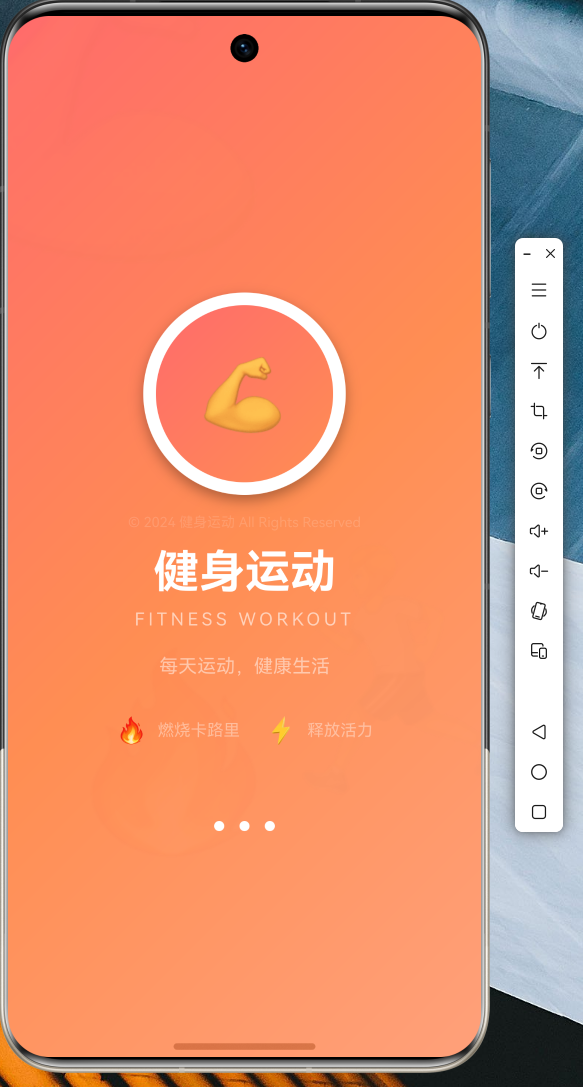
4.1 应用启动页
应用启动时展示精美的启动动画,渐变背景配合健身主题图标:
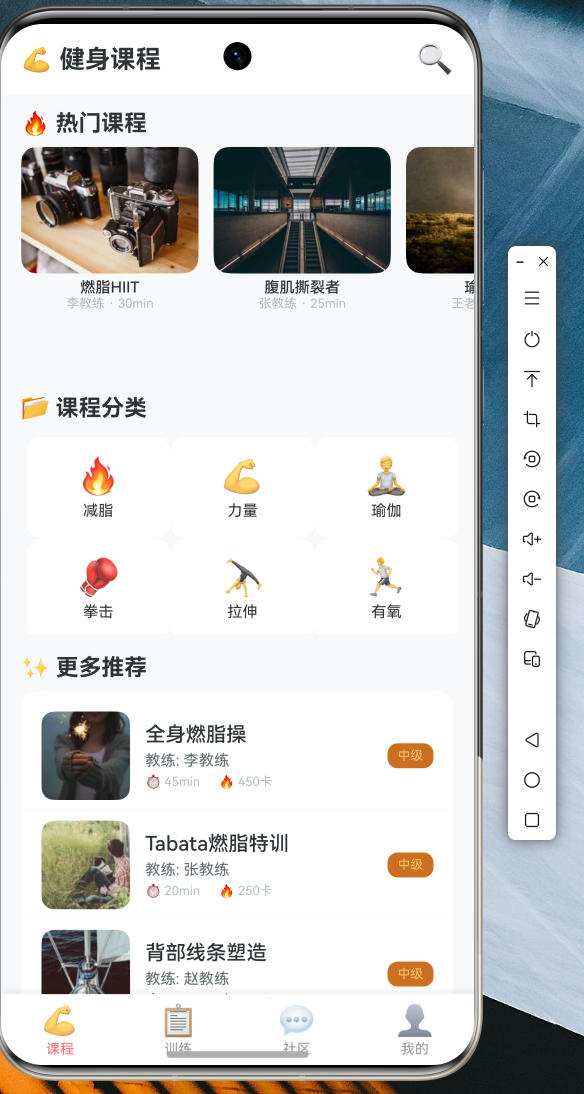
4.2 课程列表页面
展示热门课程推荐,支持分类筛选和下拉刷新:
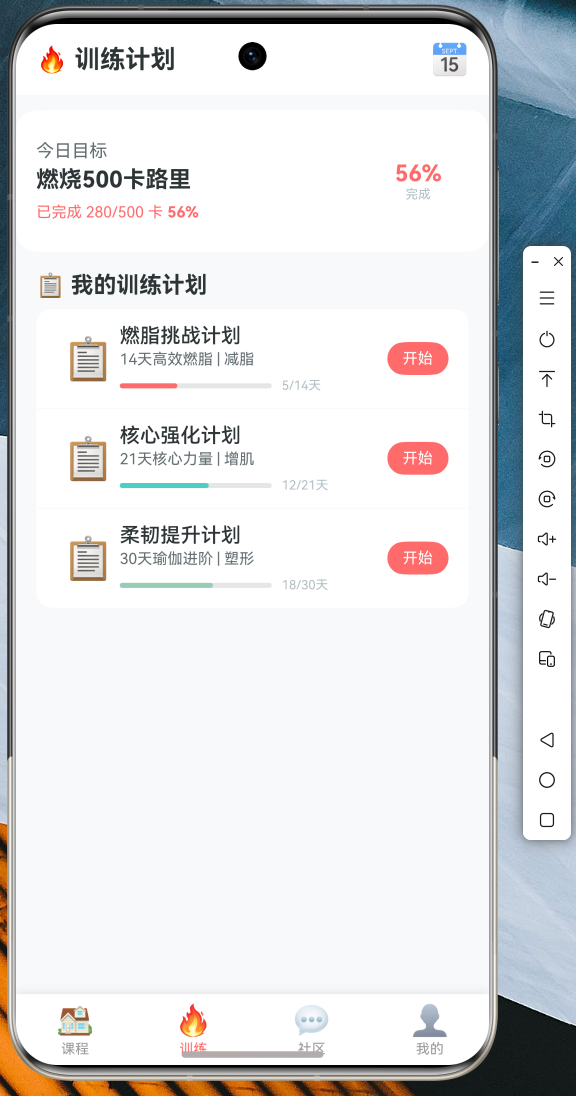
4.3 训练页面
倒计时动画和圆形进度环,实时显示训练状态:
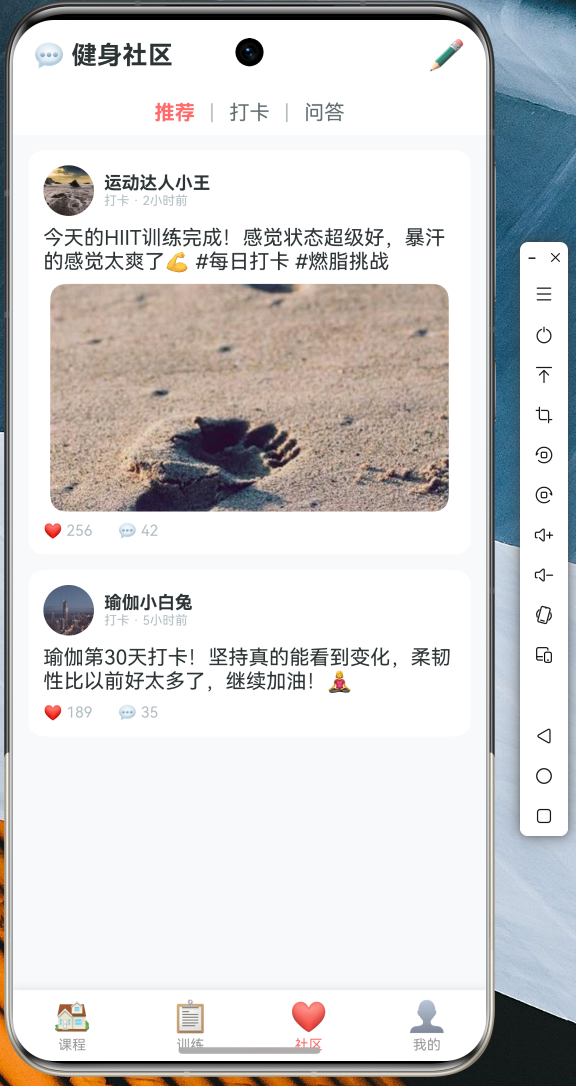
4.4 社区页面
用户动态、健身打卡、互动交流:
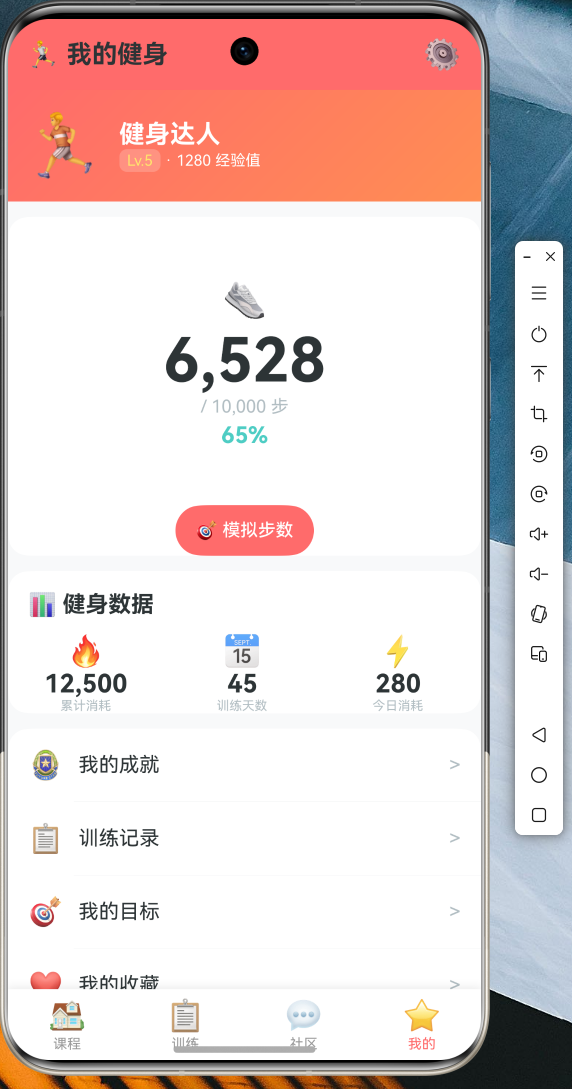
4.5 我的健身页面
计步器动画、数据统计、训练记录:
五、代码仓库
本文所有代码已托管至 AtomGit 平台:
仓库地址:https://atomgit.com/maaath/fitness_flutter_app
仓库结构:
fitness_flutter_app/
├── lib/
│   ├── main.dart
│   ├── model/
│   │   └── fitness_model.dart
│   ├── pages/
│   │   ├── fitness_main_page.dart
│   │   ├── course_page.dart
│   │   ├── training_page.dart
│   │   ├── community_page.dart
│   │   └── my_fitness_page.dart
│   ├── services/
│   │   └── fitness_service.dart
│   └── theme/
│       └── app_theme.dart
├── screenshots/
│   └── ...
└── README.md
六、总结与展望
通过本文的实战案例,我们成功使用 Flutter for OpenHarmony 开发了一个功能完整的健身运动应用。应用涵盖了:
- 网络请求与数据管理:使用 dio 进行网络请求,实现数据层与 UI 层分离
- 丰富的 UI 组件:下拉刷新、上拉加载、动画效果、底部导航栏
- 状态管理:使用 StatefulWidget 进行组件级状态管理
- 跨平台兼容:代码在 OpenHarmony 设备上流畅运行
后续优化方向
- 引入 Provider 或 Riverpod 进行全局状态管理
- 添加本地数据持久化,支持离线缓存
- 实现用户登录与数据同步
- 增加视频课程播放功能
- 接入真实后端 API