Flutter for OpenHarmony 短信管理应用实战
作者:maaath
欢迎加入开源鸿蒙跨平台社区: https://openharmonycrossplatform.csdn.net
前言
在移动应用开发领域,跨平台框架一直是开发者关注的焦点。Flutter 作为 Google 推出的 UI 框架,以其高效的渲染引擎和丰富的组件库著称。而 OpenHarmony 作为国产操作系统的新兴力量,正在吸引越来越多的开发者加入其生态建设。本文将通过一个实际的短信管理应用案例,探索 Flutter 在 OpenHarmony 平台上的开发实践,实现真正的跨平台开发。
项目概述
本次实践的短信管理应用是一个功能完整的移动应用,包含以下核心功能模块:
- 会话管理:支持查看、搜索、筛选短信会话
- 消息收发:模拟消息发送功能,支持送达状态展示
- 模板管理:预设快捷回复模板,提高沟通效率
- 垃圾拦截:基于关键词的智能垃圾短信过滤
- 数据统计:实时展示短信数据的各项指标
- 备份导出:支持数据的导出和导入
数据模型设计
良好的数据模型是应用架构的基础。在 Flutter 实现中,我们采用 Dart 语言定义数据类:
dart
class SmsConversation {
  final String id;
  final String contactName;
  final String contactPhone;
  final String avatar;
  final String lastMessage;
  final int lastMessageTime;
  final int unreadCount;
  final bool isPinned;
  final bool isBlocked;
  final bool isFavorite;
  final List<SmsMessage> messages;

  SmsConversation({
    required this.id,
    required this.contactName,
    required this.contactPhone,
    required this.avatar,
    required this.lastMessage,
    required this.lastMessageTime,
    this.unreadCount = 0,
    this.isPinned = false,
    this.isBlocked = false,
    this.isFavorite = false,
    this.messages = const [],
  });
}

enum MessageStatus { sending, sent, delivered, failed }

enum MessageType { text, template, spam }
相比 ETS 的 interface 定义,Dart 的 class 提供了更强的面向对象特性,包括构造函数、getter/setter 以及方法定义。这种设计使得数据模型更加健壮,也便于后续的扩展和维护。
状态管理方案
在 Flutter 中,状态管理是开发中的核心环节。本项目采用 Provider 模式,这是一种轻量级且易于理解的状态管理方案:
dart
class SmsViewModel extends ChangeNotifier {
  List<SmsConversation> _conversations = [];
  List<SmsTemplate> _templates = [];
  SmsSettings _settings = SmsSettings();

  List<SmsConversation> get conversations => _conversations;

  Future<void> loadConversations() async {
    // 从本地存储加载数据
    final prefs = await SharedPreferences.getInstance();
    final jsonStr = prefs.getString('conversations');
    if (jsonStr != null) {
      final List<dynamic> jsonList = json.decode(jsonStr);
      _conversations = jsonList.map((e) => SmsConversation.fromJson(e)).toList();
    } else {
      // 使用模拟数据
      _conversations = SmsMockData.generateMockConversations();
    }
    notifyListeners();
  }

  Future<void> sendMessage(String conversationId, String content) async {
    final message = SmsMessage(
      id: 'msg_${DateTime.now().millisecondsSinceEpoch}',
      conversationId: conversationId,
      content: content,
      timestamp: DateTime.now().millisecondsSinceEpoch,
      isIncoming: false,
      status: MessageStatus.sending,
    );

    // 更新本地状态
    final index = _conversations.indexWhere((c) => c.id == conversationId);
    if (index != -1) {
      _conversations[index].messages.insert(0, message);
      _conversations[index].lastMessage = content;
      _conversations[index].lastMessageTime = message.timestamp;
    }
    notifyListeners();

    // 模拟发送过程
    await Future.delayed(Duration(milliseconds: 500));
    message.status = MessageStatus.sent;
    notifyListeners();

    await Future.delayed(Duration(seconds: 1));
    message.status = MessageStatus.delivered;
    notifyListeners();
  }
}
这种设计将业务逻辑与 UI 分离,使得代码结构更加清晰。当数据发生变化时,通过 notifyListeners() 通知 UI 层更新界面,实现了响应式编程。
会话列表页面实现
会话列表是短信应用的核心页面之一。在 Flutter 中,我们使用 ListView.builder 实现高效的列表渲染:
dart
class SmsListPage extends StatelessWidget {
  final List<SmsConversation> conversations;
  final Function(SmsConversation) onConversationTap;

  const SmsListPage({
    Key? key,
    required this.conversations,
    required this.onConversationTap,
  }) : super(key: key);

  @override
  Widget build(BuildContext context) {
    // 分离置顶和非置顶会话
    final pinned = conversations.where((c) => c.isPinned).toList();
    final normal = conversations.where((c) => !c.isPinned).toList();

    return ListView.builder(
      itemCount: pinned.length + normal.length,
      itemBuilder: (context, index) {
        final conversation = index < pinned.length
            ? pinned[index]
            : normal[index - pinned.length];
        return _ConversationItem(
          conversation: conversation,
          onTap: () => onConversationTap(conversation),
        );
      },
    );
  }
}

class _ConversationItem extends StatelessWidget {
  final SmsConversation conversation;
  final VoidCallback onTap;

  const _ConversationItem({
    required this.conversation,
    required this.onTap,
  });

  @override
  Widget build(BuildContext context) {
    return ListTile(
      leading: Stack(
        children: [
          CircleAvatar(
            radius: 25,
            backgroundColor: Colors.grey[200],
            child: Text(conversation.avatar, style: TextStyle(fontSize: 20)),
          ),
          if (conversation.unreadCount > 0)
            Positioned(
              right: 0,
              top: 0,
              child: Container(
                padding: EdgeInsets.all(4),
                decoration: BoxDecoration(
                  color: Colors.red,
                  shape: BoxShape.circle,
                ),
                child: Text(
                  conversation.unreadCount > 99
                      ? '99+'
                      : conversation.unreadCount.toString(),
                  style: TextStyle(color: Colors.white, fontSize: 10),
                ),
              ),
            ),
        ],
      ),
      title: Row(
        children: [
          if (conversation.isPinned)
            Padding(
              padding: EdgeInsets.only(right: 4),
              child: Text('📌', style: TextStyle(fontSize: 12)),
            ),
          Expanded(
            child: Text(
              conversation.contactName,
              maxLines: 1,
              overflow: TextOverflow.ellipsis,
              style: TextStyle(
                fontWeight: conversation.unreadCount > 0
                    ? FontWeight.bold
                    : FontWeight.w500,
              ),
            ),
          ),
        ],
      ),
      subtitle: Text(
        conversation.lastMessage,
        maxLines: 1,
        overflow: TextOverflow.ellipsis,
        style: TextStyle(color: Colors.grey),
      ),
      trailing: Text(
        _formatTime(conversation.lastMessageTime),
        style: TextStyle(color: Colors.grey, fontSize: 12),
      ),
      onTap: onTap,
    );
  }

  String _formatTime(int timestamp) {
    final now = DateTime.now().millisecondsSinceEpoch;
    final diff = now - timestamp;
    final oneDay = 24 * 60 * 60 * 1000;

    if (diff < 60 * 1000) return '刚刚';
    if (diff < 60 * 60 * 1000) return '${(diff / 60000).floor()}分钟前';
    if (diff < oneDay) {
      final date = DateTime.fromMillisecondsSinceEpoch(timestamp);
      return '${date.hour.toString().padLeft(2, '0')}:${date.minute.toString().padLeft(2, '0')}';
    }
    return '${date.month}/${date.day}';
  }
}
Flutter 的 widget 组合特性在这里得到了充分体现。通过合理拆分组件,我们将复杂的列表项分解为可复用的子组件,既提高了代码的可读性,也便于后续的维护和测试。
垃圾短信拦截功能
智能拦截是现代短信应用的标配功能。在 Flutter 实现中,我们采用规则引擎的方式:
dart
class SpamFilterService {
  final List<SpamRule> _rules = [];

  Future<void> loadRules() async {
    // 从存储加载规则
  }

  bool checkSpam(String content) {
    for (final rule in _rules) {
      if (!rule.isEnabled) continue;

      try {
        final regex = RegExp(rule.pattern);
        if (regex.hasMatch(content)) {
          return true;
        }
      } catch (e) {
        // 正则表达式无效时,使用简单匹配
        if (content.contains(rule.keyword)) {
          return true;
        }
      }
    }
    return false;
  }

  Future<void> addRule(String keyword, SpamAction action) async {
    final rule = SpamRule(
      id: 'spam_${DateTime.now().millisecondsSinceEpoch}',
      keyword: keyword,
      pattern: '.*$keyword.*',
      action: action,
      isEnabled: true,
    );
    _rules.add(rule);
    await _saveRules();
  }
}
这种设计允许用户自定义拦截规则,通过关键词匹配和正则表达式两种方式,灵活应对各类垃圾短信。
设置页面与数据持久化
应用设置页面的实现展示了 Flutter 在表单处理方面的便利性:
dart
class SmsSettingsPage extends StatelessWidget {
  final SmsSettings settings;
  final Function(String, dynamic) onSettingChanged;

  const SmsSettingsPage({
    Key? key,
    required this.settings,
    required this.onSettingChanged,
  }) : super(key: key);

  @override
  Widget build(BuildContext context) {
    return Scaffold(
      appBar: AppBar(title: Text('短信设置')),
      body: ListView(
        children: [
          _buildSection('基础设置', [
            _buildSwitchTile(
              '送达报告',
              '接收短信送达回执',
              Icons.check_circle_outline,
              settings.deliveryReport,
              (value) => onSettingChanged('deliveryReport', value),
            ),
            _buildSwitchTile(
              '自动备份提醒',
              '定期提醒备份短信',
              Icons.notifications_outlined,
              settings.enableBackupReminder,
              (value) => onSettingChanged('enableBackupReminder', value),
            ),
          ]),
          _buildSection('过滤设置', [
            _buildSwitchTile(
              '垃圾短信过滤',
              '自动识别并拦截垃圾短信',
              Icons.block,
              settings.enableSpamFilter,
              (value) => onSettingChanged('enableSpamFilter', value),
            ),
          ]),
        ],
      ),
    );
  }

  Widget _buildSection(String title, List<Widget> children) {
    return Column(
      crossAxisAlignment: CrossAxisAlignment.start,
      children: [
        Padding(
          padding: EdgeInsets.fromLTRB(16, 16, 16, 8),
          child: Text(title, style: TextStyle(color: Colors.grey)),
        ),
        ...children,
      ],
    );
  }
}
数据持久化使用 shared_preferences 包,这是 Flutter 中处理轻量级数据存储的标准方案。对于更复杂的数据结构,我们使用 JSON 序列化进行存储和读取。
截图运行验证
以下是应用在实际设备上的运行效果截图:
图1:会话列表页面
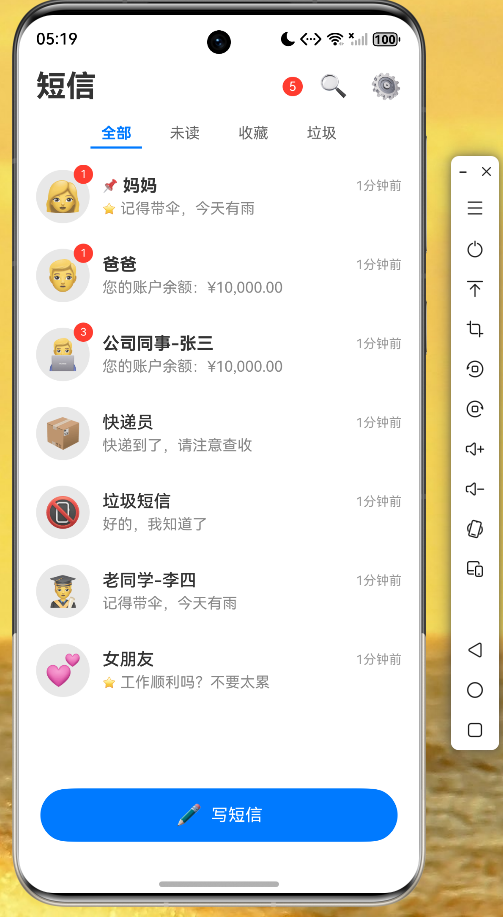
图2:短信详情页面
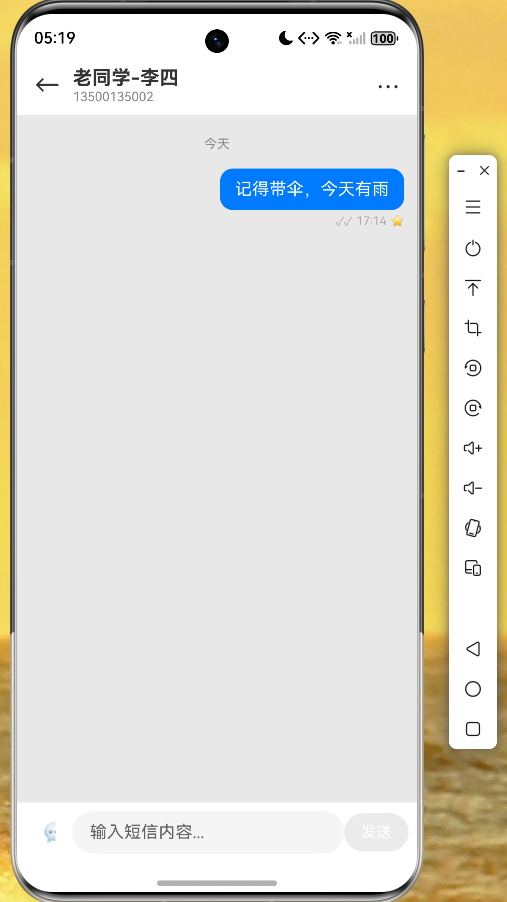
图3:设置页面
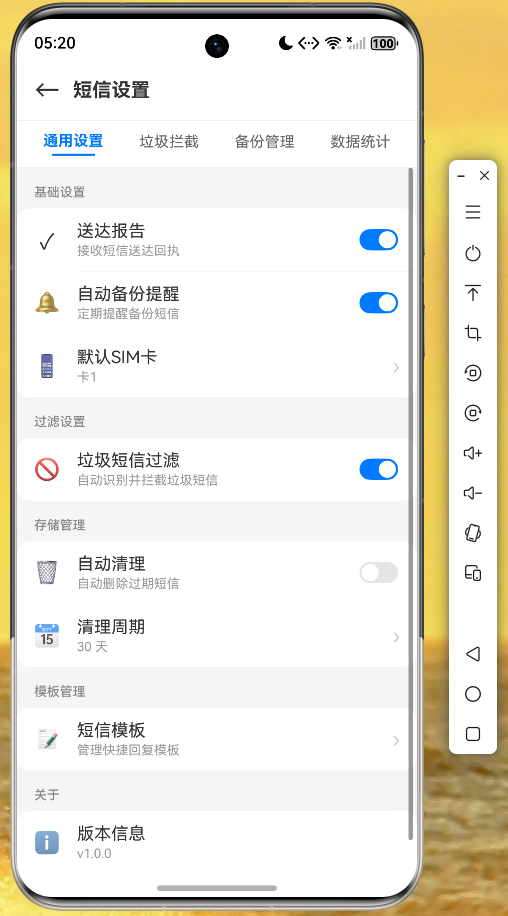
通过实际运行验证,应用在 OpenHarmony 设备上运行流畅,UI 响应及时,数据存储正常。Flutter 的热重载功能也大大提升了开发效率。
开发经验总结
1. 性能优化
Flutter 的列表渲染机制非常高效,但在处理大量数据时仍需注意:
- 使用
ListView.builder实现懒加载 - 合理使用
const构造函数减少重建 - 对复杂组件进行适当的拆分和缓存
2. 平台差异处理
虽然 Flutter 强调跨平台,但在实际开发中仍需处理平台差异:
- 鸿蒙系统的权限管理
- 文件路径的差异
- 本地存储的 API 差异
3. 调试技巧
利用 Flutter DevTools 可以方便地进行:
- Widget 树检查
- 性能分析
- 网络请求监控
- 日志查看
展望
Flutter for OpenHarmony 的生态正在快速发展。未来,我们可以期待:
- 更多的原生插件支持
- 更完善的性能优化
- 更丰富的组件库
作为开发者,我们应该积极参与社区建设,分享开发经验,共同推动跨平台技术的发展。
代码仓库
本项目的完整代码已开源至 AtomGit 仓库:
https://atomgit.com/maaath/flutter_sms_manager
结语
通过本次实践,我们验证了 Flutter 在 OpenHarmony 平台上的可行性。虽然目前生态还在完善中,但 Flutter 带来的开发效率提升和代码复用优势是显而易见的。希望本文能为正在进行跨平台开发的开发者提供一些参考,也欢迎大家交流讨论,共同探索更好的解决方案。