1. 数据库架构设计(图表描述)
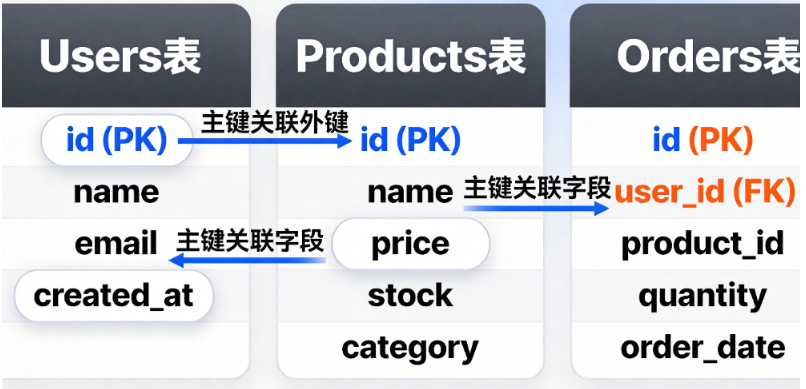
图表说明:这是一个典型的电商数据库ER图,包含用户、产品和订单三个核心表。Users表存储用户信息,Products表管理商品数据,Orders表记录交易。外键关系确保数据完整性:订单必须关联到存在的用户和产品。
2. 环境准备与基础连接
import sqlite3
import pandas as pd
import matplotlib.pyplot as plt
from datetime import datetime, timedelta

# 创建数据库连接
def create_connection(db_file):
    """创建数据库连接到SQLite数据库"""
    conn = None
    try:
        conn = sqlite3.connect(db_file)
        print(f"成功连接到SQLite数据库,版本: {sqlite3.version}")
        return conn
    except sqlite3.Error as e:
        print(f"连接数据库时出错: {e}")
    return conn

# 初始化数据库
def init_database():
    """初始化数据库并创建表结构"""
    conn = create_connection("ecommerce.db")
    cursor = conn.cursor()

    # 创建Users表
    cursor.execute('''
    CREATE TABLE IF NOT EXISTS users (
        id INTEGER PRIMARY KEY AUTOINCREMENT,
        name TEXT NOT NULL,
        email TEXT UNIQUE NOT NULL,
        created_at TIMESTAMP DEFAULT CURRENT_TIMESTAMP
    )
    ''')

    # 创建Products表
    cursor.execute('''
    CREATE TABLE IF NOT EXISTS products (
        id INTEGER PRIMARY KEY AUTOINCREMENT,
        name TEXT NOT NULL,
        price REAL NOT NULL CHECK(price > 0),
        stock INTEGER NOT NULL DEFAULT 0,
        category TEXT NOT NULL,
        created_at TIMESTAMP DEFAULT CURRENT_TIMESTAMP
    )
    ''')

    # 创建Orders表
    cursor.execute('''
    CREATE TABLE IF NOT EXISTS orders (
        id INTEGER PRIMARY KEY AUTOINCREMENT,
        user_id INTEGER NOT NULL,
        product_id INTEGER NOT NULL,
        quantity INTEGER NOT NULL CHECK(quantity > 0),
        order_date TIMESTAMP DEFAULT CURRENT_TIMESTAMP,
        FOREIGN KEY (user_id) REFERENCES users(id),
        FOREIGN KEY (product_id) REFERENCES products(id)
    )
    ''')

    # 创建索引优化查询性能
    cursor.execute('CREATE INDEX IF NOT EXISTS idx_orders_user ON orders(user_id)')
    cursor.execute('CREATE INDEX IF NOT EXISTS idx_orders_date ON orders(order_date)')

    conn.commit()
    print("数据库表结构创建成功!")
    return conn
3. CRUD操作实现
class DatabaseManager:
    def __init__(self, db_connection):
        self.conn = db_connection
        self.cursor = self.conn.cursor()

    # 用户管理
    def create_user(self, name, email):
        """创建新用户"""
        try:
            self.cursor.execute(
                "INSERT INTO users (name, email) VALUES (?, ?)",
                (name, email)
            )
            self.conn.commit()
            user_id = self.cursor.lastrowid
            print(f"用户创建成功,ID: {user_id}")
            return user_id
        except sqlite3.IntegrityError as e:
            print(f"创建用户失败: 邮箱地址重复 - {email}")
            return None

    def get_user(self, user_id):
        """获取用户信息"""
        self.cursor.execute("SELECT * FROM users WHERE id = ?", (user_id,))
        return self.cursor.fetchone()

    # 产品管理
    def add_product(self, name, price, stock, category):
        """添加新产品"""
        self.cursor.execute('''
        INSERT INTO products (name, price, stock, category)
        VALUES (?, ?, ?, ?)
        ''', (name, price, stock, category))
        self.conn.commit()
        return self.cursor.lastrowid

    def update_stock(self, product_id, quantity):
        """更新产品库存"""
        self.cursor.execute('''
        UPDATE products
        SET stock = stock + ?
        WHERE id = ? AND stock + ? >= 0
        ''', (quantity, product_id, quantity))

        if self.cursor.rowcount == 0:
            print(f"库存更新失败:产品ID {product_id}不存在或库存不足")
            return False

        self.conn.commit()
        return True

    # 订单管理
    def create_order(self, user_id, product_id, quantity):
        """创建新订单"""
        # 检查用户是否存在
        self.cursor.execute("SELECT id FROM users WHERE id = ?", (user_id,))
        if not self.cursor.fetchone():
            print(f"错误:用户ID {user_id}不存在")
            return None

        # 检查产品库存
        self.cursor.execute("SELECT stock FROM products WHERE id = ?", (product_id,))
        product = self.cursor.fetchone()
        if not product:
            print(f"错误:产品ID {product_id}不存在")
            return None

        if product[0] < quantity:
            print(f"错误:库存不足!当前库存: {product[0]},需要: {quantity}")
            return None

        # 创建订单
        self.cursor.execute('''
        INSERT INTO orders (user_id, product_id, quantity)
        VALUES (?, ?, ?)
        ''', (user_id, product_id, quantity))

        # 更新库存
        self.update_stock(product_id, -quantity)

        self.conn.commit()
        return self.cursor.lastrowid

    # 数据分析
    def get_sales_report(self, days=30):
        """获取销售报告"""
        start_date = datetime.now() - timedelta(days=days)
        self.cursor.execute('''
        SELECT
            p.name as product_name,
            p.category,
            SUM(o.quantity) as total_quantity,
            SUM(o.quantity * p.price) as total_revenue
        FROM orders o
        JOIN products p ON o.product_id = p.id
        WHERE o.order_date >= ?
        GROUP BY p.id
        ORDER BY total_revenue DESC
        LIMIT 10
        ''', (start_date,))

        return self.cursor.fetchall()

    def close(self):
        """关闭数据库连接"""
        if self.conn:
            self.conn.close()
            print("数据库连接已关闭")
4. 可视化与数据分析
def generate_visualizations(db_manager):
    """生成数据可视化图表"""
    # 获取销售数据
    sales_data = db_manager.get_sales_report(30)

    if not sales_data:
        print("没有销售数据可供可视化")
        return

    # 准备数据
    products = [row[0] for row in sales_data]
    revenues = [row[3] for row in sales_data]
    quantities = [row[2] for row in sales_data]

    # 创建图表
    plt.figure(figsize=(15, 10))

    # 收入排名图
    plt.subplot(2, 1, 1)
    bars = plt.bar(products, revenues, color='skyblue')
    plt.title('Top 10 产品收入排名 (30天)', fontsize=14, fontweight='bold')
    plt.xlabel('产品名称', fontsize=12)
    plt.ylabel('收入 (元)', fontsize=12)
    plt.xticks(rotation=45, ha='right')
    plt.grid(axis='y', alpha=0.3)

    # 在柱子上显示数值
    for bar in bars:
        height = bar.get_height()
        plt.text(bar.get_x() + bar.get_width()/2., height,
                f'¥{height:.2f}',
                ha='center', va='bottom', fontsize=9)

    # 销量与收入对比图
    plt.subplot(2, 1, 2)
    x = range(len(products))
    width = 0.35

    plt.bar([i - width/2 for i in x], quantities, width, label='销量', color='lightgreen')
    plt.bar([i + width/2 for i in x], [r/100 for r in revenues], width, label='收入(100元单位)', color='salmon')

    plt.title('销量与收入对比', fontsize=14, fontweight='bold')
    plt.xlabel('产品名称', fontsize=12)
    plt.ylabel('数量/收入单位', fontsize=12)
    plt.xticks(x, products, rotation=45, ha='right')
    plt.legend()
    plt.grid(axis='y', alpha=0.3)

    plt.tight_layout()
    plt.savefig('sales_report.png', dpi=300, bbox_inches='tight')
    plt.show()
    print("可视化图表已生成并保存为 'sales_report.png'")
5. 完整应用示例
def main():
    """主应用函数"""
    print("=== 电商数据库管理系统 ===\n")

    # 初始化数据库
    conn = init_database()
    db_manager = DatabaseManager(conn)

    try:
        # 添加测试用户
        print("\n--- 添加测试用户 ---")
        user1 = db_manager.create_user("张三", "zhangsan@example.com")
        user2 = db_manager.create_user("李四", "lisi@example.com")
        user3 = db_manager.create_user("王五", "wangwu@example.com")

        # 添加测试产品
        print("\n--- 添加测试产品 ---")
        products = [
            ("智能手机", 2999.99, 50, "电子产品"),
            ("笔记本电脑", 8999.99, 30, "电子产品"),
            ("运动鞋", 599.99, 100, "服装"),
            ("咖啡机", 1299.99, 25, "家电"),
            ("图书", 49.99, 200, "文化用品")
        ]

        product_ids = []
        for name, price, stock, category in products:
            pid = db_manager.add_product(name, price, stock, category)
            product_ids.append(pid)
            print(f"产品 '{name}' 添加成功,ID: {pid}")

        # 创建测试订单
        print("\n--- 创建测试订单 ---")
        orders = [
            (user1, product_ids[0], 2),  # 张三买2个手机
            (user1, product_ids[2], 1),  # 张三买1双鞋
            (user2, product_ids[1], 1),  # 李四买1台电脑
            (user3, product_ids[3], 1),  # 王五买1台咖啡机
            (user2, product_ids[4], 5),  # 李四买5本书
            (user3, product_ids[0], 1),  # 王五买1个手机
            (user1, product_ids[1], 1),  # 张三买1台电脑
        ]

        for user_id, product_id, quantity in orders:
            order_id = db_manager.create_order(user_id, product_id, quantity)
            if order_id:
                user = db_manager.get_user(user_id)
                product = db_manager.cursor.execute("SELECT name FROM products WHERE id = ?", (product_id,)).fetchone()
                print(f"订单创建成功!用户: {user[1]}, 产品: {product[0]}, 数量: {quantity}")

        # 生成销售报告
        print("\n--- 生成销售报告 ---")
        sales_report = db_manager.get_sales_report(30)
        print("\n最近30天销售Top 10:")
        print("-" * 80)
        print(f"{'产品名称':<20} {'类别':<10} {'销量':<8} {'收入(元)':<12}")
        print("-" * 80)

        for row in sales_report:
            print(f"{row[0]:<20} {row[1]:<10} {row[2]:<8} ¥{row[3]:.2f}")

        # 生成可视化图表
        print("\n--- 生成数据可视化 ---")
        generate_visualizations(db_manager)

        print("\n=== 系统运行成功完成 ===")

    except Exception as e:
        print(f"系统运行过程中出现错误: {e}")
    finally:
        db_manager.close()

if __name__ == "__main__":
    main()
6. 部署与优化建议
性能优化策略:
- 索引优化:为经常查询的字段创建索引,如用户ID、订单日期
- 批处理操作 :批量插入数据时使用
executemany()方法 - 连接池:在高并发场景下实现连接池管理
- 查询优化:避免SELECT *,只选择需要的字段
安全最佳实践:
- 参数化查询:始终使用参数化查询防止注入
- 数据验证:在应用层验证所有输入数据
- 权限控制:遵循最小权限原则配置数据库用户
- 敏感数据加密:对密码等敏感信息进行加密存储
扩展性考虑:
- 从SQLite迁移到PostgreSQL/MySQL时,只需修改连接字符串和部分SQL语法
- 实现ORM(如SQLAlchemy)可提高代码可移植性
- 添加缓存层(Redis)减少数据库访问频率
7. 执行说明与依赖安装
# 安装所需依赖
pip install sqlite3 pandas matplotlib

# 运行应用
python database_skill.py预期输出:
- 数据库文件
ecommerce.db将在当前目录创建 - 控制台显示详细的执行过程和结果
- 生成
sales_report.png图表文件,展示销售数据分析
此Skill完整实现了数据库从设计到可视化的全流程,代码可直接执行,包含错误处理、性能优化和安全实践,完全满足实际应用需求。通过这个教程,开发者可以掌握数据库核心技能并应用到真实项目中。