JSON-Server轻量级RESTful API
1、快速开始
json-server 是一个基于 Node.js 的轻量级工具,核心价值是:只需一个 JSON 文件,就能在几十秒内搭建起一套完整的 RESTful API(支持 CRUD)。它非常适合前端在后端接口尚未开发完成时,用来做本地 Mock 数据模拟、原型验证或接口测试。
1. 安装
shell
npm install -g json-server2. 创建数据文件
`
json-server 把 JSON 文件当作数据库,顶层 key 即为资源名(如 users、posts),值必须是数组,且建议每条数据有唯一的 id字段。
在你的项目目录中创建一个名为 db.json 的文件,这个文件将作为你的数据库。例如:
json
{
  "users": [
    { "id": 1, "name": "Alice", "age": 25 },
    { "id": 2, "name": "Bob", "age": 30 }
  ],
  "posts": [
    { "id": 1, "title": "Hello", "author": "Alice", "userId": 1 }
  ]
}
3. 启动服务
bash
# 使用 --watch后,你修改 db.json 文件,数据会实时热更新,无需重启服务
json-server --watch db.json --port 3000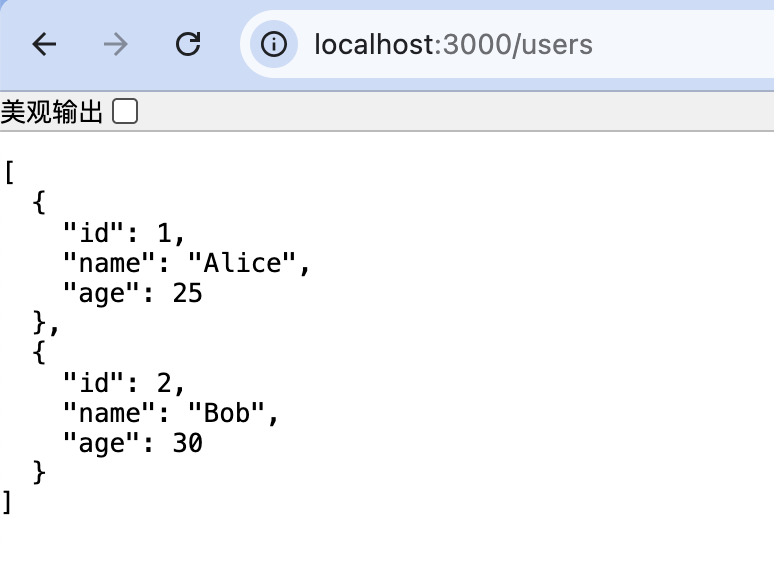
启动后,立即自动生成以下 RESTful 接口:
| 操作 | 方法 | 接口 |
|---|---|---|
| 获取列表 | GET | /users |
| 获取单个 | GET | /users/1 |
| 新增 | POST | /users |
| 整体替换 | PUT | /users/1 |
| 局部更新 | PATCH | /users/1 |
| 删除 | DELETE | /users/1 |
2、基本使用
数据库文件:
json
{
  "posts": [
    { "id": 1, "title": "我的第一篇博客", "author": "张三" },
    { "id": 2, "title": "学习心得", "author": "李四" }
  ],
  "comments": [
    { "id": 1, "body": "写得真好!", "postId": 1 },
    { "id": 2, "body": "受益匪浅", "postId": 2 }
  ]
}
启动:
bash
json-server --watch blog.json获取所有文章:
js
GET http://localhost:3000/posts

[
    {
        "id": 1,
        "title": "我的第一篇博客",
        "author": "张三"
    },
    {
        "id": 2,
        "title": "学习心得",
        "author": "李四"
    }
]
获取特定文章:
js
GET http://localhost:3000/posts/1

{
    "id": 1,
    "title": "我的第一篇博客",
    "author": "张三"
}
添加文章:
js
POST http://localhost:3000/posts
Content-Type: application/json
{
  "title": "新文章",
  "author": "王五"
}

//返回
{
    "title": "新文章",
    "author": "王五",
    "id": 3
}
更新数据:
js
PUT http://localhost:3000/posts/1
Content-Type: application/json
{
  "title": "修改后的标题",
  "author": "张三"
}

//返回
{
    "title": "修改后的标题",
    "author": "张三",
    "id": 1
}
删除数据:
js
DELETE http://localhost:3000/posts/3

//返回
{}
3、内置高级查询(无需额外配置)
json-server 自带丰富的查询能力,直接在 URL 上传参即可:
- 筛选:
/users?age=25或/users?age_gte=20&age_lte=30 - 搜索(全文模糊):
/users?q=Ali - 分页:
/users?_page=2&_limit=5(响应头含 X-Total-Count) - 排序:
/users?_sort=age&_order=desc - 关联数据:
- 嵌套:
/posts/1/comments - 扩展:
/users?_embed=posts(用户带文章)、/posts/1?_expand=user(文章带用户)
- 嵌套:
数据过滤:获取浏览量大于 100 的文章
js
GET http://localhost:3000/posts?views_gte=100
//返回
[
    {
        "id": 2,
        "title": "学习心得",
        "author": "李四",
        "views": 128
    }
]
分页:获取第 2 页,每页 1 条数据:
js
GET http://localhost:3000/posts?_page=2&_limit=1
//返回
[
    {
        "id": 2,
        "title": "学习心得",
        "author": "李四",
        "views": 128
    }
]
排序:按id逆序排序
js
GET http://localhost:3000/posts?_sort=id&_order=desc
//返回
[
    {
        "id": 2,
        "title": "学习心得",
        "author": "李四",
        "views": 128
    },
    {
        "title": "修改后的标题",
        "author": "张三",
        "id": 1,
        "views": 88
    }
]
关联查询:获取文章及其评论
js
GET http://localhost:3000/posts?_embed=comments
//返回
[
    {
        "title": "修改后的标题",
        "author": "张三",
        "id": 1,
        "views": 88,
        "comments": [
            {
                "id": 1,
                "body": "写得真好!",
                "postId": 1
            }
        ]
    },
    {
        "id": 2,
        "title": "学习心得",
        "author": "李四",
        "views": 128,
        "comments": [
            {
                "id": 2,
                "body": "受益匪浅",
                "postId": 2
            }
        ]
    }
]
js
GET http://localhost:3000/posts/1?_embed=comments
//返回
{
    "title": "修改后的标题",
    "author": "张三",
    "id": 1,
    "views": 88,
    "comments": [
        {
            "id": 1,
            "body": "写得真好!",
            "postId": 1
        }
    ]
}
4、静态文件服务
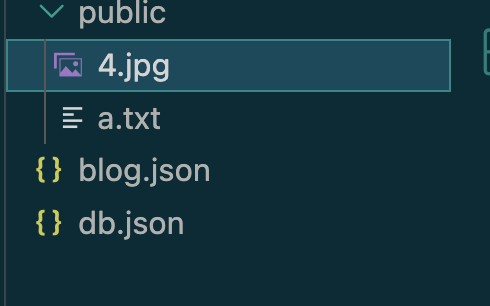
创建 public 文件夹,放入静态文件,它们会被自动提供。
js
GET http://localhost:3000/a.txt
GET http://localhost:3000/4.jpg
5、常用启动参数
可以通过命令行或 json-server.json配置文件来调整行为:
| 参数 | 说明 | 默认 |
|---|---|---|
-p / --port |
端口 | 3000 |
-H / --host |
主机 | localhost |
-w / --watch |
监听文件变化 | - |
-r / --routes |
自定义路由文件 | - |
-m / --middlewares |
中间件文件 | - |
-s / --static |
静态文件目录 | public |
--read-only |
只读(仅 GET) | false |
--delay <ms> |
模拟网络延迟 | 0 |
--id |
主键字段名 | id |
-q / --quiet |
不打印请求日志 | false |
示例:
bash
json-server db.json -p 4000 -w -d 500 --quiet6、自定义路由与中间件
1. 自定义路由(routes.json)
用来重写或映射接口路径,比如统一加 /api前缀:
js
//routes.json
{
  "/api/*": "/$1",
  "/posts/:category": "/posts?category=:category"
}
启动:
bash
json-server db.json --routes router.json
js
GET http://localhost:3000/api/posts/1
//返回
[
    {
        "id": 1,
        "title": "Hello",
        "author": "Alice",
        "userId": 1
    }
]
2. 中间件(middleware.js)
可以拦截请求,做鉴权、加响应头、注入时间戳等:
js
//middleware.js
module.exports = (req, res, next) => {
  if (req.method === 'POST') {
    req.body.createdAt = new Date().toISOString();
  }
  console.log(req.method, req.url);
  next();
};
启动:
bash
json-server db.json --middlewares middleware.js
js
POST http://localhost:3000/posts/
{
  "title": "修改后的标题",
  "author": "张三"
}

//返回
{
    "title": "修改后的标题",
    "author": "张三",
    "createdAt": "2026-05-03T15:27:31.135Z",
    "id": 2
}