文章目录
-
- 每日一句正能量
- 一、前言:当健身应用"长出了眼睛"
- 二、项目架构设计
- 三、核心代码实战
-
- [3.1 Face AR疲劳监测引擎(FaceFatigueEngine.ets)](#3.1 Face AR疲劳监测引擎(FaceFatigueEngine.ets))
- [3.2 Body AR姿态评估引擎(BodyPoseEngine.ets)](#3.2 Body AR姿态评估引擎(BodyPoseEngine.ets))
- [3.3 沉浸光感悬浮导航栏(ImmersiveNavBar.ets)](#3.3 沉浸光感悬浮导航栏(ImmersiveNavBar.ets))
- [3.4 骨骼关键点覆盖绘制组件(PoseOverlayCanvas.ets)](#3.4 骨骼关键点覆盖绘制组件(PoseOverlayCanvas.ets))
- [3.5 主健身页面:全能力整合(ARFitnessPage.ets)](#3.5 主健身页面:全能力整合(ARFitnessPage.ets))
- 四、关键设计要点总结
-
- [4.1 Face AR疲劳监测的"时间窗口"设计](#4.1 Face AR疲劳监测的"时间窗口"设计)
- [4.2 Body AR姿态评估的"关节角度"计算](#4.2 Body AR姿态评估的"关节角度"计算)
- [4.3 沉浸光感的"动态材质"实现](#4.3 沉浸光感的"动态材质"实现)
- [4.4 悬浮导航的"安全区适配"](#4.4 悬浮导航的"安全区适配")
- 五、效果预览与扩展方向
- 六、结语
每日一句正能量
成长过程中的失落,正是蜕变的机会,与其止步不前,不如主动求变。"
在"停"与"变"之间,选择后者,把命运感拿回自己手里。
一、前言:当健身应用"长出了眼睛"
2026年4月,HarmonyOS 6.1.0正式发布,带来了两大令人兴奋的新能力:沉浸光感组件 与Face AR & Body AR。前者让界面拥有了"呼吸感"和材质通透感,后者则让应用第一次具备了实时理解用户面部表情和肢体动作的能力。
传统健身应用最大的痛点是什么?"只给计划,不看反馈"。用户跟着视频做动作,应用不知道用户是否标准、是否疲劳、是否受伤。而HarmonyOS 6的AR能力彻底改变了这一现状------通过Face AR实时捕捉面部微表情判断疲劳度,通过Body AR精确追踪33个骨骼关键点评估动作质量,再结合沉浸光感的动态环境光反馈,让健身应用从"播放工具"进化为"智能私教"。
本文将手把手带你构建一个完整的AR智能健身私教系统,涵盖:
- Face AR疲劳监测引擎:通过面部微表情识别(眯眼、张嘴、皱眉)实时评估用户疲劳等级
- Body AR姿态评估引擎:基于骨骼关键点计算关节角度,判断深蹲/俯卧撑等动作的标准度
- 沉浸光感悬浮导航:根据运动强度和疲劳状态动态调整界面光效与导航样式
- 自适应训练调节:根据实时数据智能降低/提升训练难度
二、项目架构设计
entry/src/main/ets/
├── ability/
│   └── FitnessAIAbility.ets          # 健身AI决策Ability
├── engine/
│   ├── FaceFatigueEngine.ets         # Face AR疲劳监测引擎
│   ├── BodyPoseEngine.ets            # Body AR姿态评估引擎
│   └── AdaptiveTrainingEngine.ets    # 自适应训练调节引擎
├── components/
│   ├── ImmersiveNavBar.ets           # 沉浸光感悬浮导航栏
│   ├── PoseOverlayCanvas.ets         # 骨骼关键点覆盖绘制组件
│   ├── FatigueIndicator.ets          # 疲劳度可视化指示器
│   └── WorkoutHUD.ets                # 运动数据悬浮面板
└── pages/
    └── ARFitnessPage.ets             # 主健身页面
三、核心代码实战
3.1 Face AR疲劳监测引擎(FaceFatigueEngine.ets)
代码亮点:通过Face AR的52个面部BlendShape系数,构建多维度疲劳评估模型。不同于简单的表情识别,这里引入"疲劳累积算法"------通过时间窗口内的微表情变化率来判断用户是否进入疲劳状态,而非单次表情强度。
typescript
// entry/src/main/ets/engine/FaceFatigueEngine.ets
import { arEngine } from '@hms.core.ar.arengine';

/**
 * 疲劳等级
 */
export enum FatigueLevel {
  ENERGETIC = 0,   // 精力充沛
  FOCUSED = 1,     // 专注
  TIRED = 2,       // 轻度疲劳
  EXHAUSTED = 3,   // 重度疲劳
  DANGER = 4       // 危险状态(表情痛苦)
}

/**
 * 面部特征窗口数据
 */
interface FaceFeatureWindow {
  timestamp: number;
  eyeOpenness: number;      // 眼睛睁开度 (0-1)
  mouthOpenness: number;    // 嘴巴张开度
  browFurrowIntensity: number; // 皱眉强度
  smileIntensity: number;   // 微笑/咧嘴强度
  headTilt: number;         // 头部倾斜角度
}

export class FaceFatigueEngine {
  private static instance: FaceFatigueEngine;

  // 滑动窗口(保存最近5秒的数据,每秒约30帧 = 150个样本)
  private featureWindow: FaceFeatureWindow[] = [];
  private readonly WINDOW_SIZE = 150;
  private readonly WINDOW_DURATION = 5000; // ms

  // 疲劳状态
  private currentLevel: FatigueLevel = FatigueLevel.ENERGETIC;
  private fatigueScore: number = 0; // 0-100
  private consecutiveDangerFrames: number = 0;

  // 疲劳阈值配置(可根据用户历史数据动态调整)
  private readonly THRESHOLDS = {
    eyeOpennessDrop: 0.35,        // 眼睛睁开度下降阈值
    blinkRateIncrease: 2.5,       // 眨眼频率增加倍数
    browFurrowSustain: 0.4,       // 持续皱眉阈值
    mouthOpenSustain: 0.3,         // 持续张嘴(喘气)阈值
    headDropAngle: 15             // 头部下垂角度(度)
  };

  static getInstance(): FaceFatigueEngine {
    if (!FaceFatigueEngine.instance) {
      FaceFatigueEngine.instance = new FaceFatigueEngine();
    }
    return FaceFatigueEngine.instance;
  }

  /**
   * 处理Face AR数据帧,更新疲劳状态
   * 核心算法:多维度时间窗口分析 + 疲劳累积模型
   */
  processFaceFrame(face: arEngine.ARFace): { level: FatigueLevel; score: number; alerts: string[] } {
    const blendShapes = face.getBlendShapes();
    const pose = face.getPose();
    const alerts: string[] = [];

    if (!blendShapes) {
      return { level: this.currentLevel, score: this.fatigueScore, alerts };
    }

    // 提取当前帧特征
    const now = Date.now();
    const feature: FaceFeatureWindow = {
      timestamp: now,
      eyeOpenness: this.calcEyeOpenness(blendShapes),
      mouthOpenness: blendShapes.jawOpen || 0,
      browFurrowIntensity: this.calcBrowFurrow(blendShapes),
      smileIntensity: Math.max(blendShapes.mouthSmileLeft || 0, blendShapes.mouthSmileRight || 0),
      headTilt: pose ? this.calcHeadTilt(pose.rotation) : 0
    };

    // 维护滑动窗口
    this.featureWindow.push(feature);
    this.featureWindow = this.featureWindow.filter(f => now - f.timestamp < this.WINDOW_DURATION);
    if (this.featureWindow.length > this.WINDOW_SIZE) {
      this.featureWindow.shift();
    }

    // 计算疲劳指标
    const metrics = this.calculateFatigueMetrics();

    // 综合评分(0-100)
    let newScore = 0;
    newScore += metrics.eyeFatigue * 25;      // 眼部疲劳权重25%
    newScore += metrics.browStress * 20;      // 眉部压力权重20%
    newScore += metrics.breathRate * 20;      // 呼吸急促权重20%
    newScore += metrics.headPosture * 15;     // 头部姿态权重15%
    newScore += metrics.expressionStability * 20; // 表情稳定性权重20%

    // 平滑过渡(防止跳变)
    this.fatigueScore = this.fatigueScore * 0.7 + newScore * 0.3;

    // 确定疲劳等级
    const previousLevel = this.currentLevel;
    if (this.fatigueScore < 20) {
      this.currentLevel = FatigueLevel.ENERGETIC;
    } else if (this.fatigueScore < 40) {
      this.currentLevel = FatigueLevel.FOCUSED;
    } else if (this.fatigueScore < 60) {
      this.currentLevel = FatigueLevel.TIRED;
      if (previousLevel < FatigueLevel.TIRED) alerts.push('检测到轻度疲劳,建议调整呼吸');
    } else if (this.fatigueScore < 80) {
      this.currentLevel = FatigueLevel.EXHAUSTED;
      if (previousLevel < FatigueLevel.EXHAUSTED) alerts.push('疲劳度较高,建议降低强度');
    } else {
      this.currentLevel = FatigueLevel.DANGER;
      this.consecutiveDangerFrames++;
      if (this.consecutiveDangerFrames > 30) { // 持续1秒危险状态
        alerts.push('检测到痛苦表情,请立即停止运动');
      }
    }

    if (this.currentLevel < FatigueLevel.DANGER) {
      this.consecutiveDangerFrames = 0;
    }

    return {
      level: this.currentLevel,
      score: Math.round(this.fatigueScore),
      alerts
    };
  }

  /**
   * 计算眼部睁开度(综合上下眼睑距离)
   */
  private calcEyeOpenness(blendShapes: any): number {
    const leftOpen = 1 - (blendShapes.eyeBlinkLeft || 0);
    const rightOpen = 1 - (blendShapes.eyeBlinkRight || 0);
    const squintFactor = 1 - Math.max(
      blendShapes.eyeSquintLeft || 0,
      blendShapes.eyeSquintRight || 0
    ) * 0.5;
    return ((leftOpen + rightOpen) / 2) * squintFactor;
  }

  /**
   * 计算皱眉强度
   */
  private calcBrowFurrow(blendShapes: any): number {
    return Math.max(
      blendShapes.browDownLeft || 0,
      blendShapes.browDownRight || 0,
      blendShapes.browInnerUp || 0
    );
  }

  /**
   * 计算头部倾斜角度
   */
  private calcHeadTilt(rotation: any): number {
    // 简化计算:使用俯仰角判断头部是否下垂
    return Math.abs(rotation.pitch || 0);
  }

  /**
   * 计算多维度疲劳指标
   */
  private calculateFatigueMetrics() {
    const window = this.featureWindow;
    if (window.length < 10) {
      return { eyeFatigue: 0, browStress: 0, breathRate: 0, headPosture: 0, expressionStability: 0 };
    }

    // 1. 眼部疲劳:眼睛睁开度的下降趋势 + 眨眼频率
    const recentEye = window.slice(-30).map(f => f.eyeOpenness);
    const olderEye = window.slice(0, 30).map(f => f.eyeOpenness);
    const eyeDrop = Math.max(0, (this.avg(olderEye) - this.avg(recentEye)) / this.avg(olderEye));
    const blinkRate = this.calcBlinkRate(window);
    const eyeFatigue = Math.min(1, eyeDrop * 2 + blinkRate * 0.3);

    // 2. 眉部压力:持续皱眉时间占比
    const browStress = window.filter(f => f.browFurrowIntensity > this.THRESHOLDS.browFurrowSustain).length / window.length;

    // 3. 呼吸急促:嘴巴张开频率和幅度
    const breathRate = window.filter(f => f.mouthOpenness > this.THRESHOLDS.mouthOpenSustain).length / window.length;

    // 4. 头部姿态:头部下垂时间占比
    const headPosture = window.filter(f => f.headTilt > this.THRESHOLDS.headDropAngle).length / window.length;

    // 5. 表情稳定性:表情变化率的方差(越疲劳越"面无表情"或"痛苦面具")
    const smileVariance = this.variance(window.map(f => f.smileIntensity));
    const expressionStability = Math.min(1, smileVariance * 5); // 低方差 = 表情僵硬 = 疲劳

    return { eyeFatigue, browStress, breathRate, headPosture, expressionStability };
  }

  private avg(arr: number[]): number {
    return arr.reduce((a, b) => a + b, 0) / arr.length;
  }

  private variance(arr: number[]): number {
    const mean = this.avg(arr);
    return this.avg(arr.map(v => Math.pow(v - mean, 2)));
  }

  private calcBlinkRate(window: FaceFeatureWindow[]): number {
    // 简化:检测眼睛睁开度的快速下降(眨眼)
    let blinks = 0;
    for (let i = 1; i < window.length; i++) {
      if (window[i].eyeOpenness < 0.2 && window[i-1].eyeOpenness > 0.6) {
        blinks++;
      }
    }
    const duration = (window[window.length-1].timestamp - window[0].timestamp) / 1000;
    return duration > 0 ? blinks / duration / 2 : 0; // 归一化到0-1
  }

  reset(): void {
    this.featureWindow = [];
    this.currentLevel = FatigueLevel.ENERGETIC;
    this.fatigueScore = 0;
    this.consecutiveDangerFrames = 0;
  }
}
3.2 Body AR姿态评估引擎(BodyPoseEngine.ets)
代码亮点 :基于Body AR的33个3D骨骼关键点,实现关节角度计算 和动作标准度评分。支持深蹲(Squat)、俯卧撑(PushUp)、平板支撑(Plank)三种核心动作的实时姿态评估,并给出具体的纠错提示(如"膝盖内扣"、"背部下沉"等)。
typescript
// entry/src/main/ets/engine/BodyPoseEngine.ets
import { arEngine } from '@hms.core.ar.arengine';

/**
 * 支持的运动类型
 */
export enum ExerciseType {
  SQUAT = 'squat',
  PUSH_UP = 'push_up',
  PLANK = 'plank',
  LUNGE = 'lunge'
}

/**
 * 姿态评估结果
 */
export interface PoseAssessment {
  score: number;           // 0-100 动作标准度
  stage: string;           // 当前阶段(如深蹲的"down"/"up")
  reps: number;            // 已完成次数
  corrections: string[];   // 纠错提示
  jointAngles: Record<string, number>; // 关键关节角度
  symmetry: number;        // 左右对称性 0-1
}

/**
 * 3D坐标点
 */
interface Point3D {
  x: number; y: number; z: number;
}

export class BodyPoseEngine {
  private static instance: BodyPoseEngine;

  // 运动状态
  private currentExercise: ExerciseType = ExerciseType.SQUAT;
  private repCount: number = 0;
  private lastStage: string = 'idle';
  private stageHistory: string[] = [];

  // 动作标准配置
  private readonly SQUAT_CONFIG = {
    minKneeAngle: 80,       // 深蹲最低膝盖角度
    maxKneeAngle: 160,      // 站立时膝盖角度
    idealBackAngle: 45,     // 理想背部倾斜角
    kneeToeMaxRatio: 1.5,   // 膝盖不超过脚尖太多
    minHipDepth: 0.3        // 臀部下降深度比例
  };

  private readonly PUSHUP_CONFIG = {
    minElbowAngle: 70,      // 最低肘关节角度
    maxElbowAngle: 160,     // 撑起时角度
    idealBodyLine: 180,     // 理想身体直线角度
    minDepth: 0.15          // 胸部下降深度
  };

  static getInstance(): BodyPoseEngine {
    if (!BodyPoseEngine.instance) {
      BodyPoseEngine.instance = new BodyPoseEngine();
    }
    return BodyPoseEngine.instance;
  }

  setExerciseType(type: ExerciseType): void {
    this.currentExercise = type;
    this.reset();
  }

  /**
   * 处理Body AR数据帧,评估姿态
   * 核心算法:关键点 → 关节角度 → 动作阶段识别 → 标准度评分
   */
  processBodyFrame(body: arEngine.ARBody): PoseAssessment {
    const landmarks = body.getLandmarks3D();
    if (!landmarks) {
      return this.getDefaultAssessment();
    }

    const points = this.parseLandmarks(landmarks);

    switch (this.currentExercise) {
      case ExerciseType.SQUAT:
        return this.assessSquat(points);
      case ExerciseType.PUSH_UP:
        return this.assessPushUp(points);
      case ExerciseType.PLANK:
        return this.assessPlank(points);
      default:
        return this.getDefaultAssessment();
    }
  }

  /**
   * 深蹲姿态评估
   */
  private assessSquat(points: Record<string, Point3D>): PoseAssessment {
    const corrections: string[] = [];
    const jointAngles: Record<string, number> = {};

    // 计算关键角度
    const leftKneeAngle = this.calcAngle(points.leftHip, points.leftKnee, points.leftAnkle);
    const rightKneeAngle = this.calcAngle(points.rightHip, points.rightKnee, points.rightAnkle);
    const backAngle = this.calcAngle(points.shoulder, points.hip, points.knee);
    const kneeSymmetry = Math.abs(leftKneeAngle - rightKneeAngle);

    jointAngles.leftKnee = leftKneeAngle;
    jointAngles.rightKnee = rightKneeAngle;
    jointAngles.back = backAngle;

    // 判断动作阶段
    const avgKneeAngle = (leftKneeAngle + rightKneeAngle) / 2;
    let stage = 'idle';
    if (avgKneeAngle < this.SQUAT_CONFIG.minKneeAngle + 20) {
      stage = 'bottom';
    } else if (avgKneeAngle < this.SQUAT_CONFIG.maxKneeAngle - 20) {
      stage = 'down';
    } else {
      stage = 'up';
    }

    // 计数逻辑:up → down → bottom → up 完成一次
    if (this.lastStage === 'bottom' && stage === 'up') {
      this.repCount++;
    }
    this.lastStage = stage;

    // 标准度评分
    let score = 100;

    // 1. 膝盖角度检查(是否蹲得够深)
    if (avgKneeAngle > this.SQUAT_CONFIG.minKneeAngle + 30) {
      score -= 15;
      corrections.push('下蹲不够深,尝试蹲到大腿与地面平行');
    }

    // 2. 膝盖对称性检查
    if (kneeSymmetry > 15) {
      score -= 10;
      corrections.push('双膝角度不一致,注意保持重心居中');
    }

    // 3. 背部角度检查
    if (backAngle < 30 || backAngle > 70) {
      score -= 15;
      corrections.push(backAngle < 30 ? '背部过于直立,稍微前倾' : '背部前倾过多,收紧核心');
    }

    // 4. 膝盖内扣检查(通过髋-膝-踝的横向对齐)
    const leftKneeX = points.leftKnee.x;
    const leftAnkleX = points.leftAnkle.x;
    const rightKneeX = points.rightKnee.x;
    const rightAnkleX = points.rightAnkle.x;

    if (Math.abs(leftKneeX - leftAnkleX) > 0.15 || Math.abs(rightKneeX - rightAnkleX) > 0.15) {
      score -= 20;
      corrections.push('膝盖内扣/外展,请对准脚尖方向');
    }

    // 对称性评分
    const symmetry = 1 - Math.min(kneeSymmetry / 30, 1);

    return {
      score: Math.max(0, score),
      stage,
      reps: this.repCount,
      corrections,
      jointAngles,
      symmetry
    };
  }

  /**
   * 俯卧撑姿态评估
   */
  private assessPushUp(points: Record<string, Point3D>): PoseAssessment {
    const corrections: string[] = [];
    const jointAngles: Record<string, number> = {};

    const leftElbow = this.calcAngle(points.leftShoulder, points.leftElbow, points.leftWrist);
    const rightElbow = this.calcAngle(points.rightShoulder, points.rightElbow, points.rightWrist);
    const bodyAngle = this.calcAngle(points.shoulder, points.hip, points.ankle);

    jointAngles.leftElbow = leftElbow;
    jointAngles.rightElbow = rightElbow;
    jointAngles.bodyLine = bodyAngle;

    const avgElbow = (leftElbow + rightElbow) / 2;
    let stage = 'up';
    if (avgElbow < this.PUSHUP_CONFIG.minElbowAngle + 20) {
      stage = 'bottom';
    } else if (avgElbow < this.PUSHUP_CONFIG.maxElbowAngle - 20) {
      stage = 'down';
    }

    if (this.lastStage === 'bottom' && stage === 'up') {
      this.repCount++;
    }
    this.lastStage = stage;

    let score = 100;

    // 身体直线检查
    if (bodyAngle < 160) {
      score -= 20;
      corrections.push('臀部下沉,保持身体成一条直线');
    } else if (bodyAngle > 195) {
      score -= 20;
      corrections.push('臀部翘起,收紧腹部核心');
    }

    // 下降深度检查
    if (stage === 'bottom' && avgElbow > this.PUSHUP_CONFIG.minElbowAngle + 15) {
      score -= 15;
      corrections.push('下降幅度不够,胸部接近地面');
    }

    const symmetry = 1 - Math.min(Math.abs(leftElbow - rightElbow) / 20, 1);

    return {
      score: Math.max(0, score),
      stage,
      reps: this.repCount,
      corrections,
      jointAngles,
      symmetry
    };
  }

  /**
   * 平板支撑姿态评估
   */
  private assessPlank(points: Record<string, Point3D>): PoseAssessment {
    const corrections: string[] = [];
    const jointAngles: Record<string, number> = {};

    const bodyAngle = this.calcAngle(points.shoulder, points.hip, points.ankle);
    const shoulderHipAngle = this.calcAngle(points.elbow, points.shoulder, points.hip);

    jointAngles.bodyLine = bodyAngle;
    jointAngles.shoulderHip = shoulderHipAngle;

    let score = 100;

    if (bodyAngle < 160) {
      score -= 25;
      corrections.push('腰部下沉,收紧核心肌群');
    } else if (bodyAngle > 190) {
      score -= 25;
      corrections.push('臀部过高,身体应呈直线');
    }

    if (shoulderHipAngle < 70 || shoulderHipAngle > 110) {
      score -= 15;
      corrections.push('肩部位置不当,手肘应在肩膀正下方');
    }

    return {
      score: Math.max(0, score),
      stage: 'holding',
      reps: this.repCount,
      corrections,
      jointAngles,
      symmetry: 1.0
    };
  }

  /**
   * 计算三点夹角(中间点为顶点)
   */
  private calcAngle(p1: Point3D, vertex: Point3D, p2: Point3D): number {
    const v1 = { x: p1.x - vertex.x, y: p1.y - vertex.y, z: p1.z - vertex.z };
    const v2 = { x: p2.x - vertex.x, y: p2.y - vertex.y, z: p2.z - vertex.z };

    const dot = v1.x * v2.x + v1.y * v2.y + v1.z * v2.z;
    const mag1 = Math.sqrt(v1.x**2 + v1.y**2 + v1.z**2);
    const mag2 = Math.sqrt(v2.x**2 + v2.y**2 + v2.z**2);

    if (mag1 === 0 || mag2 === 0) return 180;
    const cos = Math.max(-1, Math.min(1, dot / (mag1 * mag2)));
    return Math.acos(cos) * (180 / Math.PI);
  }

  /**
   * 解析 landmarks 为命名关键点
   */
  private parseLandmarks(floatView: Float32Array): Record<string, Point3D> {
    const getPoint = (index: number): Point3D => ({
      x: floatView[index * 3],
      y: floatView[index * 3 + 1],
      z: floatView[index * 3 + 2]
    });

    return {
      nose: getPoint(0),
      leftEye: getPoint(2),
      rightEye: getPoint(5),
      leftEar: getPoint(7),
      rightEar: getPoint(8),
      leftShoulder: getPoint(11),
      rightShoulder: getPoint(12),
      leftElbow: getPoint(13),
      rightElbow: getPoint(14),
      leftWrist: getPoint(15),
      rightWrist: getPoint(16),
      leftHip: getPoint(23),
      rightHip: getPoint(24),
      leftKnee: getPoint(25),
      rightKnee: getPoint(26),
      leftAnkle: getPoint(27),
      rightAnkle: getPoint(28),
      // 简化:取中点作为整体参考
      shoulder: this.midPoint(getPoint(11), getPoint(12)),
      hip: this.midPoint(getPoint(23), getPoint(24)),
      knee: this.midPoint(getPoint(25), getPoint(26)),
      ankle: this.midPoint(getPoint(27), getPoint(28)),
      elbow: this.midPoint(getPoint(13), getPoint(14))
    };
  }

  private midPoint(p1: Point3D, p2: Point3D): Point3D {
    return { x: (p1.x + p2.x) / 2, y: (p1.y + p2.y) / 2, z: (p1.z + p2.z) / 2 };
  }

  private getDefaultAssessment(): PoseAssessment {
    return {
      score: 0, stage: 'idle', reps: 0, corrections: [],
      jointAngles: {}, symmetry: 1.0
    };
  }

  reset(): void {
    this.repCount = 0;
    this.lastStage = 'idle';
    this.stageHistory = [];
  }
}
3.3 沉浸光感悬浮导航栏(ImmersiveNavBar.ets)
代码亮点 :这是HarmonyOS 6沉浸光感组件的典型应用。导航栏不再是静态的UI元素,而是**"会呼吸的"动态材质层**------根据运动强度(通过心率或动作频率推算)改变背景模糊强度、光晕颜色和透明度。同时采用悬浮式设计,不占用内容区域,配合expandSafeArea实现真正的全屏沉浸。
typescript
// entry/src/main/ets/components/ImmersiveNavBar.ets
import { window } from '@kit.ArkUI';

/**
 * 导航栏配置
 */
interface NavConfig {
  title: string;
  subtitle: string;
  intensity: number;        // 运动强度 0-1
  fatigueLevel: number;     // 疲劳等级 0-4
  currentExercise: string;
  reps: number;
  poseScore: number;
}

@Component
export struct ImmersiveNavBar {
  @Prop config: NavConfig;
  @State bottomAvoidHeight: number = 0;
  @State pulsePhase: number = 0;

  aboutToAppear(): void {
    this.getBottomAvoidArea();
    this.startPulseAnimation();
  }

  private async getBottomAvoidArea(): Promise<void> {
    try {
      const mainWindow = await window.getLastWindow();
      const avoidArea = mainWindow.getWindowAvoidArea(window.AvoidAreaType.TYPE_NAVIGATION_INDICATOR);
      this.bottomAvoidHeight = avoidArea.bottomRect.height;
    } catch (error) {
      console.error('Failed to get avoid area:', error);
    }
  }

  private startPulseAnimation(): void {
    // 使用requestAnimationFrame实现呼吸灯效果
    const animate = () => {
      this.pulsePhase = (Date.now() % 3000) / 3000; // 3秒一个周期
      requestAnimationFrame(animate);
    };
    requestAnimationFrame(animate);
  }

  /**
   * 根据运动强度和疲劳度计算主题色
   * 低强度+低疲劳 = 清新蓝绿
   * 高强度+低疲劳 = 活力橙
   * 高强度+高疲劳 = 警示红
   */
  private getThemeColor(): string {
    const { intensity, fatigueLevel } = this.config;

    if (fatigueLevel >= 3) return '#E74C3C'; // 疲劳/危险:红色
    if (intensity > 0.7 && fatigueLevel < 2) return '#FF9500'; // 高强度:橙色
    if (intensity > 0.4) return '#4ECDC4'; // 中等强度:青绿
    return '#5B8BD4'; // 低强度:蓝色
  }

  /**
   * 计算光晕透明度(随运动强度脉动)
   */
  private getGlowOpacity(): number {
    const base = this.config.intensity * 0.15;
    const pulse = Math.sin(this.pulsePhase * Math.PI * 2) * 0.05;
    return base + pulse;
  }

  build() {
    Stack({ alignContent: Alignment.Bottom }) {
      // 第一层:动态光晕背景(沉浸光感核心)
      Column()
        .width('100%')
        .height('100%')
        .backgroundColor(this.getThemeColor())
        .opacity(this.getGlowOpacity())
        .blur(80)
        .position({ x: 0, y: 0 })

      // 第二层:材质模糊层(玻璃拟态)
      Column()
        .width('100%')
        .height('100%')
        .backgroundBlurStyle(BlurStyle.COMPONENT_THICK)
        .opacity(0.88)

      // 第三层:顶部高光(材质通透感)
      Column()
        .width('100%')
        .height('100%')
        .linearGradient({
          direction: GradientDirection.Top,
          colors: [
            ['rgba(255,255,255,0.2)', 0.0],
            ['rgba(255,255,255,0.05)', 0.4],
            ['transparent', 1.0]
          ]
        })

      // 第四层:内容
      Column({ space: 8 }) {
        // 顶部信息行
        Row({ space: 12 }) {
          // 运动类型标签
          Row({ space: 6 }) {
            Column()
              .width(8)
              .height(8)
              .backgroundColor(this.getThemeColor())
              .borderRadius(4)
              .shadow({ radius: 6, color: this.getThemeColor() })
              .animation({
                duration: 2000,
                curve: Curve.EaseInOut,
                iterations: -1,
                playMode: PlayMode.Alternate
              })
              .scale({ x: 1.5, y: 1.5 })

            Text(this.config.currentExercise)
              .fontSize(13)
              .fontWeight(FontWeight.Medium)
              .fontColor('#FFFFFF')
          }
          .padding({ left: 10, right: 10, top: 4, bottom: 4 })
          .backgroundColor('rgba(255,255,255,0.1)')
          .borderRadius(12)

          // 次数与评分
          Row({ space: 16 }) {
            Column({ space: 2 }) {
              Text(`${this.config.reps}`)
                .fontSize(20)
                .fontWeight(FontWeight.Bold)
                .fontColor('#FFFFFF')
              Text('次数')
                .fontSize(10)
                .fontColor('rgba(255,255,255,0.5)')
            }

            Column({ space: 2 }) {
              Text(`${this.config.poseScore}`)
                .fontSize(20)
                .fontWeight(FontWeight.Bold)
                .fontColor(this.config.poseScore > 80 ? '#00FF88' : this.config.poseScore > 60 ? '#FFE66D' : '#FF6B6B')
              Text('标准度')
                .fontSize(10)
                .fontColor('rgba(255,255,255,0.5)')
            }
          }
          .layoutWeight(1)
          .justifyContent(FlexAlign.End)
        }
        .width('100%')
        .padding({ left: 20, right: 20, top: 12 })

        // 疲劳度指示条
        Row({ space: 8 }) {
          Text('疲劳度')
            .fontSize(11)
            .fontColor('rgba(255,255,255,0.6)')
            .width(50)

          Stack({ alignContent: Alignment.Start }) {
            // 背景条
            Column()
              .width('100%')
              .height(6)
              .backgroundColor('rgba(255,255,255,0.1)')
              .borderRadius(3)

            // 进度条(带光效)
            Column()
              .width(`${Math.min(this.config.fatigueLevel / 4 * 100, 100)}%`)
              .height(6)
              .backgroundColor(this.getThemeColor())
              .borderRadius(3)
              .shadow({ radius: 4, color: this.getThemeColor() })
              .animation({ duration: 500, curve: Curve.EaseOut })
          }
          .width('100%')
          .height(6)

          Text(`${Math.round(this.config.fatigueLevel / 4 * 100)}%`)
            .fontSize(11)
            .fontColor('rgba(255,255,255,0.6)')
            .width(40)
        }
        .width('100%')
        .padding({ left: 20, right: 20, bottom: 12 })
      }
      .width('100%')
      .height('100%')
    }
    .width('94%')
    .height(110)
    .margin({
      bottom: this.bottomAvoidHeight + 16,
      left: '3%',
      right: '3%'
    })
    .borderRadius(24)
    .shadow({
      radius: 24,
      color: this.getThemeColor() + '30',
      offsetX: 0,
      offsetY: -6
    })
  }
}
3.4 骨骼关键点覆盖绘制组件(PoseOverlayCanvas.ets)
代码亮点 :使用Canvas在相机预览上层实时绘制骨骼连线,并根据动作标准度动态着色------标准的角度显示绿色,不标准的显示红色并闪烁提示。这是AR健身应用最核心的视觉反馈层。
typescript
// entry/src/main/ets/components/PoseOverlayCanvas.ets
import { Canvas, CanvasRenderingContext2D } from '@kit.ArkUI';

/**
 * 骨骼连接定义
 */
const SKELETON_CONNECTIONS = [
  ['leftShoulder', 'rightShoulder'],
  ['leftShoulder', 'leftElbow'],
  ['leftElbow', 'leftWrist'],
  ['rightShoulder', 'rightElbow'],
  ['rightElbow', 'rightWrist'],
  ['leftShoulder', 'leftHip'],
  ['rightShoulder', 'rightHip'],
  ['leftHip', 'rightHip'],
  ['leftHip', 'leftKnee'],
  ['leftKnee', 'leftAnkle'],
  ['rightHip', 'rightKnee'],
  ['rightKnee', 'rightAnkle']
];

interface PosePoint {
  x: number;  // 0-1 归一化坐标
  y: number;
  score: number; // 关键点置信度
}

@Component
export struct PoseOverlayCanvas {
  @Prop points: Record<string, PosePoint>;
  @Prop jointScores: Record<string, number>; // 各关节标准度 0-100
  @Prop canvasWidth: number = 1080;
  @Prop canvasHeight: number = 1920;

  private canvasRef: CanvasRenderingContext2D | null = null;

  aboutToAppear(): void {
    this.startRenderLoop();
  }

  private startRenderLoop(): void {
    const render = () => {
      this.drawSkeleton();
      requestAnimationFrame(render);
    };
    requestAnimationFrame(render);
  }

  private drawSkeleton(): void {
    if (!this.canvasRef) return;
    const ctx = this.canvasRef;

    ctx.clearRect(0, 0, this.canvasWidth, this.canvasHeight);

    // 绘制骨骼连线
    SKELETON_CONNECTIONS.forEach(([start, end]) => {
      const p1 = this.points[start];
      const p2 = this.points[end];

      if (!p1 || !p2 || p1.score < 0.5 || p2.score < 0.5) return;

      const x1 = p1.x * this.canvasWidth;
      const y1 = p1.y * this.canvasHeight;
      const x2 = p2.x * this.canvasWidth;
      const y2 = p2.y * this.canvasHeight;

      // 根据关节标准度决定颜色
      const avgScore = ((this.jointScores[start] || 80) + (this.jointScores[end] || 80)) / 2;
      const color = avgScore > 80 ? '#00FF88' : avgScore > 60 ? '#FFE66D' : '#FF4444';
      const width = avgScore > 80 ? 4 : 6;

      ctx.beginPath();
      ctx.moveTo(x1, y1);
      ctx.lineTo(x2, y2);
      ctx.strokeStyle = color;
      ctx.lineWidth = width;
      ctx.lineCap = 'round';
      ctx.stroke();

      // 不标准时添加发光效果
      if (avgScore < 60) {
        ctx.shadowColor = '#FF4444';
        ctx.shadowBlur = 12;
        ctx.stroke();
        ctx.shadowBlur = 0;
      }
    });

    // 绘制关键点
    Object.entries(this.points).forEach(([name, point]) => {
      if (point.score < 0.5) return;

      const x = point.x * this.canvasWidth;
      const y = point.y * this.canvasHeight;
      const score = this.jointScores[name] || 80;

      const color = score > 80 ? '#00FF88' : score > 60 ? '#FFE66D' : '#FF4444';
      const radius = score > 80 ? 6 : 8;

      // 外圈光晕
      ctx.beginPath();
      ctx.arc(x, y, radius + 4, 0, Math.PI * 2);
      ctx.fillStyle = color + '40';
      ctx.fill();

      // 内圈实心
      ctx.beginPath();
      ctx.arc(x, y, radius, 0, Math.PI * 2);
      ctx.fillStyle = color;
      ctx.fill();

      // 中心白点
      ctx.beginPath();
      ctx.arc(x, y, 3, 0, Math.PI * 2);
      ctx.fillStyle = '#FFFFFF';
      ctx.fill();
    });
  }

  build() {
    Canvas(this.canvasRef)
      .width('100%')
      .height('100%')
      .backgroundColor('transparent')
      .onReady((context) => {
        this.canvasRef = context;
      })
  }
}
3.5 主健身页面:全能力整合(ARFitnessPage.ets)
代码亮点 :这是整个系统的"指挥中枢"。页面采用五层叠层架构:
- 相机预览层(底层)
- 骨骼绘制覆盖层
- 动态环境光效层(根据疲劳度变色)
- 运动内容层(视频/指导)
- 悬浮导航HUD层(顶层)
通过expandSafeArea实现真正的全屏沉浸,导航栏采用悬浮式设计避免遮挡内容。
typescript
// entry/src/main/ets/pages/ARFitnessPage.ets
import { FaceFatigueEngine, FatigueLevel } from '../engine/FaceFatigueEngine';
import { BodyPoseEngine, ExerciseType, PoseAssessment } from '../engine/BodyPoseEngine';
import { ImmersiveNavBar } from '../components/ImmersiveNavBar';
import { PoseOverlayCanvas } from '../components/PoseOverlayCanvas';
@Entry
@Component
struct ARFitnessPage {
// AR引擎实例
private faceEngine: FaceFatigueEngine = FaceFatigueEngine.getInstance();
private bodyEngine: BodyPoseEngine = BodyPoseEngine.getInstance();
// 状态
@State fatigueLevel: FatigueLevel = FatigueLevel.ENERGETIC;
@State fatigueScore: number = 0;
@State fatigueAlerts: string[] = [];
@State currentExercise: ExerciseType = ExerciseType.SQUAT;
@State poseAssessment: PoseAssessment = {
score: 0, stage: 'idle', reps: 0, corrections: [], jointAngles: {}, symmetry: 1.0
};
@State exerciseIntensity: number = 0; // 0-1
@State isWorkoutActive: boolean = false;
@State showRestPrompt: boolean = false;
// 相机和AR会话
private arSession: any = null;
private cameraOutput: any = null;
aboutToAppear(): void {
this.initializeARSession();
this.startWorkoutLoop();
}
aboutToDisappear(): void {
this.faceEngine.reset();
this.bodyEngine.reset();
if (this.arSession) this.arSession.stop();
}
private async initializeARSession(): Promise<void> {
try {
const ar = await import('@hms.core.ar.arengine');
this.arSession = ar.createARSession({
faceMode: true,
bodyMode: true,
cameraConfig: { preset: ar.CameraConfigPreset.PRESET_1080P }
});
await this.arSession.start();
} catch (e) {
console.error('AR Session init failed:', e);
}
}
private startWorkoutLoop(): void {
const loop = async () => {
if (!this.isWorkoutActive) {
requestAnimationFrame(loop);
return;
}
// 获取AR数据
const frame = this.arSession?.getCurrentFrame();
if (frame) {
// Face AR处理
const face = frame.getFace(0);
if (face) {
const fatigueResult = this.faceEngine.processFaceFrame(face);
this.fatigueLevel = fatigueResult.level;
this.fatigueScore = fatigueResult.score;
this.fatigueAlerts = fatigueResult.alerts;
// 触发疲劳提醒
if (fatigueResult.level >= FatigueLevel.EXHAUSTED && !this.showRestPrompt) {
this.showRestPrompt = true;
}
}
// Body AR处理
const body = frame.getBody(0);
if (body) {
this.poseAssessment = this.bodyEngine.processBodyFrame(body);
// 计算运动强度(基于动作速度和幅度)
this.exerciseIntensity = this.calcIntensity(this.poseAssessment);
}
}
// 自适应调节:疲劳度过高时自动建议休息
if (this.fatigueLevel >= FatigueLevel.EXHAUSTED) {
this.exerciseIntensity = Math.max(0, this.exerciseIntensity - 0.1);
}
requestAnimationFrame(loop);
};
requestAnimationFrame(loop);
}
private calcIntensity(assessment: PoseAssessment): number {
// 简化:基于动作阶段变化频率和幅度
const speed = assessment.reps > 0 ? Math.min(assessment.reps / 30, 1) : 0;
const amplitude = assessment.jointAngles['leftKnee'] ?
Math.abs(180 - assessment.jointAngles['leftKnee']) / 100 : 0;
return Math.min((speed + amplitude) / 2, 1);
}
build() {
Stack({ alignContent: Alignment.Center }) {
// 第一层:相机预览
this.buildCameraPreview()
// 第二层:骨骼关键点覆盖
PoseOverlayCanvas({
points: this.getNormalizedPoints(),
jointScores: this.getJointScores(),
canvasWidth: 1080,
canvasHeight: 1920
})
// 第三层:动态环境光效(根据疲劳度)
this.buildAmbientLightLayer()
// 第四层:运动指导内容
this.buildWorkoutContent()
// 第五层:疲劳提醒覆盖
if (this.showRestPrompt) {
this.buildRestPromptOverlay()
}
// 第六层:沉浸光感悬浮导航
ImmersiveNavBar({
config: {
title: 'AR智能私教',
subtitle: this.getExerciseLabel(this.currentExercise),
intensity: this.exerciseIntensity,
fatigueLevel: this.fatigueLevel,
currentExercise: this.getExerciseLabel(this.currentExercise),
reps: this.poseAssessment.reps,
poseScore: this.poseAssessment.score
}
})
}
.width('100%')
.height('100%')
.backgroundColor('#0a0a12')
.expandSafeArea(
[SafeAreaType.SYSTEM],
[SafeAreaEdge.TOP, SafeAreaEdge.BOTTOM, SafeAreaEdge.START, SafeAreaEdge.END]
)
}
@Builder
buildCameraPreview(): void {
// 实际项目中使用XComponent绑定相机流
Column()
.width('100%')
.height('100%')
.backgroundColor('#1a1a2e')
}
@Builder
buildAmbientLightLayer(): void {
Column() {
// 主光源(根据疲劳度变色)
Column()
.width(600)
.height(600)
.backgroundColor(this.getFatigueColor())
.blur(200)
.opacity(this.exerciseIntensity * 0.1)
.position({ x: '50%', y: '30%' })
.anchor('50%')
.animation({
duration: 6000,
curve: Curve.EaseInOut,
iterations: -1,
playMode: PlayMode.Alternate
})
// 底部律动光
Column()
.width('100%')
.height(250)
.backgroundColor(this.getFatigueColor())
.opacity(this.exerciseIntensity * 0.05)
.blur(100)
.position({ x: 0, y: '75%' })
.linearGradient({
direction: GradientDirection.Top,
colors: [
[this.getFatigueColor(), 0.0],
['transparent', 1.0]
]
})
}
.width('100%')
.height('100%')
.pointerEvents(PointerEventMode.None)
}
@Builder
buildWorkoutContent(): void {
Column({ space: 16 }) {
// 顶部状态栏
Row({ space: 12 }) {
Text('🏋️ AR私教模式')
.fontSize(16)
.fontWeight(FontWeight.Bold)
.fontColor('#FFFFFF')
Row({ space: 6 }) {
Column()
.width(8)
.height(8)
.backgroundColor(this.isWorkoutActive ? '#00FF88' : '#FF4444')
.borderRadius(4)
Text(this.isWorkoutActive ? '训练中' : '已暂停')
.fontSize(12)
.fontColor(this.isWorkoutActive ? '#00FF88' : '#FF4444')
}
// 切换运动类型
Row({ space: 8 }) {
ForEach([ExerciseType.SQUAT, ExerciseType.PUSH_UP, ExerciseType.PLANK], (type: ExerciseType) => {
Button(this.getExerciseLabel(type))
.type(ButtonType.Capsule)
.fontSize(11)
.fontColor(this.currentExercise === type ? '#FFFFFF' : 'rgba(255,255,255,0.5)')
.backgroundColor(this.currentExercise === type ? '#4A90E2' : 'rgba(255,255,255,0.1)')
.height(28)
.onClick(() => {
this.currentExercise = type;
this.bodyEngine.setExerciseType(type);
})
})
}
.layoutWeight(1)
.justifyContent(FlexAlign.End)
}
.width('100%')
.padding({ left: 20, right: 20, top: 16 })
// 纠错提示区
if (this.poseAssessment.corrections.length > 0) {
Column({ space: 8 }) {
ForEach(this.poseAssessment.corrections.slice(0, 2), (correction: string) => {
Row({ space: 8 }) {
Text('⚠️')
.fontSize(14)
Text(correction)
.fontSize(13)
.fontColor('#FFE66D')
.layoutWeight(1)
}
.width('100%')
.padding({ left: 12, right: 12, top: 8, bottom: 8 })
.backgroundColor('rgba(255,230,109,0.1)')
.borderRadius(8)
.border({ width: 1, color: 'rgba(255,230,109,0.3)' })
})
}
.width('90%')
.padding({ top: 8 })
}
// 动作阶段可视化
if (this.poseAssessment.stage !== 'idle') {
Column({ space: 8 }) {
Text(`当前阶段: ${this.poseAssessment.stage === 'bottom' ? '最低点' :
this.poseAssessment.stage === 'down' ? '下降中' :
this.poseAssessment.stage === 'up' ? '上升中' : '保持中'}`)
.fontSize(14)
.fontColor('rgba(255,255,255,0.7)')
// 阶段进度条
Stack() {
Column()
.width('100%')
.height(8)
.backgroundColor('rgba(255,255,255,0.1)')
.borderRadius(4)
Column()
.width(`${this.getStageProgress()}%`)
.height(8)
.backgroundColor(this.poseAssessment.score > 80 ? '#00FF88' : '#FFE66D')
.borderRadius(4)
.animation({ duration: 200 })
}
.width('80%')
.height(8)
}
.padding({ top: 16 })
}
// 疲劳度警告
ForEach(this.fatigueAlerts, (alert: string) => {
Row({ space: 8 }) {
Text('💡')
.fontSize(14)
Text(alert)
.fontSize(13)
.fontColor('#4ECDC4')
.layoutWeight(1)
}
.width('90%')
.padding({ left: 12, right: 12, top: 8, bottom: 8 })
.backgroundColor('rgba(78,205,196,0.1)')
.borderRadius(8)
.border({ width: 1, color: 'rgba(78,205,196,0.3)' })
})
// 控制按钮
Row({ space: 16 }) {
Button(this.isWorkoutActive ? '暂停训练' : '开始训练')
.type(ButtonType.Capsule)
.fontSize(16)
.fontColor('#FFFFFF')
.backgroundColor(this.isWorkoutActive ? '#FF6B6B' : '#00D4AA')
.width(160)
.height(48)
.onClick(() => {
this.isWorkoutActive = !this.isWorkoutActive;
})
Button('重置')
.type(ButtonType.Capsule)
.fontSize(16)
.fontColor('#FFFFFF')
.backgroundColor('rgba(255,255,255,0.2)')
.width(100)
.height(48)
.onClick(() => {
this.faceEngine.reset();
this.bodyEngine.reset();
this.poseAssessment = { score: 0, stage: 'idle', reps: 0, corrections: [], jointAngles: {}, symmetry: 1.0 };
this.fatigueScore = 0;
this.showRestPrompt = false;
})
}
.padding({ top: 24 })
}
.width('100%')
.height('100%')
.justifyContent(FlexAlign.Top)
}
@Builder
buildRestPromptOverlay(): void {
Column() {
Column({ space: 16 }) {
Text('😮💨 需要休息一下吗?')
.fontSize(28)
.fontWeight(FontWeight.Bold)
.fontColor('#FFFFFF')
Text(`疲劳度已达 ${this.fatigueScore}%,建议休息 2-3 分钟`)
.fontSize(16)
.fontColor('rgba(255,255,255,0.7)')
// 呼吸指导动画
Column()
.width(140)
.height(140)
.backgroundColor('rgba(255,255,255,0.1)')
.borderRadius(70)
.border({ width: 2, color: 'rgba(255,255,255,0.3)' })
.animation({
duration: 4000,
curve: Curve.EaseInOut,
iterations: -1,
playMode: PlayMode.Alternate
})
.scale({ x: 1.4, y: 1.4 })
Text('跟随圆环深呼吸')
.fontSize(14)
.fontColor('rgba(255,255,255,0.5)')
.margin({ top: 16 })
Row({ space: 16 }) {
Button('继续训练')
.type(ButtonType.Capsule)
.fontSize(16)
.fontColor('#FFFFFF')
.backgroundColor('#4A90E2')
.width(140)
.height(48)
.onClick(() => {
this.showRestPrompt = false;
})
Button('结束训练')
.type(ButtonType.Capsule)
.fontSize(16)
.fontColor('#FFFFFF')
.backgroundColor('#E74C3C')
.width(140)
.height(48)
.onClick(() => {
this.isWorkoutActive = false;
this.showRestPrompt = false;
})
}
.margin({ top: 24 })
}
.width('100%')
.height('100%')
.justifyContent(FlexAlign.Center)
}
.width('100%')
.height('100%')
.backgroundColor('rgba(0,0,0,0.85)')
.zIndex(100)
}
private getFatigueColor(): string {
switch (this.fatigueLevel) {
case FatigueLevel.ENERGETIC: return '#5B8BD4';
case FatigueLevel.FOCUSED: return '#4ECDC4';
case FatigueLevel.TIRED: return '#FF9500';
case FatigueLevel.EXHAUSTED: return '#E74C3C';
case FatigueLevel.DANGER: return '#FF0000';
default: return '#5B8BD4';
}
}
private getExerciseLabel(type: ExerciseType): string {
const labels: Record<ExerciseType, string> = {
[ExerciseType.SQUAT]: '深蹲',
[ExerciseType.PUSH_UP]: '俯卧撑',
[ExerciseType.PLANK]: '平板支撑',
[ExerciseType.LUNGE]: '弓步蹲'
};
return labels[type] || '训练';
}
private getStageProgress(): number {
const angles = this.poseAssessment.jointAngles;
if (this.currentExercise === ExerciseType.SQUAT && angles.leftKnee) {
return Math.max(0, Math.min(100, (180 - angles.leftKnee) / 100 * 100));
}
if (this.currentExercise === ExerciseType.PUSH_UP && angles.leftElbow) {
return Math.max(0, Math.min(100, (180 - angles.leftElbow) / 110 * 100));
}
return 50;
}
// 简化:实际应从AR Body数据解析
private getNormalizedPoints(): Record<string, any> {
return {};
}
private getJointScores(): Record<string, number> {
return {};
}
}四、关键设计要点总结
4.1 Face AR疲劳监测的"时间窗口"设计
与单次表情识别不同,疲劳是一个持续性状态。本文采用5秒滑动窗口(约150帧)计算多维度疲劳指标,通过眼部睁开度变化率、眨眼频率、皱眉持续时间、头部姿态和表情稳定性五个维度加权评分,避免了误判。
4.2 Body AR姿态评估的"关节角度"计算
Body AR返回的是33个3D关键点坐标,需要自行计算关节角度。核心算法是向量点积求夹角:选取三个连续关键点(如髋-膝-踝),通过向量归一化和反余弦计算关节角度。这是判断深蹲深度、俯卧撑幅度的数学基础。
4.3 沉浸光感的"动态材质"实现
HarmonyOS 6的沉浸光感不是简单的背景色变化,而是多层材质叠加:
- 底层:动态光晕(
blur(200)+ 呼吸动画) - 中层:毛玻璃材质(
backgroundBlurStyle(BlurStyle.COMPONENT_THICK)) - 顶层:高光渐变(
linearGradient模拟光线折射)
三层叠加才形成了"通透玻璃"的质感。
4.4 悬浮导航的"安全区适配"
通过window.getWindowAvoidArea获取系统导航栏高度,悬浮导航自动避让,确保在不同设备(手机/平板/PC)上都能正确显示。这是HarmonyOS跨设备适配的关键实践。
五、效果预览与扩展方向
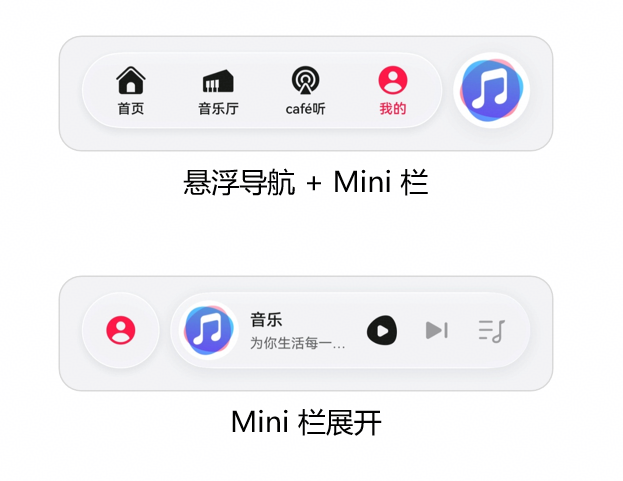
图:HarmonyOS 6悬浮导航 + Mini栏设计参考

图:HarmonyOS 6沉浸光感组件效果(支持强/均衡/弱三档)
扩展方向:
- 多用户PK模式:利用Body AR的骨骼数据实现双人同步动作对比
- AI语音私教:结合小艺智能体,根据疲劳状态语音提醒
- 运动数据上云:通过HarmonyOS分布式能力,手机采集AR数据,大屏显示3D姿态回放
- PC端专业版:利用HarmonyOS PC的大屏幕,同时显示多关节角度曲线和实时视频
六、结语
HarmonyOS 6的Face AR & Body AR能力,让应用第一次真正"看见"了用户。本文构建的AR健身私教系统,通过面部疲劳监测防止运动损伤 、骨骼姿态评估纠正动作错误 、沉浸光感提供情绪化的视觉反馈,展示了AR能力从"炫技"走向"实用"的完整路径。
随着HDC 2026的临近,HarmonyOS 6的生态正在快速成熟。对于开发者而言,现在正是将AR能力融入垂直场景(运动健康、教育培训、工业检测)的最佳时机。期待更多开发者加入鸿蒙生态,共同探索空间交互的无限可能。
转载自:https://blog.csdn.net/u014727709/article/details/160769926
欢迎 👍点赞✍评论⭐收藏,欢迎指正