- 在Anaconda中创建相关虚拟环境
注:Torch2.8需要python版本大于等于3.9
2.到PyTorch官网下滑到中段位置
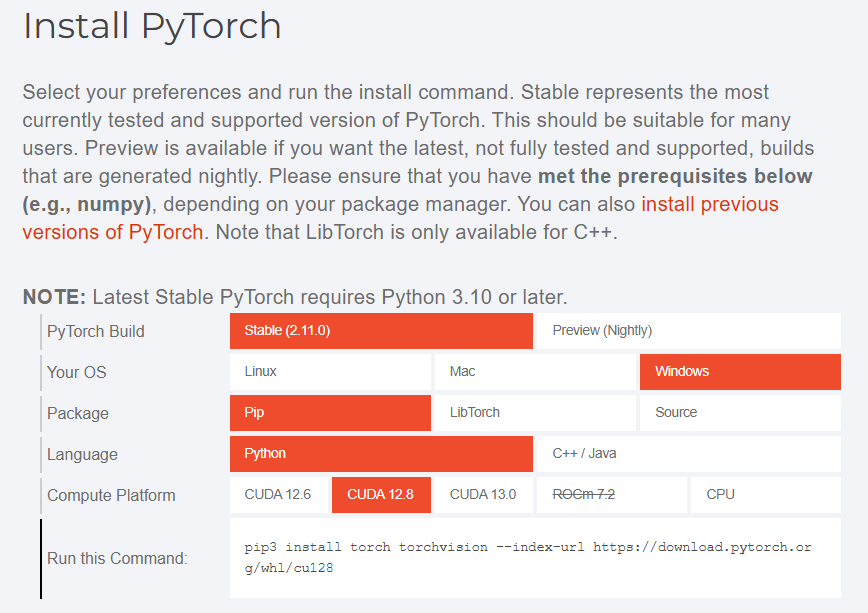
选择StableCUDA12.8以上12.6没试过不知道行不行。
复制Run this Command:中的链接
pip3 install torch torchvision --index-url https://download.pytorch.org/whl/cu128conda activate XXX 激活你需要运行的环境,如果之前安装
测试能不能用
import torch

print(f"PyTorch 版本: {torch.__version__}")

print(f"CUDA  是否可用: {torch.cuda.is_available()}")

print(f"CUDA 版本: {torch.version.cuda}")

print(f"GPU 设备: {torch.cuda.get_device_name(0)}")
如果你CUDA版本不支持sm_120就会报错
PyTorch 版本: 2.6.0+cu124

CUDA  是否可用: True

CUDA 版本: 12.4

E:\miniconda\miniconda3\envs\deepRAG\Lib\site-packages\torch\cuda\__init__.py:235: UserWarning:

NVIDIA GeForce RTX 5060 Ti with CUDA capability sm_120 is not compatible with the current PyTorch installation.

The current PyTorch install supports CUDA capabilities sm_50 sm_60 sm_61 sm_70 sm_75 sm_80 sm_86 sm_90.

If you want to use the NVIDIA GeForce RTX 5060 Ti GPU with PyTorch, please check the instructions at https://pytorch.org/get-started/locally/

  warnings.warn(

GPU 设备: NVIDIA GeForce RTX 5060 Ti
如果报错
1. 更新显卡驱动(前提条件)
Blackwell 架构需要非常新的驱动支持。请确保你的 NVIDIA 驱动版本在 570.xx 或更高。如果版本过低,即便安装了新版 PyTorch 也无法识别硬件。
2. 卸载旧版本
在当前环境中,先卸载现有的 PyTorch 相关包:
pip uninstall torch torchvision torchaudio然后运行我们在PyTorch官网找到的链接
pip3 install torch torchvision --index-url https://download.pytorch.org/whl/cu128等待安装就好了,安装完成再运行一下测试文件没问题就好了