前几期文章中已经介绍了基于#CodeBuddy、#OpenClaw 等通用智能体进行 #Skills 实践的案例。当用户使用这些工具时,只需直接从第三方Skill市场下载相关技能,或通过官方的skill-creator工具快速创建个性化技能,即可在工具使用过程中实现无感调用。
但如果我们需要自研/构建个性化智能体时,应如何支撑Skills的运行呢?本文选择 #LangChain #DeepAgent 框架为基础,通过实际案例分析Agent Skills的运行机制。
以下场景围绕生活中的一个典型简单场景展开,力求全面覆盖Agent Skills的各类使用方法。
案例业务背景和运行效果
场景名称:日常着装OOTD及出行助手
说明:小张在日常生活中缺乏对穿搭及出行必备物品的规划意识,常常找不到合适的衣物,也容易遗漏必要的携带工具。为此,他设计了一款智能体,该智能体能够每日定时根据小张所在城市的实时天气情况,为其推荐适宜的穿搭方案及需携带的工具。
智能体设计
根据应用场景,我们可将该智能体拆解为以下核心模块:
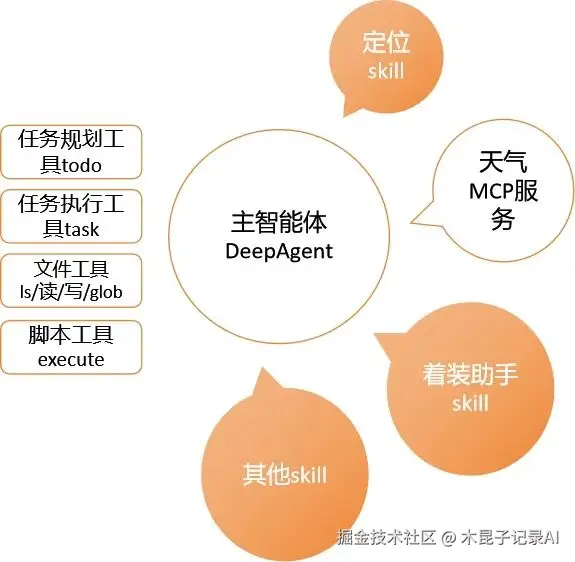
主智能体:
负责接收用户的需求,规划任务执行的具体步骤并迭代执行,在任务流程中自动选择调用相关技能/工具。当获取足够的信息后,调用大模型生成答案并输出。
技能工具:
- 位置工具:用于获取用户当前所在的城市信息;
- 天气工具:获取指定城市的实时天气信息,若用户未明确指定城市,则默认获取其所在城市的天气数据,具体包含天气状况、温度、湿度、风向等关键信息;
- 着装及出行建议技能:基于获取到的天气信息,为用户生成针对性的穿搭方案及出行必备物品建议。
案例运行分析
我们先来看下智能体运行的效果,并分析详细的过程。
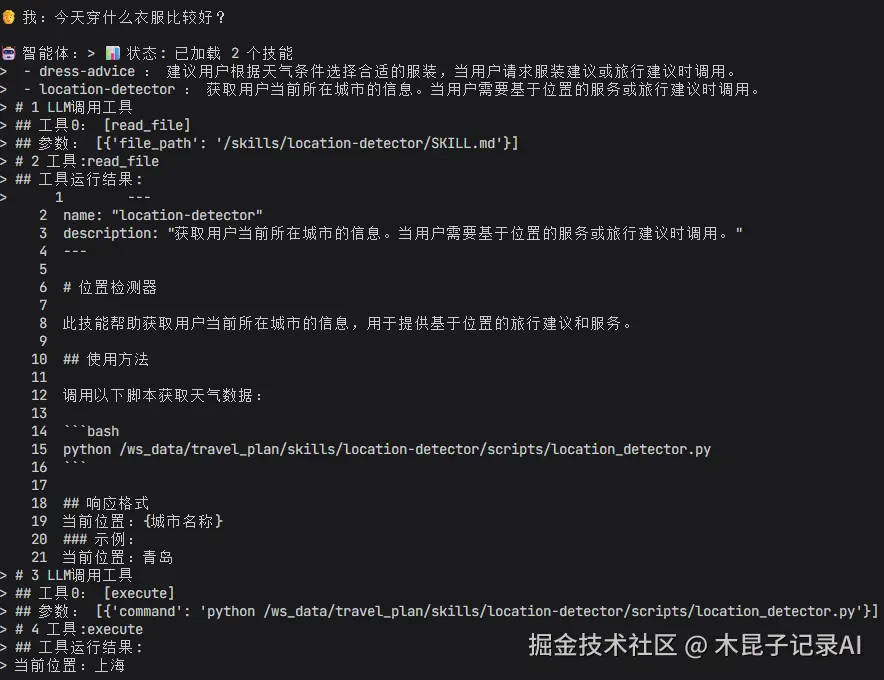
当用户提问关于位置的问题("今天穿什么衣服比较好?")时,可以看到:
- 智能体加载了2个skill(dress-advice、location-detector)的元数据(name和description)
- 智能体调用LLM规划任务,发现可以调用位置服务location-detector,需要先加载SKILL。
- 智能体执行read_file命令加载了location-detector技能的全文(SKILL.md)
- 智能体调用LLM更新规划任务,发现location-detector中有调用bash命令获取位置信息的脚本。
- 智能体执行execute命令调用scripts/location_detector.py脚本,返回结果:当前位置:上海。
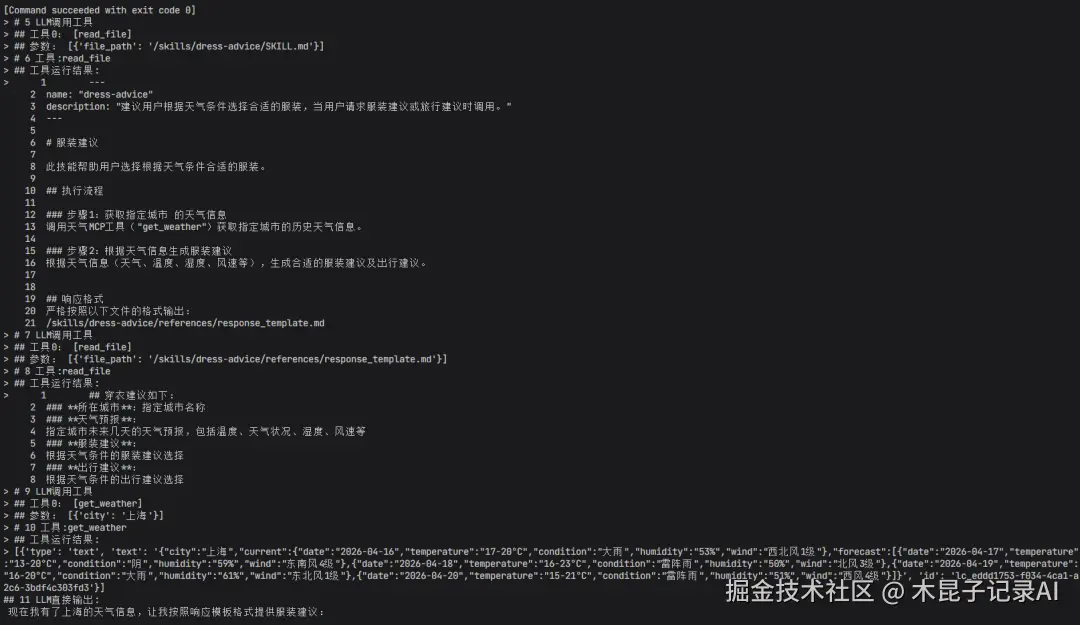
- 智能体继续调用LLM更新任务,发现可以调用dress-advice技能,需要先加载SKILL。
- 智能体执行read_file命令加载了dress-advice技能的全文(SKILL.md)
- 智能体调用LLM更新规划任务,发现dress-advice中有调用天气MCP工具("get_weather")获取指定城市的历史天气信息的步骤。
- 智能体调用天气MCP工具("get_weather")获取天气信息。
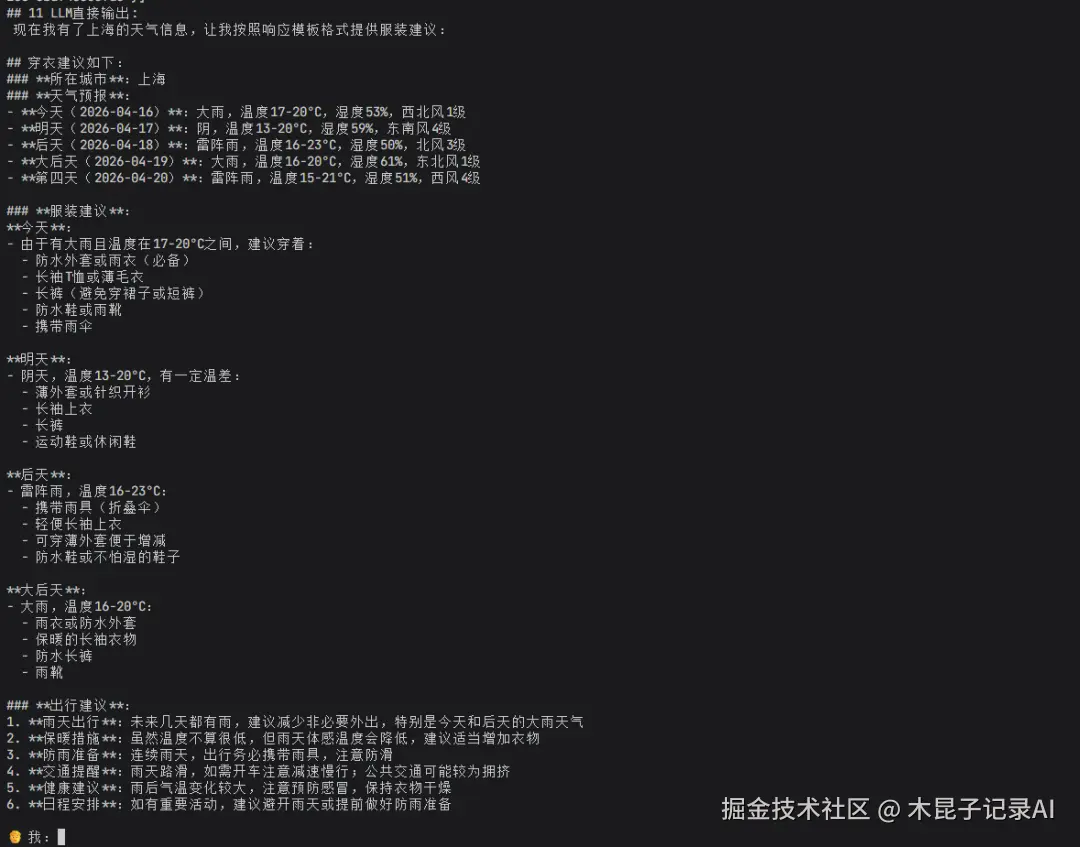
- 智能体最后是调用LLM根据前面拿到的天气信息回答具体着装的问题。
案例Skill结构解读
仔细分析以上案例运行过程,可以看到它用到了获取位置的Skill,根据位置获取天气的MCP服务,以及根据天气生成着装建议的Skill等。
其中获取指定城市的实时天气信息MCP服务,具体包含天气状况、温度、湿度、风向等,具体demo实现此处不作赘述。
以下我们来详细解读下这个案例中的两个关键Skill结构:
位置工具-Skill实现
1. 作用: 获取用户当前所在的城市信息。
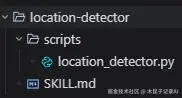
2. 目录结构:
3. SKILL.md详情:
md
---
name:"location-detector"
description:"获取用户当前所在城市的信息。当用户需要基于位置的服务或旅行建议时调用。"
---

# 位置检测器
此技能帮助获取用户当前所在城市的信息,用于提供基于位置的旅行建议和服务。
## 使用方法
调用以下脚本获取天气数据:
```bash
pythonscripts/location_detector.py
```
## 响应格式
当前位置:{城市名称}
### 示例:
当前位置:青岛
说明:
Name: location-detector 【注:和目录名保持一致,由小写字母和-组成。】
Description: 获取用户当前所在城市的信息。当用户需要基于位置的服务或旅行建议时调用。 【注:描述中说明触发条件,大模型会根据触发条件触发技能调用】
内容:Markdown格式,内容不固定,建议包括说明方法、响应格式等。脚本location_detector.py放到scripts/目录下,通过bash命令调用,不占用token。避免一个SKILL.md文件过大。
4. scripts/locataion_detector.py(模拟数据):
此处用模拟服务代替,生产环境中改为真实的逻辑实现。
sh
#!/usr/bin/env python3
"""位置检测脚本"""

import random
# 模拟城市数据
CITIES = [
    "北京", "上海", "广州", "深圳", "成都",
    "杭州", "南京", "武汉", "西安", "重庆",
    "天津", "苏州", "郑州", "长沙", "青岛"
]
# 城市基本信息
CITY_INFO = {
    "北京": "中国首都,政治文化中心",
    "上海": "中国经济金融中心,国际化大都市",
    "广州": "华南地区经济中心,千年商都",
    "深圳": "科技创新之城,改革开放前沿",
    "成都": "天府之国,休闲生活之都",
    "杭州": "人间天堂,电子商务中心",
    "南京": "历史文化名城,六朝古都",
    "武汉": "九省通衢,中部地区中心城市",
    "西安": "十三朝古都,历史文化名城",
    "重庆": "山城,火锅之都",
    "天津": "北方重要港口城市",
    "苏州": "园林之城,江南水乡",
    "郑州": "中原地区中心城市",
    "长沙": "娱乐之都,湘菜发源地",
    "青岛": "海滨城市,啤酒之都"
}
defget_current_location():
    """
    模拟获取当前位置

    Returns:
        dict: 包含城市信息的字典
    """
    # 随机选择一个城市作为当前位置
    current_city = random.choice(CITIES)

    return {
        "city": current_city,
        "info": CITY_INFO.get(current_city, "中国城市"),
        "timestamp": "2026-04-15 17:00:00"
    }
if __name__ == "__main__":
    location = get_current_location()
    print(f"当前位置:{location['city']}")
着装及出行建议技能-Skill实现
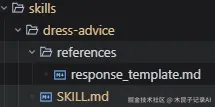
1. 目录结构:
2. SKILL.md详情:
md
---
name: "dress-advice"
description: "建议用户根据天气条件选择合适的服装,当用户请求服装建议或旅行建议时调用。"
---

# 服装建议
此技能帮助用户选择根据天气条件合适的服装。
## 执行流程
### 步骤1:获取指定城市 的天气信息
调用天气MCP工具("get_weather")获取指定城市的历史天气信息。
### 步骤2:根据天气信息生成服装建议
根据天气信息(天气、温度、湿度、风速等),生成合适的服装建议及出行建议。
## 响应格式
严格按照以下文件的格式输出:
/skills/dress-advice/references/response_template.md
说明:
Name: dress-advice 【注:和目录名保持一致,由小写字母和-组成。】
Description: 获取用户当前所在城市的信息。当用户需要基于位置的服务或旅行建议时调用。 【注:描述中说明触发条件,大模型会根据触发条件触发技能调用】
内容:Markdown格式,内容不固定,建议包括说明方法、响应格式等。参考资料,response_template.md放到references/目录下,避免一个SKILL.md文件过大。
3. references/response_template.md(响应模板)
md
## 穿衣建议如下:
### **所在城市**:指定城市名称
### **天气预报**:
指定城市未来几天的天气预报,包括温度、天气状况、湿度、风速等
### **服装建议**:
根据天气条件的服装建议选择
### **出行建议**:
根据天气条件的出行建议选择
案例Agent代码解读
本案例的主智能体是基于LangChain的DeepAgents框架实现,详细说明如下:
初始化模型
说明:模型配置放到settings里,替换为自己的模型参数。
py
llm = init_chat_model(
        model=settings.OPENAI_MODEL,
        api_key=settings.OPENAI_API_KEY,
        base_url=settings.OPENAI_API_BASE,
        streaming=True,
)
创建MCP服务客户端,可配置多个服务
py
    mcp_client = MultiServerMCPClient(
        {
            "weather":{
                "transport":"http",
                "url":"http://127.0.0.1:9001/mcp"
            }
        }
    )

    tools = await mcp_client.get_tools()
创建Backend后端运行环境
DeepAgent运行时需要操作后台文件(ls, read,write, glob,grep等),运行脚本(execute),此处为了简单先使用LocalShellbackend,生产环境建议采用沙箱环境,以确保安全。
py
    # 初始化backend
    root_dir = Path.cwd()
    shell_env = os.environ.copy()
    backend = LocalShellBackend(root_dir=root_dir, inherit_env=True, env=shell_env, virtual_mode=True)
创建DeepAgent
py
    agent = create_deep_agent(
        model=llm,
        tools=tools,
        backend=backend,
        skills=[skills_dir],
        checkpointer=checkpointer,
        system_prompt=SYSTEM_PROMPT
    )
说明:
- Model: 大模型配置
- Tools: MCP或者Langchain工具
- Backend: 本地shell运行环境
- Skills: 指向本地存放skills的目录
- Checkpointer: 本地内存记忆
- System_prompt: 智能体系统提示词。
智能体流式响应
py
async defastream_main(q):
    agent = await create_agent()

    inputs = {"messages": [{"role": "user", "content": q}]}
    step = 0
    asyncfor chunk in agent.astream(inputs, config={"configurable": {"thread_id": "job_01"}}):
        # 监控:是否加载成功
        if'SkillsMiddleware.before_agent'in chunk:
            count = len(chunk['SkillsMiddleware.before_agent'].get('skills_metadata', []))
            print(f"> 📊 状态: 已加载 {count} 个技能")
            for skill in chunk['SkillsMiddleware.before_agent'].get('skills_metadata', []):
                print(f">  - {skill.get('name', '')} : {skill.get('description', '')}")
        # # 监控:正在做什么
        if'model'in chunk:
            step += 1
            msg = chunk['model']['messages'][0]
            if msg.tool_calls:
                print(f"> # {step} LLM调用工具")
                # 只打印动作名称,不打印那一长串内容
                for idx, tool_call inenumerate(msg.tool_calls):
                    print(f"> ## 工具{idx}: [{tool_call['name']}]")
                    print(f"> ## 参数: [{tool_call['args']}]")
            elif msg.content:
                print(f"## {step} LLM直接输出:\n {msg.content}")
        if'tools'in chunk:
            step += 1
            print(f"> # {step} 工具:{chunk['tools']['messages'][0].name}")
完整代码dress_agent.py
py
"""智能体核心模块"""
from langchain_core.language_models import BaseChatModel
from langgraph.checkpoint.memory import MemorySaver
from langchain.chat_models import init_chat_model
from langchain_core.messages import  HumanMessage, AIMessage, ToolMessage
from deepagents import create_deep_agent
from deepagents.backends import LocalShellBackend
from langchain_mcp_adapters.client import MultiServerMCPClient
import os
from pathlib import Path
import asyncio
try:
    # 作为模块导入时使用相对导入
    from .config import settings
except ImportError:
    # 直接运行时使用绝对导入
    from config import settings

SYSTEM_PROMPT = """
## 角色
你是一个专业的服装建议助手,帮助用户选择合适的服装。
## 重要规则:
1. 始终用中文回复
"""
asyncdefcreate_agent() :
    """创建服装建议智能体

    Returns:
        配置好的 DeepAgent 实例
    """

    llm = init_chat_model(
        model=settings.OPENAI_MODEL,
        api_key=settings.OPENAI_API_KEY,
        base_url=settings.OPENAI_API_BASE,
        streaming=True,
    )
    mcp_client = MultiServerMCPClient(
        {
            "weather":{
                "transport":"http",
                "url":"http://127.0.0.1:9001/mcp"
            }
        }
    )
    tools = await mcp_client.get_tools()
    # 初始化checkpointer
    checkpointer = MemorySaver()
    # 初始化backend
    root_dir = f"/ws_data/travel_plan"# Path.cwd()
    skills_dir = f"/skills"
    shell_env = os.environ.copy()
    backend = LocalShellBackend(root_dir=root_dir, inherit_env=True, env=shell_env, virtual_mode=True)
    # 创建 agent
    agent = create_deep_agent(
        model=llm,
        tools=tools,
        backend=backend,
        skills=[skills_dir],
        checkpointer=checkpointer,
        system_prompt=SYSTEM_PROMPT
    )
    return agent
asyncdefastream_main(q):
    agent = await create_agent()
    inputs = {"messages": [{"role": "user", "content": q}]}
    step = 0
    asyncfor chunk in agent.astream(inputs, config={"configurable": {"thread_id": "job_01"}}):
        # 监控:是否加载成功
        if'SkillsMiddleware.before_agent'in chunk:
            count = len(chunk['SkillsMiddleware.before_agent'].get('skills_metadata', []))
            print(f"> 📊 状态: 已加载 {count} 个技能")
            for skill in chunk['SkillsMiddleware.before_agent'].get('skills_metadata', []):
                print(f">  - {skill.get('name', '')} : {skill.get('description', '')}")
        # # 监控:正在做什么
        if'model'in chunk:
            step += 1
            msg = chunk['model']['messages'][0]
            if msg.tool_calls:
                print(f"> # {step} LLM调用工具")
                # 只打印动作名称,不打印那一长串内容
                for idx, tool_call inenumerate(msg.tool_calls):
                    print(f"> ## 工具{idx}: [{tool_call['name']}]")
                    print(f"> ## 参数: [{tool_call['args']}]")
            elif msg.content:
                print(f"## {step} LLM直接输出:\n {msg.content}")
        if'tools'in chunk:
            step += 1
            print(f"> # {step} 工具:{chunk['tools']['messages'][0].name}")
            print(f"> ## 工具运行结果:\n> {chunk['tools']['messages'][0].content}")
程序入口main.py
提供用户和智能体一问一答的功能。
py
"""TravelPlan 旅行计划智能体 - CLI 入口"""

from agents.agent import astream_main
import asyncio

defmain():
    """主入口函数"""
    print("=" * 50)
    print("🗺️  您好,我是的专属生活助手!")
    print("=" * 50)
    print()
    # 检查配置
    print("输入您的问题开始对话,输入 'quit' 或 'exit' 退出")
    print("示例:'今天穿什么衣服比较好?'")
    print("-" * 50)
    # 交互循环
    whileTrue:
        try:
            user_input = input("\n🧑 我:").strip()
        except (EOFError, KeyboardInterrupt):
            print("\n\n👋 再见,祝生活愉快!")
            break
        ifnot user_input:
            continue
        if user_input.lower() in ("quit", "exit", "q"):
            print("👋 再见,祝您的生活愉快!")
            break
        if user_input.lower() in ("help", "帮助"):
            print("\n可用命令:")
            print("  - 直接输入问题,如'今天穿什么衣服比较好?'")
            print("  - quit/exit:退出程序")
            print("  - help:显示帮助")
            continue
        # 调用智能体
        print("\n🤖 服装建议:", end="", flush=True)
        try:
            asyncio.run(astream_main(user_input))

        except Exception as e:
            print(f"\n❌ 处理问题时出错:{e}")
            print("请重试或换一种方式描述您的问题")
if __name__ == "__main__":
    main()
启动智能体对话程序
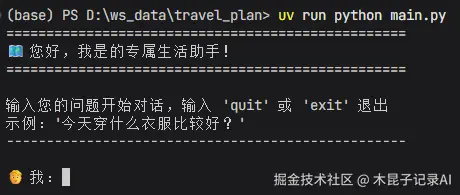
在终端里执行 python run main.py,就可以启动该智能体,和你进行日常穿搭的交互了:
DeepAgent源码分析
上文描述了如何基于DeepAgent框架实现一个带有两个Skill的智能体,分析了该智能体的源码构建过程。
接下来我们进一步看看这个智能体底层的DeepAgent框架本身的源码,分析下它是如何规划任务并调用Skills、Tools等工具的。
create_deep_agent源码分析
我们从DeepAgent的源码入手,创建DeepAgent的源码如下:
py
def create_deep_agent(# noqa: C901, PLR0912  # Complex graph assembly logic with many conditional branches
    model: str | BaseChatModel | None = None,
    tools: Sequence[BaseTool | Callable | dict[str, Any]] | None = None,
    *,
    system_prompt: str | SystemMessage | None = None,
    middleware: Sequence[AgentMiddleware] = (),
    subagents: Sequence[SubAgent | CompiledSubAgent | AsyncSubAgent] | None = None,
    skills: list[str] | None = None,
    memory: list[str] | None = None,
    response_format: ResponseFormat | None = None,
    context_schema: type[Any] | None = None,
    checkpointer: Checkpointer | None = None,
    store: BaseStore | None = None,
    backend: BackendProtocol | BackendFactory | None = None,
    interrupt_on: dict[str, bool | InterruptOnConfig] | None = None,
    debug: bool = False,
    name: str | None = None,
    cache: BaseCache | None = None,
) -> CompiledStateGraph:
    model = get_default_model() if model isNoneelse resolve_model(model)
    backend = backend if backend isnotNoneelse (StateBackend)

    # Build general-purpose subagent with default middleware stack
    gp_middleware: list[AgentMiddleware[Any, Any, Any]] = [
        TodoListMiddleware(),
        FilesystemMiddleware(backend=backend),
        create_summarization_middleware(model, backend),
        PatchToolCallsMiddleware(),
    ]
    if skills isnotNone:
        gp_middleware.append(SkillsMiddleware(backend=backend, sources=skills))
    gp_middleware.append(AnthropicPromptCachingMiddleware(unsupported_model_behavior="ignore"))
    if interrupt_on isnotNone:
        gp_middleware.append(HumanInTheLoopMiddleware(interrupt_on=interrupt_on))

    general_purpose_spec: SubAgent = {  # ty: ignore[missing-typed-dict-key]
        **GENERAL_PURPOSE_SUBAGENT,
        "model": model,
        "tools": tools or [],
        "middleware": gp_middleware,
    }

    # Set up subagent middleware
    inline_subagents: list[SubAgent | CompiledSubAgent] = []
    async_subagents: list[AsyncSubAgent] = []
    for spec in subagents or []:
        if"graph_id"in spec:
            # Then spec is an AsyncSubAgent
            async_subagents.append(cast("AsyncSubAgent", spec))
            continue
        if"runnable"in spec:
            # CompiledSubAgent - use as-is
            inline_subagents.append(spec)
        else:
            # SubAgent - fill in defaults and prepend base middleware
            subagent_model = spec.get("model", model)
            subagent_model = resolve_model(subagent_model)

            # Build middleware: base stack + skills (if specified) + user's middleware
            subagent_middleware: list[AgentMiddleware[Any, Any, Any]] = [
                TodoListMiddleware(),
                FilesystemMiddleware(backend=backend),
                create_summarization_middleware(subagent_model, backend),
                PatchToolCallsMiddleware(),
            ]
            subagent_skills = spec.get("skills")
            if subagent_skills:
                subagent_middleware.append(SkillsMiddleware(backend=backend, sources=subagent_skills))
            subagent_middleware.extend(spec.get("middleware", []))
            subagent_middleware.append(AnthropicPromptCachingMiddleware(unsupported_model_behavior="ignore"))

            processed_spec: SubAgent = {  # ty: ignore[missing-typed-dict-key]
                **spec,
                "model": subagent_model,
                "tools": spec.get("tools", tools or []),
                "middleware": subagent_middleware,
            }
            inline_subagents.append(processed_spec)

    # If an agent with general purpose name already exists in subagents, then don't add it
    # This is how you overwrite/configure general purpose subagent
    ifnotany(spec["name"] == GENERAL_PURPOSE_SUBAGENT["name"] for spec in inline_subagents):
        # Add a general purpose subagent if it doesn't exist yet
        inline_subagents.insert(0, general_purpose_spec)

    # Build main agent middleware stack
    deepagent_middleware: list[AgentMiddleware[Any, Any, Any]] = [
        TodoListMiddleware(),
    ]
    if skills isnotNone:
        deepagent_middleware.append(SkillsMiddleware(backend=backend, sources=skills))
    deepagent_middleware.extend(
        [
            FilesystemMiddleware(backend=backend),
            SubAgentMiddleware(
                backend=backend,
                subagents=inline_subagents,
            ),
            create_summarization_middleware(model, backend),
            PatchToolCallsMiddleware(),
        ]
    )

    if async_subagents:
        # Async here means that we run these subagents in a non-blocking manner.
        # Currently this supports agents deployed via LangSmith deployments.
        deepagent_middleware.append(AsyncSubAgentMiddleware(async_subagents=async_subagents))

    if middleware:
        deepagent_middleware.extend(middleware)
    # Caching + memory after all other middleware so memory updates don't
    # invalidate the Anthropic prompt cache prefix.
    deepagent_middleware.append(AnthropicPromptCachingMiddleware(unsupported_model_behavior="ignore"))
    if memory isnotNone:
        deepagent_middleware.append(MemoryMiddleware(backend=backend, sources=memory))
    if interrupt_on isnotNone:
        deepagent_middleware.append(HumanInTheLoopMiddleware(interrupt_on=interrupt_on))

    # Combine system_prompt with BASE_AGENT_PROMPT
    if system_prompt isNone:
        final_system_prompt: str | SystemMessage = BASE_AGENT_PROMPT
    elifisinstance(system_prompt, SystemMessage):
        final_system_prompt = SystemMessage(content_blocks=[*system_prompt.content_blocks, {"type": "text", "text": f"\n\n{BASE_AGENT_PROMPT}"}])
    else:
        # String: simple concatenation
        final_system_prompt = system_prompt + "\n\n" + BASE_AGENT_PROMPT

    return create_agent(
        model,
        system_prompt=final_system_prompt,
        tools=tools,
        middleware=deepagent_middleware,
        response_format=response_format,
        context_schema=context_schema,
        checkpointer=checkpointer,
        store=store,
        debug=debug,
        name=name,
        cache=cache,
    ).with_config(
        {
            "recursion_limit": 10_001,
            "metadata": {
                "ls_integration": "deepagents",
                "versions": {"deepagents": __version__},
                "lc_agent_name": name,
            },
        }
    )
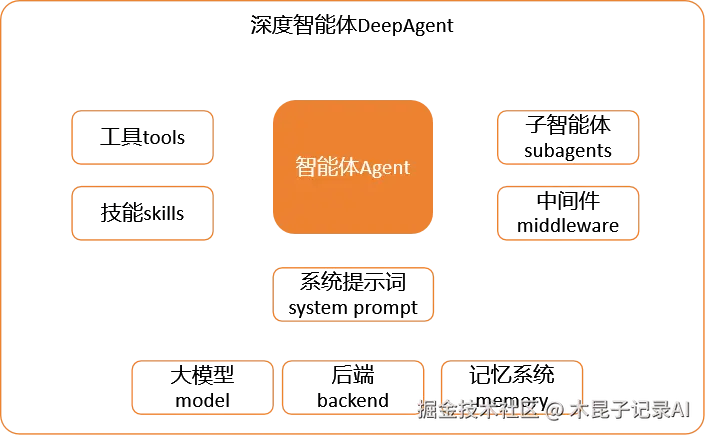
从源码中可以看出,DeepAgent是在Agent的基础上添加了一系列的插件,包括tools、skills、subagent等,其中skills和subagent等通过middleware的形式注册到智能体Agent,MCP服务作为tools注册到智能体Agent。如图所示:
create_agent源码分析
进一步分析以上代码中引用的create_agent的源码:
py
def create_agent(
        model: str | BaseChatModel,
        tools: Sequence[BaseTool | Callable[..., Any] | dict[str, Any]] | None = None,
        *,
        system_prompt: str | SystemMessage | None = None,
        middleware: Sequence[AgentMiddleware[StateT_co, ContextT]] = (),
        response_format: ResponseFormat[ResponseT] | type[ResponseT] | dict[str, Any] | None = None,
        state_schema: type[AgentState[ResponseT]] | None = None,
        context_schema: type[ContextT] | None = None,
        checkpointer: Checkpointer | None = None,
        store: BaseStore | None = None,
        interrupt_before: list[str] | None = None,
        interrupt_after: list[str] | None = None,
        debug: bool = False,
        name: str | None = None,
        cache: BaseCache[Any] | None = None,
) -> CompiledStateGraph[
    AgentState[ResponseT], ContextT, _InputAgentState, _OutputAgentState[ResponseT]
]:
    ...

    # create graph, add nodes
    graph: StateGraph[
        AgentState[ResponseT], ContextT, _InputAgentState, _OutputAgentState[ResponseT]
    ] = StateGraph(
        state_schema=resolved_state_schema,
        input_schema=input_schema,
        output_schema=output_schema,
        context_schema=context_schema,
    )

    ...
    # Use sync or async based on model capabilities
    graph.add_node("model", RunnableCallable(model_node, amodel_node, trace=False))

    # Only add tools node if we have tools
    if tool_node isnotNone:
        graph.add_node("tools", tool_node)

    # Add middleware nodes
    for m in middleware:
        if (
                m.__class__.before_agent isnot AgentMiddleware.before_agent
                or m.__class__.abefore_agent isnot AgentMiddleware.abefore_agent
        ):
            ...
            graph.add_node(
                f"{m.name}.before_agent", before_agent_node, input_schema=resolved_state_schema
            )

        if (
                m.__class__.before_model isnot AgentMiddleware.before_model
                or m.__class__.abefore_model isnot AgentMiddleware.abefore_model
        ):
            ...
            graph.add_node(
                f"{m.name}.before_model", before_node, input_schema=resolved_state_schema
            )

        if (
                m.__class__.after_model isnot AgentMiddleware.after_model
                or m.__class__.aafter_model isnot AgentMiddleware.aafter_model
        ):
            ...
            graph.add_node(f"{m.name}.after_model", after_node, input_schema=resolved_state_schema)

        if (
                m.__class__.after_agent isnot AgentMiddleware.after_agent
                or m.__class__.aafter_agent isnot AgentMiddleware.aafter_agent
        ):
            ...
            graph.add_node(
                f"{m.name}.after_agent", after_agent_node, input_schema=resolved_state_schema
            )

    ...

    graph.add_edge(START, entry_node)
    # add conditional edges only if tools exist
    if tool_node isnotNone:
        ...
        graph.add_conditional_edges(
            "tools",
            RunnableCallable(
                _make_tools_to_model_edge(
                    tool_node=tool_node,
                    model_destination=loop_entry_node,
                    structured_output_tools=structured_output_tools,
                    end_destination=exit_node,
                ),
                trace=False,
            ),
            tools_to_model_destinations,
        )

        ...

        graph.add_conditional_edges(
            loop_exit_node,
            RunnableCallable(
                _make_model_to_tools_edge(
                    model_destination=loop_entry_node,
                    structured_output_tools=structured_output_tools,
                    end_destination=exit_node,
                ),
                trace=False,
            ),
            model_to_tools_destinations,
        )
    eliflen(structured_output_tools) > 0:
        graph.add_conditional_edges(
            loop_exit_node,
            RunnableCallable(
                _make_model_to_model_edge(
                    model_destination=loop_entry_node,
                    end_destination=exit_node,
                ),
                trace=False,
            ),
            [loop_entry_node, exit_node],
        )
    elif loop_exit_node == "model":
        # If no tools and no after_model, go directly to exit_node
        graph.add_edge(loop_exit_node, exit_node)
    ...
    return graph.compile(
        checkpointer=checkpointer,
        store=store,
        interrupt_before=interrupt_before,
        interrupt_after=interrupt_after,
        debug=debug,
        name=name,
        cache=cache,
    ).with_config(config)
可以看出Agent 的本质是基于LangGraph的一个流程图:LLM + 工具 + 动态决策循环,其基本原理如下:

其中的工具包含:
1、系统默认工具:包括任务规划、文件操作等工具。
2、用户注入的工具:包括MCP工具、Middleware(skills、subagents)等。
案例Agent 不是固定链式调用,而是一个典型的ReAct模式智能体,每一步都由 LLM 自己决定下一步做什么:
- Reason(思考)LLM 接收用户问题 + 历史上下文 + 工具描述,自主判断:
- 是否需要调用工具?
- 调用哪个工具?
- 传入什么参数?
-
Act(行动)执行工具(搜索、API、数据库、代码解释器等)。
-
Observe(观察)把工具返回结果丢回给 LLM,进入下一轮思考。
-
终止条件LLM 认为信息足够,直接输出最终答案,循环结束。
本系列说明:在本系列中我们将通过不同 AI Agent(如 Code Buddy、OpenClaw、OpenCode、Hermes Agent 等)作为载体,结合具体业务案例进行实战,以深入剖析 Skill 的实现机制和底层原理。
参考对比:
用OpenClaw帮孩子成为真学霸---带你拆解AI Agent执行Skill+MCP的原理
---End---
本文作者:陈治中
本文原载:公众号"木昆子记录AI"