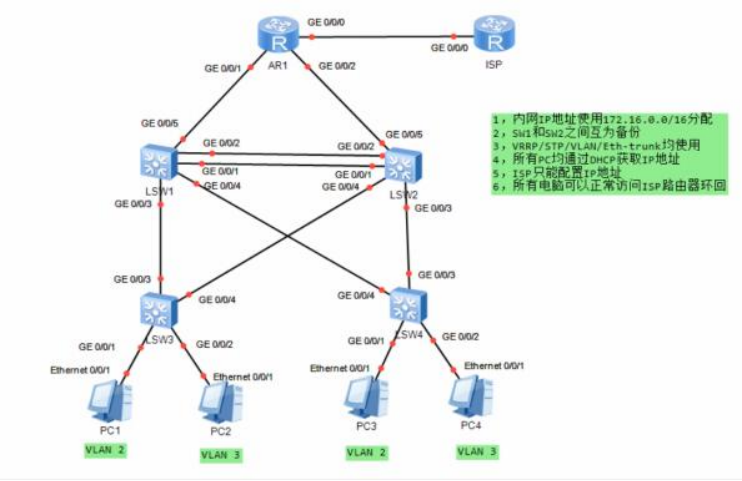
一.要求及拓扑图如下:
1. 内网IP地址使用<172.16.0.0>/16划分
2. vlan遵循最少vlan透传原则
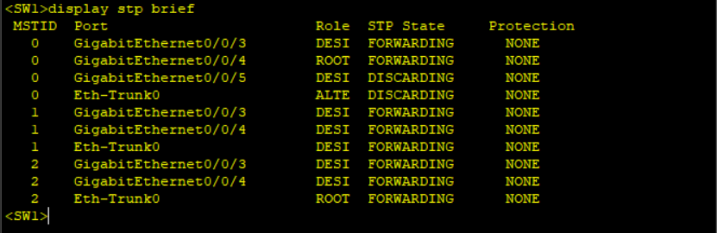
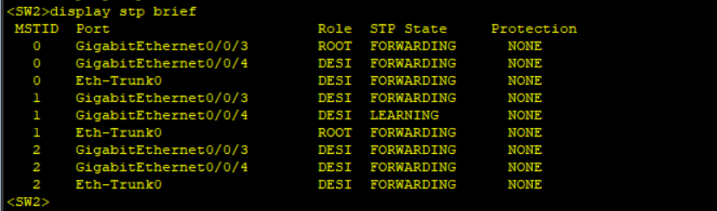
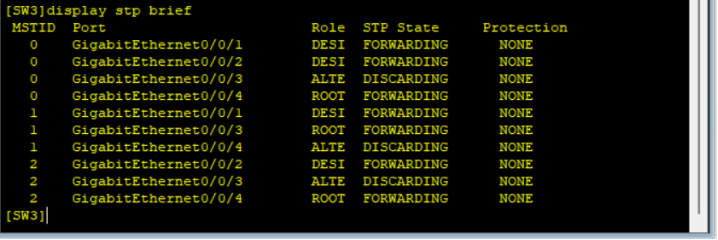
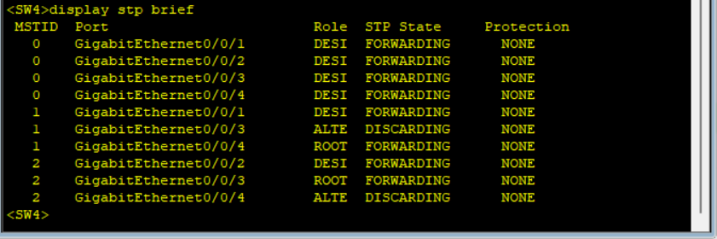
3. vlan2 属于 instance1 ;vlan3 属于 instance2 ,SW1是instance1的主根, instance2的备份根, SW2反之
4. SW1为vlan2的主网关设备, vlan3的备份网关设备; SW2反之
3. SW1与SW2直接链路做聚合
4. 所有pc均通过DHCP获取IP地址
5. ISP只配置IP地址
6. 所有电脑可以正常访问ISP路由器环回
二.解题思路及配置顺序:
-
根据图中内网广播域个数划分对应网段
-
创建eth-trunk,划入成员接口
-
创建vlan、划分接口类型
-
MSTP配置
-
配置IP地址
-
VRRP配置,增强网关可靠性
-
配置DHCP,并测试
-
路由互通(自选协议)
-
配置NAT,做公私网的转换
-
测试 ···
三.解题拓扑图及设备配置如下:
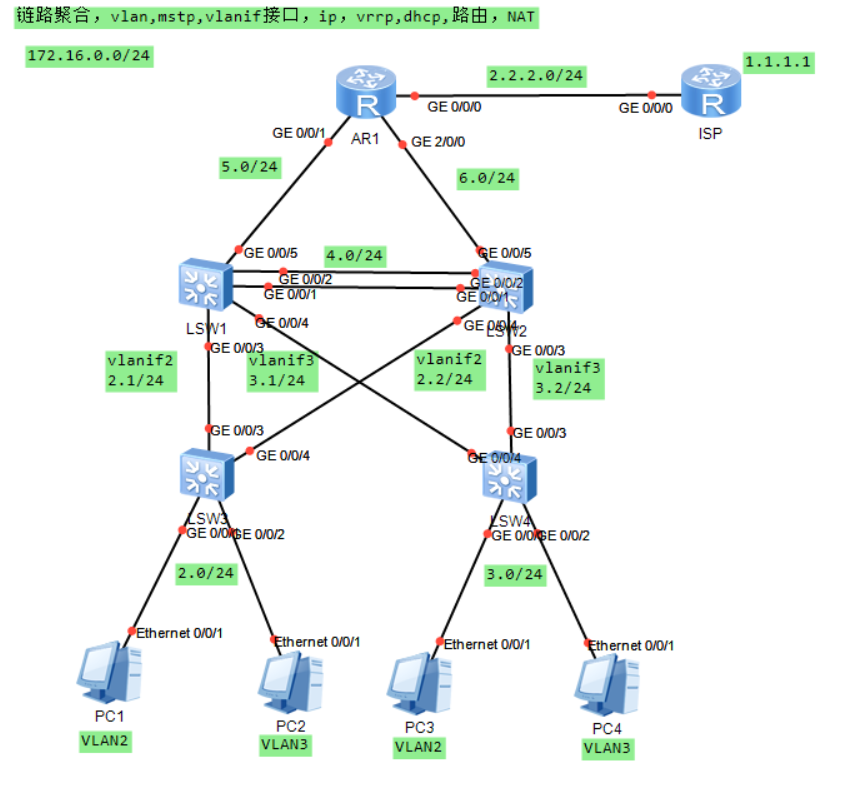
1.接入交换机 LSW3 配置:
system-view
sysname LSW3
vlan batch 2 3
# 下联PC配置
interface Ethernet0/0/1
port link-type access
port default vlan 2
interface Ethernet0/0/2
port link-type access
port default vlan 3
# 上联核心配置(透传必要VLAN)
interface GigabitEthernet0/0/3
port link-type trunk
port trunk allow-pass vlan 2 3
interface GigabitEthernet0/0/4
port link-type trunk
port trunk allow-pass vlan 2 3
# MSTP配置(透传所有VLAN)
stp mode mstp
stp region-configuration
region-name MSTP-REGION
instance 1 vlan 2
instance 2 vlan 3
active region-configuration
quit
stp enable
quit
2.接入交换机 LSW4 配置:
system-view
sysname LSW4
vlan batch 2 3
# 下联PC配置
interface Ethernet0/0/1
port link-type access
port default vlan 2
interface Ethernet0/0/2
port link-type access
port default vlan 3
# 上联核心配置
interface GigabitEthernet0/0/3
port link-type trunk
port trunk allow-pass vlan 2 3
interface GigabitEthernet0/0/4
port link-type trunk
port trunk allow-pass vlan 2 3
# MSTP配置(与LSW3保持一致)
stp mode mstp
stp region-configuration
region-name MSTP-REGION
instance 1 vlan 2
instance 2 vlan 3
active region-configuration
quit
stp enable
quit
3.核心交换机 LSW1 配置:
# 基础配置与 VLAN
system-view
sysname LSW1
vlan batch 2 3 5
# 与AR1互联VLAN5
interface GigabitEthernet0/0/5
port link-type access
port default vlan 5
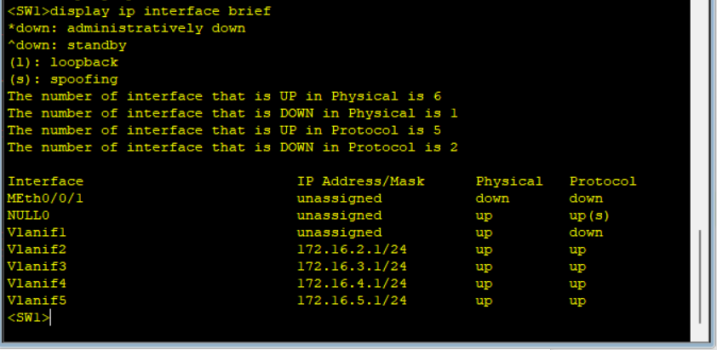
interface Vlanif5
ip address 172.16.5.1 255.255.255.0
# 链路聚合(与 LSW2 互联)
interface Eth-Trunk0
port link-type trunk
port trunk allow-pass vlan 2 3
interface GigabitEthernet0/0/1
eth-trunk 0
interface GigabitEthernet0/0/2
eth-trunk 0
# MSTP 配置(满足根桥要求)
stp mode mstp
stp region-configuration
region-name MSTP-REGION
instance 1 vlan 2
instance 2 vlan 3
active region-configuration
quit
# 要求:instance1主根,instance2备份根
stp instance 1 root primary
stp instance 2 root secondary
stp enable
# VRRP 配置(满足网关主备)
VLAN2配置(主网关)
interface Vlanif2
ip address 172.16.2.1 255.255.255.0
vrrp vrid 2 virtual-ip 172.16.2.3
vrrp vrid 2 priority 120
vrrp vrid 2 preempt-mode timer delay 0
VLAN3配置(备份网关)
interface Vlanif3
ip address 172.16.3.1 255.255.255.0
vrrp vrid 3 virtual-ip 172.16.3.3
vrrp vrid 3 priority 100
vrrp vrid 3 preempt-mode timer delay 0
# DHCP 配置(为 PC 分配 IP)
dhcp enable
ip pool VLAN2
gateway-list 172.16.2.3
network 172.16.2.0 mask 255.255.255.0
ip pool VLAN3
gateway-list 172.16.3.3
network 172.16.3.0 mask 255.255.255.0
interface Vlanif2
dhcp select global
interface Vlanif3
dhcp select global
# 静态路由(回包给 AR1)
ip route-static 0.0.0.0 0.0.0.0 172.16.5.2
quit
4.核心交换机 LSW2 配置:
# 基础配置与 VLAN
system-view
sysname LSW2
vlan batch 2 3 6
# 与AR1互联VLAN6
interface GigabitEthernet0/0/1
port link-type access
port default vlan 6
interface Vlanif6
ip address 172.16.6.1 255.255.255.0
# 链路聚合(与 LSW1 互联)
interface Eth-Trunk0
mode lacp-static
port link-type trunk
port trunk allow-pass vlan 2 3
interface GigabitEthernet0/0/1
eth-trunk 0
interface GigabitEthernet0/0/2
eth-trunk 0
# MSTP 配置(满足根桥要求)
stp mode mstp
stp region-configuration
region-name MSTP-REGION
instance 1 vlan 2
instance 2 vlan 3
active region-configuration
quit
# 要求:instance1备份根,instance2主根
stp instance 1 root secondary
stp instance 2 root primary
stp enable
# VRRP 配置(满足网关主备)
# VLAN2配置(备份网关)
interface Vlanif2
ip address 172.16.2.2 255.255.255.0
vrrp vrid 2 virtual-ip 172.16.2.3
vrrp vrid 2 priority 100
vrrp vrid 2 preempt-mode timer delay 0
# VLAN3配置(主网关)
interface Vlanif3
ip address 172.16.3.2 255.255.255.0
vrrp vrid 3 virtual-ip 172.16.3.3
vrrp vrid 3 priority 120
vrrp vrid 3 preempt-mode timer delay 0
# DHCP 配置(为 PC 分配 IP)
dhcp enable
ip pool VLAN2
gateway-list 172.16.2.3
network 172.16.2.0 mask 255.255.255.0
ip pool VLAN3
gateway-list 172.16.3.3
network 172.16.3.0 mask 255.255.255.0
interface Vlanif2
dhcp select global
interface Vlanif3
dhcp select global
# 静态路由(回包给 AR1)
ip route-static 0.0.0.0 0.0.0.0 172.16.6.2
quit
5.出口路由器 AR1 配置:
# 接口 IP 配置
system-view
sysname AR1
# 与LSW1互联
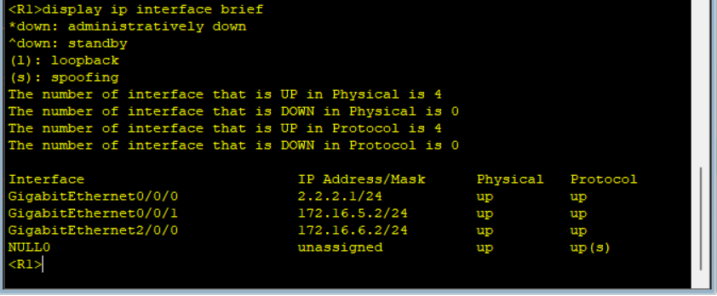
interface GigabitEthernet0/0/1
ip address 172.16.5.2 255.255.255.0
# 与LSW2互联
interface GigabitEthernet2/0/0
ip address 172.16.6.2 255.255.255.0
# 与ISP互联
interface GigabitEthernet0/0/0
ip address 2.2.2.1 255.255.255.0
# 静态路由(回包内网)
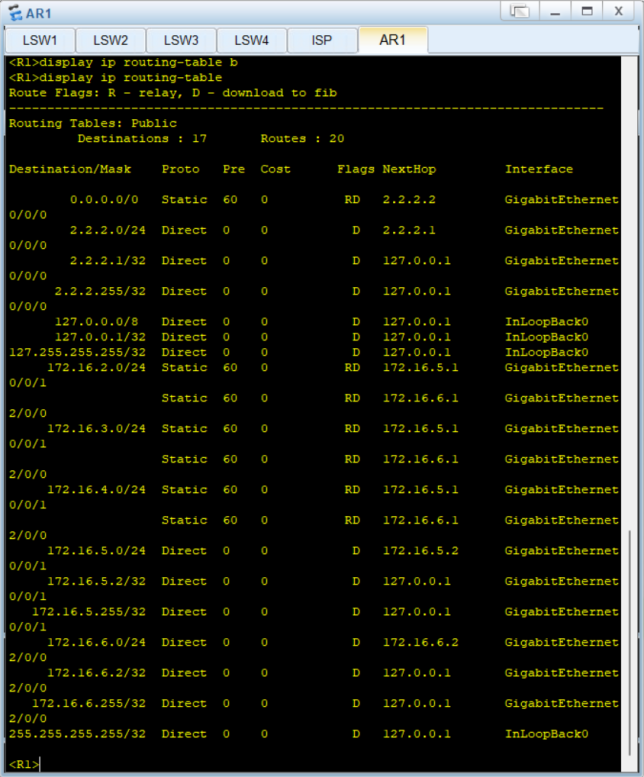
ip route-static 172.16.2.0 255.255.255.0 172.16.5.1
ip route-static 172.16.3.0 255.255.255.0 172.16.6.1
# 为了负载均衡(也可以写浮动路由)
ip route-static 172.16.2.0 255.255.255.0 172.16.6.1
ip route-static 172.16.3.0 255.255.255.0 172.16.5.1
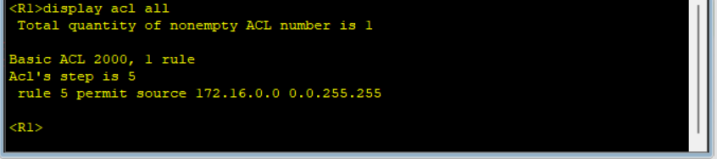
# NAT 配置(让 PC 访问公网)
acl number 2000
rule permit source 172.16.0.0 0.0.255.255
interface GigabitEthernet0/0/0
nat outbound 2000
quit
6.ISP 路由器配置(仅 IP 地址)
system-view
sysname ISP
interface GigabitEthernet0/0/0
ip address 2.2.2.2 255.255.255.0
interface LoopBack0
ip address 1.1.1.1 255.255.255.255
quit
四.验收:
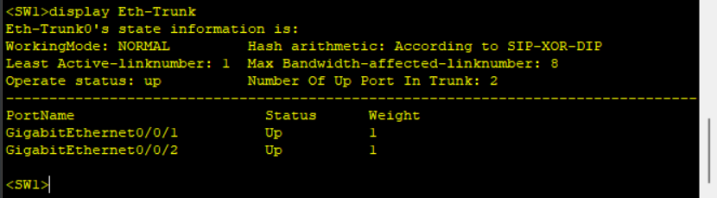
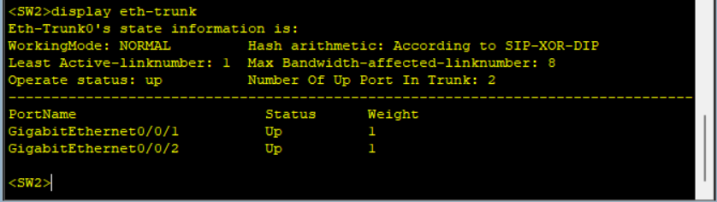
1. 验收聚合链路结果 display Eth-Trunk {number}
SW1:
SW2:
2. 验收 vlan 划分 display port vlan active
SW1:
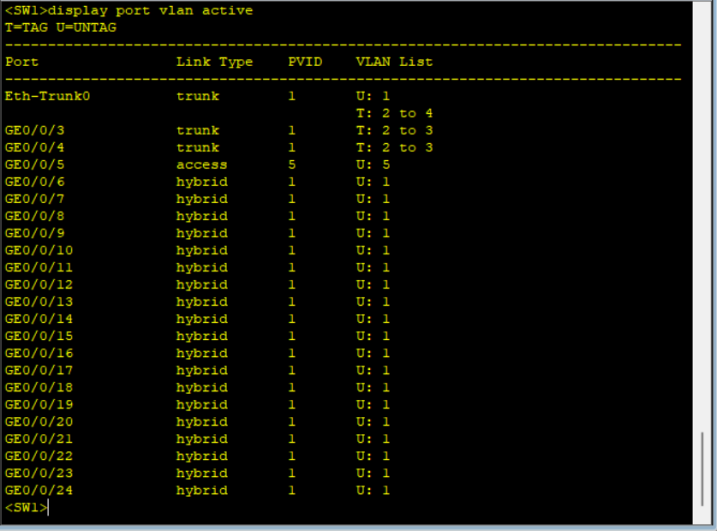
SW2:
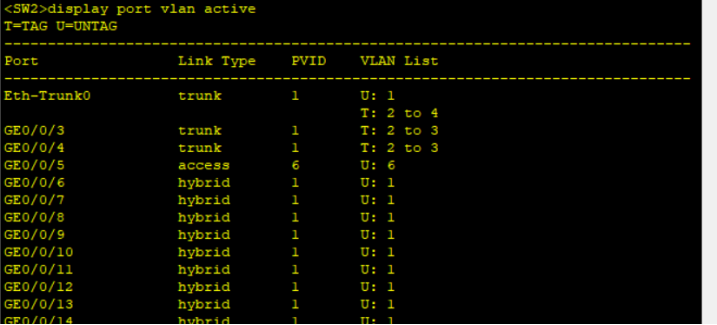
SW3:
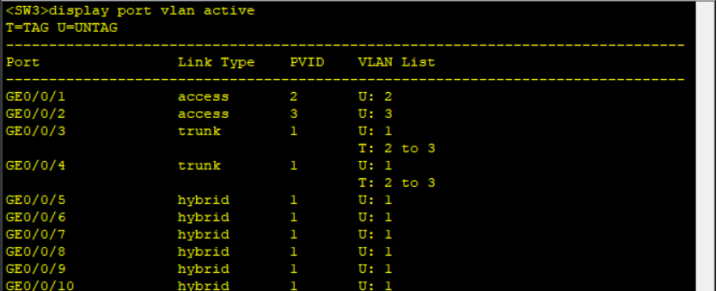
SW4:
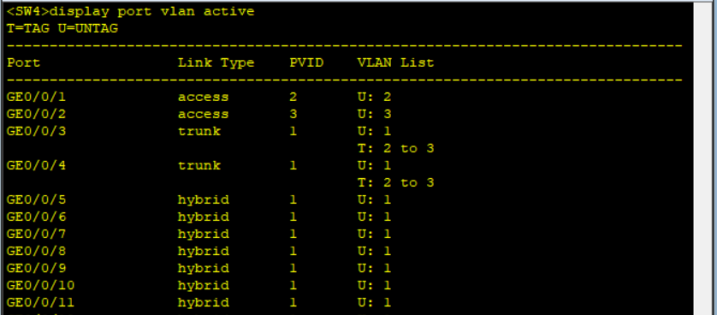
3.验收 MSTP 配置 display stp brief
SW1:
SW2:
SW3:
SW4:
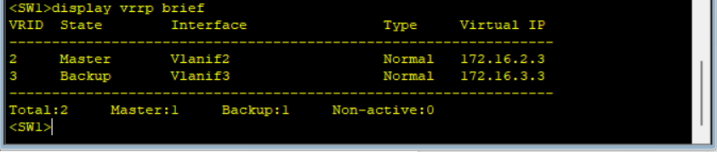
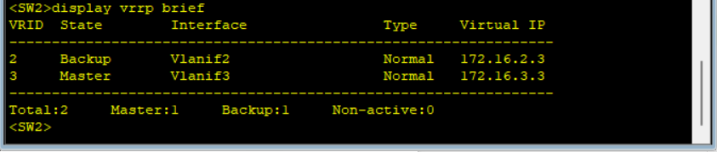
4. 验收 VRRP 配置 display vrrp brief
SW1:
SW2:
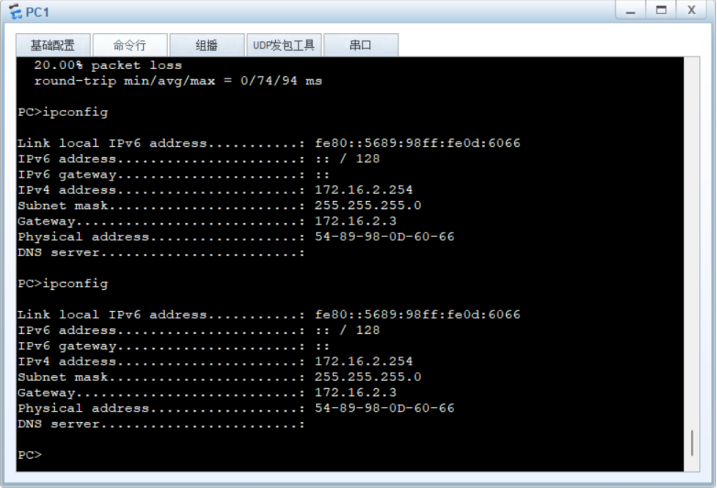
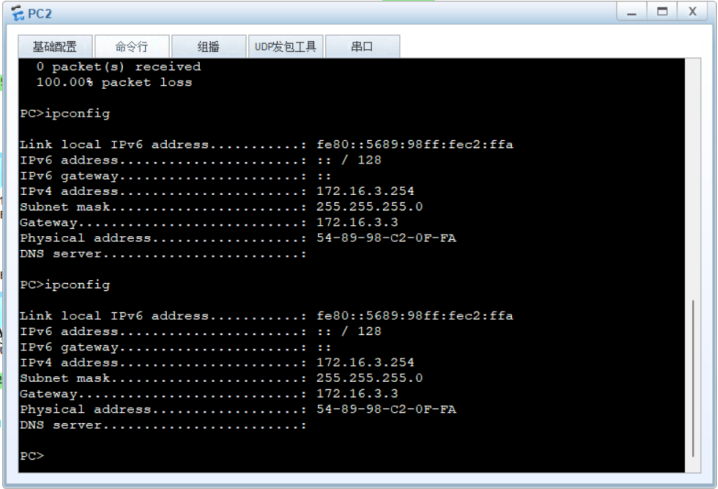
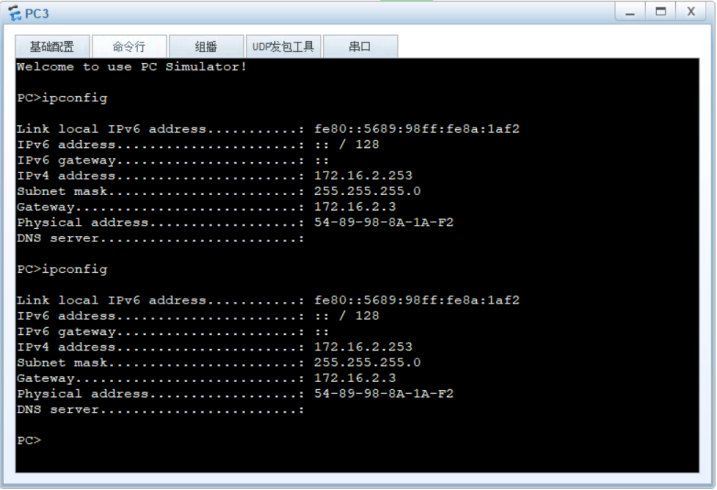
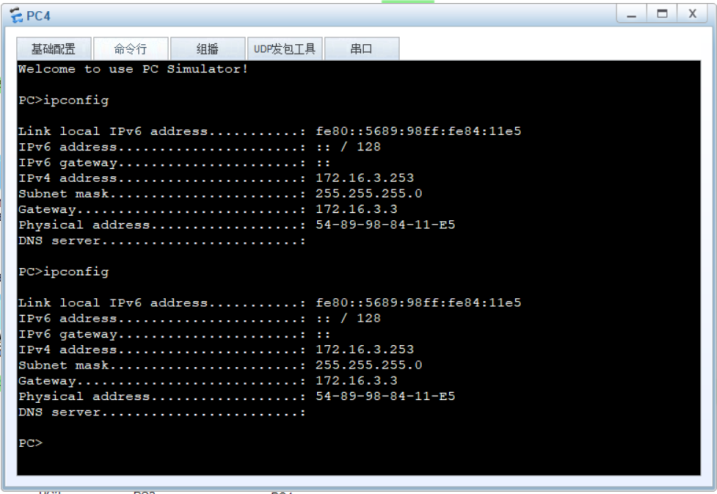
5. 验收 DHCP 配置
PC1:
PC2:
PC3:
PC4:
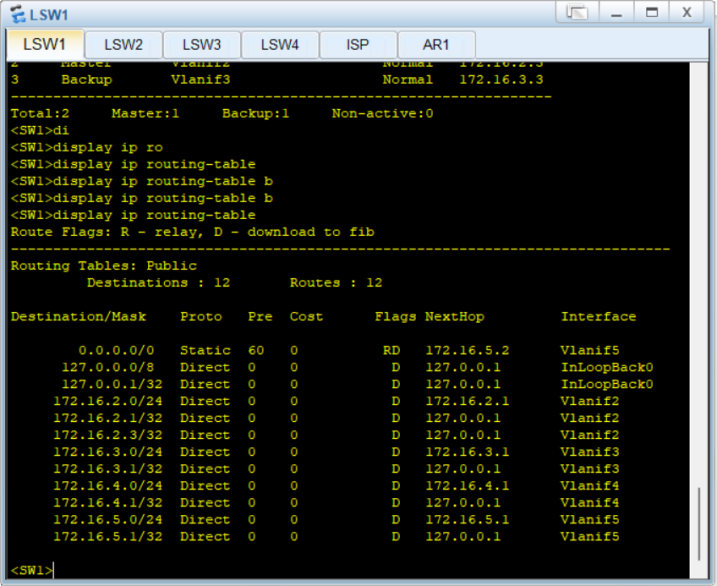
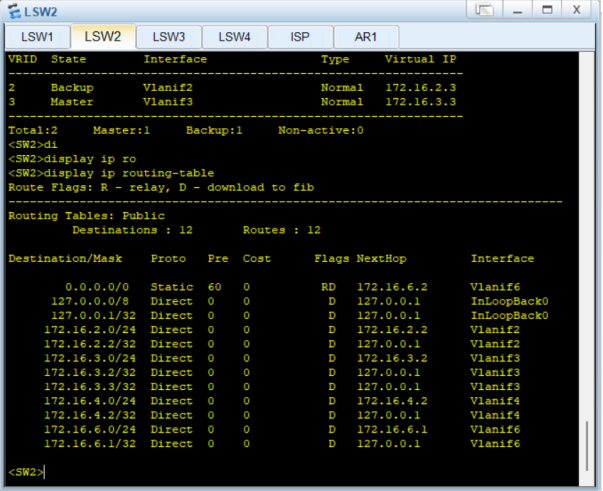
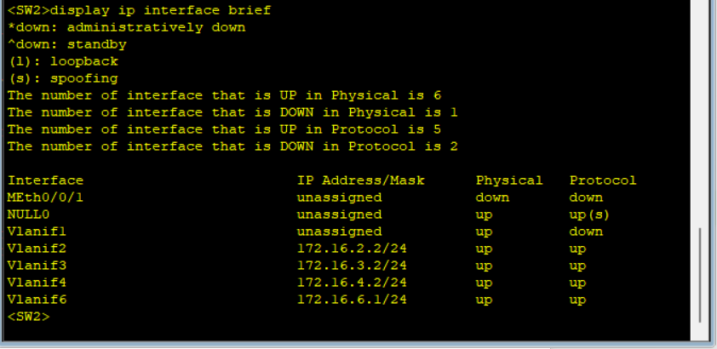
6. 验收路由情况
SW1:
SW2:
R1:
7. 验收 NAT 配置
ACL配置:
接口配置:
SW1:
R1:
SW2:
实验到此结束!