挑战AI辅助从零构建3D模型编辑器:基于Vue3 + Three.js的现代化架构设计
引言
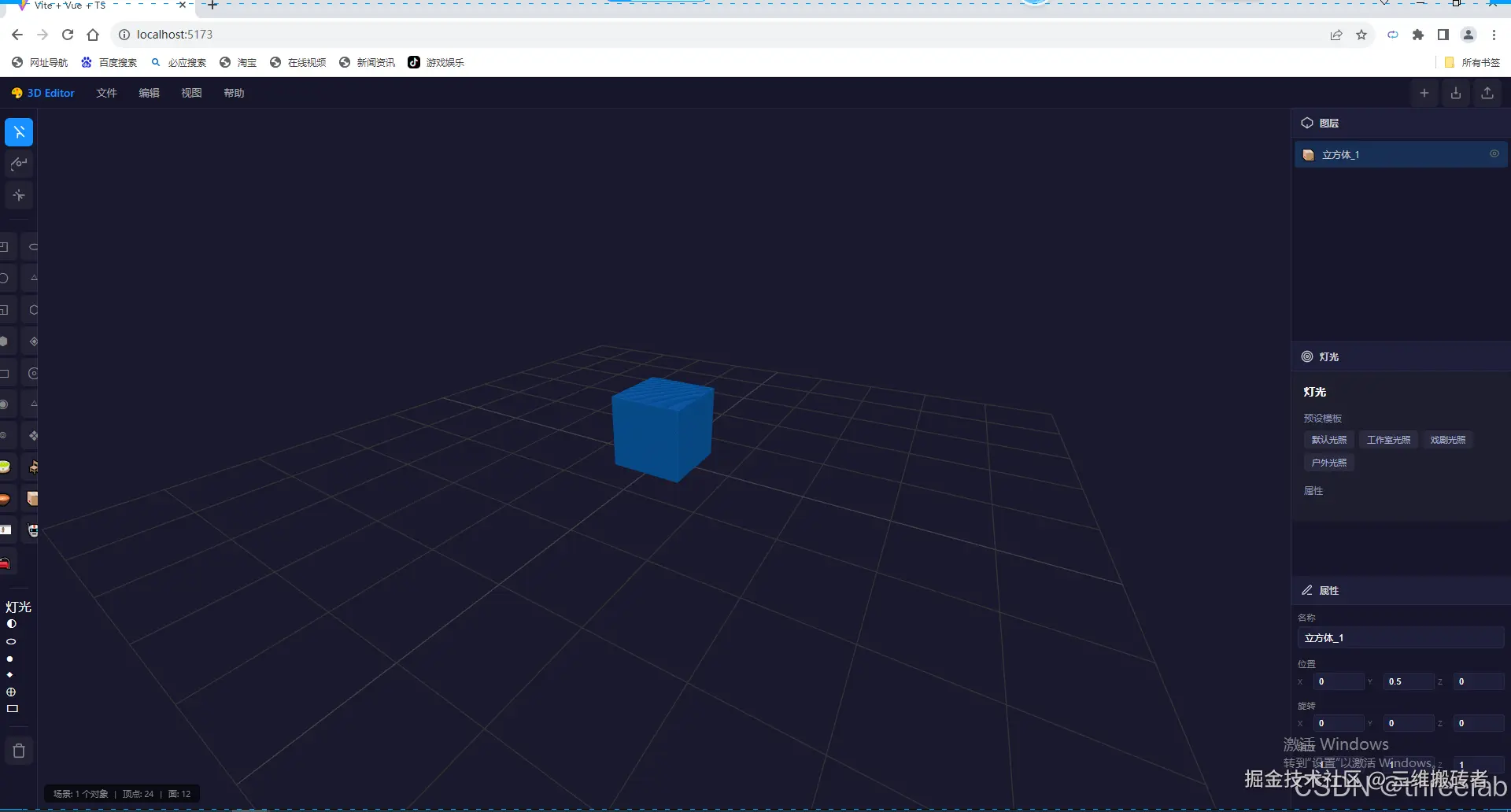
在Web 3D开发领域,构建一个可扩展、可维护的3D模型编辑器是一项具有挑战性的任务。本文将详细介绍如何基于Vue3 + Three.js构建一个专业级的3D模型编辑器框架,包含完整的架构设计、核心实现和最佳实践。
一、项目背景与目标
1.1 技术趋势
随着WebGL技术的成熟和浏览器性能的提升,Web端3D应用越来越普及:
- 在线3D模型查看器
- 交互式产品展示
- 3D游戏和虚拟体验
- 建筑可视化
1.2 项目目标
我们的目标是构建一个:
- 可扩展:支持插件化扩展机制
- 可维护:清晰的分层架构设计
- 高性能:优化的渲染和资源管理
- 易用性:友好的API和开发体验
二、技术栈选型
2.1 核心技术对比
| 技术 | 选型理由 |
|---|---|
| Three.js | 最成熟的Web 3D库,API稳定,社区活跃 |
| Vue 3 | 组合式API适合复杂交互,响应式系统完善 |
| TypeScript | 类型安全,减少运行时错误 |
| Vite | 快速热更新,开发体验优秀 |
2.2 技术栈详情
typescript
// package.json 核心依赖
{
  "three": "^0.183.0",
  "vue": "^3.5.0",
  "typescript": "^5.7.2",
  "vite": "^6.1.0"
}
三、架构设计
3.1 分层架构
yaml
┌─────────────────────────────────────────────────────────────┐
│  Layer 4: UI层                                             │
│  ┌─────────────────────────────────────────────────────┐    │
│  │  SceneView (场景视图)                               │    │
│  └─────────────────────────────────────────────────────┘    │
│                           │                                 │
│                           ▼                                 │
│  Layer 1: Core层                                            │
│  ┌─────────────────────────────────────────────────────┐    │
│  │  SceneManager (场景管理)                             │    │
│  └─────────────────────────────────────────────────────┘    │
└─────────────────────────────────────────────────────────────┘
3.2 实际项目结构
bash
src/
├── core/                    # 核心模块
│   ├── SceneManager.ts      # 场景管理核心类
│   └── index.ts             # 统一导出入口
├── components/              # UI组件
│   └── SceneView.vue        # 3D场景视图组件
├── App.vue                  # 应用主组件
├── main.ts                  # 入口文件
└── vite-env.d.ts            # Vite类型定义
四、核心类设计详解
4.1 SceneManager 核心实现
SceneManager 是整个框架的核心,负责管理Three.js场景、相机、渲染器和交互控制。
4.1.1 类型定义
typescript
export interface SceneManagerConfig {
  container: HTMLElement;
  cameraPosition?: [number, number, number];
  cameraTarget?: [number, number, number];
  fov?: number;
  near?: number;
  far?: number;
  backgroundColor?: number;
  enableShadow?: boolean;
  enableGrid?: boolean;
}

export interface ObjectTransform {
  position: [number, number, number];
  rotation: [number, number, number];
  scale: [number, number, number];
}

export interface LightConfig {
  type: 'ambient' | 'directional' | 'point' | 'spot';
  color?: string;
  intensity?: number;
  position?: [number, number, number];
}

export interface CreateCubeOptions {
  size?: number;
  color?: string;
  position?: [number, number, number];
  rotation?: [number, number, number];
  scale?: [number, number, number];
}
4.1.2 类结构
typescript
export class SceneManager {
  public readonly scene: THREE.Scene;
  public readonly camera: THREE.PerspectiveCamera;
  public readonly renderer: THREE.WebGLRenderer;
  public readonly orbitControls: OrbitControls;
  public readonly transformControls: TransformControls;

  private container: HTMLElement;
  private animationFrameId: number | null = null;
  private objects: THREE.Object3D[] = [];
  private selectedObject: THREE.Object3D | null = null;
  private isInitialized: boolean = false;
}
4.1.3 构造函数实现
typescript
constructor(config: SceneManagerConfig) {
  this.container = config.container;

  this.scene = new THREE.Scene();
  this.scene.background = new THREE.Color(config.backgroundColor ?? 0x1a1a2e);

  const { clientWidth, clientHeight } = config.container;
  this.camera = new THREE.PerspectiveCamera(
    config.fov ?? 75,
    clientWidth / clientHeight,
    config.near ?? 0.1,
    config.far ?? 1000
  );

  const cameraPos = config.cameraPosition ?? [3, 3, 5];
  this.camera.position.set(cameraPos[0], cameraPos[1], cameraPos[2]);

  const target = config.cameraTarget ?? [0, 0, 0];
  this.camera.lookAt(target[0], target[1], target[2]);

  this.renderer = new THREE.WebGLRenderer({
    antialias: true,
    powerPreference: 'high-performance'
  });
  this.renderer.setSize(clientWidth, clientHeight);
  this.renderer.setPixelRatio(Math.min(window.devicePixelRatio, 2));
  this.renderer.shadowMap.enabled = config.enableShadow ?? true;
  this.renderer.shadowMap.type = THREE.PCFSoftShadowMap;

  this.orbitControls = new OrbitControls(this.camera, this.renderer.domElement);
  this.orbitControls.enableDamping = true;
  this.orbitControls.dampingFactor = 0.05;

  this.transformControls = new TransformControls(this.camera, this.renderer.domElement);

  this.setupEventListeners();

  if (config.enableGrid !== false) {
    this.setupGridHelper();
  }
  this.setupDefaultLighting();
}
4.1.4 生命周期管理
typescript
public init(): void {
  if (this.isInitialized) {
    console.warn('SceneManager has already been initialized');
    return;
  }

  this.container.appendChild(this.renderer.domElement);
  this.setupClickHandler();
  this.startRenderLoop();
  this.isInitialized = true;
}

public destroy(): void {
  if (!this.isInitialized) return;

  if (this.animationFrameId !== null) {
    cancelAnimationFrame(this.animationFrameId);
  }

  this.clearScene();
  this.orbitControls.dispose();
  this.transformControls.dispose();
  this.renderer.dispose();

  if (this.renderer.domElement.parentNode === this.container) {
    this.container.removeChild(this.renderer.domElement);
  }

  window.removeEventListener('resize', this.handleResize);
  this.isInitialized = false;
}
4.1.5 对象管理
typescript
public addObject(object: THREE.Object3D): void {
  if (!this.isInitialized) {
    throw new Error('SceneManager must be initialized before adding objects');
  }
  this.objects.push(object);
  this.scene.add(object);
}

public removeObject(object: THREE.Object3D): void {
  const index = this.objects.indexOf(object);
  if (index > -1) {
    this.objects.splice(index, 1);
  }
  if (this.selectedObject === object) {
    this.deselectObject();
  }
  this.scene.remove(object);
  this.disposeObjectResources(object);
}

public createCube(options: CreateCubeOptions = {}): THREE.Mesh {
  const {
    size = 1,
    color = '#1890ff',
    position = [0, 0, 0],
    rotation = [0, 0, 0],
    scale = [1, 1, 1]
  } = options;

  const geometry = new THREE.BoxGeometry(size, size, size);
  const material = new THREE.MeshStandardMaterial({
    color,
    metalness: 0.3,
    roughness: 0.4
  });

  const cube = new THREE.Mesh(geometry, material);
  cube.name = 'Cube';
  cube.castShadow = true;
  cube.receiveShadow = true;

  cube.position.set(position[0], position[1], position[2]);
  cube.rotation.set(rotation[0], rotation[1], rotation[2]);
  cube.scale.set(scale[0], scale[1], scale[2]);

  return cube;
}
4.1.6 对象变换控制
typescript
public selectObject(object: THREE.Object3D): void {
  if (this.selectedObject === object) return;

  this.deselectObject();
  this.selectedObject = object;
  this.transformControls.attach(object);
}

public deselectObject(): void {
  if (this.selectedObject) {
    this.transformControls.detach();
    this.selectedObject = null;
  }
}

public setTransformMode(mode: 'translate' | 'rotate' | 'scale'): void {
  this.transformControls.setMode(mode);
}
4.1.7 光照管理
typescript
public addLight(config: LightConfig): THREE.Light | null {
  let light: THREE.Light | null = null;

  switch (config.type) {
    case 'ambient':
      light = new THREE.AmbientLight(config.color ?? '#ffffff', config.intensity ?? 0.5);
      break;
    case 'directional':
      light = new THREE.DirectionalLight(config.color ?? '#ffffff', config.intensity ?? 1);
      if (config.position) {
        light.position.set(config.position[0], config.position[1], config.position[2]);
      }
      light.castShadow = true;
      break;
    case 'point':
      light = new THREE.PointLight(config.color ?? '#ffffff', config.intensity ?? 1);
      if (config.position) {
        light.position.set(config.position[0], config.position[1], config.position[2]);
      }
      break;
    case 'spot':
      light = new THREE.SpotLight(config.color ?? '#ffffff', config.intensity ?? 1);
      if (config.position) {
        light.position.set(config.position[0], config.position[1], config.position[2]);
      }
      break;
  }

  if (light) {
    this.scene.add(light);
  }

  return light;
}
五、Vue组件集成
5.1 SceneView 组件
vue
<template>
  <div class="scene-container">
    <div class="toolbar">
      <button
        class="tool-btn"
        :class="{ active: transformMode === 'translate' }"
        @click="setTransformMode('translate')"
        title="移动"
      >
        <svg width="20" height="20" viewBox="0 0 24 24" fill="none" stroke="currentColor" stroke-width="2">
          <polyline points="5 3 15 14 10 14 10 21"></polyline>
          <line x1="15" y1="3" x2="20" y2="8"></line>
          <line x1="15" y1="14" x2="20" y2="19"></line>
        </svg>
      </button>
      <button
        class="tool-btn"
        :class="{ active: transformMode === 'rotate' }"
        @click="setTransformMode('rotate')"
        title="旋转"
      >
        <svg width="20" height="20" viewBox="0 0 24 24" fill="none" stroke="currentColor" stroke-width="2">
          <polyline points="23 4 23 10 17 10"></polyline>
          <path d="M4 22.5a5.5 5.5 0 0 1-1.38-10.68l9-9.03"></path>
          <circle cx="12" cy="12" r="3"></circle>
        </svg>
      </button>
      <button
        class="tool-btn"
        :class="{ active: transformMode === 'scale' }"
        @click="setTransformMode('scale')"
        title="缩放"
      >
        <svg width="20" height="20" viewBox="0 0 24 24" fill="none" stroke="currentColor" stroke-width="2">
          <line x1="21" y1="12" x2="12" y2="12"></line>
          <line x1="7" y1="12" x2="3" y2="12"></line>
          <line x1="12" y1="21" x2="12" y2="12"></line>
          <line x1="12" y1="7" x2="12" y2="3"></line>
          <line x1="17" y1="17" x2="12" y2="12"></line>
          <line x1="12" y1="12" x2="7" y2="7"></line>
        </svg>
      </button>
    </div>
    <div ref="containerRef" class="canvas-wrapper"></div>
  </div>
</template>

<script setup lang="ts">
import { ref, onMounted, onUnmounted } from 'vue';
import { SceneManager } from '../core';

const containerRef = ref<HTMLElement | null>(null);
const transformMode = ref<'translate' | 'rotate' | 'scale'>('translate');
let sceneManager: SceneManager | null = null;

const setTransformMode = (mode: 'translate' | 'rotate' | 'scale') => {
  transformMode.value = mode;
  sceneManager?.setTransformMode(mode);
};

onMounted(() => {
  if (containerRef.value) {
    sceneManager = new SceneManager({
      container: containerRef.value,
      cameraPosition: [3, 3, 5],
      cameraTarget: [0, 0.5, 0],
      backgroundColor: 0x1a1a2e
    });

    sceneManager.init();

    const cube = sceneManager.createCube({
      size: 1,
      color: '#1890ff',
      position: [0, 0.5, 0]
    });
    sceneManager.addObject(cube);
  }
});

onUnmounted(() => {
  sceneManager?.destroy();
});
</script>

<style scoped>
.scene-container {
  width: 100%;
  height: 100%;
  position: relative;
  overflow: hidden;
}

.canvas-wrapper {
  width: 100%;
  height: 100%;
}

.toolbar {
  position: absolute;
  top: 16px;
  left: 16px;
  display: flex;
  gap: 8px;
  padding: 8px;
  background: rgba(30, 30, 50, 0.9);
  border-radius: 8px;
  backdrop-filter: blur(10px);
  z-index: 100;
}

.tool-btn {
  width: 40px;
  height: 40px;
  display: flex;
  align-items: center;
  justify-content: center;
  background: rgba(255, 255, 255, 0.1);
  border: none;
  border-radius: 6px;
  color: #aaa;
  cursor: pointer;
  transition: all 0.2s ease;
}

.tool-btn:hover {
  background: rgba(255, 255, 255, 0.2);
  color: #fff;
}

.tool-btn.active {
  background: #1890ff;
  color: #fff;
}
</style>
5.2 App.vue
vue
<template>
  <div class="app-container">
    <SceneView />
  </div>
</template>

<script setup lang="ts">
import SceneView from './components/SceneView.vue';
</script>

<style>
* {
  margin: 0;
  padding: 0;
  box-sizing: border-box;
}

html, body, #app {
  width: 100%;
  height: 100%;
  overflow: hidden;
}

.app-container {
  width: 100%;
  height: 100%;
}
</style>
5.3 main.ts
typescript
import { createApp } from 'vue';
import App from './App.vue';

createApp(App).mount('#app');
六、SDK化设计
6.1 导出配置
typescript
// src/core/index.ts
export {
  SceneManager,
  type SceneManagerConfig,
  type ObjectTransform,
  type LightConfig,
  type CreateCubeOptions
} from './SceneManager';

export { default } from './SceneManager';
6.2 使用示例
typescript
import { SceneManager } from '@3d-editor/core';

// 创建实例
const container = document.getElementById('canvas-container');
const sceneManager = new SceneManager({
  container,
  cameraPosition: [3, 3, 5],
  cameraTarget: [0, 0.5, 0],
  backgroundColor: 0x1a1a2e
});

// 初始化
sceneManager.init();

// 创建对象
const cube = sceneManager.createCube({
  size: 1,
  color: '#1890ff',
  position: [0, 0.5, 0]
});
sceneManager.addObject(cube);

// 销毁
sceneManager.destroy();
七、性能优化策略
7.1 资源管理
typescript
private disposeObjectResources(object: THREE.Object3D): void {
  object.traverse((child) => {
    if (child instanceof THREE.Mesh) {
      child.geometry?.dispose();
      if (child.material) {
        if (Array.isArray(child.material)) {
          child.material.forEach(m => m.dispose());
        } else {
          child.material.dispose();
        }
      }
    } else if (child instanceof THREE.Light) {
      child.dispose?.();
    }
  });
}
7.2 渲染优化
| 优化项 | 实现方式 |
|---|---|
| 抗锯齿 | 启用MSAA抗锯齿 |
| 阴影优化 | 使用PCFSoftShadowMap |
| 像素比限制 | Math.min(window.devicePixelRatio, 2) |
| 渲染循环 | requestAnimationFrame |
| 高性能模式 | powerPreference: 'high-performance' |
八、交互功能说明
8.1 相机控制
| 操作 | 效果 |
|---|---|
| 左键拖动 | 旋转视角 |
| 右键拖动 | 平移视角 |
| 滚轮 | 缩放 |
8.2 对象变换
| 按钮 | 功能 |
|---|---|
| 移动 | 显示移动手柄,可在三个轴向上移动对象 |
| 旋转 | 显示旋转圆环,可绕三个轴旋转对象 |
| 缩放 | 显示缩放手柄,可在三个轴向上缩放对象 |
8.3 对象选择
- 点击场景中的立方体即可选中
- 选中后显示变换手柄
- 点击空白区域取消选中
九、总结
本文详细介绍了基于Vue3 + Three.js构建3D模型编辑器的完整架构设计。核心要点:
- 分层架构:UI层 → Core层的简洁设计
- 配置驱动:通过配置对象灵活初始化
- 生命周期管理:明确的init/destroy方法
- 类型安全:完整的TypeScript类型定义
- SDK化设计:支持包导出和独立使用
- 交互完善:完整的相机控制和对象变换功能
项目地址 :three-vue-edit
编辑版权 threelab.cn