FFmpeg 6.0 实战:用 C++ 封装摄像头采集与 RTSP 推流(附完整代码)
引言
在 Windows 平台上,使用 FFmpeg 进行摄像头采集和 RTSP 推流是常见的需求。然而,官方示例多以 C 语言为主,且涉及多线程、图像格式转换、编码器等复杂流程,容易踩坑。本文分享一个基于 Qt 的 CVideoCapTask 类,它独立于 Qt 的 UI 部分,封装了 摄像头采集 → 解码 → 预览(QImage)→ H.264 编码 → RTSP 推流 的完整流程,并特别解决了在 FFmpeg 6.0 环境下 avio_open 导致 Protocol not found 的典型问题。
代码已在 Windows 10 + MSVC 2019 + FFmpeg 6.0.2(win32 shared)验证通过,可作为直播推流、视频监控终端的基础组件。
一、类设计与功能概览
CVideoCapTask 继承自 QThread,将采集和推流放在独立线程中,通过信号 SigFrameCaptured(QImage) 将预览画面传递给 UI 线程,避免界面卡顿。
主要接口:
SetDeviceName(const QString&):设置 DirectShow 设备名,如"video=Integrated Camera"SetFramerate(int):目标帧率(默认30)SetTargetSize(int,int):预览缩放尺寸(可选)SetRtspUrl(const QString&):推流地址,如"rtsp://127.0.0.1:8554/live"EnablePush(bool):是否启用推流StartCapture() / StopCapture():启停采集
内部工作流:
摄像头(DShow) → av_read_frame → 解码(MJPEG/H.264) → AVFrame
                                              ├→ 缩放→ RGB32 → 发送预览
                                              └→ 色彩转换(YUV420P) → H.264编码 → RTMP/RTSP
二、FFmpeg 初始化与设备打开
2.1 全局初始化
cpp
avdevice_register_all();   // 注册设备(dshow/v4l2)
avformat_network_init();   // 初始化网络(后续RTSP推流需要)
2.2 打开 DirectShow 摄像头
这里使用 带 const 修饰 的 API,因为 FFmpeg 6.0 中 av_find_input_format 返回 const AVInputFormat*:
cpp
const AVInputFormat* pInputFmt = av_find_input_format("dshow");
AVDictionary* opts = nullptr;
av_dict_set(&opts, "framerate", "30", 0);
av_dict_set(&opts, "rtbufsize", "512M", 0);
avformat_open_input(&m_pFormatCtx, "video=摄像头名", pInputFmt, &opts);
查找视频流后,根据 codecpar->codec_id(通常为 AV_CODEC_ID_MJPEG)打开解码器:
cpp
const AVCodec* pDecoder = avcodec_find_decoder(pCodecPar->codec_id);
m_pCodecCtx = avcodec_alloc_context3(pDecoder);
avcodec_parameters_to_context(m_pCodecCtx, pCodecPar);
avcodec_open2(m_pCodecCtx, pDecoder, nullptr);
三、图像格式转换:解码 → 预览(QImage)
摄像头输出格式可能是 MJPEG、YUYV 等,而 Qt 显示需要 BGRA/RGB32 。我们使用 sws_scale 进行颜色空间和尺寸转换。
cpp
QImage AVFrameToQImage(AVFrame* frame) {
    int dstW = m_targetWidth ? m_targetWidth : frame->width;
    int dstH = m_targetHeight ? m_targetHeight : frame->height;
    SwsContext* sws = sws_getContext(frame->width, frame->height, (AVPixelFormat)frame->format,
                                     dstW, dstH, AV_PIX_FMT_BGRA, SWS_FAST_BILINEAR, ...);
    uint8_t* dstData[1] = { (uint8_t*)av_malloc(dstW * dstH * 4) };
    sws_scale(sws, frame->data, frame->linesize, 0, frame->height, dstData, dstStride);
    QImage img(dstData[0], dstW, dstH, dstW*4, QImage::Format_ARGB32);
    QImage ret = img.copy(); // 深拷贝
    av_free(dstData[0]);
    return ret;
}
注意: 每次调用都会重新创建 SwsContext,但代码中缓存的 m_pSwsCtx 只在尺寸/格式变化时重建,避免重复分配。
四、RTSP 推流:编码与封装
4.1 推流初始化(关键!)
在早期的代码中,手动调用 avio_open 打开网络连接,导致 FFmpeg 内部协议识别错乱(RTSP protocol found: file)。参考 CLiveTask 的成功经验,让 RTSP muxer 自动管理 IO ,即不手动调用 avio_open ,直接调用 avformat_write_header 即可。
正确做法:
cpp
bool InitPushStream() {
    // 1. 分配输出上下文
    avformat_alloc_output_context2(&m_pOutFormatCtx, nullptr, "rtsp", rtspUrl.c_str());

    // 2. 添加视频流,配置 H.264 编码器
    const AVCodec* encoder = avcodec_find_encoder(AV_CODEC_ID_H264);
    AVStream* outStream = avformat_new_stream(m_pOutFormatCtx, nullptr);
    m_pOutCodecCtx = avcodec_alloc_context3(encoder);
    // ... 设置宽高、比特率、gop等 ...
    avcodec_open2(m_pOutCodecCtx, encoder, nullptr);
    avcodec_parameters_from_context(outStream->codecpar, m_pOutCodecCtx);

    // 3. 关键:不调用 avio_open,让 muxer 自己处理
    m_pOutFormatCtx->pb = nullptr;

    // 4. 添加 RTSP 传输选项(TCP模式,避免丢包)
    AVDictionary* opts = nullptr;
    av_dict_set(&opts, "rtsp_transport", "tcp", 0);
    ret = avformat_write_header(m_pOutFormatCtx, &opts);
    av_dict_free(&opts);

    // 5. 颜色转换上下文(解码帧 -> YUV420P,供编码器使用)
    m_pOutSwsCtx = sws_getContext(width, height, m_pCodecCtx->pix_fmt,
                                  width, height, AV_PIX_FMT_YUV420P, ...);
    return true;
}
4.2 编码与推送(PushFrame)
每一帧经历:
- 使用
m_pOutSwsCtx将解码后的AVFrame(可能是 MJPEG 解码后的 YUVJ 或其它格式)转为 YUV420P。 - 填充
pts(按帧计数,简单递增)。 - 调用
avcodec_send_frame和avcodec_receive_packet获得 H.264 编码包。 - 调整时间基后调用
av_interleaved_write_frame发送。
cpp
bool PushFrame(AVFrame* frame) {
    AVFrame* yuv = av_frame_alloc();
    // ... 分配 buffer,sws_scale ...
    yuv->pts = m_ptsCounter++;
    avcodec_send_frame(m_pOutCodecCtx, yuv);
    while (avcodec_receive_packet(m_pOutCodecCtx, &pkt) == 0) {
        av_packet_rescale_ts(&pkt, m_pOutCodecCtx->time_base, outStream->time_base);
        av_interleaved_write_frame(m_pOutFormatCtx, &pkt);
    }
    av_frame_free(&yuv);
}
五、线程主循环(run)
cpp
void run() override {
    OpenDevice();
    if (m_pushEnabled) InitPushStream();
    AVPacket packet;
    AVFrame* frame = av_frame_alloc();
    while (m_running) {
        if (av_read_frame(m_pFormatCtx, &packet) < 0) {
            msleep(1); continue;
        }
        if (packet.stream_index == m_videoStreamIndex) {
            avcodec_send_packet(m_pCodecCtx, &packet);
            while (avcodec_receive_frame(m_pCodecCtx, frame) == 0) {
                emit SigFrameCaptured(AVFrameToQImage(frame));  // 预览
                if (m_pushEnabled) PushFrame(frame);            // 推流
                av_frame_unref(frame);
            }
        }
        av_packet_unref(&packet);
    }
    // 清理资源...
}
注意预览帧率: 如果 UI 显示卡顿,可以在 emit 之前加入帧数控制(例如每 2 帧发送一次),因为预览不需要和推流同频。
六、解决推流失败的心路历程
现象
- 执行
avio_open时返回Protocol not found,虽然avio_find_protocol_name("rtsp")返回"file"。 - 同一个 FFmpeg 库,另一个
CLiveTask类却能正常推流。
对比分析
CLiveTask 的推流初始化流程:
cpp
avformat_alloc_output_context2(...);
// 配置编码器,添加流,不调用 avio_open
avformat_write_header(m_pOutFormatCtx, &opts);   // 内部自动打开网络连接
而 CVideoCapTask 早期版本:
cpp
avio_open(&m_pOutFormatCtx->pb, url, AVIO_FLAG_WRITE);  // 手动打开
avformat_write_header(...);
结论: 在某些 FFmpeg 版本或编译配置中,手动调用 avio_open 会干扰 RTSP muxer 的协议注册 ,导致 muxer 无法识别 rtsp 协议。解决方法就是 移除手动 avio_open,完全信任 muxer 的自动处理。
七、使用示例、结果
cpp
// 在主线程中
CVideoCapTask* task = new CVideoCapTask(this);
task->SetDeviceName("video=Integrated Camera");
task->SetTargetSize(640, 360);            // 预览缩放
task->SetRtspUrl("rtsp://192.168.1.100:8554/cam");
task->EnablePush(true);
task->StartCapture();

// 连接预览信号到 UI 控件
connect(task, &CVideoCapTask::SigFrameCaptured, this, [=](const QImage& img){
    ui->label->setPixmap(QPixmap::fromImage(img).scaled(ui->label->size()));
});
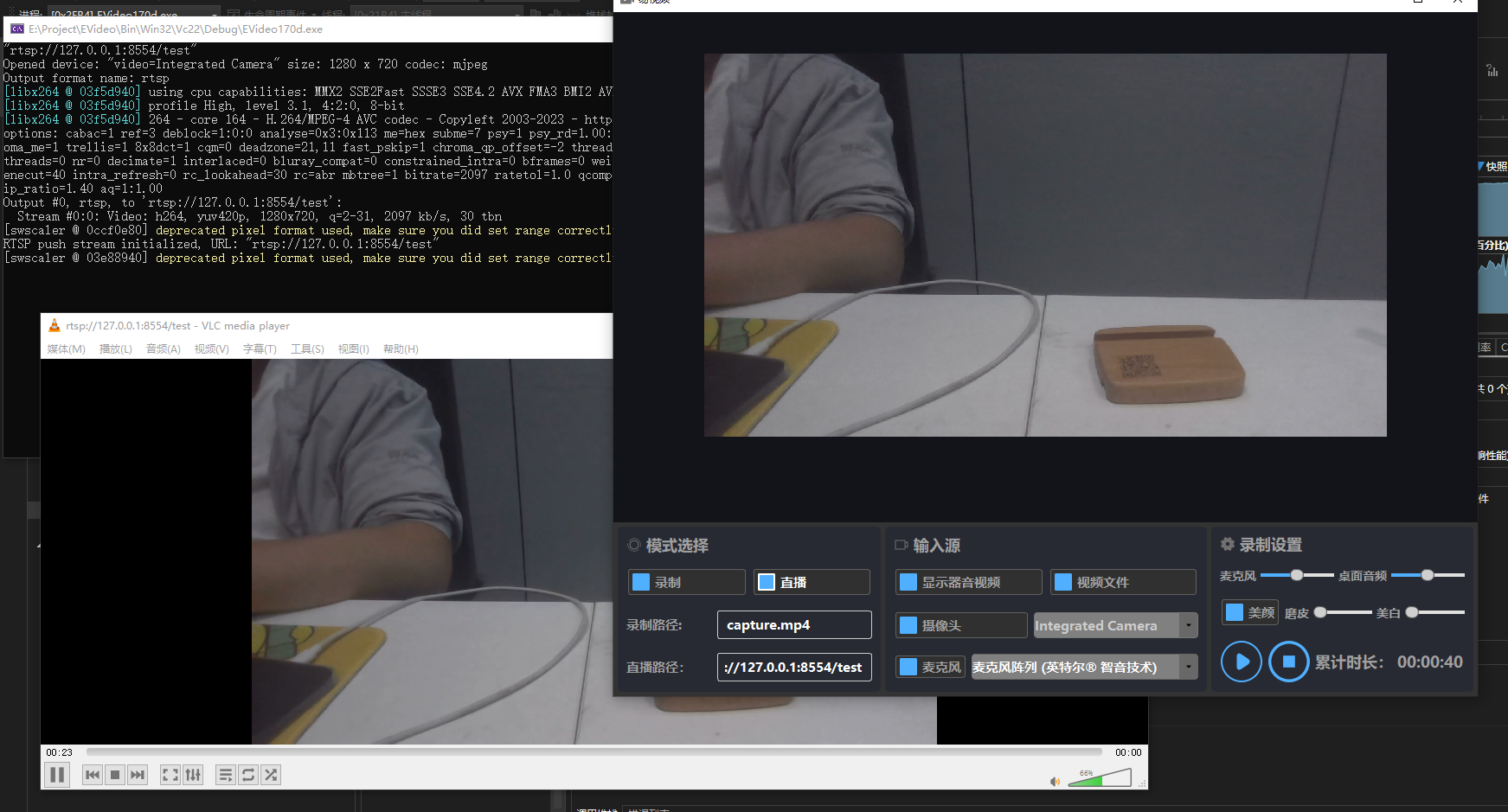
结果:
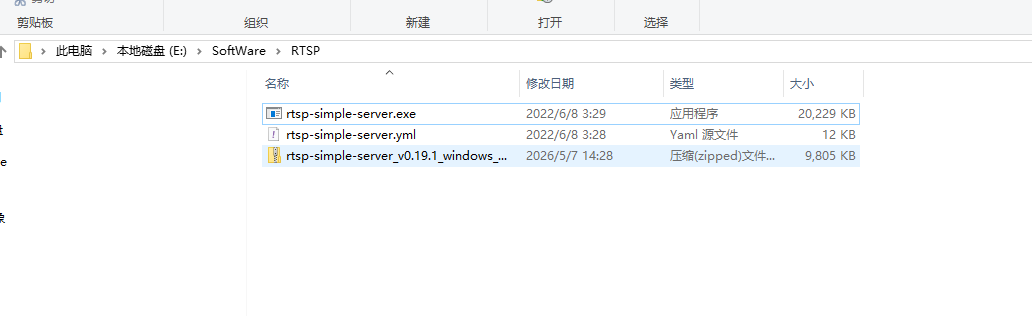
使用window rtsp 服务器演示
推流到rtsp服务器 ,使用vlc 播放
八、注意事项与优化建议
- 帧率控制 :当前推流的
pts使用递增计数器,不依赖实际时间。若需严格同步,可基于系统时间计算。 - CPU 占用 :MJPEG 解码 + H.264 编码对 CPU 有一定要求。可调低编码质量(
bit_rate设为 500k ~ 1000k)或使用硬件编码器(如h264_mf或h264_qsv)。 - 容错处理 :当 RTSP 服务器断开时,
av_interleaved_write_frame会返回错误,代码中仅警告。生产环境应加入重连逻辑。 - 内存泄漏 :确保
AVFrame、AVPacket正确释放,示例代码已全部使用av_frame_free、av_packet_unref。
九、完整源码获取
cpp
#include "../Include/VideoCapTask.h"
#include <QDebug>
#include <chrono>
#include <thread>

CVideoCapTask::CVideoCapTask(QObject* parent)
    : QThread(parent)
    , m_framerate(30)
    , m_targetWidth(0)
    , m_targetHeight(0)
    , m_srcWidth(0)
    , m_srcHeight(0)
    , m_dstWidth(0)
    , m_dstHeight(0)
    , m_running(false)
    , m_pFormatCtx(nullptr)
    , m_pCodecCtx(nullptr)
    , m_pSwsCtx(nullptr)
    , m_videoStreamIndex(-1)
    , m_pushEnabled(false)
    , m_pOutFormatCtx(nullptr)
    , m_pOutCodecCtx(nullptr)
    , m_pOutSwsCtx(nullptr)
    , m_outStreamIndex(-1)
    , m_ptsCounter(0)
{
    InitFFmpeg();
}

CVideoCapTask::~CVideoCapTask()
{
    StopCapture();
    wait();
    CloseDevice();
    ClosePushStream();
}

void CVideoCapTask::SetDeviceName(const QString& deviceName)
{
    QMutexLocker locker(&m_mutex);
    m_deviceName = deviceName;
}

void CVideoCapTask::SetFramerate(int fps)
{
    QMutexLocker locker(&m_mutex);
    if (fps > 0) m_framerate = fps;
}

void CVideoCapTask::SetTargetSize(int width, int height)
{
    QMutexLocker locker(&m_mutex);
    m_targetWidth = width;
    m_targetHeight = height;
}

void CVideoCapTask::SetRtspUrl(const QString& url)
{
    QMutexLocker locker(&m_mutex);
    m_rtspUrl = url;
    qDebug() << m_rtspUrl;
}

void CVideoCapTask::EnablePush(bool enable)
{
    QMutexLocker locker(&m_mutex);
    m_pushEnabled = enable;
}

void CVideoCapTask::StartCapture()
{
    if (m_running) return;
    if (m_deviceName.isEmpty()) {
        qWarning() << "Device name not set";
        return;
    }
    m_running = true;
    start();
}

void CVideoCapTask::StopCapture()
{
    if (!m_running) return;
    m_running = false;
}

bool CVideoCapTask::InitFFmpeg()
{
    static bool bRegistered = false;
    if (!bRegistered) {
        avdevice_register_all();
        avformat_network_init();
        bRegistered = true;
    }
    return true;
}

bool CVideoCapTask::OpenDevice()
{
    // ***** const 修饰 *****
    const AVInputFormat* pInputFmt = nullptr;
#ifdef _WIN32
    pInputFmt = av_find_input_format("dshow");
#else
    pInputFmt = av_find_input_format("v4l2");
#endif
    if (!pInputFmt) {
        qCritical() << "Cannot find input format";
        return false;
    }

    AVDictionary* pOptions = nullptr;
    av_dict_set(&pOptions, "framerate", QString::number(m_framerate).toUtf8().constData(), 0);
    av_dict_set(&pOptions, "rtbufsize", "512M", 0);

    int ret = avformat_open_input(&m_pFormatCtx, m_deviceName.toUtf8().constData(),
        pInputFmt, &pOptions);
    av_dict_free(&pOptions);
    if (ret < 0) {
        char errbuf[128];
        av_strerror(ret, errbuf, sizeof(errbuf));
        qCritical() << "Cannot open device:" << m_deviceName << errbuf;
        return false;
    }

    if (avformat_find_stream_info(m_pFormatCtx, nullptr) < 0) {
        qCritical() << "Cannot find stream info";
        return false;
    }

    m_videoStreamIndex = -1;
    for (unsigned i = 0; i < m_pFormatCtx->nb_streams; ++i) {
        if (m_pFormatCtx->streams[i]->codecpar->codec_type == AVMEDIA_TYPE_VIDEO) {
            m_videoStreamIndex = i;
            break;
        }
    }
    if (m_videoStreamIndex == -1) {
        qCritical() << "No video stream found";
        return false;
    }

    AVCodecParameters* pCodecPar = m_pFormatCtx->streams[m_videoStreamIndex]->codecpar;
    // ***** const 修饰 *****
    const AVCodec* pDecoder = avcodec_find_decoder(pCodecPar->codec_id);
    if (!pDecoder) {
        qCritical() << "Decoder not found";
        return false;
    }

    m_pCodecCtx = avcodec_alloc_context3(pDecoder);
    if (avcodec_parameters_to_context(m_pCodecCtx, pCodecPar) < 0) {
        qCritical() << "Failed to copy codec parameters";
        return false;
    }

    if (avcodec_open2(m_pCodecCtx, pDecoder, nullptr) < 0) {
        qCritical() << "Cannot open decoder";
        return false;
    }

    qDebug() << "Opened device:" << m_deviceName
        << "size:" << pCodecPar->width << "x" << pCodecPar->height
        << "codec:" << avcodec_get_name(pCodecPar->codec_id);
    return true;
}

void CVideoCapTask::CloseDevice()
{
    if (m_pCodecCtx) {
        avcodec_free_context(&m_pCodecCtx);
        m_pCodecCtx = nullptr;
    }
    if (m_pFormatCtx) {
        avformat_close_input(&m_pFormatCtx);
        m_pFormatCtx = nullptr;
    }
    if (m_pSwsCtx) {
        sws_freeContext(m_pSwsCtx);
        m_pSwsCtx = nullptr;
    }
    m_videoStreamIndex = -1;
}

QImage CVideoCapTask::AVFrameToQImage(AVFrame* frame)
{
    if (!frame || frame->width <= 0 || frame->height <= 0)
        return QImage();

    int dstWidth = m_targetWidth > 0 ? m_targetWidth : frame->width;
    int dstHeight = m_targetHeight > 0 ? m_targetHeight : frame->height;
    AVPixelFormat dstFormat = AV_PIX_FMT_BGRA;

    if (!m_pSwsCtx ||
        m_srcWidth != frame->width || m_srcHeight != frame->height ||
        m_dstWidth != dstWidth || m_dstHeight != dstHeight) {
        if (m_pSwsCtx) sws_freeContext(m_pSwsCtx);
        m_pSwsCtx = sws_getContext(frame->width, frame->height, (AVPixelFormat)frame->format,
            dstWidth, dstHeight, dstFormat,
            SWS_FAST_BILINEAR, nullptr, nullptr, nullptr);
        if (!m_pSwsCtx) {
            qWarning() << "Cannot create SwsContext";
            return QImage();
        }
        m_srcWidth = frame->width;
        m_srcHeight = frame->height;
        m_dstWidth = dstWidth;
        m_dstHeight = dstHeight;
    }

    int dstStride = dstWidth * 4;
    uint8_t* dstData = (uint8_t*)av_malloc(dstStride * dstHeight);
    if (!dstData) return QImage();

    uint8_t* dstPlane[1] = { dstData };
    int dstLinesize[1] = { dstStride };
    sws_scale(m_pSwsCtx, frame->data, frame->linesize, 0, frame->height,
        dstPlane, dstLinesize);

    QImage image(dstData, dstWidth, dstHeight, dstStride, QImage::Format_ARGB32);
    QImage result = image.copy();
    av_free(dstData);
    return result;
}

bool CVideoCapTask::InitPushStream()
{
    if (m_rtspUrl.isEmpty()) {
        qWarning() << "RTSP URL is empty, cannot push";
        return false;
    }

    // 1. 分配输出上下文(与之前相同)
    int ret = avformat_alloc_output_context2(&m_pOutFormatCtx, nullptr, "rtsp", m_rtspUrl.toStdString().c_str());
    if (!m_pOutFormatCtx || ret < 0) {
        qCritical() << "Failed to allocate output context for RTSP";
        return false;
    }

    qDebug() << "Output format name:" << m_pOutFormatCtx->oformat->name;

    // 2. 查找编码器、创建流、配置编码器(保持原样)
    const AVCodec* encoder = avcodec_find_encoder(AV_CODEC_ID_H264);
    if (!encoder) {
        qCritical() << "H.264 encoder not found";
        return false;
    }

    AVStream* outStream = avformat_new_stream(m_pOutFormatCtx, nullptr);
    if (!outStream) {
        qCritical() << "Failed to create output stream";
        return false;
    }
    m_outStreamIndex = outStream->index;

    m_pOutCodecCtx = avcodec_alloc_context3(encoder);
    if (!m_pOutCodecCtx) {
        qCritical() << "Failed to allocate encoder context";
        return false;
    }

    int width = m_pCodecCtx->width;
    int height = m_pCodecCtx->height;
    m_pOutCodecCtx->width = width;
    m_pOutCodecCtx->height = height;
    m_pOutCodecCtx->pix_fmt = AV_PIX_FMT_YUV420P;
    m_pOutCodecCtx->time_base = AVRational{ 1, m_framerate };
    m_pOutCodecCtx->framerate = AVRational{ m_framerate, 1 };
    m_pOutCodecCtx->bit_rate = 2 * 1024 * 1024;
    m_pOutCodecCtx->gop_size = m_framerate;
    m_pOutCodecCtx->max_b_frames = 0;
    if (m_pOutFormatCtx->oformat->flags & AVFMT_GLOBALHEADER)
        m_pOutCodecCtx->flags |= AV_CODEC_FLAG_GLOBAL_HEADER;

    ret = avcodec_open2(m_pOutCodecCtx, encoder, nullptr);
    if (ret < 0) {
        char errbuf[128];
        av_strerror(ret, errbuf, sizeof(errbuf));
        qCritical() << "Cannot open encoder:" << errbuf;
        return false;
    }

    ret = avcodec_parameters_from_context(outStream->codecpar, m_pOutCodecCtx);
    if (ret < 0) {
        qCritical() << "Failed to copy encoder parameters to stream";
        return false;
    }
    outStream->time_base = m_pOutCodecCtx->time_base;

    av_dump_format(m_pOutFormatCtx, 0, m_rtspUrl.toStdString().c_str(), 1);

    // 3. 关键修改:不要手动调用 avio_open,让 muxer 自己处理
    // 确保 pb 为 nullptr(默认就是)
    m_pOutFormatCtx->pb = nullptr;

    // 可选:设置 RTSP 传输选项(与 CLiveTask 一致)
    AVDictionary* opts = nullptr;
    av_dict_set(&opts, "rtsp_transport", "tcp", 0);
    // 如果仍然有问题,可以加上协议白名单(虽然不是必须)
    // av_dict_set(&opts, "protocol_whitelist", "file,udp,tcp,rtp,rtsp", 0);

    // 4. 写头部:这一步内部会自动调用 avio_open 并正确处理 RTSP 协议
    ret = avformat_write_header(m_pOutFormatCtx, &opts);
    av_dict_free(&opts);
    if (ret < 0) {
        char errbuf[128];
        av_strerror(ret, errbuf, sizeof(errbuf));
        qCritical() << "Failed to write header:" << errbuf;
        return false;
    }

    // 5. 初始化颜色空间转换(保持不变)
    m_pOutSwsCtx = sws_getContext(width, height, m_pCodecCtx->pix_fmt,
        width, height, AV_PIX_FMT_YUV420P,
        SWS_FAST_BILINEAR, nullptr, nullptr, nullptr);
    if (!m_pOutSwsCtx) {
        qCritical() << "Cannot create SwsContext for encoder conversion";
        return false;
    }

    m_ptsCounter = 0;
    qDebug() << "RTSP push stream initialized, URL:" << m_rtspUrl;
    return true;
}

void CVideoCapTask::ClosePushStream()
{
    if (m_pOutCodecCtx) {
        avcodec_free_context(&m_pOutCodecCtx);
        m_pOutCodecCtx = nullptr;
    }
    if (m_pOutFormatCtx) {
        if (m_pOutFormatCtx->pb) {
            av_write_trailer(m_pOutFormatCtx);
            avio_close(m_pOutFormatCtx->pb);
        }
        avformat_free_context(m_pOutFormatCtx);
        m_pOutFormatCtx = nullptr;
    }
    if (m_pOutSwsCtx) {
        sws_freeContext(m_pOutSwsCtx);
        m_pOutSwsCtx = nullptr;
    }
    m_outStreamIndex = -1;
    m_ptsCounter = 0;
}

bool CVideoCapTask::PushFrame(AVFrame* frame)
{
    if (!m_pOutFormatCtx || !m_pOutCodecCtx || !m_pOutSwsCtx)
        return false;

    // 1. 转换像素格式到 YUV420P(编码器需要)
    AVFrame* yuvFrame = av_frame_alloc();
    yuvFrame->format = AV_PIX_FMT_YUV420P;
    yuvFrame->width = frame->width;
    yuvFrame->height = frame->height;
    if (av_frame_get_buffer(yuvFrame, 0) < 0) {
        av_frame_free(&yuvFrame);
        qWarning() << "Failed to allocate buffer for YUV frame";
        return false;
    }

    sws_scale(m_pOutSwsCtx, frame->data, frame->linesize, 0, frame->height,
        yuvFrame->data, yuvFrame->linesize);

    // 2. 设置时间戳
    yuvFrame->pts = m_ptsCounter++;
    yuvFrame->pkt_dts = yuvFrame->pts;

    // 3. 发送原始帧到编码器
    int ret = avcodec_send_frame(m_pOutCodecCtx, yuvFrame);
    if (ret < 0) {
        av_frame_free(&yuvFrame);
        char errbuf[128];
        av_strerror(ret, errbuf, sizeof(errbuf));
        qWarning() << "Error sending frame to encoder:" << errbuf;
        return false;
    }

    // 4. 接收编码后的包并写入输出
    AVPacket pkt;
    av_init_packet(&pkt);
    pkt.data = nullptr;
    pkt.size = 0;

    while (true) {
        ret = avcodec_receive_packet(m_pOutCodecCtx, &pkt);
        if (ret == AVERROR(EAGAIN) || ret == AVERROR_EOF) {
            break;
        }
        else if (ret < 0) {
            char errbuf[128];
            av_strerror(ret, errbuf, sizeof(errbuf));
            qWarning() << "Error receiving packet from encoder:" << errbuf;
            break;
        }

        // 转换时间基
        pkt.stream_index = m_outStreamIndex;
        av_packet_rescale_ts(&pkt, m_pOutCodecCtx->time_base, m_pOutFormatCtx->streams[m_outStreamIndex]->time_base);
        pkt.pos = -1;

        ret = av_interleaved_write_frame(m_pOutFormatCtx, &pkt);
        if (ret < 0) {
            char errbuf[128];
            av_strerror(ret, errbuf, sizeof(errbuf));
            qWarning() << "Error writing packet to RTSP:" << errbuf;
        }
        av_packet_unref(&pkt);
    }

    av_frame_free(&yuvFrame);
    return true;
}

void CVideoCapTask::run()
{
    if (!OpenDevice()) {
        qCritical() << "Failed to open device, cannot run";
        m_running = false;
        return;
    }

    if (m_pushEnabled && !m_rtspUrl.isEmpty()) {
        if (!InitPushStream()) {
            qWarning() << "Failed to initialize RTSP push stream, continuing without push";
            m_pushEnabled = false;
        }
    }

    AVPacket packet;
    AVFrame* pFrame = av_frame_alloc();
    if (!pFrame) {
        qCritical() << "Failed to allocate frame";
        CloseDevice();
        ClosePushStream();
        m_running = false;
        return;
    }

    while (m_running) {
        int ret = av_read_frame(m_pFormatCtx, &packet);
        if (ret < 0) {
            if (ret == AVERROR(EAGAIN)) {
                std::this_thread::sleep_for(std::chrono::milliseconds(1));
                continue;
            }
            else {
                char errbuf[128];
                av_strerror(ret, errbuf, sizeof(errbuf));
                qWarning() << "av_read_frame error:" << errbuf;
                break;
            }
        }

        if (packet.stream_index == m_videoStreamIndex) {
            ret = avcodec_send_packet(m_pCodecCtx, &packet);
            if (ret < 0) {
                av_packet_unref(&packet);
                continue;
            }

            while (true) {
                ret = avcodec_receive_frame(m_pCodecCtx, pFrame);
                if (ret == AVERROR(EAGAIN) || ret == AVERROR_EOF) {
                    break;
                }
                else if (ret < 0) {
                    char errbuf[128];
                    av_strerror(ret, errbuf, sizeof(errbuf));
                    qWarning() << "Decode error:" << errbuf;
                    break;
                }

                //QImage img = AVFrameToQImage(pFrame);
                //if (!img.isNull()) {
                //    emit SigFrameCaptured(img);
                //}

                static int previewFrameCount = 0;
                if (++previewFrameCount % 3 == 0) {
                    QImage img = AVFrameToQImage(pFrame);
                    if (!img.isNull()) {
                        emit SigFrameCaptured(img);
                    }
                }

                if (m_pushEnabled && m_pOutFormatCtx) {
                    PushFrame(pFrame);
                }

                av_frame_unref(pFrame);
            }
        }
        av_packet_unref(&packet);
    }

    av_frame_free(&pFrame);
    CloseDevice();
    ClosePushStream();
    qDebug() << "CVideoCapTask stopped";
}
十、总结
通过封装 CVideoCapTask 类,我们实现了:
- Windows DirectShow 摄像头采集
- 跨平台(可迁移到 Linux v4l2)
- 多线程无阻塞预览
- RTSP 推流(H.264)
- 常见 FFmpeg API 误用问题的回避
希望本文能帮助到正在使用 FFmpeg 开发视频应用的开发者。如果觉得有用,请点赞、收藏、转发!
参考链接
上一篇文章:
QT开发技术【ffmpeg EVideo录屏软件 一】