Mac 极简安装 Pikachu 漏洞靶场
一、下载 Pikachu 源码
打开终端,逐行输入执行:
bash
# 下载源码
cd ~
curl -L https://github.com/zhuifengshaonianhanlu/pikachu/archive/refs/heads/master.zip -o pikachu.zip

# 解压
unzip pikachu.zip

# 进入目录
cd pikachu-master
二、安装&启动 PHP 服务器(关键!)
1.Mac 自带 PHP,直接用命令启动:
bash
php -S 127.0.0.1:8081✅ 看到这个就成功了:
bash
PHP 7.3.24 Development Server started at Fri May  9 15:22:00 2026
Listening on http://127.0.0.1:8081
2.如果Mac 不带 PHP
所以需要:安装 PHP
打开终端,直接复制运行这 一条命令:
bash
brew install php等待安装完成(几 分钟左右)。
bash
% brew install php
==> Fetching downloads for: php
✔︎ Bottle Manifest php (8.5.6) Downloaded 65.2KB/ 65.2KB
✔︎ Bottle Manifest apr (1.7.6) Downloaded 11.9KB/ 11.9KB
✔︎ Bottle Manifest apr-util (1.6.3_1) Downloaded 18.7KB/ 18.7KB
✔︎ Bottle Manifest argon2 (20190702_1) Downloaded 15.6KB/ 15.6KB
✔︎ Bottle Manifest m4 (1.4.21) Downloaded 9.5KB/ 9.5KB
✔︎ Bottle Manifest autoconf (2.73) Downloaded 14.9KB/ 14.9KB
✔︎ Bottle Manifest brotli (1.2.0) Downloaded 8.0KB/ 8.0KB
✔︎ Bottle Manifest libnghttp2 (1.69.0) Downloaded 7.3KB/ 7.3KB
✔︎ Bottle Manifest libnghttp3 (1.15.0) Downloaded 7.3KB/ 7.3KB
✔︎ Bottle Manifest libngtcp2 (1.22.1) Downloaded 9.7KB/ 9.7KB
✔︎ Bottle Manifest libssh2 (1.11.1_1) Downloaded 12.1KB/ 12.1KB
✔︎ Bottle Manifest lz4 (1.10.0) Downloaded 13.8KB/ 13.8KB
✔︎ Bottle Manifest zstd (1.5.7_1) Downloaded 13.2KB/ 13.2KB
✔︎ Bottle Manifest curl (8.20.0) Downloaded 22.3KB/ 22.3KB
✔︎ Bottle Manifest libtool (2.5.4) Downloaded 13.8KB/ 13.8KB
✔︎ Bottle Manifest unixodbc (2.3.14) Downloaded 10.2KB/ 10.2KB
✔︎ Bottle libnghttp2 (1.69.0) Downloaded 230.7KB/230.7KB
✔︎ Bottle apr-util (1.6.3_1) Downloaded 243.8KB/243.8KB
✔︎ Bottle libtool (2.5.4) Downloaded 1.1MB/ 1.1MB
✔︎ Bottle Manifest freetds (1.5.17) Downloaded 15.0KB/ 15.0KB
✔︎ Bottle Manifest libpng (1.6.58) Downloaded 8.6KB/ 8.6KB
✔︎ Bottle unixodbc (2.3.14) Downloaded 587.5KB/587.5KB
✔︎ Bottle argon2 (20190702_1) Downloaded 503.4KB/503.4KB
✔︎ Bottle libssh2 (1.11.1_1) Downloaded 419.9KB/419.9KB
✔︎ Bottle Manifest freetype (2.14.3) Downloaded 9.4KB/ 9.4KB
✔︎ Bottle libpng (1.6.58) Downloaded 455.9KB/455.9KB
✔︎ Bottle Manifest libunistring (1.4.2) Downloaded 7.3KB/ 7.3KB
✔︎ Bottle Manifest gettext (1.0) Downloaded 13.7KB/ 13.7KB
✔︎ Bottle m4 (1.4.21) Downloaded 290.2KB/290.2KB
✔︎ Bottle lz4 (1.10.0) Downloaded 295.1KB/295.1KB
✔︎ Bottle Manifest fontconfig (2.17.1) Downloaded 17.3KB/ 17.3KB
✔︎ Bottle Manifest jpeg-turbo (3.1.4.1) Downloaded 8.4KB/ 8.4KB
✔︎ Bottle Manifest libvmaf (3.1.0) Downloaded 7.7KB/ 7.7KB
✔︎ Bottle libnghttp3 (1.15.0) Downloaded 186.7KB/186.7KB
✔︎ Bottle Manifest aom (3.13.3) Downloaded 24.3KB/ 24.3KB
✔︎ Bottle Manifest dav1d (1.5.3) Downloaded 7.6KB/ 7.6KB
✔︎ Bottle jpeg-turbo (3.1.4.1) Downloaded 1.2MB/ 1.2MB
✔︎ Bottle gettext (1.0) Downloaded 10.2MB/ 10.2MB
✔︎ Bottle Manifest libavif (1.4.1) Downloaded 26.0KB/ 26.0KB
✔︎ Bottle autoconf (2.73) Downloaded 1.1MB/ 1.1MB
✔︎ Bottle Manifest giflib (6.1.3) Downloaded 7.7KB/ 7.7KB
✔︎ Bottle Manifest libtiff (4.7.1_1) Downloaded 12.6KB/ 12.6KB
✔︎ Bottle dav1d (1.5.3) Downloaded 781.3KB/781.3KB
✔︎ Bottle Manifest webp (1.6.0) Downloaded 19.5KB/ 19.5KB
✔︎ Bottle fontconfig (2.17.1) Downloaded 384.7KB/384.7KB
✔︎ Bottle giflib (6.1.3) Downloaded 132.4KB/132.4KB
✔︎ Bottle Manifest gd (2.3.3_6) Downloaded 36.2KB/ 36.2KB
✔︎ Bottle libavif (1.4.1) Downloaded 357.1KB/357.1KB
✔︎ Bottle Manifest icu4c@78 (78.3) Downloaded 9.7KB/ 9.7KB
✔︎ Bottle Manifest gmp (6.3.0) Downloaded 13.3KB/ 13.3KB
✔︎ Bottle libvmaf (3.1.0) Downloaded 1.3MB/ 1.3MB
✔︎ Bottle gd (2.3.3_6) Downloaded 307.4KB/307.4KB
✔︎ Bottle Manifest krb5 (1.22.2) Downloaded 16.3KB/ 16.3KB
✔︎ Bottle zstd (1.5.7_1) Downloaded 928.8KB/928.8KB
✔︎ Bottle freetds (1.5.17) Downloaded 5.3MB/ 5.3MB
✔︎ Bottle brotli (1.2.0) Downloaded 808.5KB/808.5KB
✔︎ Bottle Manifest libsodium (1.0.22) Downloaded 7.3KB/ 7.3KB
✔︎ Bottle Manifest libpq (18.3) Downloaded 21.1KB/ 21.1KB
✔︎ Bottle Manifest libzip (1.11.4_1) Downloaded 11.4KB/ 11.4KB
✔︎ Bottle Manifest net-snmp (5.9.5.2) Downloaded 16.3KB/ 16.3KB
✔︎ Bottle libsodium (1.0.22) Downloaded 475.0KB/475.0KB
✔︎ Bottle gmp (6.3.0) Downloaded 1.1MB/ 1.1MB
✔︎ Bottle Manifest oniguruma (6.9.10) Downloaded 10.0KB/ 10.0KB
✔︎ Bottle krb5 (1.22.2) Downloaded 1.3MB/ 1.3MB
✔︎ Bottle Manifest openldap (2.6.13) Downloaded 27.3KB/ 27.3KB
✔︎ Bottle Manifest pcre2 (10.47_1) Downloaded 11.7KB/ 11.7KB
✔︎ Bottle freetype (2.14.3) Downloaded 1.0MB/ 1.0MB
✔︎ Bottle Manifest tidy-html5 (5.8.0) Downloaded 14.3KB/ 14.3KB
✔︎ Bottle openldap (2.6.13) Downloaded 3.1MB/ 3.1MB
✔︎ Bottle pcre2 (10.47_1) Downloaded 2.5MB/ 2.5MB
✔︎ Bottle libzip (1.11.4_1) Downloaded 142.8KB/142.8KB
✔︎ Bottle icu4c@78 (78.3) Downloaded 31.8MB/ 31.8MB
✔︎ Bottle webp (1.6.0) Downloaded 1.1MB/ 1.1MB
✔︎ Bottle libngtcp2 (1.22.1) Downloaded 397.2KB/397.2KB
✔︎ Bottle tidy-html5 (5.8.0) Downloaded 786.0KB/786.0KB
✔︎ Bottle libpq (18.3) Downloaded 8.0MB/ 8.0MB
✔︎ Bottle libtiff (4.7.1_1) Downloaded 1.9MB/ 1.9MB
✔︎ Bottle oniguruma (6.9.10) Downloaded 465.9KB/465.9KB
✔︎ Bottle aom (3.13.3) Downloaded 4.6MB/ 4.6MB
✔︎ Bottle libunistring (1.4.2) Downloaded 1.9MB/ 1.9MB
✔︎ Bottle net-snmp (5.9.5.2) Downloaded 3.8MB/ 3.8MB
✔︎ Bottle php (8.5.6) Downloaded 28.9MB/ 28.9MB
✔︎ Bottle curl (8.20.0) Downloaded 1.6MB/ 1.6MB
✔︎ Bottle apr (1.7.6) Downloaded 408.4KB/408.4KB
==> Installing dependencies for php: apr, apr-util, argon2, m4, autoconf, brotli, libnghttp2, libnghttp3, libngtcp2, libssh2, lz4, zstd, curl, libtool, unixodbc, freetds, libpng, freetype, libunistring, gettext, fontconfig, jpeg-turbo, libvmaf, aom, dav1d, libavif, libtiff, giflib, webp, gd, gmp, icu4c@78, krb5, libpq, libsodium, libzip, net-snmp, oniguruma, openldap, pcre2 and tidy-html5
==> Installing php dependency: apr
==> Pouring apr--1.7.6.sonoma.bottle.tar.gz
🍺 /usr/local/Cellar/apr/1.7.6: 58 files, 1.4MB
==> Installing php dependency: apr-util
==> Pouring apr-util--1.6.3_1.sonoma.bottle.tar.gz
🍺 /usr/local/Cellar/apr-util/1.6.3_1: 55 files, 897.8KB
==> Installing php dependency: argon2
==> Pouring argon2--20190702_1.sonoma.bottle.tar.gz
🍺 /usr/local/Cellar/argon2/20190702_1: 13 files, 685.3KB
==> Installing php dependency: m4
==> Pouring m4--1.4.21.tahoe.bottle.tar.gz
🍺 /usr/local/Cellar/m4/1.4.21: 14 files, 783.6KB
==> Installing php dependency: autoconf
==> Pouring autoconf--2.73.tahoe.bottle.tar.gz
🍺 /usr/local/Cellar/autoconf/2.73: 73 files, 3.8MB
==> Installing php dependency: brotli
==> Pouring brotli--1.2.0.sonoma.bottle.tar.gz
🍺 /usr/local/Cellar/brotli/1.2.0: 33 files, 1.8MB
==> Installing php dependency: libnghttp2
==> Pouring libnghttp2--1.69.0.sonoma.bottle.tar.gz
🍺 /usr/local/Cellar/libnghttp2/1.69.0: 14 files, 814.7KB
==> Installing php dependency: libnghttp3
==> Pouring libnghttp3--1.15.0.sonoma.bottle.tar.gz
🍺 /usr/local/Cellar/libnghttp3/1.15.0: 20 files, 566.4KB
==> Installing php dependency: libngtcp2
==> Pouring libngtcp2--1.22.1.sonoma.bottle.tar.gz
🍺 /usr/local/Cellar/libngtcp2/1.22.1: 21 files, 1.2MB
==> Installing php dependency: libssh2
==> Pouring libssh2--1.11.1_1.tahoe.bottle.tar.gz
🍺 /usr/local/Cellar/libssh2/1.11.1_1: 201 files, 1.3MB
==> Installing php dependency: lz4
==> Pouring lz4--1.10.0.tahoe.bottle.1.tar.gz
🍺 /usr/local/Cellar/lz4/1.10.0: 24 files, 712.9KB
==> Installing php dependency: zstd
==> Pouring zstd--1.5.7_1.tahoe.bottle.tar.gz
🍺 /usr/local/Cellar/zstd/1.5.7_1: 32 files, 2.5MB
==> Installing php dependency: curl
==> Pouring curl--8.20.0.sonoma.bottle.tar.gz
🍺 /usr/local/Cellar/curl/8.20.0: 554 files, 4.6MB
==> Installing php dependency: libtool
==> Pouring libtool--2.5.4.tahoe.bottle.tar.gz
🍺 /usr/local/Cellar/libtool/2.5.4: 76 files, 4MB
==> Installing php dependency: unixodbc
==> Pouring unixodbc--2.3.14.sonoma.bottle.tar.gz
🍺 /usr/local/Cellar/unixodbc/2.3.14: 48 files, 2.0MB
==> Installing php dependency: freetds
==> Pouring freetds--1.5.17.sonoma.bottle.tar.gz
🍺 /usr/local/Cellar/freetds/1.5.17: 2,703 files, 24.8MB
==> Installing php dependency: libpng
==> Pouring libpng--1.6.58.sonoma.bottle.tar.gz
🍺 /usr/local/Cellar/libpng/1.6.58: 28 files, 1.3MB
==> Installing php dependency: freetype
==> Pouring freetype--2.14.3.sonoma.bottle.tar.gz
🍺 /usr/local/Cellar/freetype/2.14.3: 68 files, 2.8MB
==> Installing php dependency: libunistring
==> Pouring libunistring--1.4.2.sonoma.bottle.tar.gz
🍺 /usr/local/Cellar/libunistring/1.4.2: 59 files, 5.8MB
==> Installing php dependency: gettext
==> Pouring gettext--1.0.sonoma.bottle.tar.gz
🍺 /usr/local/Cellar/gettext/1.0: 2,499 files, 33.9MB
==> Installing php dependency: fontconfig
==> Pouring fontconfig--2.17.1.sonoma.bottle.1.tar.gz
==> Regenerating font cache, this may take a while
==> /usr/local/Cellar/fontconfig/2.17.1/bin/fc-cache --force --really-force --verbose
🍺 /usr/local/Cellar/fontconfig/2.17.1: 98 files, 1.2MB
==> Installing php dependency: jpeg-turbo
==> Pouring jpeg-turbo--3.1.4.1.sonoma.bottle.tar.gz
🍺 /usr/local/Cellar/jpeg-turbo/3.1.4.1: 47 files, 4.4MB
==> Installing php dependency: libvmaf
==> Pouring libvmaf--3.1.0.sonoma.bottle.tar.gz
🍺 /usr/local/Cellar/libvmaf/3.1.0: 235 files, 7.9MB
==> Installing php dependency: aom
==> Pouring aom--3.13.3.sonoma.bottle.tar.gz
🍺 /usr/local/Cellar/aom/3.13.3: 28 files, 12.5MB
==> Installing php dependency: dav1d
==> Pouring dav1d--1.5.3.sonoma.bottle.tar.gz
🍺 /usr/local/Cellar/dav1d/1.5.3: 16 files, 2.4MB
==> Installing php dependency: libavif
==> Pouring libavif--1.4.1.sonoma.bottle.tar.gz
🍺 /usr/local/Cellar/libavif/1.4.1: 22 files, 975.6KB
==> Installing php dependency: libtiff
==> Pouring libtiff--4.7.1_1.sonoma.bottle.tar.gz
🍺 /usr/local/Cellar/libtiff/4.7.1_1: 488 files, 8.2MB
==> Installing php dependency: giflib
==> Pouring giflib--6.1.3.sonoma.bottle.tar.gz
🍺 /usr/local/Cellar/giflib/6.1.3: 19 files, 348.5KB
==> Installing php dependency: webp
==> Pouring webp--1.6.0.sonoma.bottle.tar.gz
🍺 /usr/local/Cellar/webp/1.6.0: 64 files, 2.7MB
==> Installing php dependency: gd
==> Pouring gd--2.3.3_6.sonoma.bottle.tar.gz
🍺 /usr/local/Cellar/gd/2.3.3_6: 34 files, 1.3MB
==> Installing php dependency: gmp
==> Pouring gmp--6.3.0.tahoe.bottle.tar.gz
🍺 /usr/local/Cellar/gmp/6.3.0: 22 files, 3.4MB
==> Installing php dependency: icu4c@78
==> Pouring icu4c@78--78.3.sonoma.bottle.tar.gz
🍺 /usr/local/Cellar/icu4c@78/78.3: 279 files, 86.7MB
==> Installing php dependency: krb5
==> Pouring krb5--1.22.2.sonoma.bottle.tar.gz
🍺 /usr/local/Cellar/krb5/1.22.2: 163 files, 4.2MB
==> Installing php dependency: libpq
==> Pouring libpq--18.3.sonoma.bottle.1.tar.gz
🍺 /usr/local/Cellar/libpq/18.3: 2,427 files, 33.9MB
==> Installing php dependency: libsodium
==> Pouring libsodium--1.0.22.sonoma.bottle.tar.gz
🍺 /usr/local/Cellar/libsodium/1.0.22: 88 files, 1.3MB
==> Installing php dependency: libzip
==> Pouring libzip--1.11.4_1.sonoma.bottle.tar.gz
🍺 /usr/local/Cellar/libzip/1.11.4_1: 161 files, 757.8KB
==> Installing php dependency: net-snmp
==> Pouring net-snmp--5.9.5.2.sonoma.bottle.tar.gz
🍺 /usr/local/Cellar/net-snmp/5.9.5.2: 556 files, 14.5MB
==> Installing php dependency: oniguruma
==> Pouring oniguruma--6.9.10.sonoma.bottle.tar.gz
🍺 /usr/local/Cellar/oniguruma/6.9.10: 15 files, 1.5MB
==> Installing php dependency: openldap
==> Pouring openldap--2.6.13.sonoma.bottle.tar.gz
🍺 /usr/local/Cellar/openldap/2.6.13: 342 files, 8.5MB
==> Installing php dependency: pcre2
==> Pouring pcre2--10.47_1.tahoe.bottle.tar.gz
🍺 /usr/local/Cellar/pcre2/10.47_1: 244 files, 7.3MB
==> Installing php dependency: tidy-html5
==> Pouring tidy-html5--5.8.0.sonoma.bottle.tar.gz
🍺 /usr/local/Cellar/tidy-html5/5.8.0: 15 files, 3MB
==> Installing php
==> Pouring php--8.5.6.sonoma.bottle.tar.gz
==> /usr/local/Cellar/php/8.5.6/bin/pear config-set php_ini /usr/local/etc/php/8.5/php.ini system
==> /usr/local/Cellar/php/8.5.6/bin/pear config-set php_dir /usr/local/share/pear system
==> /usr/local/Cellar/php/8.5.6/bin/pear config-set doc_dir /usr/local/share/pear/doc system
==> /usr/local/Cellar/php/8.5.6/bin/pear config-set ext_dir /usr/local/lib/php/pecl/20250925 system
==> /usr/local/Cellar/php/8.5.6/bin/pear config-set bin_dir /usr/local/opt/php/bin system
==> /usr/local/Cellar/php/8.5.6/bin/pear config-set data_dir /usr/local/share/pear/data system
==> /usr/local/Cellar/php/8.5.6/bin/pear config-set cfg_dir /usr/local/share/pear/cfg system
==> /usr/local/Cellar/php/8.5.6/bin/pear config-set www_dir /usr/local/share/pear/htdocs system
==> /usr/local/Cellar/php/8.5.6/bin/pear config-set man_dir /usr/local/share/man system
==> /usr/local/Cellar/php/8.5.6/bin/pear config-set test_dir /usr/local/share/pear/test system
==> /usr/local/Cellar/php/8.5.6/bin/pear config-set php_bin /usr/local/opt/php/bin/php system
==> /usr/local/Cellar/php/8.5.6/bin/pear update-channels
==> Caveats
To enable PHP in Apache add the following to httpd.conf and restart Apache:
LoadModule php_module /usr/local/opt/php/lib/httpd/modules/libphp.so
<FilesMatch \.php$>
SetHandler application/x-httpd-php
</FilesMatch>
Finally, check DirectoryIndex includes index.php
DirectoryIndex index.php index.html
The php.ini and php-fpm.ini file can be found in:
/usr/local/etc/php/8.5/
To start php now and restart at login:
brew services start php
Or, if you don't want/need a background service you can just run:
/usr/local/opt/php/sbin/php-fpm --nodaemonize
==> Summary
🍺 /usr/local/Cellar/php/8.5.6: 533 files, 126.3MB
==> Running `brew cleanup php`...
Disable this behaviour by setting `HOMEBREW_NO_INSTALL_CLEANUP=1`.
Hide these hints with `HOMEBREW_NO_ENV_HINTS=1` (see `man brew`).
==> Caveats
==> php
To enable PHP in Apache add the following to httpd.conf and restart Apache:
LoadModule php_module /usr/local/opt/php/lib/httpd/modules/libphp.so
<FilesMatch \.php$>
SetHandler application/x-httpd-php
</FilesMatch>
Finally, check DirectoryIndex includes index.php
DirectoryIndex index.php index.html
The php.ini and php-fpm.ini file can be found in:
/usr/local/etc/php/8.5/
To start php now and restart at login:
brew services start php
Or, if you don't want/need a background service you can just run:
/usr/local/opt/php/sbin/php-fpm --nodaemonize安装完后,再次运行 Pikachu
继续在终端输入:
bash
cd ~/pikachu-master
php -S 127.0.0.1:8081
[Sat May  9 10:04:06 2026] PHP 8.5.6 Development Server (http://127.0.0.1:8081) started
✅ 出现下面这行就成功了
bash
[Sat May 9 10:04:06 2026] PHP 8.5.6 Development Server (http://127.0.0.1:8081) started三、打开浏览器安装
1.Chrome 访问:
2.点击:初始化 / 安装 Pikachu
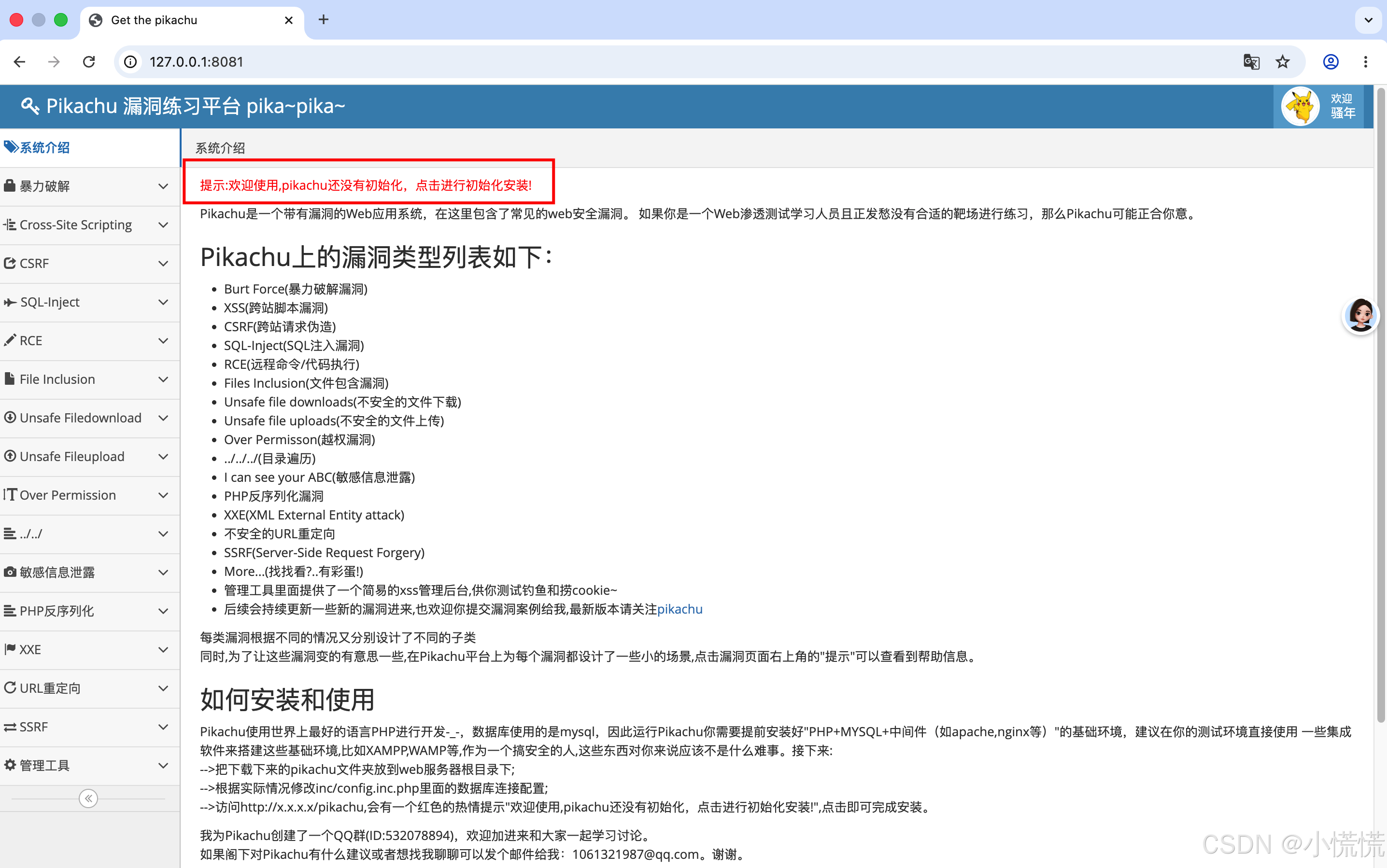
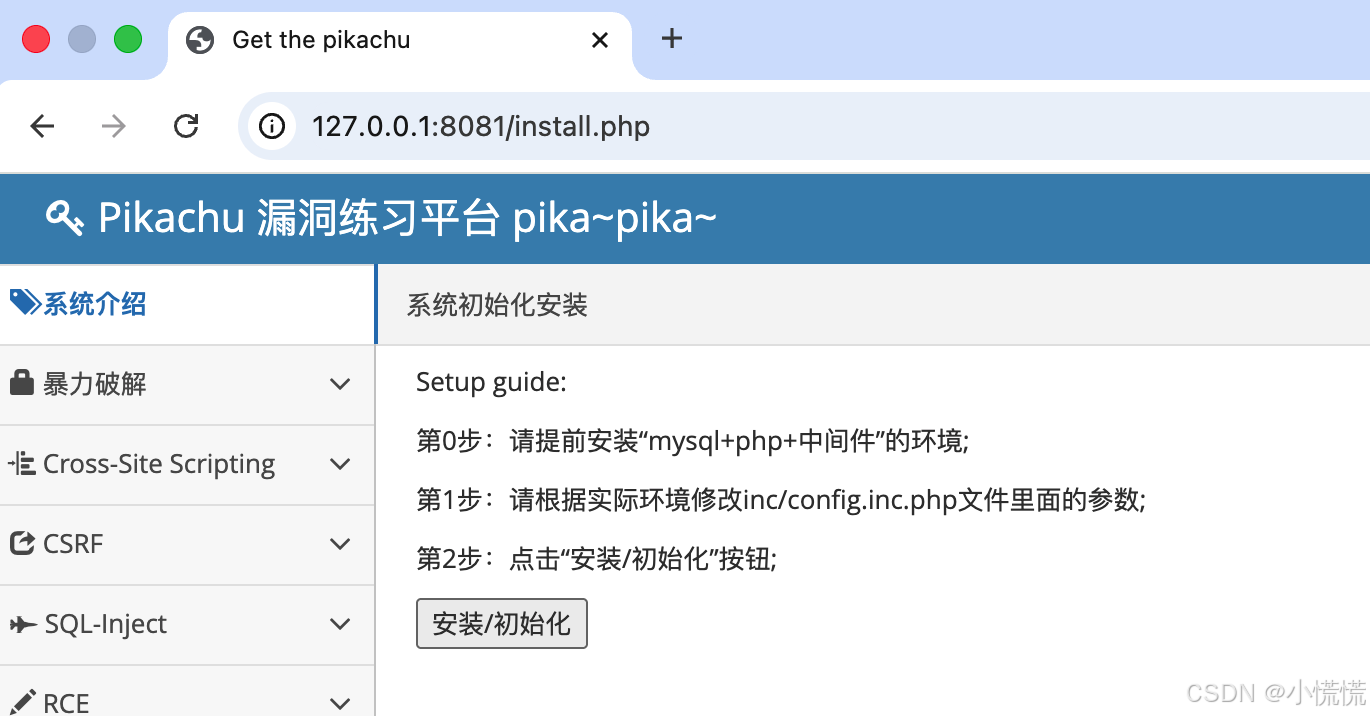
看到这个界面说明你已经成功启动 Pikachu 了!现在只差最后一步配置 MySQL 数据库
四、 MAC安装mysql
1.安装 MySQL(Mac 一键搞定)
打开终端,复制执行:
bash
brew install mysql装完后启动服务:
bash
brew services start mysql2.配置 MySQL(给 Pikachu 建库和用户)
终端执行下面的命令,直接创建 Pikachu 要用的数据库和用户:
bash
# 进入 MySQL(首次登录默认无密码)
mysql -u root

# 下面这些命令,在 mysql> 提示符里逐行输入
CREATE DATABASE IF NOT EXISTS pikachu DEFAULT CHARSET=utf8mb4;
CREATE USER IF NOT EXISTS 'pikachu'@'localhost' IDENTIFIED BY 'Pika_123';
GRANT ALL ON pikachu.* TO 'pikachu'@'localhost';
FLUSH PRIVILEGES;
exit;
这样就建好了:
数据库名:pikachu
用户名:pikachu
密码:Pika_123(建议修改强密码)
3.修改 Pikachu 配置文件(一键写入)
终端执行:
bash
cd ~/pikachu-master
rm -rf inc/config.inc.php

cat > inc/config.inc.php << 'EOF'
<?php
define('DBHOST','127.0.0.1');
define('DBUSER','root');
define('DBPW','');
define('DBNAME','test');
define('DBPORT','3306');
date_default_timezone_set('Asia/Shanghai');
?>
EOF
Pikachu 官方安装脚本的 BUG,新版 MySQL 不支持它写的md5()语法
bash
cd ~/pikachu-master

# 直接覆盖修复 install.php,彻底解决 md5() 报错
cd ~/pikachu-master

cat > install.php << 'EOF'
<?php
include_once "inc/config.inc.php";
$conn = mysqli_connect(DBHOST, DBUSER, DBPW, DBNAME, DBPORT);
mysqli_set_charset($conn,'utf8');

// 完整重建 users 表
mysqli_query($conn, "DROP TABLE IF EXISTS users");
mysqli_query($conn, "
CREATE TABLE users (
  user_id int(11) NOT NULL AUTO_INCREMENT,
  username varchar(20) NOT NULL,
  password varchar(32) NOT NULL,
  sex varchar(10) DEFAULT NULL,
  phonenum varchar(11) DEFAULT NULL,
  address varchar(100) DEFAULT NULL,
  email varchar(30) DEFAULT NULL,
  userphoto varchar(255) DEFAULT 'avatar.jpg',
  level int(11) DEFAULT 0,
  PRIMARY KEY (user_id)
) ENGINE=InnoDB DEFAULT CHARSET=utf8;
");

// 插入完整数据
mysqli_query($conn, "INSERT INTO users (username,password,level) VALUES ('admin','e10adc3949ba59abbe56e057f20f883e',1)");
mysqli_query($conn, "INSERT INTO users (username,password,level) VALUES ('pikachu','e10adc3949ba59abbe56e057f20f883e',0)");
mysqli_query($conn, "INSERT INTO users (username,password,level) VALUES ('test','e10adc3949ba59abbe56e057f20f883e',0)");

echo "✅ 安装成功!<a href='index.php'>进入靶场</a>";
?>
EOF
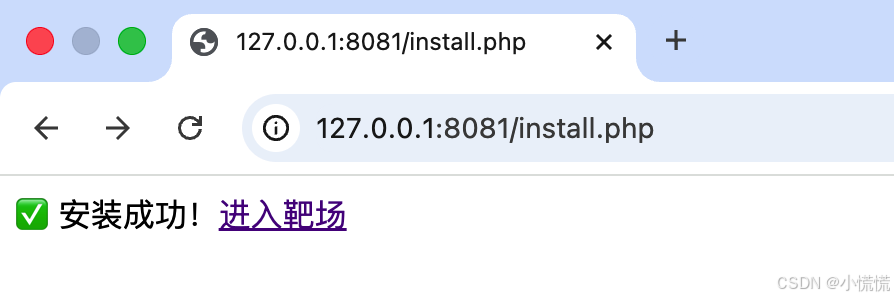
4.回到浏览器,点击「安装 / 初始化」
刷新 http://127.0.0.1:8081/install.php,
直接点「安装 / 初始化」,就能看到 安装成功 提示!
五、🎯 现在你就能玩漏洞靶场了
进入靶场主页,访问:
左边的 SQL 注入、XSS 等所有漏洞模块都可以正常用了。
里面包含:
- SQL 注入
- XSS 文件上传
- 越权漏洞
- 未授权访问
- 命令执行
- 文件包含
- 弱口令漏洞
六、下次想启动靶场,只需要 2 行命令
bash
cd ~/pikachu-master
php -S 127.0.0.1:8081