Arduino ESP8266/32 中国天气网天气获取
- 📌中国天气网:
https://www.weather.com.cn/
- 基于 ESP8266或者 ESP32 天气信息获取和解析程序,天气数据从中国天气网(weather.com.cn)获取地区的天气数据并以结构化方式显示。
- 实时天气查询:
https://www.weather.com.cn/weather1d/101010100.shtml - 速查方式:
https://e.weather.com.cn/e_index/sudutianqi.html?aid=101250303 - 📍中国天气网全城市代码weather_cityId参考:
https://blog.csdn.net/iechenyb/article/details/78652461 - 🧨获取方式依赖速查接口:
c
https://ra.weather.com.cn/ra/a/article/base/api/weather/weaArticleObj?stationCode=101250303&_=1778316346接口说明:
c
stationCode=101250303//换成自己的城市ID
&_=1778316346//查询的时间戳- 返回的数据为json格式,中文数据:
c
var weaArticle={"result":{"101250303":[{"pubtime":"2026-05-09 06:50","title":"醴陵今日天气","content":"<p>中国天气网讯 今天是5月9日星期六,一起来看天气。</p><p>今晨6时,醴陵晴,气温18℃,东风3-4级,相对湿度96%。</p><p>预计,今天白天阴,最高气温24℃,微风,今天夜间阴,最低气温15.8℃,微风。</p><iframe frameborder='0' width='100%' height='400px' scrolling='no' src='https://m.weather.com.cn/tips/index.html?aid=101250303' ></iframe><p>空气质量方面,今晨6时,AQI指数32,空气质量为优,未来24小时空气质量持续良好。适宜开窗通风和进行户外运动。</p><p>天气信息就是这么多啦~想看更多内容,请访问中国天气网移动网站:<a href='https://e.weather.com.cn'>https://e.weather.com.cn</a>!</p>"}]},"status":"success"}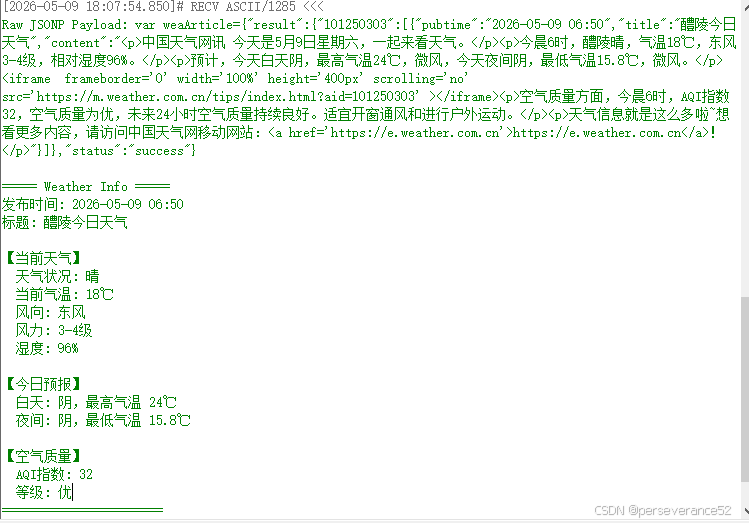
- 不需要私钥,开放获取。不像心知天气、和风天气接口需要使用私钥。
- 其他不需要私钥免费的天气接口:
OpenMeteo,uapis - 🔖选择调用的接口平台需要考虑平台服务的稳定性。
✨测试的接口,个人无法保该证平台接口的稳定性,未来不会变更。毕竟这个接口比较隐蔽,该接口是个人通过分析源代码发现的,在中国天气网(weather.com.cn)也未找到有提供公开的接口说明文档。
功能特点
- ✅ WiFi 连接管理
- ✅ NTP 时间戳获取(替代 HTTP API)
- ✅ 中国天气网数据获取(JSONP 格式)
- ✅ JSON 数据解析
- ✅ HTML 标签清理
- ✅ 结构化天气数据提取:
- 当前天气状况
- 当前气温、湿度
- 风向、风力
- 白天/夜间预报
- AQI 指数和空气质量等级
🛠硬件需求
- ESP8266/32 开发板(如 NodeMCU)
- USB 数据线
- 电脑端串口上位机(串口助手最好选择支持GBK/UTF-8编码格式选择的例如:UartAssist,否则输出中文会是乱码)
🛠依赖库
- 🔧ArduinoJson
- 🔨WiFiUdp
📑程序代码
c
#ifdef ESP32
  #include <WiFi.h>
  #include <HTTPClient.h>
#elif defined(ESP8266)
  #include <ESP8266WiFi.h>
  #include <ESP8266HTTPClient.h>
#else
  #error "Unsupported platform! Only ESP32 and ESP8266 are supported."
#endif
#include <WiFiClientSecure.h>
#include <ArduinoJson.h>
#include <WiFiUdp.h>


WiFiUDP udp;

// Wi-Fi 配置
const char* ssid = "CU_fPaA";
const char* password = "pba5ayzk";

// NTP 服务器配置
const char* ntpServer = "pool.ntp.org";
const long gmtOffset_sec = 8 * 3600;  // 东八区 UTC+8
const int daylightOffset_sec = 0;

#define REQUEST_INTERVAL 60000 // 请求间隔(毫秒)


// 天气数据结构
struct WeatherData {
  String pubtime;
  String title;
  String currentWeather;
  String currentTemp;
  String windDirection;
  String windLevel;
  String humidity;
  String dayWeather;
  String dayHighTemp;
  String nightWeather;
  String nightLowTemp;
  String aqi;
  String aqiLevel;
};

void setup() {
  Serial.begin(115200);
  WiFi.begin(ssid, password);

  while (WiFi.status() != WL_CONNECTED) {
    delay(500);
    Serial.print(".");
  }
  Serial.println("\nWiFi 已连接");

  // 初始化 NTP
  udp.begin(2390);
}

// 获取 NTP 时间戳
unsigned long getNtpTimestamp() {
  Serial.println("获取 NTP 时间戳...");

  byte packetBuffer[48];
  memset(packetBuffer, 0, 48);

  // 设置 NTP 包
  packetBuffer[0] = 0b11100011;  // LI, Version, Mode
  packetBuffer[1] = 0;
  packetBuffer[2] = 6;
  packetBuffer[3] = 0xEC;
  packetBuffer[12] = 49;
  packetBuffer[13] = 0x4E;
  packetBuffer[14] = 49;
  packetBuffer[15] = 52;

  // 发送 NTP 请求
  IPAddress timeServerIP;
  if (!WiFi.hostByName(ntpServer, timeServerIP)) {
    Serial.println("无法解析 NTP 服务器地址");
    return 0;
  }

  udp.beginPacket(timeServerIP, 123);
  udp.write(packetBuffer, 48);
  udp.endPacket();

  // 等待响应
  unsigned long timeout = millis();
  while (udp.parsePacket() == 0) {
    if (millis() - timeout > 5000) {
      Serial.println("NTP 请求超时");
      return 0;
    }
    delay(10);
  }

  // 读取响应
  udp.read(packetBuffer, 48);

  // 提取时间戳(从字节40开始的4字节)
  unsigned long highWord = word(packetBuffer[40], packetBuffer[41]);
  unsigned long lowWord = word(packetBuffer[42], packetBuffer[43]);
  unsigned long secsSince1900 = highWord << 16 | lowWord;

  // Unix 时间戳 = 从1900年到1970年的秒数差
  const unsigned long seventyYears = 2208988800UL;
  unsigned long epoch = secsSince1900 - seventyYears;

  Serial.printf("NTP 时间戳: %lu\n", epoch);
  return epoch;
}

void loop() {

  // 发送HTTP请求并处理天气数据
  fetchAndParseWeather();

   delay(REQUEST_INTERVAL);
}

// 移除HTML标签的辅助函数
String removeHtmlTags(String html) {
  String result = "";
  bool inTag = false;

  for (int i = 0; i < html.length(); i++) {
    char c = html.charAt(i);

    if (c == '<') {
      inTag = true;
    } else if (c == '>') {
      inTag = false;
    } else if (!inTag) {
      result += c;
    }
  }

  return result;
}


// 从文本中提取结构化天气数据
void parseWeatherData(String content, WeatherData &data) {
  // 清除HTML标签
  String cleanContent = removeHtmlTags(content);

  // 提取当前天气状况(如:醴陵晴 -> 晴)
  int idx = cleanContent.indexOf("醴陵");
  if (idx != -1) {
    // 醴陵是2个中文字符,UTF-8占6字节
    int weatherStart = idx + 6;
    int endIdx = cleanContent.indexOf(",", weatherStart);
    if (endIdx != -1) {
      data.currentWeather = cleanContent.substring(weatherStart, endIdx);
    }
  }

  // 提取当前气温
  idx = cleanContent.indexOf("气温");
  if (idx != -1) {
    int tempStart = idx + 6;  // 气温是2个中文字符,UTF-8占6字节
    int endIdx = cleanContent.indexOf("℃", tempStart);
    if (endIdx != -1) {
      data.currentTemp = cleanContent.substring(tempStart, endIdx + 3);  // ℃是UTF-8字符
    }
  }

  // 提取风向和风力
  idx = cleanContent.indexOf("东风");
  if (idx != -1) {
    data.windDirection = "东风";
    int windStart = idx + 6;  // 东风是2个中文字符
    int endIdx = cleanContent.indexOf("级", windStart);
    if (endIdx != -1) {
      data.windLevel = cleanContent.substring(windStart, endIdx + 3);  // 级是UTF-8字符
    }
  }

  // 提取相对湿度
  idx = cleanContent.indexOf("相对湿度");
  if (idx != -1) {
    int humidityStart = idx + 12;  // 相对湿度是4个中文字符
    int endIdx = cleanContent.indexOf("%", humidityStart);
    if (endIdx != -1) {
      data.humidity = cleanContent.substring(humidityStart, endIdx + 1);
    }
  }

  // 提取白天天气和最高气温
  idx = cleanContent.indexOf("今天白天");
  if (idx != -1) {
    int weatherStart = idx + 12;  // 今天白天是4个中文字符
    int weatherEndIdx = cleanContent.indexOf(",", weatherStart);
    if (weatherEndIdx != -1) {
      data.dayWeather = cleanContent.substring(weatherStart, weatherEndIdx);

      int tempIdx = cleanContent.indexOf("最高气温", weatherEndIdx);
      if (tempIdx != -1) {
        int tempStart = tempIdx + 12;  // 最高气温是4个中文字符
        int tempEndIdx = cleanContent.indexOf("℃", tempStart);
        if (tempEndIdx != -1) {
          data.dayHighTemp = cleanContent.substring(tempStart, tempEndIdx + 3);
        }
      }
    }
  }

  // 提取夜间天气和最低气温
  idx = cleanContent.indexOf("今天夜间");
  if (idx != -1) {
    int weatherStart = idx + 12;  // 今天夜间是4个中文字符
    int weatherEndIdx = cleanContent.indexOf(",", weatherStart);
    if (weatherEndIdx != -1) {
      data.nightWeather = cleanContent.substring(weatherStart, weatherEndIdx);

      int tempIdx = cleanContent.indexOf("最低气温", weatherEndIdx);
      if (tempIdx != -1) {
        int tempStart = tempIdx + 12;  // 最低气温是4个中文字符
        int tempEndIdx = cleanContent.indexOf("℃", tempStart);
        if (tempEndIdx != -1) {
          data.nightLowTemp = cleanContent.substring(tempStart, tempEndIdx + 3);
        }
      }
    }
  }

  // 提取AQI指数
  idx = cleanContent.indexOf("AQI指数");
  if (idx != -1) {
    int aqiStart = idx + 9;  // AQI(3字节) + 指数(6字节) = 9字节
    int endIdx = cleanContent.indexOf(",", aqiStart);
    if (endIdx != -1) {
      data.aqi = cleanContent.substring(aqiStart, endIdx);
    }
  }

  // 提取空气质量等级
  idx = cleanContent.indexOf("空气质量为");
  if (idx != -1) {
    int levelStart = idx + 15;  // 空气质量为是5个中文字符
    int endIdx = cleanContent.indexOf(",", levelStart);
    if (endIdx != -1) {
      data.aqiLevel = cleanContent.substring(levelStart, endIdx);
    }
  }
}

void fetchAndParseWeather() {
  if (WiFi.status() != WL_CONNECTED) {
    Serial.println("Error: Wi-Fi not connected.");
    return;
  }

  WiFiClientSecure client;          // 使用HTTPS, 需要WiFiClientSecure
  client.setInsecure();             // 忽略SSL证书验证 (简化开发环境使用)

  HTTPClient http;

  // 第一步:获取时间戳(使用 NTP)
  unsigned long timestamp = getNtpTimestamp();

  if (timestamp == 0) {
    Serial.println("获取时间戳失败,使用默认时间戳");
    timestamp = 1778316346;  // 默认时间戳
  }

  String result_Sec = String(timestamp);
  Serial.print("时间戳: ");
  Serial.println(result_Sec);

  // 第二步:获取天气数据
  String WEATHER_URL = "https://ra.weather.com.cn/ra/a/article/base/api/weather/weaArticleObj?stationCode=101250303&_=" + result_Sec;
  http.begin(client, WEATHER_URL);

  int httpCode2 = http.GET();
  if (httpCode2 > 0) {
    if (httpCode2 == HTTP_CODE_OK) {
      String jsonpPayload = http.getString();
      Serial.println("Raw JSONP Payload: " + jsonpPayload);

      // 去除 JSONP 前缀
      int startIdx = jsonpPayload.indexOf('{');
      if (startIdx != -1) {
        String jsonString = jsonpPayload.substring(startIdx);

        DynamicJsonDocument doc2(4096);
        DeserializationError error2 = deserializeJson(doc2, jsonString);

        if (!error2) {
          JsonObject result = doc2["result"];
          if (!result.isNull()) {
            JsonArray data101250303 = result["101250303"];
            if (!data101250303.isNull() && data101250303.size() > 0) {
              JsonObject firstWeather = data101250303[0];
              const char* pubtime = firstWeather["pubtime"];
              const char* title = firstWeather["title"];
              const char* content = firstWeather["content"];

              // 解析结构化天气数据
              WeatherData weatherData;
              weatherData.pubtime = String(pubtime);
              weatherData.title = String(title);
              parseWeatherData(String(content), weatherData);

              // 打印结构化天气信息
              Serial.println("\n===== Weather Info =====");
              Serial.print("发布时间: "); Serial.println(weatherData.pubtime);
              Serial.print("标题: "); Serial.println(weatherData.title);
              Serial.println("\n【当前天气】");
              Serial.print("  天气状况: "); Serial.println(weatherData.currentWeather);
              Serial.print("  当前气温: "); Serial.println(weatherData.currentTemp);
              Serial.print("  风向: "); Serial.println(weatherData.windDirection);
              Serial.print("  风力: "); Serial.println(weatherData.windLevel);
              Serial.print("  湿度: "); Serial.println(weatherData.humidity);
              Serial.println("\n【今日预报】");
              Serial.print("  白天: "); Serial.print(weatherData.dayWeather);
              Serial.print(",最高气温 "); Serial.println(weatherData.dayHighTemp);
              Serial.print("  夜间: "); Serial.print(weatherData.nightWeather);
              Serial.print(",最低气温 "); Serial.println(weatherData.nightLowTemp);
              Serial.println("\n【空气质量】");
              Serial.print("  AQI指数: "); Serial.println(weatherData.aqi);
              Serial.print("  等级: "); Serial.println(weatherData.aqiLevel);
              Serial.println("=======================\n");
            } else {
              Serial.println("No data for stationCode 101250303.");
            }
          } else {
            Serial.println("No 'result' object in response.");
          }
        } else {
          Serial.print("JSON parsing failed: ");
          Serial.println(error2.c_str());
        }
      } else {
        Serial.println("Could not find start of JSON object.");
      }
    } else {
      Serial.printf("HTTP request failed with code: %d\n", httpCode2);
    }
  } else {
    Serial.printf("HTTP GET weather failed, error: %s\n", http.errorToString(httpCode2).c_str());
  }

  http.end();
  client.stop();
  Serial.println("HTTP connection closed.");
}
📘使用方法
- 将程序上传到 ESP8266 开发板
- 打开串口监视器(波特率:115200)
- 观察天气数据输出
📄输出示例
cpp
WiFi 已连接
获取 NTP 时间戳...

[2026-05-09 18:07:53.369]# RECV ASCII/49 <<<
NTP 时间戳: 1778321273
时间戳: 1778321273

[2026-05-09 18:07:54.850]# RECV ASCII/1285 <<<
Raw JSONP Payload: var weaArticle={"result":{"101250303":[{"pubtime":"2026-05-09 06:50","title":"醴陵今日天气","content":"<p>中国天气网讯 今天是5月9日星期六,一起来看天气。</p><p>今晨6时,醴陵晴,气温18℃,东风3-4级,相对湿度96%。</p><p>预计,今天白天阴,最高气温24℃,微风,今天夜间阴,最低气温15.8℃,微风。</p><iframe  frameborder='0' width='100%' height='400px' scrolling='no' src='https://m.weather.com.cn/tips/index.html?aid=101250303' ></iframe><p>空气质量方面,今晨6时,AQI指数32,空气质量为优,未来24小时空气质量持续良好。适宜开窗通风和进行户外运动。</p><p>天气信息就是这么多啦~想看更多内容,请访问中国天气网移动网站:<a href='https://e.weather.com.cn'>https://e.weather.com.cn</a>!</p>"}]},"status":"success"}

===== Weather Info =====
发布时间: 2026-05-09 06:50
标题: 醴陵今日天气

【当前天气】
  天气状况: 晴
  当前气温: 18℃
  风向: 东风
  风力: 3-4级
  湿度: 96%

【今日预报】
  白天: 阴,最高气温 24℃
  夜间: 阴,最低气温 15.8℃

【空气质量】
  AQI指数: 32
  等级: 优
=======================

HTTP connection closed.