最近用业余时间搭了一个在线工具平台,把 PDF 转换、图片处理、视频转 GIF 等 40 多个工具整合到了一起。技术上最大的挑战是:Java 生态适合做 Web 服务,但文档/媒体处理却是 Python 的强项。这篇文章分享一下我的混合架构设计思路。
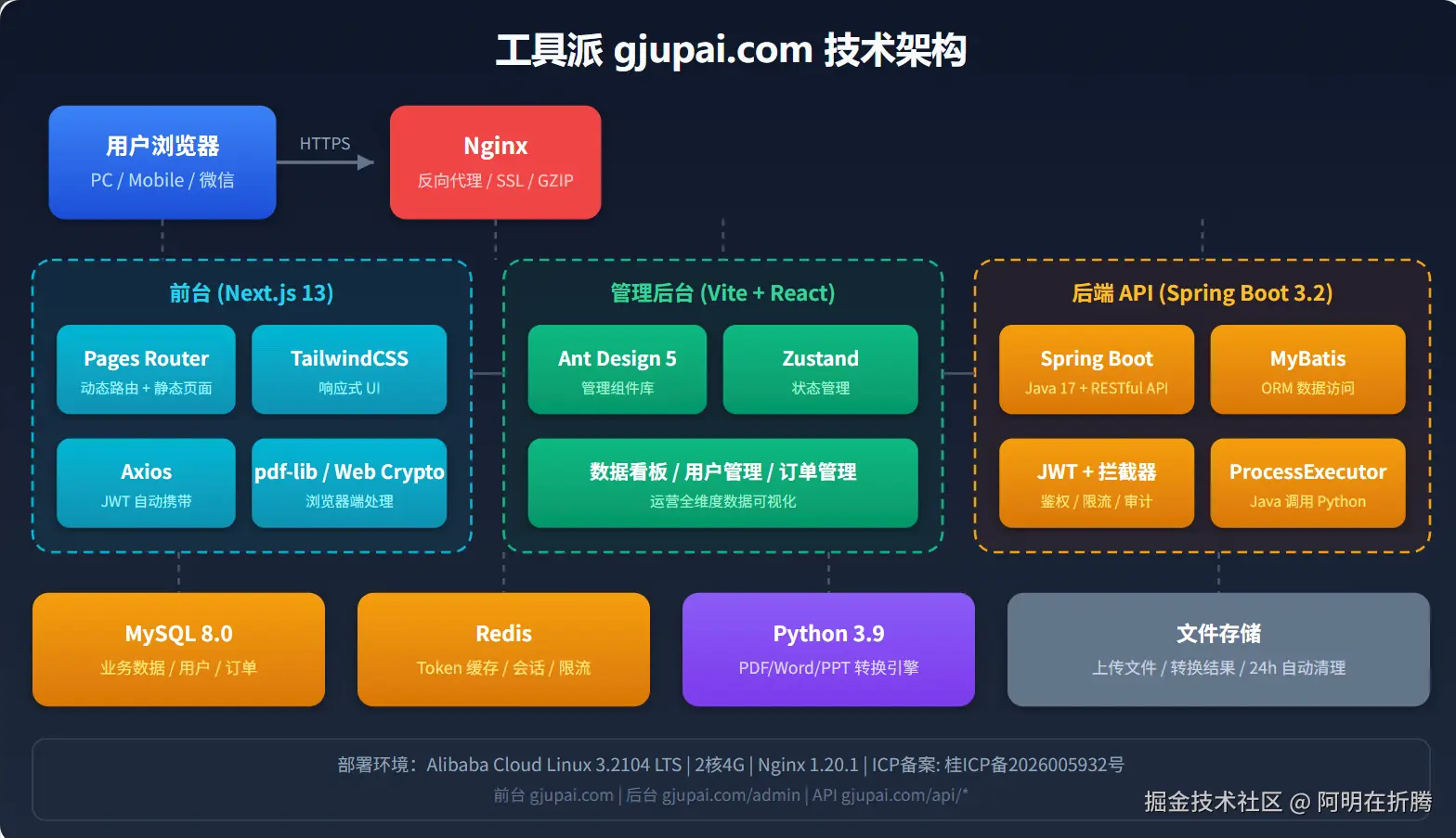
一、为什么用混合架构?
做这个项目之前,我调研了几种技术方案:
| 方案 | 优点 | 缺点 |
|---|---|---|
| 纯 Java | 技术栈统一,部署简单 | PDF/图片/视频处理库少,效果差 |
| 纯 Python | 处理库丰富(pdf2docx、Pillow、FFmpeg) | Web 性能不如 Java,高并发吃力 |
| Java + Python 混合 | 各司其职,扬长避短 | 架构复杂,需要进程间通信 |
最终选择了 Spring Boot 主服务 + Python 处理脚本 的混合架构:
- Java 层:负责 HTTP 接口、用户认证、限流、文件管理、数据库操作
- Python 层:负责具体的文档/媒体处理任务
二、整体架构设计
scss
┌─────────────┐     ┌─────────────────┐     ┌─────────────────┐
│   前端      │────▶│  Spring Boot    │────▶│  Python 脚本    │
│  Next.js    │     │   API 服务      │     │  (pdf2docx等)   │
└─────────────┘     └─────────────────┘     └─────────────────┘
                            │
                            ▼
                     ┌─────────────────┐
                     │   MySQL + Redis │
                     │   数据存储      │
                     └─────────────────┘
2.1 技术栈选型
| 层级 | 技术 | 用途 |
|---|---|---|
| 前端 | Next.js 14 + React 18 | SSR 渲染,SEO 友好 |
| API 网关 | Spring Boot 3.2 + Java 17 | RESTful API,业务逻辑 |
| 数据处理 | Python 3.9 | PDF/图片/视频处理 |
| 数据库 | MySQL 8.0 | 用户、订单、工具配置 |
| 缓存 | Redis 7.0 | Token、限流、热点数据 |
| 文件存储 | 本地磁盘 + 定时清理 | 临时文件,24h 自动删除 |
三、核心实现:Java 调用 Python
3.1 方案对比
我尝试了三种 Java 调用 Python 的方案:
| 方案 | 实现方式 | 优点 | 缺点 |
|---|---|---|---|
| Jython | 在 JVM 里运行 Python | 调用方便 | 不支持 C 扩展,很多库用不了 |
| HTTP 服务 | Python 启动 Flask/FastAPI | 解耦彻底 | 需要维护两个服务,部署复杂 |
| ProcessBuilder | Java 启动 Python 子进程 | 简单直接,无额外依赖 | 需要处理进程管理、超时控制 |
最终选择了 ProcessBuilder,因为:
- 不需要额外部署 Python HTTP 服务
- 每个任务是独立的进程,互不影响
- 可以精确控制超时,防止脚本卡死
3.2 核心代码实现
kotlin
@Service
@Slf4j
public class PythonExecutorService {
@Value("${python.path:python3}")
private String pythonPath;
@Value("${python.script.path:/app/scripts}")
private String scriptPath;
@Value("${python.timeout:120}")
private int timeoutSeconds;
/**
* 执行 Python 脚本
* @param scriptName 脚本名称
* @param args 参数列表
* @return 执行结果
*/
public PythonResult execute(String scriptName, List<String> args) {
List<String> command = new ArrayList<>();
command.add(pythonPath);
command.add(Paths.get(scriptPath, scriptName).toString());
command.addAll(args);
ProcessBuilder pb = new ProcessBuilder(command);
pb.redirectErrorStream(true); // 合并错误流到标准输出
Process process = null;
try {
process = pb.start();
// 读取输出
String output;
try (InputStream is = process.getInputStream();
BufferedReader reader = new BufferedReader(new InputStreamReader(is))) {
output = reader.lines().collect(Collectors.joining("\n"));
}
// 等待执行完成(带超时)
boolean finished = process.waitFor(timeoutSeconds, TimeUnit.SECONDS);
if (!finished) {
process.destroyForcibly();
log.error("Python script timeout: {}", scriptName);
return PythonResult.fail("处理超时,请重试或减小文件大小");
}
int exitCode = process.exitValue();
if (exitCode != 0) {
log.error("Python script failed, exitCode: {}, output: {}", exitCode, output);
return PythonResult.fail("处理失败: " + output);
}
return PythonResult.success(output);
} catch (Exception e) {
log.error("Python execution error", e);
return PythonResult.fail("系统错误: " + e.getMessage());
} finally {
if (process != null && process.isAlive()) {
process.destroyForcibly();
}
}
}
}3.3 超时与资源控制
在线工具平台最大的风险是:用户上传大文件或恶意文件,导致脚本卡死或内存溢出。
我的解决方案:
less
@ConfigurationProperties(prefix = "python")
@Data
public class PythonProperties {
    private int timeout = 120;           // 默认超时 120 秒
    private long maxFileSize = 50 * 1024 * 1024;  // 最大文件 50MB
    private int maxMemoryMb = 512;       // 限制 Python 进程内存
}
配合 Linux 的 ulimit 限制进程资源:
bash
# 启动脚本中设置资源限制
ulimit -v 524288  # 限制虚拟内存 512MB
ulimit -t 120     # 限制 CPU 时间 120 秒
四、具体工具实现
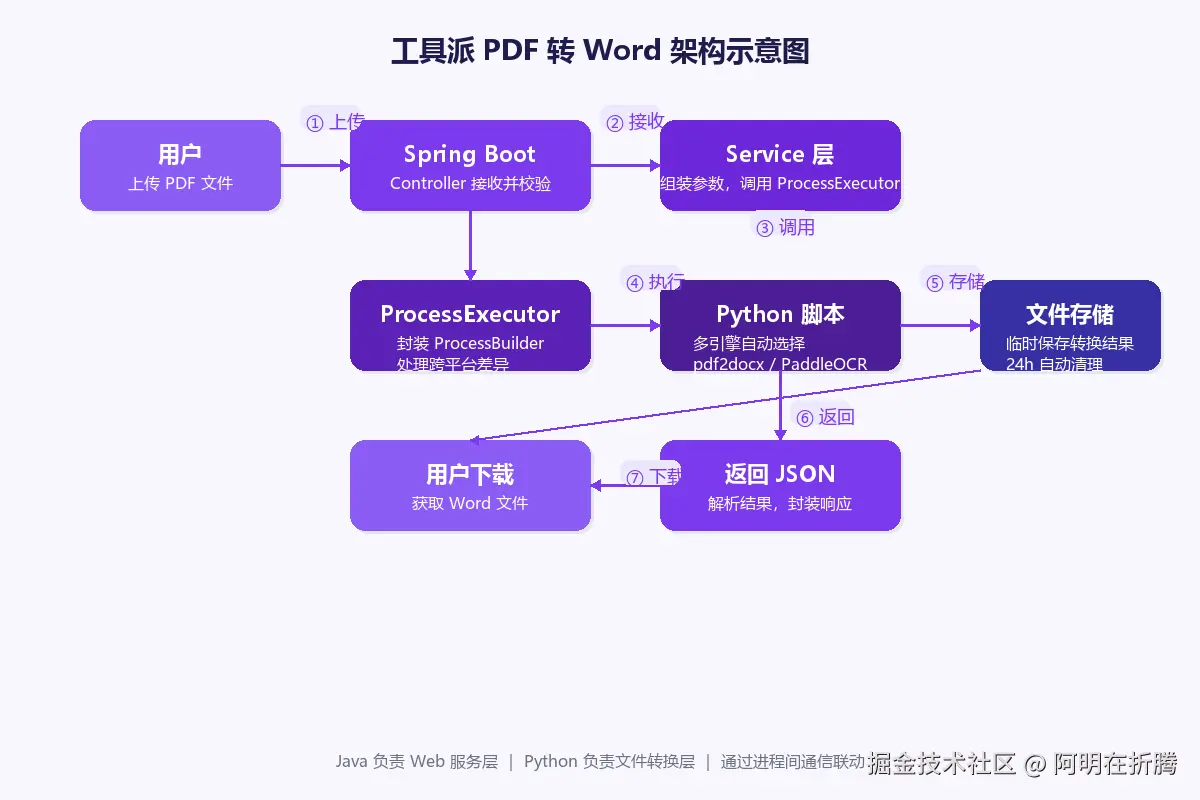
4.1 PDF 转 Word
使用 pdf2docx 库,这是目前 Python 生态里效果最好的 PDF 转 Word 方案。
python
# pdf_to_docx.py
import sys
import json
from pdf2docx import Converter
def convert_pdf_to_docx(pdf_path, docx_path, start_page=0, end_page=None):
"""PDF 转 Word"""
try:
cv = Converter(pdf_path)
# 支持页码范围转换
if end_page is None:
end_page = len(cv.pages)
cv.convert(docx_path, start=start_page, end=end_page)
cv.close()
return {
"success": True,
"pageCount": end_page - start_page,
"outputPath": docx_path
}
except Exception as e:
return {
"success": False,
"error": str(e)
}
if __name__ == "__main__":
pdf_path = sys.argv[1]
docx_path = sys.argv[2]
start_page = int(sys.argv[3]) if len(sys.argv) > 3 else 0
end_page = int(sys.argv[4]) if len(sys.argv) > 4 else None
result = convert_pdf_to_docx(pdf_path, docx_path, start_page, end_page)
print(json.dumps(result))Java 调用:
ini
public ConvertResult convertPdfToDocx(MultipartFile file, int startPage, int endPage) {
// 1. 保存上传文件到临时目录
String tempDir = createTempDir();
File pdfFile = saveToTemp(file, tempDir);
String docxPath = tempDir + "/output.docx";
// 2. 调用 Python 脚本
List<String> args = Arrays.asList(
pdfFile.getAbsolutePath(),
docxPath,
String.valueOf(startPage),
String.valueOf(endPage)
);
PythonResult result = pythonExecutor.execute("pdf_to_docx.py", args);
// 3. 处理结果
if (result.isSuccess()) {
return ConvertResult.success(docxPath);
} else {
return ConvertResult.fail(result.getError());
}
}
4.2 图片批量处理
使用 Pillow 库实现图片压缩、格式转换、批量处理。
python
# image_processor.py
from PIL import Image
import os
import sys
import json
def compress_image(input_path, output_path, quality=85, max_width=None):
"""图片压缩"""
with Image.open(input_path) as img:
# 转换为 RGB(处理 PNG 透明通道)
if img.mode in ('RGBA', 'LA', 'P'):
img = img.convert('RGB')
# 等比缩放
if max_width and img.width > max_width:
ratio = max_width / img.width
new_size = (max_width, int(img.height * ratio))
img = img.resize(new_size, Image.Resampling.LANCZOS)
# 保存
img.save(output_path, quality=quality, optimize=True)
# 返回压缩前后大小对比
original_size = os.path.getsize(input_path)
compressed_size = os.path.getsize(output_path)
return {
"success": True,
"originalSize": original_size,
"compressedSize": compressed_size,
"compressionRatio": round((1 - compressed_size/original_size) * 100, 2)
}
def convert_format(input_path, output_path, format):
"""格式转换"""
with Image.open(input_path) as img:
if format.upper() == 'JPEG' and img.mode in ('RGBA', 'LA'):
img = img.convert('RGB')
img.save(output_path, format=format)
return {"success": True, "outputPath": output_path}4.3 视频转 GIF
使用 FFmpeg + moviepy 实现视频处理。
python
# video_to_gif.py
from moviepy.editor import VideoFileClip
import sys
import json
def video_to_gif(input_path, output_path, start_time, end_time, fps=10, resize=0.5):
"""视频转 GIF"""
try:
clip = VideoFileClip(input_path)
# 截取片段
if start_time is not None and end_time is not None:
clip = clip.subclip(start_time, end_time)
# 调整尺寸和帧率
clip = clip.resize(resize).set_fps(fps)
# 生成 GIF
clip.write_gif(output_path, program='ffmpeg')
clip.close()
return {
"success": True,
"outputPath": output_path,
"duration": end_time - start_time if end_time else clip.duration
}
except Exception as e:
return {"success": False, "error": str(e)}
五、文件存储与清理策略
在线工具平台会产生大量临时文件,必须做好管理:
5.1 存储目录结构
bash
/data/uploads/
├── 2024/
│   ├── 01/
│   │   ├── 15/
│   │   │   ├── upload_xxx.pdf      # 用户上传的原始文件
│   │   │   ├── result_xxx.docx     # 处理后的结果文件
│   │   │   └── ...
5.2 自动清理机制
使用 Spring 的 @Scheduled 定时清理:
scss
@Component
@Slf4j
public class FileCleanupTask {
@Value("${file.temp.path:/data/uploads}")
private String tempPath;
@Value("${file.retention.hours:24}")
private int retentionHours;
/**
* 每天凌晨 3 点清理过期文件
*/
@Scheduled(cron = "0 0 3 * * ?")
public void cleanupExpiredFiles() {
log.info("Starting file cleanup task...");
File tempDir = new File(tempPath);
if (!tempDir.exists()) return;
long cutoffTime = System.currentTimeMillis() -
(retentionHours * 60 * 60 * 1000L);
int deletedCount = cleanupDirectory(tempDir, cutoffTime);
log.info("Cleanup completed. Deleted {} files/directories", deletedCount);
}
private int cleanupDirectory(File dir, long cutoffTime) {
int count = 0;
File[] files = dir.listFiles();
if (files == null) return count;
for (File file : files) {
if (file.isDirectory()) {
count += cleanupDirectory(file, cutoffTime);
// 如果目录为空,删除目录
if (file.list() != null && file.list().length == 0) {
file.delete();
count++;
}
} else if (file.lastModified() < cutoffTime) {
file.delete();
count++;
}
}
return count;
}
}六、限流与防刷设计
工具类网站容易被滥用,必须做好限流:
6.1 基于 Redis 的令牌桶限流
typescript
@Component
public class RateLimiter {
@Autowired
private StringRedisTemplate redisTemplate;
/**
* 检查是否允许请求
* @param key 限流标识(用户ID或IP)
* @param limit 限制次数
* @param window 时间窗口(秒)
*/
public boolean allowRequest(String key, int limit, int window) {
String redisKey = "rate_limit:" + key;
Long current = redisTemplate.opsForValue().increment(redisKey);
if (current == 1) {
// 第一次请求,设置过期时间
redisTemplate.expire(redisKey, window, TimeUnit.SECONDS);
}
return current <= limit;
}
}6.2 多层级限流策略
| 层级 | 限流规则 | 说明 |
|---|---|---|
| IP 级 | 每分钟 10 次 | 防止单 IP 恶意刷接口 |
| 用户级 | 每分钟 5 次 | 登录用户单独限制 |
| 工具级 | 每日免费额度 | 单工具每日 3 次免费 |
| 全局级 | 每秒 100 QPS | 防止服务过载 |
七、踩坑记录
7.1 Python 环境问题
问题:服务器上 Python 脚本找不到依赖库。
解决:使用虚拟环境 + 绝对路径:
bash
# 创建虚拟环境
python3 -m venv /opt/python-env
# 安装依赖
/opt/python-env/bin/pip install pdf2docx PyMuPDF pillow moviepy
# Java 配置
python.path=/opt/python-env/bin/python7.2 大文件内存溢出
问题:处理 100MB+ 的 PDF 时,Python 进程内存暴涨导致 OOM。
解决:
- 限制上传文件大小(默认 50MB)
- 使用流式处理代替全量加载
- 设置进程内存限制
ulimit -v 524288
7.3 并发处理性能
问题:高峰期多个用户同时处理文件,系统卡顿。
解决:
- 使用线程池控制并发数
- 大文件处理改为异步队列(Redis + 消息队列)
- 前端展示处理进度条,提升体验
八、性能数据
上线 3 个月的实际运行数据:
| 指标 | 数值 | 说明 |
|---|---|---|
| 平均响应时间 | 2.3s | PDF 转 Word 平均耗时 |
| 成功率 | 98.7% | 包含用户上传损坏文件的情况 |
| 并发处理 | 20 个 | 单服务器同时处理任务数 |
| 内存占用 | 2-4GB | Java + Python 进程总和 |
| 文件清理 | 99.9% | 24h 自动清理成功率 |
九、总结
Spring Boot + Python 混合架构的核心思路:
- 各司其职:Java 负责 Web 服务,Python 负责数据处理
- 进程隔离:每个处理任务独立进程,互不影响
- 超时控制:防止脚本卡死,保障服务稳定性
- 资源限制:文件大小、内存、CPU 时间多重限制
- 自动清理:临时文件定时清理,防止磁盘占满
这种架构适合需要复杂文档/媒体处理能力的 Web 项目,比如:
- 在线工具平台
- 文档管理系统
- 媒体处理服务
- 数据转换平台
参考项目
以上方案都在我的在线工具平台「工具派」落地了:
集成了 42+ 个实用工具,包括:
- PDF 转换、压缩、合并拆分
- 图片压缩、格式转换、批量处理
- 视频转 GIF、音频提取
- 开发工具(正则测试、编解码、SQL 格式化)
免费使用,欢迎体验。有问题评论区交流 👇