语言模型以文本作为输入,这个文本通常被称为提示词(prompt),在开发过程中,对于提示词通常不能直接硬编码,不利于提示词管理,而是通过提示词模版进行维护,类似开发过程中遇到的短信模版、邮件模版等等。
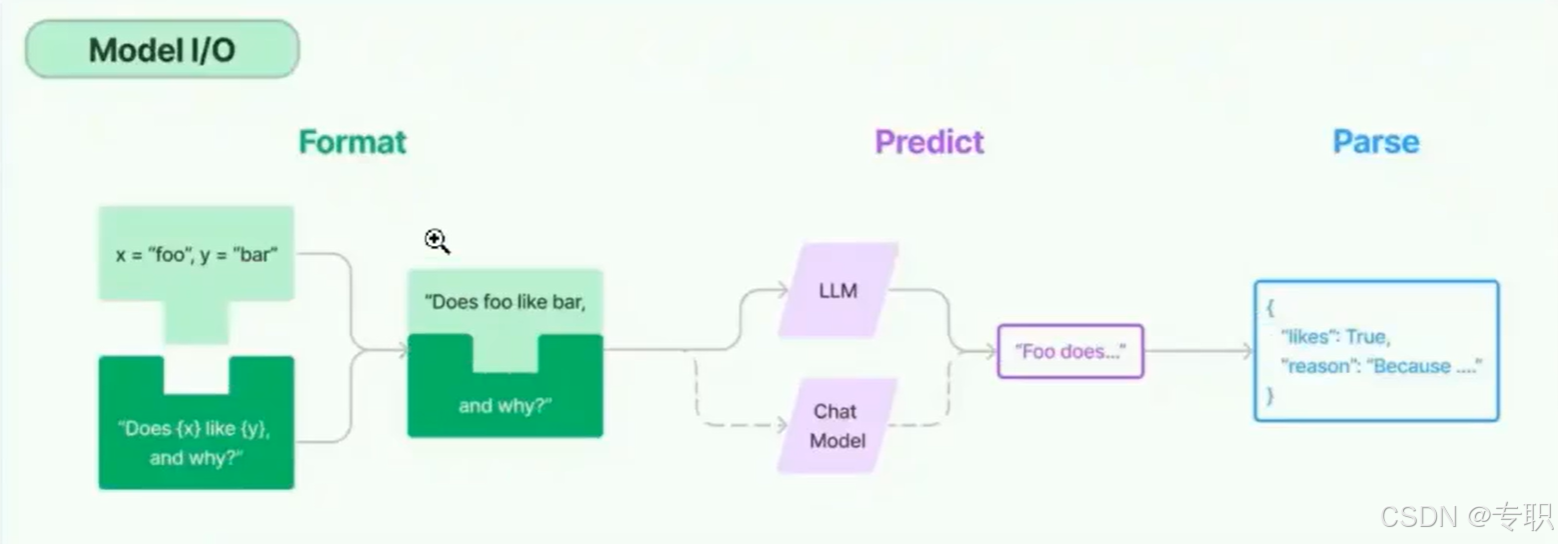
什么是提示词模版
提示词模版本质上跟平时大家使用的邮件模版、短息模版没什么区别,就是一个字符串模版,模版可以包含一组模版参数,通过模版参数值可以替换模版对应的参数。
一个提示词模版可以包含下面的内容:
- 发给大语言模型(LLM)的指令
- 一组问答示例,以提醒AI以什么格式返回请求
- 发给语言模型的问题
创建一个提示词模版
可以使用PromptTemplate类创建简单的提示词。提示词模版可以内嵌任意数量的模版参数,然后通过参数值格式化模版内容。
- 字符串提示词模版
python
from langchain_core.prompts import ChatPromptTemplate


# 定义一个提示词模版,包含adjective和content两个模版变量,模版变量使用{}包括起来
prompt_template = ChatPromptTemplate.from_template(
    "给我讲一个关于{content}的{adjective}的笑话"
)

# 使用模版变量填充模版
result = prompt_template.format(adjective="冷", content="猴子")
print(result)
聊天消息提示词模版
聊天模型(Chat Model)以聊天消息列表作为输入,这个聊天消息列表的消息内容也可以通过提示词模版进行管理,这些聊天消息与原始字符串不同,因为每个消息都与角色(role)相关联。
例如,在OpenAI的Chat Completion API中,OpenAI的聊天模型,给不同的聊天消息定义了三种角色类型,分别是助手(assistant)、人类(human)或系统(system)角色。
- 助手(Assistant)消息指的是当前消息是AI回答的内容
- 人类(user)消息指的是你发给AI的内容
- 系统(system)消息通常是用来给AI身份进行描述
创建聊天消息模版例子:
python
from langchain_core.prompts import ChatPromptTemplate


"""
通过一个消息数组创建聊天消息模版
数组每一个元素代表一条消息,每个消息元祖,第一个元素代表消息角色(也称为消息类型),第二个元素代表消息内容
消息角色:system代表系统消息,human代表人类信息,ai代表LLM返回的消息内容
下面定义2个模版参数:name和user_input
"""
prompt_template = ChatPromptTemplate.from_messages(
    [
        ("system", "你是一位人工智能助手,你的名字是:{name}"),
        ("human", "你好"),
        ("ai", "我很好,谢谢"),
        ("human", "{user_input}")
    ]
)

# 使用模版变量填充模版
result = prompt_template.format_messages(name="小明", user_input="你好,我是小明")
print(result)
MessagesPlaceholder
这个提示模版负责在特定位置添加消息列表。在上面的ChatPromptTemplate中,我们看到了如何格式化两条消息,每条消息都是一个字符串。但是如果我们希望用户传入一个消息列表,我们将其插入到特定位置,该怎么办?这就是您使用MessagesPlaceholder的方式。
python
from langchain_core.prompts import ChatPromptTemplate, MessagesPlaceholder
from langchain_core.messages import HumanMessage


prompt_template = ChatPromptTemplate.from_messages([
    ("system", "You are a helpful assistant"),
    MessagesPlaceholder("msgs")
])

prompt_template.invoke({"msgs": [HumanMessage(content="你好,我是小明")]})
将生成两条消息,第一条消息是系统消息,第二条使我们传入的HumanMessage。如果我们传入了5条消息,
那么总共会生成6条消息(系统消息加传入的5条消息)。这对于将一系列消息插入到特定位置非常有用,
另一种实现效果的替代方法是,不直接使用MessagesPlaceholder类,而是:
python
prompt_template = ChatPromptTemplate.from_messages([
    ("system", "You are a helpful assistant"),
    ("placeholder", "{msgs}")
])
提示词追加示例(Few-shot prompt templates)
提示词中包含交互样本的作用是为了帮助模型更好的理解用户的意图,从而更好的回答问题或执行任务。小样本提示模版是指使用一组少量的示例指导模型处理新的输入。这些示例可以用来训练模型,以便模型可以更好的理解和回答类似的问题。
例子:
text
Q:什么事蝙蝠侠?
A: 蝙蝠侠是一个虚构的漫画人物

Q:什么是torsalplexity?
A: 未知

Q:什么事语言模型?
A:
告诉模型根据,Q是问题,A是答案,按这种格式进行问答交互。
下面讲解的就是LangChain针对在提示词中插入少量交互样本提供的工具类。
使用示例集
下面定义了一个examples示例数组,里面包含一组问答样例:
python
from langchain_core.messages import HumanMessage
from langchain_core.prompts import (
    ChatPromptTemplate,
    FewShotChatMessagePromptTemplate,
    MessagesPlaceholder,
)


examples = [
    {
        "question": "谁的寿命更长,穆罕默德阿里还是艾伦图灵?",
        "answer":
        """
        这里需要跟进问题吗:是的。
        跟进:穆罕默德阿里去世时多大?
        中间答案:穆罕默德阿里去世时84岁。
        跟进:艾伦图灵去世时多大?
        中间答案:艾伦图灵去世时52岁。
        最终答案:穆罕默德阿里寿命更长。
        """
    },
    {
        "question": "百度的创始人是什么时候出生的?",
        "answer":
        """
        这里需要跟进问题吗:是的。
        跟进:百度创始人是谁?
        中间答案:百度创始人是李彦宏。
        跟进:李彦宏是什么时候出生的?
        中间答案:李彦宏出生于1968年11月。
        最终答案:百度创始人出生于1968年11月。
        """
    },
    {
        "question": "爱因斯坦在1905年提出了什么理论?",
        "answer":
        """
        这里需要跟进问题吗:是的。
        跟进:爱因斯坦在1905年提出了什么理论?
        中间答案:爱因斯坦在1905年提出了相对论。
        """
    }
]
example_prompt = ChatPromptTemplate.from_messages([
    ("human", "{question}"),
    ("ai", "{answer}"),
])

few_shot_prompt = FewShotChatMessagePromptTemplate(
    examples=examples, example_prompt=example_prompt
)

final_prompt = ChatPromptTemplate.from_messages(
    [
        ("system", "你是一个擅长分步推理的助手。"),
        few_shot_prompt,
        ("human", "{question}"),
    ]
)

print("=== FewShotChatMessagePromptTemplate 示例 ===")
ret = final_prompt.format_messages(question="谁的寿命更长,穆罕默德阿里还是艾伦图灵?")
print(ret)

# for msg in final_prompt.format_messages(question="谁的寿命更长,穆罕默德阿里还是艾伦图灵?"):
#     print(f"{msg.type}: {msg.content}\n")
创建小样本示例的格式化程序
通过PromptTemplate对象,简单的在提示词模版中插入样例。
python
from langchain_core.messages import HumanMessage
from langchain_core.prompts import (
    PromptTemplate,
)
example_prompt = PromptTemplate(input_variables=["question", "answer"], template="问题:{question}\n答案:{answer}")
print(example_prompt.format(**examples[0]))
将示例和格式化程序提供给FewShotPromptTemplate
通过FewshotPromptTemplate对象,批量插入示例内容。
python
example_prompt = PromptTemplate(input_variables=["question", "answer"], template="问题:{question}\n答案:{answer}")
# 接收examples示例数组参数,通过example_prompt提示词模版批量渲染示例内容
# suffix和input_variables参数用于在提示词模版最后追加内容,input_variables用于定义suffix中包含
prompt = FewShotPromptTemplate(
    examples=examples,
    example_prompt=example_prompt,
    suffix="问题:{input}",
    input_variables=["input"]
)
print(prompt.format(input="谁的寿命更长,穆罕默德阿里还是艾伦图灵?"))
使用示例选择器
将示例提供给ExampleSelector
这里重用前一部分中的示例集和提示词模版(prompt template)。但是,不会将示例直接提供给FewShotPromptTemplate对象,把全部示例插入到提示词中,而是将他们提供给一个ExampleSelector对象,插入部分示例。
这里我们使用 类,该类根据与输入的相似性选择小样本示例。它使用嵌入模型计算输入和小样本之间的相似性,然后使用向量数据库执行相似搜索,获取跟输入相似的示例。
- 提示:这里涉及向量计算、向量数据库、在AI领域这两个主要用于数据相似度搜索,例如:查询相似文章内容、相似的图片、视频等等。
python
from langchain_core.example_selectors import SemanticSimilarityExampleSelector
from langchain_chroma import Chroma
from langchain_huggingface import HuggingFaceEmbeddings

# 使用语义相似性示例选择器
example_selector = SemanticSimilarityExampleSelector.from_examples(
    # 待选择示例列表
    examples,
    # 这是用于生成嵌入的嵌入类,该嵌入用于衡量语义的相似性
    HuggingFaceEmbeddings(model_name="sentence-transformers/paraphrase-multilingual-MiniLM-L12-v2"),
    # 这是用于存储嵌入和执行相似性搜索的VectorStore类
    Chroma,
    # 这是要生成的示例数
    k=1
)

# 选择与输入最相似的示例
question = "谁的寿命更长"
selected_examples = example_selector.select_examples({"question": question})
print(f"最相似的示例:{selected_examples}")
for example in selected_examples:
    print(f"示例:{example['question']}")
    print(f"答案:{example['answer']}")
    print("-" * 50)
将示例选择器提供给FewShopPromptTemplate
最后,创建一个FewShotPromptTemplate对象。根据前面的example_selector示例选择器,选择一个跟问题相似的例子。
python
from langchain_core.prompts import PromptTemplate, FewShotPromptTemplate
from langchain_core.example_selectors import SemanticSimilarityExampleSelector
from langchain_chroma import Chroma
from langchain_huggingface import HuggingFaceEmbeddings

# 使用语义相似性示例选择器
example_selector = SemanticSimilarityExampleSelector.from_examples(
    # 待选择示例列表
    examples,
    # 这是用于生成嵌入的嵌入类,该嵌入用于衡量语义的相似性
    HuggingFaceEmbeddings(model_name="sentence-transformers/paraphrase-multilingual-MiniLM-L12-v2"),
    # 这是用于存储嵌入和执行相似性搜索的VectorStore类
    Chroma,
    # 这是要生成的示例数
    k=1
)

# 声明这个模版需要两个输入变量,分别是question和answer
# template: 定义输出格式先写问题,然后写答案
example_prompt = PromptTemplate(input_variables=["question", "answer"], template="问题:{question}\n答案:{answer}")

prompt = FewShotPromptTemplate(
    example_selector=example_selector,
    example_prompt=example_prompt,
    suffix="问题:{input}",
    input_variables=["input"]
)
print(prompt.format(input="谁的寿命更长,穆罕默德阿里还是艾伦图灵?"))