
🔥草莓熊Lotso: 个人主页
❄️个人专栏: 《C++知识分享》 《Linux 入门到实践:零基础也能懂》
✨生活是默默的坚持,毅力是永久的享受!
🎬 博主简介:

文章目录
- [一. 核心原理:with_structured_output () 方法详解](#一. 核心原理:with_structured_output () 方法详解)
-
- [1.1 方法定义与核心参数](#1.1 方法定义与核心参数)
- [1.2 工作流程](#1.2 工作流程)
- [二. 三种输出格式实战](#二. 三种输出格式实战)
-
- [2.1 返回 Pydantic 对象(推荐)](#2.1 返回 Pydantic 对象(推荐))
- [2.2 返回 TypedDict](#2.2 返回 TypedDict)
- [2.3 返回 JSON](#2.3 返回 JSON)
- [三. 实用场景深度解析](#三. 实用场景深度解析)
-
- [3.1 场景 1:作为信息提取器](#3.1 场景 1:作为信息提取器)
- [3.2 场景 2:少样本提示增强提取能力](#3.2 场景 2:少样本提示增强提取能力)
- [3.3 场景 3:与工具调用结合使用](#3.3 场景 3:与工具调用结合使用)
- 四、核心总结与注意事项
-
- [4.1 核心要点总结](#4.1 核心要点总结)
- [4.2 常见坑与注意事项](#4.2 常见坑与注意事项)
- 结尾:
前言
在构建大语言模型(LLM)应用时,我们最常遇到的痛点之一就是:大模型天生擅长生成自然语言文本,但程序却很难直接处理这些非结构化的字符串 。想象一下,你需要从用户输入中提取用户信息并存入数据库,或者让模型返回一个可以直接调用 API 的参数列表。如果只能得到一段自然语言描述,你不得不编写复杂的正则表达式或文本解析逻辑,不仅容易出错,还难以维护。LangChain 提供的结构化输出能力完美解决了这个问题。它允许我们预先定义一个数据结构(Schema),然后指示大模型严格按照这个结构返回响应。这实现了从 "模糊的文本对话" 到 "精确的数据 API 调用" 的范式转换,是构建生产级 LLM 应用的必备技能。本文将从原理到实战,全面讲解 LangChain 聊天模型的结构化输出能力,包括三种常用输出格式、核心参数解析以及三个高频实用场景。
一. 核心原理:with_structured_output () 方法详解
1.1 方法定义与核心参数
LangChain 中所有支持结构化输出的聊天模型都提供了 with_structured_output() 方法。这个方法接收一个输出结构定义,返回一个新的 Runnable 实例。当调用这个实例时,模型会自动生成符合指定结构的响应。
方法完整定义如下:
python
def with_structured_output(
    schema: dict[str, Any] | type[_BM] | type | None = None,
    method: Literal['function_calling', 'json_mode', 'json_schema'] = 'json_schema',
    include_raw: bool = False,
    strict: bool | None = None,
    **kwargs: Any,
) -> Runnable[PromptValue | str | Sequence[BaseMessage], dict | _BM]
核心参数说明:
| 参数 | 类型 | 默认值 | 说明 |
|---|---|---|---|
schema |
dict/type | 必填 | 输出结构定义,可以是 Pydantic 类、TypedDict 或 JSON Schema |
method |
Literal | json_schema |
生成方法,推荐使用默认的 json_schema(OpenAI 官方结构化输出 API) |
include_raw |
bool | False |
是否返回原始模型响应。如果为 True,会返回包含 raw、parsed 和 parsing_error 的字典 |
strict |
bool | None |
是否严格验证输出与 Schema 的匹配。设置为 True 可以大幅减少幻觉和格式错误 |
1.2 工作流程
结构化输出的完整工作流程可以分为三步:
- Schema 转换:LangChain 将你定义的 Pydantic 类 / TypedDict/JSON Schema 转换为大模型能够理解的格式说明
- 模型生成:大模型根据格式说明,生成符合要求的结构化数据
- 解析验证:LangChain 解析模型输出,并验证其是否符合 Schema 定义,最终返回结构化对象
这个过程完全透明,你只需要关注定义 Schema 和使用返回的结构化数据即可。
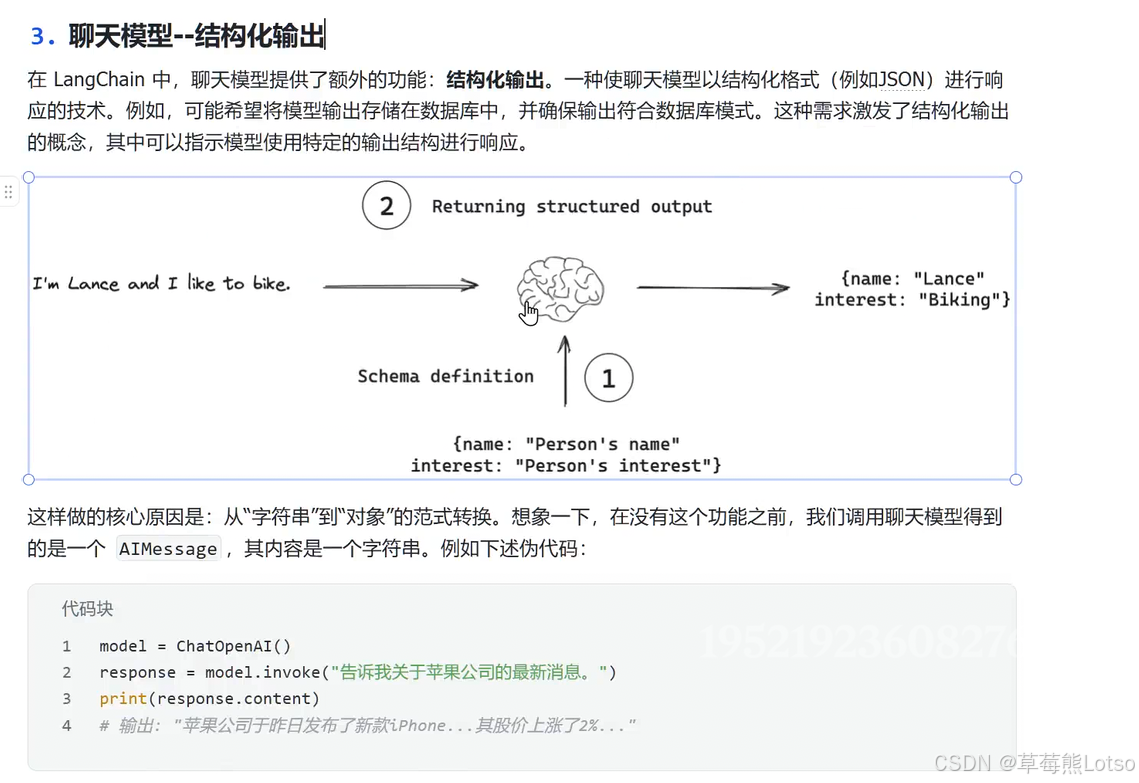
二. 三种输出格式实战
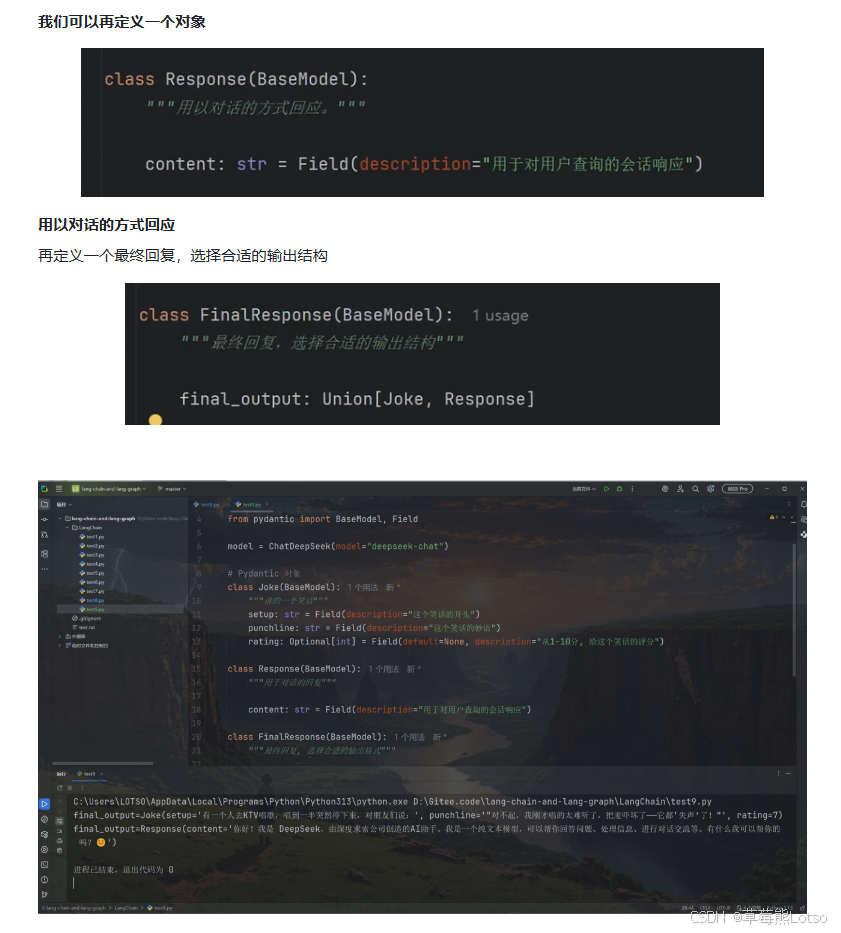
2.1 返回 Pydantic 对象(推荐)
Pydantic 是 Python 中最流行的数据验证库,也是 LangChain 结构化输出的首选方式。它提供了强大的类型提示、数据验证和序列化能力,非常适合用于定义复杂的数据结构。
基础示例
python
from langchain_openai import ChatOpenAI
from typing import Optional
from pydantic import BaseModel, Field

# 1. 定义大模型
model = ChatOpenAI(model="gpt-4o-mini")

# 2. 定义输出结构:Pydantic 类
class Joke(BaseModel):
    """给用户讲一个笑话"""
    setup: str = Field(description="这个笑话的开头")
    punchline: str = Field(description="这个笑话的妙语")
    rating: Optional[int] = Field(
        default=None, description="从1到10分,给这个笑话评分"
    )

# 3. 绑定结构化输出
model_with_structured = model.with_structured_output(Joke)

# 4. 调用并获取结构化结果
result = model_with_structured.invoke("讲一个关于唱歌的笑话")
print(result)
# 输出:setup='为什么歌手总是带着梯子?' punchline='因为他们想要达到更高的音调!' rating=7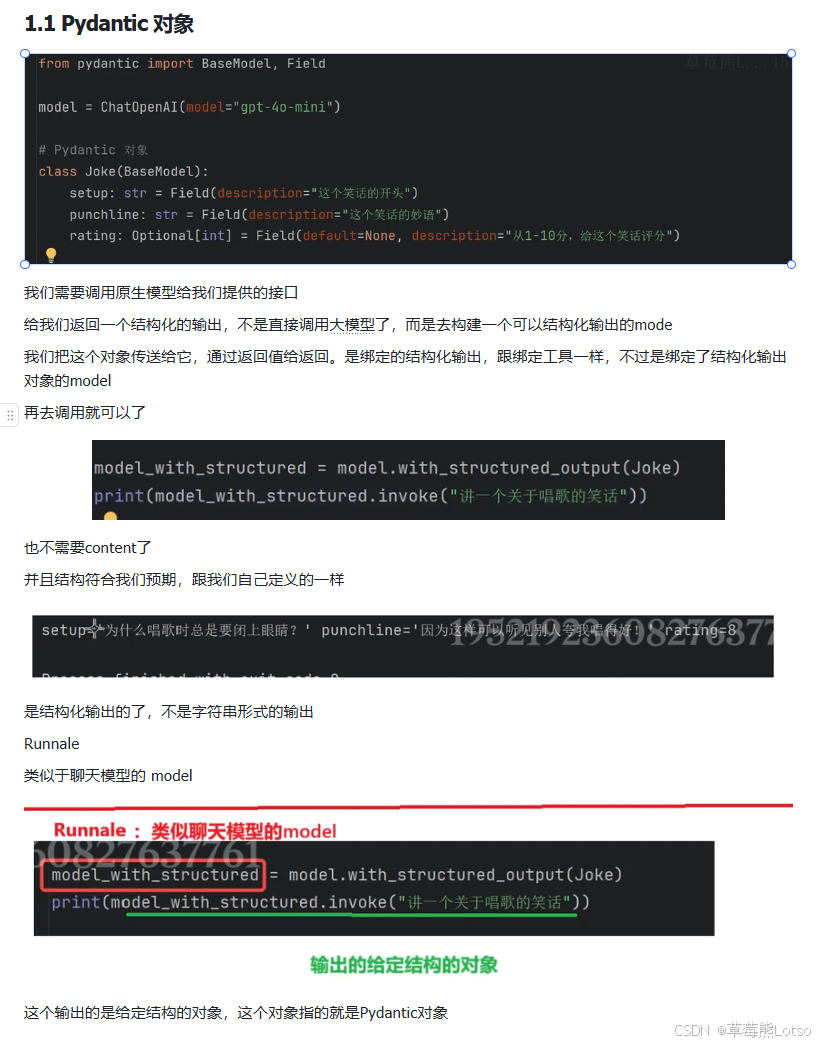
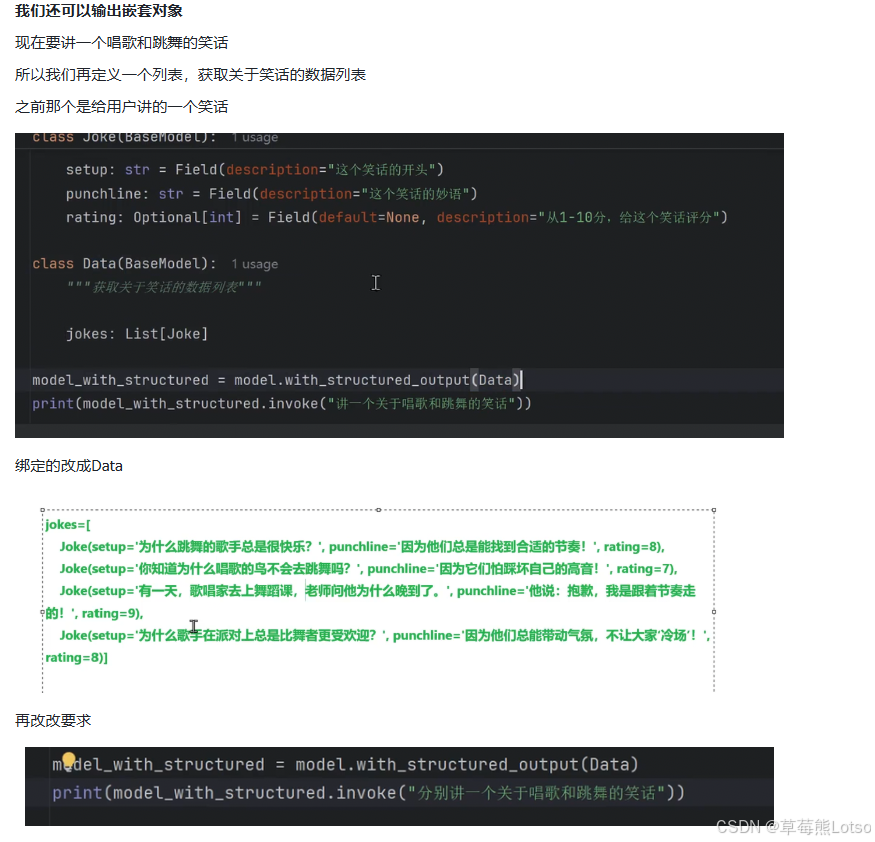
嵌套结构支持
Pydantic 完美支持嵌套结构,这让我们可以定义非常复杂的数据模型:
python
from typing import List

class Joke(BaseModel):
    """给用户讲一个笑话"""
    setup: str = Field(description="这个笑话的开头")
    punchline: str = Field(description="这个笑话的妙语")
    rating: Optional[int] = Field(
        default=None, description="从1到10分,给这个笑话评分"
    )

class Data(BaseModel):
    """获取关于笑话的数据列表"""
    jokes: List[Joke]

model_with_structured = model.with_structured_output(Data)
result = model_with_structured.invoke("分别讲一个关于唱歌和跳舞的笑话")
print(result)
# 输出:
# jokes=[
#     Joke(setup='为什么唱歌的人总是很快乐?', punchline="因为他们总是'音'乐满满!", rating=8),
#     Joke(setup='一个跳舞的牛走进俱乐部,为什么大家都不理它?', punchline="因为它总是'踏'错节拍!", rating=7)
# ]
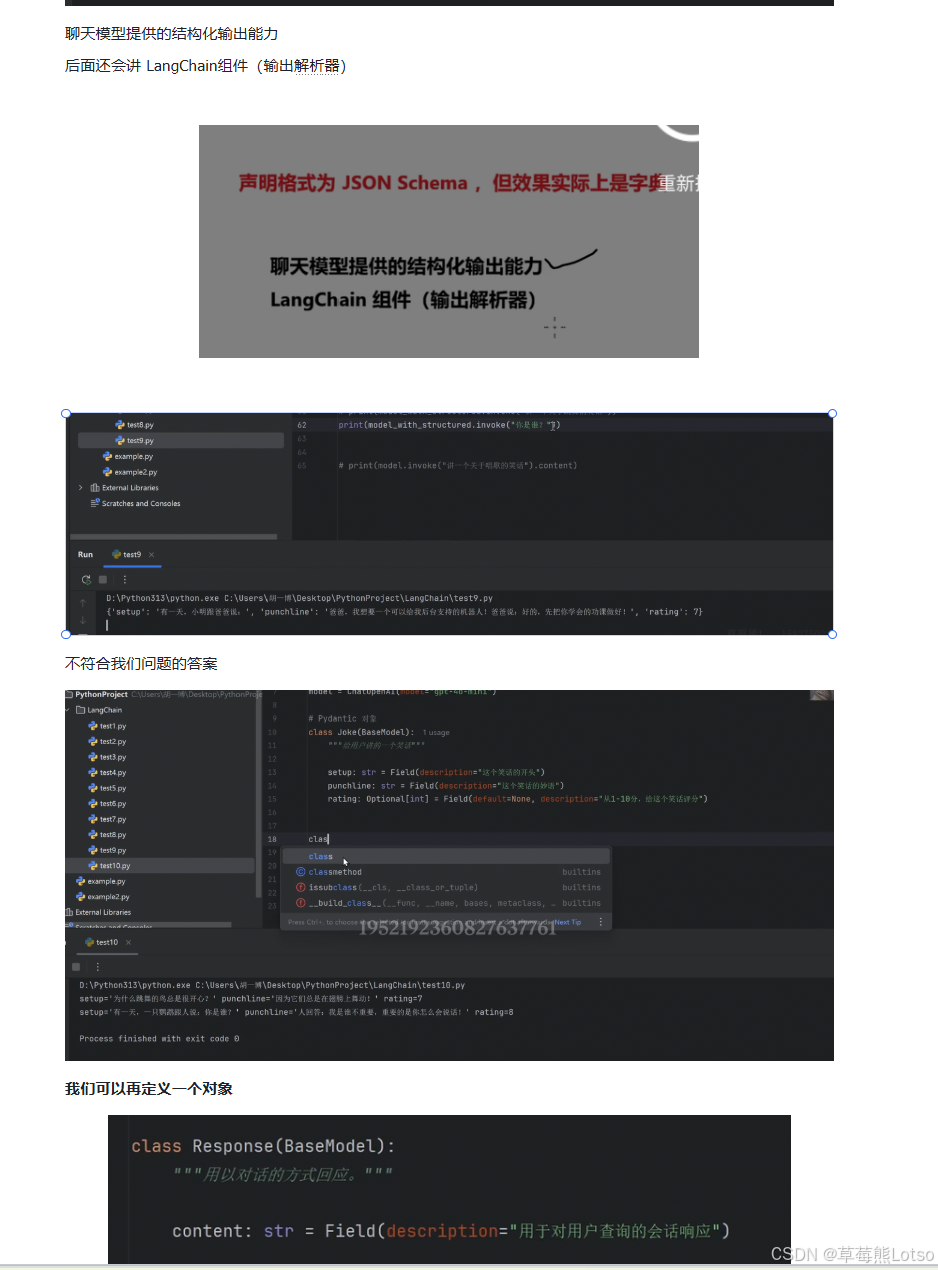
2.2 返回 TypedDict
TypedDict 是 Python 3.8+ 引入的特性,用于为字典对象提供精确的类型提示。如果你更喜欢使用字典而不是类实例,可以选择这种方式。
python
from typing import Optional
from typing_extensions import Annotated, TypedDict

# 定义输出结构:TypedDict
class Joke(TypedDict):
    """给用户讲一个笑话"""
    setup: Annotated[str, ..., "这个笑话的开头"]
    punchline: Annotated[str, ..., "这个笑话的妙语"]
    rating: Annotated[Optional[int], None, "从1到10分,给这个笑话评分"]

model_with_structured = model.with_structured_output(Joke)
result = model_with_structured.invoke("讲一个关于唱歌的笑话")
print(result)
# 输出:{'setup': '为什么歌手总是带一把伞?', 'punchline': '因为他们怕下雨时会错过音调!', 'rating': 7}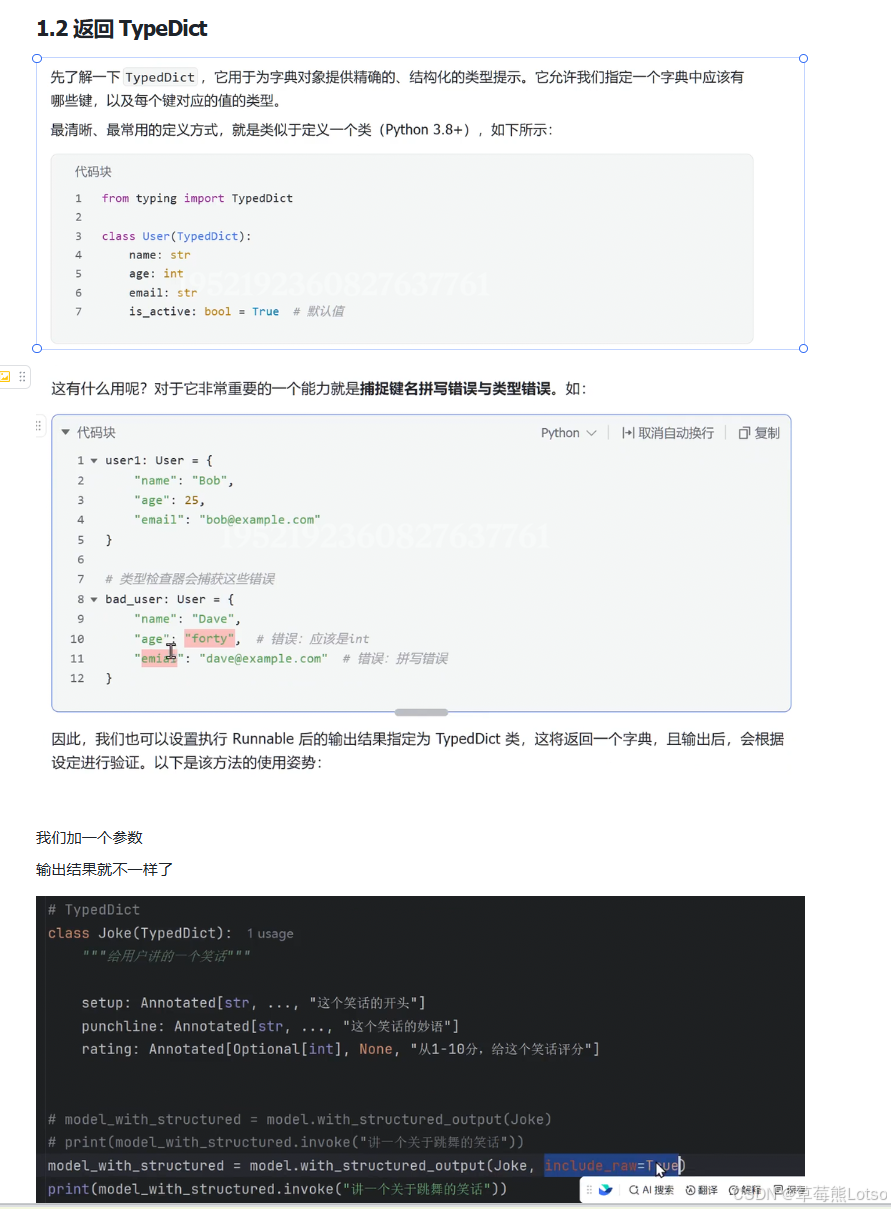
查看原始响应
设置 include_raw=True 可以同时获取原始模型响应和解析后的结构化数据,这对于调试非常有用:
python
model_with_structured = model.with_structured_output(Joke, include_raw=True)
result = model_with_structured.invoke("讲一个关于唱歌的笑话")
print(result)
# 输出包含:
# 'raw': 原始 AIMessage 对象
# 'parsed': 解析后的字典
# 'parsing_error': 解析错误信息(如果有)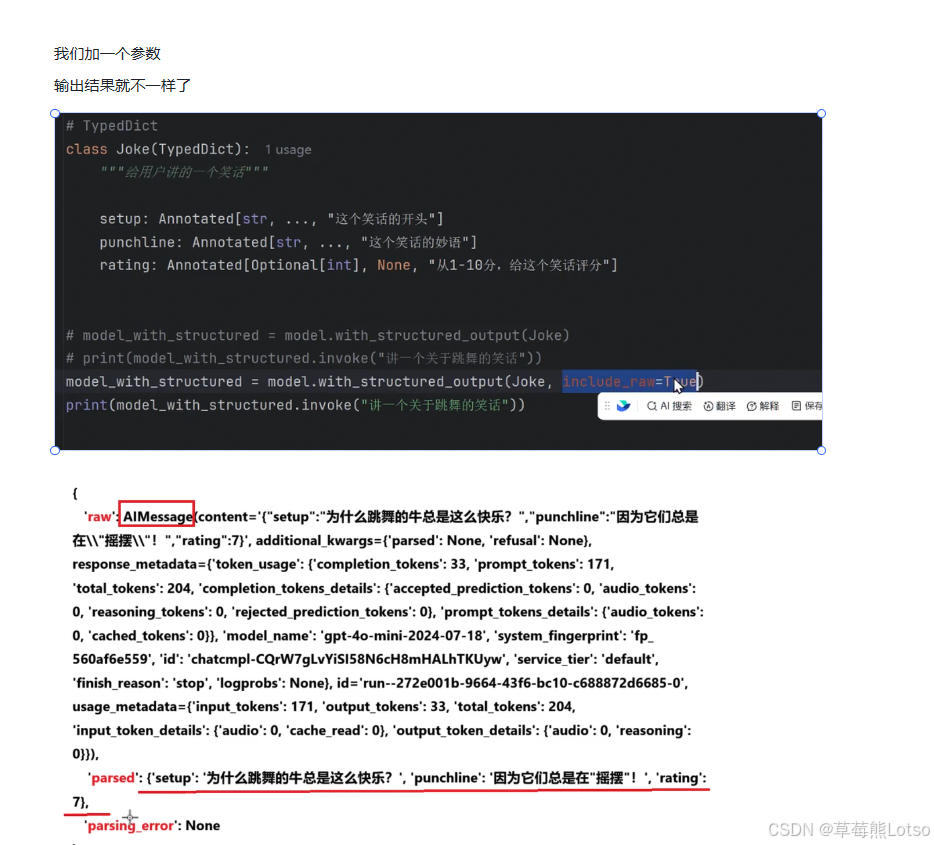
2.3 返回 JSON
如果你需要直接获取 JSON 格式的数据,可以直接传入 JSON Schema 作为输出结构:
python
# 定义 JSON Schema
json_schema = {
    "title": "joke",
    "description": "给用户讲一个笑话",
    "type": "object",
    "properties": {
        "setup": {
            "type": "string",
            "description": "这个笑话的开头",
        },
        "punchline": {
            "type": "string",
            "description": "这个笑话的妙语",
        },
        "rating": {
            "type": "integer",
            "description": "从1到10分,给这个笑话评分",
            "default": None,
        },
    },
    "required": ["setup", "punchline"],
}

model_with_structured = model.with_structured_output(json_schema)
result = model_with_structured.invoke("讲一个关于唱歌的笑话")
print(result)
# 输出:{'setup': '为什么唱歌的人总是很开心?', 'punchline': '因为他们总是有很多音符可供选择!', 'rating': 7}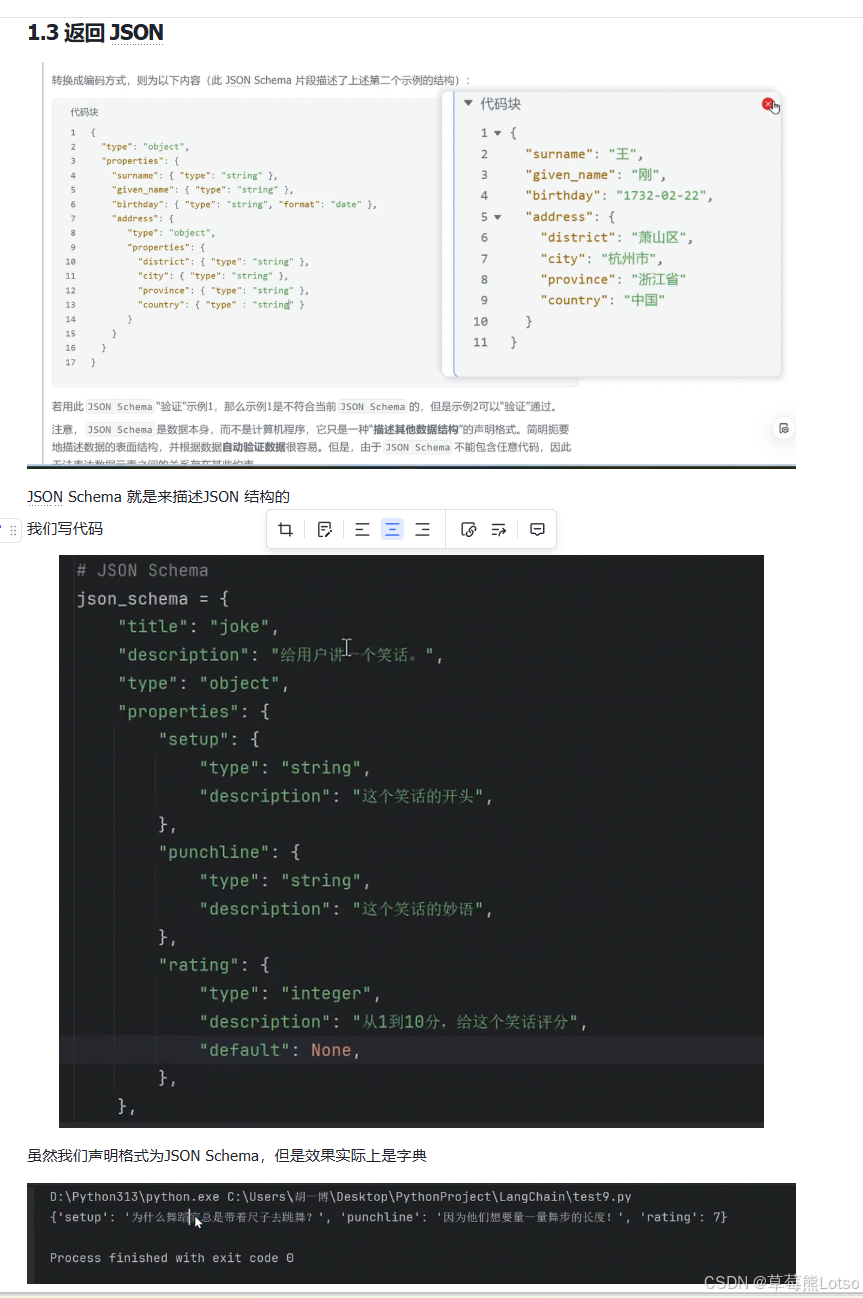
三. 实用场景深度解析
3.1 场景 1:作为信息提取器
结构化输出最常见的应用场景就是信息提取。我们可以定义一个数据结构,让模型从非结构化文本中自动提取出我们需要的信息。
python
from langchain_openai import ChatOpenAI
from typing import Optional
from pydantic import BaseModel, Field
from langchain_core.messages import HumanMessage, SystemMessage

# 定义大模型
model = ChatOpenAI(model="gpt-4o-mini")

# 定义要提取的信息结构
class Person(BaseModel):
    """一个人的信息"""
    # 注意:
    # 1. 每个字段都是 Optional ------ 允许 LLM 在不知道答案时输出 None
    # 2. 每个字段都有 description ------ LLM 使用这个描述来理解要提取什么
    name: Optional[str] = Field(default=None, description="这个人的名字")
    hair_color: Optional[str] = Field(default=None, description="如果知道这个人头发的颜色")
    skin_color: Optional[str] = Field(default=None, description="如果知道这个人的肤色")
    height_in_meters: Optional[str] = Field(default=None, description="以米为单位的高度")

# 绑定结构化输出
structured_model = model.with_structured_output(schema=Person)

# 构造提示
messages = [
    SystemMessage(content="你是一个提取信息的专家,只从文本中提取相关信息。如果您不知道要提取的属性的值,属性值返回null"),
    HumanMessage(content="史密斯身高6英尺,金发。")
]

# 提取信息
result = structured_model.invoke(messages)
print(result)
# 输出:name='史密斯' hair_color='金发' skin_color=None height_in_meters='1.83'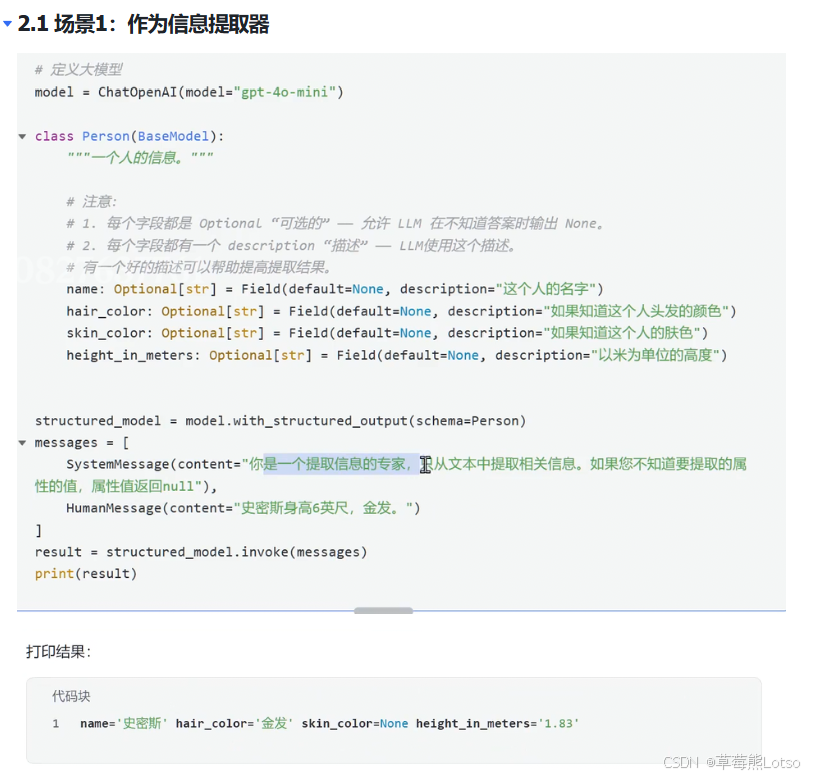
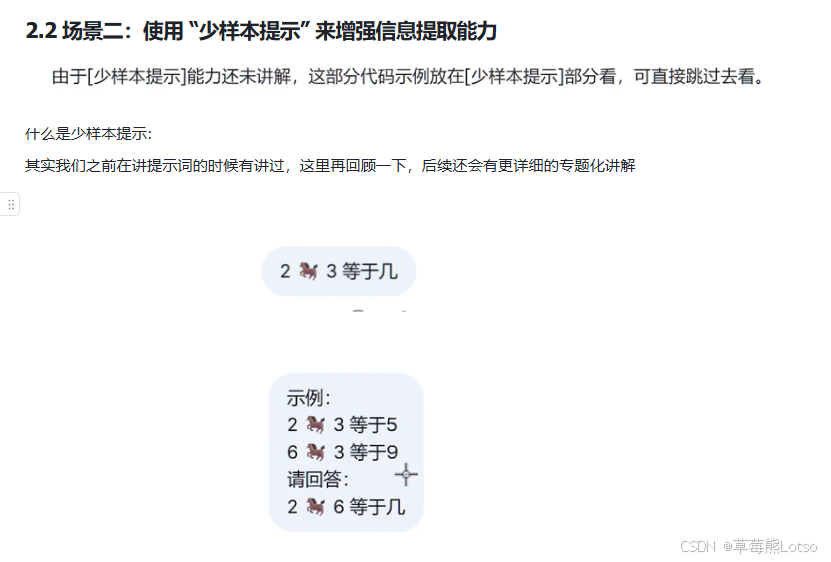
3.2 场景 2:少样本提示增强提取能力
对于复杂的提取任务,仅靠字段描述可能不够。我们可以结合少样本提示技术,给模型提供几个示例,让它更准确地理解我们的需求。
python
from typing import List, Optional
from pydantic import BaseModel, Field
from langchain_core.prompts import ChatPromptTemplate, MessagesPlaceholder
from langchain_core.messages import HumanMessage, SystemMessage
from langchain_core.utils.function_calling import tool_example_to_messages

# 1. 定义结构化输出
class Person(BaseModel):
    """一个人的信息"""
    name: Optional[str] = Field(default=None, description="这个人的名字")
    hair_color: Optional[str] = Field(default=None, description="如果知道这个人头发的颜色")
    skin_color: Optional[str] = Field(default=None, description="如果知道这个人的肤色")
    height_in_meters: Optional[str] = Field(default=None, description="以米为单位的高度")

class Data(BaseModel):
    """提取关于人的数据"""
    people: List[Person]

# 2. 定义示例:每个示例包含输入文本和期望的输出
examples = [
    (
        "海洋是广阔而蓝色的。它有两万多英尺深。",
        Data(people=[]),  # 没有人物信息的情况
    ),
    (
        "小强从中国远行到美国。",
        Data(people=[
            Person(name="小强", height_in_meters=None, skin_color=None, hair_color=None),
        ]),  # 部分信息缺失的情况
    ),
]

# 3. 定义提示词模板
prompt_template = ChatPromptTemplate([
    SystemMessage(content="你是一个提取信息的专家,只从文本中提取相关信息。如果您不知道要提取的属性的值,属性值返回null"),
    MessagesPlaceholder("example_messages"),
    ("user", "{new_message}"),
])

# 4. 将示例转换为模型可理解的消息格式
example_messages = []
for txt, tool_call in examples:
    ai_response = "检测到人" if tool_call.people else "未检测到人"
    example_messages.extend(
        tool_example_to_messages(txt, [tool_call], ai_response=ai_response)
    )

# 5. 调用模型
structured_model = model.with_structured_output(schema=Data)
chain = prompt_template | structured_model

result = chain.invoke({
    "example_messages": example_messages,
    "new_message": "篮球场上,身高两米的中锋王伟默契地将球传给一米七的后卫挚友李明,完成一记绝杀。这对老友用十年配合弥补了身高的差距。"
})

print(result)
# 输出:
# people=[
#     Person(name='王伟', hair_color=None, skin_color=None, height_in_meters='2.0'),
#     Person(name='李明', hair_color=None, skin_color=None, height_in_meters='1.7')
# ]
3.3 场景 3:与工具调用结合使用
结构化输出可以和工具调用完美结合,让我们在获取工具返回结果后,将其整理成指定的结构化格式。
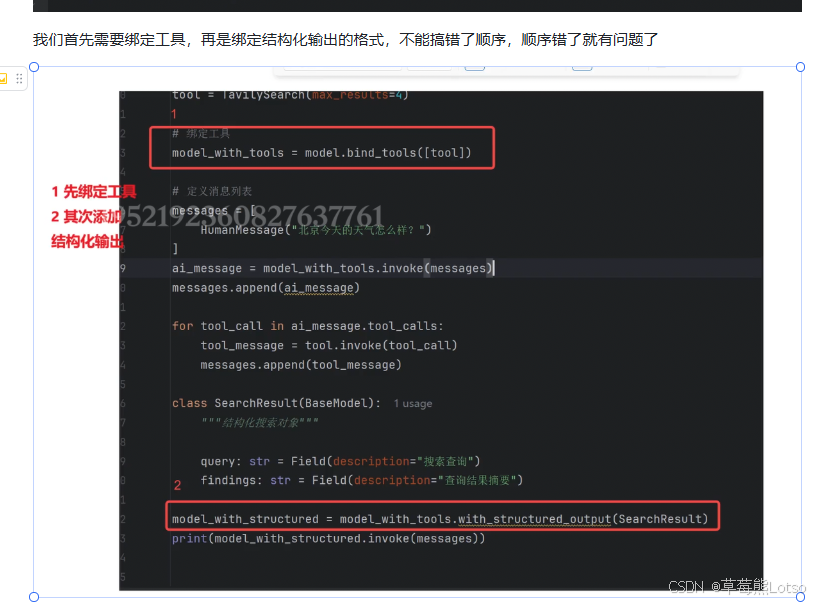
注意:必须先绑定工具,再绑定结构化输出,顺序不能反!
python
from langchain_openai import ChatOpenAI
from pydantic import BaseModel, Field
from langchain_core.tools import tool
from langchain_core.messages import HumanMessage

# 1. 定义大模型
model = ChatOpenAI(model="gpt-4o-mini")

# 2. 定义结构化输出对象
class SearchResult(BaseModel):
    """结构化搜索结果"""
    query: str = Field(description="搜索查询")
    findings: str = Field(description="调查结果摘要")

# 3. 定义工具
@tool
def web_search(query: str) -> str:
    """在网上搜索信息

    Args:
        query: 搜索查询
    """
    # 模拟搜索返回结果
    return "西安今天多云转小雨,气温18-23度,东南风2级,空气质量良好"

# 4. 先绑定工具,再绑定结构化输出(顺序很重要!)
model_with_search = model.bind_tools([web_search])

# 5. 手动处理工具调用流程
messages = [HumanMessage("搜索当前最新的西安的天气")]
ai_msg = model_with_search.invoke(messages)
messages.append(ai_msg)

for tool_call in ai_msg.tool_calls:
    tool_msg = web_search.invoke(tool_call)
    messages.append(tool_msg)

# 6. 最后绑定结构化输出,处理包含工具结果的消息列表
structured_search_model = model_with_search.with_structured_output(SearchResult)
result = structured_search_model.invoke(messages)

print(result)
# 输出:query='西安天气' findings='西安今天多云转小雨,气温18-23度,东南风2级,空气质量良好。'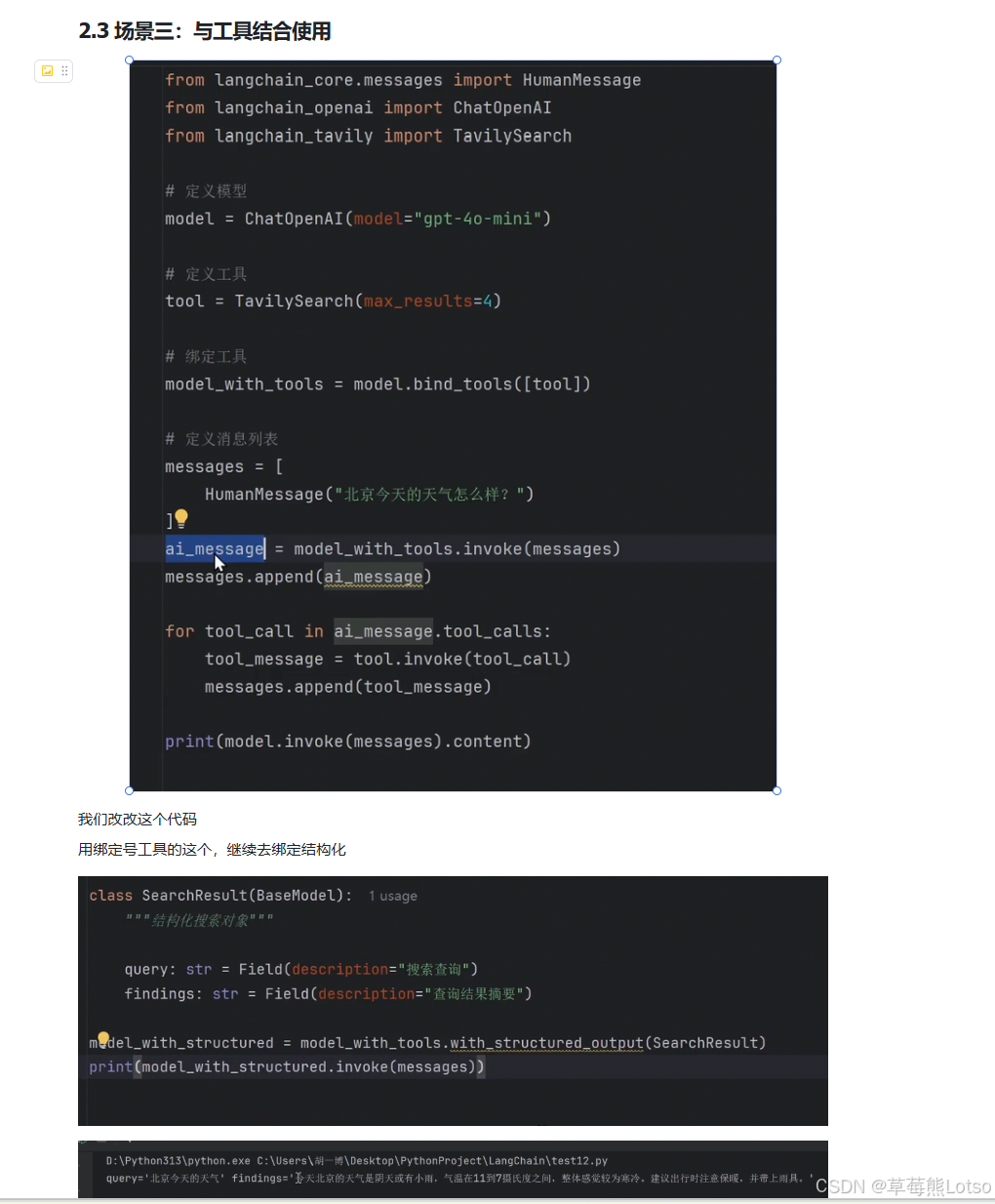
四、核心总结与注意事项
4.1 核心要点总结
- 结构化输出的本质:让大模型返回符合预定义 Schema 的数据,实现从 "文本对话" 到 "数据 API" 的转换
- 三种输出格式 :
- Pydantic 对象:推荐首选,提供最强的类型安全和数据验证能力
- TypedDict:适合偏好字典操作的场景
- JSON:适合需要直接处理 JSON 字符串的场景
- 关键参数 :
strict=True:强制模型输出与 Schema 完全匹配,大幅减少格式错误include_raw=True:返回原始响应,方便调试
- 实用场景:信息提取、数据标准化、工具调用结果整理
4.2 常见坑与注意事项
- 顺序问题:与工具结合使用时,必须先绑定工具,再绑定结构化输出
- 字段描述 :为每个字段添加清晰的
description,这是模型正确理解需求的关键 - 可选字段 :将不确定的字段设为
Optional,允许模型在不知道答案时返回None - 模型支持:不是所有模型都支持结构化输出,推荐使用 GPT-4o-mini、GPT-4o、Claude 3 等最新模型
- 验证机制:即使使用了结构化输出,也建议在关键业务逻辑中添加额外的数据验证
结尾:
html
🍓 我是草莓熊 Lotso!若这篇技术干货帮你打通了学习中的卡点:
👀 【关注】跟我一起深耕技术领域,从基础到进阶,见证每一次成长
❤️ 【点赞】让优质内容被更多人看见,让知识传递更有力量
⭐ 【收藏】把核心知识点、实战技巧存好,需要时直接查、随时用
💬 【评论】分享你的经验或疑问(比如曾踩过的技术坑?),一起交流避坑
🗳️ 【投票】用你的选择助力社区内容方向,告诉大家哪个技术点最该重点拆解
技术之路难免有困惑,但同行的人会让前进更有方向~愿我们都能在自己专注的领域里,一步步靠近心中的技术目标!
结语:结构化输出是 LangChain 最实用的功能之一,它让大模型真正成为了我们程序中的一个可靠组件。掌握了这项技能,你就可以构建出更加健壮、可维护的 LLM 应用。下一篇文章,我们将继续深入 LangChain 的核心组件,讲解如何使用输出解析器处理更复杂的模型输出场景。
✨把这些内容吃透超牛的!放松下吧✨ ʕ˘ᴥ˘ʔ づきらど
